
AcceleratorsScheduling coordination tool
Group scheduling without the back-and-forth
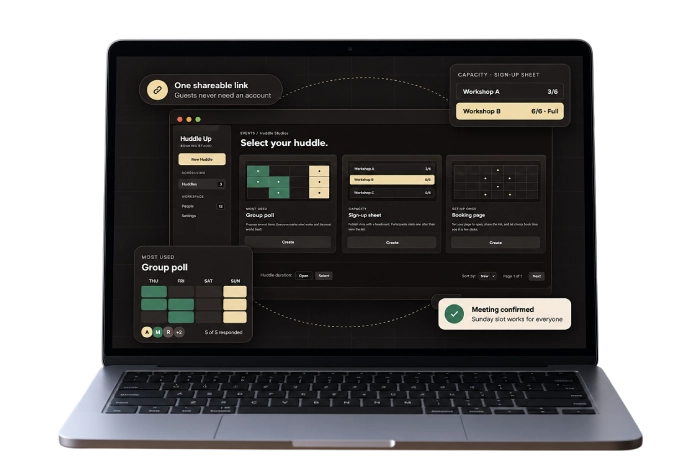
Huddle Up replaces the email chain with a single shareable link. Propose times, collect responses, and confirm a meeting in minutes. Guests never need an account.
Let's Discuss Now
Play Video
Live & demo-ready

Coordinating a group meeting is harder than it should be
Rather than asking the model to “be careful,” each gate makes an unsafe state either impossible to construct or automatically blocked.
01
The endless thread
Group scheduling collapses into “does Tuesday work?” reply chains with no clear resolution and someone always left out.
02
Tools built for one-on-one
Most booking tools handle a single guest booking a single slot. They don’t support group polls, limited-seat workshops, or vote-then-confirm flows.
03
Forced sign-up friction
Requiring guests to create accounts before they can simply say “yes” kills response rates and frustrates participants before the meeting even happens.
How it works
Two journeys, one product
The organiser
Signs in once, creates huddles in minutes, then manages everything from a single dashboard.
- Sign in with a six-digit code emailed to you. No password, ever.
- Choose a huddle type: Group Poll, Sign-up Sheet, or Booking Page.
- Fill in the details: times, sessions, or weekly availability in one form.
- Share one link. Copy it, email it, or download it as a calendar invite.
- Watch responses arrive live and get notified by email on your schedule.
- Confirm and settle, lock in the time with one click; everyone is notified.
The guest
Clicks a link, responds in one step. No account required, no app to download, ever.
- Click the link in the email or message.
- Respond in one step: vote, claim a seat, or pick an open slot.
- Confirm identity with just a name and email address.
- Get a private management link to change a vote, release a seat, or reschedule without emailing the organiser.
- Get notified automatically when the organiser settles the time, or if a deadline is approaching.
Features
Everything scheduling needs. Nothing it doesn’t.
Three huddle types, full guest access without accounts, calendar sync, and automated notifications built as one coherent product.
Group poll
Propose several times, guests vote, organiser confirms the winner. The answer settles itself.
Sign-up sheet
Sessions with a seat limit. First-come-first-served. Auto-closes when full, with optional waitlist.
Huddles dashboard
Every huddle in one list with live status. Edit, duplicate, archive, or delete at any time.
Guest access, no account
Every guest surface works from a link alone. No sign-up, no password, no app download required.
Smart notifications
Instant email per response, or a single daily/weekly digest. Automatic reminders before deadlines.
Huddles dashboard
Every huddle in one list with live status. Edit, duplicate, archive, or delete at any time.
People directory
Cross-huddle contact list with response-rate tracking, time-zone info, filters, and search.
Google Calendar sync
Prevents real-world double-booking. Optionally writes confirmed holds back to the calendar.
Response deadlines
Auto-closes voting, sign-ups, and rescheduling the moment a deadline passes. Guests are nudged automatically beforehand.

Product screens
Built, live, and demo-ready
Every screen shown is the running application. Click any screenshot to view it full-size.
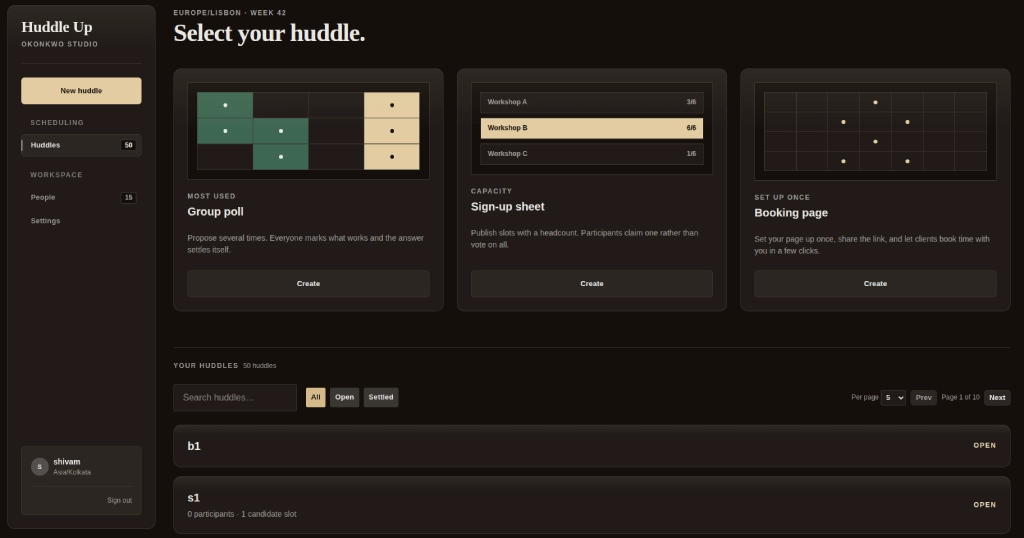
Dashboard
Triage Queue
Organisers land on a clear home screen showing all three scheduling modes and every huddle they’ve ever created, with live open/settled status.
- Group poll, sign-up sheet, and booking page in one place
- 50 live huddles, searchable and filterable
- Settled vs open status at a glance
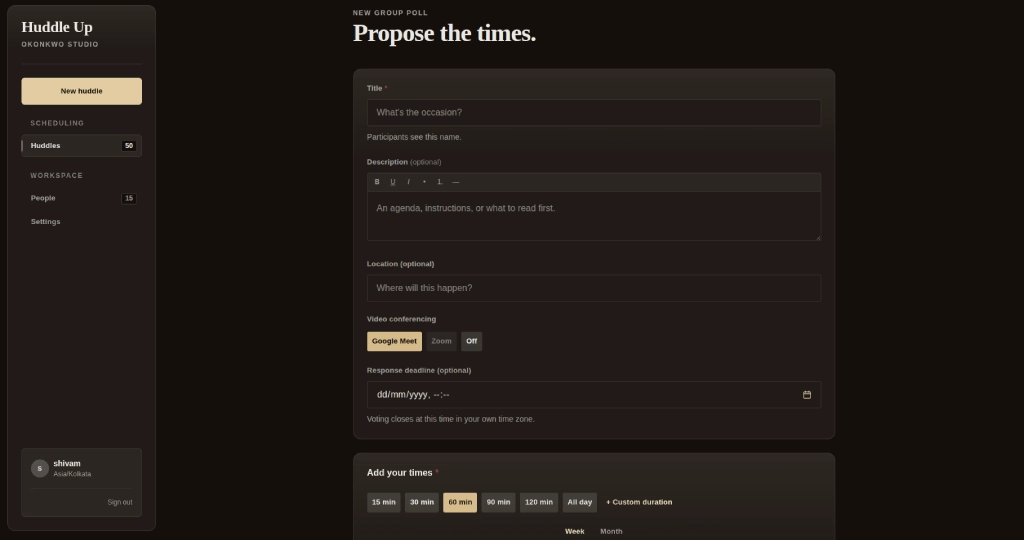
Group poll creation
Propose the times in one form
The organiser sets the title, optional description, location, video conferencing choice, and response deadline all before picking times on the calendar.
- Google Meet or Zoom pre-integrated
- Optional response deadline with automatic closing
- Duration presets: 15, 30, 60, 90, 120 min or custom
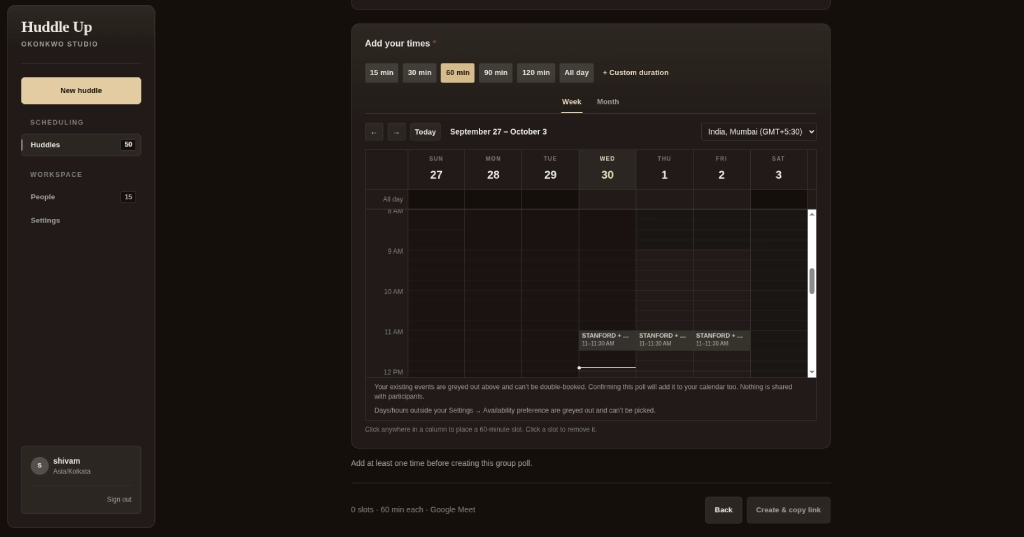
Time selection
Click slots directly on the calendar
A week or month view shows the organiser’s existing calendar events greyed out. Click any open column to place a time slot. Click again to remove it.
- Existing events blocked automatically — no double-booking
- Time zone shown and adjustable per viewer
- Week and month views available
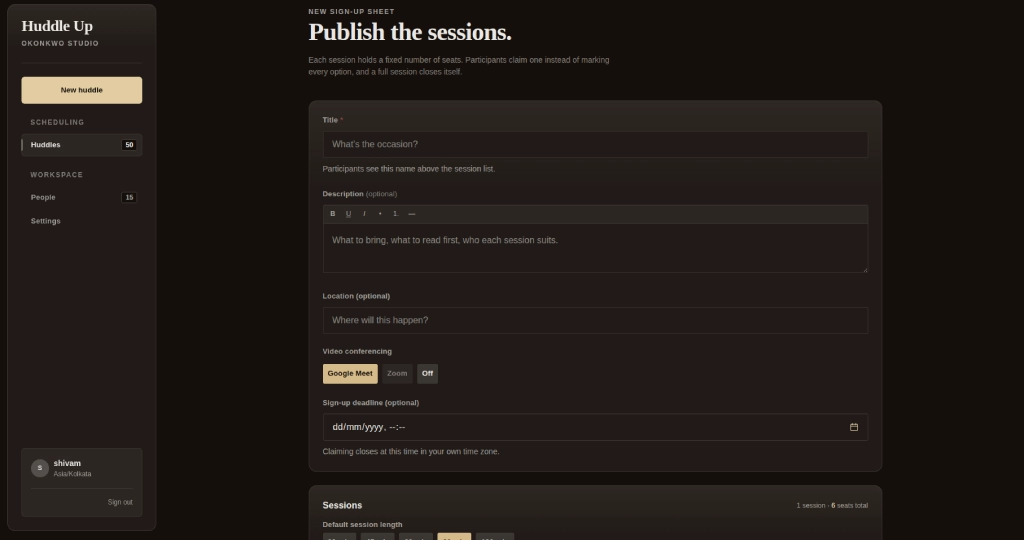
Sign-up sheet
Publish sessions with seat limits
The sign-up sheet flow publishes fixed-capacity sessions. Guests claim one seat rather than voting, and a full session closes itself automatically.
- Configurable seats per session
- Optional sign-up deadline
- Google Meet and Zoom supported
Booking page setup
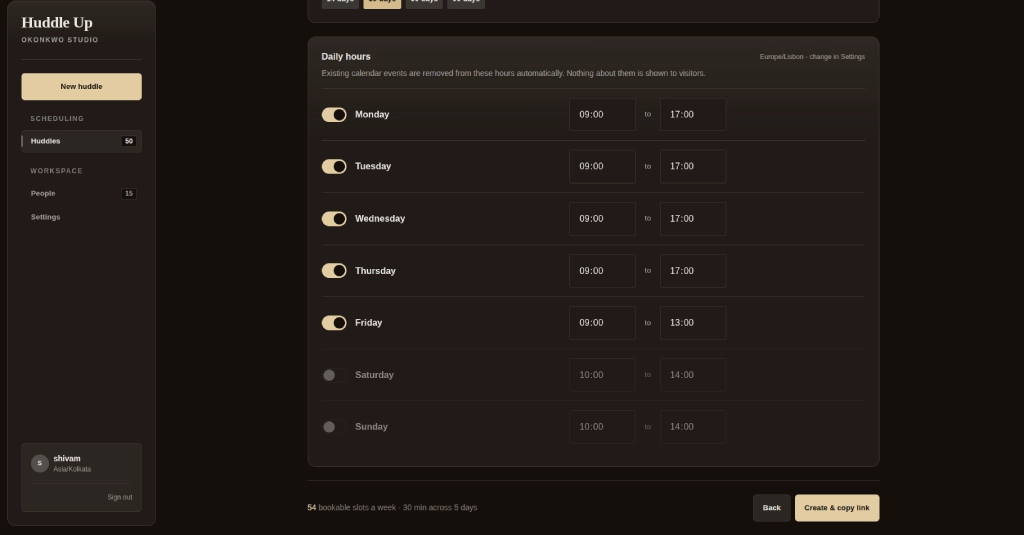
Set your hours once, share forever
The booking page uses the organiser’s standing weekly availability. Days and times outside those hours grey out automatically on every guest’s view.
- Per-day start and end times
- 14, 30, 60, 90-day booking windows
- Existing calendar events auto-block slots
People directory
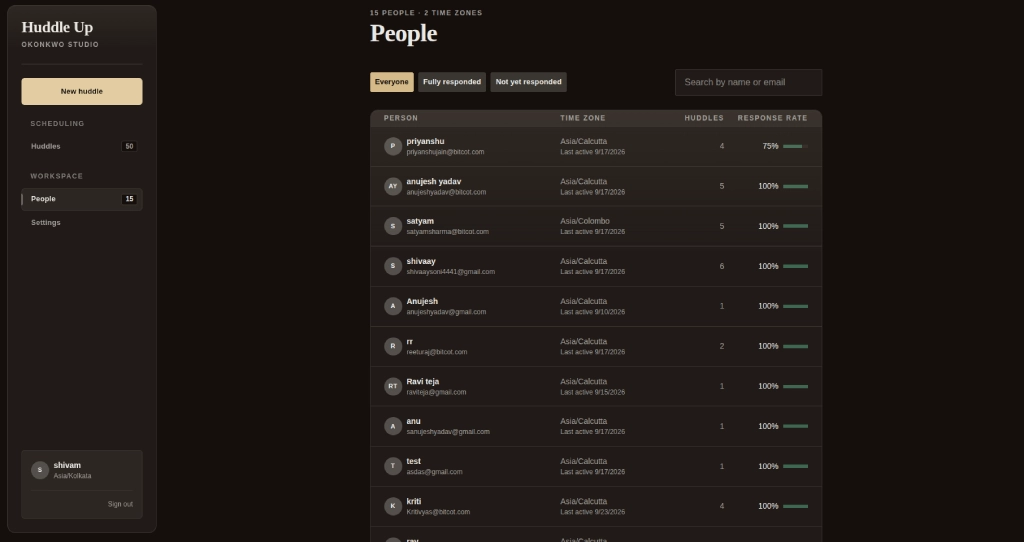
See who’s responded across every huddle
A cross-huddle contact list shows everyone who has ever participated, their time zone, how many huddles they’ve been in, and their overall response rate.
- Filter by everyone, fully responded, or not yet responded
- Search by name or email
- Response-rate bar charts per person
Sharing
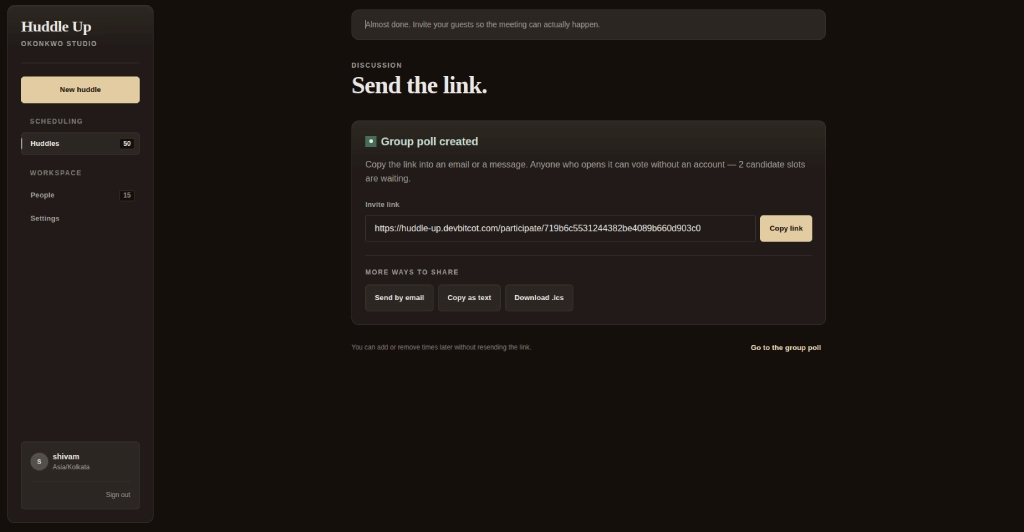
One link. Multiple ways to send it.
Once the huddle is created, the organiser gets a shareable link with four sending options, including a downloadable .ics calendar file for inboxes that prefer it.
- Copy link to clipboard
- Send by email directly from the app
- Download as a .ics calendar file
- Copy as plain text for any messaging tool
Settings
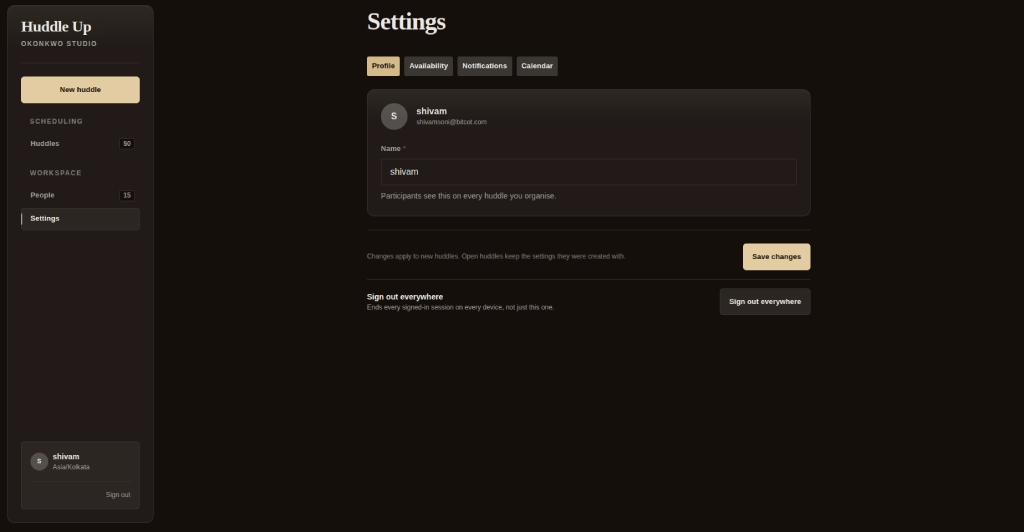
Profile, availability, notifications, and calendar in one place
Organisers manage their profile name, notification preferences, connected calendar, and availability windows from a single tabbed settings page.
- Profile, Availability, Notifications, Calendar tabs
- Sign out everywhere option for security
- Changes apply to new huddles going forward
Product demo
Watch the full walkthrough
A complete demo of the running application, from creating a huddle to settling the final time.
Technology stack
Built for reliability, real-time updates, and zero-friction guest access from day one.
Next.js (App Router)TypeScriptReactSupabase (Postgres)Supabase RealtimeDrizzle ORMSendGridGoogle Calendar OAuthVercelCron jobs (digest)Signed tokenized links
Get in Touch
Ready to see Huddle Up live?
The platform is running and demo-ready. Reach out to the Bitcot team to schedule a walkthrough.
Let’s go from 0 to 1+
Tell us how you dream it. We’ll show you how to ship it.
A 30-minute discovery call with a senior engineer, not a sales rep. Walk away with a build plan, a timeline, and a clear next step.
✓Reply within 1 business day
✓NDA on request, no obligation
✓Talk to engineers who’ve shipped in your industry
✓HIPAA and SOC 2-aware engineering
Prefer to talk now? +1 858 683 3692
Start the conversation
Takes about 30 seconds.