
AcceleratorsRevenue Cycle Management
Medical billing that actually closes the loop One jobsite of record.
A multi-tenant RCM web platform covering every step from patient registration and authorization to claims, denials, payments, and analytics. Built for any outpatient practice.
See the platform

7
User roles
6
Build phases
4
AI features
12
Orgs on platform
52
Total users

The problem
The original system couldn’t serve any practice beyond one
Regenexx started as a front-end prototype for one specialty. It needed to become a real, multi-tenant billing platform that any outpatient practice could operate.
Hardcoded to one specialty
Procedure dropdowns, statuses, and workflows were wired to employer-funded orthopedics. A cardiology or primary-care practice couldn’t use any of it.
No real system behind the UI
One hardcoded user, mock data only, no backend, no database, no authentication. Most save and submit actions did nothing at all.
No tenant isolation or compliance
Nothing kept organizations’ data separate. No role-based access, no audit trail, no session timeout enforcement for protected health information.
How we built it
Six phases, from auth to patient portal
Each phase had a concrete “working when” test. Nothing moved forward until the feature ran correctly in a real browser against real data.
Phase 1
Foundation
Real Supabase auth, RBAC, role-based redirects, session timeout, audit logging for every PHI read and write.
Phase 2
Front Desk
Patient registration, demographics, insurance, emergency contacts, Active/Inactive status, and authorization records.
Phase 3
Provider
Encounters with ICD-10 and CPT/HCPCS coding, medical necessity attestation, live authorization status check.
Phase 4
Biller
Claim creation, scrubbing rules, claim state machine (Draft to Paid/Denied), payments, denials, aging report.
Phase 5
Admin
Analytics dashboards, scrubbing config, user management, notifications on claim and authorization changes.
Phase 6
Patient Portal
Balance view, online card payment, receipt, payment split across claims, with data strictly scoped to that patient.
Core modules
The full billing loop, end to end
Every module in the platform maps to a real billing workflow step, with server-side role checks and RLS enforcing access at every layer.
Multi-View Synchronized Visualization
Axial, Coronal, Sagittal, and 3D views update in real time as you navigate; crosshair sync ensures spatial accuracy across all perspectives.
Patients & registration
Server-side search by name, ID, phone, or email. Create and edit demographics, insurance, and emergency contacts. Active/Inactive status control.
Authorization records
Combined eligibility and prior-auth tracking: Requested, Approved, Denied, and Expired states with visit limits, dollar limits, and expiry dates.
Encounters & coding
Provider-created encounters with full ICD-10 diagnosis search, CPT/HCPCS procedures, medical-necessity attestation, and personal code favorites.
Claims & state machine
Claims created from coded encounters. Only legal status transitions are allowed (Draft, Submitted, Accepted/Rejected, Denied, Paid, Appealed), each saved atomically with a history row.
Claim scrubbing
Org-configurable rules set as errors or warnings. Invalid claims are blocked from submission. Admins can define and tune rules from the settings panel.
Payments & denials
Manual payment and denial entry, a denied-claims queue, aging report with CSV export, and rework paths back to Submitted.
Analytics & notifications
Claim volume, approval rate, total revenue, average processing time, denial reasons, and money-at-risk alerts. In-app notifications on all claim and auth status changes.
Audit logging
Every read and write of protected health information logged automatically through the data-access layer: who, what, and when. Accessible to Org Admin and Super Admin.
Patient portal
Patients view only their own balance, pay by card through a sandboxed processor, receive a receipt, and split payments across oldest claims first.
Four AI features built in
All four are advisory only and never change data on their own. Each shows a visible “AI features unavailable” notice if no API key is configured, rather than crashing.
AI coding assistant
Available in Provider encounter forms and the Biller coding workspace. Suggested codes are checked against the real ICD-10/CPT catalog — made-up codes never reach the UI.
Claim risk assessment
Runs on request in the New Claim form, using the org’s own denial history. Does not affect the real scrub check.
Denial-pattern insight
Surfaces patterns from denial history and suggests a new scrubbing rule. A person must click “Add this rule”; new rules start as warnings, not errors.
Patient billing Q&A
Available on the patient balance page. The prompt contains only that patient’s own balance data, nothing else.
Product screenshots
Five role-specific dashboards, all live
Each role lands on a dashboard built specifically for their workflow. Click any screenshot to view full-size.
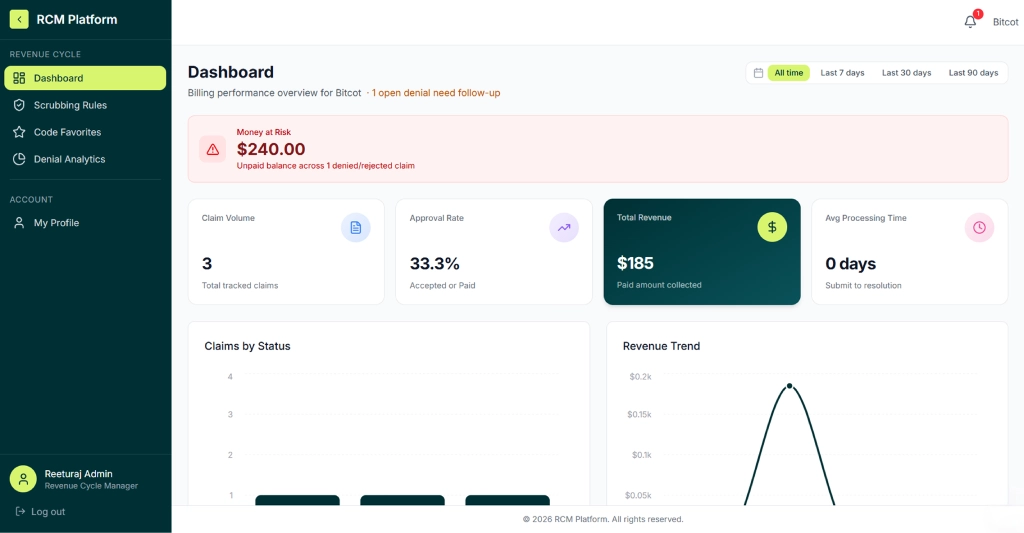
Revenue Cycle Manager
Full billing performance at a glance
The RCM Admin sees claim volume, approval rate, total revenue collected, average processing time, and a live money-at-risk alert for unpaid denied claims.
- Claims by status bar chart with revenue trend overlay
- Scrubbing rules and denial analytics in the sidebar
- Configurable date range: all time, 7, 30, or 90 days
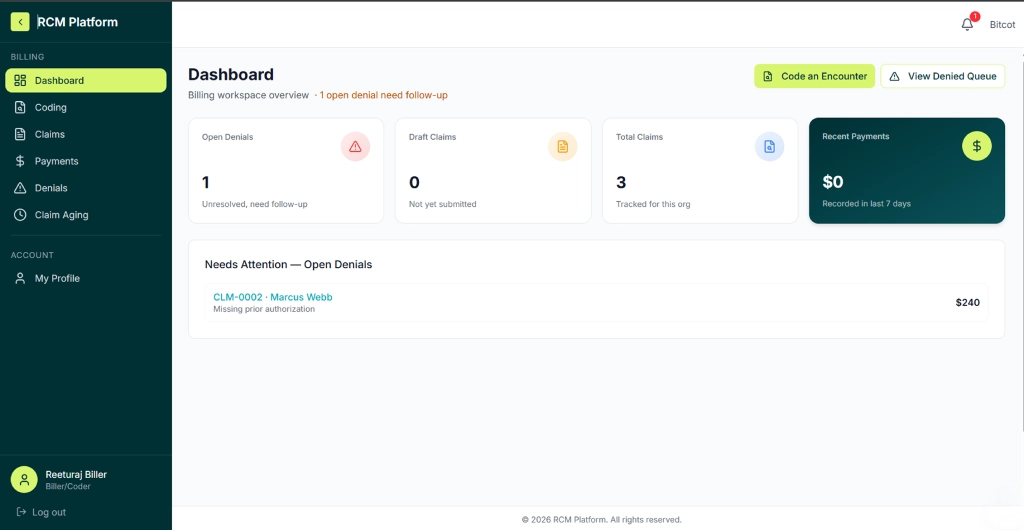
Biller / Coder
Denials surface immediately, nothing is hidden
The Biller’s dashboard shows open denials, draft claims pending submission, total tracked claims, and recent payments. An open denial is flagged in the header and listed with the denial reason.
- One-click shortcut to code an encounter or view the denial queue
- Full coding, claims, payments, denials, and aging report in the sidebar
- Needs Attention panel surfaces claims requiring immediate action
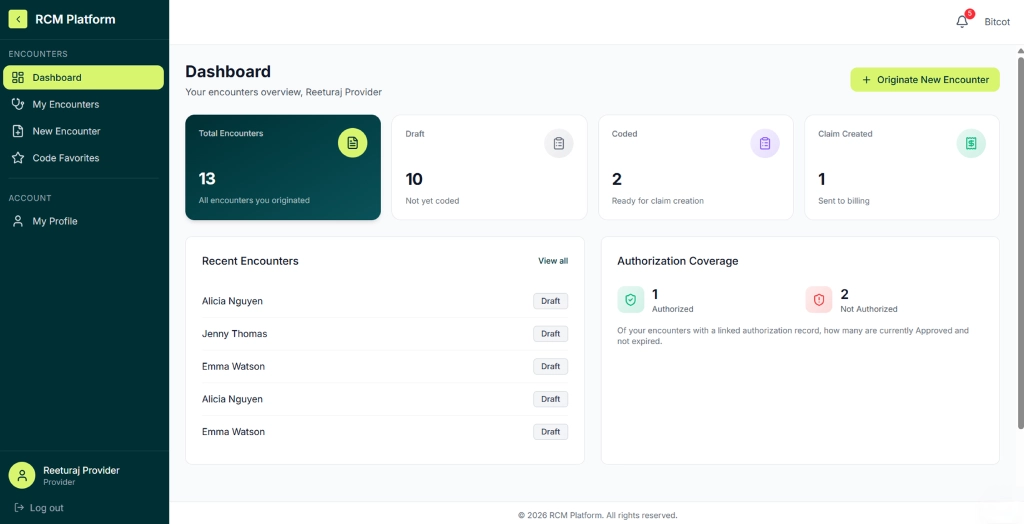
Provider
Encounters and authorization coverage in one view
Providers see only their own encounters total, draft, coded, and sent to billing alongside a live authorization coverage breakdown showing how many patients have valid prior auth.
- Originate a new encounter with one button
- Recent encounters list with live draft/coded/submitted status
- Authorization coverage split: authorized vs. not authorized
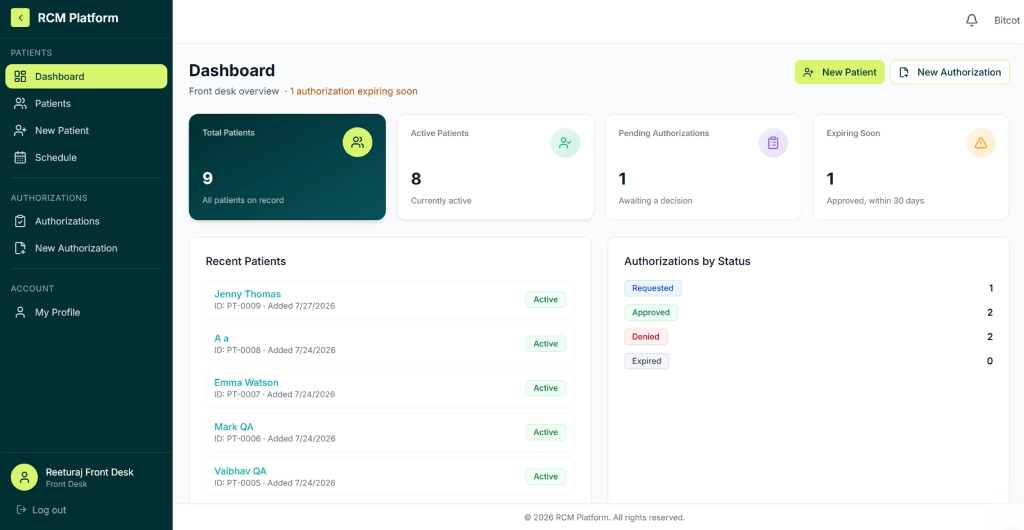
Front Desk sheet
Patients and authorizations, not claims
The Front Desk dashboard focuses on patient census and authorization status total, active, pending, and expiring soon with a recent patient list and authorizations grouped by status.
- New Patient and New Authorization shortcuts always visible
- Expiring authorization alert in the dashboard header
- Authorizations by status: Requested, Approved, Denied, Expired
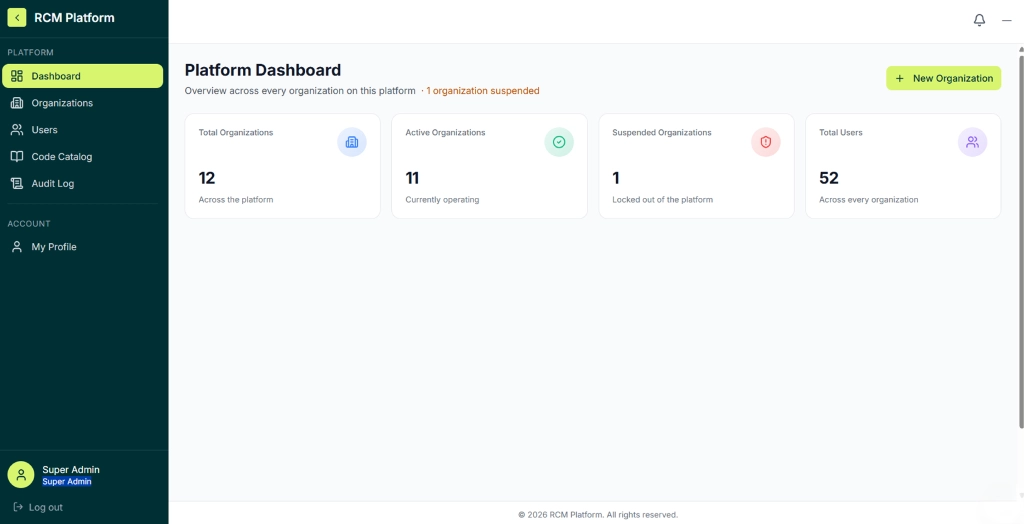
Super Admin
Platform-wide visibility across every org
The Super Admin sees the whole platform: total organizations, active vs. suspended, and total users across every tenant. Suspended orgs are flagged immediately in the dashboard header.
- Organizations, users, code catalog, and audit log in the sidebar
- Create a new organization directly from the platform dashboard
- The only role that operates across tenant boundaries
| Role | What they do | Scope |
|---|---|---|
| Super Admin | Manages the platform: organizations, cross-tenant user search, shared ICD-10/CPT catalog, platform-wide audit log. | The only role that works across tenants. User search is read-only. |
| Org Admin | Creates users (one at a time or by CSV), assigns roles, deactivates accounts, edits org profile and session timeout, views org audit log. | Own org only. Cannot assign Patient or Super Admin role. |
| RCM Admin | Billing performance dashboards (volume, approval rate, revenue, processing time, denial analytics), scrubbing rules, code favorites. | Own org only. Read-mostly access. |
| Biller / Coder | Codes encounters, creates and scrubs claims, marks them submitted, records payments and denials, works the denial queue, generates aging report with CSV export. | Org-wide claims and encounters. |
| Provider | Creates encounters with ICD-10/CPT codes, attests medical necessity, checks authorization status, maintains personal code favorites. | Sees only their own encounters. No access to claims, coding, or payments. |
| Front Desk | Registers, searches, edits and imports patients; handles authorizations, schedule, check-in, patient documents, and patient portal login creation. | Own org only. |
| Patient | Portal access: view balance and statements, make online card payments, receive receipts, print statements, ask billing questions via AI Q&A. | Sees only their own records — enforced in the app and by RLS. |
Technology stack
One Next.js App Router application backed by Supabase. All reads and writes run server-side through Drizzle, with role and org checked first. RLS is a second enforcement layer on the database.
Next.js (App Router)ReactTypeScriptTailwind CSSRadix UIRechartsSupabase Auth (@supabase/ssr)Supabase PostgresDrizzle ORMRow-Level Security (RLS)Supabase StorageAI SDK (gpt-5-mini)Playwright (E2E tests)simple-react-validator
Get in Touch
Ready to see the platform live?
The RCM platform is running and demo-ready. Contact the Bitcot team to schedule a walkthrough.
Let’s go from 0 to 1+
Tell us how you dream it. We’ll show you how to ship it.
A 30-minute discovery call with a senior engineer, not a sales rep. Walk away with a build plan, a timeline, and a clear next step.
✓Reply within 1 business day
✓NDA on request, no obligation
✓Talk to engineers who’ve shipped in your industry
✓HIPAA and SOC 2-aware engineering
Prefer to talk now? +1 858 683 3692
Start the conversation
Takes about 30 seconds.