
AcceleratorsBuilt & Live Demo Ready
Surgical Planning Meets 3D Precision
An advanced DICOM visualization platform that gives orthopedic surgeons real-time 3D analysis,automated screw recommendations, and precise implant positioning all in one integrated workflow.
Schedule a Demo
Play Video
Watch Platform Flow

3
Delivery Phases
4
Synchronized Views
14
+
Measurement Tools
9
%
Segmentation Modes

The Challenge
Why traditional imaging falls short in the OR
Orthopedic surgeons have long relied on 2D DICOM images to plan complex implant procedures, a workflow that introduces avoidable risk at every step. Our platform was built to close that gap.
Depth Perception Gaps
Conventional 2D imaging provides no true sense of anatomical depth, making accurate trajectory planning for screw implantation reliant on guesswork rather than data.
Fragmented Workflows
Without integrated planning tools, surgeons must mentally reconcile data from multiple disconnected systems, increasing cognitive load and operational time during critical procedures.
Implant Placement Risk
Suboptimal implant positioning caused by incomplete spatial information leads to higher rates of revision surgery, extended operative time, and increased patient risk.
The Solution
One platform. Every dimension of surgical planning.
Built on Cornerstone.js and delivered in three precision-engineered phases, this platform transforms raw DICOM data into a complete surgical planning environment from real-time 3D rendering to intelligent screw recommendations and full administrative control.

Multi-View Synchronized Visualization
Axial, Coronal, Sagittal, and 3D views update in real time as you navigate; crosshair sync ensures spatial accuracy across all perspectives.
Intelligent Screw Recommendations
Define your implant trajectory in the axial view and let the software recommend optimal screw type and length automatically.
Full Administrative Dashboard
Track studies, analyses, custom STL screws, and surgical types all from a clean management interface built for clinical workflows.
Precision Measurement Suite
14+ clinical tools including ROI analysis, angle measurement, Cobb angle, ETDRS grid, and livewire segmentation for complete anatomical assessment.
Platform Overview
Explore the Interface
Platform Overview Core Imaging & Surgical Planning Screens

Login Screen
Secure authentication portal with a clean credentials interface and a branded entry experience.
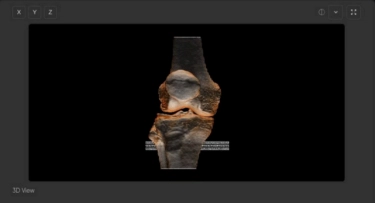
3D Volume View
Photorealistic volumetric rendering of DICOM data with X/Y/Z axis rotation controls and full-screen capability.
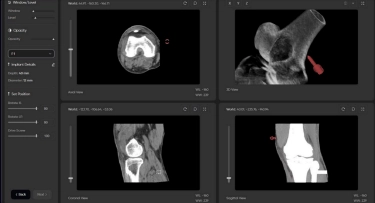
Quad View + Screw Planning
Axial, Coronal, Sagittal, and 3D views synchronized with live trajectory overlay and implant placement tools.
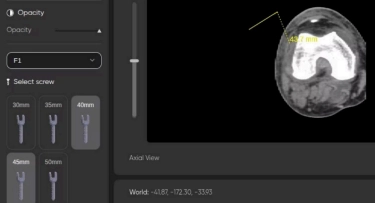
Screw Selector
Visual catalogue of screw variants (30mm–50mm) with measurement overlay in the axial view for precise sizing decisions.
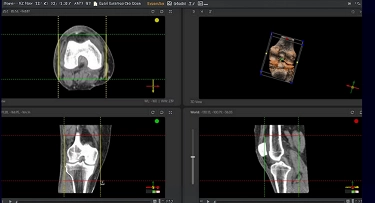
Implant Planning Controls
Left panel controls for Window/Level, Opacity, Implant Details, and rotational positioning with real-time 3D feedback.
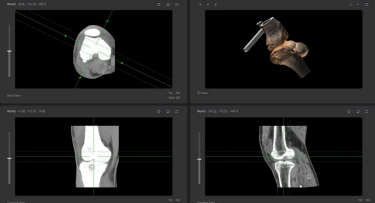
Crosshair Synchronization
Moving the crosshair in any orthographic view instantly updates its position across all other views, ensuring precise spatial correlation.
Measurement & Analysis Clinical Measurement Tools
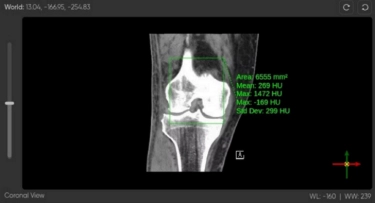
ROI Measurement
Rectangle ROI tool with live HU statistics: Area, Mean, Max, and Std Dev overlaid directly on the Coronal view.
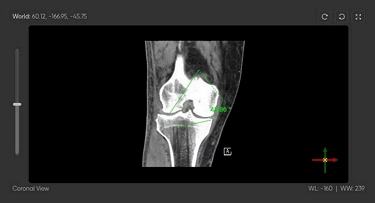
Angle Measurement
Precise angular measurement tool with degree readout rendered in-viewport on the Coronal view, critical for alignment assessment.

Capability Showcase
Watch the platform evolve, feature by feature.
Three live demos, each building on the last, walking through every capability as delivered.
Core Visualization
Multi-View Rendering & Surgical Planning
The foundation: secure DICOM uploads, full four-view synchronized visualization, and an intelligent trajectory planning workflow with automated screw recommendations.
- Axial, Coronal, Sagittal & 3D views fully synchronized
- World coordinates & crosshair sync across all viewports
- Pre-configured presets, zoom, pan & free rotation
- Implant trajectory definition via axial viewport
- Automated screw type & length recommendations
- Real-time rotational & depth controls for optimal positioning
Measurement & Segmentation
Advanced Clinical Analysis Tools
A comprehensive suite of measurement and segmentation instruments layered on top of the core visualization — enabling detailed anatomical assessment and region isolation.
- ETDRS Grid overlay for retinal analysis
- Volume cropping to isolate specific regions of interest
- ColorBar for interpreting tissue density values
- 14+ measurement tools: ROI, Angle, Cobb, Elliptical, Bidirectional, Livewire & more
- 9 segmentation modes: Brush, Scissors, Sphere Eraser, Dynamic Threshold & more
Management & Administration
Full Clinical Workflow & Administration
The complete administrative layer a dashboard giving physicians full visibility into studies, custom implants, surgical types, and user management in a single, unified interface.
- Dashboard: studies, analyses, screws & surgical type counts at a glance
- Screws Module: upload custom STL implants, view all variants instantly
- Surgical Type Module: pre-select procedure type (knee, hip, cardiac) to load relevant tools
- Profile Page: manage name, email, phone & password from one screen

Get in Touch
Ready to see it in action?
The platform is live and demo-ready. Reach out to schedule a walkthrough with the Bitcot team.
Let’s go from 0 to 1+
Tell us how you dream it. We’ll show you how to ship it.
A 30-minute discovery call with a senior engineer, not a sales rep. Walk away with a build plan, a timeline, and a clear next step.
✓Reply within 1 business day
✓NDA on request, no obligation
✓Talk to engineers who’ve shipped in your industry
✓HIPAA and SOC 2-aware engineering
Prefer to talk now? +1 858 683 3692
Start the conversation
Takes about 30 seconds.






