
Accelerators Asset Management Application
Every asset, tracked.
Every task, owned.
One platform. Three roles. Zero spreadsheets.
From checkout to condition reporting, from task assignment to real-time dashboards a complete equipment tracking and maintenance platform, built mobile-first for Admins, Staff, and Technicians.
Get a Live Walkthrough
React NativeSupabasePostgreSQLReal-Time SyncRow-Level Security
Android & iOS
Staff & Technician Apps
Web Console
Full Admin Access

The Problem
Why spreadsheets can’t keep up
Manual & Spreadsheet Tracking
- Equipment goes missing with no accountability trail
- No one knows what’s actually available right now
- Maintenance requests get lost in email threads
- Damaged items get checked out again by mistake
- Approvals happen over phone calls and sticky notes
- Spreadsheets fall out of sync across teams
- No audit trail for compliance reviews
- Zero visibility into utilization or trends
- Staff waste time hunting for equipment
- Return conditions go unrecorded
- Slow, manual asset lookups
Asset Management Application
-
Every checkout logged with full custody history
-
Live availability across Admin, Staff & Technician apps
-
Task-driven maintenance with clear technician assignment
-
Condition reporting blocks damaged assets automatically
-
One-tap Approve / Reject from the Admin dashboard
-
Real-time Supabase sync keeps every device current
-
Complete, timestamped audit trail on every action
-
Built-in reports: availability, distribution, maintenance
-
Self-service browse, search & one-tap checkout requests
-
Structured condition logging with notes on every return
-
Built-in Scan for instant checkout & return lookups
The App
Three roles,
one seamless platform
Role 01
Admin – Command Center
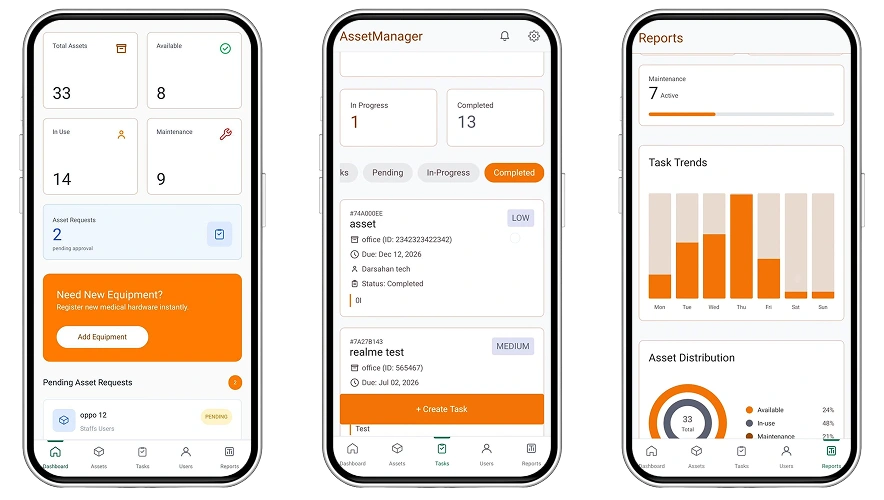
Dashboard
Live KPIs & pending requests
Task Queue
Pending, in-progress & completed
Reports
Trends & distribution charts
Dashboard · Task Assignment · User Mgmt · Reports
Role 02
Staff – Checkout & Returns
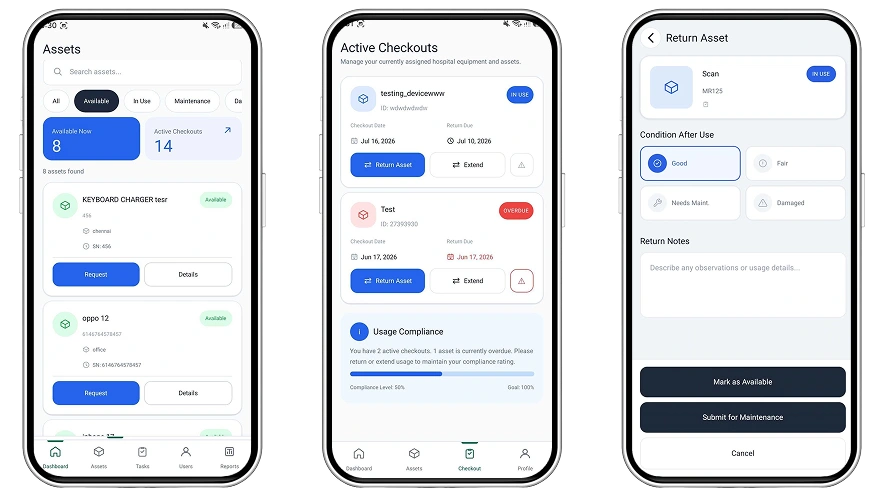
Browse Assets
Search, filter & request
Active Checkouts
Due dates & extensions
Return & Log
Condition report on return
Self-Service Checkout · Scan · Condition Reports
Role 03
Technician – Task Execution
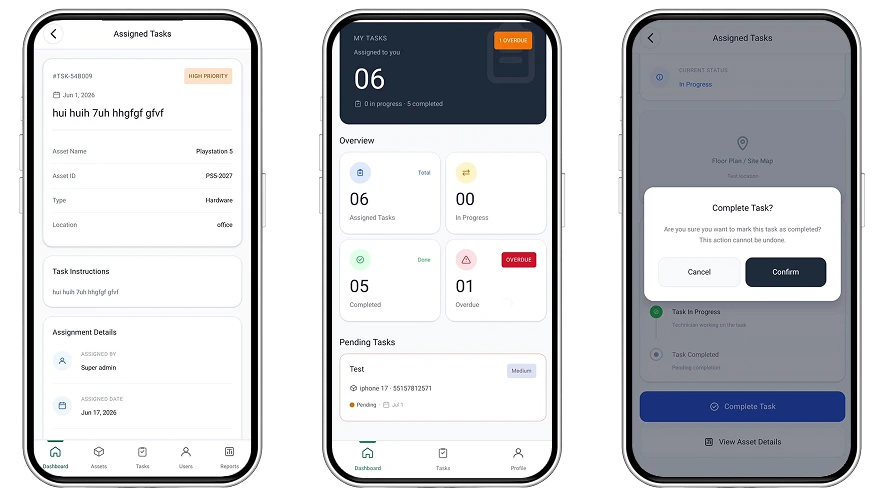
Task Detail
Instructions, asset & due date
My Tasks
Pending, in-progress, overdue
Complete Task
One tap to close out work
Assigned Tasks · Status Tracking · Completion Log
Ready to put
the platform to work?
One pilot rollout away from replacing every tracking spreadsheet in the building.
Inside The Platform
Twelve modules.
Every workflow covered.
Admin Dashboard
Live KPIs, pending requests, one tap approvals & quick actions.
Asset Management
Full inventory with filters, search, safety instructions & photos.
Task Management
Create, assign, prioritize & track maintenance tasks end to end.
User Management
Provision Admins, Staff & Technicians with role-based access.
Reports & Analytics
Availability, distribution, task trend & maintenance reports.
Staff Dashboard
Personal KPIs and one-tap asset discovery for every shift.
Checkout Workflow
Purpose, dates & notes from request to approval to pickup.
Condition Logging
Good vs. Damaged branching with automatic maintenance tasks.
Deadline Management
3-day, 1-day & overdue alerts with simple extension requests.
Staff Analytics
Checkouts, requests, issues reported & weekly usage trends.
Task Execution
Start → In Progress → Complete, with instructions & notes.
Technician Profile
Completion rate, average time & full activity history.
Detailed App Flow · 01 – Admin
From dashboard to decision.
01 Review – the KPI dashboard surfaces total, available, in-use & maintenance counts instantly
02 Approve – pending checkout requests are approved or rejected without leaving the dashboard.
03 Assign – a new task is created with asset, technician, due date & priority in seconds.


Detailed App Flow · 02 – Staff
Request it.
Return it right.
01 Browse & Request – search or filter assets, then submit purpose, dates & notes in one form.
02 Checkout & Track – approved assets move to Active Checkouts with due dates and Scan support.
03 Return & Log Condition – good condition returns instantly; damage auto-creates a maintenance task.
Detailed App Flow · 03 – Technician
Clear tasks.
Clean handoffs.
01 View Task – full instructions, asset details, assigner & due date in one screen.
02 Start Task – one tap moves work from Pending to In Progress.
03 Complete Task – confirm completion; the asset instantly returns to Available.


See It Live
The full app,
in action.
Most fintech builds spend the first six months getting the regulated foundation right. BitCot’s FinTech accelerator ships with a [PCI DSS]-aware architecture, [named gateway] integrations, and identity-verification workflows built in, so engineering starts at the product layer rather than the compliance layer.
01 Sign In – Role-based login for Admin, Staff & Technician apps
02 Admin Command Center – KPIs, approvals & task assignment in one view
03 Staff Checkout – Browse, request, scan & return in under a minute
04 Condition Reporting – Good vs. damaged branching with auto-created maintenance tasks
05 Technician Execution – Start, complete & track every task through to closure
“A spreadsheet can’t approve a request or flag a damaged asset. This app does both automatically.”
– Asset Management Product Team
Why Now
Built for every role,ready to roll out
01
For Admin
Complete visibility into inventory & location, efficient task assignment, live KPIs, and automated maintenance creation.
02
For Staff
Self-service browsing & checkout, fast approvals, transparent request status, and flexible extensions.
03
For Technician
Clear instructions & asset info, a focused task queue, simple status transitions, and performance tracking.
04
For Organization
Asset protection, reduced loss, efficient maintenance, better utilization, and a complete audit trail.
3
User roles
12
Core modules
100
%
Real-time sync
Next Steps
Ready to see it
running live?
Explore the full walkthrough, review the workflows role by role, or bring this straight into your next planning session.The platform is fully mapped and ready to demo – every screen shown is real, working software.
Contact Us: +1 (858) 683-3692Watch Full Demo
Walkthrough
Schedule a Guided Tour
Step through Admin, Staff & Technician flows live
Rollout
Request Pilot Access
Start with a single department before wider rollout
Technical
Architecture Deep-Dive
Supabase schema, RLS policies & real-time sync design
Feedback
Share Workflow Notes
Flag gaps or edge cases before wider rollout
Let’s go from 0 to 1+
Tell us how you dream it. We’ll show you how to ship it.
A 30-minute discovery call with a senior engineer, not a sales rep. Walk away with a build plan, a timeline, and a clear next step.
✓Reply within 1 business day
✓NDA on request, no obligation
✓Talk to engineers who’ve shipped in your industry
✓HIPAA and SOC 2-aware engineering
Prefer to talk now? +1 858 683 3692
Start the conversation
Takes about 30 seconds.





