
Accelerators Dispatch Pro App
The job flow now finds a way, every time.
We rebuilt the core path a job takes through DispatchPro from the moment a customer raises a request to the moment a dispatcher signs off on completed work. Fewer stalled requests, live visibility for everyone involved, and no job marked done without proof.
Get a Live Walkthrough
Play Video
Explore the Dispatch App

3
connected roles, one shared job
8
stages, fully tracked end to end
0
jobs completed without sign-off
Built on
React Native – FrontendSupabase – Backend
One codebase across Dispatcher, Customer, and Field Agent apps, backed by Supabase’s real-time layer the same infrastructure that pushes live location updates and status changes to all three roles at once.
The case
A job that used to stall now routes itself.
Every job moves through the same eight stages, whether it’s a routine electrical check or an urgent HVAC callout. What changed in this refinement is what happens at the edges the moments where a job used to sit waiting on one person.
Requested
Customer submits request
Routed
Auto routing & escalation
Assigned
Field agent selected
En Route
Live tracking for everyone
Arrived
Job timer starts
Submitted
Photos & signature uploaded
Approved
Dispatcher signs off
Completed
Visible to all roles
01
Customer creates a job request
Issue type, location, a preferred date, and a site photo enough context for a dispatcher to act on immediately, without a follow-up call.
02
The request finds a dispatcher automatically
The request goes out to dispatchers in that location with a visible response timer. If it times out or gets declined, it no longer dead-ends it cascades to the next registered dispatcher in the same location. Only if nobody accepts does it go stale, and the customer is prompted to re-raise it.
Refined Auto-cascading routing
03
Dispatcher assigns a field agent
The dispatcher accepts, adds job notes, and picks from a list of available agents in that location, matched by proximity and current load.
04
Everyone can see the agent en route
Dispatcher, customer, and field agent all see the same live map of the agent’s location, route, and progress toward the job site, in a single shared view instead of three separate stories.
Refined Live map tracking, all roles
05
Agent arrives; the clock starts
An explicit “Arrive” action marks on-site time and starts the job timer a clean, timestamped record of how long the work actually took.
06
Completion requires proof, not just a status flip
“Complete Service” now requires site images, a captured photo of the finished work, and the customer’s signature on the device, plus any notes the agent wants to add.
Refined Structured completion
07
Dispatcher reviews and approves
The submission images, summary, and signature are sent to the dispatcher for a final check before the job can close. Nothing is marked done on the agent’s say-so alone.
Refined Structured approval step
08
Completed, visible to all three roles
Status updates to Completed everywhere at once: full job details, proof of work, and history, for the customer, the agent, and the dispatcher.
Before / after
What actually changed for each role?
The lifecycle above is the same shape it always was. These are the three points in that flow that used to depend on one person being available and now don’t.
Routing a new request
Before
One dispatcher, one shot
- Request goes to a single dispatcher
- If they miss it, the job sits with no owner
- Customer has no visibility into what’s happening
After
A request that keeps looking
- Visible countdown timer on every request
- Auto-cascades to the next available dispatcher
- Only goes stale if no one in the location accepts
Tracking the field agent
Before
Status updates by phone call
- No shared view of where the agent actually is
- Customer calls dispatcher to ask “are they close?”
- Dispatcher relays secondhand information
After
One live map, three viewers
- Field agent’s location and route, live
- Same map for dispatcher, customer, and agent
- No calls needed to answer “where are they”
Closing out a job
Before
Marked done, no record
- Agent flips job to complete
- No consistent proof of work performed
- No dispatcher checkpoint before closing
After
Proof, then approval
- Site photos, work summary, customer signature required
- Submission routes to the dispatcher for review
- Job closes only after explicit dispatcher approval

Watch it
One job, three simulators,
one flow.
A walkthrough recorded across Dispatcher, Customer, and Field Agent simulators side by side, following a single job from request to approval.
See it
The flow, on device.
Four screens from the live build, one from each end of the lifecycle above.
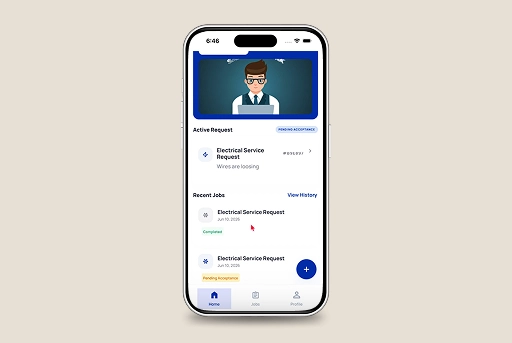
Job status, at a glance
Active requests and recent job history in one home screen no digging to find out where things stand.
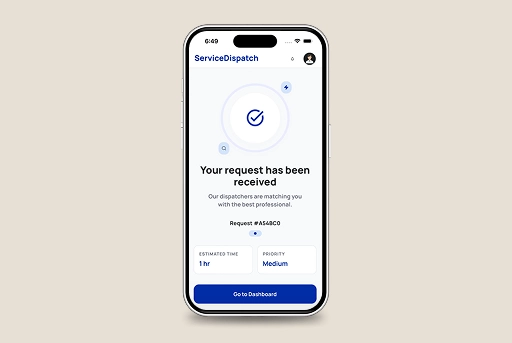
Confirmation with a real ID
Every request gets a trackable ID, an estimated time, and a priority the moment it’s submitted.
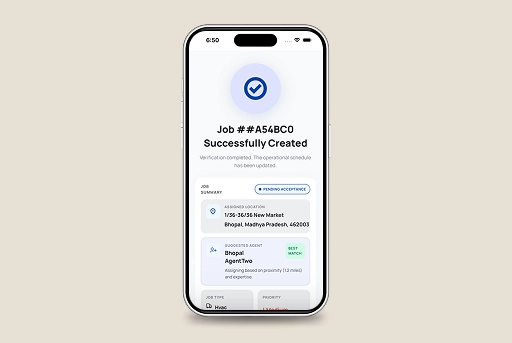
A suggested agent, ranked by fit
Location, suggested field agent, and match reasoning surfaced automatically at assignment.
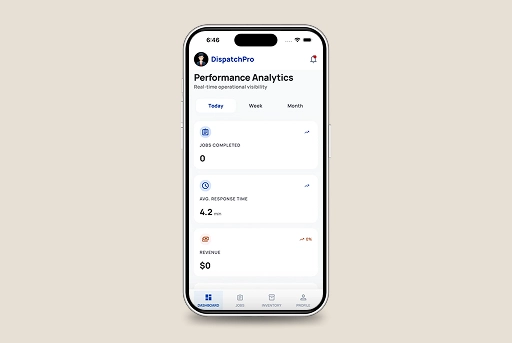
Operational visibility, live
Jobs completed, average response time, and revenue the numbers that show whether routing is actually working.
The flow is live in the build.
Next step is yours.
Let’s go from 0 to 1+
Tell us how you dream it. We’ll show you how to ship it.
A 30-minute discovery call with a senior engineer, not a sales rep. Walk away with a build plan, a timeline, and a clear next step.
✓Reply within 1 business day
✓NDA on request, no obligation
✓Talk to engineers who’ve shipped in your industry
✓HIPAA and SOC 2-aware engineering
Prefer to talk now? +1 858 683 3692
Start the conversation
Takes about 30 seconds.





