
AcceleratorsDICOM · Clinical Trials
Medical imaging data, transferred with zero compromise.
A secure, end-to-end platform for transferring, de-identifying, reviewing, and approving DICOM images across multi-site clinical trials with full adjudication workflow and audit trail built in.
See the Use CaseBook a Demo
The Problem
Clinical imaging workflows are broken at every handoff.
Hundreds of research sites, multiple reviewers, and strict PHI regulations yet most organizations are still coordinating by email and spreadsheet. Every manual step is a compliance risk.
- ✕Risk of exposing Protected Health Information (PHI)
- ✕Manual verification of image de-identification
- ✕Inconsistent review processes across reviewers
- ✕No standardized approval workflow
- ✕Limited visibility into transfer progress
- ✕No audit trails for regulatory compliance
- ✕Email-based coordination causing delays
- ✕Difficult resolution of reviewer disagreements
- ✕Inefficient management of large imaging studies
End-to-end workflow from upload to secure transfer.
The Medical Image Transfer Platform automates the entire pipeline: DICOM images are uploaded from any clinical site, automatically de-identified, routed to qualified reviewers through a structured adjudication workflow, and only released for final transfer after explicit approval.
Every action is tracked. Every decision is auditable. Every image is protected.
DICOM-compatibleAutomated De-IDHIPAA-readyMulti-siteRBACFull Audit Trail
Adjudication Workflow
A structured path from upload to approved transfer.
Every case passes through the same controlled pipeline no shortcuts, no ambiguity.
- DICOM images uploaded from clinical site
- Automated de-identification PHI removed
- Review case created with subject & study metadata
- Primary reviewers independently assigned
- Blinded independent review approve or reject
- Discordance detected if reviewers disagree
- Tie-breaker escalation & final decision
- Administrator completes secure final transfer
Ideal for
Clinical Research OrganizationsPharmaceutical CompaniesBiotechnologyImaging Core LabsMedical Research InstitutionsClinical Trial SponsorsAcademic Research CentersResearch Hospitals
Key Capabilities
Everything clinical imaging teams need nothing they don’t.
Secure DICOM Upload
Upload studies from multiple clinical sites. Project- and subject-based organization with support for large imaging datasets including ZIP bundles.
Automated De-identification
PHI is automatically removed from DICOM metadata and image overlays before any reviewer ever sees the data. No manual anonymization steps.
Adjudication Workflow
Structured case creation, blinded reviewer assignment, independent review, discordance detection, and tie-breaker escalation all in one platform.
Integrated DICOM Viewer
Reviewers open, inspect, and verify anonymization directly in the platform pan, zoom, rotate, window/level, and multi-frame playback included.
Confidence Scoring
Reviewers submit a confidence score alongside their decision, giving administrators richer data on review quality and supporting escalation decisions.
Tie-breaker Resolution
When primary reviewers disagree, the case automatically escalates to a designated tie-breaker who reviews both decisions and makes the final call.
Admin Dashboard
Real-time KPIs across all active studies: total cases, pending reviews, discordance cases, consensus rate, average review time, and active studies.
Transfer Management
Track every transfer ongoing and completed with Upload ID, Project ID, Site ID, Subject ID, status, and uploader identity in a single view.
Complete Audit Trail
Every upload, review decision, escalation, approval, and transfer is permanently logged with timestamp and user identity for regulatory readiness.

User Roles
Three roles. One controlled pipeline.
The harness is the guardrails, standards, domain context, and stack conventions that turn a capable but generic agent into one that builds the Bitcot way, so output is correct, secure, and idiomatic by default. Governance is continuous here, not a step in the loop.
Role 01 – Administrator
Platform Controller
- Create projects & sites
- Manage users & permissions
- Assign reviewers & tie-breakers
- Create & monitor transfer cases
- Escalate discordant cases
- Complete final transfers
Role 02 – Reviewer
Independent Reviewer
- View assigned cases
- Open DICOM images in viewer
- Verify de-identification
- Approve or reject cases
- Submit confidence score
- Add clinical rationale
Role 03 – Tie-breaker
Final Decision Maker
- Review escalated cases only
- View blinded reviewer decisions
- Analyze DICOM images
- Make final approval/rejection
- Resolve discordance
Product Screens
Built, live, and demo-ready.
Every screen shown is the live platform not a mockup.
- Dashboard
- Transfers
- Upload & Transfer
- DICOM Viewer
- Cases
- Create Case
- Assign Reviewers
- Review Status
- DICOM Review
- Consensus Review
Administrator Console
Complete operational visibility across all studies.
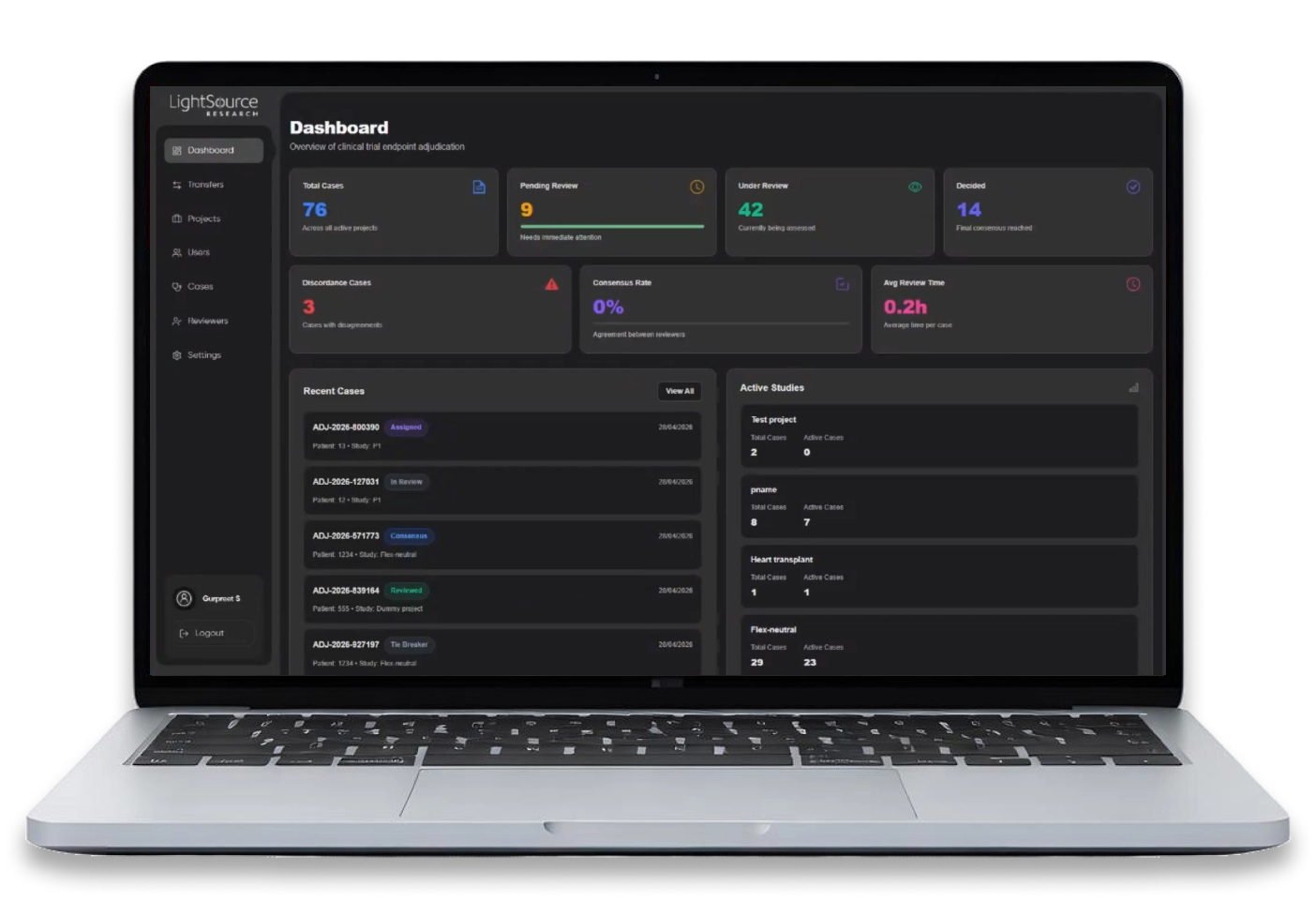
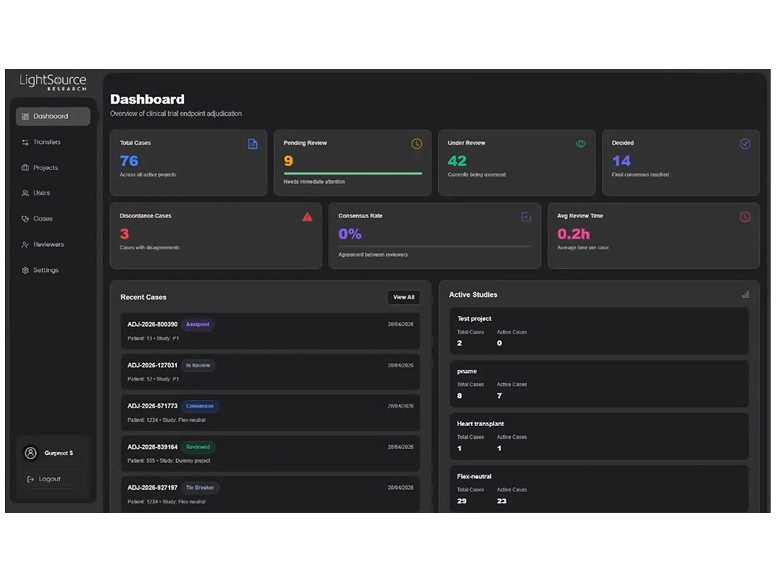
The admin dashboard shows real-time KPIs total cases, pending reviews, cases under review, decided cases, discordance count, consensus rate, and average review time plus a live feed of recent cases and active studies.
- 76 total cases across active projects
- 9 pending immediate attention
- 3 discordance cases flagged
- Avg review time: 0.2h per case
- Active studies panel with per-project breakdown
Transfer Management
Every transfer tracked from upload to delivery.
The transfers view shows all ongoing and completed transfers with Upload ID, Project, Site, Subject, Visit, uploader identity, date, and de-identification status. Administrators can filter by project or site and initiate new transfers directly.
- 59 total transfers tracked
- 23 successful, 36 ongoing
- Real-time de-identification status per upload
- Searchable and filterable by project & site
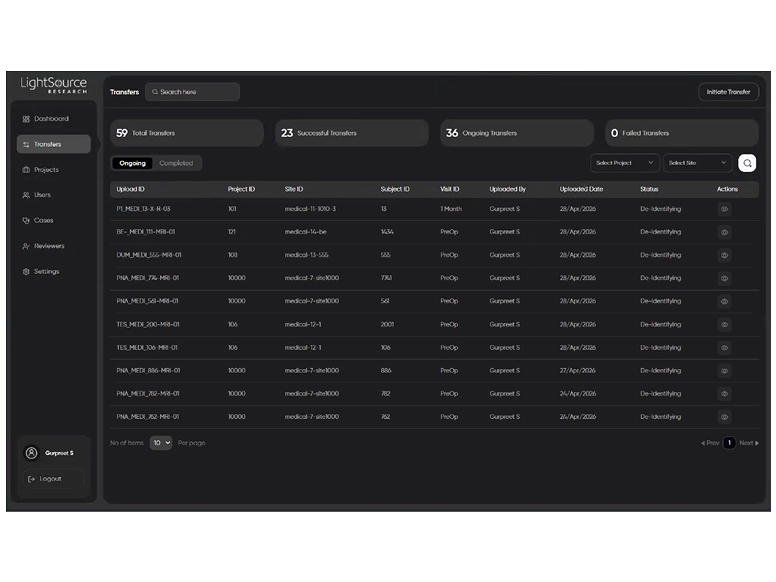
Image Upload
Structured upload with project and subject context.
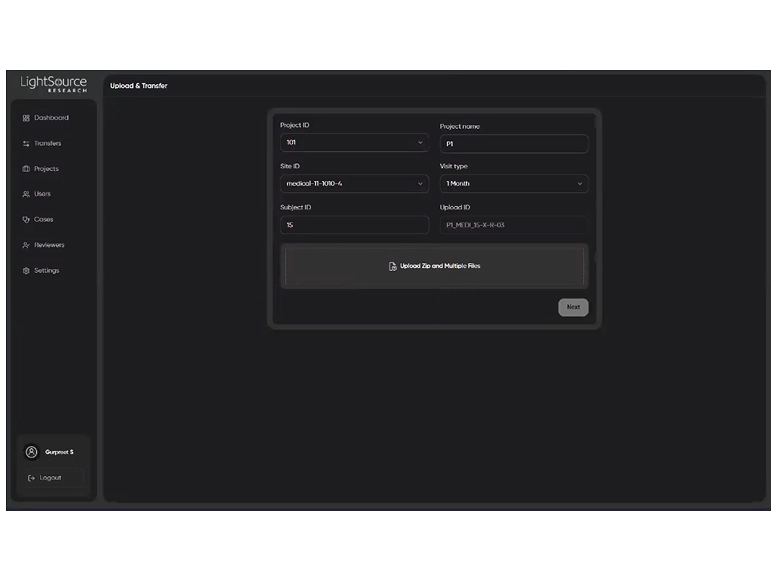
Administrators initiate a transfer by selecting Project ID, Site ID, Subject ID, and Visit type. An auto-generated Upload ID provides a traceable reference throughout the pipeline. DICOM ZIP bundles and multiple files are supported.
- Project, site, and subject-level organization
- Visit type selection for study structure
- Auto-generated Upload ID for traceability
- Supports ZIP and multi-file DICOM uploads
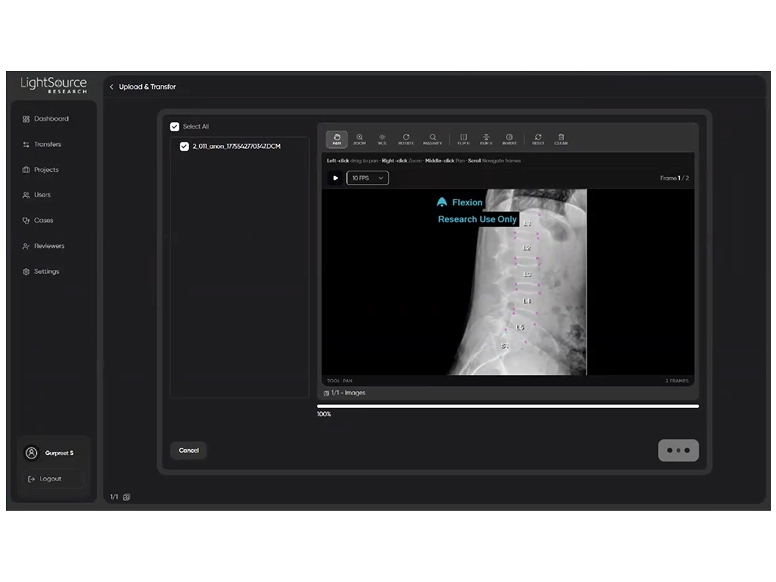
DICOM Image Viewer
Inspect images before and during review.
The integrated DICOM viewer renders medical images directly in the browser no external software required. Full toolset includes pan, zoom, window/level, rotate, flip, invert, and multi-frame playback for series review.
- Pan, zoom, rotate, W/L controls
- Multi-frame playback at configurable FPS
- Flip horizontal/vertical & invert
- Frame navigation for image series
Case Management
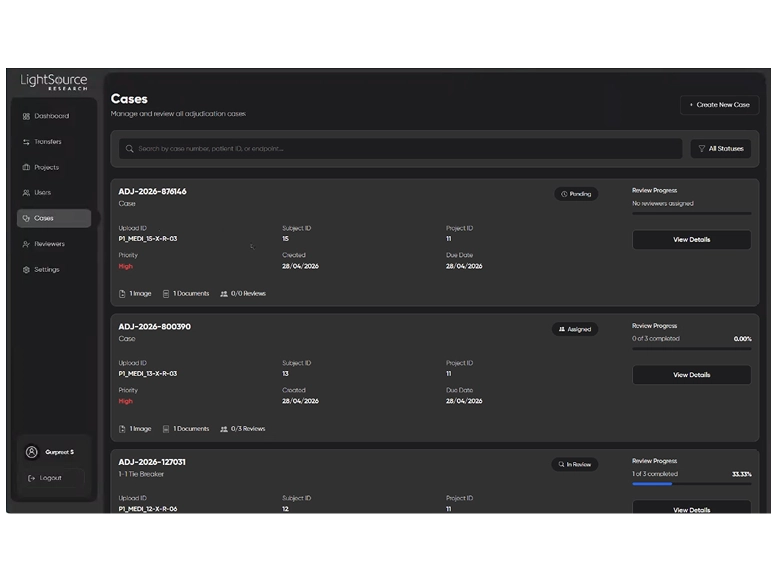
Every adjudication case in one view.
The cases list shows all active cases with status badges, review progress bars, image and document counts, priority level, and due dates. Cases can be searched by number, patient ID, or endpoint, and filtered by status.
- Status: Pending, Assigned, In Review, Consensus, Tie Breaker
- Review progress % per case
- Image, document, and review counts
- Priority and due date at a glance
Case Creation
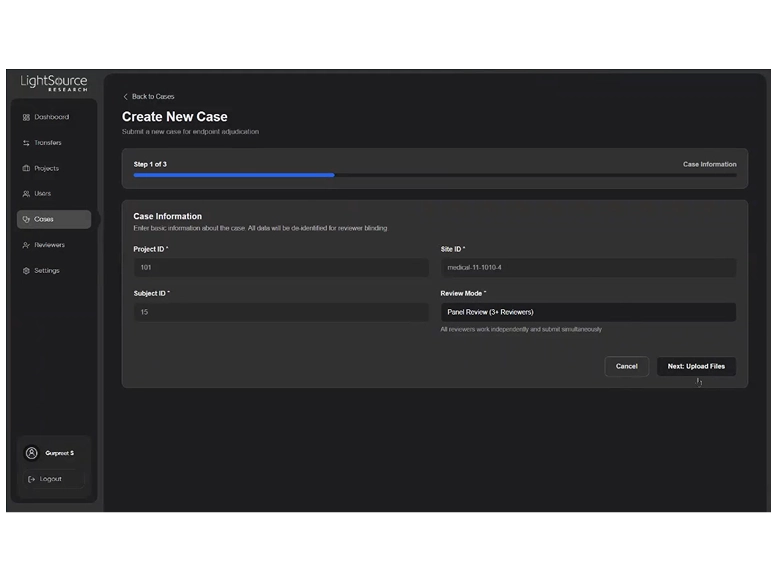
Three-step guided case submission.
Administrators create new adjudication cases in a structured three-step flow: case information (Project ID, Site ID, Subject ID, Review Mode), file upload (supporting documents), and review & submit with clinical notes. Panel Review (3+ reviewers) is configurable.
- Step 1: Case information & review mode
- Step 2: Upload supporting documents (PDF, DOCX, XLSX)
- Step 3: Review summary & submit clinical notes
- Progress bar keeps track across all steps
Reviewer Assignment
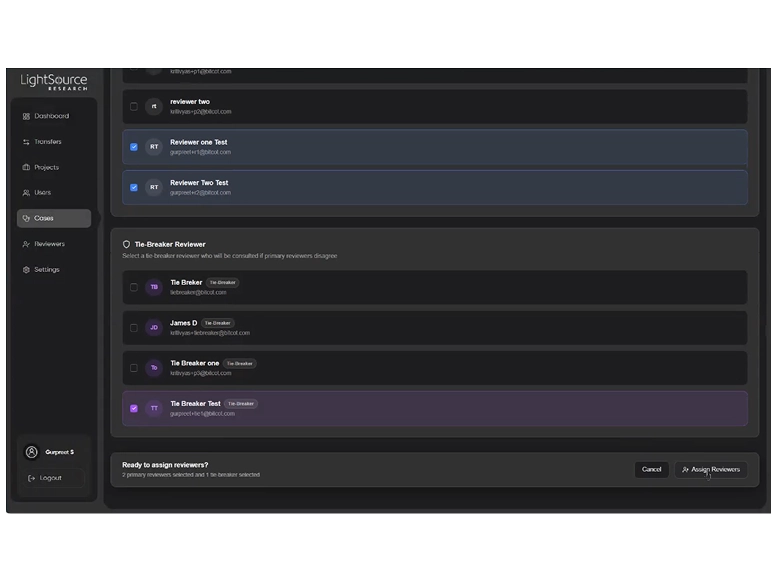
CSelect primary reviewers and a tie-breaker in one step.
Administrators select 2 primary reviewers and 1 tie-breaker from a searchable roster. Blinding is enforced automatically reviewers cannot see each other’s identity or decisions until all reviews are submitted. The tie-breaker is only notified if discordance is detected.
- Primary reviewers selected independently
- Blinding enabled by default
- Tie-breaker only notified on discordance
- 15 reviewers available in the panel
Review Status
Real-time view of reviewer decisions and case progress.
The case detail view shows positive vs. negative review counts, individual reviewer statuses, and the final adjudication decision. When reviewers disagree, the tie-breaker required status is surfaced immediately for administrator action.
- Positive/negative decision counts
- Consensus not reached tie-breaker escalation flagged
- Individual reviewer status (Pending, Submitted)
- Final adjudication decision displayed clearly
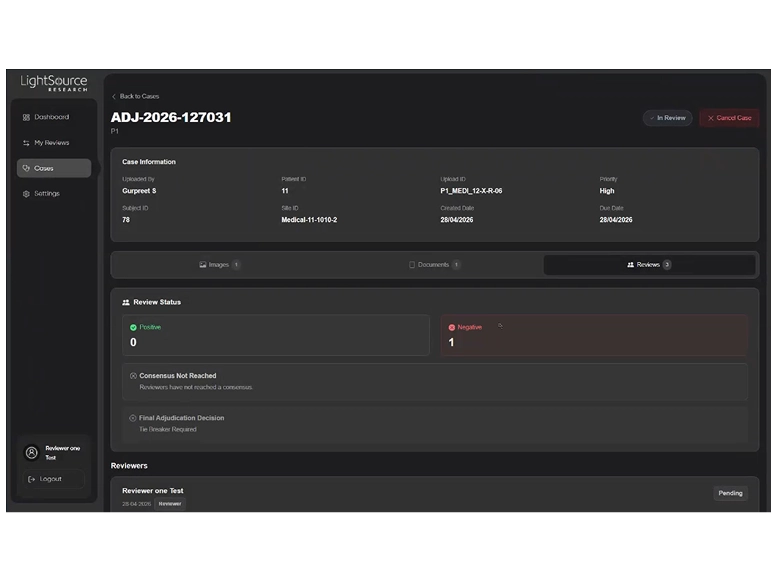
Image Review
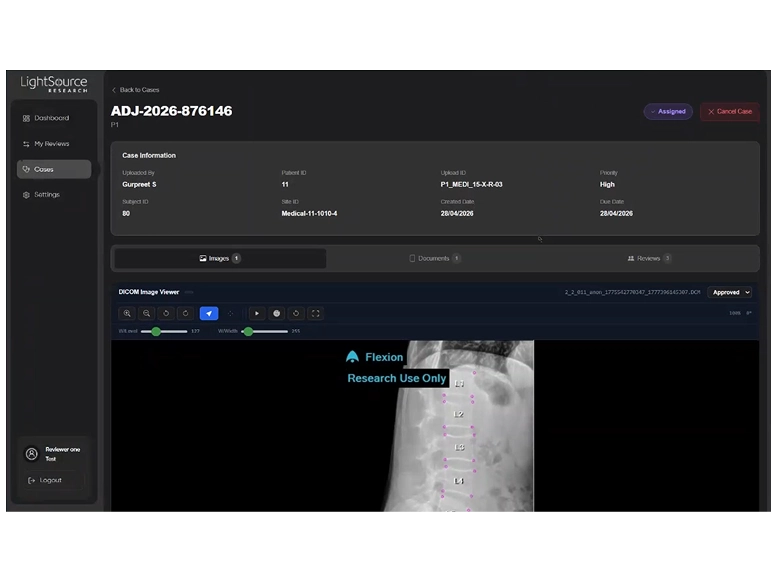
Reviewers verify de-identification directly in the platform.
Assigned reviewers open DICOM studies in the integrated viewer, inspect image quality and anonymization, and submit their approval or rejection. The viewer shows the de-identified study with a Research Use Only watermark confirming PHI removal.
- Full DICOM viewer built into the review workflow
- Anonymization verified visually before decision
- Approved status set per image file
- Case metadata visible alongside viewer
Discordance & Tie-breaker
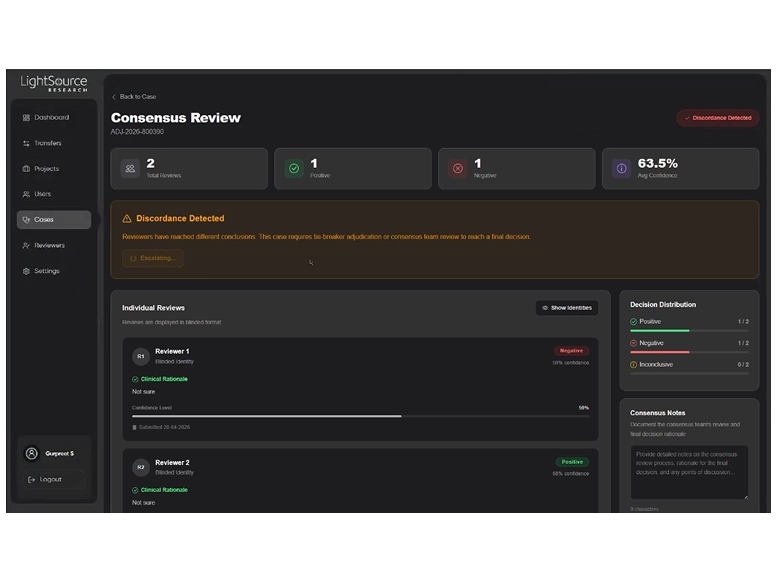
Automatic discordance detection and structured escalation.
When reviewers reach different conclusions, the platform automatically detects discordance, flags the case, and escalates to the assigned tie-breaker. Individual reviewer decisions are shown in blinded format alongside confidence scores and clinical rationale. A decision distribution panel summarizes the outcome.
- Discordance detected automatically
- Reviews shown in blinded format until revealed
- Confidence level per reviewer (63.5% avg)
- Consensus notes panel for tie-breaker documentation
Live Demo
See the full
pipeline in action.
From DICOM upload through de-identification, adjudication, discordance resolution, and final secure transfer the complete end-to-end workflow.
Next Steps
Ready to see it with your data?
The platform is fully functional and available to demo today. Every screen shown is live, working software.
Let’s go from 0 to 1+
Tell us how you dream it. We’ll show you how to ship it.
A 30-minute discovery call with a senior engineer, not a sales rep. Walk away with a build plan, a timeline, and a clear next step.
✓Reply within 1 business day
✓NDA on request, no obligation
✓Talk to engineers who’ve shipped in your industry
✓HIPAA and SOC 2-aware engineering
Prefer to talk now? +1 858 683 3692
Start the conversation
Takes about 30 seconds.





