
AcceleratorsClinical Mobile
The trauma bay doesn't wait
for a binder.
MedPro puts UC Health’s trauma center protocols, unit rosters, and on-call contacts into a single phone in every clinician’s pocket searchable in seconds, ready before the next patient rolls in.
See Inside the App
Play Video
Watch the Demo
A–Z INDEX
Full protocol library, categorized
LIVE ROSTERS
Join a unit, see who’s active
TAP TO CALL
Directory with one-tap dialing
TSU TAB
Built for the Trauma Surgical Unit

The Problem
Attention split in two,
every single time.
Trauma teams have always split their attention between the patient in front of them and the reference material on the wall. MedPro closes that gap with the same protocols on the device already in every pocket.
Binder Era
Laminated pages chained to a wall in one room
MedPro
The full protocol library, in every clinician’s pocket
Binder Era
Flipping through tabs while the clock is running
MedPro
Type-ahead search returns matching groups and protocols at once
Binder Era
Calling the operator to track down an on-call contact
MedPro
A tap-to-call directory, organized by unit and role
Binder Era
One master copy, edited by hand, easy to fall out of date
MedPro
Protocols and reference PDFs, kept current centrally
Binder Era
No visibility into who’s actually using the material
MedPro
Live group rosters join a unit and see who else has
Binder Era
Generic reference material, the same in every hospital
MedPro
Scoped to Main Hospital’s own Trauma Surgical Unit
Inside the App
One home screen.
Every protocol the team needs.
Six pieces of a single, focused workflow built around how a trauma team actually moves through a shift.
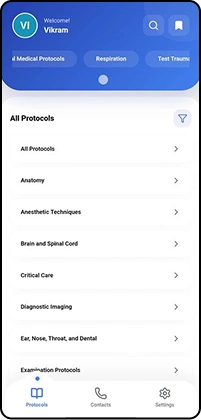
Protocol Library
Organized like a hospital, not a filing cabinet
Anatomy, Anesthetic Techniques, Brain and Spinal Cord, Critical Care, Diagnostic Imaging, Examination Protocols, and more a full A-to-Z index, plus unit-specific groups layered on top.
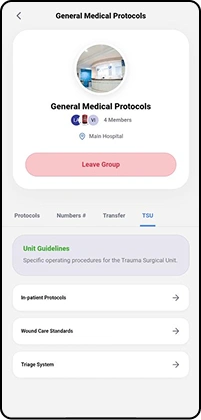
Trauma Surgical Unit
TSU workflows, purpose-built
Inside the General Medical Protocols group, a dedicated TSU tab holds Unit Guidelines, In-Patient Protocols, Wound Care Standards, and the Triage System separate from general hospital-wide material.
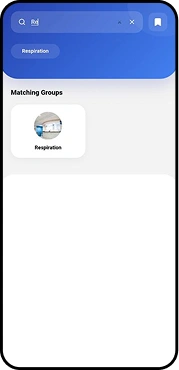
Search
Thinks in two directions
As a clinician types, results split instantly into matching groups and matching protocols, both at once, no extra tap required.
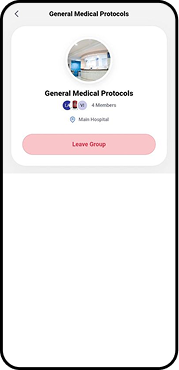
Group Rosters
Every group has a roster
Join or leave a protocol group and watch the member count and roster update immediately a live signal of who’s using what.
Document Handoff
Resources open where clinicians already work
Attached protocol PDFs hand straight off to OneDrive or Drive’s native viewer no custom reader competing for attention.
Contacts
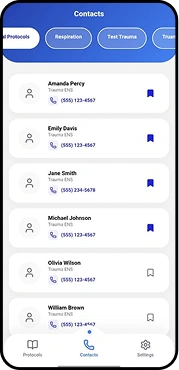
Built for one-tap calls
Names, roles, and numbers for the trauma team, with bookmarking for the contacts a shift reaches for most.
How a Shift Moves Through It
From badge-in
to bedside, in under a minute.
Six pieces of a single, focused workflow built around how a trauma team actually moves through a shift.

STEP 01
Sign in once.
A standard email and password gate stands between the device and any clinical content protocols, contacts, and PDFs stay behind the login.
STEP 02
Land on what’s relevant
Recently Viewed and quick category chips reflect what this clinician actually opened last not a generic table of contents.


STEP 03
Drill into a protocol
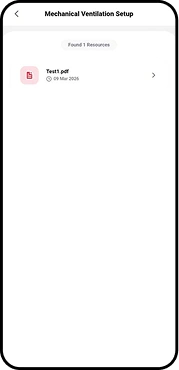
Anatomy leads to Mechanical Ventilation Setup, which leads to the exact resource dated, versioned, and ready to open.
STEP 04
Or skip straight to search
Two result sets appear as you type: matching groups above, matching protocols below whichever gets there faster.


STEP 05
Reach the right person
When a protocol isn’t enough, Contacts is one tab away organized by unit, one tap from a name to a phone call.
Live Demo
Watch it run.
Every screen here is real, working software login, protocols, groups, search, and contacts, captured in one continuous walkthrough.
Ready to put this
in a clinician’s pocket?
Step through the walkthrough again, or bring this straight into your next department review.
At a Glance
A complete system, built around one shift.
Six capabilities working together, the same ones shown throughout this walkthrough.
A secure sign-in gate stands in front of every protocol, contact, and PDF; no clinical content loads before login.
Group membership is live: joining or leaving a protocol group updates the member count and roster immediately.
Search returns matching groups and matching protocols in the same pass, as the clinician is still typing.
Protocol PDFs hand off to the viewer already on the device OneDrive or Drive instead of a custom in-app reader.
The Trauma Surgical Unit gets its own tab Unit Guidelines, In-Patient Protocols, Wound Care, Triage, separate from general hospital protocols.
Clinician profiles are editable in place: photo, name, phone, and address, with a clear sign-out path.
Under the Hood
One codebase.Feels native.
MedPro is built as a Progressive Web App the same codebase installs and behaves like a native application on a clinician’s phone.
PWA → Native Shell
Installable, offline-capable, and wrapped for iOS and Android — clinicians get an app icon and a native-feeling experience without two separate codebases to maintain.

Next.js
The React framework behind every screen protocols, groups, search, and contacts all run on one routing and rendering layer.

TypeScript
A typed codebase end to end, catching mismatched data before it ever reaches a clinician’s screen.

Capacitor
Wraps the PWA in a native shell the same code, installed and running like a true iOS or Android app.

Supabase
Backend for authentication, protocol data, and the live group rosters shown throughout this walkthrough.
Let’s go from 0 to 1+
Tell us how you dream it. We’ll show you how to ship it.
A 30-minute discovery call with a senior engineer, not a sales rep. Walk away with a build plan, a timeline, and a clear next step.
✓Reply within 1 business day
✓NDA on request, no obligation
✓Talk to engineers who’ve shipped in your industry
✓HIPAA and SOC 2-aware engineering
Prefer to talk now? +1 858 683 3692
Start the conversation
Takes about 30 seconds.






