
AcceleratorsPharmacy Management App · iOS + Admin Portal
Every prescription, order and shelf. One connected pharmacy.
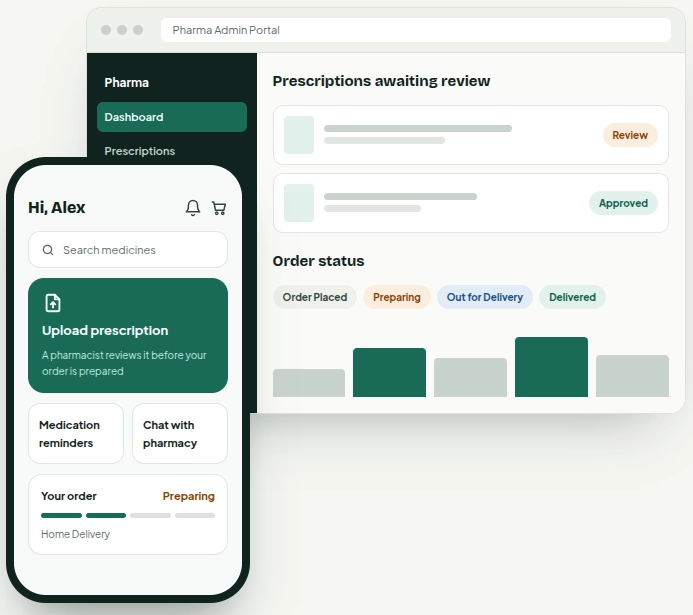
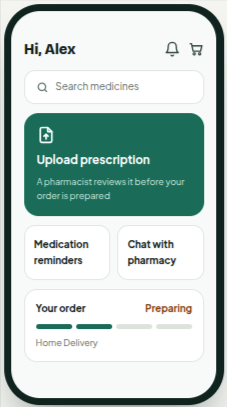
Pharma gives customers one simple app to order medicines, upload prescriptions and track every order. It gives your pharmacy team one Admin Portal to verify, fulfill and manage it all.
See how it works
Play Video
Watch the demo
Built in Flutter for iOSPickup and home deliveryPharmacist approval built in
The problem
Pharmacy work is scattered across too many places.
Many pharmacies still run on a mix of phone calls, paper prescriptions, spreadsheets and the front counter. Every handoff is a chance for an order to stall or a customer to be left waiting.
01
Prescriptions arrive everywhere
Paper, photos and phone calls, with no single queue for review.
02
Customers cannot see their order
So they call to ask where it is, and staff stop to find out.
03
Stock is hard to confirm
Quantities live apart from orders, so availability is a guess.
04
Conversations get lost
Questions come in by phone, text and at the counter, with no shared history.
05
Pickup and delivery run by hand
Two fulfillment paths, tracked on notes and memory.

The Pharma solution
One platform. Two connected interfaces.
Customers and pharmacy staff work on the same prescription, order and customer records. What a customer does in the app shows up in the Admin Portal, and every staff update flows back to the customer.
For customers
User App
Search, upload, order, choose pickup or delivery, track, set reminders and chat.
Shared data
CustomersPrescriptionsOrdersMessages
For pharmacy staff
Admin Portal
Verify prescriptions, process orders, manage inventory, pickup, delivery, messages and reports.
Product Screens
Built, live, and demo-ready.
Every screen shown is the live platform not a mockup.
One set of order stages, seen by everyone
Order Placed
Confirmation and order details reach the customer.
Preparing
The team fills the order once any prescription is approved.
Out for Delivery
The order is on its way to the saved address.
Delivered
The customer and the pharmacy both see it complete.
Stages shown for home delivery. Store pickup orders follow pickup-specific statuses. [PICKUP STATUS LABELS]
The problem
What changes for your pharmacy.
Centralized pharmacy management
Prescriptions, orders, inventory, pickup, delivery, messages and reports live in one Admin Portal instead of separate tools.
Clear order visibility
Staff and customers follow the same order stages, so fewer orders slip and fewer calls ask for status.
Simpler prescription processing
Prescriptions arrive digitally into one review queue, with an explicit approval before any order is filled.
Better inventory tracking
Quantity and stock status for every medicine sit in one view, kept current by authorized staff.
More convenience for customers
Search, upload, order, choose pickup or delivery, track, set reminders and chat, all from one app.
Application demos
See both sides in action.
Two walkthroughs recorded from the working app. Tap a chapter to jump straight to it.
User App walkthrough
The customer journey on iOS, from sign in to settings. About 3 minutes.
Admin Portal walkthrough
The pharmacy team’s workspace, from dashboard to reports. About 2 minutes.
Built for trust
Control stays with your pharmacists.
Human approval on every prescription
Prescription orders cannot move to fulfillment until authorized staff review and approve them. The app never approves on its own.
Role-based staff access
Only authorized staff can change prescription decisions, orders and inventory, and every record stays tied to the right customer.
Protected customer data
Designed for authenticated access, secure transmission and audit logging of sensitive changes to customer and prescription records.
Pharma is built. Let’s put it to work.
The iOS User App and the Admin Portal are ready to walk through. Let’s show your team the live app and agree the rollout plan together.
Let’s go from 0 to 1+
Tell us how you dream it. We’ll show you how to ship it.
A 30-minute discovery call with a senior engineer, not a sales rep. Walk away with a build plan, a timeline, and a clear next step.
✓Reply within 1 business day
✓NDA on request, no obligation
✓Talk to engineers who’ve shipped in your industry
✓HIPAA and SOC 2-aware engineering
Prefer to talk now? +1 858 683 3692
Start the conversation
Takes about 30 seconds.