
AcceleratorsPool Service Platform
Run the route, log the water, get paid.
A pool service platform for service companies in the US. The office manages customers, technicians and billing. Technicians work their route and log every visit from the pool deck. Customers get a secure link to their report and invoices, with no account to create.
Explore the portals
Play Video
Watch the walkthrough

A guided walkthrough of the live product.
From triage queue to escalation to a closed billing record, the full loop, in one recording.
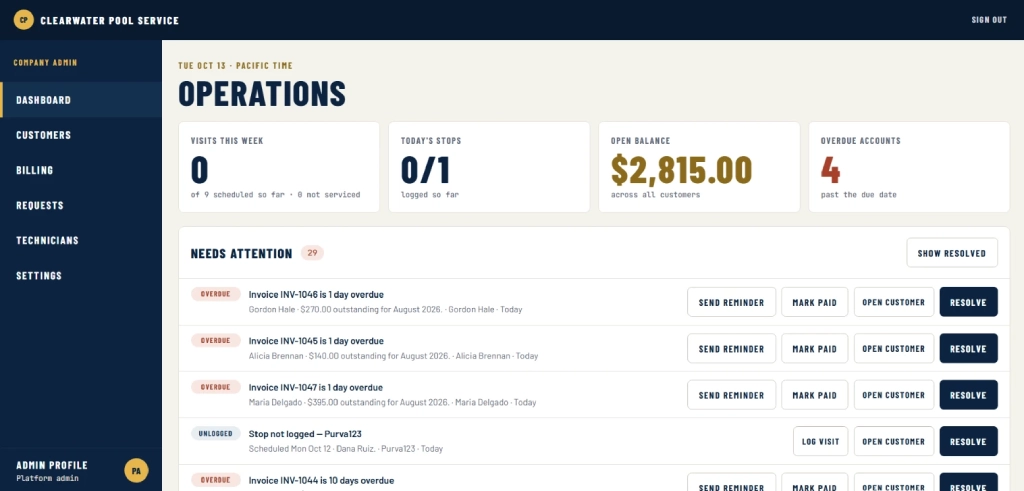
Admin portal
For the office. Customers, technicians, billing, requests, and a live view of the week.
Technician portal
For the route. Today’s stops, upcoming visits, and a one-screen visit log.
Customer link
For the homeowner. Visit reports, invoices and service requests behind a one-time code.
How a visit moves through the platform
Four hand-offs between the office, the technician and the customer, all on the same record.
01
The office sets up the account
The admin adds the customer with their plan, monthly rate, service days and technician. Saving sends a welcome email with the customer’s portal link.
02
The technician works the route
Today’s route lists every stop with gate codes and pet notes. At the pool, the tech logs readings, chemicals and services, or records why the pool couldn’t be serviced.
03
The customer gets the report
Saving the visit emails a unique, secure link. The customer confirms a one-time code, reads the report, pays what’s due or requests another visit.
04
The office sees the result
Logged visits, balances and overdue accounts update the dashboard. Anything unlogged, unpaid or requested lands in Needs attention.
Admin portal
Everything the office runs in one place: customers, technicians, billing, and customer requests, with a live read on how the week is going and what needs a decision today.
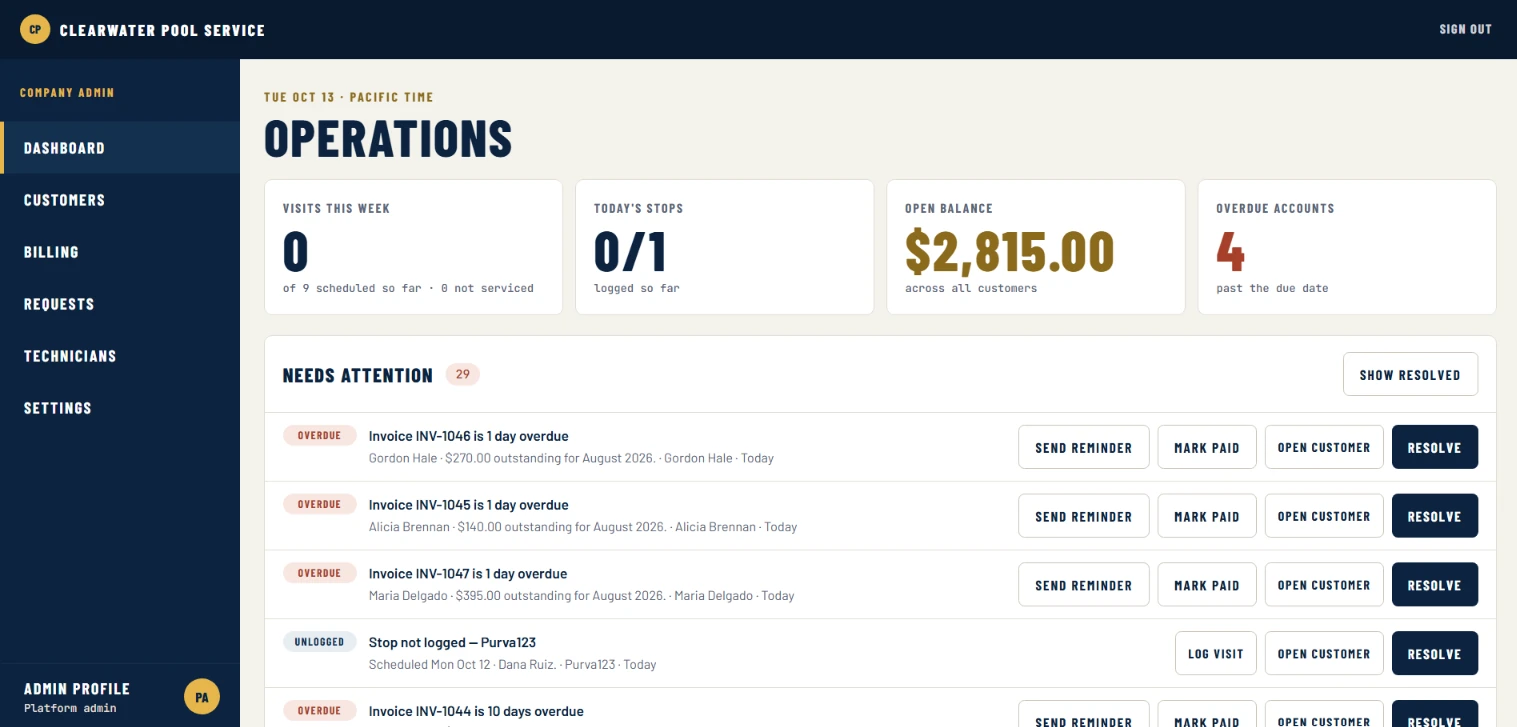
Operations dashboard
Visits this week, today’s stops, open balance, and overdue accounts at a glance. The Needs attention queue lists overdue invoices and unlogged stops, with the next action on each: send a reminder, mark paid, log the visit, or resolve.
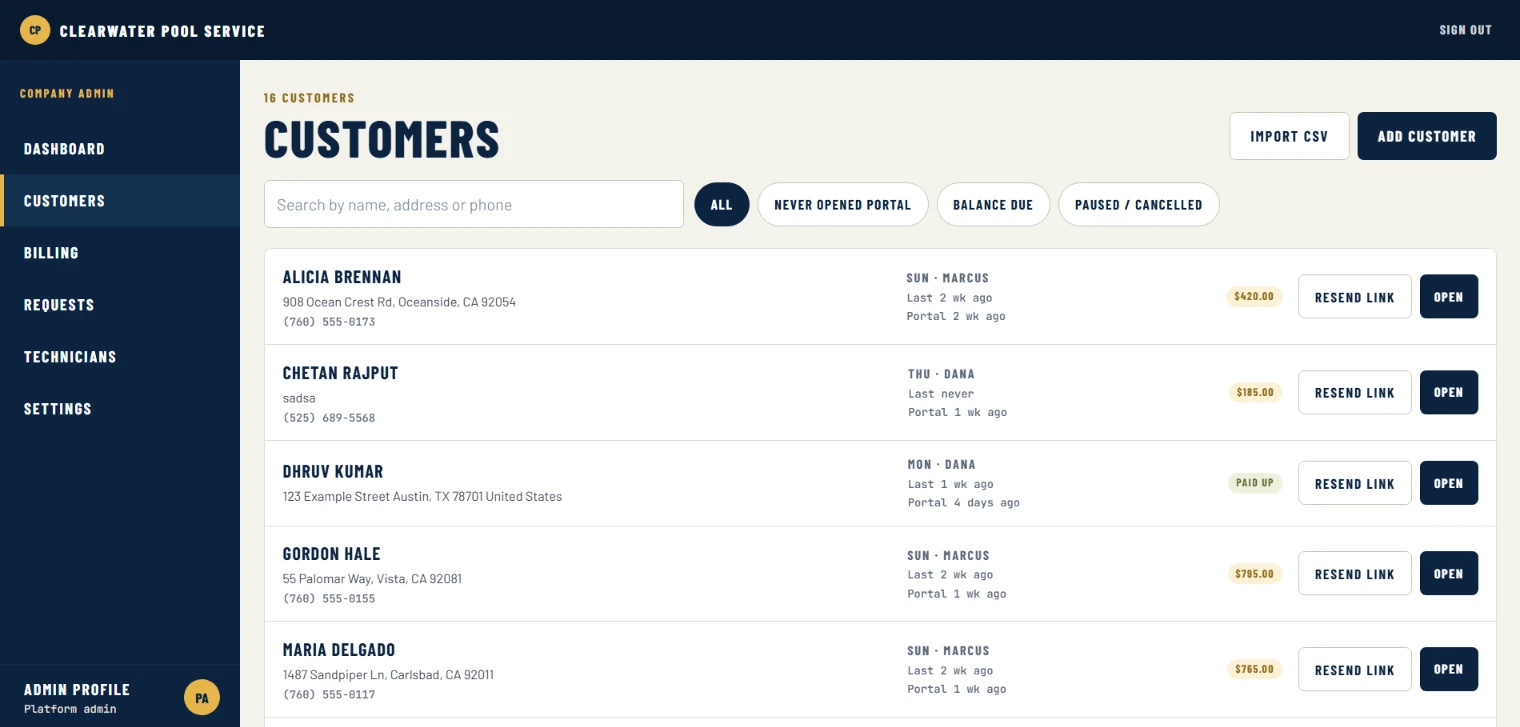
Customer list
Search by name, address or phone, and filter to customers who never opened their portal, have a balance due, or are paused or cancelled. Bring an existing book of business over with a CSV import.
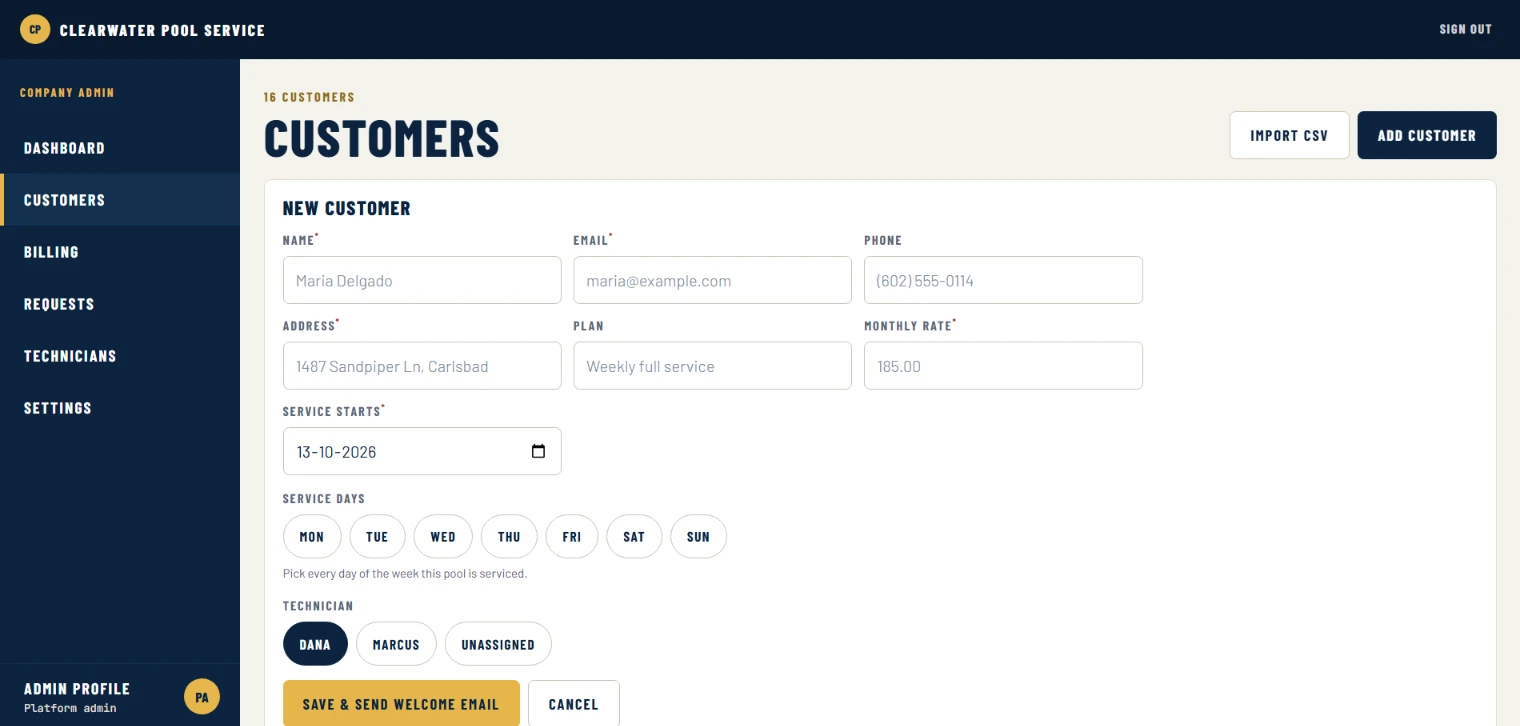
Add a customer
Name, email, address, plan, monthly rate, start date, service days, and assigned technician on one form. Save and send the welcome email in the same step.
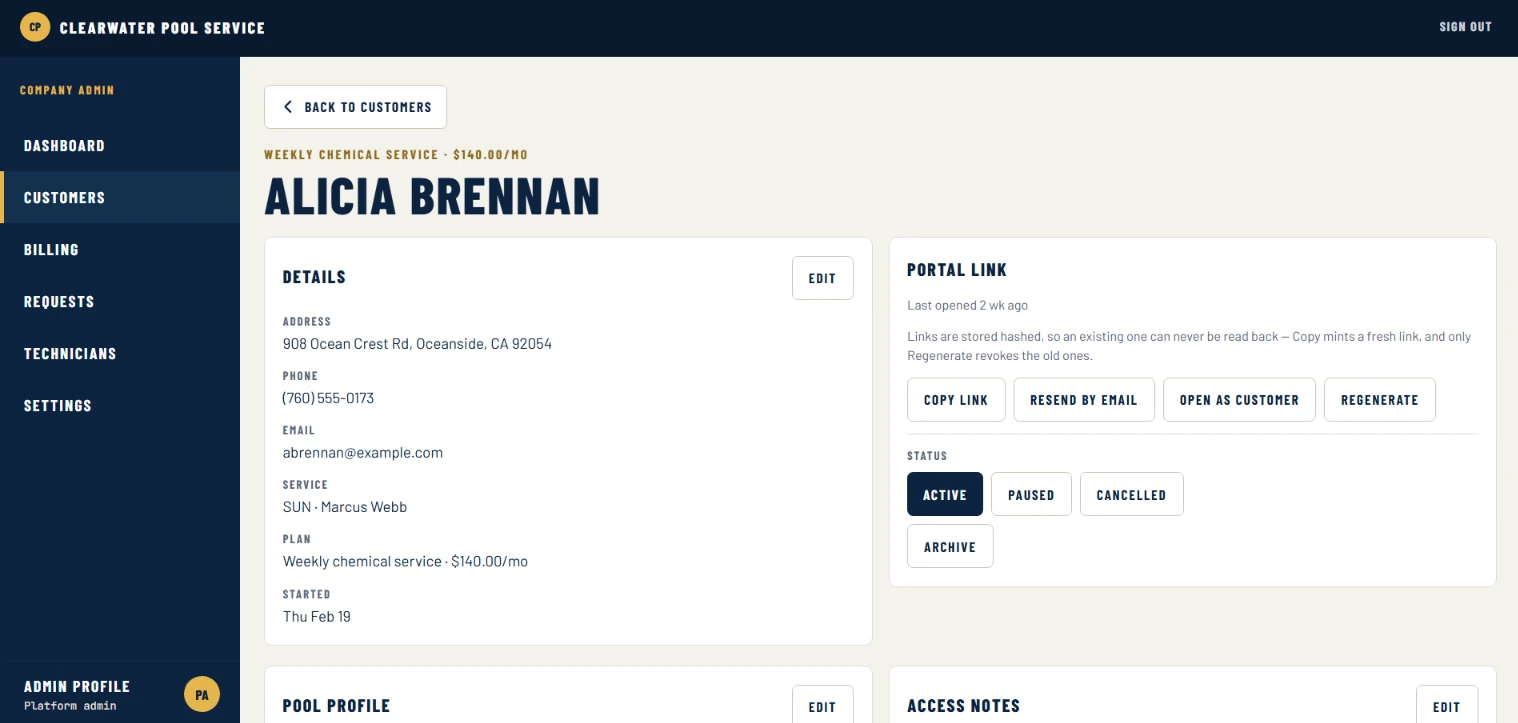
Customer profile
Contact details, plan, pool profile, and access notes are together. Portal link controls let the office copy a fresh link, resend it by email, open the portal as the customer, or regenerate to revoke old links. Status moves between active, paused, cancelled, and archived.
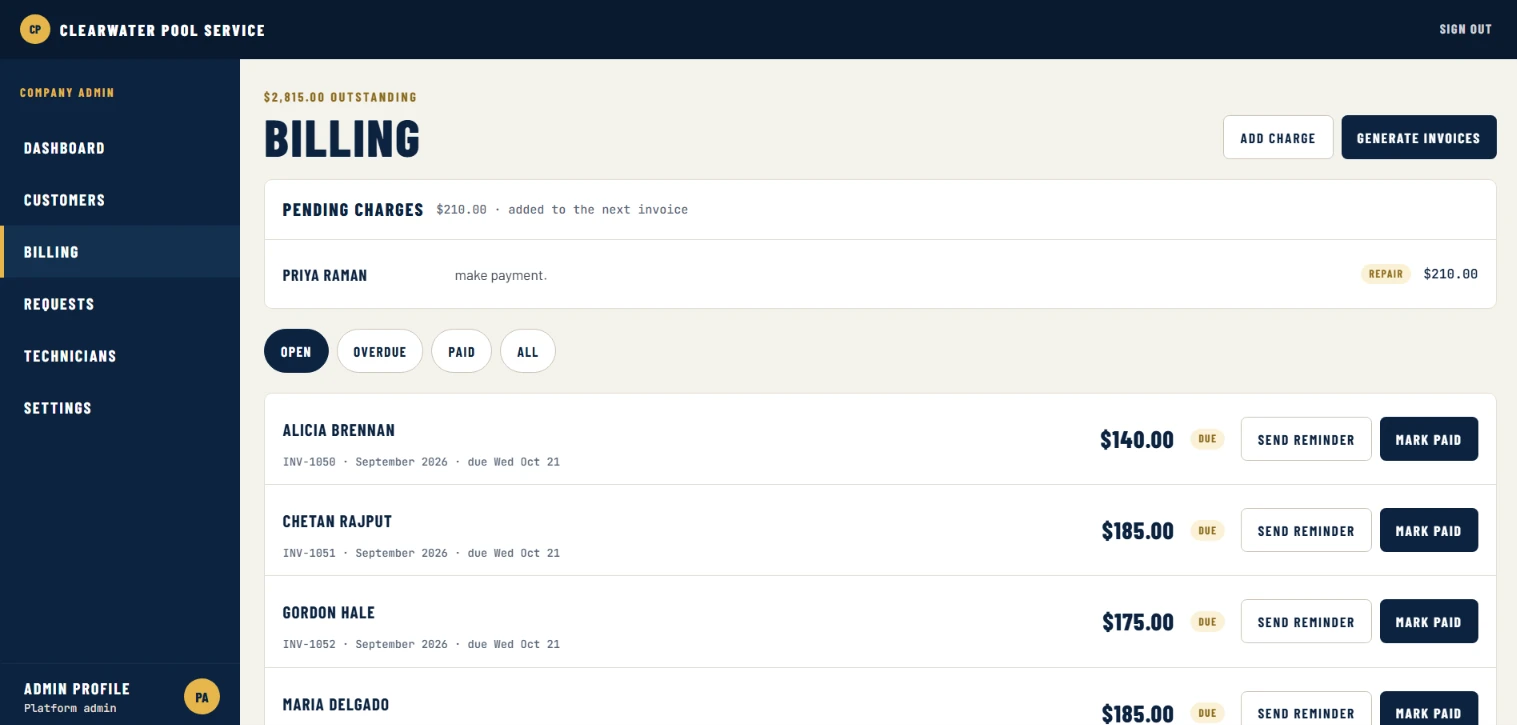
Billing
Generate the month’s invoices in one go, add one-off charges such as repairs to the next invoice, and work open, overdue, and paid invoices with reminders and mark-paid actions.
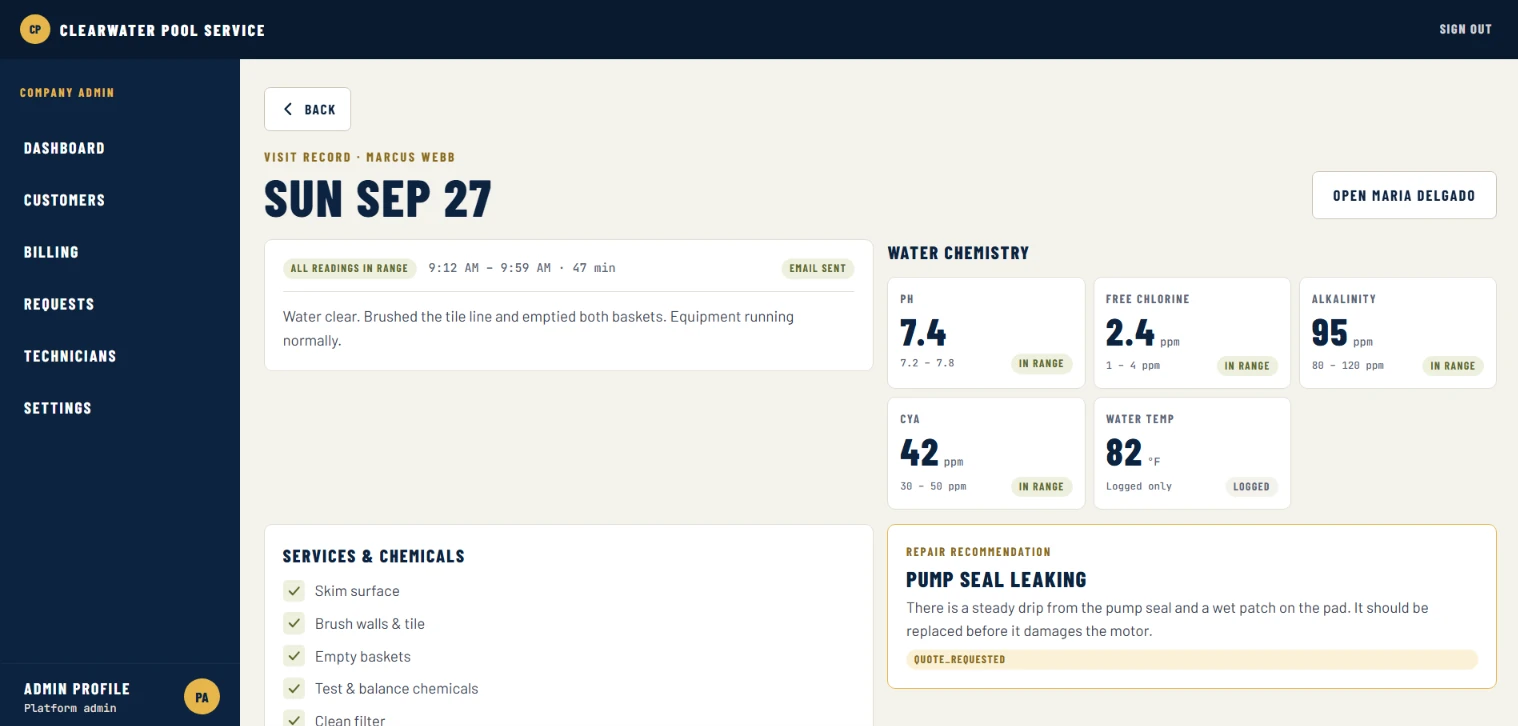
Visit records
Every visit includes its time on site, water chemistry checked against target ranges, services and chemicals, technician notes, and any repair recommendations with their quote status. The record also shows whether the report email went out.
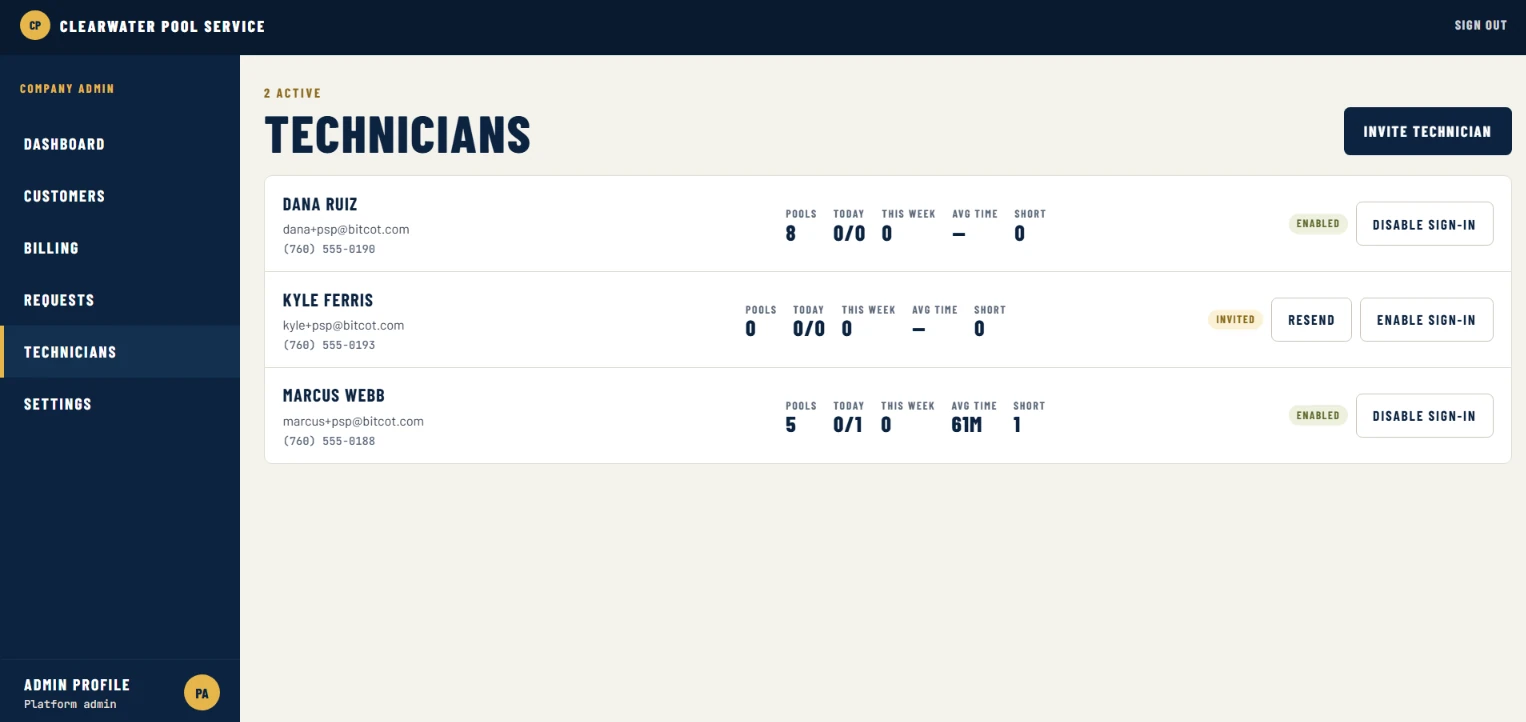
Technicians
Invite technicians, resend invites, and enable or disable sign-in. Each row shows pools assigned, today’s stops, visits this week, average time on site, and short visits.
What the office can track
Visits this week
Logged visits against what’s scheduled so far, with the number of stops that weren’t serviced.
Today’s stops
How much of today’s route has been logged, across every technician.
Open balance
Total outstanding across all customers, with pending charges queued for the next invoice.
Overdue accounts
Customers past their due date, each one a reminder away from being followed up.
Needs attention
Overdue invoices, unlogged stops and customer requests in one queue, with resolved items kept for reference.
Technician performance
Pools assigned, visits this week, average time on site and short visits for each technician.
Technician portal
Built for the route. Each stop shows what the technician needs at the gate, and logging a visit takes one screen: readings, chemicals, services, time on site and anything worth flagging.
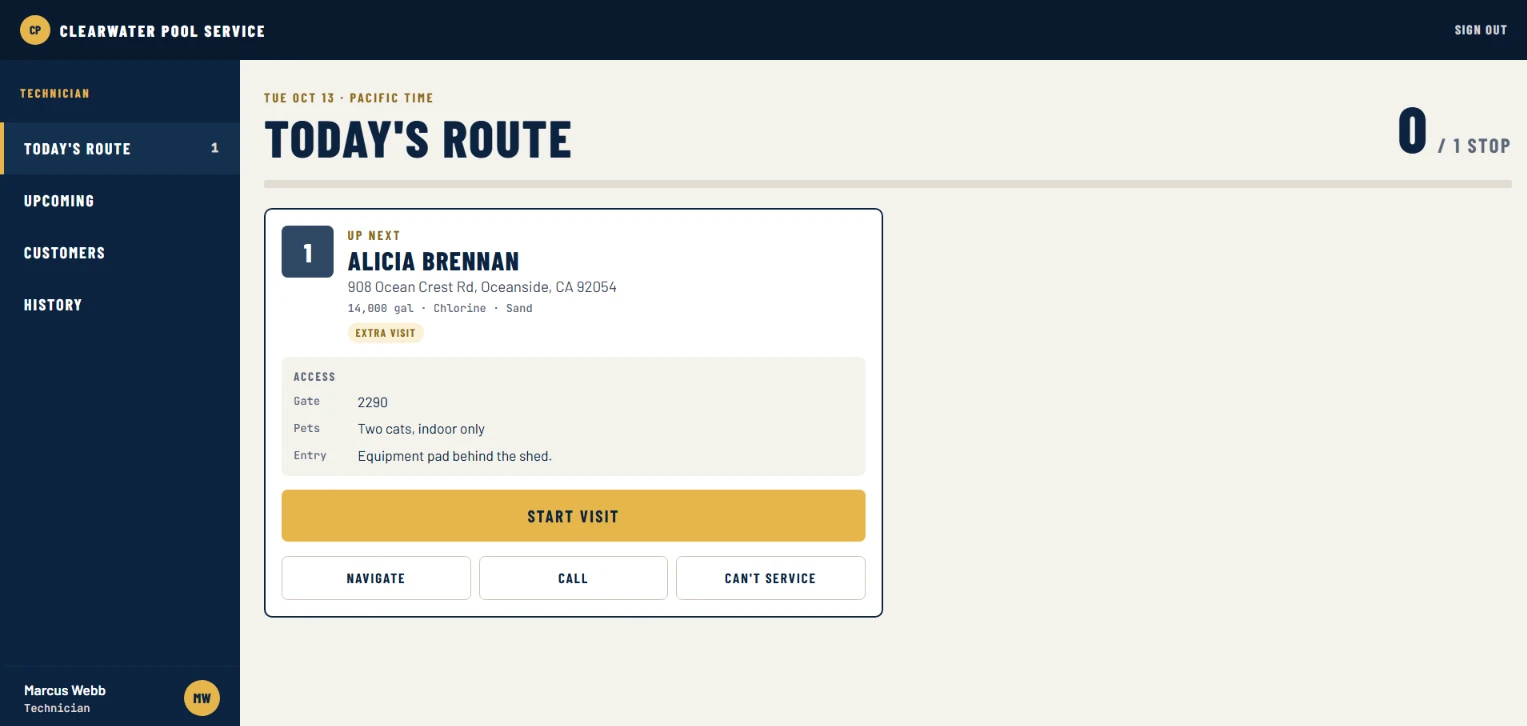
Today’s route
Stops are ordered by pool size, sanitizer and filter type, gate code, pets, and entry notes. From each stop: start the visit, navigate, call the customer, or mark it can’t be serviced. Booked and extra visits are labelled.
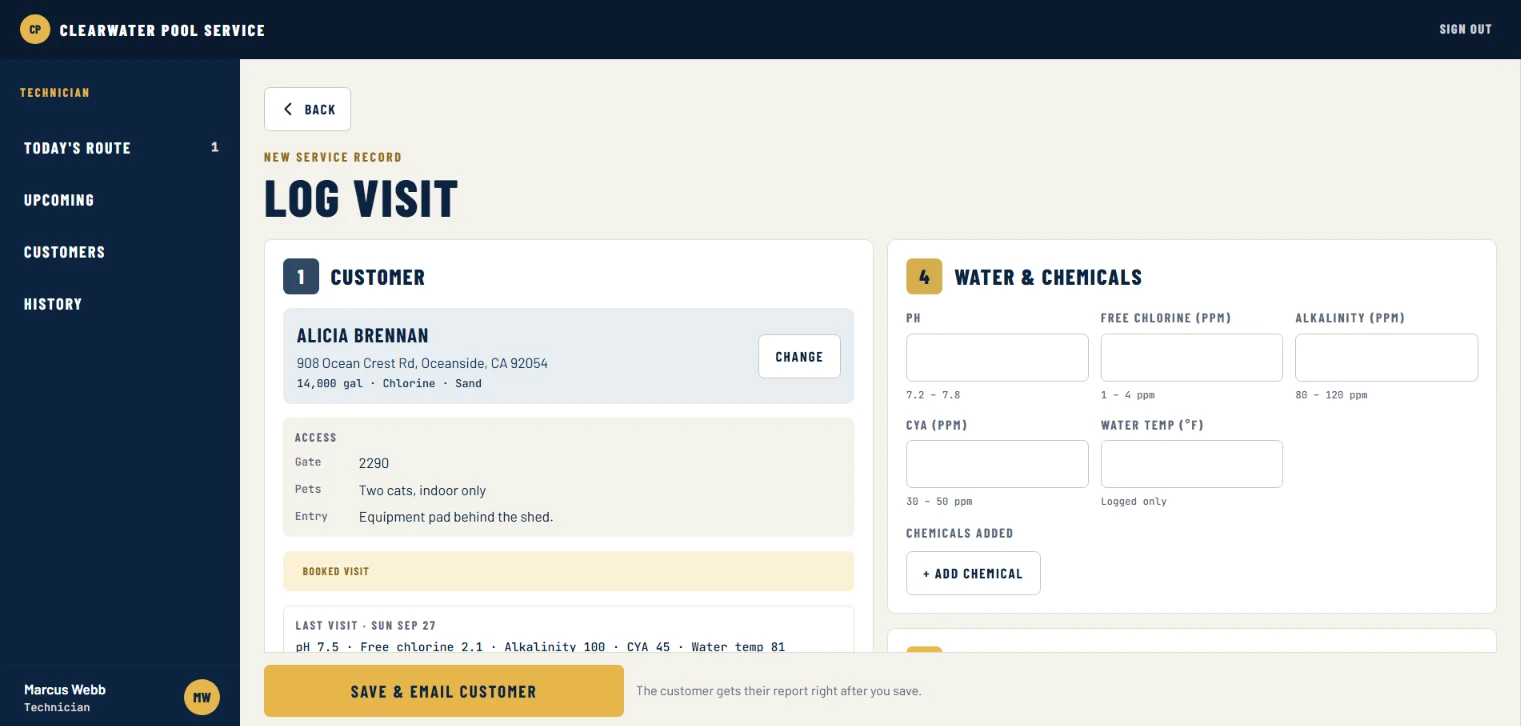
Log a visit
Enter the customer and access details, the last visit’s readings for comparison, then pH, free chlorine, alkalinity, CYA, and water temperature, with the target range under each field. Chemicals added are recorded line by line.
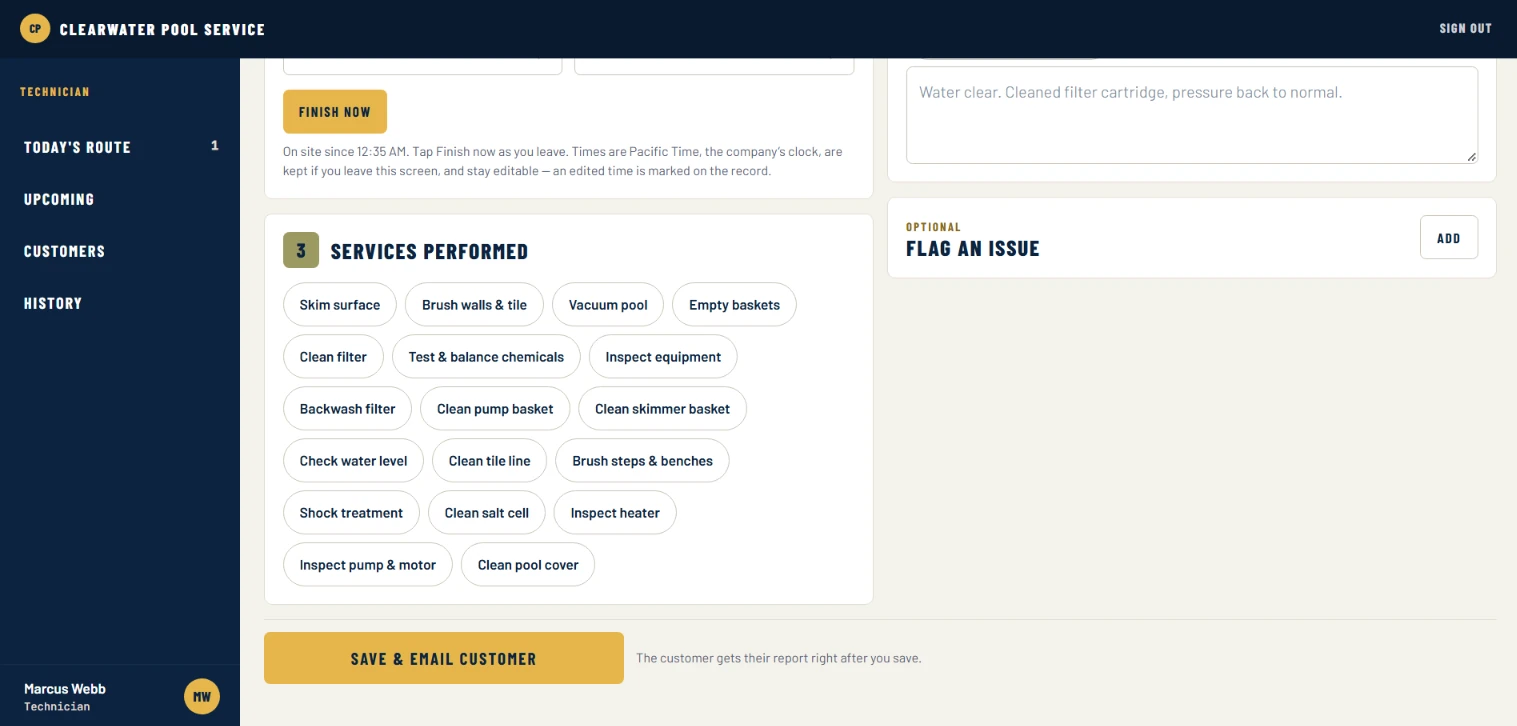
Services and time on site
Tap each service performed, add notes, and flag an issue for a repair quote. Time on site runs on the company’s Pacific Time clock, survives leaving the screen, and stays editable, with edited times marked on the record. Saving emails the report to the customer.
Upcoming
Visits booked for the coming days, so technicians can see what’s ahead before the week starts.
Customers
Add a new customer from the field and book their first pool service visit on the spot.
History
Every visit the technician has logged, ready to check when a customer asks what was done.
Readings checked against target ranges
Every field shows its target range while the technician types, and the visit record marks each reading in or out of range.
pHTarget 7.2 to 7.8
7.4
Free chlorineTarget 1 to 4 ppm
2.4
AlkalinityTarget 80 to 120 ppm
95
CYATarget 30 to 50 ppm
42
Sample readings from a logged visit. Water temperature is recorded without a range.
Skim surfaceBrush walls & tileVacuum poolEmpty basketsClean filterTest & balance chemicalsInspect equipmentBackwash filterClean pump basketClean skimmer basketCheck water levelClean tile lineBrush steps & benchesShock treatmentClean salt cellInspect heaterInspect pump & motorClean pool cover
When a pool can’t be serviced
Can’t service records the stop as not serviced, along with the reason, so it never silently drops off the day.
The customer link
When a visit is saved, the customer gets an email with a unique, secure link. There’s no account and no password. A one-time code sent to their registered email confirms it’s them, then they can read the report, pay what’s due and ask for another visit.
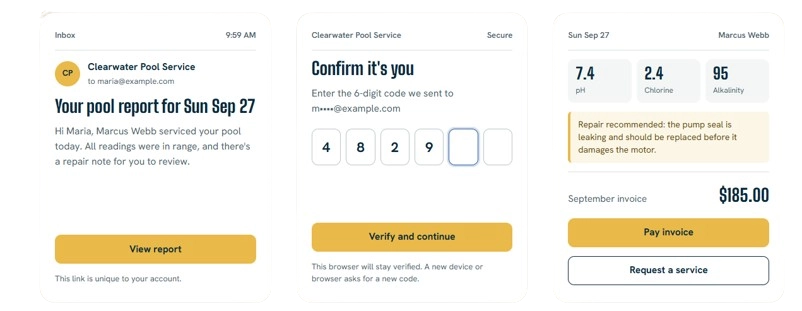
The report email arrives as soon as the technician saves the visit.
A one-time code to the registered email confirms the customer. No login to create.
The report, open invoices and service requests sit in one place.

Why it matters
Worth a CEO’s time
A reminder app is a small idea. One that’s never wrong about the window is a reason to open it every week.
No account, no password
The link and a one-time code sent to the customer’s registered email address are all it takes to get in.
The device is remembered
Once verified, a cookie keeps that browser trusted, so repeat visits open straight to the report.
New device, new code
Opening the link on another device or browser sends a fresh code to the registered email before anything is shown.
Links are stored hashed
An existing link can never be read back. The office can copy or resend a fresh one any time, and regenerating revokes every older link.
Watch the walkthrough
A recorded walkthrough of the working platform, with real screens from the admin and technician portals.
Frontend
Next.js
Renders every screen people use, from the office dashboard to the technician’s visit log and the customer’s report page.
- Admin portal
- Technician portal
- Customer link and one-time code verification
Backend
Supabase
Holds the platform’s data in Postgres and handles authentication for the people who run it.
- Customers, routes and scheduled visits
- Water readings, services and repair recommendations
- Invoices, charges and balances
- Admin and technician sign-in
Start your pool service platform from a working build
The office, the route and the customer are covered end to end. Bitcot can shape this accelerator around your plans, service checklist and billing.
Let’s go from 0 to 1+
Tell us how you dream it. We’ll show you how to ship it.
A 30-minute discovery call with a senior engineer, not a sales rep. Walk away with a build plan, a timeline, and a clear next step.
✓Reply within 1 business day
✓NDA on request, no obligation
✓Talk to engineers who’ve shipped in your industry
✓HIPAA and SOC 2-aware engineering
Prefer to talk now? +1 858 683 3692
Start the conversation
Takes about 30 seconds.