- WordPress security is a business priority because it affects revenue, uptime, search visibility, and customer trust.
- Plugins, themes, user access, hosting configuration, and third-party integrations are common sources of WordPress risk.
- Security plugins help, but they are not enough without governance, monitoring, backups, and clear ownership.
- A practical WordPress security checklist should include updates, 2FA, vulnerability scanning, role reviews, WAF protection, and backup testing.
- Businesses using WooCommerce, headless WordPress, or API integrations need stronger security planning because their attack surface is larger.
This guide explains how to protect your WordPress website, evaluate security solutions, reduce plugin and infrastructure risks, and build a security process that supports business growth in 2026 and beyond.
One security breach can undo years of digital growth.
In many cases, the risk begins with something your team did not even know was vulnerable: an outdated plugin, an unused admin account, weak hosting configuration, or a third-party integration that was never reviewed properly.
Imagine a normal workday. Your team starts receiving alerts. Your WordPress website is down, customer data may be exposed, and your business is suddenly in recovery mode. For companies that depend on their website for leads, sales, support, or customer trust, this is not just a technical issue. It is a business continuity issue.
WordPress security has become more important because WordPress powers a large share of the web and is widely used by small businesses, enterprise teams, publishers, eCommerce stores, and service companies. That popularity makes it attractive to attackers who use automated tools to scan for known weaknesses.
Think your company is too small to be targeted?
That assumption is risky. Small and mid-sized businesses are often targeted because attackers expect weaker security processes, fewer internal controls, and slower patching. The real issue is not company size. The issue is exposure.
Most WordPress breaches are preventable when businesses apply the right fundamentals consistently: plugin patching, access control, two-factor authentication, hardened hosting, monitoring, and verified backups.
At Bitcot, we help organizations build WordPress security strategies that are based on real business risk, not fear-driven tool recommendations.
Why Are WordPress Sites Prime Targets for Hackers in 2026?
WordPress is one of the most widely used content management systems in the world. That popularity makes it powerful for businesses, but it also creates a large attack surface for cybercriminals.
Attackers often use automated bots to scan thousands of WordPress websites for known vulnerabilities. Once a weakness is found, the attack can happen quickly, especially when a plugin or theme vulnerability has already been publicly disclosed.
Market dominance and large attack surface
WordPress is no longer used only for blogs. Businesses use it for corporate websites, membership portals, eCommerce stores, landing pages, resource centers, and customer-facing platforms.
That means WordPress websites often handle sensitive information such as contact form submissions, payment-related workflows, user accounts, customer records, and marketing data.
The WordPress ecosystem includes thousands of plugins and themes. Each one can improve functionality, but each one can also introduce a security risk if it is poorly coded, outdated, abandoned, or misconfigured.
The common mistake: many businesses update WordPress core but ignore plugin inventory, theme updates, access roles, and vendor risk. That creates hidden gaps that attackers can exploit.
Open-source ecosystem at enterprise scale
WordPress, being open source, is both a strength and a responsibility. Security researchers can review code, report issues, and help improve the ecosystem. At the same time, attackers can study publicly known vulnerabilities and search for websites that have not patched them yet.
Once a vulnerability becomes public, businesses are racing against attackers. The faster your team can test and apply security updates, the lower your exposure becomes.
This is why WordPress security cannot depend on occasional manual updates. It needs a repeatable process for monitoring, testing, approving, and deploying security fixes.
Third-party plugin, theme, and vendor dependencies
Plugins are one of the biggest sources of WordPress security risk. A website can have a secure WordPress core but still be exposed through a single vulnerable plugin.
Business websites often use plugins for SEO, analytics, forms, payments, CRM integration, performance optimization, popups, live chat, security, backups, and page building. Every plugin adds another dependency.
The risk is simple: your WordPress security is only as strong as the least secure plugin, theme, or integration in your environment.
To reduce this risk, businesses should maintain a plugin inventory, remove unused plugins, replace abandoned tools, review vendor reputation, and test updates in staging before pushing them to production.
AI-driven, automated, and supply-chain attacks
Modern attacks are becoming faster and more automated. Attackers use scanning tools, bots, and AI-assisted workflows to identify vulnerable websites, test login pages, and exploit known weaknesses at scale.
Supply-chain attacks are also becoming more serious. In these cases, the risk does not start on your website directly. It enters through a compromised plugin, vendor system, script, or third-party service.
For WordPress businesses, this means protection must go beyond installing a security plugin. You need visibility into dependencies, access roles, hosting controls, and response readiness.

What Do the Latest WordPress Security Statistics Reveal in 2026?
WordPress security risks are increasing because attackers now move faster, use automation more often, and target commonly used plugins and integrations.
Direct answer: the biggest WordPress security lesson for 2026 is that businesses must stop treating security as a one-time setup. It must become an ongoing operational process.
Enterprise-level breach statistics and trends
Many WordPress vulnerabilities involve plugins, themes, access control gaps, cross-site scripting, SQL injection, or exposed endpoints. Some vulnerabilities may be exploitable without a valid username or password, which makes fast patching and vulnerability scanning even more important.
For business websites, login protection, rate limiting, file integrity monitoring, and web application firewall protection should be considered baseline controls.
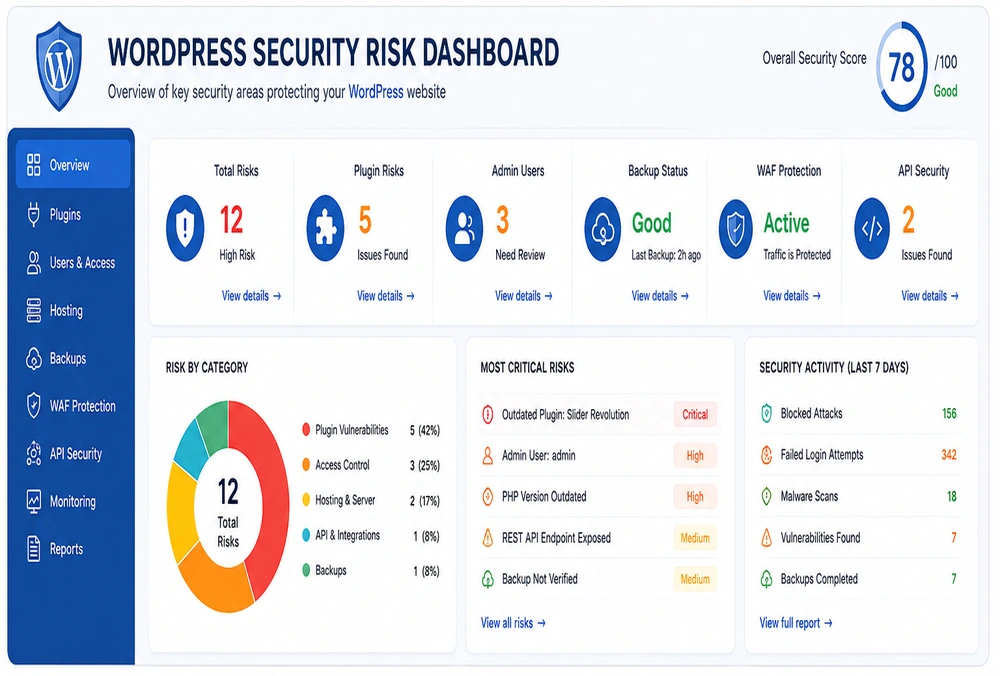
Security teams should also track failed login attempts, suspicious file changes, plugin changes, admin activity, and unusual traffic spikes. These signals can help identify attacks before they become full incidents.
Cost of downtime, data loss, and recovery
Prevention is usually cheaper than recovery. When a WordPress site is compromised, the cost is not limited to malware removal. Businesses may also face lost sales, damaged customer trust, SEO impact, legal review, notification requirements, and internal productivity loss.
For WooCommerce stores, downtime directly affects revenue. For service businesses, downtime can reduce leads and damage credibility. For content-heavy websites, a breach can affect rankings and brand authority.
This is why WordPress website security should be reviewed as part of business risk management, not only as an IT task.
What has changed since previous years
Attackers are no longer relying only on manual discovery. They can scan websites, identify outdated components, test login credentials, and exploit known weaknesses quickly.
At the same time, WordPress websites are becoming more complex. Many now include WooCommerce, membership systems, APIs, marketing integrations, automation tools, custom themes, and headless front ends.
The result is a wider attack surface. Businesses need stronger visibility, clearer ownership, and better security governance.
What Are the Top WordPress Security Threats Businesses Face in 2026?
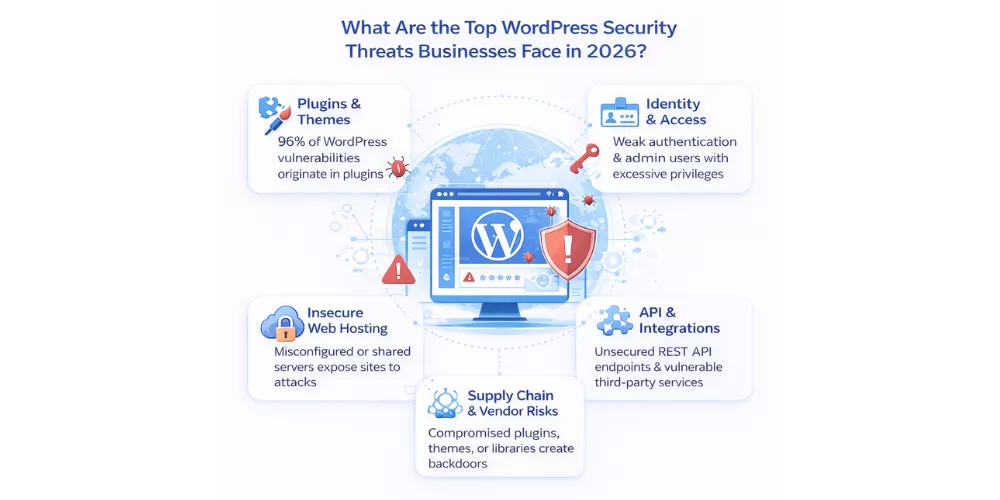
Understanding where your website is most exposed helps your team prioritize the right fixes instead of wasting time on low-impact actions.
Plugin and theme risks in large ecosystems
Plugins and themes are common sources of WordPress vulnerabilities. This does not mean businesses should avoid plugins completely. It means every plugin should have a clear purpose, a trusted vendor, active maintenance, and a defined update process.
Common plugin risks include abandoned plugins, outdated versions, poorly coded extensions, unnecessary permissions, weak support, and conflicts with other tools.
For WooCommerce websites, plugin risk is even more important because checkout flows, customer data, coupons, payment extensions, and order workflows are business-critical.
Identity, access management, and insider threats
Ask this first: how many people currently have admin access to your WordPress website?
Many websites accumulate user accounts over time. Employees, agencies, freelancers, vendors, and temporary contractors may receive access, but those permissions are not always removed later.
Role-based access control is essential. Admin access should be limited, editor and author roles should be used correctly, and inactive users should be removed or disabled.
Strong identity and access management solutions help prevent privilege misuse, credential-based attacks, and unnecessary exposure.
Hosting, cloud infrastructure, and misconfiguration risks
Your WordPress website is only as secure as the infrastructure behind it. Weak hosting, outdated PHP versions, poor file permissions, missing SSL controls, and server misconfigurations can expose your website even if WordPress itself is updated.
Shared hosting may be acceptable for simple websites, but business-critical WordPress platforms often need stronger isolation, managed security, WAF protection, backups, monitoring, and controlled deployment workflows.
Cloud computing services can reduce infrastructure risk when they are configured with proper security controls, access policies, and monitoring.
REST API, headless WordPress, and integration vulnerabilities
Modern WordPress websites often connect to CRMs, payment tools, analytics platforms, marketing automation systems, mobile apps, and custom front ends.
Headless WordPress architectures and REST API usage can improve flexibility, but they also introduce new security responsibilities.
Unprotected API endpoints, exposed tokens, weak authorization, and poor integration design can create serious data and access risks.
Working with a team experienced in secure API integrations helps businesses protect data while still getting the benefits of connected systems.
Third-party and supply-chain exposure
WordPress websites often depend on external scripts, CDNs, analytics tags, chat tools, payment services, form tools, and plugin vendors. These third-party dependencies can introduce risk if they are compromised or poorly maintained.
Businesses should review vendors, remove unused scripts, document dependencies, and monitor changes that affect website behavior or data flow.
What Are the Best WordPress Security Solutions for 2026?
The best WordPress security solutions combine people, process, and technology. A plugin alone cannot solve poor access control, weak hosting, untested backups, or unclear ownership.
Direct answer: effective WordPress security requires a layered approach that includes governance, hardening, monitoring, WAF protection, vulnerability scanning, backups, and incident response planning.
Security governance and ownership models
Security without ownership usually fails. Someone must be responsible for WordPress security decisions, update schedules, access approvals, vendor reviews, incident response, and reporting.
This does not mean one person does all the work. It means one person or team owns the process and ensures it actually happens.
Clear policies should answer practical questions:
- Who approves new plugins?
- Who reviews admin users?
- How quickly are critical vulnerabilities patched?
- Where are backups stored?
- What happens if malware is detected?
“Most businesses do not only have a WordPress security problem. They have an ownership problem. Security becomes stronger when accountability is clear before a breach happens.”
– Raj Sanghvi, Founder and CEO, Bitcot
WordPress core hardening and configuration standards
WordPress hardening means improving the default security configuration of your website so automated attacks have fewer opportunities to succeed.
Important WordPress hardening steps include disabling file editing from the dashboard, enforcing strong passwords, enabling two-factor authentication, limiting login attempts, restricting admin access, protecting configuration files, and using secure permissions.
A hardening checklist is one of the highest-value security actions because it reduces common risks without requiring a complex security program.
Enterprise-grade security tools and monitoring
Security tools should help your team detect, block, and respond to threats. Useful tools may include website vulnerability scanning, malware scanning, file integrity monitoring, audit logging, WAF protection, uptime monitoring, and login protection.
For larger organizations, these tools should connect with internal monitoring or SIEM systems so security events are not hidden inside separate dashboards.
Businesses that need deeper technical support can benefit from a full-stack development partner that understands WordPress, hosting, APIs, performance, and security together.
Secure hosting, WAFs, and zero-trust access
A Web Application Firewall helps filter malicious traffic before it reaches your website. It can block common attacks, suspicious requests, bot traffic, and exploit attempts.
Zero-trust access adds another layer by verifying users, devices, and sessions continuously instead of assuming that one successful login should be trusted forever.
For WordPress, this may include IP restrictions for admin access, 2FA, short session lifetimes, secure deployment workflows, and access reviews.
DevOps consulting best practices can also help businesses automate security checks, reduce manual deployment mistakes, and standardize secure configuration across environments.
Backup, disaster recovery, and incident response readiness
Backups are your last line of defense, but only if they work. A backup that has never been tested is not a recovery plan.
Use automated backups, off-site storage, versioned recovery points, and regular restore testing. Business-critical websites should also document who is responsible for recovery, how quickly the website must be restored, and what communication steps are required during an incident.
Incident response planning should cover malware detection, compromised credentials, suspicious admin activity, payment-related concerns, data exposure, and downtime.
WordPress Security Checklist – Essential Steps for 2026
Use this WordPress security checklist to assess your current website, prepare for audits, and identify high-priority improvements.
Update and vulnerability management
- Is WordPress core updated to the latest stable version?
- Are plugins and themes updated regularly?
- Are critical security patches handled quickly?
- Are abandoned plugins identified and replaced?
- Is WordPress vulnerability scanning scheduled?
- Are security advisories and plugin risks monitored?
- Are updates tested in staging before production when possible?
Identity, authentication, and role governance
- Is two-factor authentication enabled for admin users?
- Are default usernames like “admin” removed?
- Are strong password rules enforced?
- Are user access reviews completed regularly?
- Do user roles follow the least-privilege principle?
- Are inactive accounts removed or disabled?
- Are admin actions logged?
- Are session timeouts configured?
Vendor and plugin risk evaluation
- Is there a formal plugin approval process?
- Are plugins downloaded only from trusted sources?
- Are vendor support and update histories reviewed?
- Are unnecessary plugins removed from production?
- Are premium plugin licenses and support contracts active?
- Are development-only plugins removed before launch?
Infrastructure and hosting security controls
- Is SSL properly configured?
- Is a Web Application Firewall active?
- Is the PHP version current and supported?
- Are file permissions configured securely?
- Are database credentials protected?
- Are firewall rules and admin access restrictions documented?
- Is DDoS protection available through hosting or CDN?
Monitoring, reporting, and recovery preparedness
- Is real-time security monitoring enabled?
- Are alerts configured for suspicious activity?
- Are failed login attempts tracked?
- Is file integrity monitoring enabled?
- Are automated backups stored off-site?
- Is backup restoration tested regularly?
- Is an incident response plan documented?
- Are security metrics reviewed by leadership?
WordPress Security Myths That Cost Businesses Money
Security mistakes often begin with false confidence. These common myths can lead businesses to underinvest in the areas that matter most.
“WordPress is not suitable for enterprise use.”
WordPress can support enterprise use when it is implemented with proper architecture, governance, performance planning, and security controls.
The platform itself is not usually the main problem. The bigger risks are poor plugin choices, weak hosting, unclear ownership, excessive admin access, and lack of monitoring.
Organizations using custom WordPress development can build secure, scalable platforms when technical decisions are made carefully.
“Security plugins alone solve enterprise risks.”
Security plugins are useful, but they are not a complete security strategy.
A plugin cannot fix weak passwords, careless admin access, poor hosting, unpatched custom code, exposed API keys, or a missing response plan.
The right approach is layered security: plugins, governance, hosting controls, monitoring, backups, access management, and regular audits working together.
“Managed hosting covers all security responsibilities.”
Managed hosting can improve infrastructure security, but it does not remove your responsibility for WordPress-level security.
Your business still needs to manage plugins, themes, user roles, content security, custom code, integrations, and backup verification.
Before relying on any hosting provider, clarify exactly what they secure and what remains your responsibility.
“Compliance automatically means security.”
Compliance can provide a useful baseline, but it does not guarantee security. A website can meet certain requirements and still be vulnerable to poor access control, outdated plugins, or unmonitored integrations.
Security requires continuous review, not only checklist completion.
“Security is a process, not a product.”
– Bruce Schneier, Security Technologist and Author
How Should Businesses Prepare for Future WordPress Security Threats?
The businesses that stay secure are the ones that prepare before the attack happens. Future-ready WordPress security requires stronger automation, better visibility, and more disciplined governance.
AI-driven threats and AI-assisted defense
AI-assisted attacks can help attackers scan websites, test credentials, and identify weaknesses faster. This increases the need for automated monitoring, anomaly detection, and faster response workflows.
At the same time, AI can also support defense. Businesses can use AI-assisted monitoring, behavioral analysis, and automated alerts to detect suspicious activity earlier.
AI development services can help organizations build smarter systems that support security, operations, and decision-making.
Zero-trust and continuous verification models
Zero-trust security assumes that no user, device, or session should be trusted automatically. Every access request should be verified based on context and risk.
For WordPress, this may include stronger authentication, limited admin access, secure session handling, device checks, and tighter controls around sensitive areas of the website.
Stronger focus on software supply-chain security
Businesses should pay closer attention to the software and vendors they depend on. This includes plugins, themes, scripts, libraries, CDNs, and third-party platforms.
A stronger supply-chain security process should include vendor evaluation, plugin inventory, update monitoring, license tracking, and removal of tools that are no longer maintained.
Regulatory and compliance evolution
Data protection and cybersecurity expectations are increasing across industries. Businesses should not wait for a legal requirement before improving their WordPress security posture.
A practical approach is to document security controls, review access regularly, maintain backups, monitor risk, and keep evidence of security actions for audits or internal reviews.
How Bitcot Supports WordPress Security Implementation
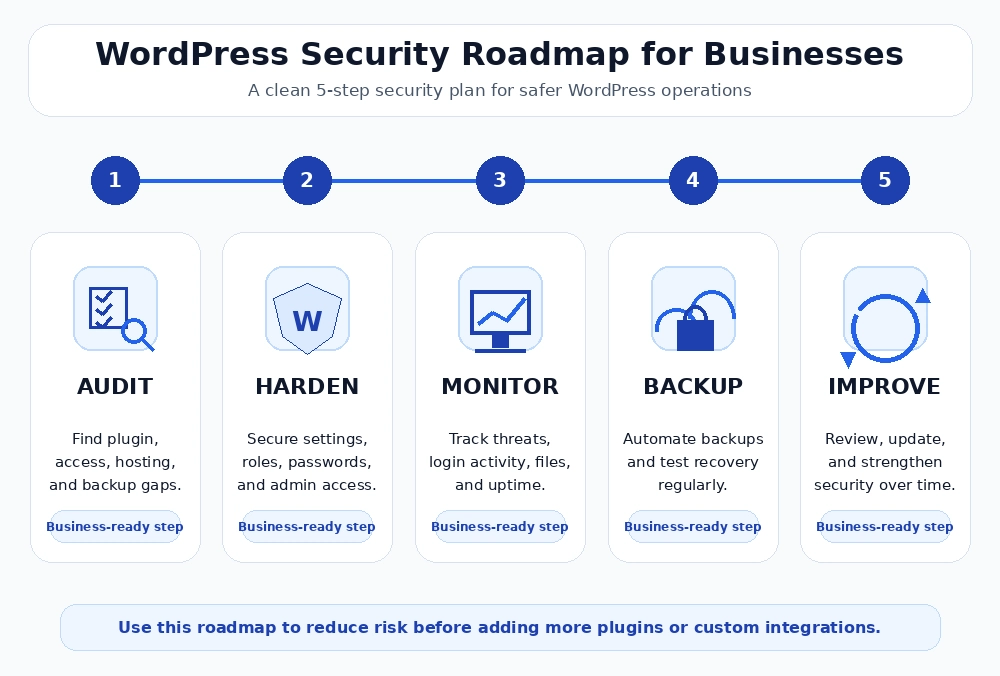
Most WordPress security issues are not caused by a lack of tools. They are caused by gaps in ownership, process, and technical visibility.
Bitcot helps businesses evaluate their current WordPress environment, identify security risks, and build a practical roadmap for improvement. This includes plugin audits, access reviews, WordPress hardening, WooCommerce security improvements, API security reviews, hosting recommendations, monitoring setup, and backup strategy.
For growing businesses, this support is especially valuable because security needs to scale with the website. A small website may need basic hardening and monitoring. A WooCommerce store may need stronger checkout security and recovery planning. A headless WordPress platform may need API security, token protection, and architecture-level review.
Bitcot works with organizations that need WordPress to be secure, reliable, and ready for growth without slowing down business operations.
Need a clearer WordPress security roadmap?
Bitcot can help you audit your website, identify high-risk gaps, and create a practical action plan to improve uptime, protect customer trust, and reduce security exposure.
Conclusion
WordPress security in 2026 is no longer just a technical concern. It directly affects revenue, customer trust, search visibility, compliance, and business continuity. As attacks become faster and more automated, businesses cannot rely only on basic plugins or occasional updates. A secure WordPress website needs consistent plugin management, strong access control, two-factor authentication, hardened hosting, real-time monitoring, and tested backups.
The practical next step is to review your current WordPress setup with a clear security checklist. Start by auditing outdated plugins, removing unused themes, checking admin users, enabling 2FA, verifying backup restoration, and reviewing hosting-level protections such as WAF, SSL, and firewall rules. These actions help reduce common risks before they turn into downtime, data loss, or customer trust issues.
Bitcot helps organizations move from reactive fixes to proactive WordPress security planning. Our team can assess your current website, identify plugin and infrastructure risks, strengthen your WordPress hardening process, and build a practical security roadmap aligned with your business goals. Whether you manage a corporate website, WooCommerce store, or API-connected WordPress platform, Bitcot can help you create a safer, more reliable foundation for growth.
If your WordPress site supports leads, sales, customer data, or business operations, now is the right time to secure it properly. Connect with Bitcot to review your WordPress security posture and plan the next steps with confidence.
Frequently Asked Questions (FAQs)
What is WordPress security?
WordPress security is the process of protecting a WordPress website from malware, unauthorized access, plugin vulnerabilities, server misconfiguration, data loss, and downtime.
Why is WordPress security important for businesses?
WordPress security is important because a breach can affect revenue, customer trust, website availability, SEO rankings, and compliance responsibilities.
How often should enterprises run WordPress security audits?
Quarterly is the minimum for comprehensive audits, with continuous automated vulnerability scanning running between formal reviews. That said, audits shouldn’t only follow a calendar. Major changes – platform upgrades, new plugins, architecture shifts – should each trigger a focused review. Annual external penetration testing adds independent validation. High-risk or eCommerce environments will often need to go beyond that baseline.
Are WordPress security plugins enough?
No. Security plugins help, but businesses also need secure hosting, access control, regular updates, monitoring, backups, and incident response planning.
How often should plugins be reviewed?
Plugins should be reviewed regularly, especially before major updates, website launches, or security advisories. Unused or abandoned plugins should be removed.
When should enterprises outsource WordPress security?
Plugins should be reviewed regularly, especially before major updates, website launches, or security advisories. Unused or abandoned plugins should be removed.
How does Bitcot help with WordPress security?
Bitcot helps businesses audit WordPress websites, review plugins, strengthen access control, improve hardening, secure integrations, and create a practical security roadmap.