Let’s be honest: we’ve all been there. You spend an hour designing the perfect label on a website, hit “order,” and two weeks later, a box arrives with stickers where the text is chopped off or the logo is weirdly skewed.
For a business, that isn’t just a minor annoyance; it’s wasted capital, delayed launches, and a fractured brand experience.
Most browser-based design tools struggle with a fundamental “accuracy gap.” They look like professional design software, but under the hood, they’re fighting against the limitations of web browsers that weren’t originally built for precision graphics.
When you add complex physical constraints, like printing on a star-shaped gold foil or a circular craft beer label, the technical house of cards often collapses.
At Bitcot, we decided to tackle this head-on. We wanted to see if we could build a web-based design engine that feels as fluid as a desktop app but maintains the mathematical precision required for professional printing.
This Proof of Concept (PoC) wasn’t just about making a “builder”; it was about engineering a shape-aware design platform. We’re talking about a system that understands the difference between a square and a circle at a code level, ensuring that your users’ designs are automatically perfectly clipped, perfectly scaled, and ready for the printer the moment they hit “save.”
In this breakdown, we’re pulling back the curtain on how we used React and Konva.js to solve the three biggest headaches in web design:
- Precision Clipping: Making sure designs stay inside the lines, no matter how “pointy” the label is.
- Desktop-Grade Performance: Eliminating the lag and “flicker” that usually plagues browser tools.
- Rock-Solid Architecture: Building a scalable foundation that can grow from a simple sticker-maker into a full-scale enterprise design suite.
Ready to see how we turned a complex engineering challenge into a seamless user experience?
Let’s dive into the engine.
What Is a Custom Label Design Tool?
At its simplest, a custom label design tool is a specialized web application that allows users to create, edit, and visualize labels for products, packaging, or personal items directly in their browser.
Unlike a general-purpose tool like Canva or Photoshop, a dedicated label designer is built with manufacturing in mind. It’s not just about making something look “pretty”; it’s about making sure the digital design aligns perfectly with a physical product.
The Three Pillars of a Label Tool
To understand why this is a specific category of software, you have to look at the three things it must do simultaneously:
- Spatial Awareness: The tool must understand physical boundaries. If you are designing for a 3-inch circular wine label, the tool shouldn’t just show you a white box; it needs to show you the circle, the “safe zone” for text, and the “bleed” area where colors extend past the cut line.
- Vector Precision: Labels often contain small text, barcodes, or regulatory symbols. A custom label tool uses vector-based rendering (via engines like Konva.js) to ensure that whether you’re designing a tiny chapstick label or a large shipping sticker, the quality remains crisp and print-ready.
- Intuitive UX: Business leaders need tools their customers can use without a degree in graphic design. This means providing a “Desktop-class” experience; think drag-and-drop, real-time rotation, and instant layer management, all without the user needing to install a single file.
The “Custom” part of the name refers to the dynamic nature of the tool. A standard editor has fixed dimensions. A custom label design tool is a flexible engine that can swap between hundreds of templates, stars, ovals, hearts, or custom die-cuts, instantly updating the “canvas” to match the specific product the user is buying.
In short: It is the bridge between a customer’s creative idea and a printer’s technical requirements. It removes the “guesswork” so that what is designed on the screen is exactly what arrives at the door.
| Feature | Generic Image Editor | Custom Label Design Tool |
| Canvas Shape | Always rectangular. | Dynamic: Circles, ovals, stars, and custom die-cuts. |
| User Guidance | Open-ended (high error risk). | Constrained: Prevents design placement in “unprintable” zones. |
| Output Quality | Often rasterized (blurry). | Print-Ready: High-resolution vector or PDF exports. |
| Accessibility | Requires design software skills. | Intuitive: Drag-and-drop simplicity for non-designers. |
Why Build a Browser-Based, Shape-Aware Label Design Tool?
The decision to build a specialized, browser-based tool rather than relying on standard design software comes down to accessibility vs. accuracy. Most web-based editors treat every project like a rectangular digital image. But in the physical world, labels are defined by mathematical constraints.
Building a tool that is both “browser-based” (easy to access) and “shape-aware” (technically precise) solves several major business hurdles.
1. Eliminating the “Accuracy Gap”
The biggest pain point in custom printing is the difference between the screen and the physical product.
- The Problem: In a generic editor, a user might place text near the corner of a square canvas, unaware that the physical label is actually a circle. The result? The text is cut off during production.
- The Solution: A shape-aware tool uses clipping logic to ensure that the canvas is the shape. If the label is a star, the user cannot physically place an element where it won’t be printed.
2. Removing Software Barriers
Professional design often requires expensive licenses and steep learning curves.
- Accessibility: By moving the engine into the browser, you remove the need for users to install software.
- Simplicity: A custom tool can “lock down” complex settings like DPI, color profiles, and bleed lines, allowing a non-designer to produce professional-grade results without needing to understand the technical jargon.
3. Scalability for eCommerce
For businesses selling custom products, manual proofing (checking every customer’s design for errors) is a massive bottleneck.
- Automation: A shape-aware tool acts as an automated gatekeeper. Since the tool prevents design errors (like overlapping a die-cut line) at the source, the design that reaches the printer is already “pre-flighted” and ready for production.
| User Need | Standard Desktop App | Generic Web Editor | Shape-Aware Web Tool |
| Ease of Access | Low (Install required) | High (URL-based) | High (URL-based) |
| Shape Precision | High (Manual setup) | Low (Rectangular only) | High (Automatic Clipping) |
| Error Prevention | None (User-driven) | Minimal | Advanced (Hard constraints) |
| Performance | High | Variable (Laggy) | Optimized (Canvas Engine) |
Benefits of React and Konva.js for Canvas-Based Design Tools
Building a professional-grade design tool requires more than just a standard web framework; it requires a specialized architecture capable of handling high-fidelity graphics and complex state logic without compromising performance.
By combining React and Konva.js, we bridge the gap between a standard UI and a high-performance rendering engine. Here is why this specific stack is the gold standard for canvas-based applications:
React: The “Brain” of the Operation
React serves as the command center, managing the interface and the data flow. Its component-based architecture is ideal for building modular design tools where every feature, like the text editor, image uploader, or layer manager, needs to function independently but stay in perfect sync.
- Declarative State Management: Whenever a user changes a color or scales an image, React ensures the UI updates instantly. Using Redux alongside React provides a “single source of truth,” meaning the property panel on the left always knows exactly what is happening on the canvas on the right.
- Modular Scalability: Because the editor is built in pieces (components), it is easy to add new features, like 3D previews or AI-driven layout suggestions, without rewiring the entire application.
Konva.js: The Rendering Powerhouse
While the browser’s native HTML5 Canvas is powerful, it is difficult to manage at scale. Konva.js provides an object-oriented layer on top of the canvas, allowing developers to treat design elements like physical objects.
- Layered Rendering: Konva allows us to split the design into multiple layers. For example, the “Label Shape” can sit on a bottom layer while “User Text” sits on top. When the user moves the text, Konva only redraws that specific layer, resulting in 60 FPS performance and zero lag.
- Complex Interactions: Konva simplifies high-end features like rotation, multi-object selection, and magnetic snapping. It also provides the foundation for the shape-aware logic, allowing us to perform the mathematical clipping required for non-rectangular labels.
The synergy between these two technologies allows for a high-fidelity PoC that doesn’t just look like a design tool; it behaves like one. Users get the fluidity of a desktop application like Adobe Illustrator with the accessibility of a standard website.
An Overview of Bitcot’s PoC Solution for Custom Label Design
Bitcot’s PoC is a sophisticated, React-based web application engineered to bring the precision of desktop publishing to the accessibility of a web browser.
By leveraging react-konva, a specialized wrapper for the high-performance HTML5 Canvas library, Konva.js, the team built a tool that handles complex graphic rendering with ease.
This isn’t just a simple UI; it is a modular design engine built for speed, scalability, and technical accuracy.
Key Features Built for 2026
The PoC was designed to bridge the gap between simple web editing and professional-grade desktop design. By focusing on high-performance rendering and mathematical precision, we implemented a suite of features that define a modern design engine.
- Dynamic Canvas: A highly responsive workspace that supports fluid zooming and panning. Users can manipulate elements with sub-pixel precision, ensuring a lag-free experience even with complex, multi-layered designs.
- Rich Element Support: The engine handles a diverse array of design assets. Users can seamlessly integrate dynamic text, vector shapes, and high-resolution images into a single cohesive layout.
- Advanced Editing Suite: We moved beyond basic “drag-and-drop” to include a professional toolkit:
▸ Transformation: Precise rotating and resizing.
▸ Image Processing: In-browser cropping and opacity adjustments.
▸ Layer Management: Full control over the z-index (layer order), allowing users to move elements forward or backward just like in Adobe Illustrator. - Shape-Aware Design: This is the core differentiator. The canvas isn’t just a rectangle; it automatically adapts to physical label shapes such as Circles, Stars, or Rounded Rectangles. The engine uses custom clipping logic to ensure every design element fits perfectly within the intended physical cut lines.
- Template Integration: To streamline the workflow, the tool seamlessly loads predefined templates. These templates come “baked-in” with specific dimensions and manufacturing constraints, preventing user error before the design even begins.
Together, these features create a powerful, intuitive, and future-ready design tool that empowers businesses to deliver high-quality labels faster and more efficiently, all within a browser-based platform.
The Architecture: A Centralized Command Center
The application operates as a high-performance Single-Page Editor (SPE). To maintain absolute precision across the design process, the architecture uses a “Central Controller” model:
- The Hub: The CustomLabelTool component acts as the brain, synchronizing data between three critical areas: the Toolbar (inputs), the Canvas (rendering), and the Properties Panel (editing).
- The State Engine: Using Redux, Bitcot ensured that every movement on the canvas, whether scaling a logo or adjusting text opacity, is tracked in a predictable state container. This allows for seamless features like undo/redo and real-time property syncing.
- Logic Isolation: Modern React patterns, specifically Custom Hooks, are used to separate the complex UI logic from the rendering engine, ensuring the code remains clean and easy to scale.
Component Breakdown: The Building Blocks
The power of this PoC lies in its organization. Bitcot’s directory structure reveals a highly decoupled and professional approach:
| Module | Key Components | Purpose |
| The Stage | label-tool-canvas | Handles the physical rendering, including shape-renderer for geometry and transformer-component for user interactions. |
| The Control Room | control-panel | A granular UI suite for managing color, rotation, opacity, and typography properties. |
| Asset Pipeline | image-handler & font-loader | Manages high-resolution image uploads, cropping, and the flicker-free loading of custom brand fonts. |
| Global Store | toolReducer | The Redux store that maintains a “single source of truth” for the entire design project. |
Technical Flow Hierarchy
To maintain performance, Bitcot structured the application logic to flow efficiently from the user’s input to the final render.
- User Action: A user changes a font size in the text-properties.tsx file.
- State Update: Redux captures the change via the toolReducer, updating the global design object.
- Canvas Render: The text-editor.tsx within the Konva stage detects the state change and instantly re-renders the specific text layer without refreshing the entire page.
This modular approach ensures that the PoC isn’t just a working tool; it’s a production-ready foundation.
How Bitcot’s PoC Solution Solves the Design-to-Print Accuracy Gap
One of the biggest challenges businesses face in label design is ensuring that what you see on screen matches exactly what comes out of the printer.
Bitcot’s solution bridges this gap by combining an intuitive user interface with a high-performance graphics engine that works in three seamless stages.
A. Simple Tool Selection & Instant Creation
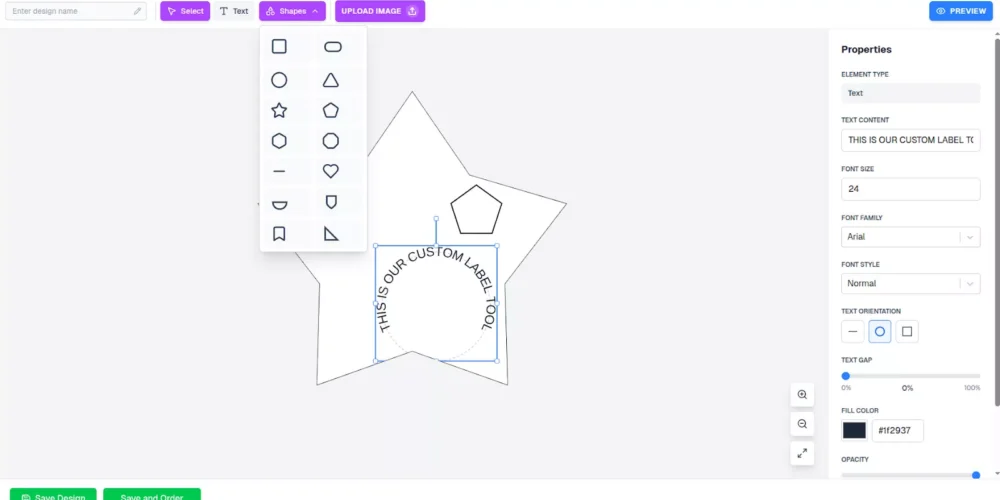
The user experience is designed to be effortless. Whether a user is a professional designer or a business owner, the journey from a blank canvas to a custom shape is straightforward:
- Pick and Draw: Users select a tool from the top bar (like a Star, Circle, or Rectangle) and simply click-and-drag on the canvas.
- Real-Time Feedback: As the user drags their mouse, the shape appears instantly. There is no waiting or “processing” time.
- Smart Selection: Once the user lets go, the tool automatically selects the new shape and attaches blue adjustment handles so they can immediately begin resizing or rotating it.
- Specialized Helpers:
- Text Tool: Simply click to type; click away to finish.
- Image Tool: Centers your uploaded logo automatically so you don’t have to hunt for it.
- Select Tool: Click an existing element to select it or click empty space to deselect.
B. Precise Editing & Visual Feedback
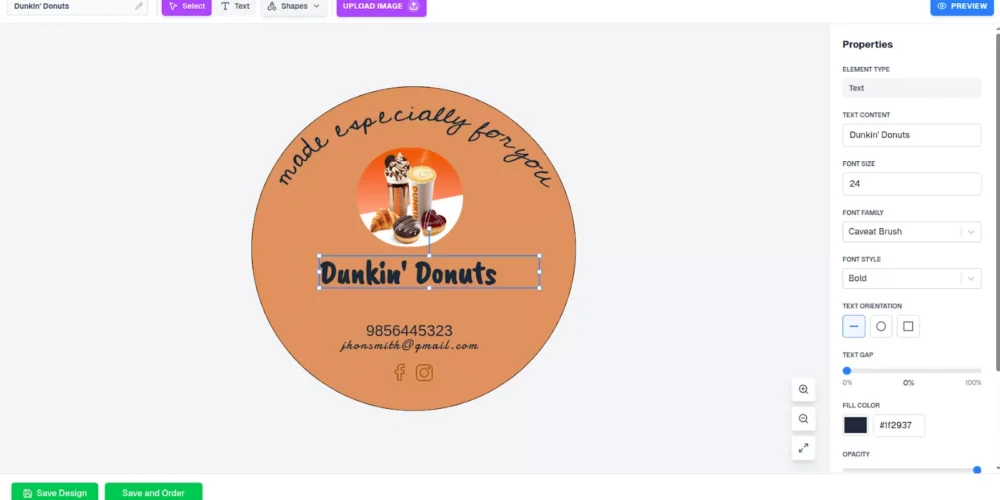
Once an element is on the canvas, the tool provides professional-grade control without the complexity of traditional design software.
- Direct Manipulation: Users can move, resize, or rotate elements directly on the canvas with their mouse. Every movement updates in real-time, so the design always feels “live.”
- The “Smart” Sidebar: The properties panel on the right is context-sensitive. It magically changes based on what you’ve clicked:
- Selected Text? You’ll see font styles, sizes, and spacing controls.
- Selected a Shape? You get color pickers, border weights, and corner rounding tools.
- Selected an Image? A “Crop” button appears alongside size controls.
- Numeric Precision: For those who need perfection, the panel allows for exact numeric inputs for position and size.
C. The “Final Look” Preview & Export
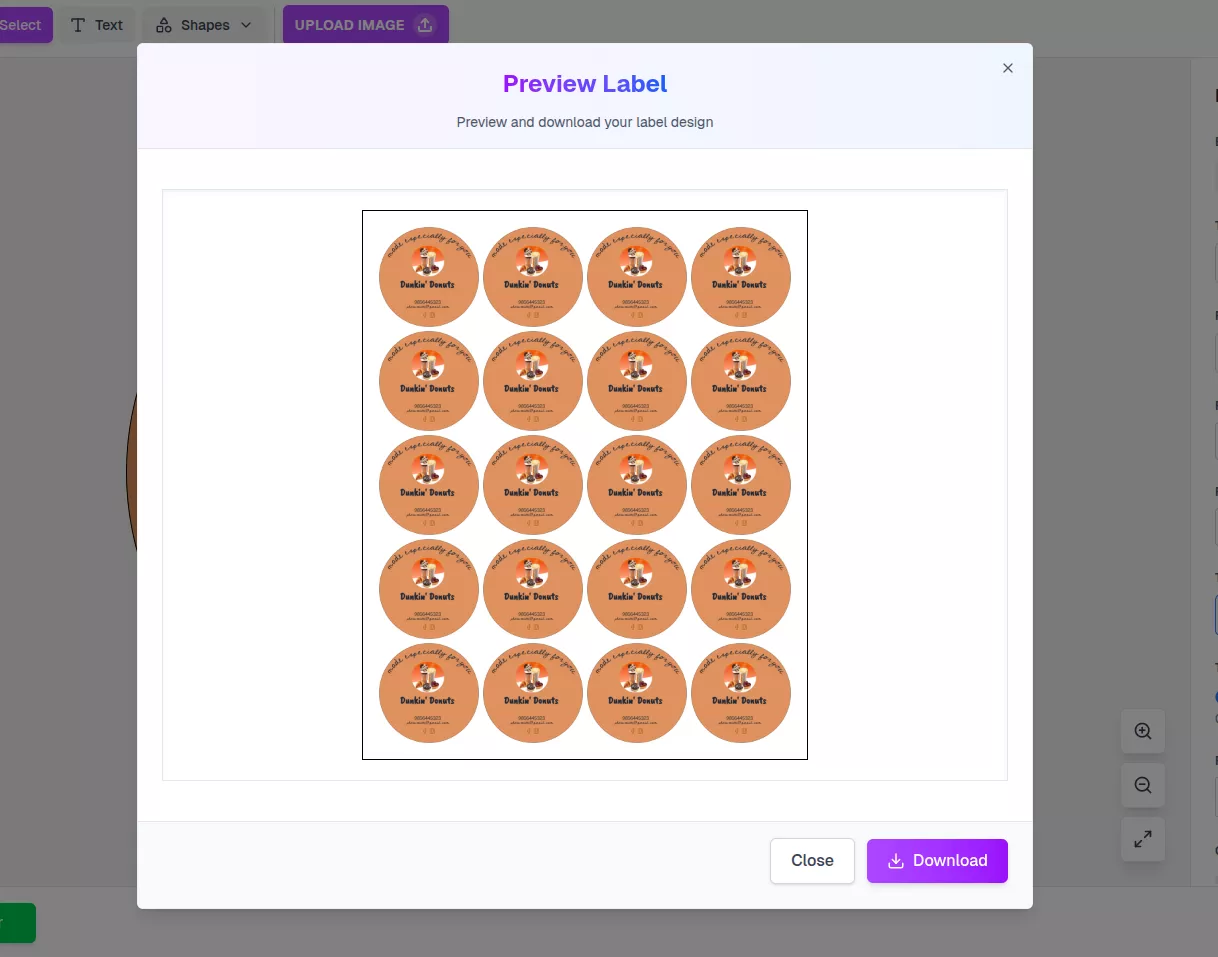
To eliminate any guesswork before printing, the tool includes a specialized preview and save workflow:
- Overlay Preview: This feature shows the design exactly as it will appear on the physical label template. It’s the final “sanity check” for the user.
- Safety Validation: The tool requires a design name and validates it (showing a red border if missed) to ensure no “unnamed” files are sent to production.
- Clean Exports: When clicking Download, the engine generates a high-resolution PNG file with a transparent background. This file contains only the design data, making it ready for professional-grade printing equipment.
System Feedback & Visual States
The tool keeps the user informed throughout the process so they are never left wondering if the system is working:
| State | What the User Sees |
| Working | A three-dot loader appears during saving or downloading. |
| Success | A brief confirmation message or a smooth redirect. |
| Error | Clear visual cues, like a red border on inputs, if a step is missed. |
By combining intuitive user workflows with a powerful technical foundation, our PoC ensures that your designs look exactly as intended when printed, eliminating the traditional gap between screen and physical output.
Bitcot’s Process Behind Building a High-Performance Design Engine
Building a professional design tool in the browser requires more than just good looks; it requires a robust technical foundation that can handle complex graphics without slowing down.
Bitcot’s development process focused on using industry-standard practices and cutting-edge libraries to ensure a high-performance, “desktop-class” experience.
1. Advanced Canvas Rendering with Konva.js
To deliver smooth, high-speed graphics, the tool leverages Konva.js, a powerful library that extends the browser’s native drawing capabilities.
- Stage and Layer Architecture: We organized the canvas like a theater stage. The “Stage” is the main container, while “Layers” organize elements into groups. This allows the engine to only redraw specific parts of the screen when they change, keeping the performance high and the code clean.
- Direct Engine Control: By using React’s useRef and forwardRef patterns, our developers can talk directly to the canvas engine. This is critical for exporting the final design at high resolution or manipulating complex shapes without the “lag” common in standard web apps.
- A Unified Shape Renderer: We built a single, smart component that handles multiple shapes: rectangles, circles, stars, polygons, text, and images. This modular approach makes it incredibly easy to add new label shapes or design elements in the future.
2. Sophisticated State Management: The “Brain” of the Tool
In a design tool, the system must remember exactly where every logo, text box, and star is located at all times.
- Redux as the “Single Source of Truth”: We used Redux to manage the global state. This ensures that when you change a color in the sidebar, the canvas updates instantly and predictably. It also simplifies debugging and prevents “data drift” where the UI and the canvas disagree.
- React Hooks for Speed: For quick, “transient” actions, like dragging an element across the screen, we use React Hooks. This balances high-speed performance with the rock-solid reliability of the central Redux store.
3. Overcoming Technical Hurdles
Developing a graphics editor in a browser environment presents unique challenges. Here is how Bitcot’s engineering team solved the three biggest “roadblocks”:
Challenge 1: Server-Side Instability
The Problem: Modern web frameworks often try to load components on a server, but graphics engines like Konva need a real browser (a “window”) to function.
The Solution: We used Dynamic Loading. This ensures the design tool only “wakes up” once it is safely inside the user’s browser, preventing crashes and ensuring a smooth initial load.
Challenge 2: The “Font Flicker” Effect
The Problem: Browsers often display text in a generic font while the custom brand font is still downloading, causing an ugly “flicker” or layout shift.
The Solution: We implemented a Web Font Loader. This specialized script detects exactly which fonts are needed, fetches them, and tells the canvas to “refresh” only once the fonts are ready, ensuring a perfect visual every time.
Challenge 3: Precise Shape Clipping
The Problem: Standard web technology is good at making squares, but it struggles with complex shapes like stars or circular labels.
The Solution: We utilized Mathematical Clipping Paths (clipFunc). Instead of using standard web borders, we wrote raw geometric commands that act like a digital “cookie cutter.” This masks everything outside the physical label boundaries, ensuring the user can see exactly where their design will be cut during printing.
| Technical Challenge | Engineering Solution | Business Benefit |
| SSR Crashes | Dynamic Hydration | 100% stable application loading. |
| Font Inconsistency | WebFont Loader + batchDraw() | Consistent brand identity and zero visual “glitches.” |
| Irregular Shapes | Custom clipFunc Geometry | Design-to-print accuracy for any label shape. |
By focusing on technical excellence, reliability, and user experience, Bitcot’s process ensured that the custom label tool isn’t just a proof of concept; it’s a high-performance design engine built to handle real-world business needs in 2026 and beyond.
Key Outcomes Delivered by Bitcot’s Custom Label Tool PoC
The ultimate goal of this PoC was to prove that a browser-based tool could match the precision of professional desktop software. By successfully integrating complex geometry with a high-speed rendering engine, Bitcot has delivered a blueprint for the future of custom manufacturing interfaces.
Here are the high-value outcomes achieved through this project:
1. 100% Design-to-Print Fidelity (The End of Waste)
The primary goal was to eliminate the accuracy gap. By implementing mathematical clipping, the tool ensures that what the user sees is exactly what the printer gets.
- The Business Impact: This significantly reduces “return-to-sender” orders and wasted material costs. Because the tool prevents users from placing text or logos in “unprintable” zones, the designs arrive at the manufacturing stage pre-validated.
- The Technical Win: 1:1 coordinate mapping between the browser canvas and high-resolution print files.
2. Desktop-Class User Retention (The Speed Factor)
Users abandon slow tools. By utilizing Konva.js for hardware-accelerated rendering, we achieved a fluid 60 FPS (frames per second) experience.
- The Business Impact: A smooth, responsive interface keeps users engaged longer and increases the likelihood of a completed purchase. It shifts the user’s perception of the brand from “budget web tool” to “professional design partner.”
- The Technical Win: Optimized layer management that only refreshes the specific elements being moved, keeping the CPU load low.
3. Drastic Reduction in Customer Support Overhead
Most support tickets for custom products stem from design errors (e.g., “Why is my logo cut off?”).
- The Business Impact: The shape-aware logic acts as a silent assistant, guiding the user to stay within safe boundaries. This “Self-Service” accuracy means fewer manual proofing steps for your team and a massive reduction in support volume.
- The Technical Win: Context-sensitive UI that only shows the controls relevant to the selected element, preventing user confusion.
4. Future-Proof Modular Architecture
This PoC was built using a “Clean Code” approach with React and Redux, making it highly extensible.
- The Business Impact: You aren’t just buying a tool for today; you’re investing in a platform for tomorrow. The foundation is ready for 3D previews, AI-assisted design, or integration with complex ERP and printing systems.
- The Technical Win: A decoupled structure where the rendering engine (Konva) is independent of the business logic (Redux), allowing for easy updates and feature additions.
| Focus Area | Technical Achievement | Impact on Business | Resulting Metric (Before vs. After) |
| User Experience | Context-Sensitive UI: Property panels that adapt based on the selected element. | Higher conversion rates; users feel like “pro designers” without the learning curve. | Interface Lag: High (Standard HTML) -> Zero (Hardware Accelerated) |
| Design Accuracy | Automated Clipping: Custom math used to lock designs within physical boundaries. | Drastic reduction in printing errors and wasted materials/returns. | User Error Rate: High (Exceeds margins) -> Near Zero (Auto-Clipping) |
| Operational Flow | Print-Ready Exports: High-resolution PNGs with transparent backgrounds. | Faster turnaround from design to physical product; eliminates manual proofing. | Proofing Time: Manual (Staff check) -> Automated (System Validated) |
| Technical Stability | SSR-Safe Loading: Dynamic hydration and font synchronization logic. | A professional, glitch-free brand experience with zero “flicker” or crashes. | Platform Reliability: Brittle/Unstable -> Industrial Strength |
| Future Scalability | Modular Architecture: Component-based React logic with a Redux state engine. | Lower long-term development costs; add new features without a total rewrite. | Deployment: Difficult to expand -> Scalable & Future-Proof |
Partner with Bitcot to Build Your Custom Design Platform
Building a high-performance design tool is a complex undertaking that sits at the intersection of advanced geometry, state-of-the-art web performance, and intuitive user experience.
As this PoC demonstrates, the difference between a “glitchy” web app and a professional-grade design engine lies in the architectural choices made at the foundation.
At Bitcot, we don’t just build software; we engineer solutions that solve real-world manufacturing and eCommerce bottlenecks. By mastering the synergy between React, Konva.js, and Redux, we have created a blueprint for platforms that are as precise as they are easy to use.
Why Choose Bitcot as Your Architectural Partner?
- Proven Graphics Expertise: We’ve already solved the “hard math” of shape-aware clipping, mathematical masking, and high-fidelity rendering.
- Scalable Thinking: We build with the future in mind. Our modular architecture ensures your platform can grow from a single tool into a multi-product ecosystem.
- Manufacturing-First Approach: We understand that a digital design is only as good as its physical output. Our focus on design-to-print accuracy protects your bottom line and reduces material waste.
- Enterprise-Grade Performance: We know how to eliminate the “lag” and “flicker” that plague standard web tools, providing your customers with a smooth, 60 FPS desktop-class experience.
Whether you are looking to build a custom label creator, a specialized apparel editor, or a complex industrial design tool, Bitcot has the technical depth to bring it to life. We help you eliminate the accuracy gap and provide your users with a world-class design experience right in their browser.
The Bitcot “Blueprint” Advantage
One of the most valuable aspects of our approach is that our PoC is highly customizable. Because we have already engineered the core architecture, including the shape-aware clipping logic, the high-speed rendering engine, and the robust state management, we don’t have to start from scratch for every client.
This “blueprint” approach allows us to deliver elite, manufacturing-ready results without the elite price tag or the long wait times:
- Accelerate Launch Times: By leveraging our pre-engineered framework, we can move from concept to a functional, branded design tool weeks faster than traditional agencies.
- Reduce Costs: We pass the efficiency of our pre-built structure on to you. You get a high-end, custom-feeling design platform that respects your project budget.
- Tailored Results: While the foundational engine is ready, the design, UI elements, specific label shapes, and features are fully customized to reflect your brand’s unique identity and workflow.
Your design interface is your most important “digital storefront.” Don’t let an outdated or inaccurate tool stand in the way of customer satisfaction or manufacturing efficiency. Whether you need a focused label creator or a complex design portal with advanced AI capabilities, Bitcot has the technical depth and the proven blueprint to get you there.
Final Thoughts
Building a high-performance, browser-based label design tool is no small feat, but as Bitcot’s PoC demonstrates, it’s absolutely possible when you combine the right technology, architecture, and user-focused design.
From shape-aware canvases to real-time editing and multi-element support, this PoC showcases how modern web technologies can bridge the gap between digital design and print accuracy, making life easier for both designers and business leaders.
The tool leverages the component-based architecture of React and the high-performance rendering of Konva to build a tool that is intuitive for end-users and maintainable for developers.
The clear separation of concerns, where Redux handles global context, React handles UI state, and Konva handles the graphics engine, creates a robust foundation. This allows for easy future extensibility, such as adding AI-generated assets or real-time collaboration features.
At the end of the day, it’s all about empowering your team to work smarter, faster, and with fewer errors. Tools like these don’t just improve efficiency; they enable creativity to flourish without being held back by technical limitations.
If your business is looking to turn complex ideas into seamless, scalable digital experiences, Bitcot can help. Our custom React development services are tailored to build high-performance, browser-based platforms that meet your unique needs, whether it’s for labels, graphics, or interactive design tools.
Let’s build the future of custom design together.
Contact us today for a technical discovery session. We’ll dive into your specific requirements and show you how our proven design engine can be tailored to meet your unique business goals.