Your content management system choice will make or break your digital strategy. Not next year. Not eventually. Right now.
Selecting the right CMS isn’t just a technical decision – it determines how fast your team ships content, how well your pages perform, and whether your platform can scale when opportunity knocks. The wrong choice? You’ll waste months rebuilding what should have worked from day one.
You’re facing a critical choice between two fundamentally different approaches: the familiar simplicity of traditional CMS platforms and the modern flexibility of headless CMS solutions. This decision affects everything from your daily workflows to your ability to expand into new markets and channels.
Maybe you’re struggling with slow website performance that’s hurting your search rankings. Perhaps your current platform can’t deliver content to your mobile app without rebuilding everything. Or you might be frustrated watching competitors launch features faster while your team wrestles with technical limitations.
Here’s what you need to know: Traditional CMS platforms like WordPress power 43.5% of all websites globally, offering ease of use and quick setup. Meanwhile, headless CMS solutions are experiencing explosive growth, with the market projected to reach $3.81 billion by 2032 at a 22.6% compound annual growth rate.
But here’s the real question: Which one actually fits your specific needs?

Do you prioritize speed to market with built-in templates? Or do you need omnichannel delivery across websites, mobile apps, and emerging platforms? The answer depends on where your business is headed and what battles you’re fighting today.
This guide breaks down both options with current data, real-world applications, and practical comparisons. No vendor hype. No technical jargon. Just clarity. Whether you’re launching your first site or upgrading an existing platform, you’ll find exactly what you need to make the right choice.
Ready to dive in? Let’s go!
What is a Traditional CMS?
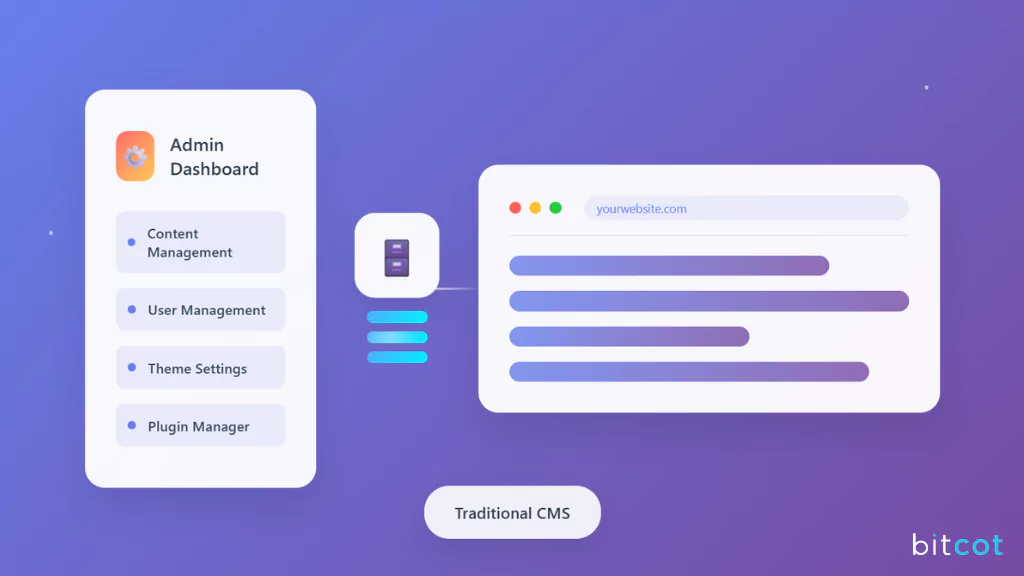
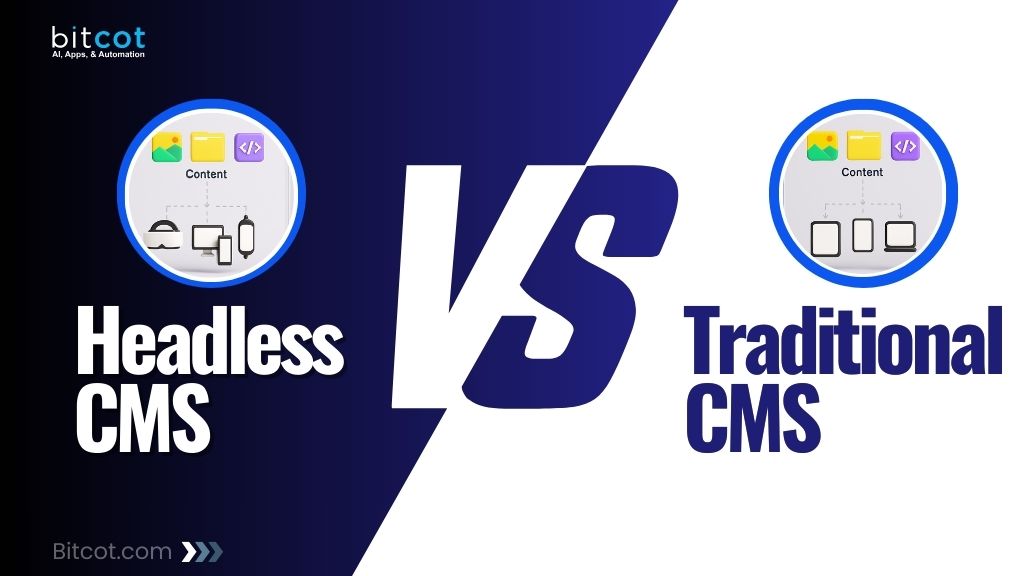
Traditional CMS platforms – also called “coupled” or “monolithic” systems – combine content management and presentation in a single, integrated solution. Everything happens in one place: creating content, designing pages, and publishing to your website.
WordPress, Joomla, Drupal, and Squarespace represent this category. These platforms handle over 68% of all websites that use a CMS, with WordPress alone commanding 61.2% of the CMS market share.
Key Features of a Traditional CMS
These core capabilities define how traditional CMS platforms operate and support content teams.
- WYSIWYG Editing: The “what you see is what you get” editor lets content creators format text, add images, and arrange layouts visually—similar to working in Microsoft Word or Google Docs.
- Pre-built Themes and Templates: Thousands of ready-made designs are available. WordPress.org offers nearly 14,000 free themes, while premium marketplaces add tens of thousands more options.
- Unified Platform: Content creation, website design, hosting setup, and publishing workflows exist within one system. Teams don’t need to coordinate between separate tools.
- Plugin Ecosystem: The WordPress plugin directory alone contains 59,600 free plugins. These add functionality for eCommerce, SEO optimization, contact forms, analytics, and virtually any feature imaginable.
- Built-in User Roles: Traditional CMS platforms include role-based permissions. Editors can create content, administrators can install plugins, and contributors can submit drafts – all managed within the same interface.
Popular examples of traditional CMSs include WordPress, Joomla, Drupal, and Squarespace.
Pros of a Traditional CMS
Understanding these advantages helps you evaluate whether traditional platforms match your requirements.
- Quick Learning Curve: Non-technical team members can publish content within hours of setup. The visual interface removes coding requirements for basic operations.
- Faster Initial Launch: Pre-configured themes and plugins accelerate deployment. Small businesses and bloggers often launch functional websites within days. No lengthy development cycles.
- Lower Startup Costs: Open-source platforms like WordPress and Joomla are free to download. Hosting costs start around $5 monthly for basic sites.
- Massive Community Support: WordPress alone has over 900 contributing companies. Finding tutorials, troubleshooting guides, and experienced developers is straightforward.
- Content Preview Capability: See exactly how pages will appear before publishing. The integrated front-end and back-end enable real-time preview functionality. What you see is what you get.
Cons of a Traditional CMS
These limitations become apparent as websites grow more complex and requirements evolve over time.
- Customization Limitations: Moving beyond provided themes requires development skills. Extensive customization often demands custom coding or expensive theme modifications.
- Performance Challenges at Scale: As sites grow complex, load times can suffer. Multiple plugins, large media libraries, and traffic spikes strain traditional architectures.
- Security Vulnerabilities: Popular platforms attract hackers. WordPress sites face frequent attack attempts, requiring constant updates and security monitoring.
- Single-Channel Focus: Traditional CMS platforms are built primarily for websites. Delivering content to mobile apps, smart devices, or other platforms requires workarounds or separate systems.
- Technical Debt Accumulation: Plugin conflicts, outdated themes, and compatibility issues compound over time. Maintenance becomes increasingly complex.
- Limited Control for Developers: If you need custom functionality beyond what plugins provide, you’ll face architectural constraints that slow development and increase costs.
The reality? Traditional CMS platforms work excellently until you outgrow them. And many businesses do. Understanding these limitations helps you choose wisely from the start – or recognize when it’s time to evolve.
Popular Traditional CMS Platforms in 2026
Understanding the leading platforms in each category helps clarify the practical differences. Here are the most widely adopted traditional CMS options:
WordPress
WordPress dominates the CMS landscape with 43.5% of all websites and 61.2% of the CMS market share. The platform’s massive ecosystem includes 59,600 free plugins and over 12,000 themes.
Best For: Blogs, business websites, eCommerce stores (via WooCommerce), content marketing platforms, and websites requiring extensive customization without deep technical expertise.
Key Strengths: Extensive plugin library, huge community support, SEO-friendly architecture, cost-effective solution, easy content management.
Considerations: Security requires ongoing attention, performance can degrade with excessive plugins, and scaling complex sites may require optimization work.
Shopify
Shopify holds 6.7% CMS market share and 29% of the eCommerce platform market. With over 4.6 million websites globally, it’s the leading platform specifically designed for online stores.
Best For: eCommerce businesses, product-based companies, dropshipping stores, and businesses prioritizing selling capabilities over content publishing. Explore our Shopify development services for expert customization and optimization.
Key Strengths: Built-in eCommerce features, integrated payment processing, extensive app marketplace with 8,000+ apps, managed hosting and security, excellent mobile experience.
Considerations: Transaction fees on external payment gateways, less flexibility for non-eCommerce content, requires learning Liquid templating for advanced customization.
Wix
Wix powers over 11.5 million websites with a focus on visual website building and beginner-friendly design. The platform offers AI-powered website generation alongside traditional drag-and-drop tools.
Best For: Small businesses, freelancers, portfolios, service-based businesses, and entrepreneurs who want professional-looking sites without technical skills.
Key Strengths: Intuitive drag-and-drop builder, AI website generation, all-in-one hosting solution, strong design templates, built-in SEO and analytics tools.
Considerations: Limited customization compared to WordPress, switching templates requires rebuilding, less suitable for complex websites or large-scale operations.
Squarespace
Squarespace serves 5.5 million live websites globally with a 3.2% CMS market share. The platform emphasizes clean design aesthetics and simplified website management.
Best For: Creative professionals, photographers, artists, small businesses prioritizing visual presentation, and users who value design quality over extensive functionality.
Key Strengths: Professionally designed templates, consistent visual quality, integrated eCommerce capabilities, managed platform with automatic updates, responsive mobile layouts.
Considerations: Less plugin ecosystem than WordPress, limited advanced customization, higher starting cost, only 0.58% of top 100k websites use Squarespace due to scalability constraints.
Joomla
Joomla maintains a position in the top CMS platforms with thousands of extensions available. Over 85,000 companies generating $1-10 million in annual revenue use Joomla, with 300+ new websites launched daily.
Best For: Complex websites requiring advanced user management, multilingual sites, community portals, and organizations comfortable with moderate technical complexity.
Key Strengths: Flexible user permission system, strong multilingual capabilities, extensive extension ecosystem, open-source and free to use.
Considerations: Steeper learning curve than WordPress, smaller plugin ecosystem, compatibility issues can arise with multiple extensions, requires more technical knowledge for customization.
What is a Headless CMS?
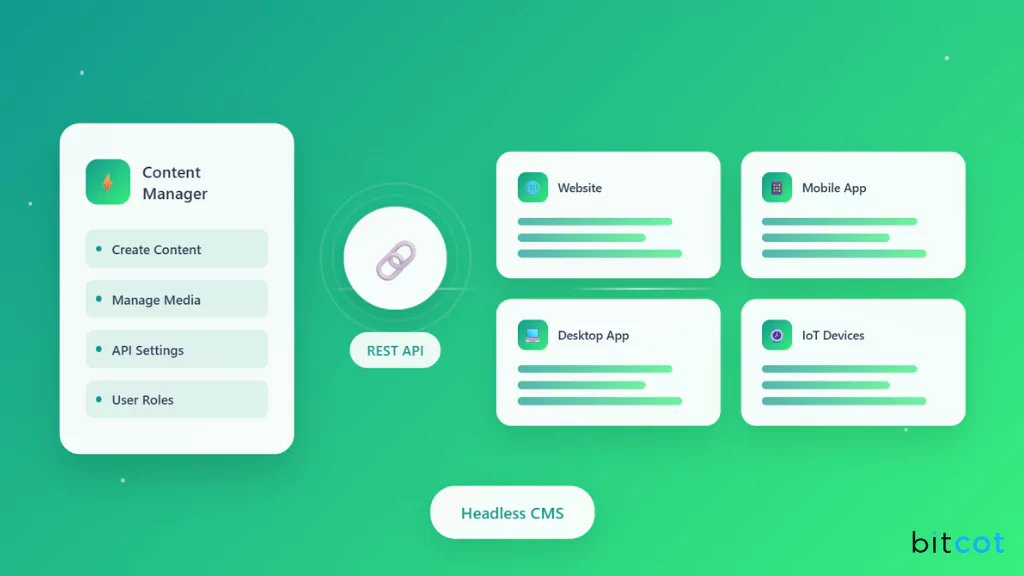
Headless CMS platforms separate content management (back-end) from content presentation (front-end). Content lives in a central repository and gets delivered through APIs to any platform or device.
Think of it as a content hub. Marketers and editors manage articles, images, and videos in the CMS interface. Developers pull that content via APIs to display on websites, mobile apps, digital signage, smart watches, or emerging platforms.
The “headless” term refers to removing the presentation layer – the “head” – that’s tightly coupled in traditional systems.
Key Features of a Headless CMS
Modern headless platforms share these architectural characteristics that enable flexible content delivery.
- API-First Architecture: All content gets delivered through RESTful APIs or GraphQL. This enables flexible distribution across any platform that can consume API data.
- Content-as-a-Service Model: Content exists independently from its presentation. Update content once, and changes propagate everywhere the content appears.
- Framework Agnostic: Developers choose their preferred front-end frameworks – React, Vue.js, Angular, Next.js, or native mobile development tools. The CMS doesn’t dictate technology choices.
- Structured Content: Content gets organized as reusable components and fields rather than formatted pages. This structure enables AI optimization and intelligent content distribution.
- Cloud-Native Infrastructure: Modern headless platforms like Contentful, Strapi, and Sanity run on cloud infrastructure, offering automatic scaling and global content delivery networks.
Pros of a Headless CMS
These benefits make headless architecture increasingly attractive for modern content strategies and growth.
- Complete Design Freedom: Developers control every aspect of the user interface. Custom front-ends match brand requirements precisely without template constraints.
- Omnichannel Distribution: Push content simultaneously to websites, iOS apps, Android apps, voice assistants, smart TVs, digital kiosks, and future platforms. One content source. Infinite destinations.
- Superior Performance: Optimized front-ends built with modern frameworks deliver faster load times. Static site generation and edge caching further improve speed.
- Enhanced Security: The separated architecture protects the content database. No direct database access from public-facing applications reduces attack surfaces. Your content stays safe.
- Future-Proof Scalability: Adding new channels doesn’t require rebuilding content infrastructure. Launching an app or integrating with IoT devices becomes straightforward.
- Better SEO Control: Developers optimize meta tags, structured data, and page performance without CMS limitations. According to recent statistics, 82% of users report improved SEO outcomes with headless CMS.
Cons of a Headless CMS
These challenges require consideration before committing to a headless implementation for your business.
- Higher Initial Complexity: Implementation requires developer expertise. Small teams without technical resources face steeper learning curves. This isn’t plug-and-play territory.
- Increased Development Time: Building custom front-ends takes longer than selecting pre-built themes. Initial setup can require weeks or months. Patience is essential.
- Higher Upfront Costs: Development expenses exceed traditional CMS platforms. Custom work and specialized skills drive costs higher initially.
- No Visual Preview: Content creators can’t see final presentation while editing. Preview environments require additional setup and often display content differently across platforms. This creates friction.
- Technical Dependency: Content teams rely on developers for design changes and new features. The separation that enables flexibility also creates workflow dependencies.
If these challenges concern you, partnering with an experienced development team can dramatically reduce implementation friction and ongoing technical overhead.
Traditional CMS vs. Headless CMS: A Comprehensive Comparison
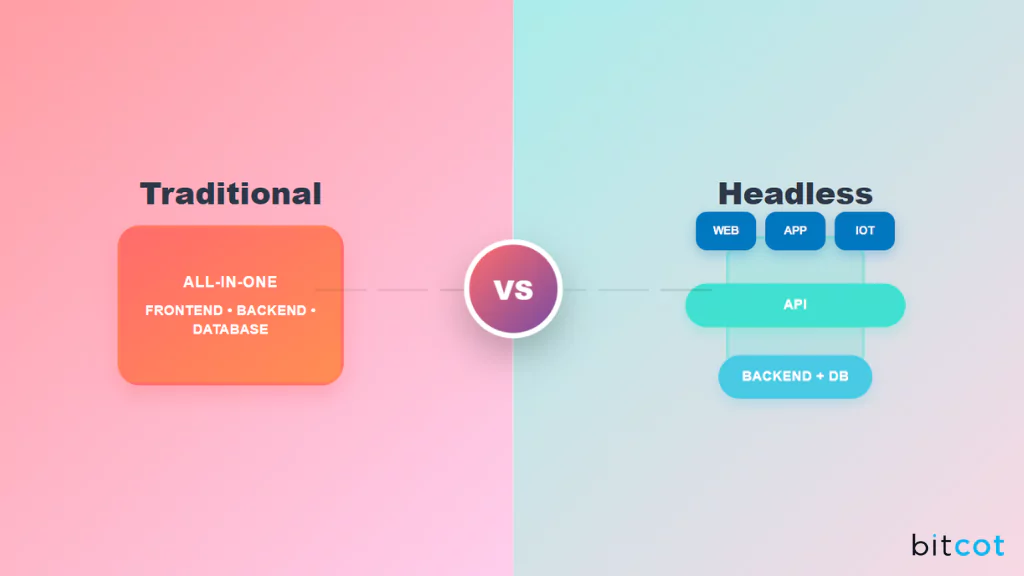
Understanding the practical differences helps determine which approach fits specific business requirements. But which factors actually matter for your situation? Let’s break down the key battlegrounds where these platforms compete.
If you’re building an online store, understanding platform options is crucial. Check our comprehensive guide to the best eCommerce platforms to see how CMS choices impact your online retail success.
1. Ease of Use and User Experience
Traditional CMS: Content creators with basic computer skills can manage websites. The visual editing experience mirrors familiar word processing tools. Training takes hours, not weeks.
Headless CMS: Content entry uses form-based interfaces rather than visual page builders. Editors work with fields and components, requiring some initial adaptation.
However, 65% of marketers report that headless CMS improves collaboration between developers and content creators once teams adjust to the workflow.
Best For: Traditional CMS wins for teams prioritizing immediate usability and minimal training requirements.
2. Customization and Design Flexibility
Traditional CMS: Design options depend on available themes and plugins. Custom development is possible but often conflicts with platform updates. Modifications can create maintenance challenges.
Headless CMS: Developers have unrestricted design control. Any user interface that can consume APIs is possible. This enables unique branded experiences and innovative interactions.
Best For: Headless CMS dominates when custom design and differentiated user experiences matter.
3. Content Delivery and Performance
Traditional CMS: Page generation happens on the server with each request. Multiple plugins can slow response times. WordPress sites average 2.5 seconds load time on desktop and 13.25 seconds on mobile.
Headless CMS: Decoupled front-ends enable static site generation, edge caching, and optimized delivery. Websites built with headless frameworks load 38% faster on average.
Best For: Headless CMS delivers superior performance, especially for global audiences and mobile users.
4. Omnichannel Capabilities
Traditional CMS: Platforms are optimized for web publishing. Delivering content to mobile apps, IoT devices, or other channels requires additional tools or complete rebuilds.
Headless CMS: Built specifically for multichannel distribution. A study found that 89% of businesses using headless CMS report significant improvement in omnichannel content delivery.
Best For: Headless CMS is essential for businesses managing content across multiple platforms and devices.
5. Scalability and Growth
Traditional CMS: Scaling works well for straightforward content growth. Complex features, high traffic, or multichannel needs can strain the architecture. Performance optimization becomes challenging.
Headless CMS: Separating content from presentation enables independent scaling. Adding new platforms, features, or handling traffic spikes is architecturally simpler.
The global headless CMS market is expanding from $973.8 million in 2025 to a projected $7.11 billion by 2035, reflecting growing enterprise adoption.
Best For: Headless CMS provides superior long-term scalability for growing organizations.
6. Total Cost of Ownership
Traditional CMS: Lower initial investment. Open-source software is free, with costs primarily in hosting ($5-$100 monthly), themes ($0-$200), and plugins ($0-$500 annually). Maintenance costs rise with complexity.
Headless CMS: Higher upfront development costs ($10,000-$100,000+ depending on scope). However, 52% of IT professionals find headless CMS more cost-effective long-term.
SaaS platform fees typically range from $300-$3,000 monthly.
Best For: Traditional CMS offers lower entry costs; headless CMS can deliver better long-term value for complex implementations.
7. Security Considerations
Traditional CMS: Unified architecture creates larger attack surfaces. WordPress powers 43% of all websites, making it a frequent target. Regular updates for core software, themes, and plugins are essential.
Headless CMS: Separated architecture limits exposure. The content API layer can implement authentication and rate limiting. However, security still depends on proper front-end implementation.
Best For: Headless CMS generally provides better security architecture, though both approaches require proper security practices.
8. Time to Market
Traditional CMS: Launch functional websites rapidly using pre-built themes. Small business sites can go live within days. Content population and basic customization happen quickly.
Headless CMS: Custom development extends timelines. Initial launches typically require weeks to months. However, 69% of users report improved time-to-market for subsequent projects after initial setup.
Best For: Traditional CMS delivers faster initial deployment; headless CMS improves velocity for ongoing multichannel initiatives.
Here is a side-by-side comparison table:
| Feature | Traditional CMS | Headless CMS | Advantage |
| Ease of Use | Visual editors, minimal training needed | Form-based editing, structured content | Traditional CMS |
| Setup Time | Days to weeks | Weeks to months | Traditional CMS |
| Design Flexibility | Limited to themes and templates | Unlimited custom design | Headless CMS |
| Performance | 2.5-13 second load times typical | 38% faster on average | Headless CMS |
| Omnichannel | Web-focused, limited multiplatform | Built for multiple channels | Headless CMS |
| Scalability | Good for single-channel growth | Excellent for complex growth | Headless CMS |
| Initial Costs | Low ($500-$5,000) | High ($10,000-$100,000+) | Traditional CMS |
| Long-term ROI | Moderate | Strong for complex needs | Depends on use case |
| Security | More vulnerable, requires monitoring | Better architecture | Headless CMS |
| Content Preview | Real-time visual preview | Requires setup | Traditional CMS |
| Developer Dependency | Low for basic operations | High throughout | Traditional CMS |
| Market Growth | Stable, mature market | 22.6% annual growth | Headless CMS |
When to Choose a Traditional CMS
Traditional CMS platforms remain the optimal choice for specific scenarios and business types.
Choose Traditional CMS If You:
These scenarios indicate that a traditional CMS platform will serve your business needs effectively.
- Need Quick Launch: Getting online rapidly matters more than custom features. Pre-built themes enable same-week launches for basic sites.
- Have Limited Technical Resources: Small teams or solo entrepreneurs without developer access benefit from user-friendly interfaces and extensive documentation.
- Manage Primarily Web Content: Your content strategy focuses on a single website without immediate plans for mobile apps or other platforms.
- Work With Tight Budgets: Initial investment needs to stay minimal. Open-source platforms offer professional capabilities without licensing fees.
- Run Simple Business Sites: Basic business websites, blogs, portfolios, or small eCommerce stores work excellently on traditional platforms.
- Value Extensive Plugin Options: The WordPress ecosystem alone offers 59,600 plugins. Finding solutions for most requirements doesn’t require custom development.
- Prefer All-in-One Solutions: Managing content, design, and hosting through a unified interface simplifies operations.
Ideal Use Cases for Traditional CMS
Traditional platforms deliver excellent results for these common website types and business models.
- Small business websites and local service providers
- Personal blogs and portfolio sites
- Information websites and knowledge bases
- Small to mid-size eCommerce stores using WooCommerce or similar plugins
- Marketing landing pages with quick iteration needs
- Community forums and membership sites
- News and media publications focused on web delivery
We specialize in WordPress development that helps businesses get the most out of traditional CMS platforms while preparing for future growth. Our eCommerce development expertise ensures your online store delivers immediate value and performs optimally from day one.
When to Choose a Headless CMS
Headless CMS platforms excel in scenarios requiring flexibility, performance, and multichannel distribution.
Choose Headless CMS If You:
Consider headless architecture when your situation aligns with these performance and flexibility demands.
- Require Omnichannel Distribution: Content needs to appear across websites, mobile apps, smartwatches, IoT devices, or digital signage.
- Prioritize Performance: Speed and optimization directly impact business metrics. Global content delivery and edge caching are priorities.
- Need Custom User Experiences: Brand differentiation requires unique interfaces that pre-built themes can’t deliver.
- Have Development Resources: In-house developers or partnership with development firms like Bitcot enable proper implementation and ongoing optimization.
- Plan Significant Growth: Anticipating expansion into new channels, platforms, or international markets makes flexibility valuable.
- Value Long-term Scalability: Short-term costs matter less than building a future-proof content infrastructure.
- Integrate Complex Systems: The platform needs to connect with multiple marketing tools, customer databases, eCommerce platforms, or analytics systems.
- Prioritize Security: Handling sensitive information or serving regulated industries where security architecture matters.
Ideal Use Cases for Headless CMS
Headless platforms excel in complex scenarios requiring advanced capabilities and multichannel reach.
- Enterprise content management across multiple channels
- Mobile-first applications with companion websites
- Progressive web applications (PWAs)
- Content-rich platforms serving global audiences
- Digital transformation initiatives
- Personalized content experiences powered by AI
- IoT and emerging platform initiatives
- Microservices-based application architectures
At Bitcot, our expertise in modern web development helps businesses confidently adopt headless CMS solutions. We focus on delivering measurable performance improvements and seamless omnichannel experiences that truly drive results.
Making Your Decision: A Practical Framework
Choosing between traditional and headless CMS comes down to matching platform capabilities with business requirements. Sounds simple, right? It’s not. But asking the right questions makes everything clearer.
The wrong choice costs more than money. It costs time, momentum, and market opportunities you can’t recover.
Ask These Questions:
Answering these key questions honestly will clarify which CMS approach aligns with your situation.
- What’s your content distribution strategy for the next 2-3 years? Single website = traditional might work. Multiple platforms = lean headless.
- What technical resources do you have? No developers = traditional makes sense. Development team or partner = headless becomes viable.
- How important is custom design? Standard layouts acceptable = traditional works. Unique experiences required = choose headless.
- What’s your realistic budget? Under $10,000 total = traditional fits better. $25,000+ available = headless becomes feasible.
- How critical is performance? Good enough works = traditional acceptable. Speed impacts revenue = invest in headless.
- Do you need content on mobile apps? No app plans = traditional sufficient. App strategy exists = strongly consider headless.
Common CMS Mistakes to Avoid
Many businesses choose based on trends rather than needs, leading to expensive do-overs. Don’t let hype drive your decision. What mistakes should you avoid? These critical failures:
- Choosing headless without developer resources leads to stalled projects and wasted budgets. Period.
- Sticking with traditional platforms when scaling creates performance bottlenecks that hurt conversions. Your users notice the lag.
- Ignoring long-term costs results in platforms that work initially but become expensive to maintain. The true cost reveals itself later.
- Underestimating training needs leaves teams frustrated with powerful tools they can’t use effectively. Adoption fails.
- Skipping security planning exposes businesses to breaches, downtime, and reputation damage. One attack changes everything.
Hybrid Approaches
Some businesses start with traditional CMS platforms and gradually transition to headless architectures. WordPress can function as a headless CMS through its REST API, offering a middle path.
This approach lets teams gain headless benefits while maintaining familiar WordPress content management. It works particularly well for organizations testing headless architectures before full commitment.
Partner with Bitcot for Expert CMS Implementation
Selecting the right CMS represents only the starting point. Successful implementation requires technical expertise, strategic planning, and ongoing optimization.
Bitcot specializes in building custom CMS solutions tailored to specific business requirements.
Whether implementing traditional platforms, headless architectures, or hybrid approaches, our team delivers solutions that align with your goals. Our technology consulting services help enterprises navigate complex CMS decisions with confidence.
Our CMS Development Expertise
Our team delivers comprehensive solutions across every phase of your CMS project lifecycle and beyond.
- Strategic Consulting: We help you evaluate options based on technical requirements, business objectives, and growth plans. Our assessment identifies the optimal approach for your situation.
- Custom Development: From WordPress customization to headless CMS implementation with modern frameworks, we build platforms that match your exact needs. Performance, security, and user experience remain priorities.
- Omnichannel Integration: Need content across websites, mobile apps, and emerging platforms? Our experience with both traditional and headless architectures ensures optimal content distribution.
- System Integration: Connect your CMS with eCommerce platforms, CRMs, marketing automation, analytics tools, and custom systems. We implement seamless workflows that reduce manual work.
- Performance Optimization: We don’t just build platforms—we optimize them. Our teams implement caching strategies, content delivery networks, and architectural improvements that deliver measurable speed gains.
- Ongoing Support: CMS platforms require continuous maintenance, security updates, and feature enhancements. Our support ensures your platform evolves with your business.
Why Choose Bitcot
Our approach combines technical excellence with business focus to deliver measurable platform results.
- Proven Track Record: Hundreds of successful CMS implementations across industries
- Technology Expertise: Deep knowledge of WordPress, headless platforms, and modern front-end frameworks
- Business Focus: We prioritize outcomes over technology, ensuring solutions drive measurable business value
- Scalable Solutions: Platforms built to grow with your organization
- Transparent Communication: Regular updates and clear explanations throughout development
Ready to build a CMS that powers your content strategy? Contact Bitcot to discuss your requirements and explore the best path forward.
Conclusion: Choose Based on Your Needs, Not Trends
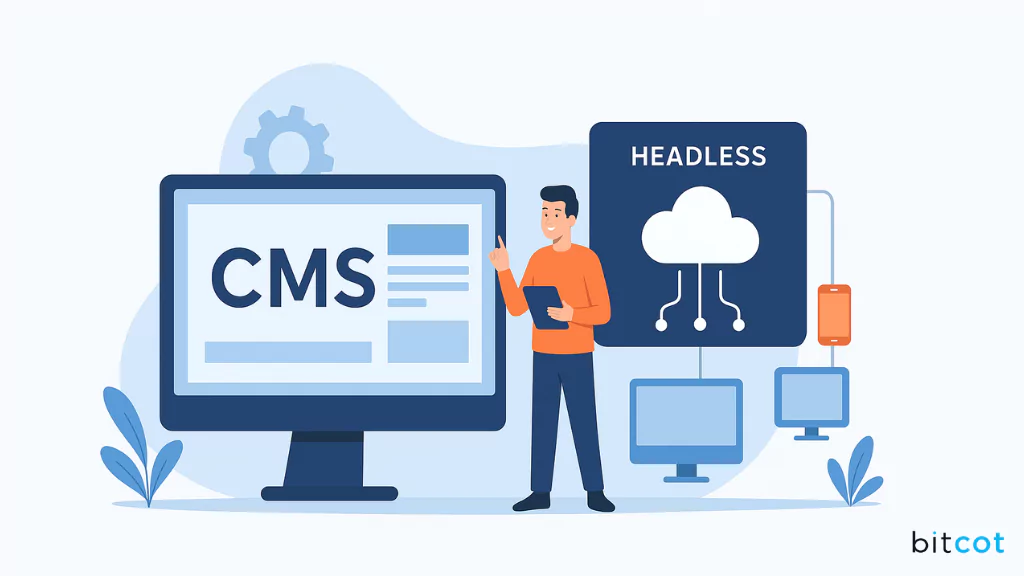
The CMS landscape in 2026 offers more options than ever. Traditional platforms continue dominating with 43% of all websites, while headless solutions grow at 22.6% annually as organizations embrace omnichannel strategies.
But here’s what matters: Neither approach is universally “better.” The right choice depends on your specific situation—but making the wrong choice costs time, money, and market opportunities you can’t get back.
Choose traditional CMS when you need quick deployment, have limited technical resources, manage primarily web content, and work with constrained budgets. Platforms like WordPress continue delivering excellent value for millions of websites. You’ll avoid the complexity of headless systems while getting your content online fast. Simple. Effective. Proven.
Choose headless CMS when you require omnichannel distribution, prioritize performance, need custom experiences, have development resources, and plan significant growth. The architecture supports modern content strategies and emerging platforms. You’ll future-proof your content infrastructure and gain competitive advantages through superior performance and flexibility. It’s an investment that compounds.
The decision shapes your digital trajectory for years. Choose wisely.
The investment in proper CMS selection and implementation pays dividends through:
- Improved team efficiency with workflows that match how your people actually work
- Better user experiences that convert visitors into customers
- Scalable platforms that grow alongside your business without expensive rebuilds
- Reduced technical debt from choosing the right foundation
- Faster time-to-market for new features and campaigns
Whether you’re launching your first website or upgrading an existing platform, Bitcot’s team brings the expertise to implement solutions that deliver results.
We build content management systems that empower teams, support growth, and enhance digital experiences—helping you avoid the costly mistakes that derail CMS projects.