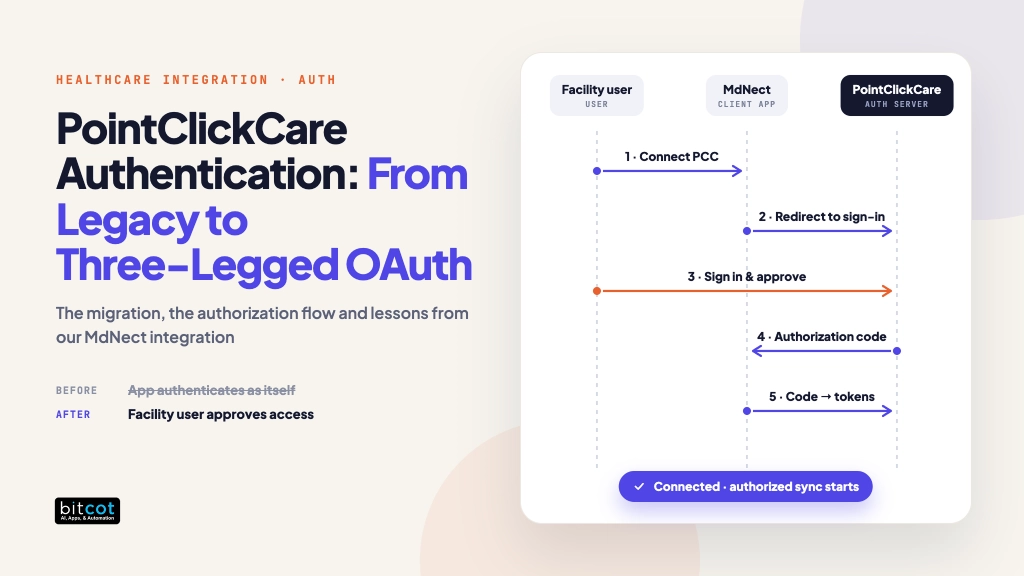
Understanding the migration, authorization flow, implementation changes, and lessons for healthcare developers
Key Takeaways
- Two-legged authentication is application-level, while three-legged OAuth adds user authorization.
- The required model depends on the specific PointClickCare program and documentation.
- Migration changes the facility connection flow, callbacks, token storage and background jobs.
- Store tokens securely and tie each authorization to the correct facility.
- Test cancellation, expiry, revocation and multi-facility isolation, not just the happy path.
Healthcare integrations depend on more than API endpoints and data mapping. They also depend on how an application proves its identity, how a healthcare organization grants access, and how that access is managed over time.
For developers integrating with PointClickCare (PCC), authentication requirements are especially important because the application may work with sensitive patient and resident information. An authentication approach that was suitable for an earlier integration may not meet the requirements of a later program, security review, or platform policy.
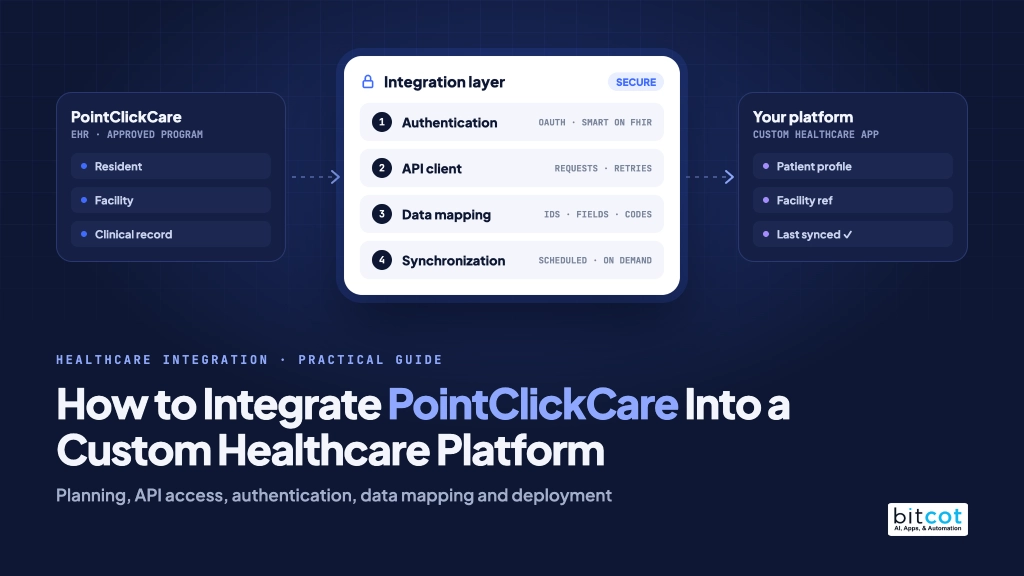
In our MdNect integration journey, we initially built the PointClickCare connection using a legacy two-legged authentication approach. Following a change in the requirements applicable to our integration, we migrated the workflow to three-legged OAuth. This was not simply a change to an API request: it affected the facility connection experience, authorization callback, token exchange and storage, connection records, and background synchronization.
This article explains the difference between legacy two-legged authentication and three-legged OAuth, why the migration matters, how the authorization-code flow works, and what developers should plan for when updating a PointClickCare integration.
Understanding Authentication in a Healthcare Integration
Authentication answers the question: who or what is making this request? Authorization answers: what is that application or user allowed to access? A healthcare integration needs both.
In a server-to-server integration, an application may authenticate using its own credentials. In a delegated authorization flow, a user signs in and approves the application’s access. These models represent different trust relationships and should not be treated as interchangeable.
The correct method for a PointClickCare integration depends on the specific integration program, application type, API documentation, and approval requirements. Developers should confirm the current requirements with PointClickCare rather than assuming one authentication model applies to every API.
What Was Legacy Two-Legged Authentication?
The term two-legged authentication is commonly used to describe a server-to-server model in which an application authenticates as itself, without a separate end-user authorization step for each connection. In OAuth terminology, a comparable pattern is often the client credentials grant, although the exact protocol used by a particular legacy integration must be checked against its documentation.
In this model, the application uses its registered credentials to obtain or present an application-level authorization credential and then calls the permitted APIs. There is no facility user being redirected to the PointClickCare sign-in page as part of that connection workflow.
Simplified legacy flow
- The developer registers an application and receives the credentials required by the integration program.
- The backend securely uses those credentials according to the documented authentication method.
- The application obtains or uses an application-level token.
- The backend sends API requests with the required authorization information.
- The application processes the API responses and synchronizes permitted data.
Potential advantages
- A relatively direct backend-to-backend connection.
- No interactive facility-user redirect is needed during the connection process.
- A simpler initial connection experience for some server-side workflows.
Important limitations
- The application may be acting with its own identity rather than a specific facility user’s delegated authorization.
- The connection may not provide the user-consent and facility-level authorization experience required by a newer integration policy.
- Credentials and tokens still require strong protection, rotation, monitoring, and access controls.
- A technically working legacy integration can still become unsuitable if the provider changes its security or program requirements.
A two-legged model is not inherently insecure in every context. The key question is whether it is approved and appropriate for the specific PointClickCare integration program and use case.
What Is Three-Legged OAuth?
Three-legged OAuth commonly refers to an OAuth 2.0 authorization-code flow in which three parties participate: the application, the resource owner (the user), and the authorization server/resource platform. The user signs in to the platform and authorizes the application to access the permitted resources on the user’s behalf.
Unlike an application-only connection, the facility user is actively involved in establishing the connection. The application does not ask the user to share their PointClickCare password with it. Instead, the user authenticates directly with PointClickCare, and the application receives an authorization response through a registered redirect URI.
The three participants
The user / resource owner
An authorized facility user who signs in and approves the requested access.
The client application
The custom healthcare platform that requests access and uses the resulting tokens.
The authorization server
PointClickCare’s authorization service, which authenticates the user and issues the authorization response and tokens according to the approved flow.
Why this model matters
Three-legged OAuth makes user authorization part of the connection process. It can provide a clearer link between an authorized user’s action and the application access being granted. The exact scopes, facility context, consent screen, and token behavior remain governed by the specific PointClickCare program.
Two-Legged vs. Three-Legged OAuth: Key Differences
| Area | Legacy two-legged model | Three-legged OAuth |
|---|---|---|
| Parties involved | Application and platform | Application, user, and platform |
| User interaction | Typically no interactive user authorization step | User signs in and authorizes access |
| Identity context | Application-level identity | Delegated authorization associated with a user and approved access |
| Connection experience | Backend credential-based setup | Redirect to platform authorization page and callback |
| Token handling | Application token or credential flow, as documented | Authorization code exchanged for access token and possibly refresh token |
| Facility onboarding | May be configured through application-side setup | Must account for the user-authorized connection and the program’s facility context |
| Implementation focus | Credential protection and server-to-server requests | Redirects, callback validation, code exchange, token lifecycle, and connection state |
This is a conceptual comparison. The exact legacy method and three-legged OAuth requirements should be taken from the PointClickCare documentation and partner instructions that apply to the application.
Why We Migrated the MdNect Integration
During the MdNect–PointClickCare integration, our team initially implemented the connection using the legacy two-legged approach. This supported our initial development and sandbox work, including the retrieval and synchronization of organization, facility, and patient information.
Later, PointClickCare communicated updated authentication requirements for our integration. The existing two-legged approach no longer met the requirements applicable to our application, and we needed to move to a three-legged OAuth authorization flow.
The migration was therefore a compliance and integration-readiness requirement, not simply an optional technical enhancement. We needed to ensure that the facility could initiate the connection and authorize MdNect through PointClickCare.
What changed for the facility user?
We introduced a dedicated Connect PCC action in MdNect’s Facility Settings. The option is shown only for facilities that have been mapped by the administrator. This gives the facility user a clear starting point for establishing the PointClickCare connection.
What changed for the development team?
- A new authorization initiation route and redirect workflow.
- A registered OAuth callback endpoint to receive the authorization response.
- Authorization-code validation and secure token exchange.
- Secure storage of access and refresh tokens where provided by the approved flow.
- Connection-state management at the appropriate facility level.
- Token expiry and refresh handling for background API activity.
- Updates to synchronization jobs so they use the facility’s authorized connection.
- Additional testing for cancellation, denial, expired tokens, and disconnected facilities.
How the Three-Legged OAuth Flow Works in MdNect
The following sequence describes the facility connection workflow implemented for MdNect. The exact authorization URL, parameters, scopes, token endpoint, and token lifecycle must always match the PointClickCare instructions for the approved application.
Step 1: Facility user signs in to MdNect
The user accesses MdNect using their facility account.
Step 2: Open Facility Settings
The user navigates to Facility Settings. The Connect PCC option is displayed only when the facility has been mapped by the administrator.
Step 3: Click Connect PCC
MdNect creates the authorization request and redirects the user to the PointClickCare authorization page.
Step 4: Authenticate with PointClickCare
The user enters their PointClickCare credentials directly on the PointClickCare page and reviews the requested access.
Step 5: Approve the connection
If the user is authorized and approves the request, PointClickCare redirects the browser to the registered MdNect callback URL with an authorization response.
The MdNect callback receives the authorization code and validates the response, including the state value and other required parameters.
Step 7: Exchange the code for tokens
The backend securely exchanges the authorization code for an access token and, if supplied by the flow, a refresh token.
Step 8: Store connection details
MdNect securely stores the tokens and the associated connection metadata against the correct facility context.
Step 9: Confirm the connection
The application updates the connection status and displays a successful connection message to the user.
The synchronization process uses the authorized connection to retrieve or exchange data permitted by the application’s scopes and API access.

Architecture Considerations for the Migration
A reliable migration requires more than adding a redirect button. Authentication is part of the integration architecture, so the related services and background processes must be reviewed together.
Connection initiation
Build a server-side route that creates the authorization request and redirects the user to the provider.
Callback handler
Create a dedicated endpoint that handles success and error responses. Validate state and any required response parameters before proceeding.
Token exchange service
Perform the code exchange on the backend. Do not expose confidential client credentials in browser code.
Secure token repository
Store tokens encrypted or in an appropriately protected secrets store, with access restricted to the integration service.
Facility connection registry
Associate each authorization with the correct MdNect facility and the corresponding PointClickCare context.
API client
Centralize authorization headers, endpoint configuration, response parsing, timeouts, and error handling.
Token lifecycle manager
Handle expiry and refresh according to the provider’s documented behavior. If refresh is not available or fails, require reauthorization.
Synchronization worker
Ensure background jobs retrieve the correct facility connection and do not reuse another facility’s token.
Secure Token Management
Token management is one of the most sensitive parts of a three-legged OAuth implementation. A successful authorization is only the beginning; the application must preserve access securely and respond correctly when credentials expire or are revoked.
Access tokens
Access tokens are presented when calling protected APIs. Treat them as secrets. Keep them out of browser storage where possible, avoid logging them, and limit which services and users can read them.
Refresh tokens
If the approved flow issues refresh tokens, the backend may use them to obtain new access tokens according to the provider’s rules. Refresh-token availability, lifetime, rotation, and reuse restrictions are provider-specific. Do not assume a refresh token will always be returned or remain valid indefinitely.
Recommended controls
- Encrypt tokens at rest and use TLS for communication.
- Restrict token access to the integration services that need it.
- Never store tokens in source code, public repositories, or client-side JavaScript.
- Avoid including tokens in application logs, analytics, error messages, or support screenshots.
- Handle refresh-token rotation atomically if the provider requires it.
- Revoke or invalidate stored credentials when a connection is disconnected, where supported.
- Maintain an auditable connection status without exposing token values.
OAuth flows can fail for normal reasons: the user may cancel the process, deny access, use an account without the required permissions, or return to an expired authorization request. Network errors and token endpoint failures can also occur.
Scenarios to handle
- The user cancels or denies authorization.
- The callback receives an error instead of an authorization code.
- The state value is missing or does not match the original request.
- The authorization code is expired, invalid, or already used.
- The token exchange fails because of a configuration or network issue.
- The access token expires and refresh is unavailable or unsuccessful.
- The user or provider revokes access.
- A facility is unmapped, disabled, or no longer authorized.
The application should show a useful status to the facility user, retain diagnostic details in secure logs, and provide a clear path to retry or reconnect. Avoid exposing raw provider errors or sensitive authorization details in the user interface.
Testing the Migration
Authentication changes affect every API request that depends on the connection. Testing should therefore cover the full lifecycle, not only the successful login and callback.
Recommended test checklist
- The Connect PCC option is available only for eligible, administrator-mapped facilities.
- The authorization request uses the correct registered client and redirect configuration.
- The user is redirected to the expected PointClickCare authorization page.
- Successful authorization returns to the correct callback.
- The callback validates state and handles provider errors safely.
- The authorization code is exchanged securely on the backend.
- Tokens and connection metadata are stored against the correct facility.
- The success and failure states are displayed correctly.
- API calls use the correct facility’s authorization context.
- Access-token expiry and refresh behavior are handled as documented.
- Revoked or invalid credentials trigger a controlled reconnect process.
- Multiple facilities can connect independently without token or data crossover.
- Background synchronization continues to work after the migration.
- Logs and monitoring do not expose credentials or unnecessary patient information.
Common Migration Challenges and How to Address Them
Changing the connection experience
A backend-only connection becomes a user-initiated workflow. Provide clear instructions in the facility settings and explain who must authorize the connection.
Preserving existing facility mappings
Do not lose the relationship between MdNect facilities and PointClickCare facilities when changing authentication. Keep connection identity and facility mapping as explicit, separately validated data.
Updating background jobs
Scheduled synchronization may previously have used application-level credentials. Update workers to retrieve the correct facility’s authorized token and handle expired or revoked access.
Managing multiple connections
Design the token store and connection registry for multiple facilities. Avoid global token variables or shared credentials that can cause cross-facility access.
Handling token lifecycle changes
Implement refresh and reauthorization based on the actual provider response. Do not assume token lifetime or rotation behavior.
Regression testing existing workflows
Retest every API and webhook workflow that depends on the connection. A successful OAuth callback does not prove that downstream synchronization still works.
Coordinating technical validation
Prepare API demonstrations, test scenarios, workflow diagrams, and explanations of why each permission or API is needed. Keep a record of reviewer feedback and remediation.
Lessons Learned From the MdNect Migration
The MdNect experience reinforced several lessons that apply to healthcare integration projects:
- Confirm the provider’s current authentication policy before committing to an architecture.
- Treat authentication as a core integration component, not a small preliminary task.
- Build the facility connection workflow around the actual user and authorization model.
- Keep facility mapping separate from token storage, but link them through a stable connection record.
- Design background synchronization around token expiry, refresh, and reauthorization from the beginning.
- Test multiple facilities and failure scenarios—not only the happy path.
- Keep communication with the platform’s partner and technical teams active throughout validation.
The most important takeaway is that an authentication migration can affect the entire integration lifecycle. Planning for the impact on user experience, backend services, data synchronization, and support operations helps prevent a narrow code change from becoming a production issue.

Conclusion
Moving from legacy two-legged authentication to three-legged OAuth is a meaningful architectural change when the applicable PointClickCare integration requirements call for user-authorized access. It changes how a connection is initiated, how permission is granted, how tokens are issued and managed, and how background processes access protected APIs.
For developers, the migration should be approached as an end-to-end workflow update. Review the current PointClickCare program requirements, redesign the connection experience, secure the callback and token exchange, associate credentials with the correct facility, and thoroughly test synchronization and failure handling.
Our MdNect integration journey showed that successful healthcare connectivity depends not only on making API calls, but also on adapting to platform security requirements and building a reliable authorization experience for facilities.
Frequently Asked Questions
What is the difference between two-legged and three-legged OAuth?
Two-legged authentication generally represents an application-to-platform connection without a separate end-user authorization step. Three-legged OAuth adds the user/resource owner, who signs in and authorizes the application to access permitted resources.
Why would a PointClickCare integration need three-legged OAuth?
A particular PointClickCare integration program may require a facility user to authorize the application. The required model depends on the program, API, and current PointClickCare instructions.
Does three-legged OAuth mean the application receives the user's password?
No. The user authenticates directly with PointClickCare. The application receives an authorization response and exchanges the code for tokens through the approved flow; it should never collect the user’s PointClickCare password.
What is an authorization code?
It is a short-lived value returned through the registered redirect URI after successful authorization. The backend exchanges it for tokens according to the provider’s token endpoint and requirements.
What is the role of an OAuth callback URL?
The callback URL is the registered endpoint to which the authorization server redirects the user after the authorization step. The application validates the response and continues the token exchange.
What is an access token?
An access token is a credential presented to an API to authorize a request within the token’s permitted scope and validity.
What is a refresh token?
When issued, a refresh token can be used to obtain a new access token according to the provider’s rules. Its availability and lifecycle are provider-specific.
Does the migration affect existing API synchronization?
It can. Any API request or background job that previously depended on the old credentials may need to be updated to use the correct facility-authorized token and handle its lifecycle.
Can one application connect multiple facilities?
That depends on the approved program and customer setup. The application should model each authorized facility connection explicitly and prevent credentials or data from being mixed across facilities.
What should developers test after migration?
Test authorization, callback validation, token exchange, token storage, refresh or reauthorization, facility isolation, API access, background synchronization, error handling, and security logging.