
Key Takeaways
- Webflow beat Squarespace and Wix in global market share
- Webflow sites load 20-35% faster than WordPress builds
- The average WordPress site runs 15-30 plugins – Webflow runs zero
- Webflow’s all-in cost is often 30-50% less than WordPress
- Webflow has built-in AI tools ready to use in 2026
- Teams update content 40-60% faster on Webflow than WordPress
In 2024, Webflow quietly did something nobody expected. It passed Squarespace, Wix, and Shopify in global website market share to become the second most-used platform in the world. Second only to WordPress.
That’s not a press release stat. That’s the market voting with its credit card.
And yet, walk into most American businesses today and you’ll still find a WordPress site held together by 22 plugins, a security patch that’s three months overdue, and a marketing team that has to file a ticket every time they want to change a headline.
There’s a better way. And a lot of smart businesses are already on it.
This guide breaks down exactly why Webflow for business websites is the right call in 2026 – what it costs, how it stacks up against the competition, and who it actually makes sense for. We’re not here to sell you on a platform. We’re here to give you the honest picture so you can make the right call.
What Is Webflow?
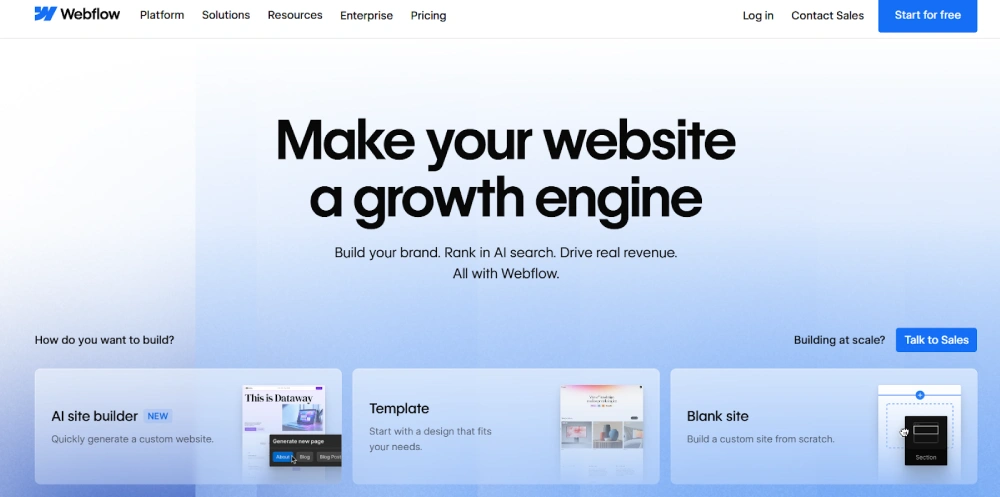
Webflow is a visual web development platform. It combines a website designer, a content management system, and hosting – all under one roof. You design visually. Webflow writes the code. The output is clean, production-ready HTML and CSS that stands up to hand-coded sites.
It launched in 2013 with a straightforward thesis: the people who design websites shouldn’t have to depend on developers to build them. Over a decade later, that thesis has held up. Webflow now has 3.5 million users and powers over 493,000 active websites worldwide.
Companies like Dell, Upwork, and Rakuten have moved to Webflow for real business reasons – not because it was trending on social media. Rakuten migrated from WordPress to Webflow and saw a 27.9% drop in bounce rate and a 12.7% lift in page views. That’s the kind of outcome that sticks.
But Webflow isn’t just for big brands. It works particularly well for growth-stage companies, marketing teams, and service businesses that need a site that performs and that their team can actually manage day-to-day without involving a developer every time something needs to change.
What kinds of sites can you build on it? More than most people expect.
Is Webflow Good for Business Websites?
Short answer: yes, for most of them.
The longer answer depends on what your website actually does for your business. If it’s your primary channel for leads, brand perception, and campaign traffic and you want your marketing team to be able to move fast without waiting on engineering – Webflow is a genuinely strong fit.
It works especially well for service-based businesses generating inbound leads, SaaS companies running their marketing site and product landing pages, startups that need to look credible fast without a full dev team, and any brand where the quality of the website directly affects how buyers feel about the company.
What it’s not built for: massive e-commerce catalogs that need deep WooCommerce-style inventory logic, or organizations whose tech stack depends entirely on WordPress-specific plugins. We cover that honestly a bit later.
For now, let’s look at what you can actually build with it.
Types of Websites You Can Build Using Webflow
Business and Marketing Websites
This is Webflow’s wheelhouse. Company sites, service pages, brand hubs – the kind of site where you need full design control, fast performance, and the ability for your marketing team to make changes without calling a developer. Most marketing-led companies land here.
Landing Pages and Funnels
If you’re running paid search or social ads, landing page quality determines your cost per acquisition. Webflow lets your team build and iterate on landing pages without a dev bottleneck. New variant for a Google Ads test? Done in an afternoon. That kind of speed compounds into real money saved on acquisition costs.
Blogs and Content Sites
Webflow’s CMS is structured, intuitive, and non-technical. Content editors add blog posts directly from a clean interface, see exactly what the published page looks like, and hit publish without touching anything they shouldn’t. Companies report 40 to 60% faster content turnaround after making the switch from WordPress.
Portfolio Websites
Designers, agencies, and consultants use Webflow to build portfolios that actually look like their work – not like a theme from 2019. Full creative control means the site reflects the craft, which is the whole point of a portfolio.
Why Webflow Is a Modern Solution
Here’s where we get into the real reasons businesses are making the switch. Not “it looks nicer” – actual business and technical reasons that show up in performance data, maintenance costs, and the speed at which your marketing team can operate.
1. Page Speed That Directly Affects Your Revenue
Akamai’s research is blunt: a one-second delay in load time cuts conversions by 7%. Google’s Core Web Vitals are now a direct ranking factor, which means a slow site doesn’t just frustrate visitors — it costs you organic rankings too.
Webflow sites run on AWS infrastructure with a global Fastly CDN baked in from day one. The code it generates is lean. No theme bloat. No plugin overhead. In head-to-head performance tests, Webflow sites consistently score 20 to 35% higher on Google PageSpeed Insights than equivalent WordPress builds. That’s not a design advantage. That’s a conversion rate advantage.
2. SEO That’s Built In, Not Bolted On
On WordPress, basic SEO requires a plugin. Webflow builds it into every page natively – custom meta titles, meta descriptions, Open Graph tags, canonical URLs, 301 redirect management, XML sitemaps, and structured data support. All of it, without installing a single plugin.
The underlying HTML is semantically clean, which matters more in 2026 than it did two years ago. Google’s AI-driven search results pull heavily from well-structured content. If your pages are built on clean semantic markup, you’re better positioned for traditional rankings and for appearing in AI-generated answer boxes.
3. Zero Plugin Roulette
This one is hard to overstate if you’ve spent any time managing a WordPress site. The average WordPress installation runs 15 to 30 active plugins. In 2024, over 13,000 WordPress vulnerabilities were documented and the vast majority came from plugins, not WordPress itself.
Every plugin is a potential security hole, a compatibility risk when WordPress updates, and an ongoing maintenance obligation. Webflow’s answer is to eliminate the plugin stack entirely. Hosting, SSL, CDN, forms, animations, CMS, and core integrations are all native. There’s no stack to manage. There’s no 3 AM call because a plugin update broke the contact form.
4. Design Freedom That Isn’t Limited by a Theme
Every WordPress site starts with a theme, which means every WordPress site starts with someone else’s design decisions. Webflow starts with a blank canvas. Your team controls every padding value, every animation trigger, every breakpoint layout.
That freedom shows up in how the final site feels. Webflow sites don’t look like templates because they aren’t built on one. And in industries where buyer perception matters – professional services, healthcare, fintech, SaaS – the quality gap between a template site and a purpose-built one is something prospects notice.
5. No-Code That Actually Scales
“No-code” gets used loosely. A lot of tools that call themselves no-code hit a ceiling the moment you need something custom. Webflow doesn’t. Developers can inject custom code when the project demands it, and the CMS architecture handles complex content structures that smaller no-code tools can’t touch.
What that means practically: you can launch quickly as a small team and scale without migrating to a different platform when you grow. That’s not a given with most no-code tools.
6. AI Features That Actually Ship in 2026
This is the feature most people don’t know about yet. Webflow’s AI Assistant helps teams generate page layouts directly within the design environment. Webflow Optimize runs conversion rate optimization experiments with AI-driven insights – without needing a separate A/B testing tool or an analytics engineering team.
WordPress is adding AI capabilities, but it’s doing so through plugins layered on a 20-year-old codebase. Webflow was built for modern visual development. When AI becomes embedded in every web design workflow and it will – platforms built on clean architecture will leverage it better. That’s Webflow’s long-term edge.
7. Enterprise Security Without the Enterprise IT Team
Webflow is SOC 2 Type II compliant. Every site gets automatic HTTPS, DDoS protection at the infrastructure level, and SSL certificates that renew on their own. There’s no exposed file system, no login page to brute-force, and no plugin vulnerabilities.
For businesses in healthcare, legal, or financial services, this matters a lot. You’re not starting from “how do we lock this down” – you’re starting from “what do we need to configure for our specific compliance requirements.” That’s a fundamentally different and more manageable starting point.
8. Content Teams That Can Actually Move
Ask anyone who manages content on WordPress how often they’ve accidentally broken something in Gutenberg. Webflow’s Editor is designed differently. Content managers see exactly what the published page looks like as they edit, and the design can’t be broken from the content layer.
When your content team isn’t filing developer tickets for every update, your publish frequency goes up. And publish frequency is one of the clearest leading indicators of organic traffic growth.
9. Built for the Way Marketing Teams Actually Work
New landing page for a campaign launch – done without a developer. Updated pricing section because the offer changed – handled in the afternoon. Hero copy swap for an A/B test – no ticket required. That’s what Webflow looks like in practice for a marketing team.
That operational speed isn’t a minor convenience. It compounds. Campaigns that launch faster, test more variants, and iterate based on data outperform campaigns that sit in dev queues waiting their turn.
Webflow vs. WordPress vs. Wix vs. Squarespace
Before we look at the numbers, here’s the honest framing: no platform wins every category. Webflow is the right call for most marketing sites, SaaS companies, and service businesses. WordPress still makes sense for large e-commerce operations with complex inventory needs. Wix and Squarespace work fine for simple brochure sites – until they don’t.
Here’s how they actually compare:
| Feature | Webflow | WordPress | Wix / Squarespace |
| Design Control | Pixel-perfect, blank canvas | Theme-limited, plugin-heavy | Template-locked |
| Hosting | Built-in AWS + Fastly CDN | Third-party required ($30-$100) | Included, basic |
| Security | SOC 2 Type II, no plugin attack surface | 13,000+ vulnerabilities (2024) | Managed, limited |
| Performance | 20-35% higher PageSpeed than WP | Needs 4+ optimization plugins | Average |
| SEO Tools | Native on every page | Yoast / RankMath plugin needed | Basic |
| Maintenance | Near zero, fully managed | High, constant updates | Low, feature-capped |
| AI Features (2026) | AI Assistant + Webflow Optimize | Bolt-on plugins only | Limited |
| Annual All-in Cost | $216-$468/yr | Varies: hosting + plugins + dev | Fixed, restricted |
| CMS Flexibility | Visual, structured, editor-friendly | Powerful but dev-heavy | Basic |
| Scalability | Strong for marketing and SaaS | Strong for large ecommerce | Limited |
The thing that often surprises people is the cost column. Most businesses assume WordPress is cheaper because the software itself is free. When you add managed hosting, a security plugin, a caching plugin, and even occasional developer time for updates and fixes, the annual total usually lands 30 to 50% higher than a Webflow Business plan. We’ll get into that in the next section.
Webflow Pricing and What It Actually Costs
Here’s the pricing breakdown. These are Webflow’s standard site hosting plans:
The Total Cost of Ownership Comparison
WordPress is “free” until you price it honestly. A mid-size business WordPress site typically costs:
- Managed hosting: $30 to $100/month (WP Engine, Kinsta, SiteGround)
- Security plugin: $10 to $50/month (Wordfence, Sucuri)
- Performance and caching plugin: $5 to $15/month
- SEO plugin: $10 to $20/month (Yoast Premium, RankMath Pro)
- Developer time for updates and fixes: variable, but rarely zero
Run those numbers over a year and you’re looking at $660 to $2,220 before developer time. A Webflow Business plan runs $468 per year – all-in, with hosting, SSL, CDN, CMS, security, and uptime guarantees included.
That’s not a minor difference. And it doesn’t count the hours your team spends managing plugins, handling update conflicts, or waiting on developers. Those hours have a cost too.
Who Should Choose Webflow in 2026?
Webflow is the right platform if you are:
- A startup that needs a professional site live in weeks without hiring a full dev team
- A SaaS company where design quality and landing page iteration speed are competitive requirements
- A service business where your website is your primary lead generation channel
- A marketing team that needs to launch and update campaigns without developer bottlenecks
- A brand migrating off WordPress to escape plugin maintenance and security overhead
- An agency or consultant building and managing client sites at scale
Webflow is probably not the right call if you are:
- Running a large e-commerce store that needs deep WooCommerce-level inventory and fulfillment logic
- Locked into specific WordPress plugins that have no direct Webflow equivalent
- Sitting on 500,000+ WordPress blog posts where migration costs outweigh the upside in the near term
- Working with a dev team whose entire expertise is WordPress and retraining isn’t practical right now
That second list isn’t a knock on Webflow. It’s just an honest assessment. Choosing the right platform means knowing where each one actually fits your situation – not defaulting to the most-marketed option.
Real Projects We’ve Built on Webflow
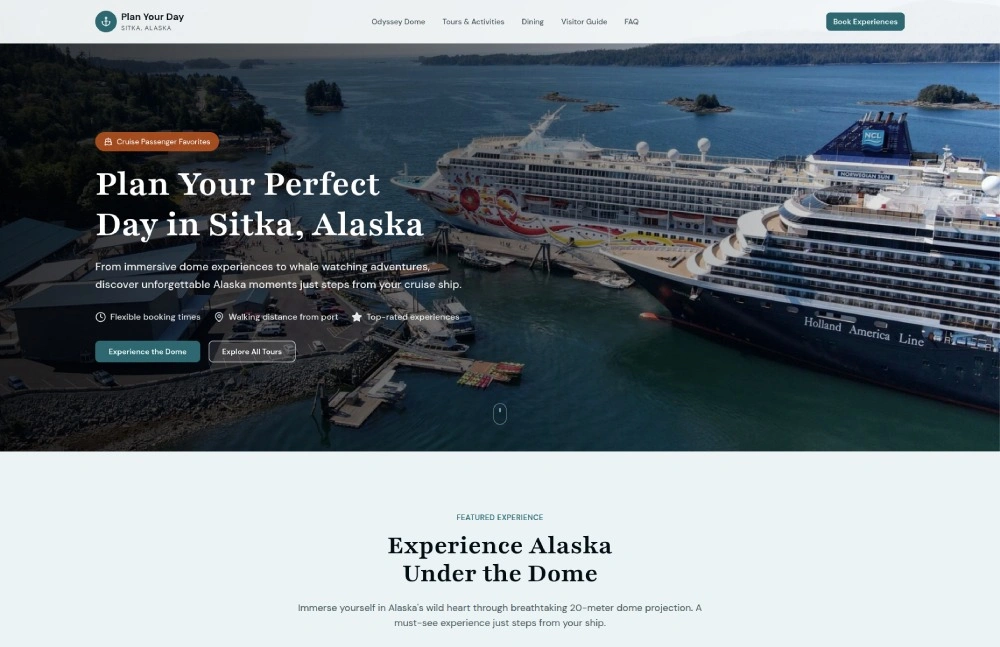
We’ve started working on Webflow projects focused on modern business needs.
Sitka Cruise Tours – Sitka Cruise Tours is a marketing website for a local Alaskan shore excursion company, focusing on small-group wildlife and cultural tours in Sitka.
Stylishly designed in Webflow, the Sitka Cruise Tours site features immersive nature imagery and intuitive scrolling interactions. It emphasizes local guides and wildlife adventures (whales, eagles, cultural sites) to attract cruise visitors. The site’s clean layout, responsive design, and CMS-powered tour listings showcase the tours’ unique value (small groups, local expertise) with strong visual appeal.
When Webflow Is Not the Right Choice
Any guide worth reading tells you when not to use the thing it’s recommending.
Stick with WordPress or another platform when:
- Your e-commerce operation needs WooCommerce-level product catalog complexity, multi-currency, or custom fulfillment workflows at scale
- Your workflow depends on WordPress-native tools like LearnDash, MemberPress, or Amelia that don’t have Webflow equivalents
- You have a massive WordPress content archive where migration costs would eat the gains
- Your dev team is WordPress-specialized and the retraining cost isn’t justified by the project
For everything outside those four scenarios – most marketing sites, SaaS pages, professional services firms, and content businesses – Webflow delivers a stronger foundation. But the honest answer depends on what your business actually needs, not on what makes the best general case.
How Bitcot Builds Scalable, High-Performance Webflow Websites
Most Webflow projects don’t fail because of design. They struggle due to early-stage decisions, especially around architecture. How the CMS is structured, how integrations are planned, and how the site will scale over time all play a critical role. These are the areas where many projects go off track.
That’s where Bitcot takes a different approach.
With over a decade of experience building software for startups, growth-stage companies, and enterprises, Bitcot approaches Webflow development with a clear focus on business outcomes. Every project begins by defining what the website needs to achieve, whether it’s generating leads, managing content efficiently, or supporting marketing campaigns. From there, the architecture is built to support those goals.
Our Webflow expertise includes:
- Custom Webflow builds focused on performance, strong branding, and giving marketing teams full control
- Seamless WordPress to Webflow migrations, including CMS restructuring and preserving SEO value
- Scalable CMS architectures designed for teams managing large volumes of content without relying on developers
- High-converting landing page systems for both paid and organic campaigns
- Integrations with CRMs, analytics platforms, and marketing automation tools
We don’t replace your internal team. Instead, we collaborate closely and help them move faster and deliver more. If your current website is slowing down campaigns, increasing maintenance effort, or not delivering results, that’s where we step in.
Our Webflow Website Development Services are designed to help businesses build scalable, high-performing websites that align with long-term growth goals.
Final Thoughts
Webflow’s rise as one of the most widely used website platforms didn’t happen by chance. Businesses repeatedly faced the same challenges with platforms like WordPress and Squarespace. Ongoing maintenance, frequent security updates, design limitations, and developer dependency pushed teams to look for a better solution.
Webflow offers that alternative.
It delivers strong performance out of the box, reduces long-term costs when evaluated realistically, and empowers marketing teams to execute faster. This flexibility makes a real difference in competitive environments.
Choosing the right platform today sets the foundation for long-term success. Faster campaign execution, lower operational costs, and a website that scales with your business all start with that decision.
If you’re ready to build it right from the start, Bitcot is ready to help. Talk to our experts today and start building a Webflow site that performs, scales, and delivers real business results.
Frequently Asked Questions (FAQs)
Is Webflow a no-code website builder?
Yes. Webflow is a no-code website builder that operates at the CSS level. You design visually and Webflow writes clean, semantic HTML and CSS in the background. Developers can extend with custom code when a project needs it, but you don’t need to write code to build and manage a professional business site.
Is Webflow a good choice for business websites?
Yes, Webflow is a reliable choice for businesses ranging from startups to enterprise teams. It combines design flexibility with strong performance, allowing companies to build fast, scalable, and visually polished websites without heavy reliance on developers for everyday updates.
Webflow works well for marketing sites, landing pages, and content-driven platforms, while also supporting integrations with CRMs, analytics tools, and automation systems. For businesses that need speed, control, and the ability to iterate quickly, it provides a solid and future-ready foundation.
Is Webflow better than WordPress in 2026?
For most marketing sites, SaaS companies, and service businesses – yes. It’s faster out of the box, more secure by default, and cheaper when total cost of ownership is calculated honestly. WordPress is still the better choice for large e-commerce operations and plugin-dependent workflows. The right answer depends on what your site actually needs to do.
How much does a Webflow website cost?
Webflow hosting plans run from $18/month (Basic) to $39/month (Business), with enterprise pricing available for larger organizations. When you factor in everything WordPress requires – managed hosting, security and performance plugins, SEO tools, and occasional developer maintenance – Webflow typically runs 30 to 50% less on an annual basis.
Can Webflow be used for landing pages and funnels?
Yes, and it’s one of its strongest use cases. Marketing teams can build, test, and iterate on landing pages and funnels without filing developer tickets. Webflow Optimize adds AI-powered CRO on top of that. For teams running paid campaigns, the speed of iteration alone is a meaningful competitive advantage.
How does Webflow handle SEO?
Webflow handles SEO natively on every page – meta titles, descriptions, Open Graph, canonical URLs, 301 redirects, XML sitemaps, and structured data. The code output is clean semantic HTML, which is what search engines prefer. There are no plugins required and no risk of losing SEO settings during a plugin update.
What types of websites can be built with Webflow?
Business and marketing websites, SaaS marketing sites, landing pages and funnels, blogs and content platforms, portfolio sites, and e-commerce storefronts. It’s best suited for projects where design quality, content management ease, and marketing team speed are priorities.
Can non-technical teams manage a Webflow website?
Yes, and this is one of the main reasons businesses switch. Webflow’s Editor lets content managers update text, swap images, add blog posts, and publish CMS items visually – directly on the live page – without any risk of breaking the design. No developer required for day-to-day content operations.