Key Takeaways
- Native apps are built per platform with Swift or Kotlin.
- Pew Research: 91% of US adults owned a smartphone in 2026.
- Decide native or cross-platform per feature, not per app.
- San Diego health and fintech apps lean native for biometrics.
- Framework longevity is a real risk: Xamarin support ended in 2024.
When this article was first published, it pointed readers to Xamarin as the way to get native performance without writing two apps. Microsoft has since ended support for every Xamarin SDK, and teams that bet their product on it have spent the last two years migrating. That history is the best argument for native app development we can offer: the code closest to the platform is the code that lasts.
Native development is not the right answer for every screen, though. The real decision for a product team in 2026 is which features need to be native and which can safely be shared across iOS and Android.
This updated guide is written for founders and product leads in San Diego and across the US who are planning a healthcare, fintech, or consumer app. It explains what native means today, where it clearly wins, where cross-platform is the smarter choice, and a feature-by-feature method for deciding.
What Is Native App Development in 2026?
Native app development means building an app separately for each operating system, using that platform’s own language, UI toolkit, and APIs. On iOS, that means Swift and SwiftUI. On Android, it means Kotlin and Jetpack Compose.
Both platforms have moved well past the languages of a decade ago. Objective-C and Java still run, but new work happens in Swift and Kotlin, and both companies now push declarative UI. According to Android Developers, Google now describes Android as “Compose-first,” has placed the older View toolkit in maintenance mode, and builds new Android Studio UI tools for Compose only.
That shift matters for product planning. A native app written today on SwiftUI and Compose is aligned with where Apple and Google will invest for years, which lowers the chance of a forced rewrite.
Native vs Cross-Platform vs Mobile Web: How the Options Compare Today
The old three-way split of native, hybrid, and mobile web no longer describes the market. “Hybrid” used to mean a web page inside a native wrapper, often built with Cordova or Ionic. Today, most shared-code apps use cross-platform frameworks such as React Native, which renders real platform UI components, or Flutter, which draws its own UI with a dedicated rendering engine.
| Native (Swift, Kotlin) | Cross-platform (React Native, Flutter) | Mobile web or PWA | |
| Codebases | One per platform | One shared, plus native modules where needed | One, served from a web server |
| Device access | Full and immediate, including new OS features on release day | Broad, but new APIs often wait for plugins or custom native code | Limited to what the browser exposes |
| Performance | Highest, compiled for the device | Close to native for most screens | Depends on browser and network |
| Platform look and feel | Matches iOS and Android conventions by default | Good with effort; Flutter needs extra work to feel native | Web-like |
| Best fit | Apps that rely on sensors, biometrics, offline use, or heavy animation | Content and form-driven apps that need both stores quickly | Reach without an install, such as marketing or simple tools |
| Engineering effort to maintain | Two teams or skill sets | One main team, plus native skills for edge cases | One web team |
Cross-platform tools have closed much of the performance gap for everyday screens. If your app is mostly lists, forms, and content, a framework approach such as Flutter app development can be a sound choice. The gap that remains shows up in specific features, which is where the decision should be made.
Where Does Native Development Make the Biggest Difference?
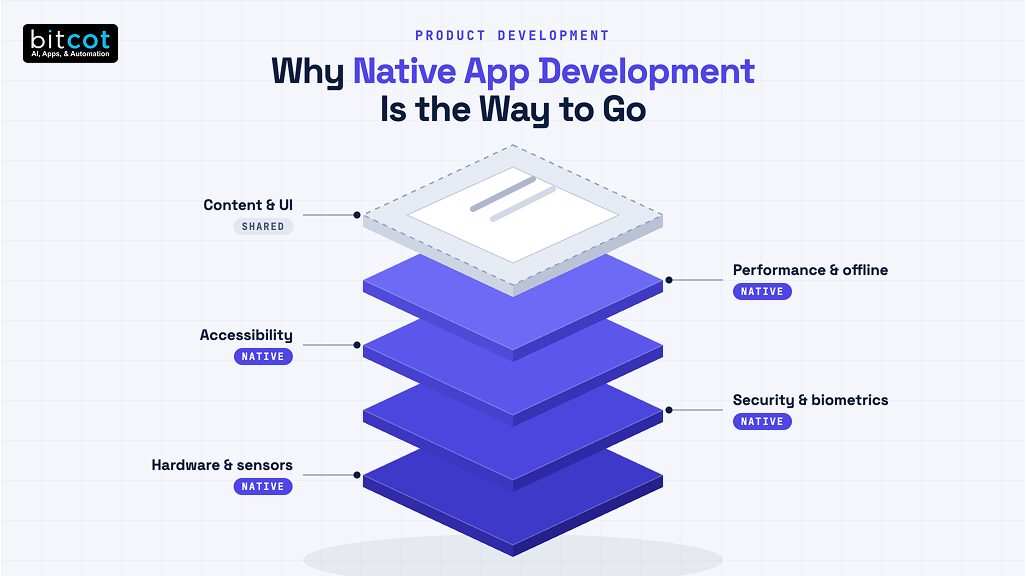
Native development makes the biggest difference in features that touch device hardware, security, accessibility, or offline behavior. These are the layers where a cross-platform framework has to call down into native code anyway.
For healthcare and financial products, those layers are often the core of the app rather than extras. According to the Pew Research Center, 91% of US adults owned a smartphone in its 2026 survey, which makes the phone the main front door for patient check-ins, prescription refills, and banking.
Hardware and Sensor Access
Apps that read from HealthKit or Health Connect, pair with Bluetooth medical devices, run the camera continuously, or track location in the background work most reliably when written natively. New sensor APIs are also available to native code the day an OS ships, while framework plugins can lag by weeks or months.
Security and Biometric Authentication
Fintech and health apps depend on Face ID, fingerprint login, and secure key storage in the iOS Keychain or Android Keystore. These features exist in cross-platform plugins, but every plugin adds a third-party layer between your app and the operating system’s security model. Writing that layer natively removes a dependency that security reviewers will otherwise ask about.
Accessibility and Platform Conventions
Native components work with VoiceOver, TalkBack, Dynamic Type, and system gestures without extra effort. For patient-facing apps used by older adults or people with low vision, that built-in behavior can decide whether the app is usable at all.
Speed and Offline Behavior
A native app ships its screens, layouts, and assets inside the install, so navigation feels instant even on a weak connection. Older hybrid apps loaded much of their interface from a server, which is why they slowed down in elevators, basements, and rural areas.

What Facebook’s Move Away From HTML5 Still Teaches Product Teams
Facebook’s early mobile apps were built mostly in HTML5, and the company publicly reversed course in 2012. According to The Register, Mark Zuckerberg called “betting too much on HTML5 as opposed to native” the company’s biggest mistake on mobile and said Facebook had burned two years on the approach.
The lesson is not that web technology is bad. It is that a shared-code strategy chosen to save time can cost more time when the product’s core experience depends on speed. Facebook’s feed was the product, so a sluggish feed was a product failure, not a technical footnote.
Product teams can apply the same test today. If the screen your users touch most often is the one most affected by performance, that screen belongs in native code.

The Overlooked Risk: Betting a Product on a Framework That Can Be Retired
Every cross-platform framework is a dependency your product cannot control. If the vendor changes direction, your roadmap changes with it.
Xamarin is the clearest recent example. According to Microsoft’s official Xamarin support policy, support ended on May 1, 2024, for all Xamarin SDKs, including Xamarin.Forms, and existing projects are expected to move to .NET for iOS and Android or to .NET MAUI. Teams that adopted it to avoid writing two apps ended up funding a migration instead.
That migration work usually looks a lot like legacy application modernization: auditing what still works, rewriting what does not, and retesting every integration. Native code carries its own upgrade work each year, but Apple and Google have strong incentives to keep Swift and Kotlin supported, which makes that path more predictable.
None of this rules out React Native or Flutter, which have large communities behind them. It means framework longevity belongs on the decision list next to performance and hiring, and it should be weighed carefully before committing a regulated product to any single toolkit.
When Is Cross-Platform the Smarter Choice?
Cross-platform is the smarter choice when an app is mostly content, forms, and standard navigation, and when speed to both app stores matters more than platform polish. In those cases, one shared codebase saves real engineering effort without a visible cost to users.
- Early validation builds: A shared codebase lets a team test demand on iOS and Android before investing in two native apps.
- Internal and field tools: Staff apps for scheduling, inventory, or data entry rarely need platform-specific polish.
- Content-led apps: News, education, and catalog apps spend most of their time rendering text and images.
- Teams with strong React skills: React Native lets an existing web team contribute to mobile without a full retraining.
Even in these cases, plan for some native code. Payment sheets, push notification handling, and biometric login often end up as native modules inside a cross-platform app, so your team needs at least one engineer comfortable on each platform.
A Feature-Layer Method for Deciding Where to Go: Native
The most reliable way to choose is to stop asking “native or cross-platform?” for the whole app and ask it for each feature. This turns a debate into a short, concrete review.
- List every feature in the first release, from login to settings.
- Tag each feature by layer: hardware, security, accessibility-critical, performance-critical, or content.
- Assign native to the first four layers unless a mature, well-maintained plugin covers the need without workarounds.
- Count the result. If most of the app lands in native layers, build fully native. If most lands in content, a cross-platform core with native modules is the better fit.
- Check long-term effort, including hiring, testing, and release pipelines, before signing off.
Applied to a telemedicine software development project, this method usually pushes video calls, device pairing, and secure messaging into native code.
The picture changes for lighter products. A simpler patient portal software development effort focused on records, forms, and appointments often fits a cross-platform core.
Financial apps follow a similar pattern. Biometric login, card scanning, and secure storage tend to go native in fintech software development, while statements, FAQs, and settings can be shared.
The long-term effort check in step five deserves real attention. Two native apps mean two release tracks and two test suites, which is why a sound total cost of ownership for digital products view should guide the choice.
Automation narrows that gap considerably. Shared CI/CD pipelines, set up through DevOps consulting, can build, test, and release both native apps from one workflow, which often makes native maintainable for smaller teams.
What California Health and Fintech Builds Keep Showing Us About Native
A recurring pattern in our mobile work, from San Diego to the projects that come through our software development in Los Angeles, is that teams rarely regret going native for the features their users touch every day. The requests to rewrite cross-platform apps almost always start with one specific feature: biometric login that fails on certain devices, Bluetooth pairing that drops, or background location that the OS keeps killing.
At Bitcot, we now run the feature-layer review before any framework discussion. It keeps the conversation focused on what the product needs instead of what the team already knows, and it often produces a mixed answer: native where the hardware is, shared code where the content is.

Conclusion
Native app development remains the strongest choice for the parts of a product that depend on hardware, security, accessibility, and speed. Cross-platform frameworks have earned a place for content-heavy screens and early validation, but they add a dependency whose future you do not control, as Xamarin’s retirement showed.
The practical takeaway is to decide feature by feature. List what your first release must do, mark the layers that touch the device or user trust, and build those natively. If you are weighing this decision now, a short feature review is the most useful next step.
Frequently Asked Questions
What is native app development?
Native app development is building a separate app for each operating system using that platform’s own language and tools, such as Swift and SwiftUI for iOS or Kotlin and Jetpack Compose for Android. Native apps get full, immediate access to device features and match each platform’s design conventions by default.
What is the difference between native and cross-platform apps?
Native apps are written separately for iOS and Android, while cross-platform apps share one codebase across both. Cross-platform frameworks like React Native and Flutter save effort on content-heavy screens, but features that rely on hardware, security, or new OS APIs often still need native code.
How do you decide which features of an app should be native?
You decide by tagging each feature as hardware, security, accessibility-critical, performance-critical, or content, and building the first four natively. If most features land in those native layers, build a fully native app; if most are content, use a cross-platform core with native modules.
Should healthcare and fintech apps in San Diego be built natively?
Healthcare and fintech apps in San Diego usually benefit from native code for biometric login, secure storage, device pairing, and accessibility. Content screens such as records, statements, and FAQs can often be shared, so many teams end up with a mixed approach decided feature by feature.
Is native app development worth the extra effort?
Native app development is worth the effort when your most-used features depend on speed, device hardware, or user trust. Facebook’s move away from HTML5 and Xamarin’s end of support both show that shortcuts on core features can cost more time later than building them natively from the start.