Key Takeaways
- Tool sprawl makes it hard to know who owns what and slows growing teams down.
- Port.io unifies data from existing tools into one software catalog without replacing them.
- Self-service actions replace ticket queues and improve developer experience.
- Scorecards and DORA dashboards make standards and delivery performance visible.
- Built-in guardrails let developers, AI agents, and coding agents work safely, preparing teams for the ADLC.
- The best portals start small and grow based on what developers actually use.
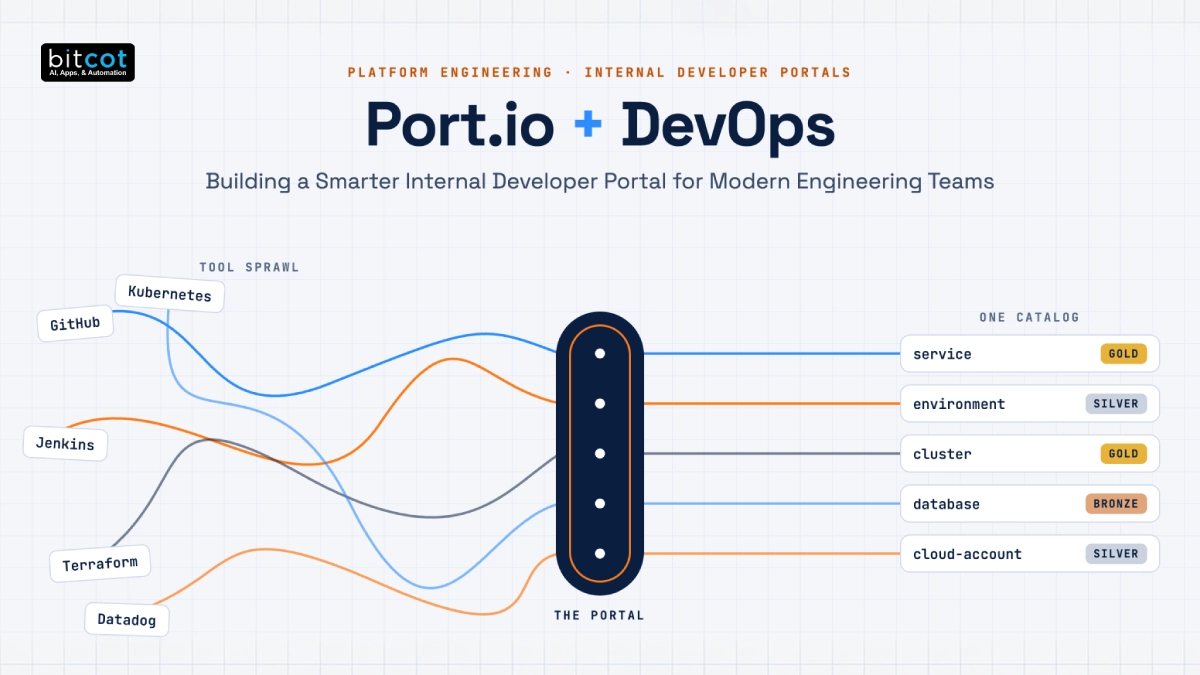
As engineering organizations grow, so does the number of tools they depend on. Source code lives in GitHub, pipelines run in GitHub Actions or Jenkins, infrastructure is managed with Terraform, workloads run on Kubernetes, and monitoring, incidents, and tickets each have their own platform.
In the early stages, this works well enough. Engineers know where things are, and the platform team can handle requests as they come in. But as the number of services and teams increases, the cracks start to show: nobody is sure who owns what, routine requests pile up in the platform team’s queue, and engineering leaders struggle to get a clear view of service health.
This is where an Internal Developer Portal (IDP) comes in. Port.io is a developer portal platform that brings data from your existing tools into a single catalog and lets developers run common workflows on their own, within guardrails set by the platform team.
In this blog post, we’ll walk through a typical platform engineering journey: the challenges teams face without a portal, how Port addresses them, what it takes to implement well, and the tools that usually make up the stack.
The Challenge: Tool Sprawl Slows Engineering Teams
Most engineering teams don’t set out to create tool sprawl. It builds up gradually as each team adopts the best tool for its job. Over time, though, the lack of a shared view creates friction for everyone. Teams commonly run into the following roadblocks: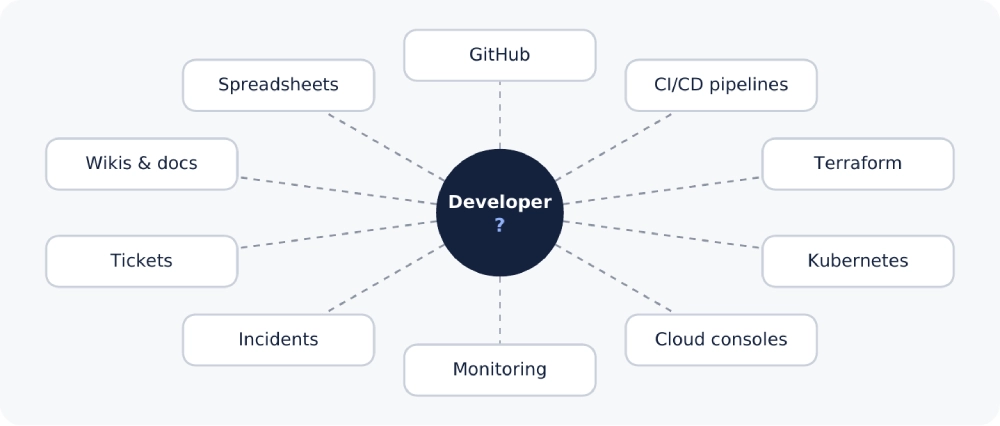 Without a portal, information is spread across many disconnected tools.
No Single Source of Truth
Service ownership, deployment status, dependencies, and on-call details are spread across repositories, wikis, spreadsheets, and individual memory. Answering a simple question like “who owns this service, and when was it last deployed?” can mean checking several tools or asking around, which is especially painful during an incident.
Ticket-Driven Toil
Routine tasks such as creating a new environment, rotating a secret, or setting up a new repository often require a ticket to the platform or DevOps team. Developers wait, the platform team spends its time on repetitive requests, and neither group is doing its most valuable work.
Inconsistent Engineering Standards
Some services have runbooks, alerting, and security scanning in place; others don’t. Without a way to measure this across the organization, gaps are usually discovered at the worst possible time, during an outage or an audit.
Limited Visibility into Delivery Performance
Metrics like deployment frequency, lead time, and change failure rate depend on data from several systems. Without a way to bring that data together, teams either calculate them manually or don’t track them at all.
Slow Developer Onboarding
New engineers have no obvious starting point. Learning which services exist, how they connect, and how to deploy them takes days of reading scattered documentation and asking colleagues.
The Solution: A Unified Developer Portal with Port
Port gives engineering organizations a central portal built on top of the tools they already use. Rather than replacing GitHub, Kubernetes, or Datadog, it pulls information from them into one place and exposes common workflows through a consistent interface.
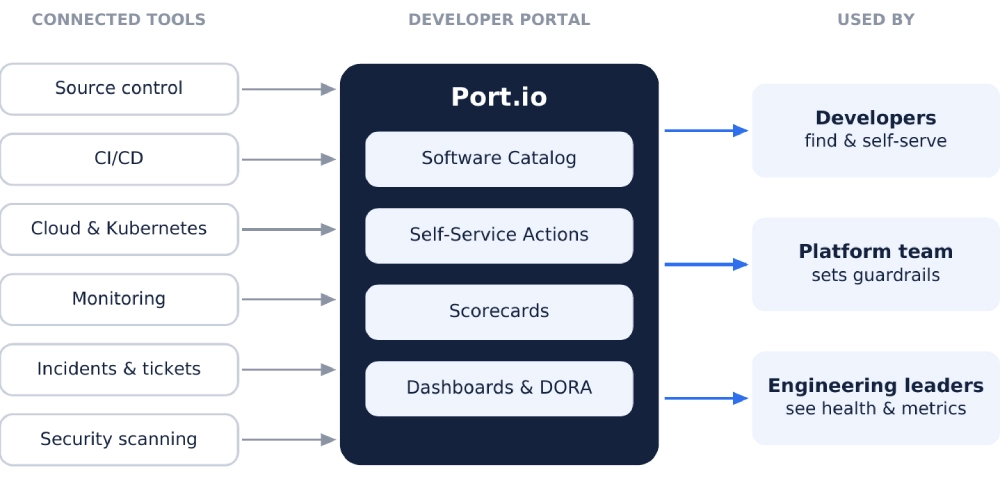
Port pulls data from existing tools into one portal used by developers, platform teams and leaders.
Software Catalog
At the core of Port is the software catalog. Platform teams define blueprints, which are custom data models for the things they want to track, such as services, environments, clusters, databases, or cloud accounts. Port then fills the catalog with real entities from connected tools and keeps them up to date. Relations between entities (a service runs in a cluster, depends on a database, belongs to a team) make it easy to see how the system fits together.
Self-Service Actions
Actions let developers trigger approved workflows directly from the portal by filling in a short form. Behind the scenes, Port invokes automation the platform team already maintains, such as a GitHub Actions workflow or a Terraform run, and reports the result back to the catalog.
Integrations with Existing Tools
Port connects to common tools across source control, CI/CD, cloud providers, Kubernetes, monitoring, incident management, ticketing, and security scanning. Many integrations are built on Ocean, Port’s open-source integration framework, and can run inside your own environment if you prefer to keep tool credentials in-house.
Scorecards
Scorecards measure each service against standards the platform team defines, such as having an owner, a README, monitoring alerts, or a passing security scan. Rules are grouped into levels (Bronze, Silver, and Gold by default), so teams can see exactly what they need to fix to reach the next level.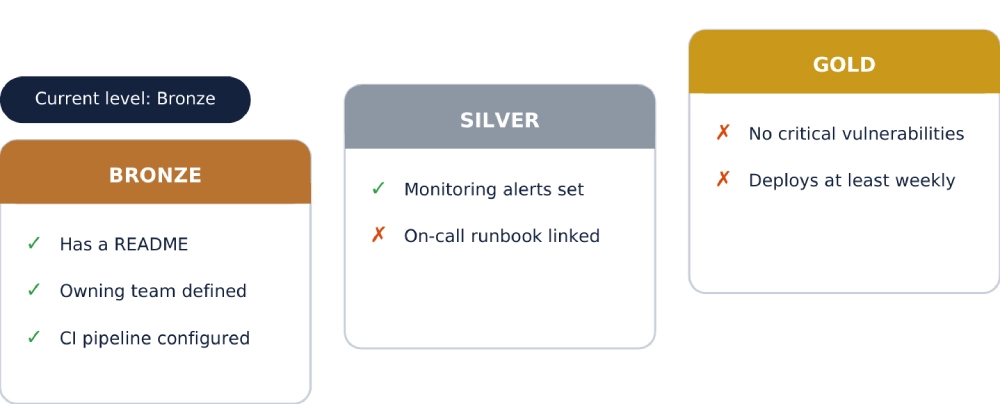
Scorecard levels show which standards a service meets and what to fix next.
Dashboards and DORA Metrics
Once CI/CD, source control, and incident data are in the catalog, Port can track the four DORA metrics and display them on customizable dashboards, giving engineering managers a shared view of delivery performance across teams.
Self-Service Actions: From Ticket Queue to Guided Workflows
For most platform teams, self-service actions are where a portal delivers its clearest value. Instead of filing a ticket and waiting, a developer opens the portal, selects an action, fills in a few fields, and the workflow runs automatically.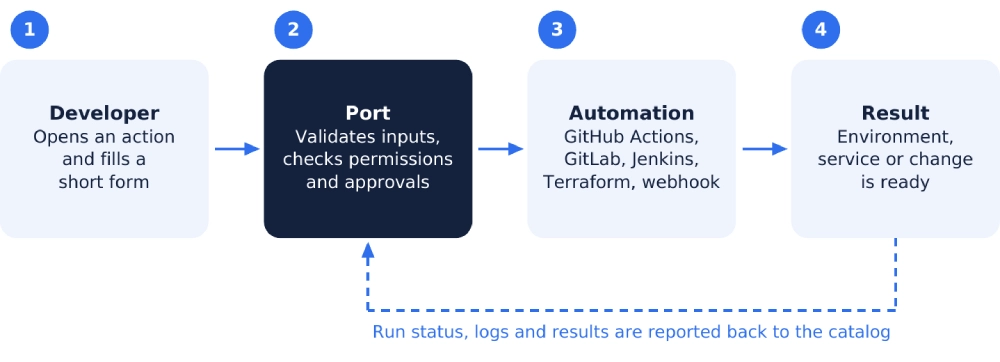
How a self-service action runs, from form to finished result.
Port supports several ways of running the automation behind an action:
- CI/CD pipelines: trigger GitHub Actions workflows, GitLab pipelines, or Jenkins jobs, passing the form inputs as parameters.
- Infrastructure as code: start Terraform Cloud runs to provision or modify infrastructure.
- Webhooks and messaging: call any HTTP endpoint or publish to a Kafka topic for custom backends.
Common actions include:
- Scaffolding a new microservice from a standard template, with repository, pipeline, and monitoring created in one step
- Spinning up a preview environment for a pull request
- Promoting a release from staging to production, with an approval step
- Rotating API keys or secrets
- Rolling back to the last known good version
Because every run is logged and linked to the relevant catalog entity, teams also get a clear record of what was created or changed, when, and by whom.
Governance and Access Control
Giving developers more autonomy only works if the right controls are in place. Port includes several governance features that let platform teams open up self-service without losing oversight.
Permissions
Role- and team-based permissions control who can view entities and who can run each action. Dynamic permission policies, written in JQ, allow finer-grained rules, for example letting only a service’s owning team trigger its production deployment.
Approvals and Audit Trail
Sensitive actions can require approval from a designated reviewer before they run. Every action run and catalog change is recorded in an audit log, which helps with compliance reviews and incident investigations.
Organizations in regulated industries should still review data residency and credential handling as part of their standard SaaS assessment.
What It Takes to Implement a Portal Well
A developer portal is only as useful as the data and automation behind it. Teams that get the most out of Port usually plan for the following:
- Data mapping: each integration needs a mapping configuration (typically in JQ) that turns source data into catalog entities and relations. This is where most of the setup effort goes, and it’s what makes the catalog trustworthy.
- Automation first: an action is only as fast as the workflow behind it. If a task is still manual today, automate it before exposing it in the portal.
- Agreed standards: scorecards work best when standards are defined together with the teams being measured, and rolled out only once the underlying data is reliable.
- Start small: begin with one or two high-impact use cases, such as service ownership or a frequently requested action, and expand once developers are using the portal regularly.
Results and Benefits of Adopting a Developer Portal
When the catalog, actions, and standards are in place, teams typically see improvements in the following areas:
Faster Access to Information
Ownership, deployment status, and dependencies are available in one place, which shortens investigations and reduces interruptions to senior engineers.
Less Toil for Platform Teams
Routine requests move from the ticket queue to self-service actions, freeing platform engineers to work on improving the platform itself.
Consistent Standards
Scorecards make gaps visible across every service, so teams can close them before they cause problems rather than discovering them during an incident.
Clearer Delivery Metrics
DORA metrics and engineering dashboards give leaders a shared, data-based view of delivery performance without building a separate reporting pipeline.
Faster Onboarding
New engineers have a single starting point to explore services, owners, and documentation, and can use the same self-service actions as everyone else from day one.
Technology Stack for a Port-Based Developer Portal
A typical portal setup combines Port with the tools the organization already uses: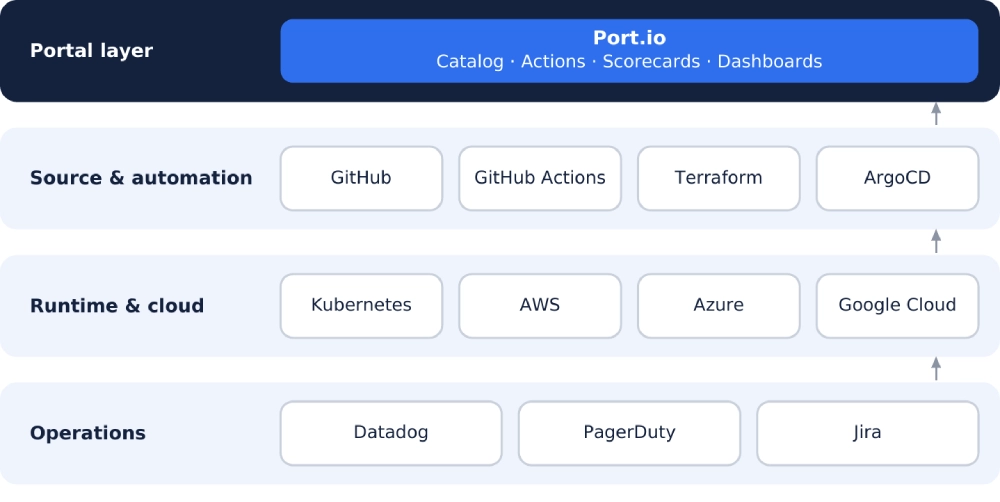
Port sits on top of the existing stack, bringing data from each layer into one catalog.
Port.io
Provides the software catalog, self-service actions, scorecards, dashboards, and access controls that make up the portal layer.
GitHub and GitHub Actions
Supply repository and pull request data to the catalog and run the workflows behind many self-service actions, such as service scaffolding and deployments.
Terraform
Handles infrastructure provisioning triggered from the portal, keeping environments consistent and version-controlled.
Cloud Providers (AWS, Azure, and Google Cloud)
Bring cloud resources such as compute instances, databases, storage, and serverless functions into the catalog, so teams can see which resources belong to each service and team, and which cloud accounts or projects they run in.
Kubernetes and ArgoCD
Provide workload and deployment data, so the catalog reflects what is actually running in each cluster and environment.
Datadog and PagerDuty
Feed monitoring, alerting, and incident data into the catalog, supporting scorecards, on-call visibility, and DORA metrics such as change failure rate and recovery time.
Jira
Links tickets and incidents to the services they affect, giving teams context without switching tools.

Final Thoughts
A developer portal won’t replace good automation or clear ownership, but it gives both a home. With Port, platform teams can bring scattered engineering data into one catalog, turn repetitive requests into self-service workflows, and make engineering standards visible across every service.
The teams that see the most value treat the portal as a product: they start with a few high-impact use cases, invest in reliable data, and expand based on what developers actually use. Done this way, a portal reduces friction for developers, frees platform teams from repetitive work, and gives leaders the visibility they need to make better decisions.
Frequently Asked Questions
What is an Internal Developer Portal (IDP)?
An IDP is a central place where developers can find information about services, owners, and infrastructure, and run common workflows on their own. It sits on top of existing tools rather than replacing them.
Does Port.io replace tools like GitHub, Kubernetes, or Datadog?
No. Port pulls data from these tools into a single catalog and exposes workflows through a consistent interface, so teams keep using the tools they already rely on.
How does Port improve developer experience?
Developers get one place to answer questions about ownership, deployments, and dependencies, and can handle routine tasks through self-service actions instead of filing tickets and waiting.
What are scorecards in Port?
Scorecards measure each service against standards defined by the platform team, such as having an owner, monitoring, or a passing security scan. Rules are grouped into levels like Bronze, Silver, and Gold so teams know what to fix next.
Can Port track DORA metrics?
Yes. Once CI/CD, source control, and incident data are in the catalog, Port can track deployment frequency, lead time, change failure rate, and recovery time on customizable dashboards.
How does a developer portal support AI agents and coding agents?
Agents need accurate context and safe boundaries to be useful. A portal gives them a trusted catalog of services and dependencies, plus the same permissions, approvals, and audit trail that apply to human developers.
What is ADLC, and why does it matter for platform teams?
ADLC (agent development lifecycle) describes how AI agents are built, deployed, governed, and improved as part of engineering work. As coding agents take on more tasks, platform teams need a portal that provides the context and guardrails those agents depend on.
How long does it take to implement Port?
It depends on the number of integrations and the quality of existing automation. Most of the effort goes into data mapping, so teams usually start with one or two high-impact use cases and expand from there.