Key Takeaways
- An event booking system automates registration, payments, and attendee communication, eliminating manual administrative work and reducing no-shows.
- Core features that drive conversions include real-time availability, flexible ticket pricing, integrated payment gateways, and automated email workflows.
- Event booking platforms serve a broad range of service types: conferences, fitness classes, guided tours, facility rentals, and virtual training.
- Building a custom system follows four distinct phases: planning, technical architecture, development, and testing with deployment.
- Project complexity, integration requirements, and ongoing maintenance are the primary cost variables in event booking software development.
Introduction
According to Statista, the global events industry is projected to exceed $2 trillion by 2028, yet a large share of event organizers still rely on manual registration processes, disconnected spreadsheets, and email threads to manage attendees. That gap between industry growth and operational infrastructure represents a real cost: lost registrations, administrative drag, and a customer experience that creates friction at the exact moment a buyer is ready to commit.
An event booking system closes that gap. Whether you run multi-day industry conferences, recurring fitness classes, or high-value client workshops, the right system transforms a fragmented process into a centralized, always-on revenue engine. This guide breaks down what an event booking system actually does, the features that make it effective, the types of services it can manage, the four-phase development roadmap for building one, and the cost factors that shape the investment. If you are evaluating whether to build or buy, this is the analysis you need before making that call.
What Is an Event Booking System?
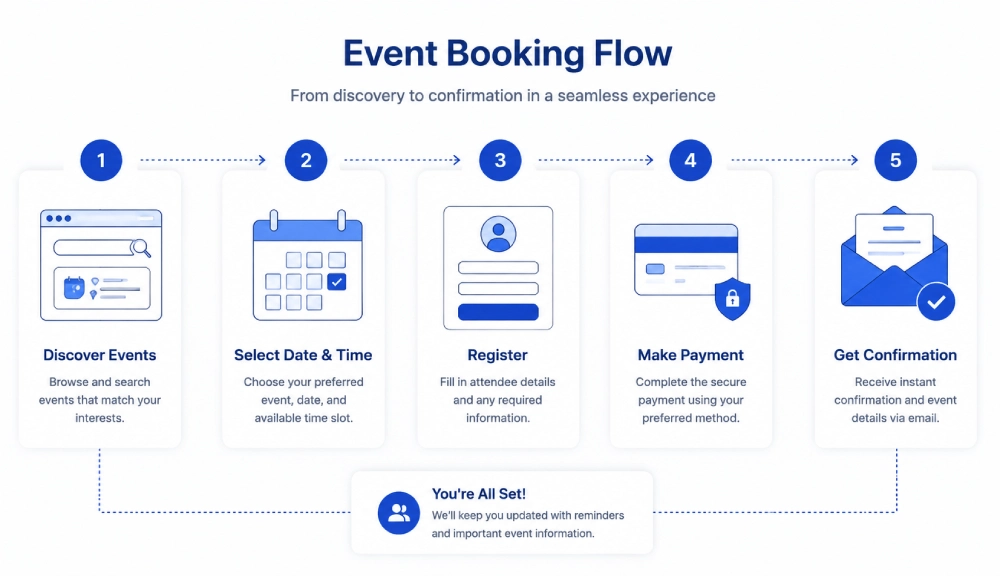
An event booking system is a dedicated software platform designed to automate the full lifecycle of event registration: from showing real-time availability and collecting attendee information, to processing payments and sending automated confirmations. It replaces the manual coordination that typically spans email inboxes, spreadsheets, and separate payment tools, consolidating all of it into a single, integrated workflow.
The core function is deceptively simple. A prospective attendee visits a booking portal, selects an event or time slot, completes a registration form, and pays securely. The system handles everything that follows: capacity tracking, confirmation delivery, reminder sequences, and data storage. For the organizer, that means no manual data entry, no payment reconciliation, and no double-booking risk.
How Event Booking Systems Differ From Generic Scheduling Tools
Generic scheduling tools manage calendar availability. Event booking systems manage revenue-generating registrations. The distinction matters because event platforms must handle concurrent demand (multiple attendees booking the same slot simultaneously), enforce capacity limits, support multi-tier pricing, and integrate with financial systems. According to Gartner, purpose-built event management platforms consistently outperform general productivity tools on attendee conversion rates and organizer time savings, particularly for organizations running more than 10 events per month.
Why Do Event Organizers Need a Dedicated Booking System?
The case for a dedicated system is straightforward: every manual step in your registration process is a potential drop-off point. When a prospective attendee cannot immediately confirm their spot, sees an unavailable time slot without alternatives, or encounters a multi-step checkout that requires leaving your site, you lose registrations that your marketing budget already paid to acquire.
A dedicated event booking system addresses three operational pain points that consistently surface across event-driven businesses:
- Administrative overhead: Registration confirmation, payment reconciliation, and reminder emails consume significant staff time when handled manually. Automation returns those hours to higher-value work.
- Revenue leakage from no-shows: According to Harvard Business Review, automated reminder sequences reduce no-show rates by 20 to 30 percent in service-based business contexts, directly improving event ROI.
- Data fragmentation: When attendee data lives across multiple tools, building a reliable picture of your audience for future marketing becomes impossible. Centralized booking data solves that.
For B2B-focused event businesses, there is an additional dimension: corporate clients expect invoicing workflows, group registration options, and attendee management portals that off-the-shelf consumer tools rarely support well.
Key Features to Include in an Event Booking System
The features that matter most are those that directly affect conversion, operational efficiency, and attendee experience. Here is what to prioritize when evaluating or building a system:
Registration and Capacity Management
- Real-time availability display: The system must reflect current seat counts accurately, automatically close registration when capacity is reached, and offer a waitlist option for full events.
- Customizable registration forms: Fields beyond name and email, such as dietary preferences, team names, skill levels, or company details, are essential for many event types and should be configurable without developer involvement.
- Concurrent session handling: For conferences or multi-track events, the system must manage multiple simultaneous sessions with independent capacity limits.
Payment and Financial Tooling
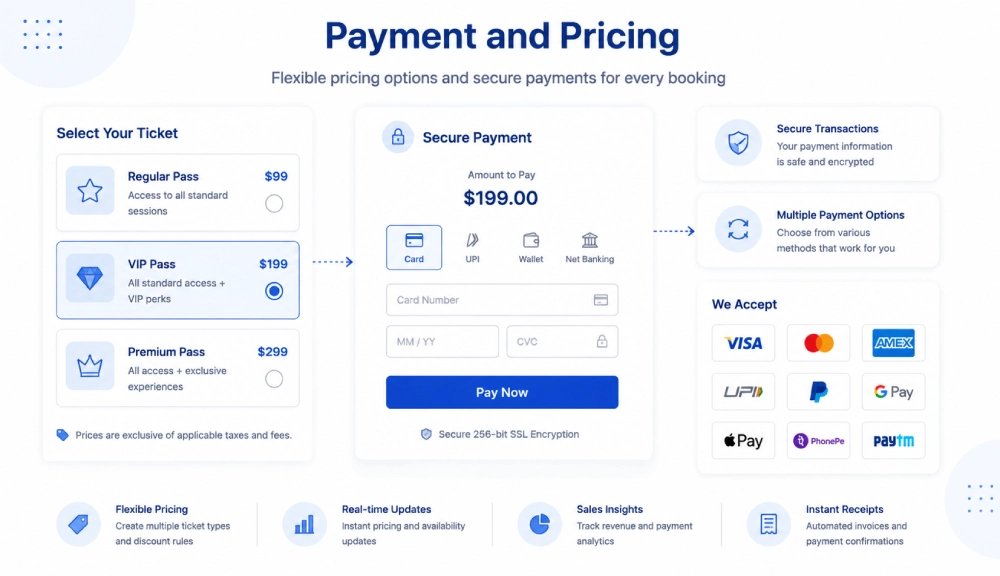
- Integrated payment gateways: Direct integration with Stripe, PayPal, or Square ensures secure, instant transactions. For B2B contexts, support for corporate invoicing and purchase order workflows is critical.
- Tiered and dynamic pricing: Early bird rates, group discounts, VIP tiers, and promo code functionality should be configurable at the event level.
- Refund and cancellation workflows: Automated refund processing according to a defined policy, with clear attendee communication, prevents support bottlenecks.
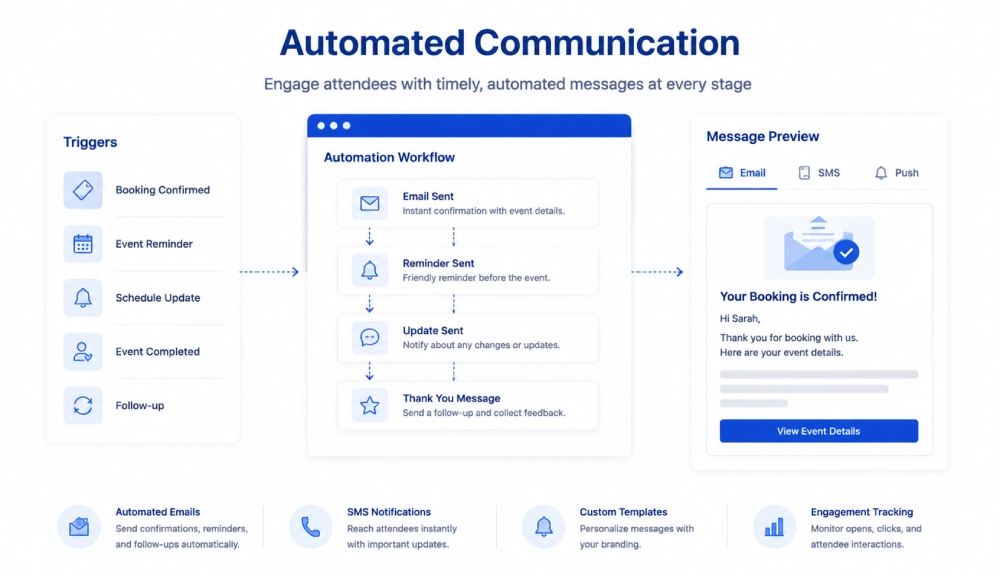
Automated Communication
- Triggered email sequences: Confirmation on registration, calendar invites, reminders at 24 hours and 1 hour pre-event, and post-event feedback requests should all fire automatically.
- Branded templates: Booking confirmation emails and digital tickets should match your visual identity, not the platform’s default styling.
Integrations and Scalability
- CRM sync: Attendee data should push automatically into your CRM (HubSpot, Salesforce) to support post-event lead nurturing without manual export and import.
- Website embeddability: A booking calendar or widget that embeds directly into your existing site preserves the user experience and avoids redirecting attendees to a third-party domain.
- Scalable infrastructure: The system must handle traffic spikes, particularly during high-demand ticket launches, without performance degradation or booking errors.

What Types of Services Can an Event Booking System Manage?
The name “event booking system” undersells the platform’s versatility. Any service that involves a defined time slot, a capacity limit, or a bookable resource is a candidate for this type of system. Here are the four primary service categories:
1. Public Events and Conferences
Large-scale gatherings with tiered ticketing, multi-session schedules, and high attendee volume represent the most common use case. This includes industry conferences, seminars, charity galas, festivals, and concerts. Key requirements include assigned seating maps, zone-based pricing, and high-concurrency transaction handling during public ticket launches.
2. Classes, Workshops, and Training
Education and skill-development businesses use event booking systems as class schedulers. Fitness studios, corporate training providers, and professional certification programs all benefit from recurring booking workflows, prerequisite tracking, and integration with virtual meeting platforms like Zoom or Google Meet for remote sessions.
3. Appointments and Guided Experiences
Service businesses that sell scheduled time slots to individuals or small groups, including consultants, tour operators, escape rooms, and photography studios, use event booking systems to manage per-person pricing, staff assignment, and slot-level capacity. This is functionally similar to how appointment scheduling software operates in healthcare and professional services contexts.
4. Venue and Resource Bookings
Properties that rent physical space or specialized equipment, such as meeting rooms, sports courts, or event halls, rely on booking systems to prevent double-bookings and manage multi-day holds. Corporate clients often require digital floor plans, exhibitor booth assignments, and contract workflows within the same platform.
How to Build an Event Booking System: A 4-Phase Roadmap
When off-the-shelf solutions cannot accommodate your business logic, pricing model, or integration requirements, custom development is the practical path forward. Here is how the build process typically unfolds:
Phase 1: Planning and Scope Definition
The planning phase is about defining requirements with precision before writing a single line of code. This includes mapping user roles (attendee, organizer, administrator), documenting the feature set using a prioritization framework like MoSCoW (Must-have, Should-have, Could-have, Won’t-have), and designing user flows for registration and checkout on both desktop and mobile. The output of this phase is a product specification that engineering can execute against.
Phase 2: Technical Architecture
Architecture decisions made in this phase shape the system’s long-term performance, maintainability, and scalability. Key decisions include:
- Technology stack: React, Vue.js, or Angular for the frontend; Node.js, Python (Django or Flask), or Java (Spring) for the backend; PostgreSQL or MySQL for the database. Relational databases are preferred for booking systems because transactional data integrity is non-negotiable.
- Database schema: Tables for events, ticket types, user profiles, and booking orders must be designed to support complex queries and concurrent writes efficiently.
- Concurrency handling: High-demand events generate simultaneous booking attempts. Database-level locking or a queuing system is required to prevent double-bookings and ensure fair access. This is a frequently underestimated engineering challenge.
According to McKinsey Digital, software projects that invest adequately in architecture planning before development reduce costly mid-project rework by a significant margin, particularly in systems handling financial transactions.
Phase 3: Development and Integration
Development follows a module-based approach, starting with the core booking flow and payment integration before layering in the organizer dashboard, notification automation, and third-party integrations. Teams experienced in custom software development will typically use an iterative delivery model, releasing working modules for review before moving to the next.
Integrations with CRM platforms, accounting software, and marketing tools are built in this phase via API connections. Each integration adds development time proportional to the complexity of the external system’s API and the depth of the data sync required.
Phase 4: Testing, Deployment, and Iteration
Testing an event booking system requires three distinct layers:
- Functional testing: Verifying that every feature works as specified across user roles.
- Security testing: Ensuring payment data and user information are protected, with particular attention to input validation and session management.
- Load testing: Simulating peak traffic conditions (such as a public ticket launch) to confirm the system handles concurrent demand without errors or performance degradation.
Deployment to a scalable cloud platform (AWS, Google Cloud, or Azure) is followed by a structured feedback period during which real-world usage reveals edge cases that testing did not surface. Ongoing maintenance and feature iteration should be planned as a continuous commitment, not a one-time event.
What Determines the Cost of Building an Event Booking System?
Custom event booking software development is not priced like a SaaS subscription. The total investment is shaped by four variables, each of which you control through the decisions you make during planning.
Project Complexity and Feature Scope
A minimum viable product with core registration and payment functionality requires significantly less development time than a full-featured platform with dynamic pricing, assigned seating, and multi-language support. Defining an MVP scope and expanding iteratively is the most reliable way to manage complexity cost.
Development Team Structure
The total cost is a function of estimated development hours multiplied by the hourly rate of the team building the system. In-house teams carry fixed overhead. Local agencies in high-cost markets carry premium rates. Offshore or nearshore development partners offer lower hourly rates but require structured communication and clear specifications to deliver reliably. The right model depends on your timeline, existing technical capacity, and how much ongoing development you anticipate post-launch.
Integration Requirements
Standard integrations with well-documented APIs (Stripe, HubSpot, Salesforce) add predictable development time. Custom integrations with proprietary or legacy systems require additional scoping and testing. Each integration also carries ongoing maintenance considerations if the external system updates its API.
Ongoing Maintenance
A custom system requires continuous investment after launch. According to Forbes Technology Council, industry benchmarks suggest allocating 15 to 20 percent of the initial development investment annually for maintenance, security updates, and incremental improvements. This is not optional for systems handling live payments and customer data.
Our Perspective
Working with clients across San Diego and California on event-driven platforms, one pattern stands out consistently: teams underinvest in concurrency architecture during the planning phase, then face significant rework when a real ticket launch exposes race conditions in the booking logic. The problem is not unique to any single tech stack. It reflects a tendency to treat real-time capacity management as a routine CRUD operation rather than a distributed systems challenge that requires explicit design.
The teams that ship reliable event platforms are the ones that plan for worst-case concurrent load before writing their first database query, not after their first oversold event. That shift in sequencing, architecture-before-features, is the single most impactful thing a development team can do to improve the long-term quality of a booking system.

Conclusion
An event booking system is not a feature addition; it is a foundational piece of infrastructure for any business where registrations, time slots, or capacity-limited services generate revenue. The difference between a system that converts and one that creates friction usually comes down to a small number of architectural decisions: how concurrency is handled, how payment flows are structured, and how attendee data is connected to the rest of your business tools.
Off-the-shelf platforms work well up to a point. When your pricing model, integration requirements, or user experience standards exceed what a generic tool can accommodate, custom development becomes the more efficient long-term path. The four-phase roadmap outlined here gives you a clear framework for that build. The next step is applying it to your specific context with a team that has done it before.
Ready to scope a system that fits your event model precisely? Get in touch with our team to start the conversation.
Frequently Asked Questions
What is an event booking system?
An event booking system is a software platform that automates the end-to-end process of event registration, including availability display, form collection, payment processing, and attendee communication. It replaces manual coordination workflows with a centralized, automated system that operates continuously without staff involvement for each transaction.
What is the difference between an event booking system and an appointment scheduling tool?
Appointment scheduling tools manage one-to-one calendar availability between a service provider and a client. Event booking systems are designed for capacity-limited registrations where multiple attendees book the same time slot, requiring concurrent transaction handling, tiered pricing, and group management features that scheduling tools do not support.
How long does it take to build a custom event booking system?
A minimum viable product covering core registration and payment functionality typically takes 10 to 16 weeks to build, depending on team size and integration complexity. A full-featured platform with CRM integration, advanced pricing logic, and an organizer dashboard can extend that timeline to six months or more. The planning and architecture phase significantly affects delivery time: systems scoped thoroughly before development begins consistently ship faster than those scoped iteratively.
Can an event booking system handle virtual and hybrid events?
Yes. Modern event booking systems can integrate directly with video conferencing platforms like Zoom or Google Meet, automatically delivering access credentials to registered attendees after payment confirmation. For hybrid events, the system manages separate capacity pools for in-person and virtual registrations, with independent pricing and communication workflows for each audience segment.
Is a custom event booking system worth building for businesses in San Diego or California?
For businesses running high-frequency or high-value events in California markets, a custom system delivers advantages that generic platforms cannot: precise alignment with your pricing logic, deep integration with the CRM and financial tools you already use, and a branded attendee experience that reinforces trust at the moment of purchase. The case for custom development strengthens as event volume and complexity increase, particularly for organizations that have outgrown the configuration limits of off-the-shelf tools.