Key Takeaways
- Microsoft Power Platform combines Power BI, Power Apps, Power Automate, and Copilot Studio into a unified low-code environment that connects to over 1,400 data sources.
- Enterprises report development timelines shrinking from several months to a matter of weeks by enabling both citizen developers and IT professionals to build applications collaboratively.
- According to a 2024 Forrester Total Economic Impact study, organizations using Power Automate achieved a 248% ROI through intelligent workflow automation.
- For US-based enterprises in San Diego, California, and New York, Power Platform accelerates time-to-market by 60-70% while reducing shadow IT risks through governed, centralized administration.
- AI-native features in 2026, including Microsoft Copilot integration, allow developers to build automations twice as fast and improve application success rates significantly.
Introduction
According to Gartner, low-code platforms will account for 75% of new application development by 2026, with the global market reaching $44.5 billion. For enterprise leaders, this shift is no longer theoretical: Microsoft Power Platform benefits are reshaping how organizations in San Diego, New York, and across the US build, automate, and analyze their operations. The question has moved from “should we adopt low-code?” to “how fast can we scale it?”
Traditional development cycles still stretch 4 to 6 months for moderate-complexity projects. Meanwhile, manual processes silently consume 40 to 60% of knowledge worker time, according to McKinsey. Microsoft Power Platform addresses both problems simultaneously: it accelerates custom application development while automating the repetitive tasks that drain your team’s capacity.
This guide covers ten concrete, measurable benefits of Microsoft Power Platform for enterprise productivity, with real-world context and implementation insights relevant to US-based founders, CTOs, product leaders, and operations heads.
What Makes Microsoft Power Platform Different for Enterprises?
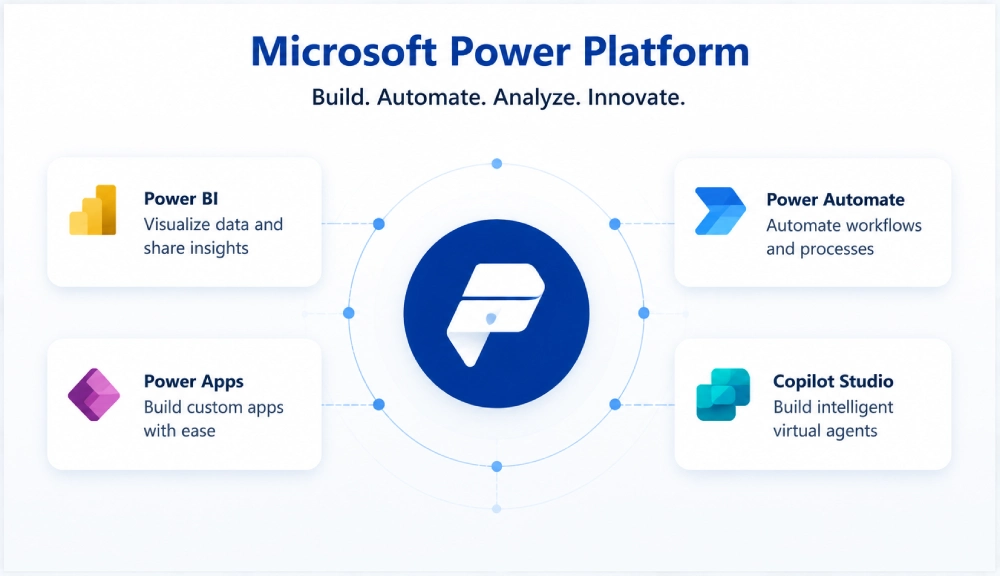
Microsoft Power Platform is a unified low-code environment that combines four core products: Power BI for data visualization, Power Apps for application development, Microsoft Power Automate for workflow automation, and Microsoft Copilot Studio for conversational AI. Together, they connect to your existing Microsoft 365 infrastructure and over 1,400 third-party data sources, including Salesforce, SAP, Oracle, and Google Workspace.
What separates Power Platform from standalone tools is how these four products operate as a single, governed ecosystem rather than isolated applications. Citizen developers build apps using drag-and-drop interfaces. Professional developers extend those apps through custom connectors and Azure integration when complexity demands it. IT administrators maintain centralized governance, role-based security, and compliance policy enforcement across all environments.
In 2026, the platform’s AI-native architecture has become its defining differentiator. Copilot capabilities are embedded directly into Power Apps, Power Automate, and Power BI, allowing development teams at enterprise software companies to build faster, automate smarter, and surface insights with far less manual effort.
Top 10 Benefits of Microsoft Power Platform for Enterprise Productivity
The value Power Platform delivers compounds across these ten benefit areas. Gains in one dimension, such as faster development, directly amplify outcomes in another, such as faster time-to-market. Here is where that value actually shows up.
1. Accelerated Application Development Through Low-Code Capabilities
Power Apps compresses multi-month development cycles into weeks by providing visual designers with pre-built templates and a component library of ready-made UI elements and business logic patterns. According to a 2024 Forrester Total Economic Impact study commissioned by Microsoft, development time drops by 50% for professional developers, effectively doubling team capacity without adding headcount.
Businesses report creating functional prototypes within hours and deploying production applications in 2 to 4 weeks, a 10x improvement over conventional approaches. In 2026, AI-powered Copilot assistants within Power Apps push this further: developers using Copilot achieve a 60% higher application success rate, and automations are built twice as fast with AI assistance. Teams can focus engineering effort on unique business requirements rather than rebuilding foundational components.
2. Intelligent Automation That Eliminates Manual Workload
Manual, repetitive tasks consume an estimated 40 to 60% of knowledge worker time. Power Automate targets this waste directly through low-code and no-code workflow automation spanning cloud flows, desktop RPA flows, and AI-powered process intelligence. The Forrester study found organizations achieved a 248% ROI from Power Automate alone.
Cloud flows handle document routing, data synchronization, notifications, approval chains, and scheduled tasks. Pre-built templates provide starting points for common scenarios including employee onboarding, invoice processing, and inventory threshold alerts. Advanced flows support conditional branching, parallel processing, and structured error handling comparable to hand-written code. AI Builder adds document intelligence, extracting structured data from unstructured invoices and forms automatically.
Desktop flows extend robotic process automation capabilities to legacy Windows applications that lack modern APIs. Organizations report 10 to 15 hours saved weekly per automated process, with error rates dropping between 85 and 95% as rule-based decisions move from humans to validated workflows.
3. Seamless Integration With Microsoft 365 and Enterprise Systems
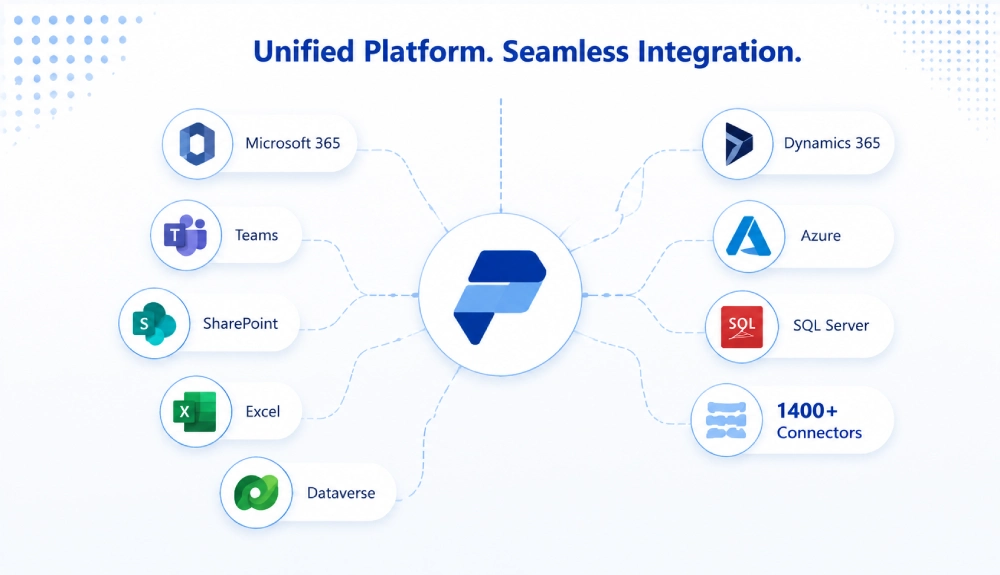
Data silos are one of the most persistent obstacles to enterprise productivity. Power Platform’s native Microsoft 365 integration means SharePoint lists, Excel workbooks, Outlook calendars, and Teams channels become instant data sources for applications and automations without writing integration code. Build an approval application in Power Apps, embed it in Teams, trigger notifications through Outlook, and store records in SharePoint as a single connected workflow.
Beyond Microsoft 365, the platform includes over 1,400 pre-built connectors. Premium connectors bridge cloud services to legacy on-premises infrastructure through data gateway support. For organizations with complex or proprietary systems, Power Platform supports custom connector development, Azure Functions, and webhook-based integrations, making it extensible without requiring architectural redesign. This flexibility aligns directly with composable enterprise architecture strategies that are defining how IT departments operate in 2026.

4. Advanced Data Visibility Through Power BI Analytics
Enterprises are generating more data than ever, yet decision-making often lags because that data sits in disconnected systems or requires analysts to build reports manually. Power BI transforms raw data across multiple sources into interactive visualizations that non-technical stakeholders can explore in real time.
The platform processes billions of rows while applying AI-powered analytics that surface patterns and anomalies humans would likely miss. Natural language query capabilities allow executives to type questions like “which product lines underperformed last quarter” and receive visual answers without understanding database structures or SQL. Row-level security enforces data access policies at the visualization layer: sales managers see their territories, finance teams see approved metrics, and executives access enterprise-wide views, all from the same report.
Real-time dashboards replace batch reporting delays, and Power BI reports embed directly into Power Apps, SharePoint pages, and Teams channels. According to the Forrester study, organizations saved an equivalent of $44.4 million in time over three years, with employees recapturing up to 25% of their time previously spent on manual reporting tasks.
5. Improved Decision-Making Through Embedded AI and Machine Learning
AI Builder makes machine learning practical for enterprise teams without requiring data science expertise. Business analysts upload sample documents, label data fields once, and AI Builder generates custom models for form processing, object detection, sentiment analysis, and prediction. These models integrate directly into Power Apps and Power Automate, enabling real-time AI-informed decisions at the point of action rather than in separate analytics workflows.
Prediction models trained on historical data forecast customer churn, equipment maintenance needs, inventory replenishment, and lead quality scoring. For organizations with more complex requirements, Power Platform connects to Azure Machine Learning for custom model deployment and management. Teams pursuing broader AI and ML development can combine these capabilities with Azure Cognitive Services and generative AI integration to build sophisticated decision-support systems on top of the Power Platform foundation.
6. Increased Business Agility and Faster Time-to-Market
Market conditions do not wait for development cycles to complete. Power Platform’s iterative model supports rapid prototyping: build a minimal viable application, deploy it to a pilot group, gather feedback, and scale in weeks rather than quarters. Built-in environment management separates development, testing, and production workloads. Solution packaging bundles applications, flows, and data models for consistent, repeatable deployment across environments.
This agility also extends to business model experimentation. Organizations can test new service offerings by quickly assembling an application rather than committing months of engineering to an unproven concept. Failed experiments cost days, not budgets. According to the Forrester study, organizations report 60 to 70% reductions in time-to-market for new solutions, with the platform contributing measurably to additional revenue from faster product and service launches.
7. Stronger Cross-Departmental Collaboration
Isolated departmental tools generate duplicated effort and conflicting data. Power Platform’s Teams integration addresses this at the workflow level: Power Apps embed directly inside Teams channels where work actually happens. Sales teams access customer applications without leaving Teams. Operations review live dashboards during stand-ups. Project teams trigger approval flows from conversation threads, with no context switching required.
Microsoft Dataverse provides a common data layer that cross-functional applications share, eliminating the conflicting spreadsheets and shadow databases that plague multi-department collaboration. Center of Excellence (CoE) toolkits provide governance frameworks that balance citizen developer enablement with IT control. According to Gartner, by 2026, 80% of low-code platform users will come from outside formal IT departments, making this governance infrastructure essential for organizations scaling adoption responsibly. Teams implementing low-code development strategies benefit directly from this structured model.
8. Enterprise-Grade Security Built Into the Platform
Security concerns stall more technology initiatives than technical limitations. Power Platform addresses enterprise security requirements through Azure Active Directory integration, which enforces multi-factor authentication and conditional access policies across all platform components. Data loss prevention policies control which connector combinations are permitted, reducing accidental data exposure without requiring custom security engineering.
Role-based access control extends to individual application features, data rows, and automation permissions. Encryption protects data at rest and in transit. Environment strategies with separate development, testing, and production boundaries enforce change management processes and security isolation. Organizations building secure web applications on top of Power Platform inherit this security architecture rather than building it from scratch. Microsoft’s reported annual security investment exceeding $1 billion provides protection depth that most individual organizations cannot replicate independently.
9. Scalability From Pilot to Enterprise-Wide Deployment
Power Platform applications that serve dozens of pilot users handle thousands of enterprise users without manual performance optimization or architectural changes. The platform distributes processing across Microsoft’s global datacenter network, maintaining response times regardless of user location or load volume. Multi-geo data residency capabilities allow organizations to keep European data in EU datacenters, US data in US facilities, and Asian data in Asian regions simultaneously, addressing data sovereignty requirements without building custom infrastructure.
Organizations pursuing cloud computing services benefit from this cloud-native scaling model: start with limited licenses for a pilot group, then scale through volume licensing agreements as adoption expands. Microsoft announced pay-as-you-go consumption options in January 2026, providing flexible alternatives to seat-based licensing for organizations with variable workload profiles. Teams report supporting 10x user growth and 50x application portfolio expansion without performance degradation as deployments mature.
10. Reduced Development and Operational Overhead
Enterprise software spending compounds quickly across licensing, hosting, maintenance, and specialized engineering talent. Power Platform consolidates significant portions of this overhead. The platform eliminates separate hosting infrastructure, database licensing, and security tooling for applications built within the governed environment. Maintenance workload reductions of 40 to 60% are reported by organizations that migrate manual or legacy processes to Power Automate-based workflows, according to the Forrester study.
Shadow IT expenses disappear when business units gain approved, governed tools for self-service development rather than procuring unmanaged point solutions. IT teams shift from reactive maintenance to proactive governance, capability building, and higher-value integration work. For organizations considering digital transformation, this reallocation of engineering capacity toward strategic initiatives is often as significant as the direct operational savings.
Our Perspective on Power Platform in Enterprise Environments
Working on enterprise application projects across healthcare, fintech, and non-profit sectors in San Diego and beyond, our team at Bitcot consistently observes the same pattern: Power Platform delivers the fastest value when organizations treat it as an integration layer rather than a replacement for custom development. The platforms that struggle are the ones where citizen developers build in isolation without a data architecture plan or connector governance policy in place from day one.
In practice, the most successful implementations we have worked on pair a Power Apps front end with a well-structured Dataverse data model and a clear separation between what citizen developers build and what professional developers extend. That boundary varies by organization. For a fintech client managing complex approval workflows, the boundary was around the financial calculation logic. For a healthcare software team, it was around the data transformation layer connecting Power Platform to their clinical data systems. Getting that boundary defined early is what separates a scalable deployment from one that becomes difficult to maintain at scale.

Conclusion
Microsoft Power Platform benefits span the full enterprise technology stack: faster development cycles, intelligent process automation, real-time analytics, embedded AI, and cloud-native scalability that grows with your organization. The ten areas covered in this guide are not independent features. They compound. Faster development leads to faster time-to-market. Better analytics improves decision quality. Intelligent automation frees the engineering capacity needed to build higher-value solutions.
According to Gartner, low-code platforms will represent 75% of new application development by 2026. Organizations that establish governed, scalable Power Platform deployments now are building a durable operational advantage over those still running on manual processes and six-month development timelines. The practical first step is identifying two or three processes where the cost of inaction is most visible, and building your first production solution there. That initial win creates the internal momentum needed to scale adoption confidently.
Frequently Asked Questions
What is Microsoft Power Platform and what does it include?
Microsoft Power Platform is a unified low-code development suite that includes Power BI for data analytics, Power Apps for application development, Power Automate for workflow automation, and Microsoft Copilot Studio for building conversational AI agents. The four products share a common data layer through Microsoft Dataverse and connect natively to Microsoft 365, Azure, and over 1,400 third-party data sources and services.
What are the main benefits of Microsoft Power Platform for enterprise teams?
The primary benefits include accelerated application development through low-code tools, intelligent process automation that reduces manual workload, seamless integration with Microsoft 365 and enterprise systems, real-time data visibility through Power BI, embedded AI and machine learning capabilities, and cloud-native scalability. Enterprise teams consistently report significant reductions in development cycle time and operational overhead when Power Platform is deployed with a clear governance framework in place.
How does Microsoft Power Platform compare to custom software development?
Power Platform is best suited for process automation, data-driven applications, reporting dashboards, and cross-system integrations where standard connectors and visual development tools meet the requirements. Custom software development remains the right choice for applications with highly specific logic, proprietary algorithms, or user experience requirements that fall outside what the low-code environment can produce. Many organizations use both in combination: Power Platform for rapid internal tooling and automation, custom development for differentiated customer-facing products.
Is Microsoft Power Platform a good fit for healthcare and fintech enterprises?
Yes, Power Platform is widely used in healthcare and fintech enterprises for workflow automation, operational reporting, and internal application development. Healthcare organizations use it to build care coordination tools, patient intake workflows, and operational dashboards. Fintech teams use it for approval workflows, data reconciliation, and reporting automation. Teams building more complex clinical or financial applications often extend Power Platform with custom development through Azure, combining the speed of low-code with the flexibility of custom engineering.
How long does it take to see results from a Microsoft Power Platform implementation?
Most organizations report measurable results within the first 4 to 8 weeks of a focused Power Platform implementation when they target a well-defined, high-frequency manual process. Pilot applications are typically live within 2 to 4 weeks. The time to broader enterprise impact depends on governance readiness, training investment, and how clearly initial use cases are scoped. Organizations that define their Center of Excellence structure and connector governance policies before launching citizen developer programs scale significantly faster than those that address governance reactively.
What is the difference between Power Apps and Power Automate?
Power Apps is used to build custom business applications with user interfaces, forms, and data management capabilities. Power Automate is used to create automated workflows that run in the background, such as routing approvals, syncing data between systems, sending notifications, or triggering actions based on events. The two products work closely together: a Power Apps form submission can trigger a Power Automate flow, which then routes data across multiple connected systems and notifies the relevant stakeholders automatically.