Every organization with a database has the same quiet bottleneck: the people who need answers cannot write SQL, and the people who can write SQL are buried in requests for numbers someone could have pulled themselves. Here is the business case for closing that gap with a conversational copilot, and the range of industries where it pays off fastest.
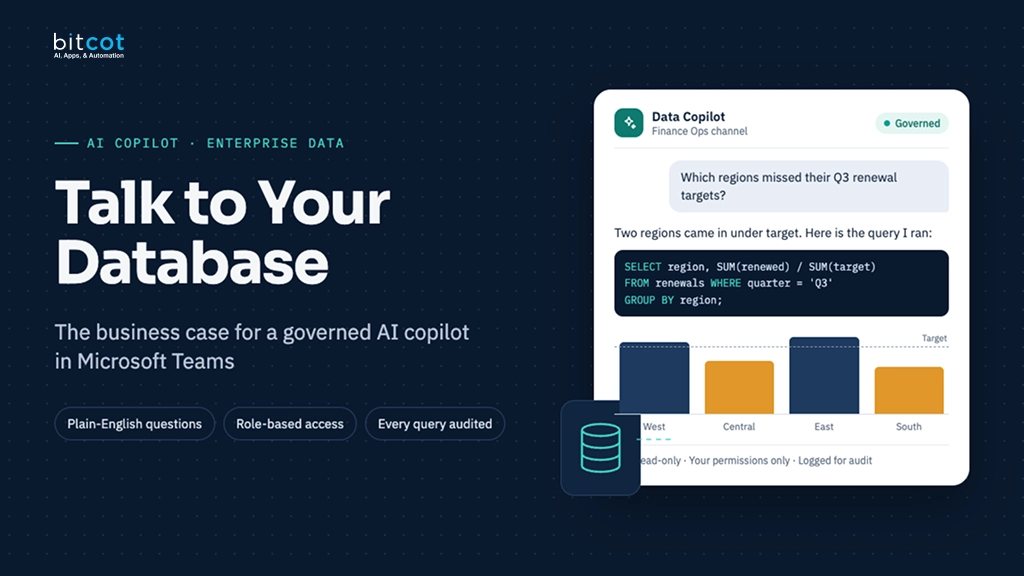
The idea in one picture: a user types a plain-language question in Microsoft Teams, an AI agent turns it into a safe SQL query, and the answer comes back as a table or chart – no analyst, no ticket, no wait.
Key takeaways
- The real cost of “ask an analyst” is not the query itself; it is the queue: decisions wait days for numbers that take seconds to compute.
- A natural language to SQL copilot turns your existing database into a self-service tool without exposing raw data access or write permissions to end users.
- The pattern is industry-agnostic: any organization with structured data and non-technical decision-makers is a fit, from retail and healthcare to finance, manufacturing, and HR.
- Delivering it inside a tool people already use, like Microsoft Teams, removes the adoption problem that kills most BI rollouts.
- The safety of the system, not the fluency of the chatbot, determines whether it is enterprise-ready. Read-only access, authentication, and tenant isolation have to be architectural guarantees, not prompt instructions.
- Rent the conversational plumbing, build the governance layer that decides what each user is allowed to ask for.
Almost every mid-size and enterprise organization has invested in dashboards, and almost every one of them still fields the same message on Slack or Teams: “can someone just pull me a number real quick?” Dashboards answer the questions someone anticipated. They do not answer the question a sales director thinks of during a Tuesday afternoon meeting. At Bitcot, we specialize in agentic development and data-integration systems for enterprise teams, and the request we hear across nearly every industry is the same one, phrased each time differently: let non-technical people ask questions in plain English and get a trustworthy answer, without opening up the database to risk. This is the business case for the architecture that does that, and a look at where it applies.
The business problem: data that only specialists can reach
Diagnosis pass
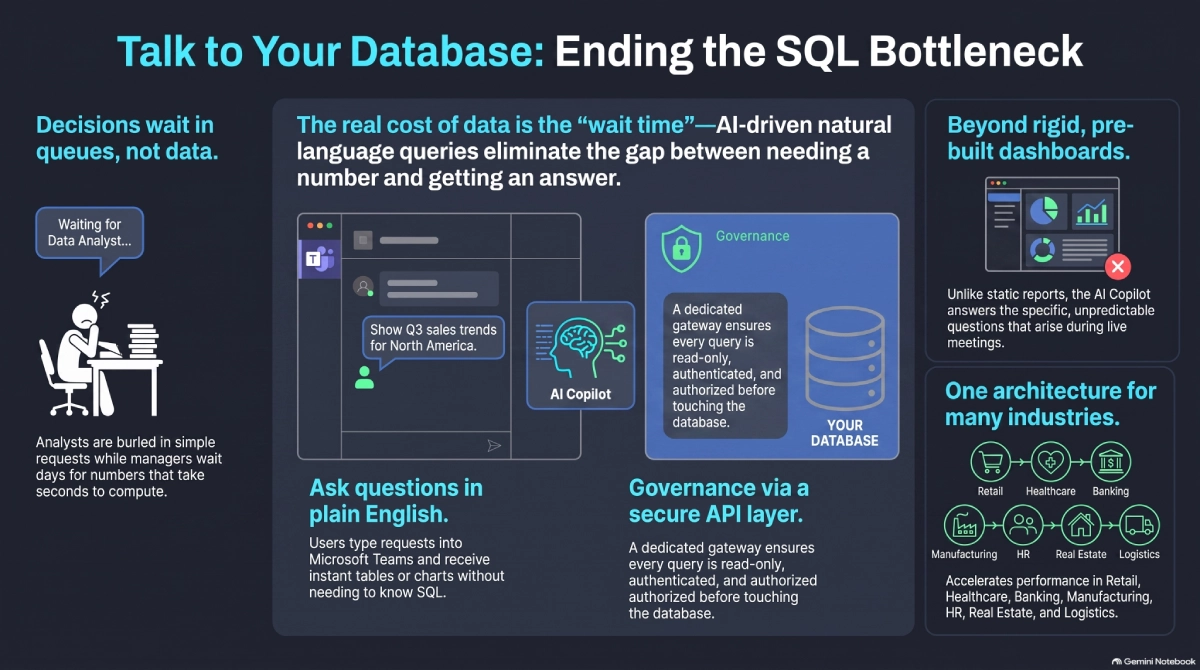
The pattern repeats at almost every organization we work with, regardless of industry. The data exists. The infrastructure to store and query it is solid. The bottleneck is entirely human, and it shows up in three predictable ways.
Decisions wait in a queue, not on the data
A regional manager wants this month’s sales by territory. A clinic director wants this week’s no-show rate. A plant supervisor wants yesterday’s defect count by shift. None of these people can write SQL, so the request goes to an analyst, gets triaged behind ten other requests, and comes back a day or three later – by which point the decision it was meant to inform has often already been made without it.
Dashboards only answer the questions someone predicted
BI tools are excellent at the twenty reports a team decided it needed six months ago. They are poor at the question that occurs to someone in the moment, phrased in a way the dashboard’s filters were never built to handle. Every dashboard eventually accumulates a graveyard of unused filters and a growing pile of “can you also add…” tickets.
Self-service tools that exist rarely get adopted
Plenty of vendors sell “ask your data” tools. Most fail quietly, not because the underlying model is weak, but because they live in a separate app people forget to open, require training nobody has time for, or return results with no visible safety rails, so business users do not trust the number enough to act on it.
The trap: Because the underlying technology – a large language model that can write SQL – looks solved, teams assume the hard part is picking a vendor. The actual hard part is everything around the model: getting the tool in front of users where they already work, making sure it has the skills to understand your specific schema and business terms, and guaranteeing it can never run a query that damages data or crosses a permission boundary it shouldn’t. Skip that, and you have a demo, not a rollout.
The solution: a governed natural language copilot, not just a chatbot
Prescription pass
The fix is not a smarter chatbot bolted onto a database. It is a small stack where each layer has exactly one job, and the layer closest to the data is the strictest one.
Meet users where they already work
Instead of another app to log into, the copilot lives inside Microsoft Teams – the same place people already ask each other for numbers. A user types a question in plain language, sees the conversation history maintained automatically, and gets results back as a table, chart, or card they can share directly in the channel where the decision is happening.
Let AI handle understanding and query-writing, nothing more
A Copilot Agent interprets what the user is actually asking – the domain, the entities, the time frame – using the conversation’s context, and only then drafts the SQL to answer it. It validates and optimizes that query and, critically, ensures it is read-only before it goes any further. The agent’s job stops at “here is a safe, well-formed question.” It does not get to decide who is allowed to see the answer.
Put a governed harness gate between the AI and the database
This is the layer that makes the difference between a demo and something IT will actually approve. A custom API sits between the agent and the database: it authenticates every request, checks the caller’s authorization for that specific tenant or department, validates the query one more time, executes it, and logs everything. The database itself never receives a request the API has not already cleared.
Keep the database exactly as it is
MySQL, or whatever the system of record already is, does not change. It is reached only through a secured connection from the API’s query executor, and it only ever sees requests that have already passed authentication, authorization, and validation. Nothing about existing reporting, applications, or integrations has to move.
The value isn’t a chatbot that can write SQL. It’s a chatbot that can only write the SQL you’d approve of, running against data it’s been explicitly allowed to touch.
Where this works: industries and use cases
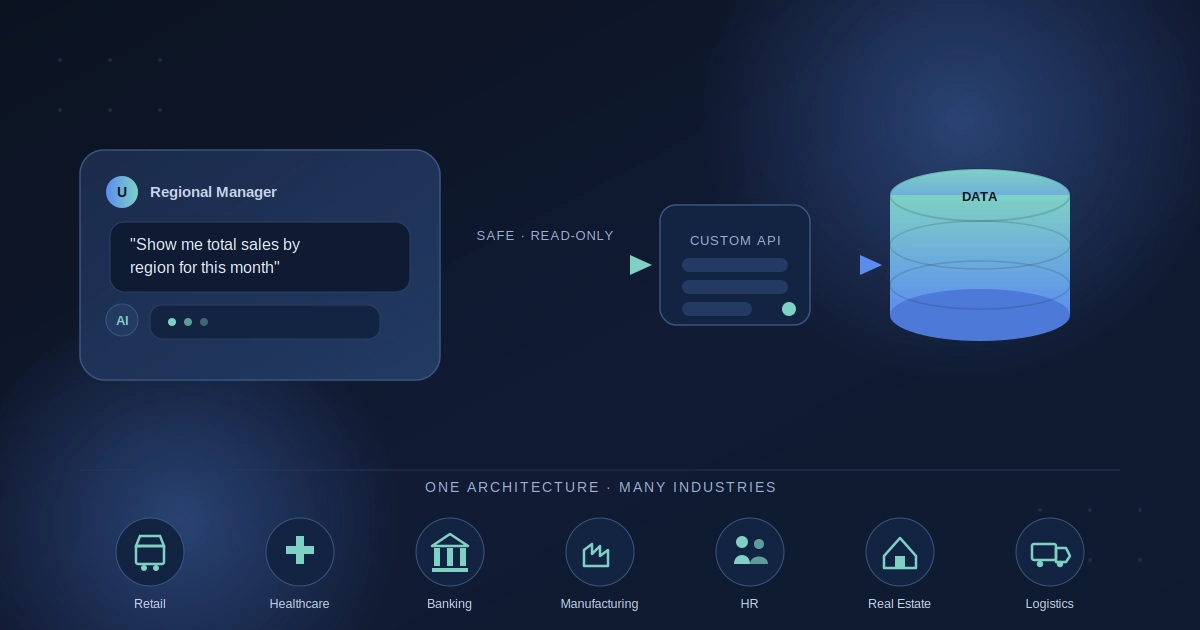
This pattern is not tied to one dataset or one department. Anywhere a non-technical team member needs an answer that lives in a structured database, the same five-layer architecture applies. A few examples of where it pays off fastest:
Retail and e-commerce. Store and regional managers ask for sales by location, inventory turnover, or return rates without waiting on a BI team, and marketing teams can check campaign performance the moment a promotion goes live instead of the following Monday.
Healthcare and life sciences. Clinic administrators and care coordinators check appointment volumes, no-show rates, or bed occupancy in plain language, while compliance teams get an auditable, read-only path to the data instead of ad hoc spreadsheet exports.
Banking and financial services. Branch and relationship managers pull account activity, loan pipeline status, or transaction volumes on demand, with tenant isolation ensuring one branch or client’s data never leaks into another’s results.
Manufacturing and supply chain. Plant supervisors and operations leads ask for defect rates by shift, on-time delivery percentages, or inventory levels across warehouses without filing a ticket to a data team that is three time zones away.
Human resources and workforce management. HR business partners check headcount, attrition, or time-to-fill by department directly, instead of maintaining a rotating set of spreadsheets that are out of date the day they are built.
Real estate and property management. Portfolio managers can pull occupancy rates, maintenance request volumes, or lease expirations across properties in seconds, rather than waiting for a monthly report cycle.
Logistics and field services. Dispatch and operations teams check fleet utilization, delivery times, or job completion rates by region without pulling a report from a system only one person on the team knows how to query.
The common thread across all of these: structured data already exists, the people who need it most cannot query it directly, and the cost of that gap is measured in delayed decisions, not missing data.
Build it or buy it
Microsoft’s Copilot Studio and the Teams platform provide the conversational shell – chat interface, adaptive cards, session handling – and that is genuinely commodity infrastructure worth renting rather than rebuilding. The part worth owning is the custom API layer: the authentication rules, tenant isolation logic, read-only enforcement, and audit trail that reflect how your organization actually governs access to its data. That logic is specific to your business, compliance requirements, and org chart, and a generic connector shouldn’t decide it for you.
Rule of thumb: if a component’s job is “let someone type a message and see a response,” buy it. If its job is “decide whether this person is allowed to see this data,” build it, and treat it as core intellectual property.

What a production-ready rollout looks like
Pulling it together, a rollout that earns business users’ trust and IT’s sign-off tends to share a few traits. It lives inside a tool people already use, so adoption does not depend on a training session. Every generated query is read-only and validated before execution. A dedicated API layer authenticates and authorizes every request by tenant or department, and it is the only component with database credentials. The underlying database is untouched and only ever receives pre-cleared queries. And the whole path runs over HTTPS with a logging and monitoring trail a compliance team would recognize on sight.
None of this requires exotic technology. It requires resisting the shortcut of connecting a model directly to production data and calling the problem solved.
Frequently Asked Questions
Do we need a data team to roll this out, or can business users query anything?
Business users interact only through natural language in Teams; they never get direct database access. A data or platform team still defines what each role or tenant is authorized to see, which is enforced in the API layer, not left to the AI’s judgment.
Is this only useful for reporting, or can it support real decisions?
It’s built for exactly the questions that inform real-time decisions – the ones that come up in a meeting or a shift change and can’t wait for the next scheduled report. Because every query is read-only, it’s safe to put in front of decision-makers without risking the underlying data.
How hard is it to adapt this to our specific industry or schema?
The five-layer architecture doesn’t change between industries; what changes is the schema and business vocabulary the Copilot Agent is taught to map to. That configuration work is what makes the rollout feel native to your business rather than generic.
What stops this from becoming a security or compliance risk?
The custom API layer, not the AI model. Authentication, tenant authorization, read-only enforcement, and logging all happen there, so even a misinterpreted question can’t result in an unauthorized or destructive query.