Key Takeaways
- AI agents amplify whatever QA process you give them. A fragmented process produces fragmented results, only faster.
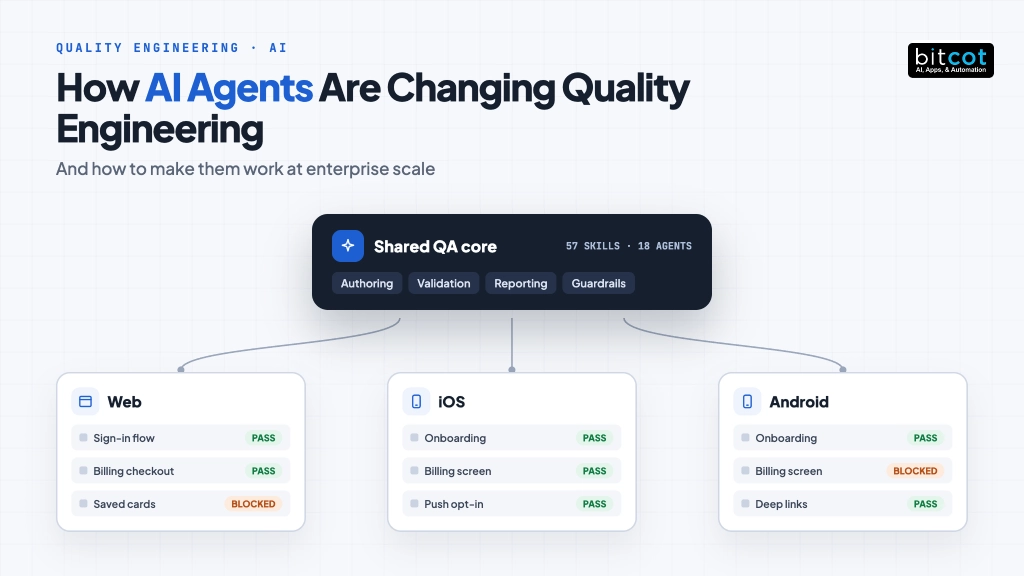
- Packaging the QA practice as a versioned library of agent “skills” gives web, iOS and Android one shared standard.
- One shared core plus thin platform layers keeps every rule in exactly one place.
- Guardrails and automated checks are designed in from day one, not added later.
AI coding agents can write and run tests faster than any team. The hard part is making them follow your standards on every platform, every time. This is the blueprint we used to do it.
The problem: AI without a playbook
Most engineering leaders we speak with have already tried an AI assistant for testing. The first impression is usually impressive: a test case drafted in seconds, an automation script generated from a plain description, a bug reproduced from a screenshot.
The second impression is often less so. The web team’s AI-written tests look nothing like the mobile team’s. One engineer’s assistant tags cases one way, another engineer’s assistant tags them differently.
Results land in the wrong folder. Nobody is quite sure what the agent was allowed to change, or whether a reported “pass” means the step really ran.
The problem is not the AI model. It is that the AI has no shared playbook. Without one, every engineer’s assistant improvises, and improvisation does not scale.
At Bitcot, we recently built that playbook for an enterprise client in a regulated industry. The client runs a large customer-facing web application alongside native iOS and Android apps, with separate QA teams for each. This article explains the approach in detail.
When web, iOS and Android testing grow up separately, each team develops its own conventions for writing test cases, naming evidence, reporting results and handling test accounts. None of these conventions is wrong on its own. Together they create costs that rarely appear on a dashboard:
| Symptom | What it costs |
|---|---|
| Three ways of writing a test case | Reviews debate format instead of coverage, and cases cannot be compared across platforms. |
| Knowledge held by a few senior testers | Onboarding depends on who has time to explain, and expertise leaves when people do. |
| Different reporting paths | Release decisions rely on results that were gathered and labeled inconsistently. |
| Uneven depth of coverage | The same feature is tested thoroughly on one platform and lightly on another. |
| Ad hoc handling of test credentials | Secrets drift into scripts, chat messages and screenshots. |
AI agents do not fix any of these on their own. They amplify whatever process they are given. Give them a fragmented process and they produce fragmented results at much higher speed.
The fastest way to scale a messy QA process is to hand it to an AI agent. The fastest way to scale a good one is the same.
What an agent “skill” is
Instead of writing ever-longer prompts, we packaged the client’s QA practice into a library of skills. A skill is a short, focused set of instructions for one job, together with the templates, reference material and scripts that job needs. AI agents load a skill automatically when a request matches it.
Some examples of skills in the library:
- Authoring test cases in the agreed format, with the agreed tags and shared parameters.
- Validating test steps by running each one against the live test environment before a case is accepted.
- Converting manual scenarios into automated browser or mobile tests.
- Running tests on device clouds and writing the results back to the test management system.
- Generating module specifications from a read-only exploration of the application.
- Reviewing coverage independently, by comparing what the application shows with what the cases cover.
- Testing accessibility and visual consistency.
For bigger jobs, the library also includes dedicated subagents: narrowly scoped AI workers such as an explorer that walks the application read-only, or a generator that runs every account-switching case for one test user. Every skill also ships with routing evaluations, small scenarios that confirm the right skill is chosen for a given request.
The architecture: one core, three platforms
We organized the library as one shared core package plus one package per platform. Teams always install the core together with the platform they work on.
One shared core, three platform packages
Shared rules live once in the core. Each platform adds only what is genuinely different.
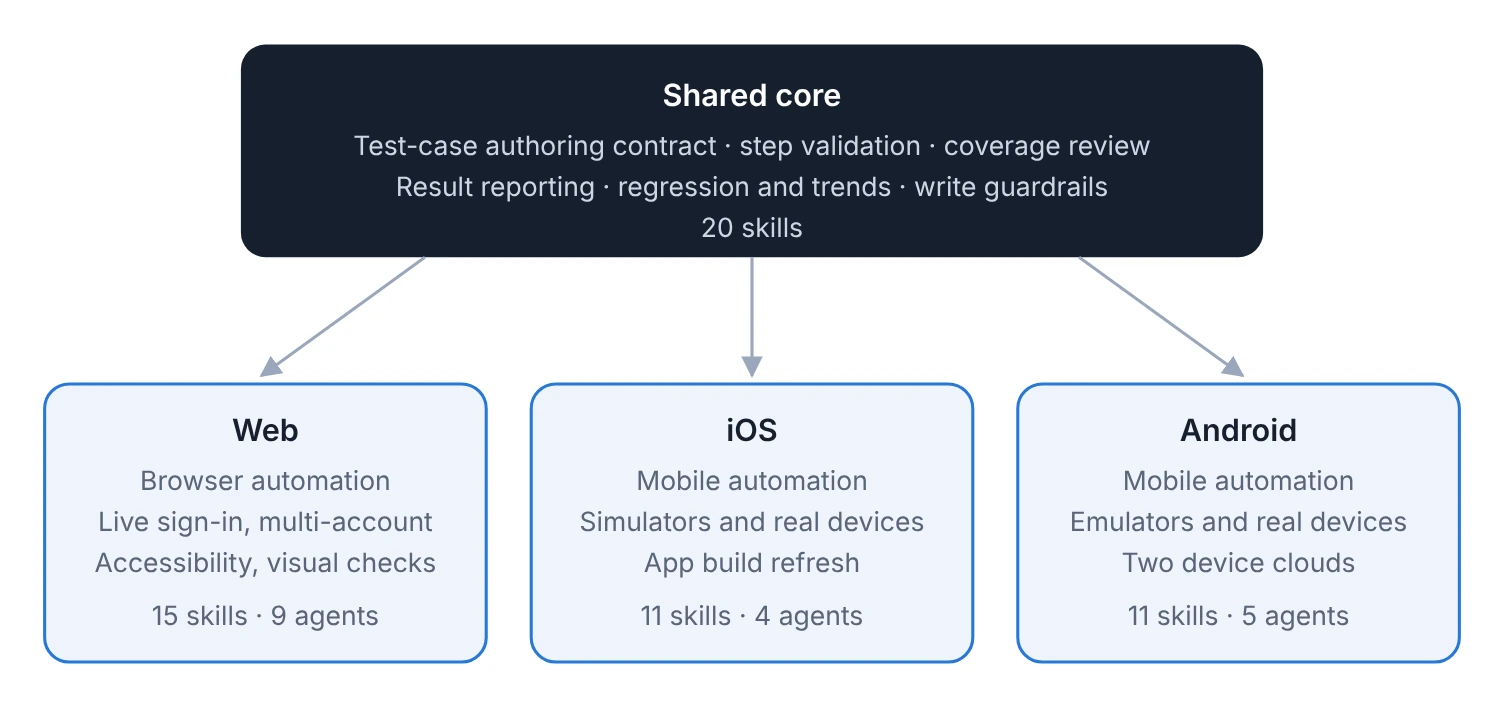
Figure 1. The library’s structure. Each platform package builds on the core rather than repeating it
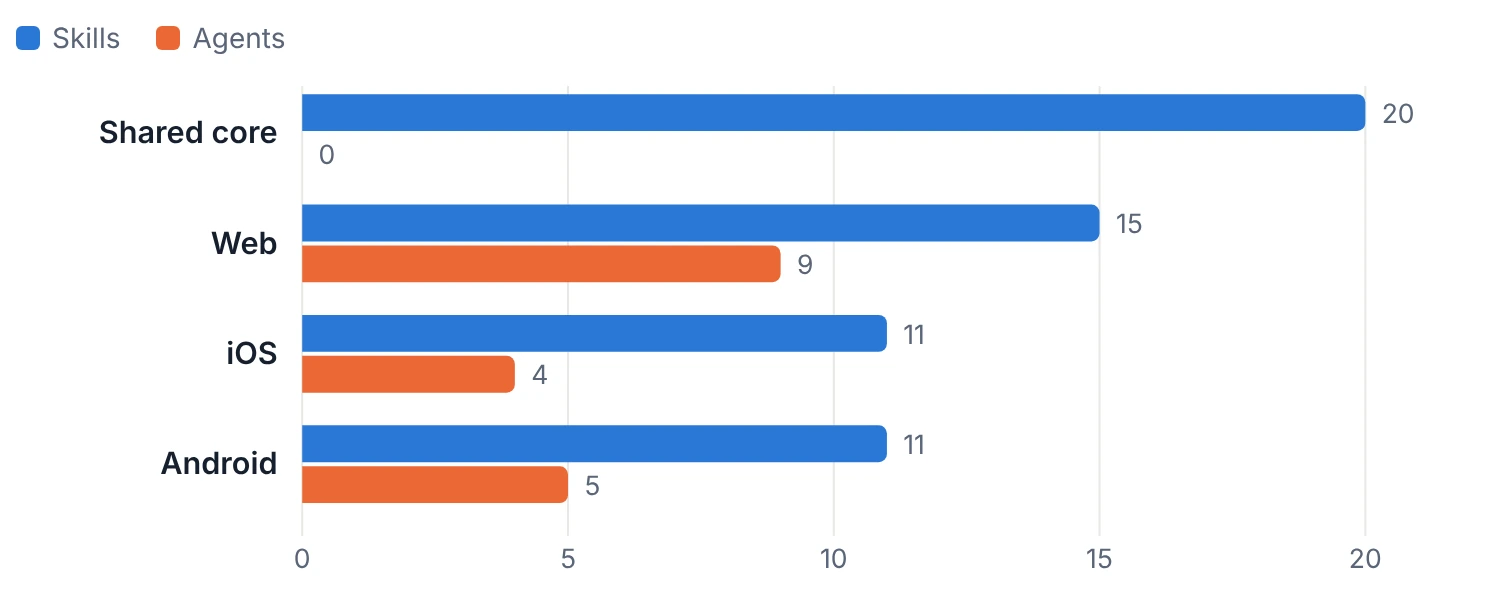
Skills and agents in each packageCount of reusable skills and dedicated subagents shipped in each package of the library.
The placement rule that keeps it honest
The single most valuable design decision was a plain rule for where every new capability goes. It removes debate and prevents the slow duplication that kills shared standards.
Where does a new skill go?
One question decides the placement of every capability added to the library.
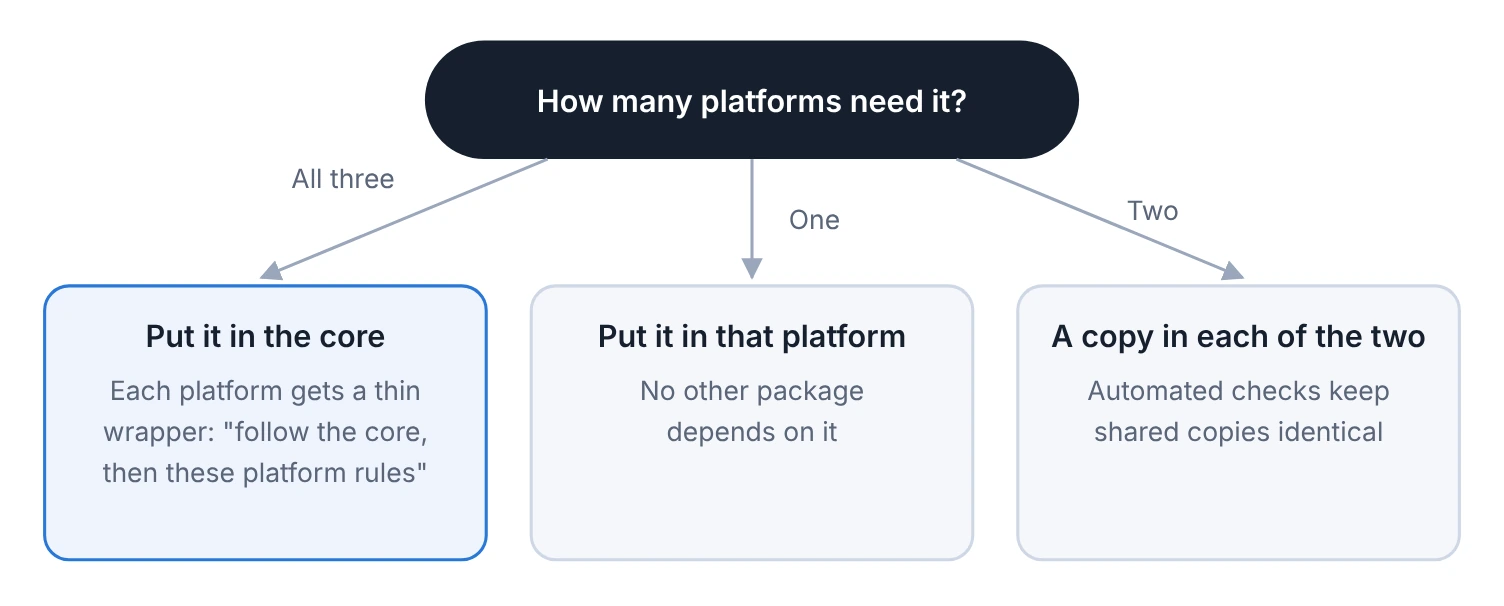
Figure 3. The thin-wrapper pattern means a change to a shared rule happens once and every platform inherits it.
The thin wrapper is what turns a shared standard from a document into a working system. When the core rule for writing an expected result changes, all three platforms pick it up. When the web team needs to say something about browser sessions that would make no sense on a phone, it says it in the web wrapper and nowhere else.
A day in the life of an AI-assisted tester
Here is how a typical request flows through the system once the library is installed.
- The request. A tester asks their AI agent to write test cases for a new billing feature.
- The right skills load. The agent recognizes the request and loads the shared authoring skill plus the web platform’s additions.
- Grounding. If the feature has a specification, the agent works from it. If not, it can explore the feature read-only first.
- Drafting. Cases are written in the agreed format, with standard tags and requirement references.
- Live validation. The agent runs each step against the test environment and judges it. Steps that cannot run because of missing test data are marked blocked, not failed.
- Review and publish. A person reviews the cases. Only after an explicit approval can they be written to the test management system.
A tester on the mobile team gets exactly the same structure, tags and reporting, without configuring anything by hand.
- 3 platforms: Web, iOS and Android following one shared testing standard.
- 57 skills: Reusable capabilities across the four packages of the library.
- 18 agents: Narrowly scoped AI workers for exploration, generation and execution.
How the QA process itself evolves
Because the library is versioned and released like any other software, improving the QA process becomes ordinary engineering work rather than a memo that some people read.
The life of a process changeFrom proposal to every team’s machine, each step is reviewed and automated.

Figure 4. A version check refuses any change that forgets to raise its package’s version, so no team silently stays on an old process.
Every proposed change runs through an automated suite that confirms instructions point at files that exist, shared helpers have not drifted apart, configuration files are valid and the version has been raised. The suite needs no secrets, so it runs on every change from every contributor.
Guardrails designed in
Enterprise teams rightly ask what an AI agent is allowed to do. In this design, the answer is enforced rather than hoped for:
- Write gate: the agent cannot create or overwrite official test cases without explicit authorization.
- Read-only exploration: when the agent explores the application, it never submits, pays, deletes or sends.
- Credentials stay out of the AI: passwords are used by scripts directly and never pass through the agent.
- Honest results: “blocked”, “failed” and “application defect” are distinct outcomes, so a pass always means a real pass.
We cover these safeguards in depth in our article on guardrails for AI-driven testing.

How to get started in your organization
You do not need to rebuild your QA practice to benefit from this approach. We typically start in four phases:
| Phase | What happens | Outcome |
|---|---|---|
| 1. Discover | Map your current test conventions, tools and pain points across platforms. | A shared standard everyone agrees on. |
| 2. Core | Package the shared rules: authoring, validation, reporting, guardrails. | One source of truth for how testing works. |
| 3. Platforms | Add thin platform layers for web, iOS and Android automation. | Every team on the same process, with platform depth. |
| 4. Scale | Add exploration, specification and coverage review skills. | Coverage grounded in the real application. |
What your team gains
- Faster onboarding: new testers inherit a working process instead of learning several informal ones.
- Consistent quality across platforms: the same feature is held to the same standard on web and mobile.
- Institutional knowledge that stays: your test strategy lives in a versioned library, not in a few people’s heads.
- AI productivity without the chaos: agents move fast, but inside rules your team defined.
Frequently Asked Questions
What is an agent skill in quality engineering?
An agent skill is a short, focused set of instructions for one QA job, packaged with the templates, reference material, and scripts that the job needs. AI agents load a skill automatically when a request matches it. Examples include authoring test cases, validating test steps, and reviewing coverage.
What is the difference between a skill and a subagent?
A skill is a set of instructions for one job, while a subagent is a narrowly scoped AI worker used for bigger jobs. An explorer that walks the application read-only is one example of a subagent. A generator that runs every account-switching case for one test user is another.
How do you decide where a new QA skill belongs?
One question decides it: how many platforms need the skill. If all three do, it goes in the shared core and each platform gets a thin wrapper. If one platform needs it, it goes in that platform’s package, and if two need it, each of the two carries a copy that automated checks keep identical.
Can AI agents be used safely for QA in a regulated industry?
Yes, this approach was built for an enterprise client in a regulated industry, with safeguards enforced rather than hoped for. The agent cannot write official test cases without explicit authorization, and its exploration is read-only. Passwords are used by scripts directly and never pass through the agent.
Do we need to rebuild our QA practice to use AI agents at scale?
No, you can start from your current conventions and tools. The approach begins in four phases: discover your current standards, package the shared core, add thin platform layers, and then scale with exploration and coverage review skills. Each phase has its own defined outcome.