For enterprises, educators, and executive boards, the most critical decisions often happen in front of a large screen.
Yet, despite the hardware being everywhere, most organizations struggle to deliver high-quality, interactive geospatial and statistical data to the “10-foot” environment of a television.
At Bitcot, we recognized a significant gap in the market: business intelligence tools that are powerful enough for the boardroom but simple enough to navigate with a standard TV remote.
To solve this, we developed a sophisticated Proof of Concept (PoC), a React Native TV application designed to bring the world’s most robust data sources to the big screen. By integrating OpenStreetMap (OSM) and Esri REST APIs with real-time analytics and weather visualizations, we’ve created a unified window into US geospatial data.
But this isn’t just about a single app. It’s about a strategic architectural shift. Using the Expo and React Native TVOS ecosystem, we’ve built a solution that works seamlessly across:
- Android TV
- Apple TV
- Web Browsers
- Mobile Devices
By maintaining a single, scalable codebase, we’ve eliminated the need for fragmented development teams while ensuring that “D-pad” navigation, the primary hurdle for TV apps, is as intuitive as a touch screen.
This blog explores the journey of building this cross-platform solution and how it can redefine how your organization interacts with its most vital data.
Why Building a TV-Optimized Mapping & Analytics App Is So Challenging
Developing for television is not as simple as stretching a mobile interface to fit a larger screen.
While the hardware is bigger, the technical constraints are significantly tighter. When you layer complex geospatial data and real-time analytics onto that environment, the complexity scales quickly.
Here are the primary hurdles we identified when engineering this solution.
Traditional mapping solutions are designed for touchscreens or mice. They rely on “drag and drop” or “pinch to zoom” gestures that simply do not exist in a television environment. Most React Native components do not natively support focus management for a D-pad remote.
This makes standard maps unusable with a remote control unless you build a custom interaction engine from the ground up to handle directional navigation.
Complex Data Integration and Performance
Merging multiple map data sources like OpenStreetMap (OSM) and Esri REST APIs is a heavy lift for any device. On a TV, the challenge is amplified. Integrating these sources with real-time statistical layers and weather data requires immense processing power.
Maintaining smooth map rendering and seamless layer toggling without lag is a performance-intensive task that requires deep optimization of the rendering pipeline.
Library Limitations and Customization
Many popular React Native libraries are built exclusively for mobile or web. When moving to a TVOS environment, these libraries often fail or lack support for “focus-friendly” interactions.
We found that standard charting and mapping tools require careful selection and extensive customization to work without touch input. Analytics visualization, in particular, must be rebuilt using custom components that allow a user to navigate through data points using only a remote.
The Cross-Platform Codebase Puzzle
The ultimate goal for any enterprise is to maintain a single codebase that serves Android TV, Apple TV, Web, and Mobile. However, achieving cross-platform compatibility without duplicating code is difficult.
Each platform has its own way of handling inputs and rendering graphics. Bridging these gaps while ensuring that demographic data remains consistent across every device is one of the most significant architectural challenges in modern smart TV app development.
What Is a Cross-Platform TV Mapping & Analytics App?
At its core, a cross-platform TV mapping and analytics app is a specialized business intelligence tool designed to function seamlessly across the “big screen” and mobile ecosystems.
Unlike standard consumer apps, it is engineered to handle massive datasets, think territorial sales figures, weather patterns, or demographic shifts, and present them in a format that is readable from ten feet away.
For our PoC, this meant building a solution that acts as a single source of truth, regardless of the device being used.
A Unified View of Geospatial Data
This type of application merges professional-grade mapping engines, such as Esri and OpenStreetMap, into a single interface.
Instead of switching between different software tools, decision-makers can overlay real-time statistical data directly onto a map. Whether you are looking at national logistics or hyper-local weather alerts, the app translates complex API data into a visual story that is easy to digest during a presentation or a briefing.
Engineered for “Lean-Back” Interactivity
The defining characteristic of this application is its navigation philosophy. On a phone, you tap; on a TV, you navigate via “focus.” A true TV-optimized app replaces touch-based interactions with a robust focus engine.
This allows users to jump between map markers, toggle data layers, and scrub through analytics charts using only the directional pad (D-pad) of a standard remote.
The Power of a Single Codebase
From a business perspective, the most important aspect of a “cross-platform” app is the unified architecture. Using frameworks like React Native and Expo, we developed a single logic layer that serves four distinct platforms:
- Android TV & Fire TV
- Apple TV (tvOS)
- Web Browsers
- Mobile (iOS & Android)
This approach ensures that if a data point is updated in the cloud, it reflects simultaneously across the executive’s tablet and the boardroom’s 4K television. It eliminates the need for separate development teams and ensures that your brand’s data visualization looks and feels consistent, no matter where it’s viewed.
Benefits of Using React Native Expo for TV-Based Mapping & Analytics
For business leaders and product owners, the choice of technology stack is often a balance between performance, cost, and speed to market. Choosing React Native Expo for a TV-based mapping project provides a significant strategic advantage by turning what used to be a fragmented development cycle into a streamlined, unified process.
Here are the primary benefits of this approach:
Accelerated Development through Code Reuse
The most compelling business case for React Native Expo is the ability to write code once and deploy it almost everywhere. By leveraging a single codebase, we can share up to 90% of the application logic across Android TV, Apple TV, Web, and Mobile.
This drastically reduces the need for separate engineering teams and ensures that feature updates are synchronized across all platforms simultaneously.
Native Performance on Specialized Hardware
Unlike web-based “wrapper” apps that can feel sluggish on television hardware, React Native renders using native UI components.
This is critical for mapping and analytics, where high frame rates are required to keep map panning and data transitions smooth. Users get the premium feel of a native application with the development efficiency of a cross-platform tool.
Simplified Maintenance and Scalability
Maintaining multiple versions of a data-heavy application, one for Apple, one for Android, and another for the Web, is a logistical burden. With the Expo ecosystem, maintenance is centralized. When your data sources (like Esri or OSM) update their APIs, you only need to adjust the integration in one place.
This allows your team to focus on innovation and data accuracy rather than chasing platform-specific bugs.
Optimized “10-Foot” User Experience
Expo’s mature ecosystem provides the tools necessary to solve the D-pad navigation challenge. Because the framework is built to handle complex interaction states, we can create a “focus-aware” interface that feels natural to the user.
This ensures that even the most data-dense analytics dashboards remain accessible and easy to navigate without the frustration of a “missing” mouse or touch interface.
Lower Total Cost of Ownership (TCO)
By reducing the headcount required for platform-specific development and shortening the QA cycle, the total cost of bringing a TV application to life is significantly lowered.
For enterprises, this means a faster ROI and the ability to pivot or scale the application as new geospatial data layers or statistical requirements emerge.
An Overview of Bitcot’s PoC Solution for TV-Based Mapping & Analytics
At Bitcot, we approached this project with a clear goal: to create a TV-ready mapping and analytics experience that is both powerful and easy to use.
The goal of this PoC was to prove that a high-performance, data-heavy mapping experience could thrive on a television screen using a single codebase.
Building the TV Mapping Prototype
By leveraging Expo and the React Native TVOS framework, we moved beyond a simple prototype to create a unified platform that feels native to the living room while maintaining the power of professional GIS tools.
1. The Mapping Engine: Precision at Scale
At the heart of our solution is a high-performance map rendering engine. We integrated Leaflet.js via a specialized WebView, allowing us to deliver the fluid, responsive experience of a web-based map within the structure of a native TV app. This engine serves as the canvas for two primary data streams:
- OpenStreetMap (OSM) Base Layers: Providing high-resolution, global geographic data.
- Esri REST API Thematic Layers: Enabling users to toggle complex overlays, including demographic trends, infrastructure layouts, and environmental data.
2. Advanced Geospatial Features
To ensure the data remains manageable on a large screen, we implemented City Clustering. Instead of cluttering the screen with thousands of individual data points, the app intelligently groups data based on zoom levels, providing a clean, professional visualization.
Additionally, we integrated real-time weather overlays, allowing decision-makers to see live meteorological impacts layered directly over their infrastructure or demographic maps.
3. Analytics Designed for the Remote
A mapping tool is only as good as the insights it provides. We built a dedicated Analytics Dashboard featuring charts and graphs specifically designed for the TV. These aren’t just scaled-up mobile charts; they are “focus-friendly” components.
This means a user can use their D-pad to “hop” between data points on a bar chart or line graph to see specific values, all without ever needing a mouse or touch interface.
4. The Engineering Achievement: A Single Codebase
The most significant outcome of this PoC is that the logic governing the map layers, the weather data, and the analytics is identical across all platforms.
Whether the user is viewing the app on an Apple TV, an Android TV, or a standard Web Browser, the experience is consistent, stable, and driven by the same core architecture.
Technology Stack Used
To deliver a solution that is both scalable and cost-effective, we chose a modern stack that prioritizes cross-platform compatibility without sacrificing the high-fidelity performance required for GIS (Geographic Information Systems).
- Framework: React Native (Expo) with React Native TVOS, allowing us to maintain a single source of truth for the logic while deploying native-quality apps to TV stores.
- Navigation: Expo Router (file-based) for streamlined page management and Custom D-pad focus management to ensure the remote control interface is intuitive.
- Mapping: Leaflet.js, Esri Leaflet Plugin, and OpenStreetMap Tiles, providing the heavy-duty engine needed to render interactive, multi-layered maps.
- Charts & Analytics: React Native SVG Charts customized with focusable components, enabling users to interact with data points using only their remote.
- State Management: Optimized React Hooks (useState, useEffect, useMemo) to ensure that toggling between complex weather or demographic layers happens instantly.
- Build & Deployment: Expo EAS and the TV Config Plugin (@react-native-tvos/config-tv) for automated, professional-grade deployment to Android TV and Apple TV.
- Platforms: Android TV, Apple TV, Web, and Mobile (iOS/Android), all powered by one unified codebase.
| Category | Technology Used | Business Value |
| Core Framework | React Native (Expo) + React Native TVOS | Rapid development with a single codebase for all platforms. |
| Navigation | Expo Router + Custom D-pad Focus Engine | Ensures 100% remote control compatibility and intuitive UX. |
| Mapping Engine | Leaflet.js, Esri Plugin, & OpenStreetMap | High-performance rendering of professional geospatial data. |
| Data Visualization | React Native SVG Charts (TV-Optimized) | Interactive, focus-friendly analytics designed for the big screen. |
| State Management | React Hooks (useState, useMemo) | Smooth UI transitions and instant data layer toggling. |
| Build & Deploy | Expo EAS + TV Config Plugin | Professional-grade deployment pipeline for App Stores. |
| Platform Reach | Android TV, Apple TV, Web, & Mobile | Maximum audience reach with zero code duplication. |
Key Features Built for 2026
To stay ahead of the curve in enterprise data visualization, our PoC includes a suite of high-end features specifically engineered for the modern “Big Screen” experience. We focused on bridging the gap between static data and interactive storytelling.
- Interactive Multi-Layer US Maps: We combined OpenStreetMap base maps with sophisticated Esri REST layers. This allows users to toggle between demographics, infrastructure, weather patterns, and environmental hazards in real-time.
- TV-Optimized D-Pad Navigation: We solved the remote control challenge by implementing full D-pad support. Every interactive element features high-visibility focus indicators and smooth transitions to ensure a frustration-free user experience.
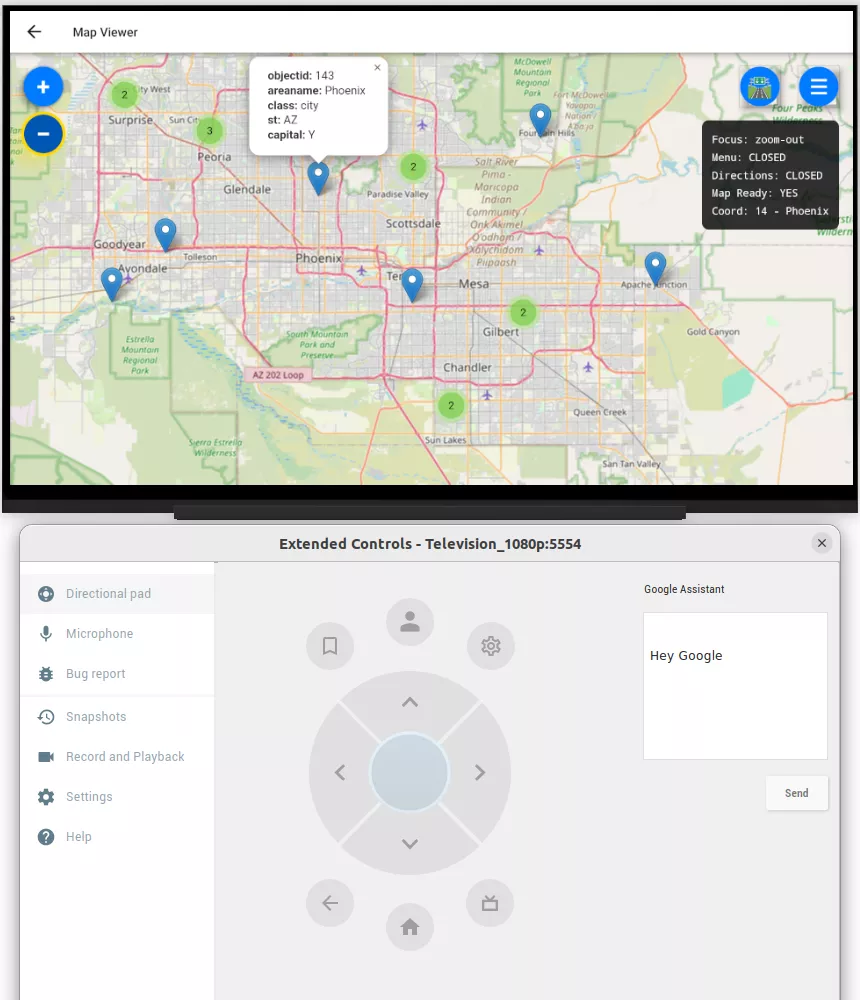
- City Clustering & Smart Zoom: To prevent visual clutter on large screens, the app uses intelligent city clustering. Dense data points are grouped into interactive clusters that expand and reorganize as the user zooms.
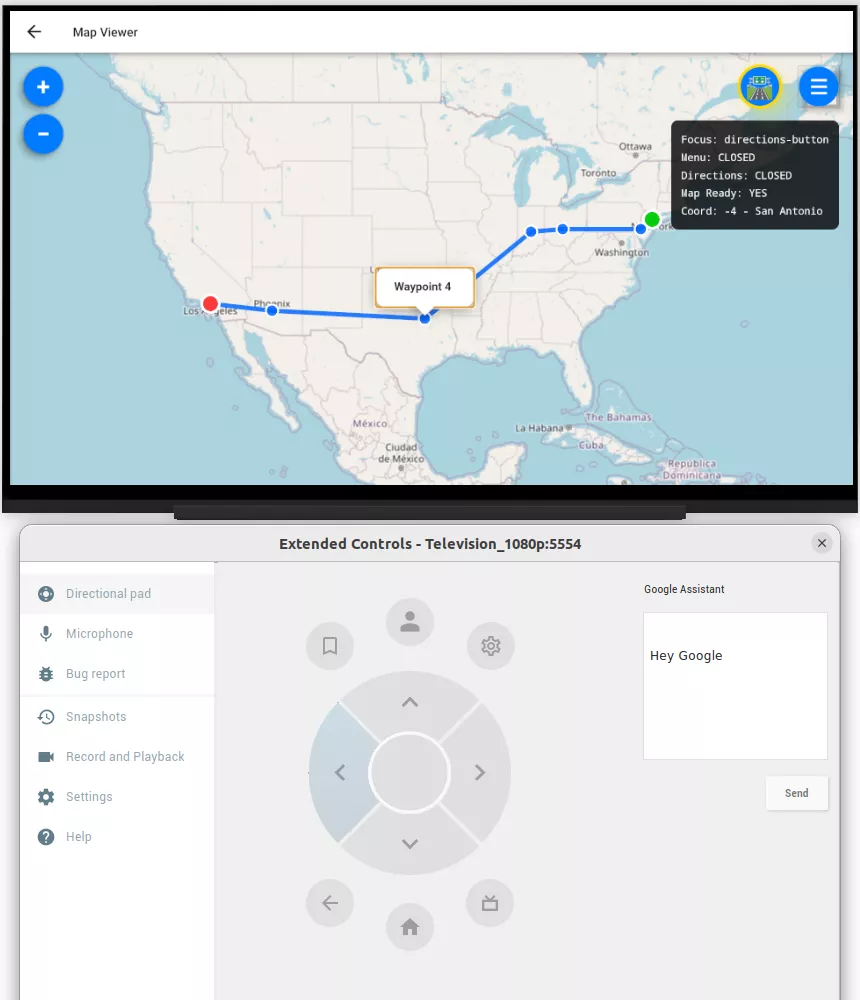
- Predefined Routes & Navigation Layer: Users can visualize long-distance routes (e.g., New York to Los Angeles) with professional-grade turn-by-turn navigation overlays, making it ideal for logistics and supply chain tracking.
- Comprehensive Analytics Dashboard: We built a library of TV-optimized visualizations, including:
▸ Trend Analysis: Bar, line, and stacked area charts.
▸ Distribution Data: Scatter plots, bubble charts, and donut charts.
▸ Performance Tracking: Gauge charts for real-time KPI monitoring. - Real-Time Engagement Metrics: A live dashboard tracks demographic trends and map usage statistics, with focusable chart components that allow users to drill down into specific data points using their remote.
- Weather & Environmental Integration: The PoC features live weather radar, storm tracking, and environmental overlays that sync with geospatial data for comprehensive situational awareness.
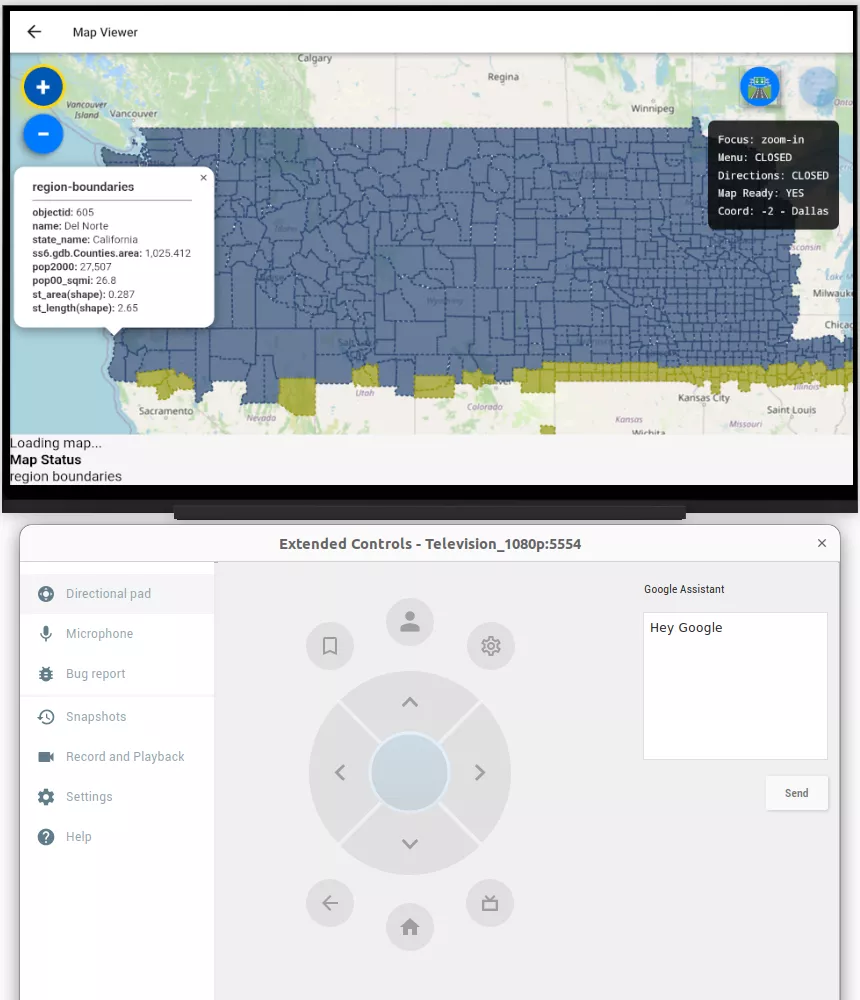
- Thematic Visualizations: Beyond standard pins, we implemented Choropleth maps, heatmaps, and custom boundary overlays to show data density and regional trends clearly.
- Cross-Platform Consistency: Every feature listed above runs on a single codebase, ensuring that the same high-end experience is delivered on Android TV, Apple TV, Web, and Mobile.
These features collectively position Bitcot’s PoC as a cutting-edge solution for TV-based mapping and analytics, combining high performance, intuitive navigation, and actionable insights for business leaders in 2026 and beyond.
How Bitcot’s PoC Solution Solves the TV-Based Mapping Challenge
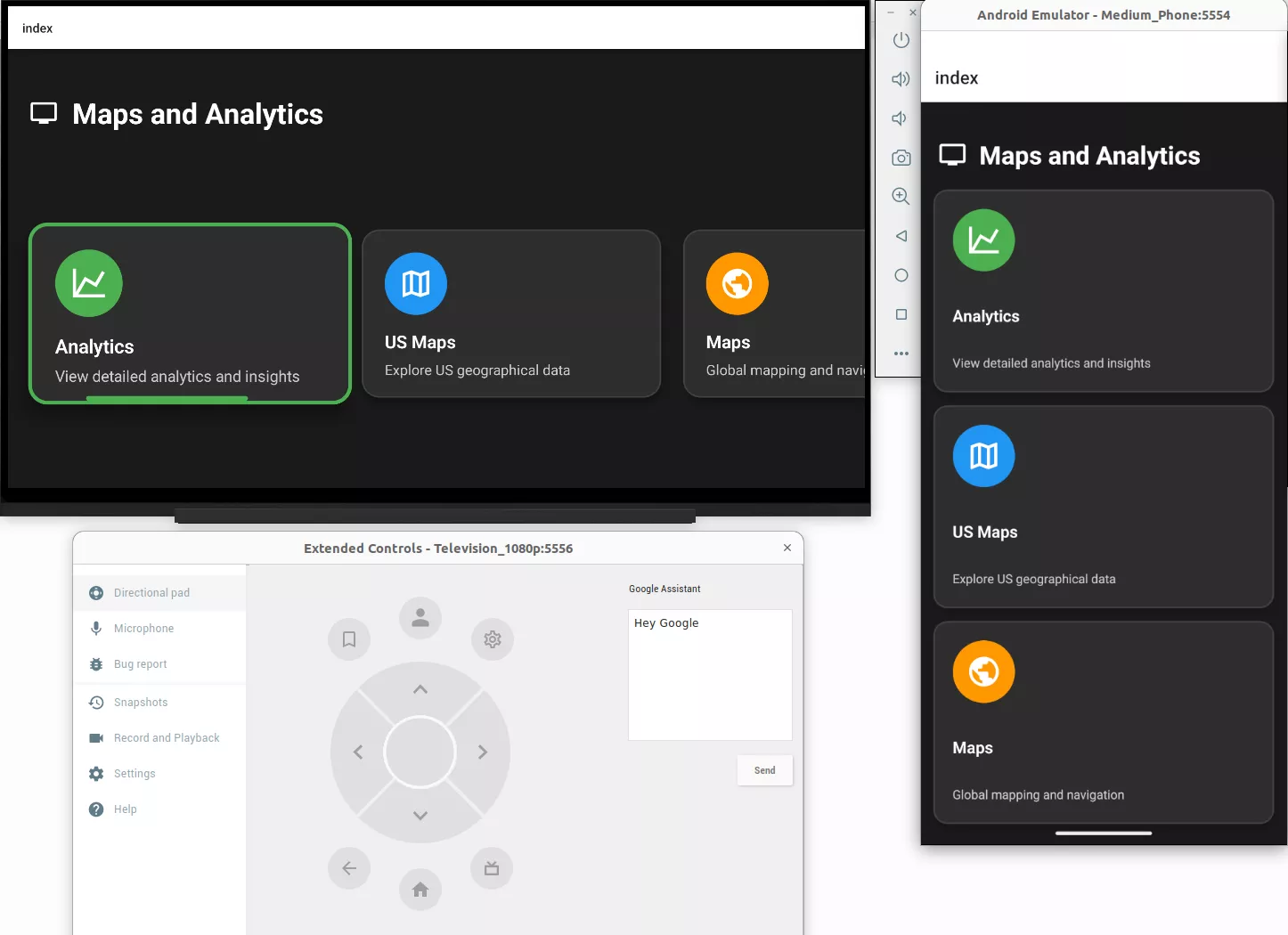
To bridge the gap between complex geospatial data and the “10-foot” television experience, we engineered a solution that prioritizes performance and remote-control accessibility.
Our PoC moves beyond basic porting by utilizing a TV-first architecture that adapts to the unique constraints of the living room across eight critical functional areas.
1. Intelligent App Launch & TV Detection
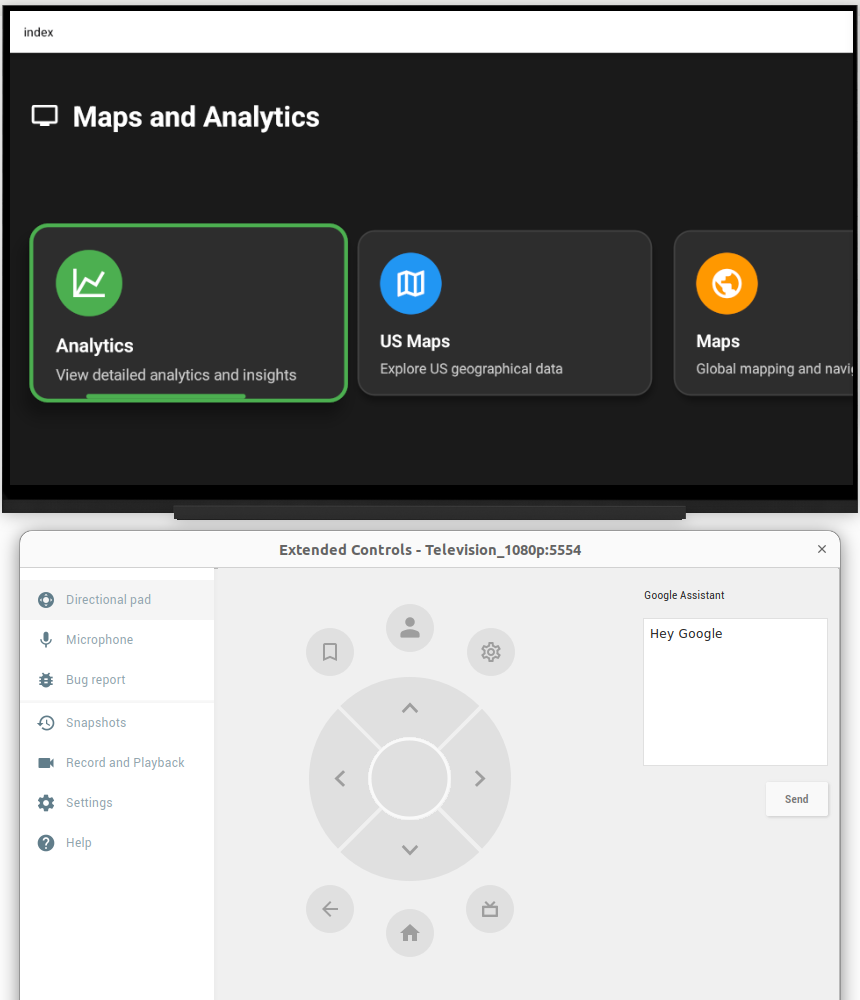
The first step in a cross-platform strategy is ensuring the app knows exactly what hardware it’s running on. We utilized the EXPO_TV=1 environment flag during the build process to trigger a specialized initialization sequence. When the app launches, it automatically detects the TV environment and switches to a TV-optimized layout with high-contrast UI elements and specialized navigation handlers.
2. High-Performance Mapping Interface
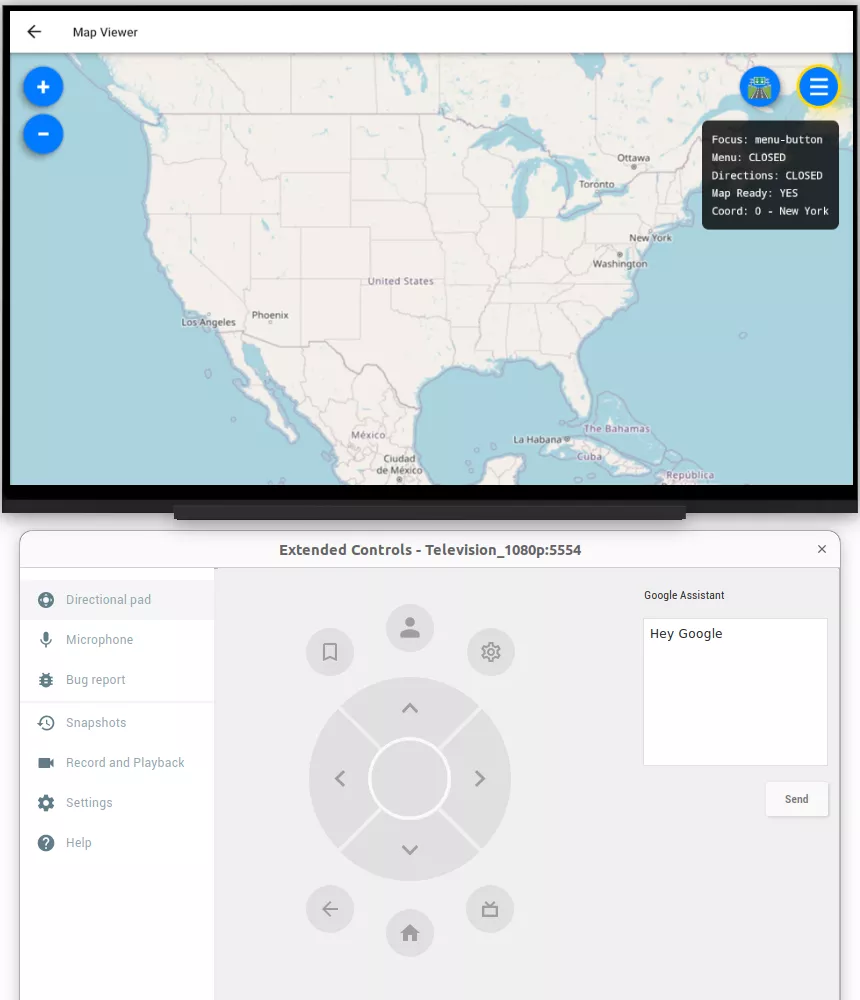
At the core of the PoC is a seamless integration of Leaflet.js within a native WebView. This allows us to render high-resolution OpenStreetMap (OSM) base layers alongside professional Esri thematic layers. By abstracting the D-pad navigation logic, we’ve ensured that moving across a map of the United States feels as fluid as scrolling through a streaming library.
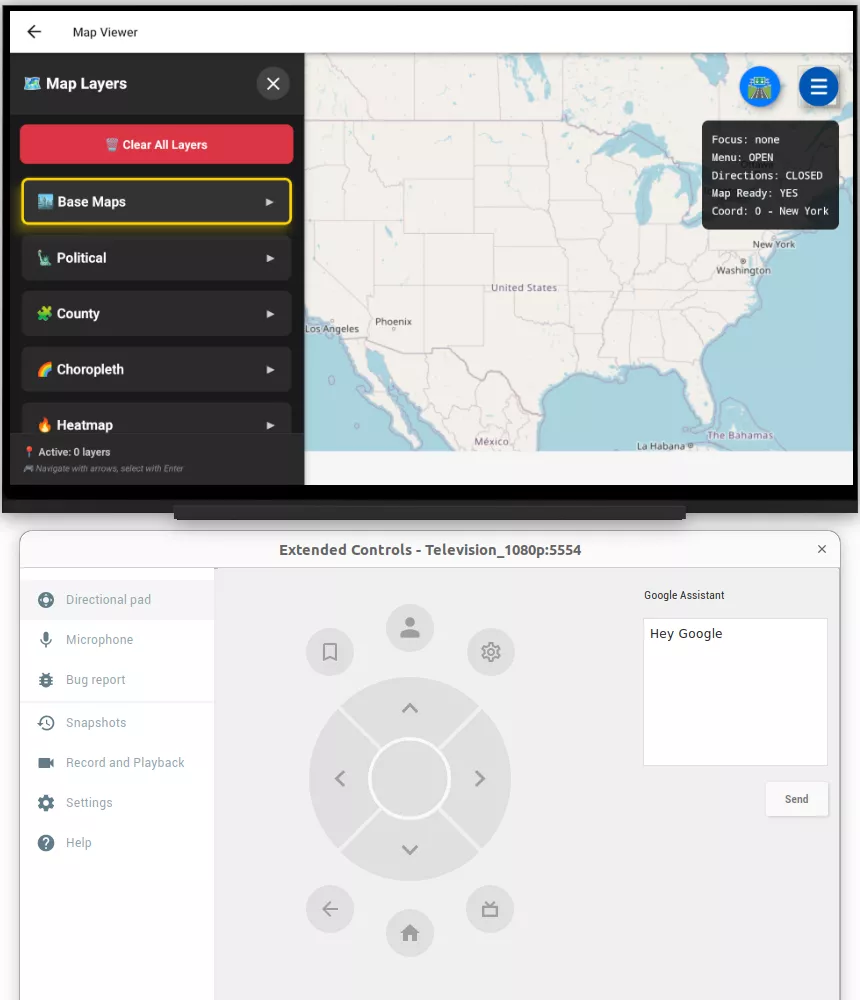
3. Dynamic Layer Selection & Toggling
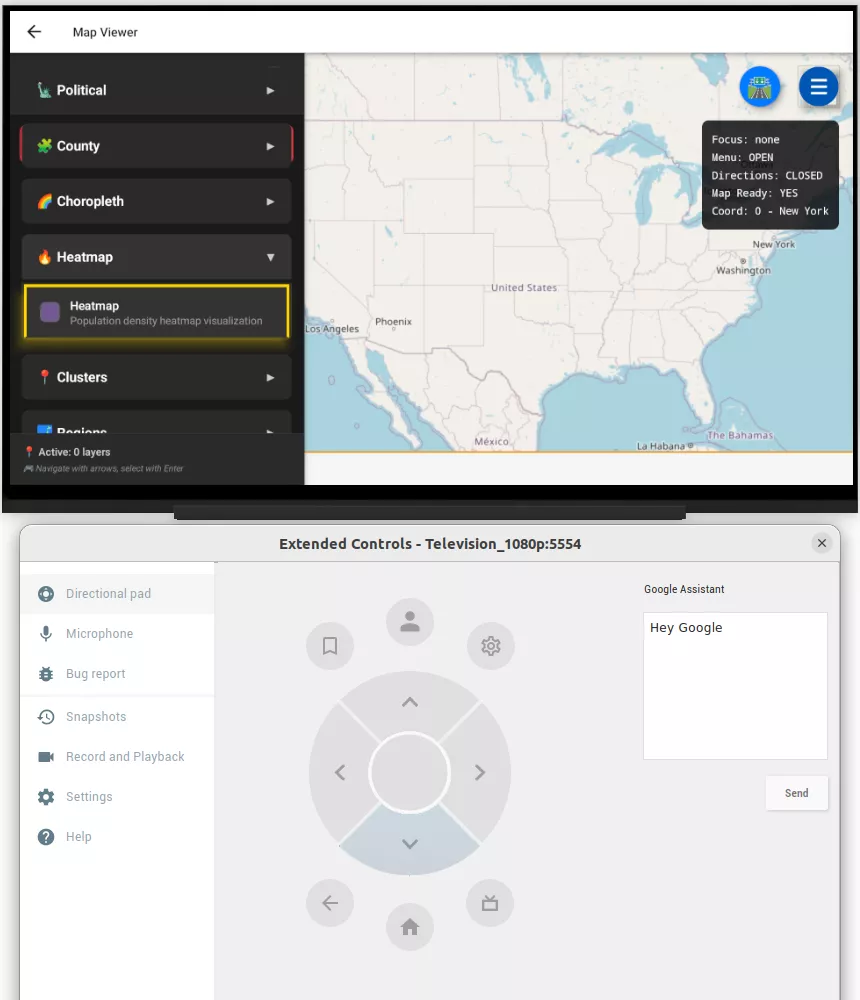
A major challenge for decision-makers is visualizing overlapping datasets. Our solution features an interactive toggle system that allows users to overlay:
- Demographics & Infrastructure: Visualizing population density and critical transit lines.
- Environmental Hazards: Mapping potential risks directly onto regional data. Each layer fetches data dynamically from Esri REST API endpoints, ensuring the “Big Screen” view is always synchronized with the latest cloud data.
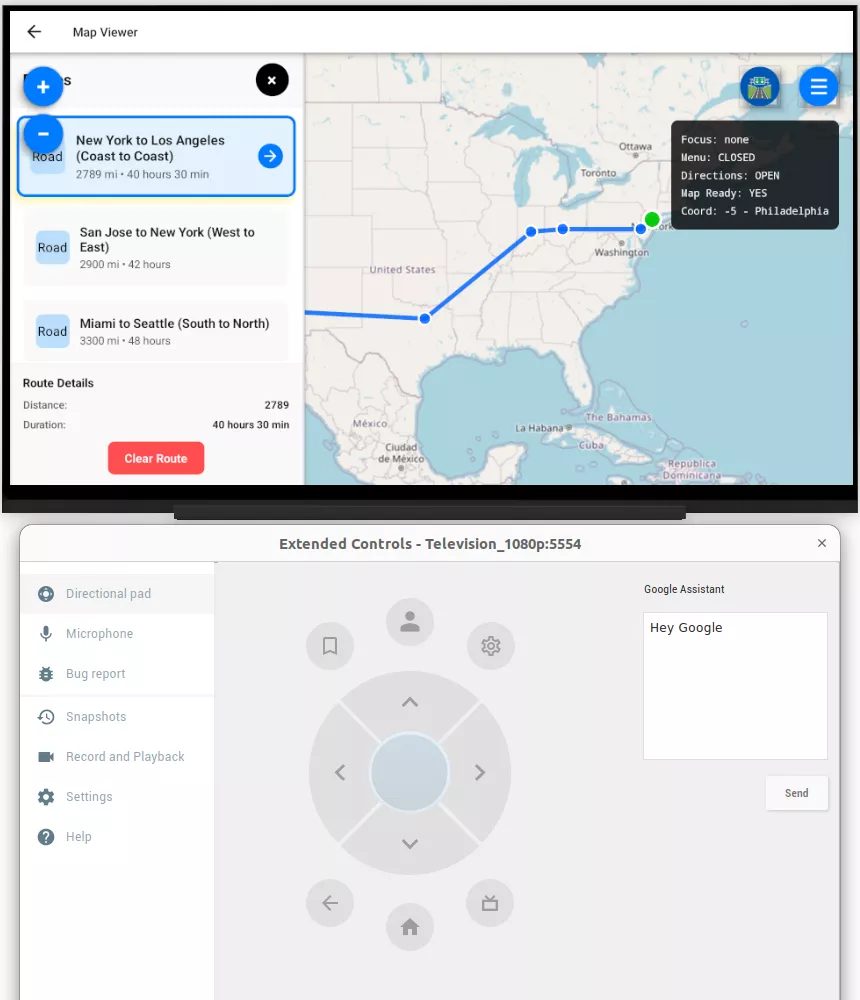
For logistics and supply chain tracking, we built a dedicated Route Visualization engine. Users can select predefined routes (e.g., New York to Los Angeles) to view waypoints, distance, and estimated travel times. A side panel provides turn-by-turn directions that are fully navigable via the D-pad, turning a standard TV into a powerful command-and-control center.
5. City Clustering & Smart Zoom
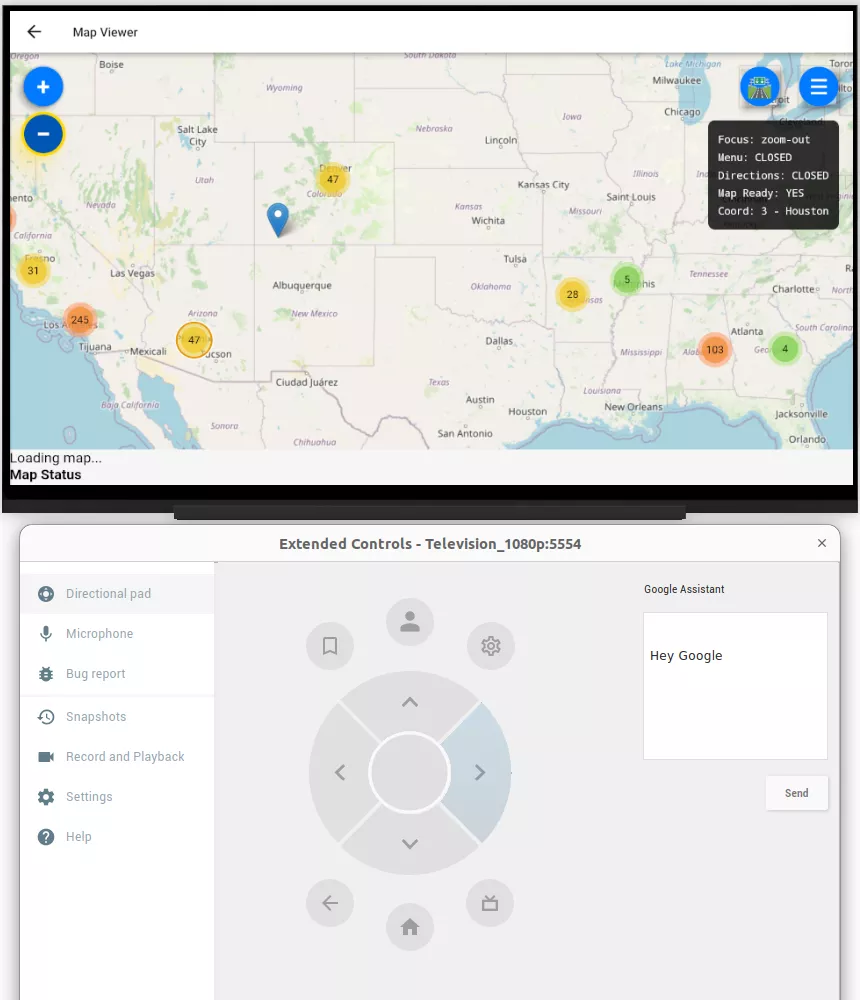
To maintain visual clarity on 4K displays, we implemented City Clustering. Dense data points are automatically grouped into interactive clusters based on the zoom level. When a user selects a cluster, the map performs an “intelligent zoom,” expanding the cluster to reveal individual cities and granular data points without overwhelming the viewer.
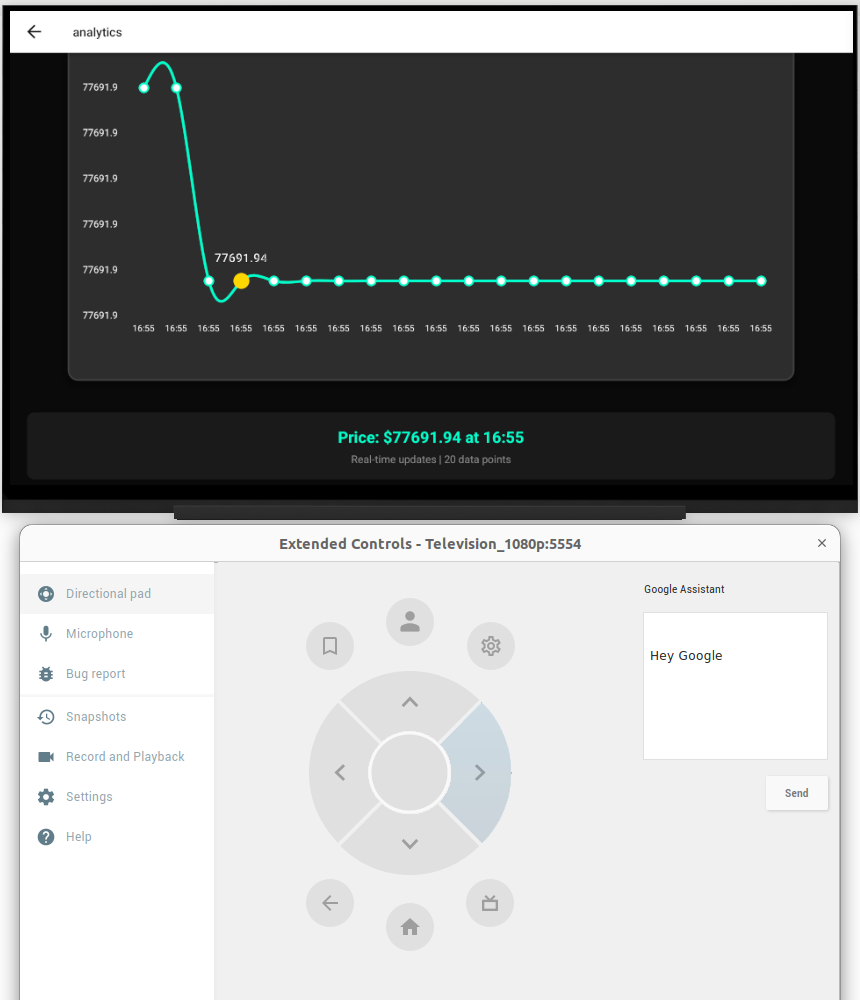
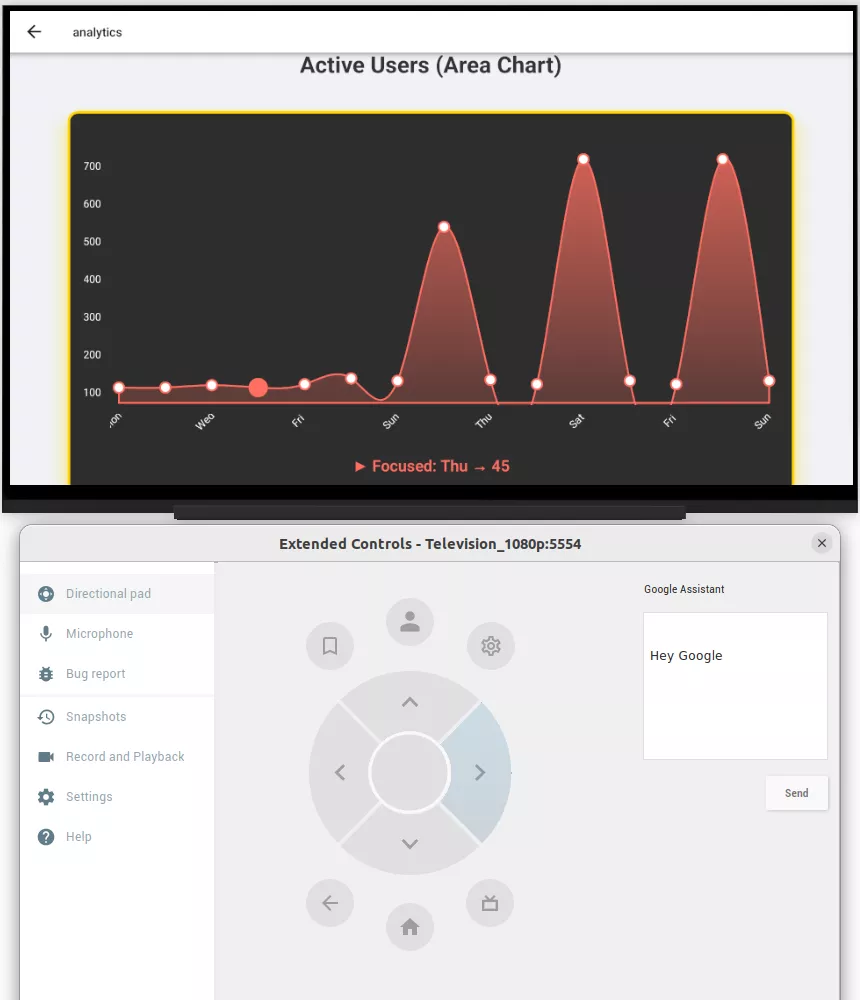
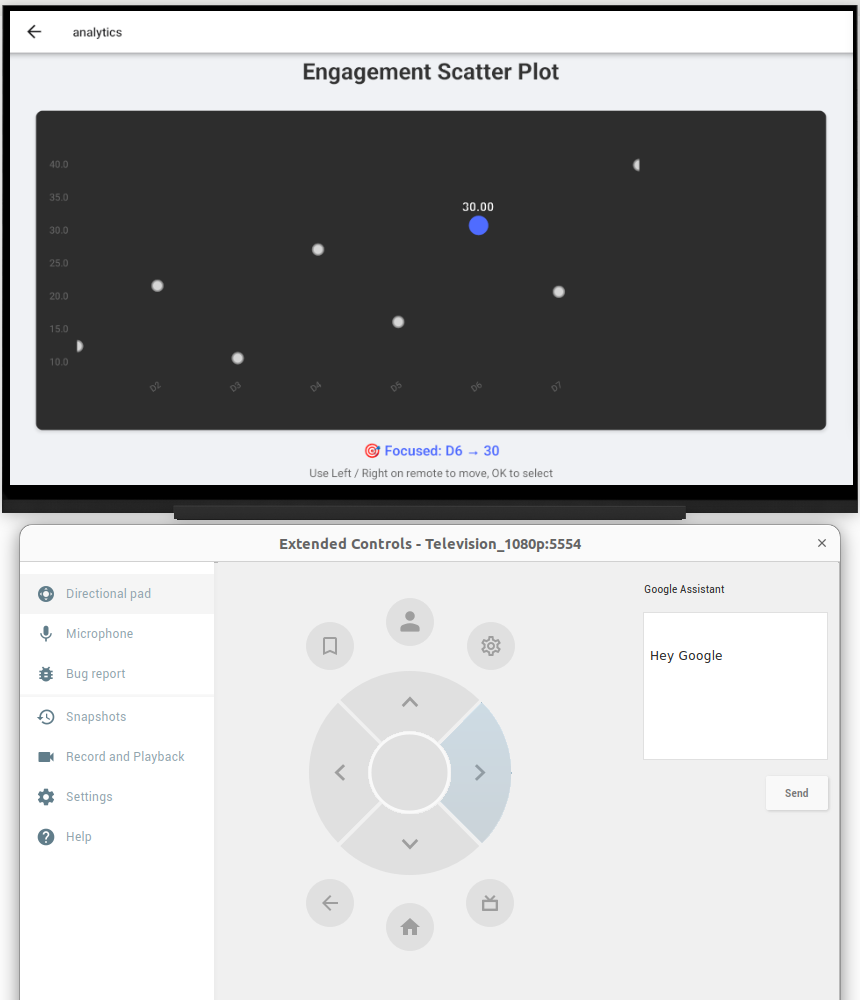
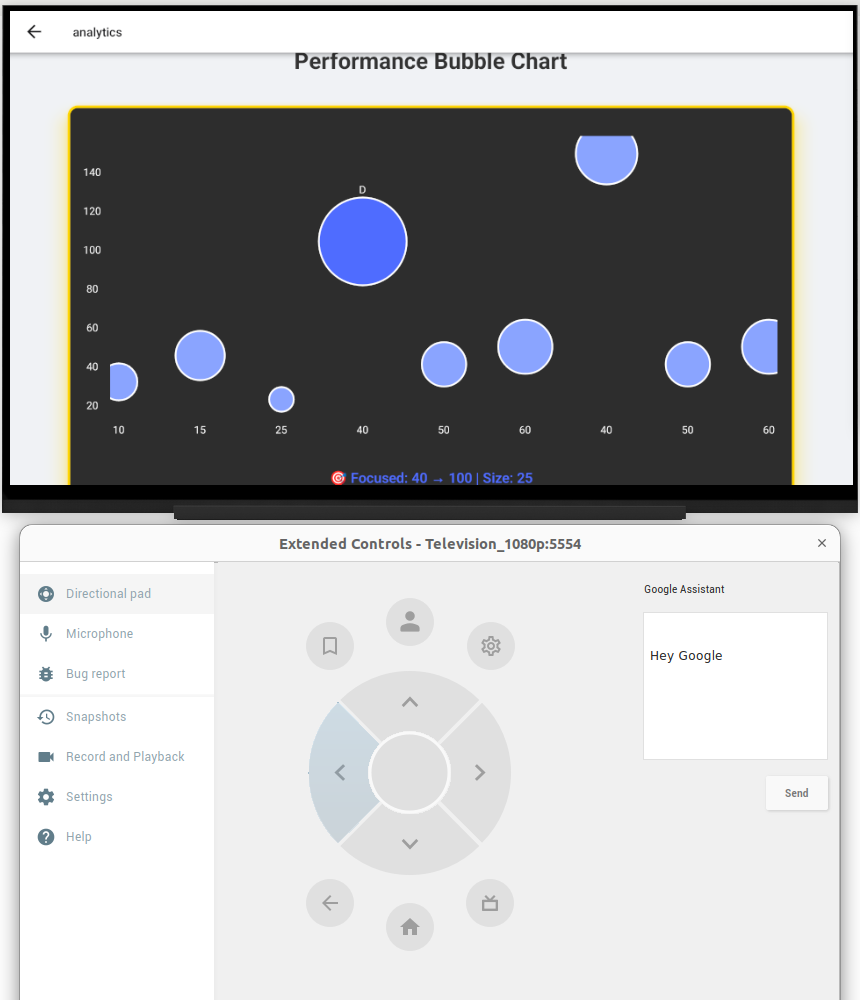
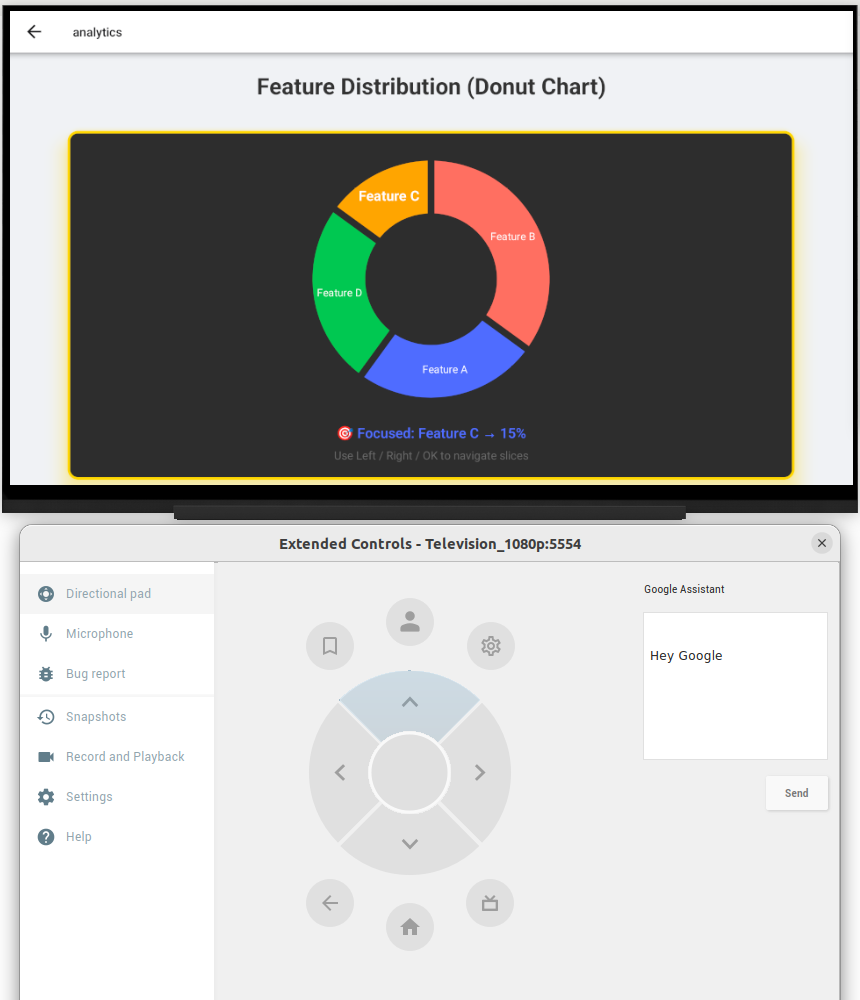
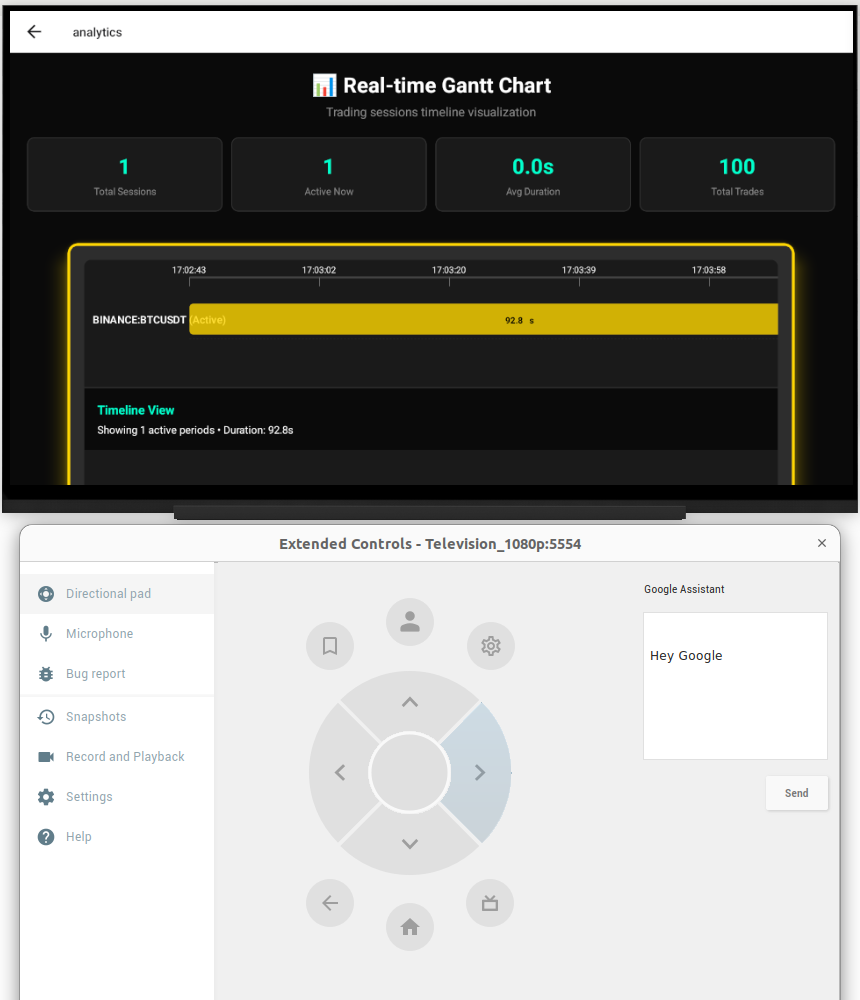
6. Comprehensive Multi-Chart Analytics
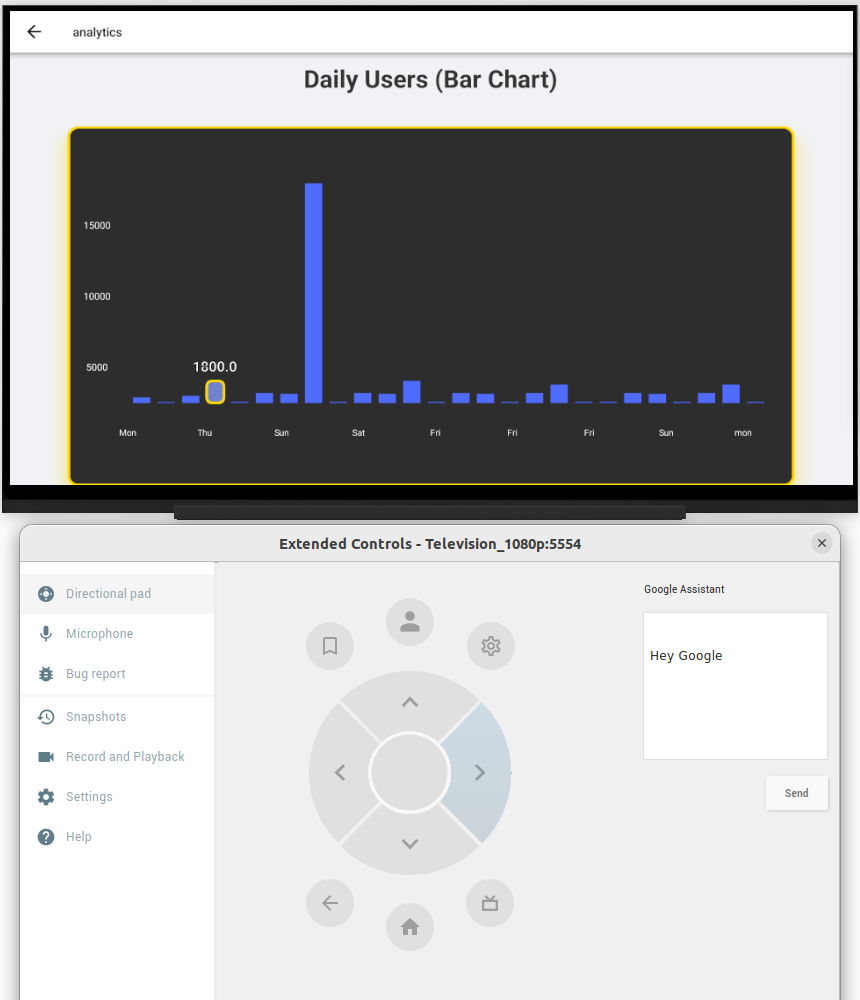
Data visualization is only effective if it’s interactive. Our analytics dashboard supports a wide range of TV-optimized chart types:
- Diverse Visualization Library: The dashboard includes Line Charts for trend analysis (e.g., population growth), Stacked Area Charts for regional compositions, and Scatter/Bubble Charts for analyzing complex correlations like income vs. education.
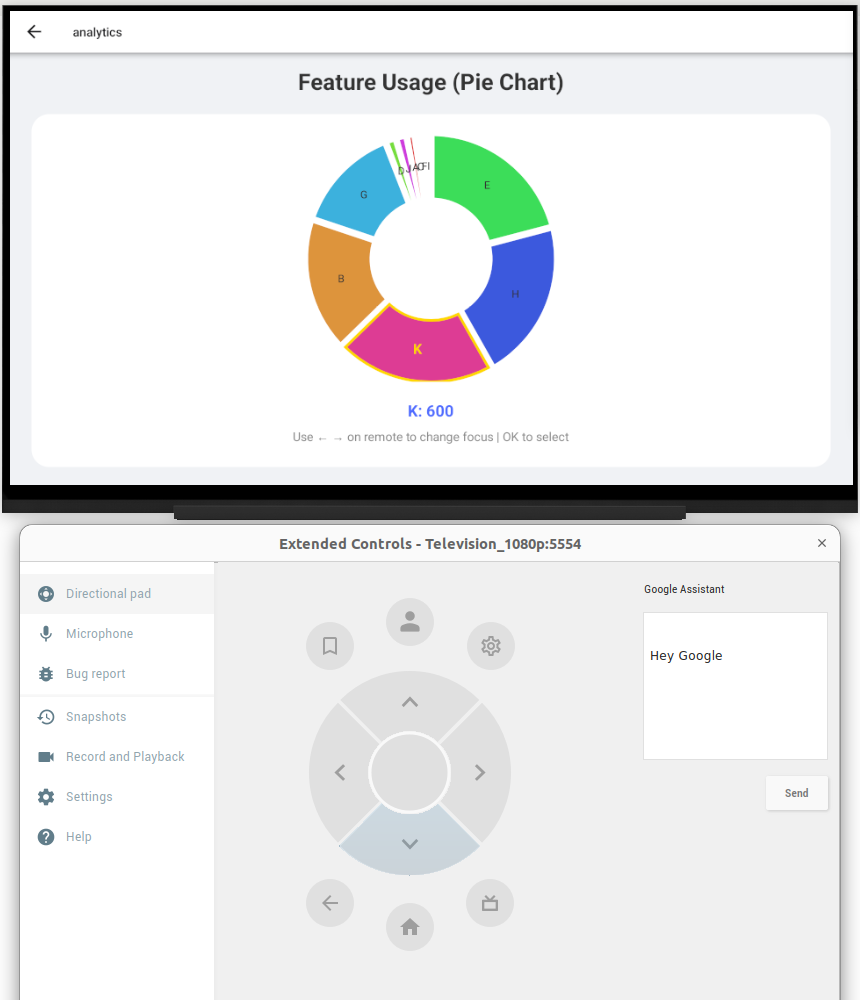
For proportional data, we’ve included Donut, Bar, and Pie Charts, along with Gauge Charts for single-metric tracking like current temperature or satisfaction indices.
- Custom D-Pad Focus Management: Unlike web charts that require a mouse, our charts feature custom focus logic. Users can use their remote to navigate directly between chart elements, data points, and interactive legends.
- Dynamic Data Binding: The charts are not static; they update in real-time. As a user toggles a map layer or zooms into a specific region, the analytics dashboard instantly rebinds the data to reflect the current view.
7. Real-Time Weather Integration
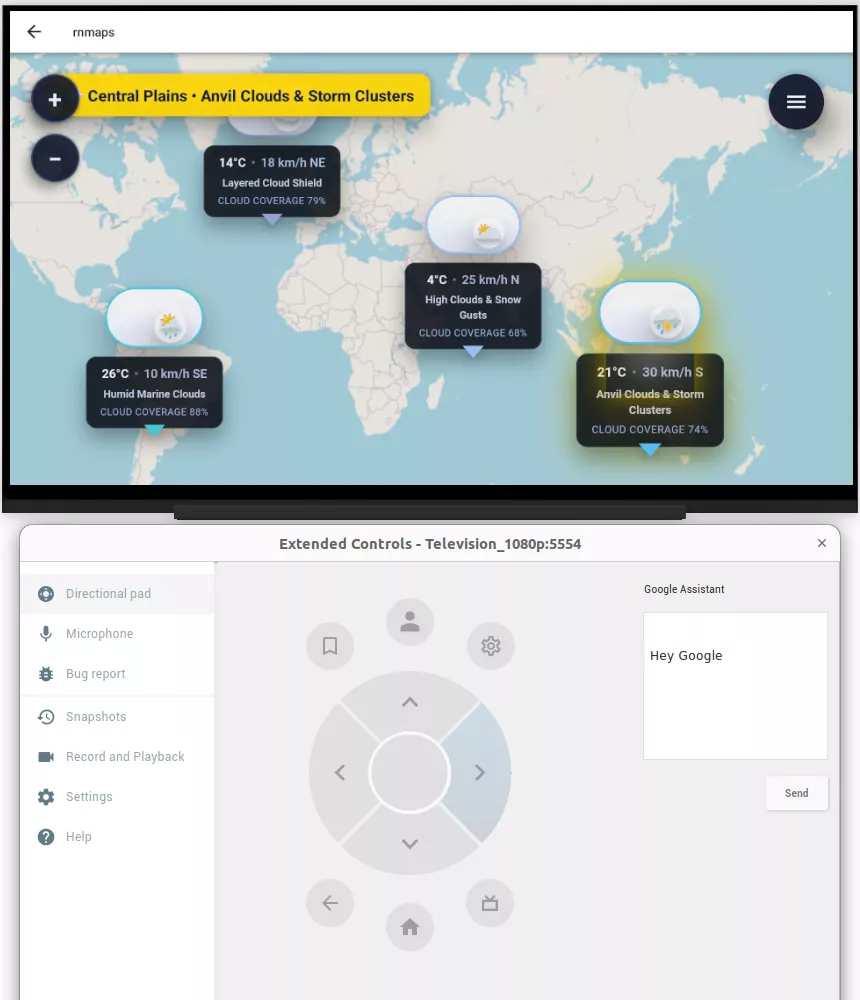
We’ve integrated a live Weather Visualization layer that includes real-time radar overlays and storm tracking. Decision-makers can toggle precipitation and temperature layers with a single click, allowing them to see how live weather patterns might impact their mapped infrastructure or regional operations.
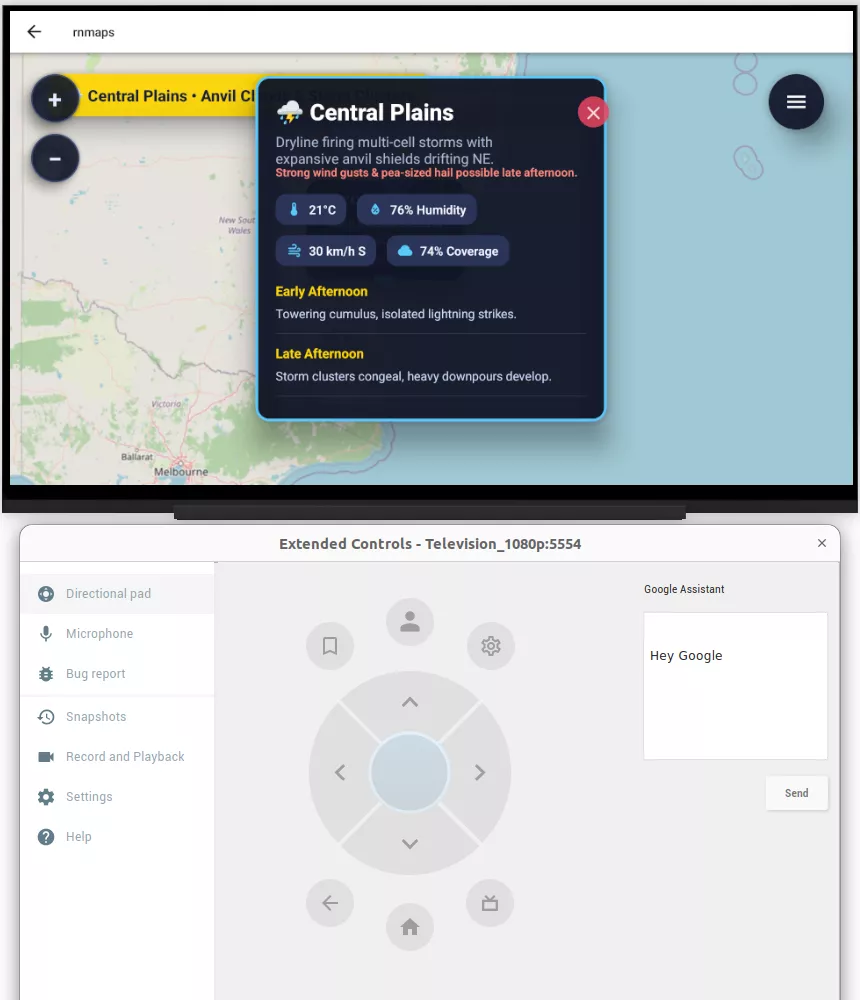
8. Fullscreen Immersion & Info Panels
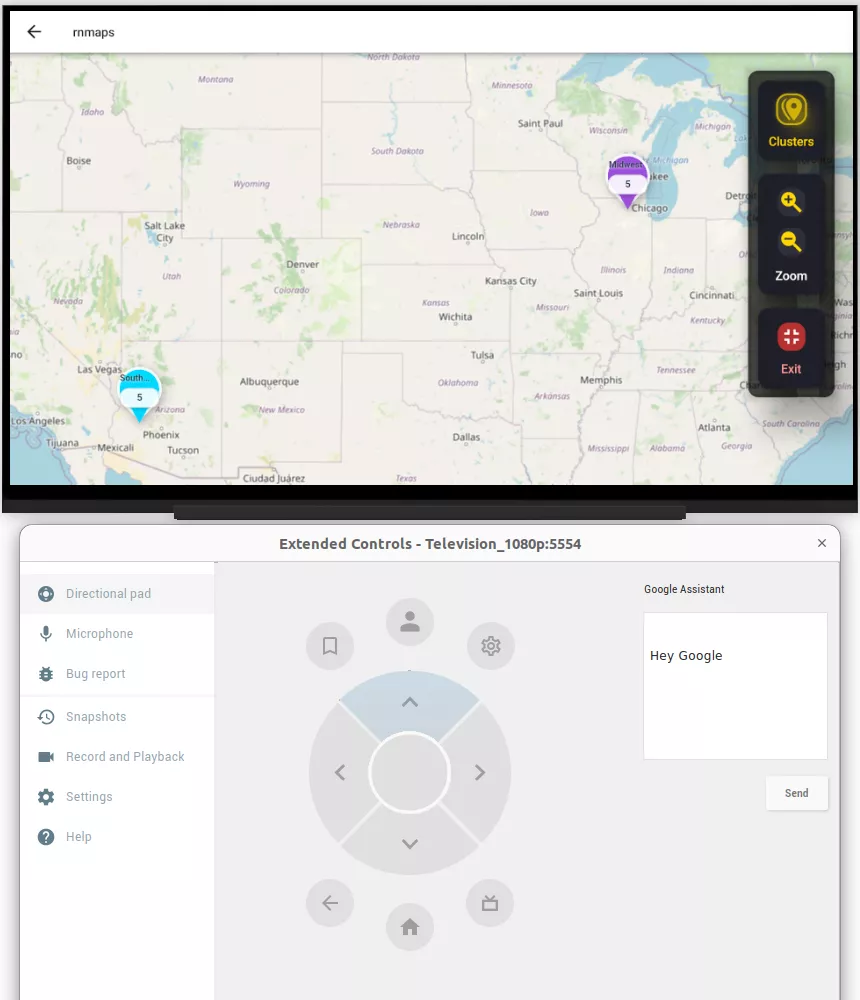
To maximize the impact of the big screen, the PoC includes an option to toggle Fullscreen Mode for immersive map exploration. When a user needs more detail, they can trigger Info Panels: context-aware sidebars that provide deep-dive statistics on selected regions while keeping the map visible in the background.
Bitcot’s Process Behind Building a Cross-Platform TV App
Engineering a high-performance mapping and analytics application for the big screen required a structured, TV-first development workflow.
To ensure a robust experience across Android TV and Apple TV, we followed a rigorous technical checklist that prioritized performance, remote-control ergonomics, and data accuracy.
Phase 1: Setting the “Big Screen” Foundation
Before writing a single line of mapping logic, we had to prepare the “engine” to speak the language of a television.
- TV-First Architecture: We used specialized project templates designed specifically for TV remotes. This ensured the app’s basic “skeleton” was ready for Apple TV and Android TV from day one.
- The “One-Build” Pipeline: We set up a smart deployment system. This allows us to update the app once and have those changes go live across TV, web, and mobile simultaneously, saving hundreds of hours in manual updates.
Phase 2: Mastering the Remote Control (D-Pad)
The biggest hurdle in TV apps is the lack of a mouse or touch. If the user gets “stuck” in a menu and can’t get back to the map, the app fails.
- The “Focus” Engine: We built a custom system that “highlights” exactly where the user is on the screen. As you click the arrows on your remote, the app intelligently predicts where you want to go next, whether that’s a specific city on the map or a data point on a chart.
- Smart Mapping: We didn’t just put a map on a screen; we made it interactive. We integrated professional-grade data (from Esri) so users can toggle between different “views”, like switching from a weather map to a demographic map, with a single click of a button.
Phase 3: Visualizing Complex Data Simply
Data is useless if it’s too cluttered to read from a couch. We focused on “visual breathing room” and performance.
- Interactive Charts: We created a library of charts (lines, bubbles, and bars) that are “remote-friendly.” You can “hop” from one bar in a graph to another to see specific numbers, just like you would scroll through movies on Netflix.
- Intelligent Clustering: To prevent the map from looking like a mess of dots, we used “clustering.” If there are 500 data points in a small area, the app groups them into one clean bubble. As you zoom in, that bubble “pops” into individual markers.
- Performance Tuning: TV hardware is often less powerful than a new iPhone. We used “Lazy Loading”, a technique where the app only “thinks” about the data you are currently looking at. This keeps the map moving at a smooth 60 frames per second, preventing any lag or stuttering.
Phase 4: Real-World Awareness
To make the tool truly professional, we added layers of real-world context.
- Live Weather & Logistics: We added live storm tracking and “turn-by-turn” route visualizations. This means a logistics manager could use a boardroom TV to track a fleet’s path across the country while monitoring live weather hazards in their way.
By following this structured process, Bitcot was able to deliver a cross-platform, TV-optimized mapping and analytics app that balances performance, usability, and business value. The approach ensures that businesses can visualize data effectively on the big screen, make faster decisions, and maintain a single, scalable codebase for future growth.
Key Outcomes Delivered by Bitcot’s Cross-Platform TV PoC
The ultimate goal of this project was to prove that complex, high-stakes data doesn’t have to be confined to a desktop monitor.
By the end of the PoC, Bitcot successfully delivered a platform that transforms the television into a powerful, interactive command center.
Here are the key outcomes that demonstrate the success and scalability of this approach:
A Unified, Multi-Screen Powerhouse
The most significant achievement is the Cross-Platform Deployment capability. By utilizing a single, unified codebase, we proved that an enterprise can deploy a native-quality experience to Android TV, Apple TV, Web, and Mobile simultaneously.
This drastically reduces the total cost of ownership and ensures that every stakeholder, from the field agent on a phone to the executive in a boardroom, is looking at the same synchronized data.
The “Living Room” Command Center
We successfully moved past the limitations of television hardware to provide a seamless TV experience.
- Remote-First Navigation: The application is fully navigable using standard TV remotes, removing the need for specialized hardware or secondary controllers.
- Rich Visualizations: Users can toggle between interactive layers for demographics, infrastructure, hazards, and real-time weather, all rendered at 60fps.
- Interactive Logistics: The Route Navigation feature allows users to visualize cross-country transit with turn-by-turn guidance, making it a viable tool for logistics and supply chain management.
Data-Driven Decision Making at Scale
The PoC proved that “Big Data” can be readable on a “Big Screen.”
- Comprehensive Analytics: We delivered a TV-friendly dashboard featuring line, area, scatter, bubble, donut, and gauge charts. Each is fully interactive via the remote, allowing users to drill down into specific metrics without leaving their seats.
- Enterprise-Ready Versatility: The real-time nature of the data makes this solution ready for immediate use in Governmental, Educational, and Commercial sectors, where situational awareness is critical.
Future-Proof Engineering
From a technical standpoint, the project was built with longevity in mind.
- Scalable & Modular: The architecture is designed to grow. Adding a new data layer, such as real-estate values or carbon emission tracking, is a “plug-and-play” process.
- Simplified Maintenance: By creating a clear separation between map logic, UI components, and TV navigation, the codebase remains easy to update. Your team spends less time fixing bugs and more time innovating.
Bitcot’s PoC proves that with the right architecture, the television is no longer just for media consumption; it is a high-performance tool for enterprise intelligence. By combining React Native Expo with specialized geospatial engines, we’ve opened a new frontier for how organizations visualize their world.
Partner with Bitcot to Build Your Custom Cross-Platform TV App
At Bitcot, we bring a proven, structured approach to specialized software development that helps organizations move faster while achieving high-impact results.
We understand that TV-based data visualization requires a unique aesthetic, one that emphasizes clarity, “lean-back” usability, and intuitive navigation that feels natural from across the room.
One of the most valuable aspects of our approach is that our PoC is highly customizable. Because we have already engineered the core architecture for a modern mapping and analytics platform, including the D-pad focus engine, real-time data binding, and cross-platform syncing, we don’t have to start from scratch for every client.
This “blueprint” approach allows us to deliver elite results without the elite price tag or the long wait times:
- Accelerate Launch Times: By leveraging our pre-engineered TV framework, we can get your custom solution live weeks faster than traditional agencies.
- Reduce Costs: We pass the efficiency of our pre-built focus handlers and mapping logic onto you, ensuring you get a high-end, custom-feeling application that respects your project’s budget.
- Tailored Results: While the foundational framework is ready, the data layers, visual styling, branding, and specific analytics are fully customized to reflect your organization’s unique needs and data sources.
While this project leverages React Native, our broader expertise includes building a TV App with BrightScript and AWS for multi-content streaming, ensuring we can choose the right tool for any high-performance requirement.
Your digital presence on the big screen is a vital “front door” for your data. Don’t let an outdated interface or clunky navigation stand in the way of your team’s decision-making. Whether you need a simple, high-performance data viewer or a complex command center with AI-driven insights, Bitcot has the blueprint to get you there.
Final Thoughts
Looking back at this project, it’s clear that we’ve only scratched the surface of what’s possible when you bring high-performance data to the biggest screen in the room.
For a long time, TVs were seen as “passive” devices, something you just sit back and watch. But as we’ve shown with this PoC, the right tech stack can turn that same screen into an active, powerful tool for decision-making.
Whether it’s a logistics manager tracking a fleet across the country, a government official monitoring environmental hazards, or an educator explaining demographic shifts, the “10-foot experience” offers a level of immersion that a laptop or smartphone simply can’t match.
By using React Native and Expo, we didn’t just build an app; we built a bridge between complex data and the people who need to see it most.
At the end of the day, technology should feel natural. It shouldn’t matter if you’re using a mouse, a touch screen, or a simple TV remote; the insights should be just as accessible and the experience just as smooth.
If you have complex data that deserves a larger stage, we’re here to help you build it. At Bitcot, we specialize in pushing the boundaries of what cross-platform technology can do. From specialized Apple tvOS App development to creating seamless experiences for Google TV App and Roku App environments, our team has the expertise to make your project a reality.
Let’s talk about how our custom React Native app development services can scale your business and transform your data into a cinematic experience.
Book a free consultation with Bitcot today!