Key Takeaways
- Structured SharePoint domains reduce AI hallucinations before they reach employees.
- RAG architecture grounds every answer in verified, document-level policy text.
- Real-time SharePoint sync eliminates the “stale policy” risk with zero retraining.
- San Diego enterprises using HITL gates automate 90% of HR queries safely.
- The architecture shift, not the chatbot UI, determines whether a copilot scales.
Introduction
Most enterprise AI projects targeting HR operations stall not because the language model underperforms, but because the documents underneath it were never organized to be read by a machine. An AI-powered HR helpdesk copilot is only as reliable as the knowledge base it retrieves from, and for the majority of mid-to-large organizations, that knowledge base is a decade of policy PDFs scattered across nested SharePoint folders with no consistent naming convention, no version discipline, and no domain segmentation.
The pattern our engineering team encounters repeatedly across enterprise engagements in San Diego and across California is predictable: organizations deploy a capable AI layer on top of a disorganized document store, get inconsistent answers, and conclude the model is the problem. It rarely is. The model is faithfully surfacing what it finds. The issue is what it finds.
This post makes a case that is different from most writing on HR AI: the architecture of your knowledge base, how policies are structured, segmented, and governed in SharePoint, is the primary determinant of whether your copilot produces answers employees trust or answers that create compliance exposure. We explain what that architecture looks like, how Retrieval-Augmented Generation uses it, and why the three-phase cognitive workflow is the engineering pattern that separates production-grade HR copilots from polished prototypes.
The shared services model was designed for a world where employees were concentrated in one location, queries arrived through one channel, and HR teams had enough capacity to triage every ticket personally. None of those conditions reliably holds today. A global workforce submitting questions across time zones, in multiple languages, about policies that change quarterly, overwhelms any model that depends on a human at the center.
The failure is not human error; it is structural. Knowledge workers consistently report losing a significant portion of their productive week searching for internal information or waiting for a response that should have been self-serve. When that search ends in a wrong answer delivered by an overloaded HR associate, the cost compounds: the employee acts on bad policy guidance, the company carries a compliance inconsistency, and the HR team spends additional time in the correction loop.
The three specific failure modes that appear repeatedly in enterprise HR operations are frozen data, channel latency, and human variance. Frozen data means policy documents live in formats and folder structures that employees cannot search effectively. Channel latency means the “fastest” resolution path email still takes 24 to 48 hours. Human variance means that the answer to “can I roll over unused vacation days?” depends on which HR associate opens the ticket, not on a single, verified policy interpretation.
What Is an AI-Powered HR Helpdesk Copilot?
An AI-powered HR helpdesk copilot is a software layer that sits between an employee’s question and an organization’s governed policy documents. It is not an FAQ widget or a keyword-matching chatbot. It is a reasoning engine that identifies the intent behind a query, retrieves the most relevant policy clause from a structured document store, and surfaces a cited, human-readable answer in seconds.
The distinction from earlier chatbot generations is architectural. A keyword-matching bot returns a list of possibly relevant documents. A copilot built on generative AI integration reads through those documents, extracts the specific clause that answers the question, and presents it in plain language alongside a direct link to the source. The employee does not need to read a 40-page PDF; the system has already done that work.
What makes this production-grade rather than demo-grade is the combination of Retrieval-Augmented Generation, real-time document sync, and source citation. Each of these is an engineering decision, not a model selection decision. The language model provides the language intelligence; the architecture provides the reliability.
SharePoint as a file library and SharePoint as a governed knowledge domain are two entirely different things. Most organizations already have the first. Building the second requires deliberate structural decisions that directly determine how well the copilot performs.
The core architectural decision is domain segmentation. Rather than allowing all HR policy documents to live in a single flat library, a governed knowledge architecture organizes them into functional domains that mirror how HR actually operates. Compensation and payroll documents belong in one folder. Leave and attendance policies in another. Benefits and reimbursement guidelines in a third. Onboarding and offboarding checklists in a fourth.
This segmentation matters for a specific technical reason: when a query arrives, the AI agent first identifies the domain of the question before selecting the documents to read. A flat, unsegmented library forces the agent to scan everything, which increases the probability of retrieving tangentially related content and producing an answer that is partially correct but ultimately misleading. A segmented library sends the agent directly to the right domain, which reduces retrieval noise and increases answer precision.
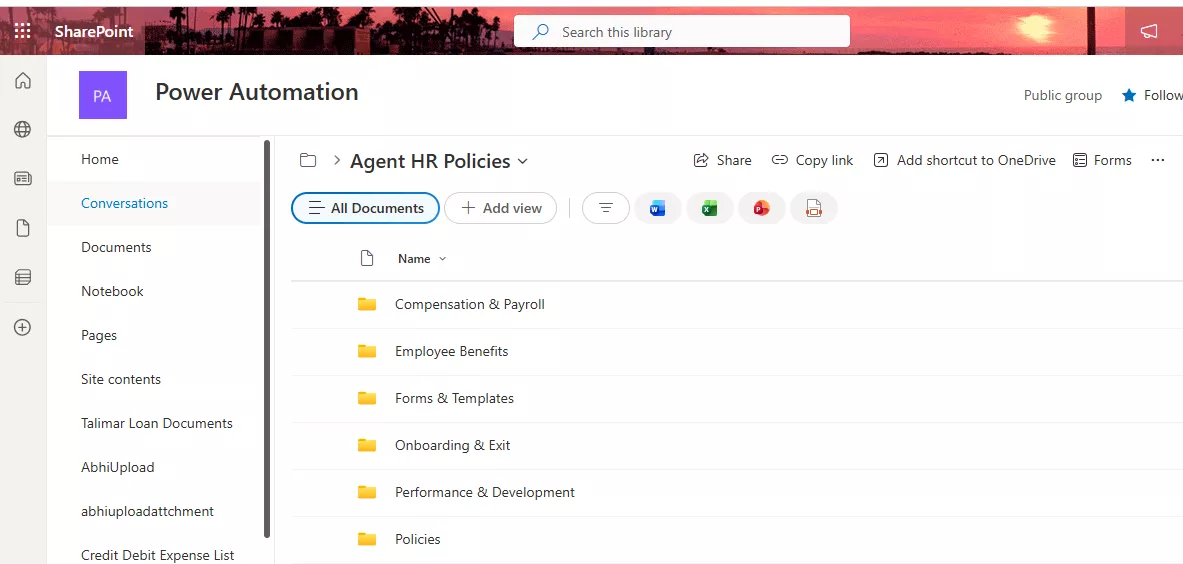
The organizational structure above shows four functional domains within the agent-hr-policies library. Each domain acts as a scoped retrieval context. When an employee asks about reimbursement limits, the agent queries the Employee Benefits domain specifically, not the entire document store. This is the design decision that prevents hallucinations at the source rather than attempting to filter them downstream.

The RAG Architecture: How the Copilot Eliminates Hallucinations
Retrieval-Augmented Generation is the engineering pattern that makes an AI HR copilot trustworthy in a way that a standalone language model cannot be. A standard language model answers from memory from patterns absorbed during training. In an HR context, that memory is useless for company-specific policy and actively dangerous if the model attempts to fill in the gap with a plausible-sounding answer.
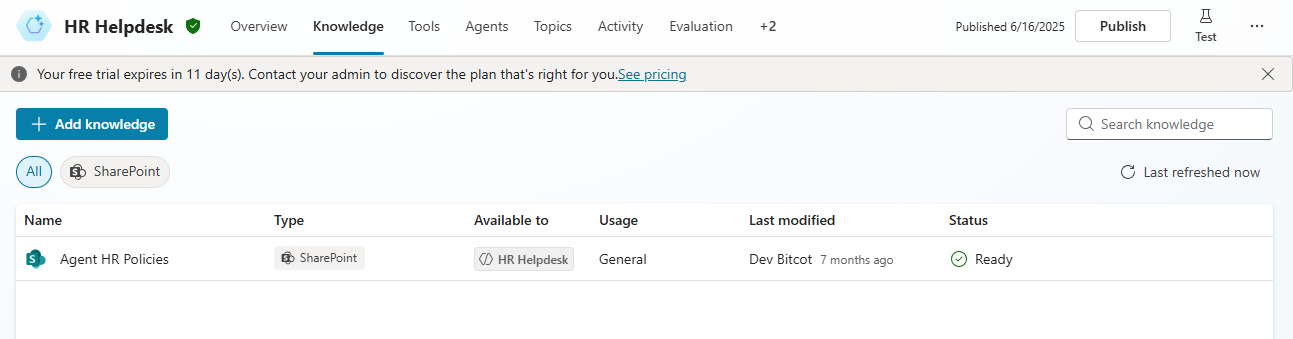
RAG inverts this. Instead of the model answering from memory, it first retrieves the most relevant text chunks from the governed SharePoint library, then generates a response using only that retrieved content as its source. The model is not inventing; it is paraphrasing and presenting text that has already been verified as accurate by the HR team that uploaded it.
The practical consequence is significant. If a policy on hybrid work eligibility was updated last Tuesday and uploaded to the Leave and Attendance domain on Wednesday, every employee who asks about hybrid work from Thursday onward receives an answer grounded in the updated document. There is no re-training cycle, no model fine-tuning, no IT deployment. The knowledge base is the source of truth, and the model reads it fresh on every query.

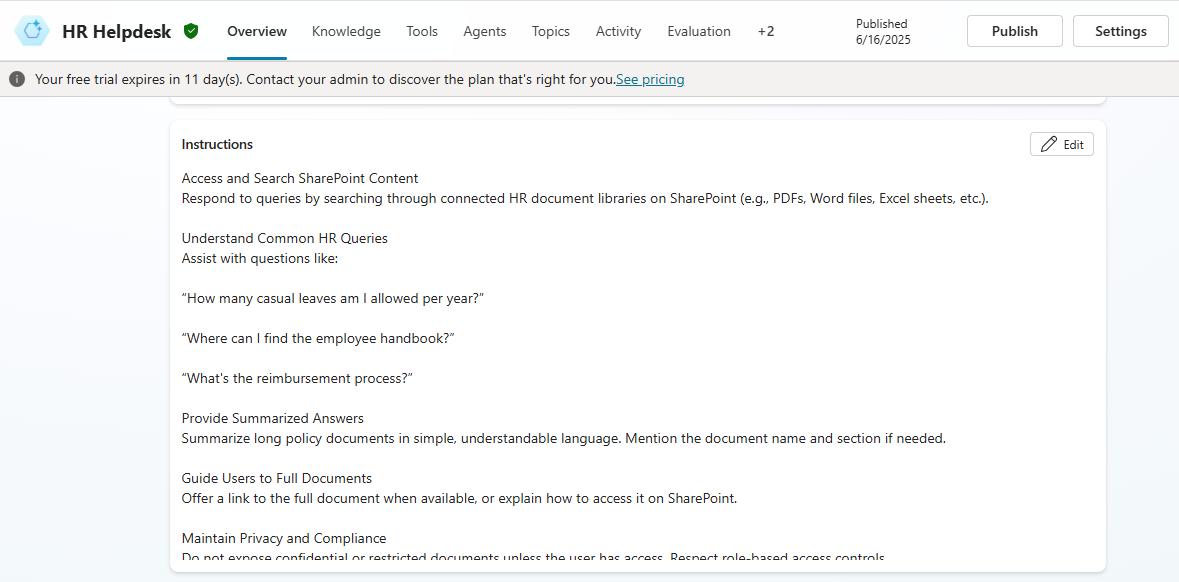
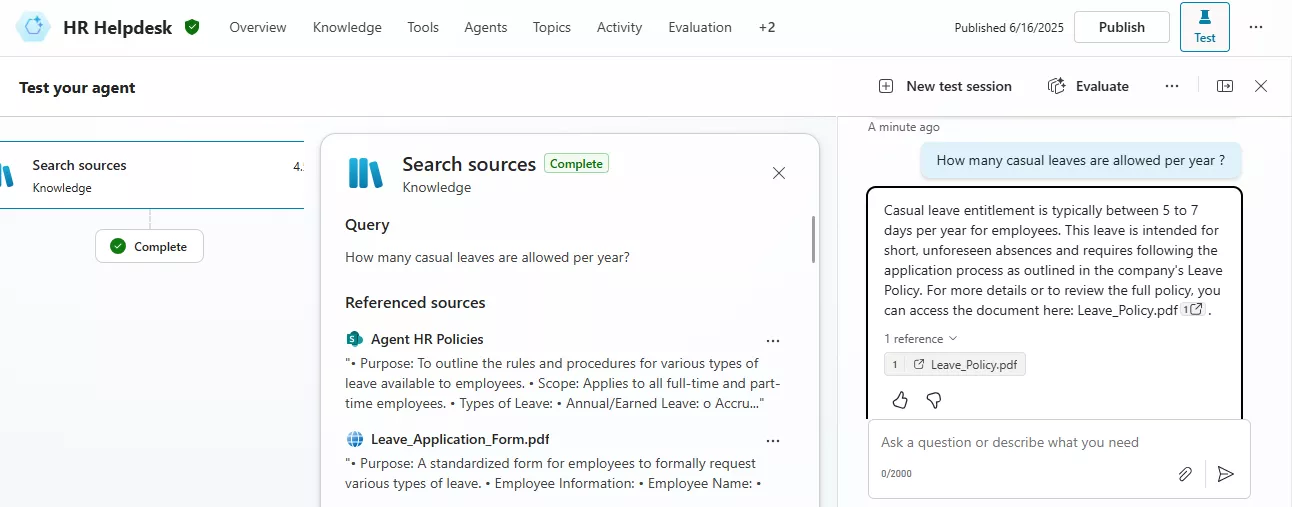
Source citation is the final layer of trust. Every answer the copilot provides includes a direct link to the SharePoint document from which it was derived. This satisfies the “trust but verify” instinct that employees and compliance officers share: the answer is presented conversationally, but the authoritative source is one click away.

The Three-Phase Cognitive Workflow: From Query to Verified Answer
A production HR copilot does not process queries in a single step. It operates through a structured three-phase workflow that mirrors how a skilled HR professional would handle a policy question: identify the topic, find the right document, and extract the relevant clause.
Phase 1: Intent Recognition and Domain Targeting
The first phase handles the gap between how employees phrase questions and how policies are actually written. An employee asking “Can I take Friday off to deal with a family situation?” is expressing the same intent as one asking “What is the dependent care leave allowance?” The copilot identifies the underlying policy domain leave and attendance regardless of phrasing, then routes the retrieval to that specific SharePoint folder.
This domain-targeting step is what prevents the most common failure mode: retrieving documents from the wrong folder because a keyword appeared in an unrelated policy. A copilot built on AI workflow automation principles routes by intent, not by keyword match.
Phase 2: Cross-Domain Context Switching
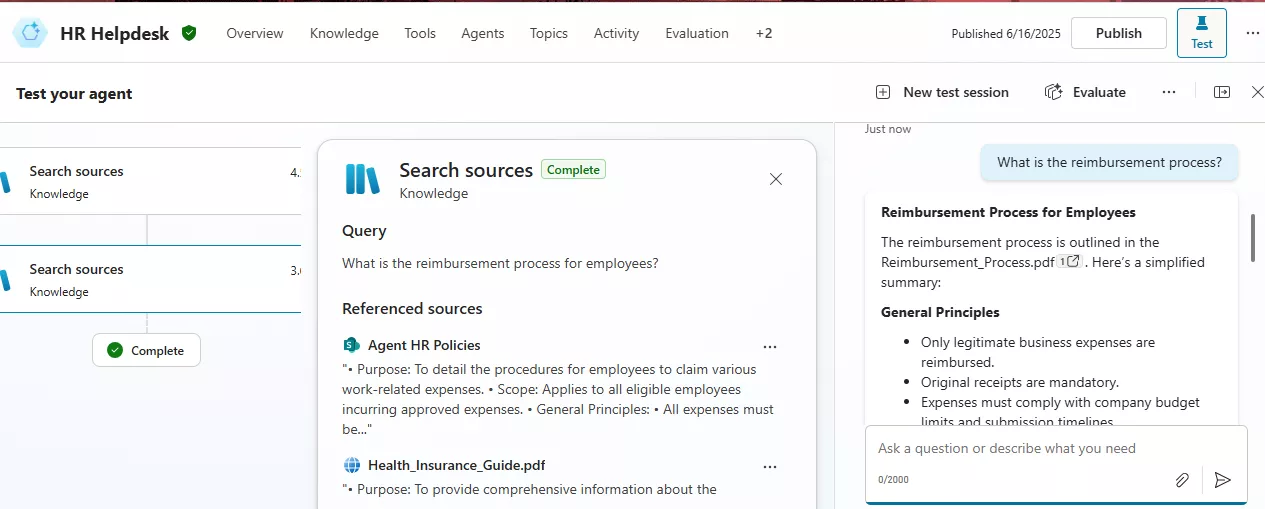
Real HR conversations do not stay in a single domain. An employee asking about their leave entitlement often follows up immediately with a question about expense reimbursement for travel during that leave. A rule-based chatbot gets stuck it either mishandles the follow-up or returns a generic “I can only answer one question at a time” response.
A production copilot recognizes when the domain of the conversation has shifted, resets its retrieval context to the new domain, and surfaces the reimbursement policy without requiring the employee to start a new session. This is implemented through stateful session management, a software architecture pattern rather than a model capability, which is why the quality of the engineering underneath the copilot matters as much as the model powering it.
Phase 3: Structured Checklist Extraction for Procedural Queries
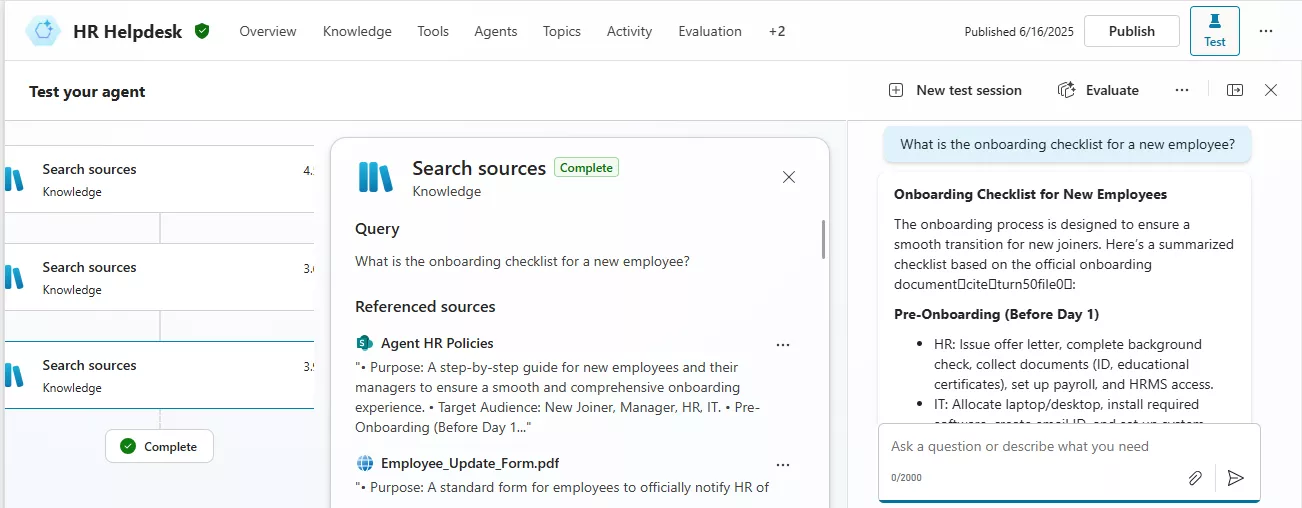
Not all HR queries have a single-sentence answer. Onboarding procedures, exit formality checklists, and benefits enrollment processes are multi-step workflows embedded in dense PDFs. A copilot that simply returns a paragraph from the middle of a 30-page document fails the employee who needs a step-by-step path.
Phase 3 handles this by extracting structured procedures from unstructured documents and organizing them into chronological phases. An employee asking for the onboarding checklist receives pre-onboarding tasks, Day One actions, and first-month milestones in order, in plain language derived entirely from the official document and linked back to it. This is the kind of output that builds genuine workforce trust in a self-service system.
Enterprise Architecture: Zero-Code Scalability and Compliance Auditability
The architecture decisions described above produce two operational advantages that executive teams care about most: the system scales without requiring developer involvement, and every interaction produces an auditable record.
Zero-code scalability means that when HR leadership creates a new policy, a hybrid work guideline, an updated parental leave framework, a revised expense cap, an HR administrator uploads the document to the appropriate SharePoint domain folder. The copilot indexes it automatically, categorizes it within the correct domain, and begins answering questions about it immediately. No retraining. No deployment cycle. No IT ticket. The HR function owns the intelligence of the system through document management alone.
For organizations in regulated industries and for enterprise software development contexts where audit trails are a compliance requirement, the source-citation architecture provides a natural record. Every interaction logs which document was retrieved, which clause was surfaced, and what answer was generated. Legal and compliance teams can pull an interaction log and trace every policy answer to its governing document, a capability that manual HR support channels cannot match.
Organizations that implement AI-assisted HR self-service with a properly governed knowledge base consistently report self-service resolution rates in the 70 to 85% range, compared to 10 to 15% with traditional ticketing systems. The difference is not the AI model; it is the architecture that ensures the model has accurate, current, domain-segmented content to work from.
The scalability advantage compounds as the organization grows. A manual shared services model requires proportional headcount growth to maintain service quality. A governed knowledge architecture with a copilot layer handles 10,000 policy queries with the same infrastructure it uses to handle 1,000. The marginal cost per query approaches zero as volume increases, which is the structural shift that moves HR from a cost center to a strategic function.
What a Governed HR Knowledge Architecture Reveals About Organizational Health
One underexplored benefit of deploying a production HR copilot is what the query data reveals about the state of HR communication across the organization. When dozens of employees ask variations of the same question, “What counts as a qualifying event for benefits re-enrollment?” and that question does not have a clear answer in the current documentation, the copilot flags a knowledge gap rather than generating a hallucinated response.
This gap-detection function is directly valuable for HR leadership. It surfaces policy documentation that is absent, ambiguous, or written in language employees cannot parse. A sudden spike in queries about a specific policy area, such as remote work boundaries, for example, signals cultural or organizational stress before it manifests as attrition. The copilot becomes a real-time pulse on workforce concerns, a signal layer that passive ticketing systems never provided.
Teams working on AI transformation strategy in mid-size enterprises consistently identify knowledge gap detection as one of the highest-value, least-expected outputs of deploying a retrieval-based HR system. The value is not only in the questions the system answers, but it is also in the questions it surfaces as unanswerable, because those gaps become the HR team’s most actionable intelligence.
What We Observe Across Enterprise Knowledge Deployments in California
Our engineering team has observed a consistent pattern across enterprise knowledge system deployments in San Diego and the broader California market: organizations that invest in document governance before deploying the AI layer achieve reliable results in weeks, while organizations that deploy the model on top of an unstructured SharePoint environment spend months in a debugging cycle that is actually a documentation problem, not a technology problem.
The specific issue is policy document hygiene. When multiple versions of the same policy exist in different folders, the retrieval system surfaces inconsistent clauses. When policies are embedded inside presentation decks or meeting notes rather than standalone structured documents, the extraction quality degrades. The model is performing correctly; it is finding and presenting what it retrieves, but what it retrieves is inconsistent source material.
The engineering decision that resolves this is enforcing a single-document-per-policy rule within each SharePoint domain, combined with version control through SharePoint’s native document management features. This is a content governance decision, not a model decision, and it is the work that makes the difference between a copilot that earns workforce trust and one that erodes it. Organizations preparing for digital transformation in their HR function should treat document governance as Phase Zero, not as an afterthought after deployment.
The software we build for AI consulting engagements in this space consistently starts with a documentation audit. The question is not “which model should we use?” The question is “Do we have a knowledge base that a model can reliably read?” The answer to the second question determines everything about the first.

Conclusion
An AI-powered HR helpdesk copilot changes the operational relationship between an organization and its own institutional knowledge. The shift is not from human HR to AI HR; it is from frozen, hard-to-access documentation to a governed, always-current knowledge system that employees can query in the same way they would ask a trusted colleague.
The architecture that makes this work RAG on a domain-segmented SharePoint environment, stateful cross-domain context switching, and source-cited responses is reproducible and maintainable without ongoing developer involvement. The HR team that uploads a policy update owns the intelligence of the system from that moment forward.
The enterprises that will gain the most from this shift are not those with the most sophisticated AI ambitions. They are the ones willing to treat their policy documentation as a first-class engineering asset. If you are building toward that outcome, the path starts with how your knowledge base is organized, not which model you select.
Frequently Asked Questions
What is an AI-powered HR helpdesk copilot and how is it different from a traditional chatbot?
An AI-powered HR helpdesk copilot is a reasoning engine that understands the intent behind employee queries and retrieves verified answers directly from your governed policy documents such as SharePoint or OneDrive. Unlike rule-based chatbots that rely on predefined scripts and keyword matching, a copilot uses Retrieval-Augmented Generation (RAG) to dynamically pull the most relevant, up-to-date policy content and deliver it as a conversational, cited response. It adapts to how employees actually phrase questions, rather than requiring them to use exact terminology.
How does the Copilot ensure the information it provides is accurate and up to date?
The Copilot is directly integrated with your SharePoint document library as its Single Source of Truth. It does not rely on a static training dataset. The moment an HR administrator updates or uploads a new policy document, the Copilot reflects that change in real time with no retraining or redeployment required. Every answer it provides is grounded in retrieved document content and accompanied by a direct link to the source file, so employees and compliance teams can always verify the response against the original policy.
Is our sensitive HR data secure when using an AI Copilot built on this architecture?
Yes. The architecture is designed with a security-first approach. The Copilot retrieves information only from your organization’s governed SharePoint environment it does not send your policy data to external public AI training pipelines. All interactions happen within your enterprise boundary, and because every response is sourced from your own approved documents, there is no risk of the AI generating answers from unverified external sources. Bitcot also recommends role-based access controls to ensure the Copilot only surfaces information relevant to a given employee’s permissions.
What types of HR queries can the Copilot handle, and when does it escalate to a human?
The Copilot is designed to autonomously handle “Level 0” and “Level 1” inquiries the high-volume, repetitive questions that account for the majority of HR tickets. This includes questions about leave policies, payroll timelines, reimbursement procedures, onboarding checklists, benefits eligibility, and attendance rules. For complex, sensitive, or multi-step situations that fall outside the documented policies (such as disciplinary matters or bespoke compensation negotiations), the Copilot is configured to flag the query and route it to the appropriate HR specialist, ensuring human judgment is applied where it matters most.
How long does it take to implement an AI HR Copilot, and what does the rollout process look like?
Using Bitcot’s pre-built accelerators and the RAG-on-SharePoint architecture demonstrated in this PoC, an initial working prototype can typically be deployed within a few weeks not months. The rollout process begins with structuring your existing HR policy documents into functional domain folders (Compensation, Leave, Benefits, Onboarding, etc.), followed by connecting the AI agent to your SharePoint environment and configuring the retrieval logic. Once live, the system is self-maintaining: your HR team manages the knowledge base simply by keeping the SharePoint folder updated, with no ongoing developer involvement required.