Every enterprise development team has felt it. The backlog keeps growing. The business wants apps faster. Developers are stretched thin. And somewhere between hiring freezes and legacy system headaches, someone asks the question everyone has been thinking.
“Is there a faster way to build enterprise applications without sacrificing quality?”
The answer, for a rapidly growing number of Fortune 500 companies, is Microsoft Power Platform – and the numbers back it up.
With adoption by 97% of Fortune 500 companies, Power Platform has moved well beyond its low-code origins. It has become a full-stack development accelerator that enterprises rely on to build, automate, and scale business applications at a pace traditional development simply cannot match.
Microsoft has been recognized as a Leader in the Gartner Magic Quadrant for Enterprise Low-Code Application Platforms for multiple consecutive years. That consistent recognition reflects a platform that has earned the trust of enterprise IT teams, product leaders, and CTOs across virtually every industry.
This guide breaks down why Power Platform is reshaping full-stack development, what problems it solves, and how to put it to work.
The Enterprise Development Problem That Will Not Go Away
Before diving into the platform itself, it helps to understand the pain points driving adoption.
Enterprise teams are under constant pressure. Business units need custom tools. IT departments are drowning in requests. And talented full-stack developers are expensive to retain.
Here is what that looks like inside most organizations.
- Development backlogs stretch months or years. Critical internal tools get deprioritized because resources are tied up on revenue-facing products.
- Legacy systems create integration nightmares. Teams spend more time connecting old systems than building new ones.
- Hiring is slow and expensive. The average full-stack developer salary in the US ranges from $119,000 to $165,000 per year depending on experience and location, and demand continues to outpace supply.
- Shadow IT keeps growing. When business teams cannot get what they need from IT, they build their own tools with consumer-grade software, creating security risks and data silos.
Can my team build apps faster without hiring more developers? That is the question driving enterprise leaders toward low-code and no-code app development platforms – and Power Platform answers it directly.
The emotional toll matters too. Product leaders feel the pressure when a simple internal tool takes six months to deliver. CTOs worry about technical debt piling up. Operations heads wonder why teams are still copying data between spreadsheets in 2026.
These are not edge cases. They are the everyday reality of enterprise software development. And they explain why the global low-code development platform market was valued at over $37 billion in 2025, with analysts projecting it to more than double by the end of the decade.

That market is growing because enterprises are actively solving this problem – and one platform keeps showing up at the center of the solution.
“Over 80% of the Fortune 500 have active agents built using these low-code, no-code tools.”
– Satya Nadella, CEO, Microsoft
What Is Microsoft Power Platform
Microsoft Power Platform is a suite of low-code and pro-code tools designed to help organizations build apps, automate workflows, analyze data, and create intelligent agents.
Five core components make up the platform, each solving a specific piece of the full-stack development puzzle.
Power Apps: Lets teams build custom business applications using drag-and-drop interfaces. Developers can choose between canvas apps for pixel-perfect UI control or model-driven apps for data-driven layouts that auto-generate from Dataverse schemas. Both app types use Power Fx, an open-source, Excel-like declarative language for application logic, and connect natively to hundreds of data sources across mobile and web.
Power Automate: Handles workflow automation and robotic process automation (RPA). Its extensive connector library automates tasks across Microsoft and third-party applications without writing backend logic from scratch.
Power BI: Delivers real-time business intelligence and data visualization by transforming raw data from multiple sources into interactive dashboards and reports that drive better decisions.
Power Pages: Enables teams to build secure, data-driven, external-facing websites-such as customer portals, partner sites, and self-service hubs-without needing a dedicated web development team.
Copilot Studio & AI Builder: Allows organizations to build AI-powered agents and chatbots using natural language, with direct integration into Microsoft 365 and Dataverse for intelligent automation beyond simple rule-based bots. Complementing this, AI Builder adds ready-to-use AI capabilities like form processing, object detection, text classification, and prediction models directly into Power Apps and Power Automate workflows.
Underpinning all of this is Microsoft Dataverse, a secure, scalable cloud-based data service that provides a unified data model across applications with enterprise-grade governance, compliance, and role-based access controls. With over 1,000 pre-built connectors for services like SharePoint, SQL Server, and Salesforce, plus custom REST-based connectors for any API, the platform integrates with virtually any system in an enterprise’s tech stack.
Together, these tools map directly to the layers of a full-stack architecture.
- Data Layer: Dataverse serves as the secure, cloud-based backbone for storing and managing application data.
- Application Layer: Power Apps delivers both canvas apps and model-driven apps for front-end development.
- Automation Layer: Power Automate handles workflows, business process automation, and RPA.
- Analytics Layer: Power BI provides data visualization, reporting, and real-time business intelligence.
- Intelligence Layer: AI Builder and Copilot add AI capabilities like form processing, prediction, and conversational agents.
- Interface Layer: Power Pages and Copilot Studio create external-facing websites and intelligent chatbots.
This is why enterprises increasingly treat Power Platform as a full-stack development environment rather than a simple point solution.
Is Power Platform Only for Citizen Developers? This is one of the most common misconceptions about Power Platform. The short answer is: both citizen developers and professional developers use it.
Power Platform is purpose-built for citizen developers while offering deep extensibility for professional developers, enabling collaboration through Microsoft’s “fusion team” model.
Professional developers gain access to a full toolchain:
- Power Platform CLI for environment management and deployments
- VS Code and Visual Studio integration for plugin development and debugging
- Power Apps Component Framework (PCF) for building custom UI components using JavaScript or TypeScript
- Native integration with Azure Functions, Azure API Management, and Azure Logic Apps for complex backend workloads
- Enterprise ALM support with Git integration, CI/CD pipelines via GitHub Actions for Power Platform and Azure DevOps
- Power Apps Developer Plan for individual developer environments and testing
Understanding what the platform is sets the foundation. The more revealing question is what happens when enterprise teams actually put it to work.
How Power Platform Accelerates Full-Stack Development
Speed matters – but real acceleration means reducing friction across the entire development lifecycle, not just writing code faster.
Faster Prototyping and MVP Delivery
Traditional full-stack development requires separate teams for front-end, back-end, database, and DevOps. Power Platform collapses much of that complexity.
A business analyst can prototype a working application in Power Apps within days, connect it to Dataverse for data storage, and add automated workflows through Power Automate. What used to take two to three months can now be validated in weeks.
How fast can we build an MVP with Power Platform? For many use cases, functional prototypes go from idea to working demo in one to two weeks. That speed fundamentally changes how enterprises approach product validation and stakeholder buy-in.
Reduced Dependency on Specialized Developers
How do we build more without growing the team? Power Platform does not replace professional developers – it multiplies their reach. Business users and citizen developers handle routine application needs, freeing full-stack developers to focus on high-value work like custom API development, advanced integrations, and architecture decisions.
Organizations using low-code platforms report 50% to 70% faster development cycles compared to traditional methods, and that efficiency compounds quickly across departments.
Native Integration with the Microsoft Ecosystem
For enterprises already invested in Microsoft 365, Azure, and Dynamics 365, Power Platform integrates without friction – no middleware, no custom glue code. Power Apps connects directly to SharePoint, Teams, Outlook, and Azure services. Power Automate orchestrates workflows across the entire Microsoft stack. Power BI pulls data from Azure SQL, Dynamics 365, Excel, and hundreds of other sources.
Does Power Platform work with our existing Microsoft licenses? In many cases, yes – several capabilities are included with Microsoft 365 and Dynamics 365 subscriptions, which reduces additional licensing costs significantly.
Enterprise-Grade Security and Governance
What compliance standards does Power Platform support? Power Platform inherits Azure’s full compliance portfolio, including SOC 1, SOC 2, ISO 27001, HIPAA, FedRAMP, and GDPR. Unlike standalone low-code platforms such as OutSystems or Mendix, it requires no separate security infrastructure – running natively on the same Azure backbone enterprises already trust.
The Power Platform Admin Center adds centralized governance, environment management, and usage analytics, so IT teams maintain full visibility and control even as citizen developers build across departments.
AI-Powered Development with Copilot
Can AI actually build business applications for us? Not entirely on its own – but it dramatically accelerates the process. Power Apps uses Copilot to create database structures and UI layouts from natural language prompts. Power Automate uses Copilot to suggest and build workflow logic, turning what was once a manual configuration task into a conversational one.
Copilot Studio lets teams build agentic AI workflows and intelligent conversational agents without any coding at all. Think of it as a force multiplier that handles boilerplate work, suggests best practices, and cuts the time from idea to working prototype in half.
Theory is one thing. Here is what it looks like when enterprises actually put all of this to work at scale.
Real-World Impact of Power Platform at Scale
Numbers tell a compelling story.
Pacific Gas & Electric built over 300 complex solutions on Power Platform, saving more than $75 million annually. Deutsche Bahn licensed every employee on the platform, enabling rapid app creation across the entire organization. The City of Everett, Washington, saved up to $120,000 in software costs by developing custom low-code applications with existing Microsoft 365 licenses.
Coca-Cola Beverages Vietnam digitized over 60 workflows in just six months using Power Apps and Power Automate, transforming operations from purchase orders to warehouse management.
These are not small pilot programs. These are enterprise-scale deployments with measurable, documented ROI.
What kind of ROI can we expect from Power Platform? Most organizations see returns within 6 to 12 months. The 2024 Forrester Total Economic Impact study found a 216% ROI over three years, with a payback period of under six months.
Standard Bank of South Africa adopted Power Platform for employee experience engineering, specifically noting it enables rapid iteration when business requirements shift frequently. That adaptability is what separates Power Platform from traditional development in fast-moving environments.
“No two organizations are alike, and neither are the solutions needed to achieve meaningful business results.”
– Alysa Taylor, Chief Marketing Officer, Commercial Cloud and AI, Microsoft
The pattern is consistent across industries: organizations start with one department, prove the value, and scale across the enterprise. Understanding why the ROI compounds so predictably becomes clearer when you map Power Platform against the layers of a traditional development stack.
Where Power Platform Fits in a Full-Stack Architecture
Power Platform is designed to work alongside traditional development, not replace it. Here is how it maps to a modern enterprise architecture built on composable architecture principles, where each layer can be extended, replaced, or integrated independently.
| Layer | Traditional Stack | Power Platform Role |
| Front-End UI | React, Angular, custom builds | Power Apps (canvas and model-driven), Power Pages |
| Business Logic | Node.js, .NET, custom APIs | Power Fx, Power Automate, Dataverse plugins |
| Data Layer | SQL, NoSQL, data warehouses | Dataverse, 1,000+ connectors, custom REST connectors |
| Automation | Custom scripts, cron jobs | Power Automate, RPA flows |
| AI and Chatbots | Custom ML models, NLP | Copilot Studio, AI Builder |
| DevOps and ALM | Jenkins, custom CI/CD | GitHub Actions, Azure DevOps pipelines |
| Governance | Custom admin tools | Power Platform Admin Center |
Can professional developers use Power Platform alongside traditional code? Absolutely – and this is where the platform’s depth often surprises teams. Power Platform supports custom connectors, PCF controls built with JavaScript or TypeScript, C# plugins for Dataverse, Power Fx for application logic, and full CI/CD pipelines through GitHub Actions and Azure DevOps. It is purpose-built for fusion teams where pro developers and citizen developers collaborate within the same environment.
That architecture flexibility is a key reason CTOs and product leaders are making Power Platform a strategic priority, not just a departmental experiment.
Why CTOs and Product Leaders Are Choosing Power Platform
The decision to adopt Power Platform is rarely just technical. It is strategic, driven by business realities that show up on every leadership agenda.
Addressing the Developer Shortage
Gartner predicts that by 2029, enterprise low-code application platforms will be used in 80% of mission-critical applications globally, up from 15% in 2024. The talent shortage is not going away. While platforms like Appian and Mendix compete in this space, Power Platform holds a distinct advantage for organizations already running Microsoft 365 or Azure – there is no second ecosystem to learn, manage, or pay for.
Enabling Fusion Teams
The most effective enterprise teams combine technical and non-technical talent. Power Platform supports this natively – business analysts build front-end apps, developers build backend integrations, and IT governs the ecosystem.
How do we empower business users without creating security risks? Power Platform’s governance framework includes environment-level controls, data loss prevention policies, and role-based access. Business users build within guardrails that IT defines from day one.
Lowering Total Cost of Ownership
How much can Power Platform actually save us compared to custom development? Enterprises consistently report 40% to 70% reductions in development costs for applications that would otherwise require full custom builds. Low-code platforms can reduce application development time by up to 90%, and the average organization avoids hiring two additional IT developers – translating to roughly $4.4 million in increased business value over three years. When factoring in reduced maintenance and faster iteration cycles, the total cost advantage compounds further over time.
Accelerating Digital Transformation
Whether it is automating invoice processing, building customer portals, creating real-time dashboards, or deploying AI chatbots, Power Platform provides a unified process automation platform that tackles digital transformation across every department from a single governed environment.
What types of apps can we build with Power Platform? Internal operations tools, customer portals, data dashboards, approval workflows, inventory systems, HR onboarding apps, field service solutions, and AI-powered agents are all common production use cases. That versatility shows up clearly when looking at adoption across industries.
Key Industries Leveraging Power Platform for Development
Power Platform adoption spans every major industry vertical. Here are the sectors seeing the strongest impact.
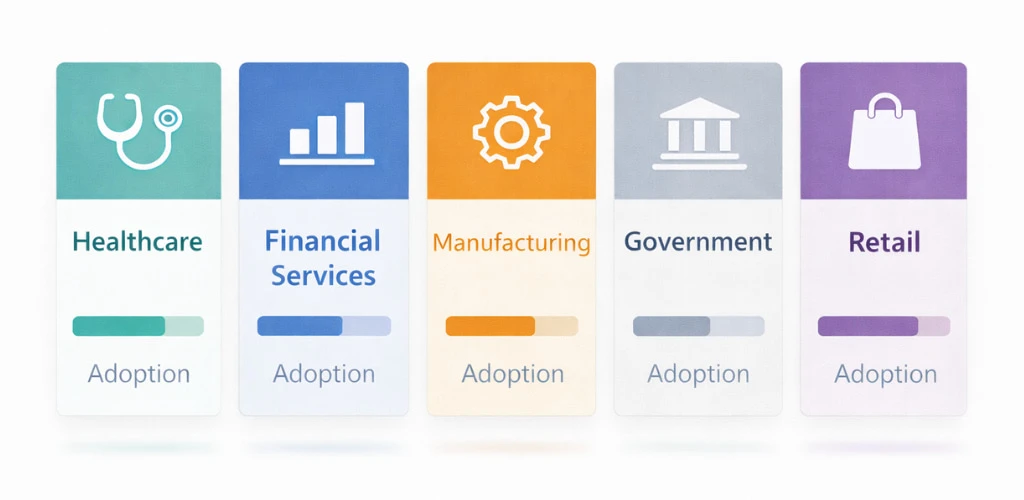
Healthcare organizations use Power Apps for patient intake workflows, Power Automate for claims processing, and Power BI for operational analytics. Compliance features in Dataverse help meet HIPAA requirements without custom-built security layers.
Financial Services teams automate loan processing, fraud detection alerts, and compliance reporting. The BFSI segment holds the largest share of the low-code market at 24%.
Manufacturing companies build production monitoring dashboards, quality control apps, and supply chain automation flows that connect plant-floor data with enterprise reporting.
Government agencies develop citizen service portals, permit processing systems, and internal workflow tools while meeting FedRAMP and other compliance standards.
Retail and eCommerce businesses create inventory management apps, real-time sales dashboards, and automated customer communication workflows.
What industry is seeing the fastest Power Platform growth? Healthcare and financial services lead adoption, driven by regulatory complexity and rapid compliance needs. But the fastest growth is coming from mid-market companies using Power Platform to compete with larger enterprises without matching their development budgets.
Power Platform vs Traditional Full-Stack Development
Knowing when to use Power Platform versus traditional development helps teams make smarter architecture decisions.
Use Power Platform when the application involves business processes, data entry workflows, dashboards, internal tools, customer portals, or automation between existing systems. These represent the majority of enterprise application needs, and Power Platform handles them significantly faster than custom code.
Use traditional development when the application requires highly custom UI frameworks, complex real-time processing, or capabilities beyond what the platform supports natively. Even then, Power Platform often handles adjacent components like admin panels, reporting layers, or automation logic.
Should we replace our existing full-stack development with Power Platform? That is not the right framing. The smartest approach is to use both strategically. Let Power Platform handle the 70% to 80% of use cases that do not require custom code, and reserve traditional development for the complex 20% to 30% that genuinely needs it. This hybrid model is how the most successful enterprise teams operate – moving faster without accumulating technical debt.
The next step is knowing how to get started without making the mistakes that slow most organizations down.
Common Mistakes Enterprises Make with Power Platform Adoption
Not every Power Platform deployment succeeds. Here is where others have stumbled – and what to do differently.
Skipping governance from the start. Without guardrails, citizen developers create hundreds of unmanaged apps, duplicated data, and security gaps. A Center of Excellence prevents this before it starts.
Treating it as IT-only or business-only. Power Platform works best with fusion teams. If IT owns everything, adoption stalls. If business users build without oversight, quality suffers. The sweet spot is structured collaboration.
Underestimating change management. Technology alone does not drive transformation. Teams need training, clear communication, and visible executive sponsorship to make adoption stick.
Building too complex, too fast. Starting with an enterprise-wide rollout instead of a focused pilot leads to delays and disillusionment. Start small, prove value, then scale with confidence.
Ignoring pro-developer extensibility. Some organizations limit Power Platform to basic apps and miss the deeper capabilities – custom connectors, PCF components, Azure Functions integration, and ALM pipelines – that make it a true enterprise application modernization tool.
What happens if our Power Platform adoption fails? The most common failure mode is organizational, not technical. Without governance, training, and executive support, any platform will underdeliver. The organizations that succeed treat Power Platform as a strategic initiative, not just a tool purchase.
That is where implementation strategy becomes as important as platform selection – and where having the right partner changes the outcome entirely.
Why Enterprises Trust Bitcot to Deliver Power Platform at Scale
For enterprises that want to move fast without trial and error, the right implementation partner makes all the difference.
Bitcot is a trusted Microsoft Power Platform consulting company that has delivered digital products for over 3000 clients across the United States. We specialize in deploying tailored Power Platform solutions that align with measurable business outcomes, not generic templates.
Our services cover the full lifecycle – discovery, custom Power Apps development, Power Automate workflow design, Power BI dashboard creation, Dataverse configuration, and ongoing optimization.
Whether your team needs to modernize legacy workflows, build a customer-facing portal with Power Pages, or integrate AI development agents through Copilot Studio, our low-code development services are built to get enterprises from concept to production faster. We also support organizations migrating from traditional SaaS platforms, Excel-based processes, and legacy systems to the Power Platform ecosystem.
“Most enterprises already own the tools to transform their operations – they just need the right implementation strategy to unlock it. That is exactly the gap we close for every client.”
– Raj Sanghvi, Founder & CEO, Bitcot
For enterprises evaluating workflow automation solutions or broader digital transformation services, we bring the strategic depth and technical execution to turn Power Platform into a lasting competitive advantage.
Conclusion
The enterprises leading over the next five years will not be the ones with the largest development teams or the biggest budgets. They will be the ones that build smarter – with platforms that let every team move fast, iterate confidently, and deliver value without bottlenecks.
Power Platform makes that possible in practice. It closes the gap between what business teams need and what development teams can realistically deliver, without forcing a choice between speed and quality. The fusion of low-code accessibility, pro-developer depth, hyperautomation capabilities, and enterprise-grade governance is not a compromise – it is the architecture modern enterprises have been waiting for.
The organizations profiled in this guide did not transform by accident. They chose a platform, committed to governance, empowered their teams, and scaled what worked. That same path is open to any enterprise willing to take the first step.
The question is no longer whether to adopt low-code. It is how quickly your organization can start turning backlogs into shipped products.
Want to accelerate your enterprise development? Talk to our Power Platform team and start building faster.