Your competitors are closing estate plans in 14 days while your files are still waiting for missing signatures at week three. The difference isn’t talent or pricing – it’s automation.
A client fills out an intake form. Half the fields are missing. The file sits for a week. A staff member sends a follow-up email. No reply. Another week passes. Multiply that by 40 open files, and suddenly an estate planning firm isn’t practicing law – it’s managing chaos.
That’s the reality inside most estate planning practices today. And it’s exactly the problem AI automation was built to solve.
The legal AI market is valued at approximately $1.89 billion in 2026 and is projected to reach $3.9 billion by 2030, growing at a 17.3% compound annual growth rate (CAGR). Yet most estate planning practices still rely on manual handoffs, spreadsheet tracking, and staff members spending hours on tasks that could be automated in minutes. The gap between what’s possible and what’s happening inside most firms is massive.
Most guides on this topic talk about AI in vague, theoretical terms. This one doesn’t. This guide maps AI automation directly to the real estate planning workflow-stage by stage, bottleneck by bottleneck.
Whether you’re asking “how do I automate my estate planning intake process?” or “what AI tools actually work for law firms like mine?”-the answers are here.
Why Estate Planning Practices Need AI Automation Right Now
The scenario above isn’t unique to one firm. It’s the daily reality across the industry.
The pressure on estate planning firms has never been higher.
Client expectations are growing. Internal capacity is stretched thin. And the firms that continue to rely entirely on manual processes are losing ground to competitors who have already made the shift.
The numbers tell the story clearly. According to a February 2026 Litify survey, 78% of legal professionals now use AI in some capacity. Law firms increased technology spending by 9.7% in 2025 alone-the fastest real growth the industry has likely ever seen-according to the 2026 Thomson Reuters and Georgetown Law report on the state of the US legal market. And AI adoption among attorneys nearly tripled between 2023 and 2024, jumping from 11% to over 30%, according to the ABA Legal Technology Survey.
Yet estate planning remains behind the curve. Data from the 2025 Legal Industry Report shows just 25% of trusts and estates professionals use AI individually, with only 18% adoption at the firm level. The opportunity gap is enormous.
“Embracing AI and integrating it into daily workflows isn’t a nice-to-have-this has rapidly become table stakes.”
– Jack Newton, CEO of Clio
But the real driver isn’t competition-it’s operational pain.
Every estate planning firm knows this pain. It’s not dramatic-it’s slow. It’s the kind of friction that nobody puts on a slide deck but everyone feels on a Tuesday afternoon.
A typical estate planning file passes through four to six staff members before a client signs their documents. Each handoff introduces delay. Each delay increases the risk of client drop-off, rescheduling, and rework. When a PIF arrives with a missing email address or an incomplete heir listing, the entire pipeline stalls.
Firm leaders eventually ask the same frustrating question: “Why is my estate planning workflow so slow?” The answer reveals something important-it’s rarely one big problem. It’s dozens of small friction points compounding across every file.
AI automation addresses this by eliminating ambiguity at the source, enforcing handoff discipline, and keeping clients engaged between touchpoints. Legal process automation, when done right, produces faster turnaround, fewer errors, and staff who can focus on work that actually requires legal judgment.
But what does that actually look like inside a real workflow? That starts with understanding the three layers of automation that matter most.
What AI Automation Actually Looks Like in Estate Planning
Before diving into specific workflow stages, it helps to understand the three types of AI and automation that apply to estate planning practices.
Rules-based automation handles structured, repeatable tasks-think auto-creating matters in a CRM when an LSA is signed, or triggering follow-up emails when a retainer payment is overdue. No AI involved, just logic and triggers.
AI agents handle tasks requiring interpretation or natural language understanding. An AI agent can review a completed intake form, flag missing fields, and send a plain-English message to the client explaining exactly what is needed.
Human-in-the-loop checkpoints are where legal judgment, emotional intelligence, or fiduciary responsibility demand a real person. Pre-signing review calls, document execution, and retention decisions all fall here.
The most effective implementations layer all three together. Automation handles the repetitive work. AI handles the gray areas. Humans handle the high-stakes moments.
Understanding these layers is essential-but seeing them in action is where everything clicks.
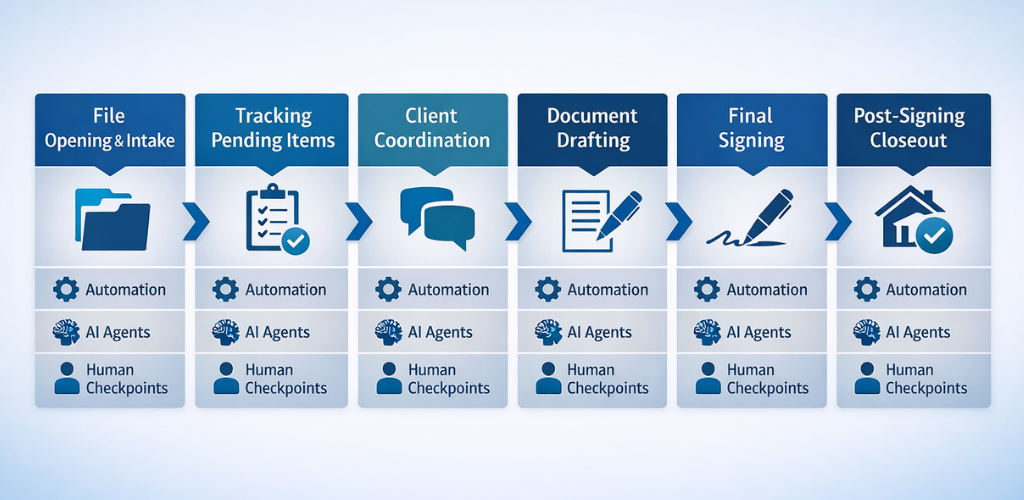
Now, let’s walk through each stage of the estate planning workflow and see exactly where each layer fits.
Stage 1 – File Opening and Intake Processing
This is where every estate planning file begins-and where the most preventable delays originate.
The intake stage typically involves updating the CRM from the Personal Information Form (PIF), renaming and saving scanned documents, creating matters and checklists, sending onboarding agreements for e-signature, and syncing the client to marketing automation.
A single incomplete PIF creates a cascade of downstream problems. Missing email addresses block e-signature workflows. Incomplete heir information prevents accurate document drafting. Unclear LSA selections force clarification emails that may not get answered for days.
This is exactly where the three layers of automation-rules-based, AI agents, and human checkpoints-work together most powerfully.
Where Automation Fits
- CRM intake automation can auto-create contacts, set statuses, apply tags, and populate notes directly from structured PIF data
- Document handling can auto-rename files using naming conventions and save them to the correct matter folder
- Matter creation can be rules-driven based on LSA selections, automatically generating Estate Planning, Annual Maintenance Plan, or DocuClub matters with the right checklists
- Marketing sync can auto-tag clients and trigger campaigns based on CRM status changes
Where AI Agents Add Value
A PIF completeness agent validates every intake form before staff touches the file. This AI-powered intake validation checks for missing emails, ZIP codes, heir details, and internal inconsistencies. When it finds gaps, it can generate a client-facing message asking for the specific missing information in clear, non-legal language.
An intake classification agent interprets the LSA and PIF data to recommend whether a file should follow the Estate Planning, Annual Maintenance Plan, or Did Not Retain workflow.
What Still Requires a Human
Final confirmation of retention vs. non-retention. Judgment calls when PIF answers conflict or when a client’s situation doesn’t fit neatly into standard categories.
People often ask, “Can AI handle client intake for law firms?” The answer is yes for data validation and routing. But the retention decision itself should always involve human judgment.
With a clean file opened, the next challenge is getting it across the finish line. And that is where most firms start bleeding time.
Stage 2 – Tracking Pending Items and Moving Files to Drafting
Once a file is opened, someone needs to track paper originals, chase missing signatures and retainers, and follow up weekly until everything is complete. Only then does the file move to the next stage.
This is where many firms face a critical bottleneck. Operations managers constantly wrestle with this question: “How do I stop files from stalling between intake and drafting?” In most firms, the answer is simple but painful-someone has to chase every pending item manually, week after week.
This is one of the most labor-intensive and frustrating stages in the entire workflow. Emails go out. Silence comes back. More emails. A phone call. Still waiting. Retainer payments get delayed. Important emails about invoicing get buried under routine correspondence. And when a firm operates across multiple locations, physical file handoffs add even more lag.
Here’s where automation and AI can transform this stage completely.
Where Automation Fits
- Follow-up automation triggers timed, multi-channel reminders based on missing signatures or retainers
- Task and due-date enforcement auto-escalates when items are overdue, preventing files from sitting idle
- Status updates automatically move files to “Hired” and notify the next team member when all pending items are received
This type of workflow automation eliminates the manual chasing that drains staff hours every week.
But automation alone isn’t enough-this is where AI agents add a layer of intelligence.
Where AI Agents Add Value
A signature and retainer monitor agent watches e-signature platforms and the CRM in real time. When a client hasn’t signed after a set period, it sends a context-aware nudge-not just a generic reminder but a message that references the specific document and explains why it matters.
An inbox monitoring agent flags critical emails about retainers, invoicing, or fee disputes that require immediate action, preventing them from getting buried under routine correspondence.
What Still Requires a Human
Deciding when a client is truly non-responsive versus still viable. Handling exceptions involving fee disputes, location-specific delays, or unusual file circumstances.
Getting files to “ready for drafting” is only half the battle. The next stage is where the biggest delays live-and where AI delivers its single greatest impact.
Stage 3 – Client Coordination and Pre-Signing Review
This stage carries the highest potential for AI impact in the entire estate planning workflow. Not close. Not debatable. This is the stage.
Between retention and the pre-signing review call, clients need to complete their “homework.” They need to gather missing information, make decisions about fiduciaries, and finalize plan details. Many struggle here. They feel uneasy about big decisions. They overthink trustee choices. They experience a kind of buyer’s remorse that keeps them from moving forward.
Meanwhile, the firm is trying to schedule pre-signing review calls, manage capacity, and set realistic production deadlines.
Every firm leader asks this at some point: “How do I keep estate planning clients engaged after the initial consultation?” This is one of the most common questions we hear. The answer lies in proactive, personalized communication-and AI is uniquely suited to deliver it at scale.
Let’s look at how automation and AI work together in this critical stage.
Where Automation Fits
- Scheduling automation runs a rules-based cadence of scheduling links, reminders, and closeout letters
- Capacity-aware due dates auto-suggest production and review deadlines based on current staff workloads, attorney availability, and signing date targets
“Firms that delay adoption risk falling behind in the legal marketplace and will soon be undercut by firms using AI to streamline operations.”
– Niki Black, Legal Insight Strategist at AffiniPay
Where AI Agents Add Value (High Impact)
A client homework coach agent guides clients through their remaining tasks using plain English. Instead of a generic email saying “please complete your intake forms,” the agent tells the client exactly which fields are missing, explains fiduciary roles in simple terms, and answers common questions about trust structures, powers of attorney, and beneficiary designations. This kind of client engagement automation is where AI delivers its clearest return on investment in estate planning.
A decision-support agent helps clients who are stuck. It explains trustee options, walks through common planning tradeoffs, and provides examples that reduce paralysis without offering legal advice.
A sentiment and risk detection agent analyzes client communications for signs of hesitation, confusion, or disengagement. When it detects a file going cold, it alerts staff so they can intervene personally before the client drops off entirely.
What Still Requires a Human
Pre-signing review calls. Emotional reassurance. Nuanced planning conversations where clients need to feel heard and understood.
Once a client is ready, the file moves into production. Speed matters here, but so does precision.
Stage 4 – Document Drafting and Production
Document production is the engine room of an estate planning practice.
A typical production specialist handles 12 to 14 files per week. The work includes reviewing LSAs to identify required documents, generating documents in assembly software, manually drafting deeds and assignments, formatting for attorney review, applying edits, and assembling final signing sets.
The biggest bottlenecks here are unclear intakes and missing information. Production managers constantly face this reality: “Why does estate plan drafting take so long even with document assembly software?” The answer is usually straightforward-the data feeding into that software is incomplete or inconsistent. When a prior client doesn’t have an updated PIF, the production team has to track down data manually. Dead questions or gaps in property and LLC information can slow drafting significantly.
The solution isn’t more powerful document assembly-it’s cleaner data and smarter pre-drafting support.
Where Automation Fits
- Data mapping pushes structured intake data directly into document assembly fields, eliminating redundant data entry
- Deed research triggers auto-initiated county lookup tasks when real property is identified in the intake
- Template selection can be automated based on LSA selections and jurisdiction
This combination of intelligent document automation and document assembly automation dramatically reduces the manual effort required to move from intake to a draft-ready file.
Beyond simple automation, AI agents can actively support the drafting process itself.
Where AI Agents Add Value
A drafting assistant agent pre-drafts deeds, assignments, and beneficiary designation language based on patterns in the intake data. It doesn’t replace the production specialist-it gives them a starting point instead of a blank page.
An intake consistency agent cross-checks the PIF, ATBD, Fiduciary Intake, and RLT intake for logical conflicts before documents are generated. If a client named one person as executor on the fiduciary form but a different person in the trust intake, the agent flags it immediately.
What Still Requires a Human
Legal judgment on drafting choices. Final review of deeds, tax-sensitive provisions, and any bespoke language. Attorney sign-off before documents go to the client.
Documents are drafted. The attorney has reviewed them. Now comes the moment everything has been building toward.
Stage 5 – The Final Signing
Final signings are in-person meetings where the client formally executes their estate planning documents.
This stage is primarily human. People sometimes wonder, “Can AI play any role in the estate planning signing process?” The honest answer is-not in the execution itself, but in everything that leads up to it. The value of the signing ceremony is trust, clarity, and confidence. An attorney or senior staff member reviews key terms with the client, guides them through proper execution, and answers any remaining questions.
While AI can’t replace the human moment at the signing table, it can ensure everything leading to that moment is flawless.
Where Automation Fits
- Post-signing task generation auto-creates CRM tasks for deed recording, asset titling follow-ups, beneficiary designation reminders, and property tax exemption filings
- Document scanning workflows can auto-route executed documents to the correct folders
This automated task routing ensures nothing falls through the cracks during the transition from signing to closeout.
Where AI Agents Add Value
A signing prep agent runs a final check on all documents against the intake data before the meeting. It flags typos, data mismatches, or inconsistencies that might otherwise surface at the table and undermine client confidence.
When errors show up during signing, the file often loops back to earlier drafting steps, adding days or weeks of delay. A small pre-check prevents that entirely.
What Still Requires a Human
The execution ceremony itself. Handling last-minute substantive changes. Providing the personal reassurance that makes clients feel confident in their plan.
The signing is done. But the file isn’t. What happens next determines whether the firm’s backend runs clean or creates a new set of problems.
Stage 6 – Post-Signing Closeout
The closeout stage involves confirming all executed documents are correctly scanned, dated, and paginated. Staff renames and saves files, closes matters in the CRM, updates marketing automation records, and handles deed recording.
This is high-volume, detail-oriented work that follows consistent patterns-making it a strong candidate for automation.
Where Automation Fits
- Closeout checklists auto-complete based on matter type and executed document set
- Subscription sync auto-updates maintenance plan and document club memberships based on the executed plan
- CRM and marketing updates trigger automatically when a matter is closed
Where AI Agents Add Value
A quality control agent verifies that all required executed documents are present, correctly dated, and properly paginated before the file is officially closed.
What Still Requires a Human
Financial exceptions. Client-specific subscription adjustments. Any closeout tasks that require judgment beyond the standard checklist.
With all six stages mapped, the next question is practical-what technology actually makes this work?
Choosing the Right Technology Stack for AI-Powered Estate Planning
Firm leaders frequently ask, “What tools do I need to automate my estate planning practice?” The answer depends on what’s already in place.
Most estate planning firms already use a CRM like Clio, a document assembly platform like WealthCounsel, an e-signature tool like HelloSign or DocuSign, and a marketing automation platform like ActiveCampaign. The goal isn’t to replace these tools-it’s to connect them and layer AI agents on top.
| Category | Purpose | Examples |
| Practice Management / CRM | Client records, matter tracking, task management | Clio, MyCase, PracticePanther |
| Document Assembly | Generating estate planning documents from intake data | WealthCounsel, Interactive Legal, Gavel |
| E-Signature | Collecting client signatures remotely | HelloSign, DocuSign, Adobe Sign |
| Marketing Automation | Client nurturing, follow-up sequences, tagging | ActiveCampaign, Mailchimp, HubSpot |
| Workflow Automation | Connecting tools, triggering actions across platforms | Zapier, Make, custom API integrations |
| AI Agents | Intake validation, client coaching, document QA | Custom-built solutions, LLM-based agents |
Integration is everything. An AI agent that validates intake data is only useful if it can read from the CRM and write back to it. Proper CRM integration is the backbone of any practice management integration strategy. Automation that triggers follow-ups only works if it connects to the e-signature platform and task management system.
One of the most common questions we hear from firms is: “Should I build custom AI tools or buy off-the-shelf solutions?” For most estate planning firms, the answer is a hybrid approach-use existing platforms where they work, build custom AI agents for workflows specific to your practice.
Having the right tech stack matters-but knowing where to aim it first matters more.
Where the Biggest ROI Comes From
Not every automation opportunity delivers equal value. Some save minutes-others save weeks. The difference matters.
Understanding where to focus your investment is critical.
“This tech revolution isn’t the gentle cycle that law firms experienced when online research replaced libraries or when email supplanted fax machines.” – 2026 Report on the State of the US Legal Market, Thomson Reuters and Georgetown Law
Based on the operational patterns in estate planning practices, three areas consistently produce the highest return on investment.
Intake validation and normalization. Every error caught at intake is a delay prevented downstream. Automating PIF completeness checks, intake classification, and data consistency validation pays for itself quickly by reducing rework across the entire pipeline.
Client-facing homework and decision support. Client hesitation and incomplete homework are the single biggest source of delay between retention and signing. An AI-powered homework coach that keeps clients moving forward can compress turnaround times by weeks.
Internal handoff discipline. When files move between team members, things get lost. Tasks get mistakenly assigned. Due dates slip. Automated handoff triggers with clear status tracking eliminate the ambiguity that causes bottlenecks at every transition point.
Firms that focus on these three areas of legal workflow optimization first will see measurable improvements in file velocity, client satisfaction, and staff workload within the first quarter of implementation.
Knowing where to focus is one thing-avoiding the traps along the way is another.
Common Mistakes to Avoid When Implementing AI in Estate Planning
Many firms approach AI automation with enthusiasm but stumble during implementation. Recognizing these patterns early can save months of wasted effort and resources.
Here are the four most common pitfalls:
Starting with the most complex workflow. It’s tempting to automate document drafting first because it feels like the biggest pain point. But drafting depends on clean intake data. If intake is still manual and error-prone, automating downstream steps just moves the bottleneck. Start upstream. Fix intake first.
Trying to remove humans from high-trust moments. Pre-signing review calls, final signings, and retention decisions are moments where clients need to feel heard. AI should support these moments, not replace them.
Underestimating integration complexity – A standalone AI tool that doesn’t connect to the CRM, document assembly platform, and marketing automation creates more work, not less. Integration architecture should be designed before tools are selected. Working with an experienced AI consulting partner early in the process prevents costly rework later.
Rolling out everything at once – The most successful implementations are sequenced. Phase one addresses intake validation. Phase two adds client communication automation. Phase three introduces AI agents for drafting support and quality control.
Avoiding these mistakes is easier with the right implementation partner-and that’s where the build matters as much as the plan.
How Bitcot Builds AI Automation Solutions for Estate Planning Firms
Bitcot works with law firms and legal operations teams to design, build, and implement custom AI automation systems that integrate seamlessly with existing practice management platforms.
For estate planning firms specifically, our AI development services cover the full scope of what this guide describes-intake validation agents, client-facing AI assistants, automated handoff workflows, and document QA systems that flag inconsistencies before signing.
The approach isn’t off-the-shelf software-it’s a custom implementation built around your firm’s actual workflow, integrating with Clio, WealthCounsel, ActiveCampaign, and HelloSign to create a connected automation layer that works seamlessly with your existing tools.
Our team handles architecture, development, integration, and ongoing optimization-so your firm’s staff can focus on practicing law rather than managing technology.
The tools exist. The expertise exists. What remains is your decision.
“The best automation isn’t built from a feature list-it’s built from understanding the actual process, where it breaks, and what the people doing the work need most.”
– Raj Sanghvi, Founder and CEO of Bitcot
Conclusion
AI automation in estate planning isn’t about replacing attorneys or removing the human element-it’s about eliminating the friction, delays, and errors that prevent firms from operating at full capacity.
The firms that move first will handle more files with fewer bottlenecks and deliver a client experience that sets them apart. The firms that wait will keep losing capacity to the same manual processes that have slowed them down for years.
The technology is ready. The implementation path is clear. The only question remaining is: when will you start?
Ready to explore what AI automation can do for your estate planning practice? Connect with Bitcot to schedule an implementation assessment and start building your automation roadmap today.