Key Takeaways
- MedPro centralizes clinical protocols, contacts, and resources for trauma center teams in a single mobile app, eliminating the friction of binders, shared drives, and disjointed communication channels.
- Group-based access control ensures that clinicians only see the protocols relevant to their unit, reducing cognitive load in high-stakes environments where seconds matter.
- A searchable protocol library with category filtering and bookmarking lets surgeons, nurses, and residents locate critical information in seconds rather than minutes.
- Built-in PDF resource attachment means procedure guidelines, ventilation setup docs, and wound care standards travel with the protocol, not stored separately on a shared network drive.
- A Contacts tab filtered by group provides instant access to on-call staff and unit-specific phone numbers, removing the need for a separate directory or operator call.
Intoduction
Because no one built them a purpose-fit tool. Until now. According to The Joint Commission, communication failures are among the leading root causes of sentinel events in hospitals. In Level I Trauma Centers, where care decisions happen in minutes, fragmented protocol access is not just an inconvenience. It is a patient safety issue.
This guide walks through exactly how MedPro, a healthcare mobile application built specifically for UC Health’s Trauma Center, was designed and engineered. It covers the architecture, the core engineering decisions, and a step-by-step breakdown of how to replicate this approach for your institution. Whether you are a healthcare engineering lead in San Diego, a clinical informatics team in New York, or a hospital system evaluating your protocol tooling, this walkthrough gives you a clear, practical blueprint.
Why Do Trauma Centers Struggle With Protocol Management?
Clinical protocol management sounds bureaucratic. The operational reality inside a trauma center is genuinely complex. According to AHRQ (Agency for Healthcare Research and Quality), care coordination failures and information retrieval delays are among the most preventable contributors to adverse clinical events. Here is why the problem persists across institutions:
- Multiple protocol sets across units. A trauma center typically runs distinct protocol sets across General Medical, Respiration, Trauma Surgical Unit (TSU), and Critical Care, each with sub-categories specific to that unit.
- Rotating staff with no structured onboarding. Residents, attendings, and nurses rotate through units on short cycles. Knowing which protocols apply to your current rotation requires navigating an institutional knowledge system that is rarely taught well.
- Static document repositories. Most institutions store protocols as PDFs on shared drives or intranet portals: not mobile-friendly, not searchable at the protocol level, and not organized around the individual clinician’s context.
- No unified contacts directory by unit. Finding who is on call in a specific unit requires calls to the operator, text threads, or printed schedules taped to nursing stations.
- Protocol versioning gaps. When a protocol changes, ensuring every provider has the updated version is an operations problem most institutions have not solved at scale.
What Is MedPro and What Does It Do?
MedPro is a cross-platform mobile application built for a Level I Trauma Center that addresses protocol fragmentation through four core capabilities:
| Feature | Description |
| Protocol Library | A fully categorized, searchable directory of clinical protocols organized by medical domain: Anatomy, Anesthetic Techniques, Brain and Spinal Cord, Critical Care, Diagnostic Imaging, and more, accessible from the home screen. |
| Group-Based Access | Providers join clinical groups (General Medical Protocols, Respiration, TSU) which surface only the protocols relevant to their unit. Groups also manage a dedicated Contacts list and Transfer protocols. |
| PDF Resource Attachments | Each protocol can hold attached PDF resources: clinical procedure guides, ventilation setup documents, wound care standards, viewable directly from within the app via OneDrive or Google Drive integration. |
| Contacts Directory | A Contacts tab filtered by group membership gives every provider instant access to on-call staff, unit coordinators, and department phone numbers. |
How Is a Medical Protocol Management App Architected?
MedPro is built on a modern, unified web-to-native stack. The deliberate choice to use a single TypeScript codebase maximizes code reuse across the web PWA and the native iOS and Android binaries. Here is the full breakdown:
Frontend and Mobile Bridge
| Layer | Technology | Why It Was Chosen |
| UI Library | React 19 | Concurrent rendering, improved transitions, and the new Actions API reduce boilerplate for async form handling, critical for login and profile update flows. |
| Meta-Framework | Next.js 15 (App Router) | File-based routing, server components, and built-in image optimization accelerate development. The App Router enables per-route layouts that map cleanly to MedPro’s tab-based navigation. |
| Language | TypeScript | End-to-end type safety across the frontend, API calls, and Supabase schema reduces runtime errors in a clinical context where correctness is non-negotiable. |
| Mobile Bridge | Capacitor 8 | Wraps the Next.js web app as a native Android and iOS binary with zero separate codebase. Provides access to native device APIs through a consistent plugin interface. |
| PWA | next-pwa | Makes the web version installable as a Progressive Web App so users on devices not running the native app still get an app-like experience with offline support. |
Backend and Data Services
| Layer | Technology | Why It Was Chosen |
| Database | Supabase (PostgreSQL) | Managed PostgreSQL with row-level security maps directly to MedPro’s group-based access model. Protocol rows are readable only by members of the associated group, enforced at the database layer. |
| Authentication | Supabase Auth | Built-in email and password auth with JWT session management. Supports future institutional SSO via OAuth2 providers without infrastructure changes. |
| Realtime | Supabase Realtime | Protocol updates and new resource attachments are pushed to connected clients instantly. When a clinical educator updates a protocol PDF, every logged-in provider sees the change without a manual refresh. |
State Management and Offline Storage
| Layer | Technology | Why It Was Chosen |
| Global State | Redux Toolkit and React-Redux | Centralized store manages authenticated user context, active group selections, recently viewed protocols, and search state across the Protocols, Contacts, and Settings tabs. |
| Offline Storage | Local Browser Storage and Capacitor Preferences | Recently viewed protocols and user preferences are persisted in local storage so they survive app restarts. Capacitor Preferences provides a native key-value store on iOS and Android that behaves identically to localStorage on web. |
Styling, UI, and Native Device Features
MedPro uses Tailwind CSS 4 for utility-first component styling, Sass for complex nested layouts, Lucide-React for a consistent SVG icon set, and React-Toastify for non-blocking toast notifications. On the native device side, Capacitor plugins handle filesystem access for PDF caching, network status detection for offline mode switching, and native preferences storage for persistent session state.

How to Build a Medical Protocol App: Step-by-Step
Here is the complete development process, from defining the data model to shipping the contacts directory.
Step 1: Define the Protocol Taxonomy
Work with clinical leadership to establish the full set of protocol categories: Anatomy, Anesthetic Techniques, Brain and Spinal Cord, Critical Care, Diagnostic Imaging, Ear Nose Throat and Dental, Examination Protocols, and more. This taxonomy drives the navigation architecture and search index. Every category maps to a top-level database record. Protocols are children of categories. Resources are children of protocols. According to HIMSS, structured clinical content taxonomies are a foundational requirement for effective clinical decision support systems.
Step 2: Model Groups and Memberships
Each clinical unit (General Medical Protocols, Respiration, TSU) is a Group entity. Groups have Members, a Location, a cover image, and four tabs: Protocols, Numbers, Transfer, and unit-specific guidelines. A provider’s group memberships determine which protocol sets surface on their home dashboard and which contacts appear in their directory. Design this as a many-to-many relationship: providers belong to multiple groups, and groups contain multiple providers.
Step 3: Build the Protocol Library Screen
The home screen surfaces two key components: a Recently Viewed carousel filtered by the user’s active groups, and an All Protocols list showing all top-level categories. Each category row navigates to a sub-list of protocols. Apply a filter icon to allow providers to narrow by group membership. This is the most-used screen in the app, so every tap decision matters for speed.
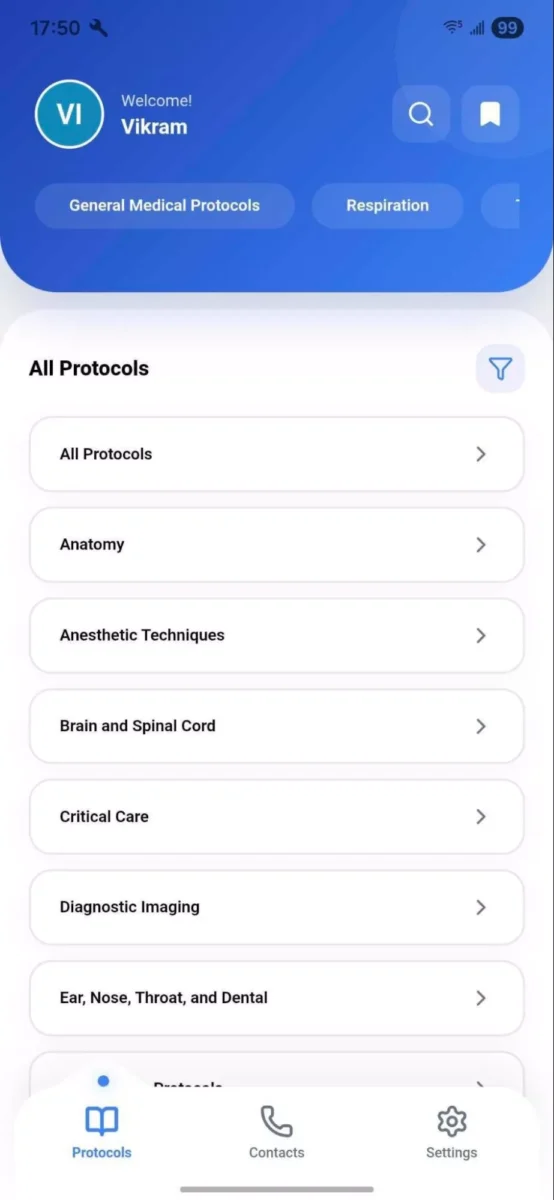
Figure 3: Anatomy Sub-category View showing Mechanical Ventilation Setup and Oxygen Therapy Methods
Step 4: Implement Full-Text Search Across Groups and Protocols
Search is a primary workflow. A provider typing “Re” should immediately surface the Respiration group card and all protocols matching that string. Implement a unified search that runs two queries in parallel: a group name match and a protocol title and content match. Display results in separate sections with a filter toggle. Debounce at 200ms and cache frequent queries. Speed is non-negotiable in a clinical environment.
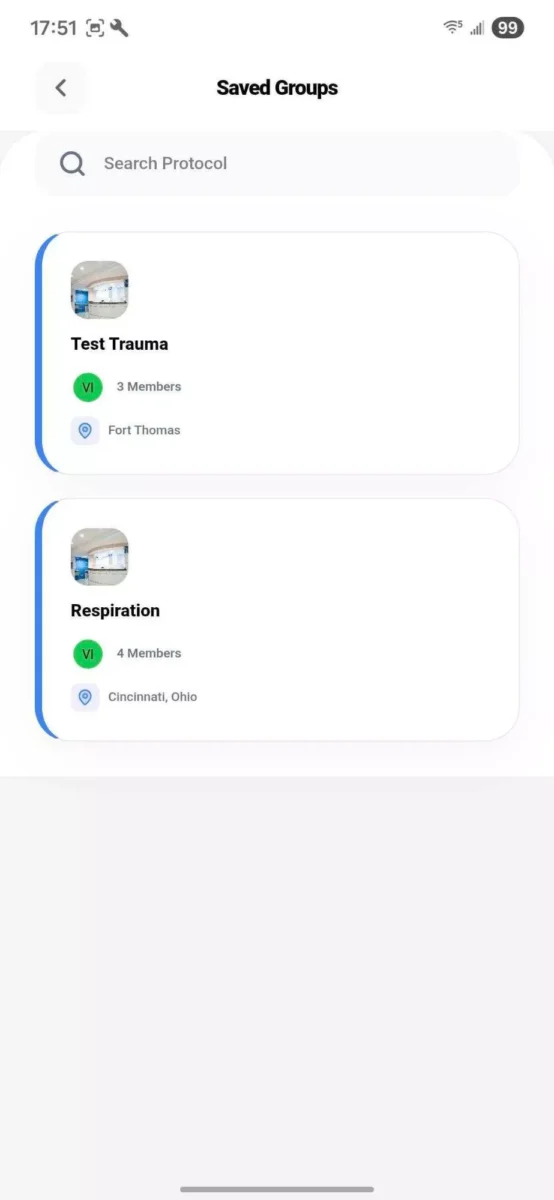
Figure 4: Saved Groups View showing Test Trauma (Fort Thomas) and Respiration (Cincinnati, Ohio)
When a provider taps into a group (e.g., General Medical Protocols), they land on a detail screen with a group cover image, member avatars, location tag, and four tabs: Protocols, Numbers, Transfer, and TSU. The TSU tab surfaces Unit Guidelines with sub-items including In-patient Protocols, Wound Care Standards, and Triage System. The “Leave Group” action should require a two-step confirmation. Providers need groups for context continuity.
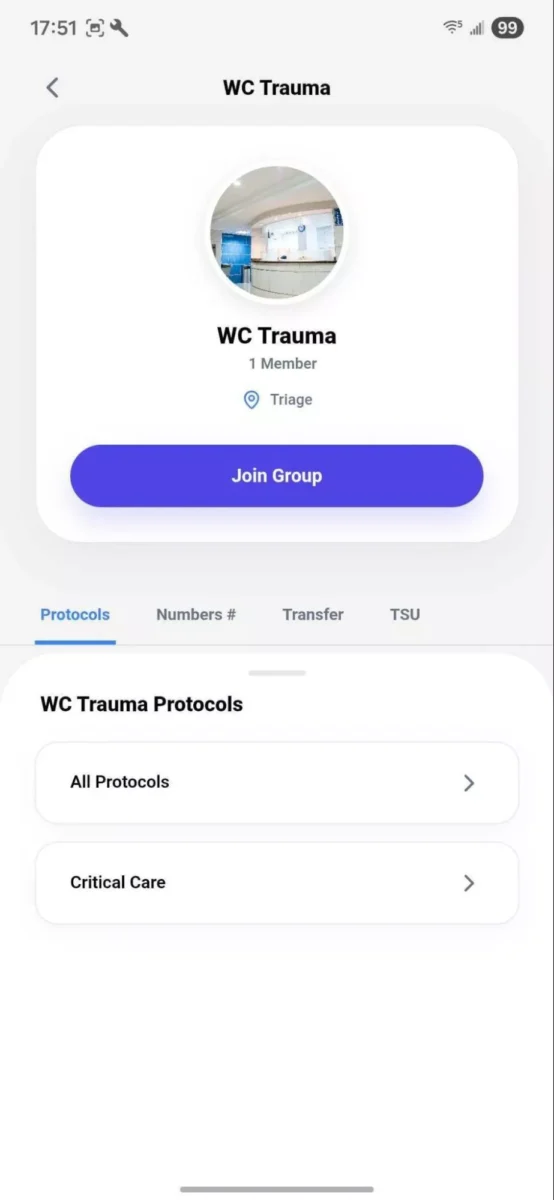
Figure 5: WC Trauma Group Detail View showing the Protocols tab with All Protocols and Critical Care
Step 6: Attach PDF Resources to Protocols
Each protocol record has an associated Resources list. Resources are named PDFs stored on OneDrive or Google Drive. When a provider taps a resource, the app triggers a native file-open intent or renders inline via PDF.js. Implement as a deep link to the document’s cloud storage URL. Do not store PDFs in the app binary. This keeps document versioning managed at the institutional cloud level.
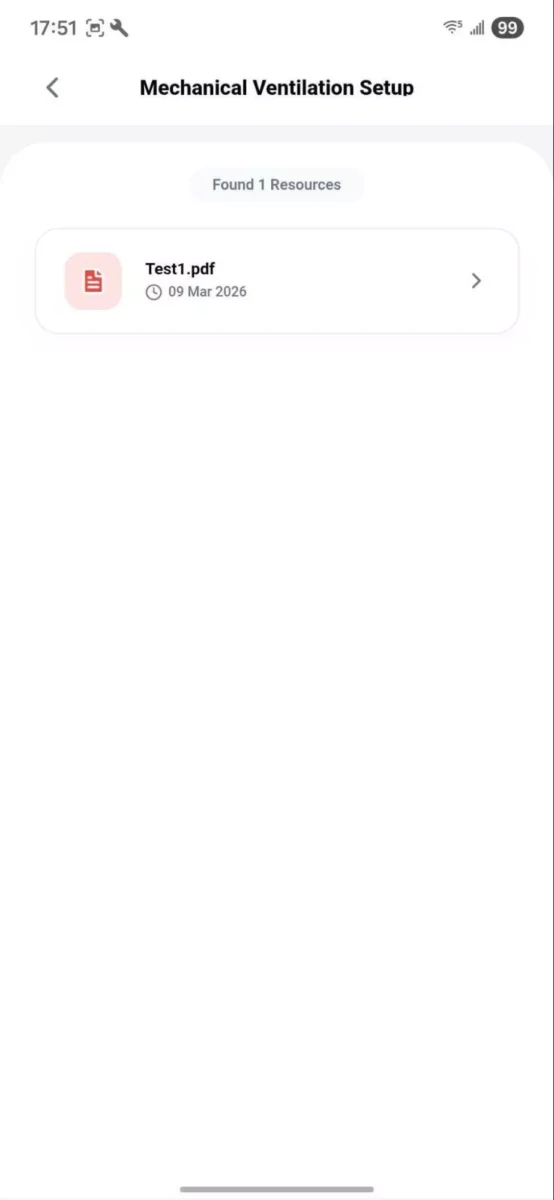
Figure 6: Mechanical Ventilation Setup showing PDF Resource View with attached protocol document
Step 7: Build the Contacts Tab
The Contacts tab mirrors the group chip navigation from the Protocols tab. Providers toggle between their groups to filter the contacts list to that unit’s staff. Contacts load asynchronously with skeleton card states during loading. Each contact record surfaces name, role, phone number, and group. Integrate with the device’s native phone dialer for one-tap calling.
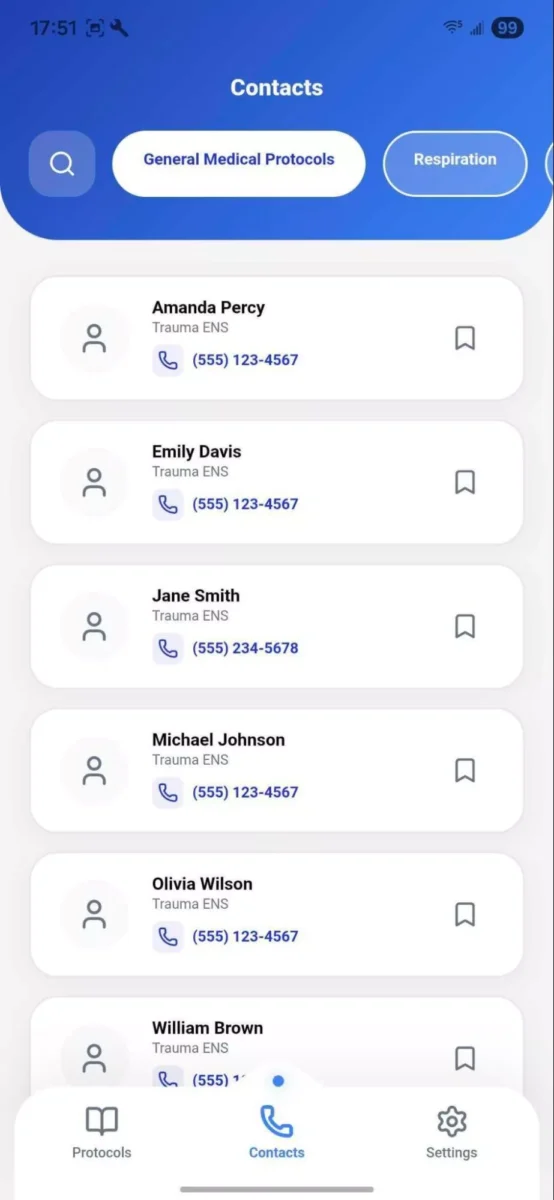
Figure 7: Contacts Tab showing Trauma ENS Staff Directory filtered by group with one-tap calling
Step 8: Build the Settings and Profile Module
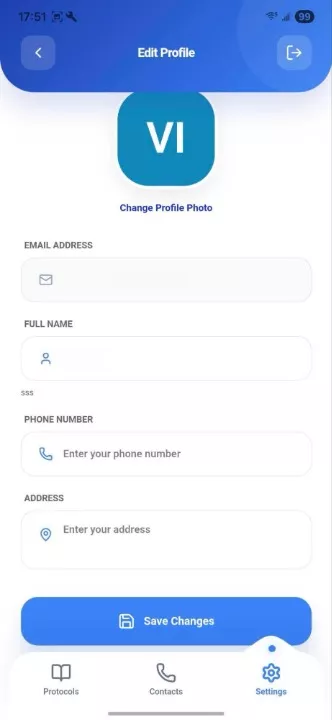
The Settings screen provides profile editing (full name, email, phone number, address, profile photo), app versioning display, and a logout action. Always display the app version with a development and production indicator. This is essential for QA workflows in clinical environments where beta builds circulate across test devices.
What Are the Key Engineering Decisions in Building This Type of App?
The engineering decisions that define MedPro’s performance and usability are worth examining individually.
Why Next.js and Capacitor Instead of React Native?
MedPro needed to be three things simultaneously: a web app, a PWA, and a native iOS and Android binary. With Next.js 15 as the core and Capacitor wrapping it for native deployment, the team maintains one TypeScript codebase and ships to all three targets. The trade-off is that deeply custom native animations require more effort, which is acceptable for a clinical reference app where information access speed matters more than motion design. According to Ionic’s Capacitor documentation, this web-to-native approach is particularly suited to apps where the web and native versions share near-identical feature sets.
The most impactful UX decision is organizing the entire experience around clinical groups rather than a flat protocol list. A trauma center clinician does not think about protocols in the abstract. They think about the protocols relevant to their current unit and role. Redux Toolkit holds the user’s active group selection in global state, ensuring every screen responds to the same group context without prop-drilling.
Why Supabase for Auth and Database?
Supabase’s row-level security maps directly to MedPro’s access model: a provider can only read protocol rows belonging to a group they are a member of, enforced at the database layer. Supabase Auth handles the email and password flow and supports future institutional SSO. Supabase Realtime means protocol updates appear on connected devices instantly without polling or manual refresh.
Offline-First With Capacitor Filesystem and Network Plugin
Hospitals have notoriously poor in-building cellular coverage. According to a report by Becker’s Hospital Review, cellular dead zones inside hospital facilities remain a widespread challenge, particularly in basement imaging suites and operating rooms. MedPro uses the Capacitor Network plugin to detect connectivity loss and the Filesystem plugin to cache recently viewed protocol PDFs locally. When a provider loses signal in a basement OR suite, the last-accessed protocols remain readable.
PDF.js for In-App Document Rendering
MedPro integrates PDF.js for inline rendering within the app viewport. Not all clinical devices have OneDrive or Google Drive installed, and forcing an external app context switch in the middle of a procedure reference creates unnecessary friction. PDF.js renders the document in a sandboxed viewer within the app, keeping the provider in context.
Common Mistakes When Building Healthcare Protocol Apps
- Over-engineering the data model before clinical validation. Build with real protocol data from real units before finalizing the taxonomy. Clinical staff will surface naming inconsistencies and missing categories that no product manager can anticipate upfront.
- Ignoring the offline problem. Network coverage in clinical facilities is worse than in almost any other enterprise environment. Treat offline-first as a Day 1 requirement, not a v2 feature.
- Building search as an afterthought. In a high-stress clinical setting, a search box that returns slow or empty results will cause providers to abandon the app for a binder within a week. Invest heavily in search quality from day one.
- Making “Leave Group” too easy. Providers who accidentally leave a group lose access to that group’s protocols and contacts instantly. Require a two-step confirmation and provide a self-service re-join flow.
- Launching without a protocol governance workflow. Who updates protocols? Who approves changes? Who is notified when a protocol version changes? Build the content governance process alongside the app. An outdated protocol is worse than no protocol.
Our Perspective on Building Clinical Protocol Apps
Across healthcare mobile projects in California and beyond, a pattern emerges consistently: institutions underestimate how much the data model matters and how quickly a poorly structured protocol taxonomy breaks the user experience. The taxonomy is not a backend concern. It is the primary navigation system. When clinical staff cannot agree on category names during discovery, that disagreement surfaces as confusion inside the app during use.
The second recurring pattern is the offline requirement. In nearly every hospital facility we have worked with, there are coverage dead zones that engineering teams did not account for at the start. On MedPro specifically, the Capacitor Filesystem integration was designed from the first sprint, not added later. That decision prevented a major re-architecture at the UAT stage. For teams building healthcare web applications or native mobile apps in this space, treating offline as a first-class requirement is the single most important thing you can do before writing a line of application code.

Conclusion
MedPro demonstrates what a purpose-built medical protocol management app looks like when it is designed around how clinicians actually work. The core thesis is straightforward: in a high-stakes clinical environment, information access speed matters. A protocol library organized by clinical group membership, fully searchable, connected to up-to-date PDF resources, and paired with a contacts directory on the same screen is materially better than anything a shared drive can provide.
Building it right requires careful attention to the data model, search quality, offline behavior, and PDF versioning strategy. Get those right and you have an application that providers will actually use, even at 2 a.m. in the middle of a trauma bay. If your organization is still relying on fragmented systems to manage clinical protocols, now is the time to rethink your approach. With the right healthcare mobile app development strategy, you can streamline access, improve clinical efficiency, and support better patient outcomes. Connect with our team to explore how we can help.
Frequently Asked Questions
What technology stack is MedPro built on?
MedPro is built on React 19 and Next.js 15 (App Router) as the core web framework, with Capacitor 8 wrapping it as a native iOS and Android binary. The backend is Supabase (PostgreSQL + Auth + Realtime). State is managed with Redux Toolkit, styling with Tailwind CSS 4 and Sass, and PDF viewing uses PDF.js. The entire codebase is TypeScript.
Is MedPro HIPAA compliant?
No – MedPro is not HIPAA compliant, as it does not handle or store protected health information (PHI).
How does MedPro handle protocol updates?
Protocol PDFs are stored in institutional cloud drives (OneDrive or Google Drive) rather than natively in the app. When a document is updated at the source, the updated version is immediately available in MedPro without requiring an app release. This keeps document versioning under institutional control.
Can MedPro work offline?
MedPro uses the Capacitor Network plugin to detect connectivity loss and the Capacitor Filesystem plugin to cache recently accessed protocol PDFs locally. The Recently Viewed protocols remain readable without a network connection. Capacitor Preferences persists the user session and last-active group so the app resumes the correct context after a device restart.
How long does it take to build an app like MedPro?
A full-featured protocol management app with group-based access, search, PDF resource integration, and a contacts directory typically takes 14–20 weeks from discovery to production deployment. Timeline depends heavily on the complexity of the institution’s existing protocol taxonomy and the SSO/cloud storage integrations required.
How much does it cost to build a healthcare mobile app like MedPro?
The development of a healthcare mobile app like MedPro depends on several factors, including the scope and complexity of the solution.
Typically, applications can range from:
A basic MVP with core features
A mid-level app with advanced functionality and integrations
A full-scale enterprise solution with high performance, security, and scalability
The final requirements depend on features, security needs, integrations, and long-term scalability goals.
Can Bitcot build a similar app for our healthcare organization?
Yes. Bitcot has extensive experience building custom healthcare mobile applications for hospitals, clinics, and healthcare organizations.
From discovery and UX design to development, integrations, and deployment, Bitcot delivers secure, scalable, and user-friendly solutions tailored to your clinical workflows and operational needs.