Key Takeaways
- Building an AI-powered health and fitness iOS app requires SwiftUI for UX, Groq API for fast AI responses, and voice chat to drive consistent engagement.
- One SwiftUI app on MVVM can replace the five trackers most people juggle, with mood, food, exercise, and AI in one codebase.
- Speed is what makes AI feel intelligent. Groq’s llama-3.1-8b-instant returns answers fast enough to feel conversational.
- Voice turns a passive tracker into a hands-free companion, running natively on iOS with zero third-party voice libraries.
- A PoC is not a shortcut. It validates AI latency, voice, and image analysis on real hardware before production scope locks in.
- A photo of a meal, a label, or a symptom becomes a question the AI can answer, straight from the iPhone camera in seconds.
Most health apps get downloaded in a single emotional moment. A troubling lab result. A birthday that hit differently. A quiet decision to finally take things seriously.
For a week or two, the app gets opened every morning. Breakfast gets logged. A walk gets recorded. A mood is noted. Then nothing. The streak dies, the icon moves to a back screen, and another health app quietly joins the graveyard.
That is not a motivation problem. It is a product problem. The app collected data but never gave anything back. It showed numbers when the user wanted answers. It displayed charts when the user needed direction.
HealthiApp was built to close that gap. It is a native iOS app built in SwiftUI that pairs four tracking modules with a voice-enabled AI health assistant powered by the Groq API.
The assistant listens, reasons, and responds out loud. It looks at meals from a photo. It reads answers back in a natural voice. It works with your hands full, your phone on the counter, and your attention somewhere else.
This breakdown walks through how we built it, what the PoC actually validated, and what it signals for any team in the United States serious about shipping AI-native health products on iOS.
Why Health and Fitness Apps Fail at Retention and What AI Does Differently
The global fitness app market was valued at $12.12 billion in 2025 and is projected to reach $33.58 billion by 2033, according to Grand View Research. North America alone accounts for nearly 40% of that revenue. Yet retention remains the biggest unsolved problem in the category.
How bad is it? Business of Apps benchmarks show health and fitness apps held a 3% retention rate by day 30 in 2023. Ninety-seven out of every hundred downloads disappear inside a month.
The core issue is fragmentation. Most people carry four or five separate apps to track what one intelligent app should handle end to end. A step counter. A calorie log. A mood tracker. A workout timer. A water reminder.
None of these apps share data. None of them actually respond to the user with insight.
That is the design failure hiding in plain sight. Health is not a set of isolated metrics. Sleep shapes appetite. Food shapes training. Training shapes mood. An app tracking each variable in a separate silo produces a lot of data and almost no meaning.
The answer is not a sixth app. It is one app that unifies the inputs, reads the pattern, and responds with context-aware guidance the moment the user needs it. That is the premise behind every serious conversational AI healthcare app shipping in the US market right now.
How SwiftUI and Groq API Power a Unified AI Health Assistant on iOS
The strategic premise was simple. The best health app is the one people actually open every day. Earning that habit means nailing three things: track what matters, interpret it, and respond in real time.
SwiftUI drives the native experience. Fluid, declarative, and genuinely premium from the first screen. No wrapper frameworks fighting the platform. No cross-platform compromises on motion or feel. This is SwiftUI iOS app development applied the way Apple intended.
MVVM architecture keeps the codebase honest. With four modules sharing state without coupling, MVVM is not a preference. It is the structural rule the whole product depends on.
Groq API supplies the intelligence layer. Fast, context-aware, and capable of handling both text queries and health image analysis. The llama-3.1-8b-instant model is engineered for low-latency inference, and the Groq API integration iOS app pattern we used is straightforward enough to adapt across most AI-native mobile builds.
A slow AI does not feel thoughtful. It feels broken. Groq’s speed is not a feature. It is what convinces the user the assistant is worth talking to.
The Four Technical Assumptions Behind an AI-Powered iOS Health App PoC
Every serious build starts by naming what you are not yet sure about. Before committing to full iOS app development for production, we needed to stress-test four specific assumptions on real hardware.
- Can SwiftUI with MVVM support a four-module health app with shared state, smooth animations, and clean navigation without the modules leaking into one another?
- Is Groq API fast enough, specifically llama-3.1-8b-instant, to run a conversational health chatbot where a slow answer quietly destroys user trust in the assistant?
- Can the Groq vision model (meta-llama/llama-4-scout-17b-16e-instruct) return genuinely useful analysis of health-related images captured straight from an iPhone camera?
- Does the voice loop hold up on a real device? Swift’s Speech framework for transcription, AVSpeechSynthesizer for output, microphone handoff, audio ducking. Does the full speak-and-listen cycle feel natural on physical iOS hardware?
All four were answered. Here is what we found.
How to De-Risk AI Integration in an iOS Health App Build Before It Hits Production
Adding AI into a mobile health app introduces a specific category of unknowns that architecture diagrams cannot resolve. API latency on device. Voice quality on real hardware. Whether image analysis actually produces useful output under real iPhone camera conditions. These are the questions every AI proof of concept mobile app has to answer before scope expands.
Early technical validation forces those unknowns into daylight before they become expensive production discoveries. Research published by McKinsey consistently shows that validating risky assumptions early cuts late-stage rework and timeline overruns across digital product builds.
The questions worth answering before the production build begins:
- Does the Groq API feel responsive enough that the user trusts the assistant, or does every wait quietly erode that trust?
- Does the speech-to-text and text-to-speech loop work smoothly on a physical iPhone, not just in a simulator where everything is easy?
- Can the vision model actually return useful health feedback from photos shot on a standard iPhone camera in normal lighting?
- With four modules in a single app, does the product feel like one cohesive experience or four apps sharing a tab bar?
Early technical validation is not the thing that slows a project down. It is the reason the production build does not fall apart the week before launch.
Inside HealthiApp: Core Features of an AI-Powered Health and Fitness iOS App
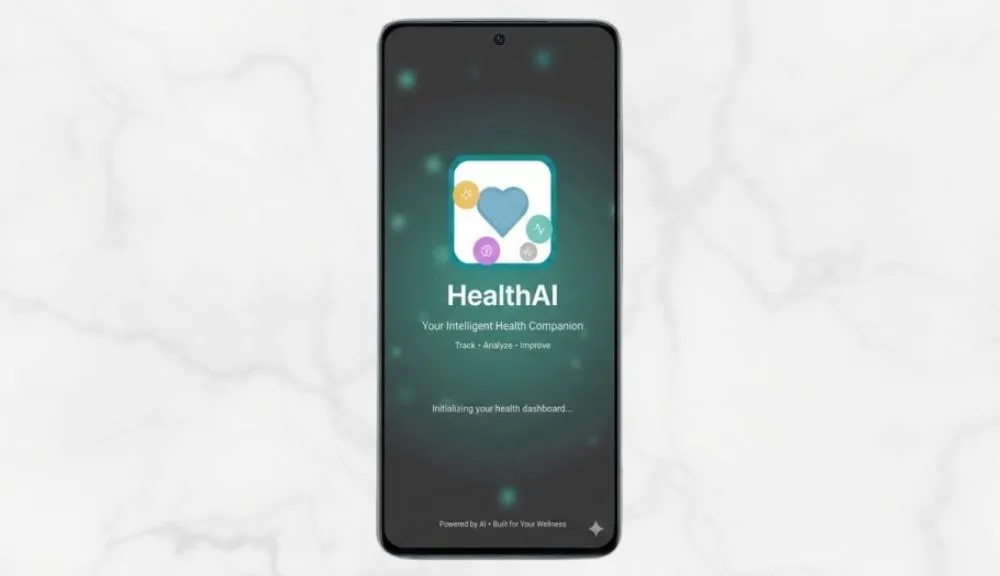
HealthiApp is not a mockup. It is a fully working SwiftUI iOS application, built on MVVM end to end, running on physical hardware with live Groq API connectivity. It is a working example of AI-powered iOS app development delivered as a complete, testable product.
- Splash Screen and Home Dashboard with a personalized welcome header, daily health tips widget, emoji-based mood tracker, quick-access cards into the Food Logger and Exercise Tracker, and a floating AI chat button that stays reachable from any scroll position.
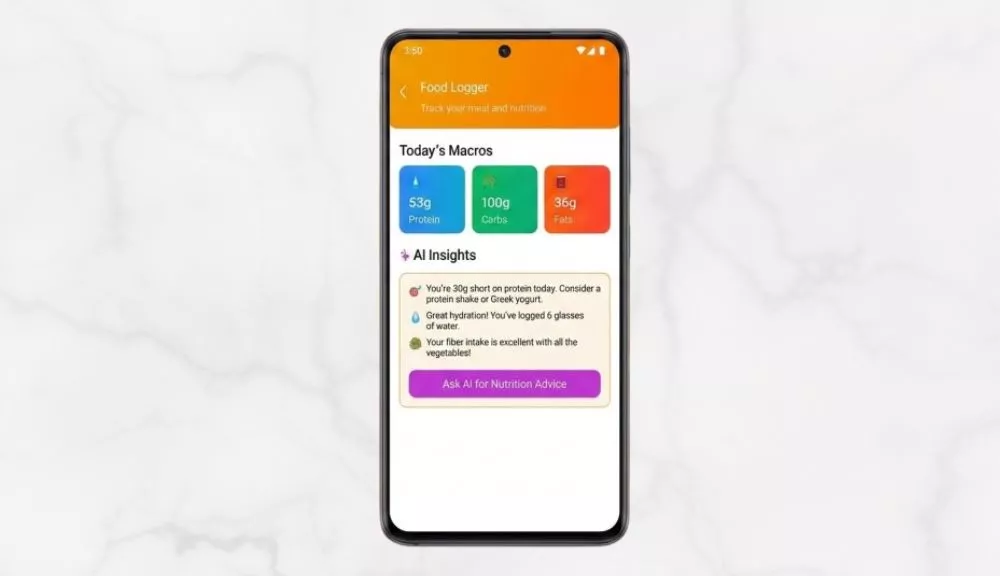
- Food Diet Logger capturing daily macro and micronutritional intake with AI-powered nutrition guidance wired directly into the logging flow, not parked behind a separate tab.
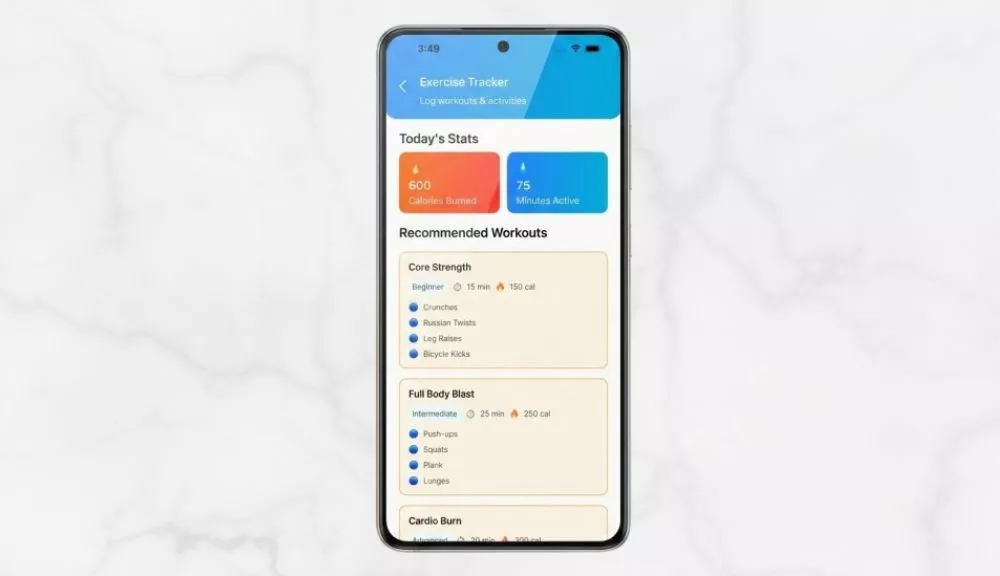
- Exercise Tracker for structured workout logging and activity monitoring that also feeds context to the AI assistant, giving fitness questions relevance instead of generic advice.
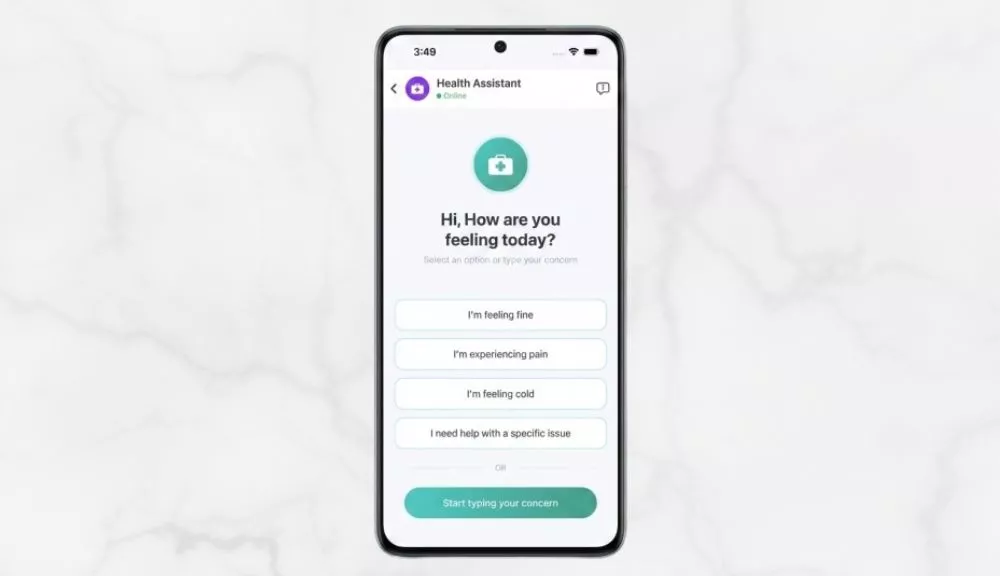
- AI Health Assistant Chat combining Groq API text and vision model connectivity, Speech-to-Text voice input, Text-to-Speech voice output, and photo-based health image analysis inside a single chat interface.
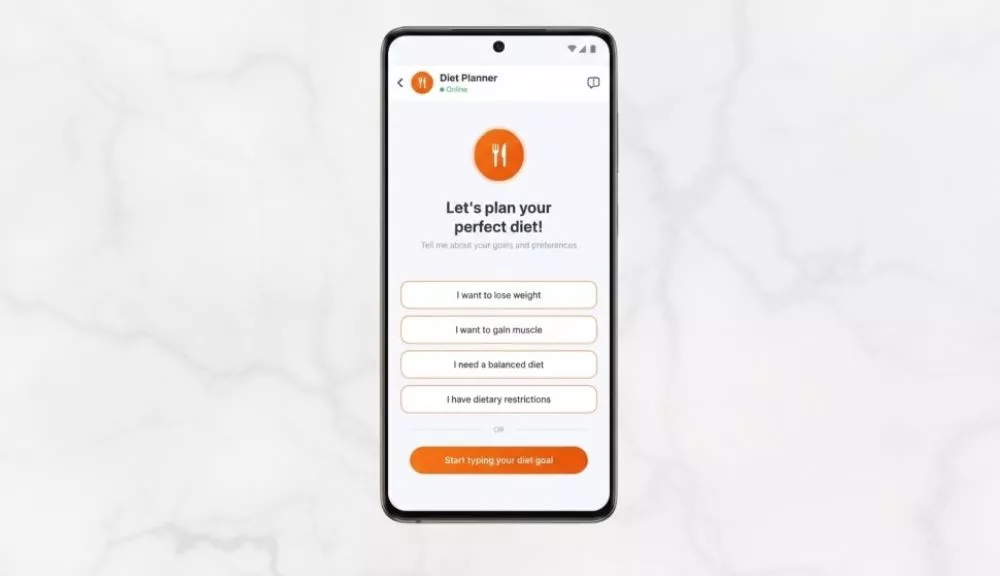
- Diet Planner Assistant offering preset goal options like lose weight, gain muscle, balanced diet, or specific dietary restrictions, so the AI starts every conversation with real context instead of a blank slate.
The floating AI chat button is not a UI decision. It is an architecture statement. The assistant is never more than one tap away, no matter where the user currently is in the app.
Key Features That Make an AI Health App Worth Opening Every Day
Home Dashboard Design That Drives Daily App Engagement
The home screen has a single job: give the user a reason to open the app today. It does that with a personalized greeting, a practical daily health tip, a mood tracker that takes three seconds to complete, and one-tap routes into every module.
The mood tracker is the habit engine. A three-second check-in turns an app into a daily ritual. That ritual is what makes every other feature sticky.
AI-Connected Food Diet Logger for Macro and Micronutritional Tracking
The Food Logger captures daily macro and micronutritional intake through a low-friction interface that feels quick instead of tedious. Every entry flows into the AI assistant as context for dietary guidance.
Diet is one of the highest-impact variables a person can actually control. An AI that already knows what the user ate today delivers meaningfully better advice than one that does not. This is where AI healthcare app development moves past tracking and into genuine guidance.
Exercise Tracker That Builds AI Context for Personalized Fitness Guidance
Structured workout logging gives the AI assistant the context it needs to answer fitness questions with specificity, not generics. Research cited by the American College of Sports Medicine has long pointed to self-monitoring as one of the strongest predictors of long-term exercise adherence.
Voice-Enabled AI Health Assistant Powered by Groq API and Swift Speech Framework
This is the feature that separates HealthiApp from every other tracking app on the App Store. As a voice AI chatbot iOS app, the AI Health Assistant powered by Groq API does four things no standard health chatbot does in one place:
- Answers health, nutrition, and fitness questions through llama-3.1-8b-instant with near-instant conversational responses.
- Accepts voice input through Swift’s native Speech framework, streaming live transcription into the chat field as the user talks.
- Reads answers aloud through AVSpeechSynthesizer tuned to pitch 1.15 and rate 0.52, for output that sounds natural instead of flat and robotic.
- Analyzes health-related photos through meta-llama/llama-4-scout-17b-16e-instruct, Groq’s vision model, using images uploaded straight from the iPhone camera.
Speak a question. Receive an answer. Hear it read back. Without ever leaving the chat screen. That loop is what makes the app genuinely useful while cooking, training, or running errands, and it is the exact real-time voice chat iOS app pattern product teams keep asking us to replicate.
Goal-Based AI Diet Planner for Faster, More Targeted Nutrition Advice
The Diet Planner surfaces preset goal options before the user types a single character. Pick a goal, and the AI starts the conversation already aware of the context. The result is faster, more targeted dietary guidance from the very first reply.
Complete Tech Stack for Building an AI Health App with SwiftUI and Groq API
This stack works as a reference for any team building an AI mobile app with SwiftUI, and it holds up whether you are shipping a consumer fitness product or a regulated health tool.
| Layer | Technology | Why We Chose It |
| UI Framework | SwiftUI | Declarative UI with native iOS performance. Dynamic screen flows, micro-animations, gradient layouts, zero wrapper frameworks. |
| Language and Concurrency | Swift 5+ with async/await | Keeps API calls and state updates clean without nested callbacks. The right pattern when AI response timing is inherently variable. |
| Architecture | MVVM | Views render. ViewModels own business logic and lifecycle. Services isolate external dependencies. Constants hold the single source of truth. |
| AI Text Model | Groq API (llama-3.1-8b-instant) | Chosen for inference speed. In a mobile health assistant, latency is not a UX detail. It is a trust signal. Any serious LLM integration mobile app depends on this choice. |
| AI Vision Model | Groq (meta-llama/llama-4-scout-17b-16e-instruct) | Handles image analysis, routed automatically through GroqService while text queries stay on the faster text model. Routing is invisible to the user. |
| Text-to-Speech | AVFoundation and AVSpeechSynthesizer | TTS tuned to pitch 1.15 and rate 0.52. Audio session configured to duck over other media, not fight it. The same pattern used when teams ask how to integrate voice AI in iOS app builds without third-party dependencies. |
| Speech-to-Text | Speech Framework and SpeechRecognizer | Live voice-to-text using Apple’s Neural Engine. Transcription streams into the chat input field in real time as the user speaks. |
| Image Pipeline | PhotosUI + Core Graphics | Native image picker with Core Graphics compression to 1024px for lean Base64 API uploads that preserve the detail the vision model needs. |
Every layer in the table was chosen deliberately, not by convenience. That matters more than the individual tools. A team swapping Groq for a slower model or SwiftUI for a cross-platform wrapper will get a different product, not just a different stack.
How MVVM Architecture Keeps Multi-Module iOS Health Apps Clean and Scalable
The architecture discipline is what separates a maintainable iOS app from a fragile one. In HealthiApp, MVVM is not a style choice. It is the structural rule applied to every module from day one, and it is the same rule we apply to building scalable AI healthcare app architecture across larger client engagements.
Views carry zero business logic. They render what the ViewModel hands them, and nothing more.
ViewModels own everything functional. Business logic, API management, STT and TTS session lifecycle, and state binding via @Observable. Every module has its own ViewModel, and none of them know the others exist.
Services isolate external dependencies. GroqService owns all Groq API calls. SpeechRecognizer manages STT sessions. No View ever touches a network request directly.
Constants like ColorExtensions, StringConstants, and AppImages enforce visual and copy consistency across every module. Any new feature skipping this convention immediately degrades the cohesion of the whole app.
The result is four modules, one app, zero coupling. Each module can be built, updated, or debugged without touching another. That is MVVM applied without compromise, not as a marketing bullet.
AI Integration Challenges in iOS Health App Development and How to Solve Them
These are the recurring challenges we have seen across multiple healthcare iOS app development with AI features, and the specific solutions that made HealthiApp production-viable.
How to Reduce Groq API Latency in a Conversational iOS Health App
An AI assistant that makes a user wait more than a couple of seconds stops feeling intelligent and starts feeling broken. LLM latency shifts with model size, prompt length, and infrastructure load. You only learn the real number by running it.
How we solved it: We picked llama-3.1-8b-instant specifically for its latency profile. UI state updates the instant a message is sent. A loading indicator appears while the response generates. The interface never freezes or goes silent on the user.
The trade-off: The Groq vision model is larger. Image analysis takes longer than text, which is expected and acceptable for a photo-based query.
Implementing Voice Input and Text-to-Speech on Physical iOS Devices
Speech recognition behaves completely differently on a simulator versus a physical iPhone. Microphone access, audio session handoff, and TTS playback all have hardware dependencies no simulator replicates accurately. This is the exact layer that makes or breaks any AI voice assistant mobile app on iOS.
How we solved it: Every voice-related test ran on a physical iOS device throughout the build. AVSpeechSynthesizer was tuned to pitch 1.15 and rate 0.52. Audio session settings were configured to duck over background media cleanly.
The trade-off: Voice requires microphone and speech recognition permissions. Users who decline simply fall back to text input, and the app handles that without errors or degraded UX.
Optimizing Health Image Compression for Groq Vision API Uploads on iOS
Full-resolution iPhone photos generate oversized Base64 payloads that drag down API performance and risk rate-limit issues. You do not find this in documentation. You find it on a real device.
How we solved it: Once PhotosUI hands off an image, a Core Graphics compression step scales it to a 1024px maximum dimension. Payload size stays well inside safe ranges while the vision model retains more than enough detail for accurate health analysis.
Maintaining UI and State Consistency Across Multi-Module iOS Apps
Four functional modules can easily feel like four separate apps stitched behind one tab bar. Visual drift and leaking state are the classic failure modes.
How we solved it: ColorExtensions and StringConstants enforce consistency across every module. MVVM isolation prevents state from leaking across boundaries. The floating AI chat button acts as a persistent thread of intelligence visible throughout the app experience.
What Held Up on Real iOS Hardware: Groq API, Voice Interaction, and MVVM in Action
All four core assumptions were validated on a physical iOS device under real usage conditions.
- SwiftUI with MVVM handled the full four-module setup cleanly, with shared state, animations, and navigation all working without coupling. Every module stays independently testable.
- Groq API with llama-3.1-8b-instant returned responses fast enough for a conversational health assistant where perceived speed directly shapes whether the user trusts the AI.
- The Groq vision model produced meaningful health-related analysis of user-uploaded photos inside acceptable latency windows for image-processing tasks.
- Swift’s Speech framework and AVSpeechSynthesizer delivered a full voice interaction loop on physical hardware, with TTS output that sounded natural instead of synthetic.
Users who experience the full loop, speaking a health question, getting an intelligent answer, hearing it read back, and optionally photographing something for visual analysis, do not return to passive tracking apps.
How to Scale an AI Health iOS App from Proof of Concept to App Store Production
A validated prototype is the start line, not the finish line. It sets up a production build that no longer carries the specific risks early validation was designed to expose, and it is the natural bridge from a working PoC to enterprise healthcare mobile app development solutions.
- API Key Security: The PoC embeds the Groq API key directly in GroqService.swift. Production requires a backend proxy that keeps the key off the device completely. No production iOS app should ship with a live API key on the client.
- Data Persistence: The PoC stores mood, food, and exercise entries in-memory. Production needs Core Data or a cloud-backed data layer for long-term history and multi-device sync.
- App Store Compliance: Production Info.plist must include descriptive usage strings for NSMicrophoneUsageDescription, NSSpeechRecognitionUsageDescription, and NSPhotoLibraryUsageDescription that meet App Store Review Guidelines.
- Testing Coverage: Unit tests for ViewModels and Services, UI tests for chat, voice input, and image upload flows, and end-to-end validation across multiple physical devices on iOS 16.0 and above.
The MVVM foundation laid during early development makes every one of those steps manageable. Modules are independently testable. Services are isolated. State boundaries are enforced. Production inherits an architecture that is ready for scale, not one starting from a question mark.
How AI-Powered Health Apps Drive Retention, Engagement, and Long-Term Growth
For product teams building healthcare and wellness applications across America, the distance between a tracking app and an AI-native health companion is the biggest available differentiator in the category right now. It is why healthcare mobile app solutions are shifting from data-collection dashboards to assistants that actually respond.
- Daily retention is unlocked through the mood tracker, daily tips, and floating AI button working together. Stacked daily reasons to open the app drive the one metric that decides whether a health app survives.
- Data that talks back turns passive logging into actionable insight. Users do not just record macros. They get a read on what the data means and what to change. That shift from collection to guidance is what separates kept apps from deleted ones.
- Hands-free usefulness is unlocked by voice input and TTS output. The app works in the exact moments health decisions actually happen, cooking dinner, mid-workout, or scanning a label at the grocery store.
- Image-based analysis is a capability no pure tracking app can match. Photographing a meal or label and getting AI feedback creates a moat that is hard to copy without the right underlying architecture.
That sets up the question every founder eventually asks: what does a build like this actually cost?
The cost of healthcare mobile app development in the USA varies widely depending on feature depth.
Industry data from Leanware’s 2025 breakdown puts the average healthcare app build between $80,000 and $250,000. Telemedicine and AI-integrated apps tend to be on the higher end due to compliance requirements and integration complexity.
In our experience, a focused validation sprint that covers the core AI, voice, and image pipeline on real hardware typically falls in the $20K to $50K range.
A full production build that includes a backend proxy, data persistence, App Store compliance, and complete testing coverage generally ranges from $80K to $200K, depending on feature depth, AI model usage, and integration requirements.
What shifts the number is not the stack. It is scope discipline. Teams that validate the risky assumptions upfront almost always ship production at a lower total cost than teams that skip validation and pay for rework later.
A health app that tracks, interprets, and responds intelligently earns higher retention, stronger reviews, and word-of-mouth growth no ad budget can purchase.
Why AI-Native iOS Health Apps Are the Next Competitive Frontier in HealthTech
The health and fitness app space is full of data collectors. HealthiApp is built on a different premise. The AI is not bolted onto the tracker. The tracker exists so the AI has something real to work with. This is where AI-powered mobile app development is clearly heading, and generative AI mobile app development is becoming the default expectation rather than a differentiator.
Across the United States, digital health founders and fitness product teams are asking whether conversational AI is actually ready for a mobile health experience. This build settles that question.
Voice-enabled AI with live image analysis is achievable inside a focused validation sprint. It does not require a dedicated ML infrastructure team. It requires SwiftUI, Groq API, Swift Concurrency, and a genuinely clean MVVM foundation. For teams researching how to build AI healthcare mobile app using SwiftUI, or how to use Groq API in iOS application workflows, this exact pattern is the fastest path we have found to a working, trust-earning product.
The teams that design AI as a first-class feature from day one will be the ones US users keep and recommend. That window to lead the category is open right now.
How Bitcot Can Help in Your App Development Journey
Most teams who contact us have already tried one of two things. Either they hired a cheaper shop and got a build that technically runs but cannot be extended. Or they hired a staffing firm and got three engineers who each solved their own piece without anyone holding the architecture together. As a custom healthcare mobile app development company that works across startups, scaleups, and health systems, we see both patterns weekly.
The call usually starts the same way. Someone walks us through a Figma file or a repo and asks whether it is salvageable. Sometimes it is. Sometimes the faster answer is rebuilding the two layers that were never scoped right in the first place.
We do not guess which situation you are in. We look at the code or the spec, tell you what we see, and explain what it would actually take to get where you want to go.
If that means a six-week validation sprint, we say that. If it requires a full rebuild, we say that. If the right approach is to keep your current team and fix the one layer that is breaking, we say that too, even when it results in a smaller engagement for us.
That pragmatism is why founders looking for custom AI iOS app development for startups tend to stay with us long after the first phase.
The reason clients stay with us across two, three, four product phases is not a retention strategy. It is that the first conversation is useful by itself. The second one is useful whether or not a contract gets signed. By the time there is a contract, the work has already been framed correctly, and the team on the call is the team on the build.
If that is the kind of engagement you are looking for, our case studies are the most honest version of what end-to-end AI mobile app development looks like in practice.
How to Build an AI-Powered iOS Health App That Users Trust and Use Every Day
HealthiApp proves that a single SwiftUI iOS application can deliver mood tracking, food logging, exercise monitoring, and a voice-enabled AI health assistant with image analysis, all from one clean MVVM codebase.
The Groq API is fast enough to feel genuinely intelligent. Swift’s Speech framework and AVSpeechSynthesizer complete the voice loop on real devices. The vision model turns camera photos into usable health insight. MVVM keeps every module testable and the whole app maintainable.
If you are building a health, fitness, or wellness iOS app and want AI to be a first-class feature from day one, not an afterthought bolted on later, start by validating the latency, the voice interaction, and the image pipeline before you commit to a full production timeline.
That is the fastest route to a product Americans will actually trust, open every day, and recommend to the people they care about.
Bitcot can help you move from concept to a validated prototype in weeks, with senior iOS engineers, AI integration experience, and an architecture-first approach built for the App Store and what comes after it.

Final Thoughts
HealthiApp is not a demo. It is a working answer to a question US digital health teams are quietly wrestling with right now: is AI actually ready to be the center of a mobile health product, or is it still something you bolt on later?
The build says ready. Groq API is fast enough to earn trust. Swift’s Speech framework and AVSpeechSynthesizer make voice feel natural. The vision model turns a camera into a diagnostic input. MVVM keeps all of it maintainable as the product grows. This is what real healthcare mobile app development looks like when AI is treated as a product decision, not a feature checkbox.
The real question now is not whether AI-native health apps are possible. It is who ships one first in your category, and how much runway the late movers lose catching up. This is also what separates a strong iOS healthcare app development partner from a generic dev shop, the ability to ship production-grade AI on a timeline that actually matches the market.
And if you are on the other side of this space, running a hospital, clinic, or health system rather than a startup, the same architectural discipline applies. The challenge just looks different: compliance, legacy systems, patient workflows, and the gap between what your clinicians need and what your current technology can deliver.
If your healthcare organization is looking to turn complex compliance requirements and patient engagement goals into a seamless, scalable mobile experience, Bitcot can help. Our healthcare mobile app development services are tailored to build high-performance patient portals that adhere strictly to HIPAA regulations and map to your specific clinical workflows, whether it is a legacy portal modernization, a new cross-platform build, or a validated prototype before committing to a full production timeline.
Whichever side of the HealthTech category you are building from, the moment to decide is quieter than it looks. Let’s map your idea into a real architecture and a real validation plan, before someone else does.
Tell us what you are building and we will show you what the next 30 days could look like.
Frequently Asked Questions (FAQs)
What is the best tech stack for building an AI-powered health and fitness iOS app?
SwiftUI paired with MVVM architecture is the most maintainable foundation for an AI-native iOS health app. It separates UI from logic cleanly and keeps every module independently testable. For the AI layer, Groq API delivers the low-latency responses mobile health experiences require. Apple’s native Speech framework handles voice interaction without any third-party voice libraries. This same stack works as a starting point for any SwiftUI app development focused on AI-integrated mobile products.
How fast is Groq API for a real-time health chatbot on iOS?
Groq’s llama-3.1-8b-instant model is engineered for low-latency inference. In our build, text response times were fast enough for a conversational health assistant where users expect near-instant replies. The vision model used for image analysis runs slower, which is expected for photo-based queries and comfortably within acceptable ranges for that workload.
Can an iOS app analyze health images using AI?
Yes. Using Groq’s meta-llama/llama-4-scout-17b-16e-instruct vision model with PhotosUI for image selection and Base64 encoding for API upload, an iOS app can analyze meals, nutrition labels, and visible physical conditions. Images are compressed to 1024px before upload, which keeps payload size tight while preserving enough detail for meaningful AI feedback.
How do you implement voice input and Text-to-Speech in a SwiftUI health app?
Voice input uses Apple’s native Speech framework through a custom SpeechRecognizer class that streams live audio and updates the chat field through @Observable state binding. TTS output uses AVSpeechSynthesizer from AVFoundation, tuned to pitch 1.15 and rate 0.52 for a natural voice. Both features need device permissions and must be validated on a physical iPhone, not a simulator.
What is MVVM and why does it matter for health app development?
MVVM (Model-View-ViewModel) separates UI presentation from business logic and data. For health apps with multiple tracking modules, MVVM ensures that no module’s state bleeds into another. Each module stays independently buildable, testable, and updatable. That directly reduces regressions and rework during production scaling.
How long does it take to build an AI-powered health iOS app?
A focused validation sprint covering four integrated modules and a voice-enabled AI assistant, like the one described here, can be completed in a sprint of several weeks. Full production timelines depend on data persistence, App Store compliance, testing depth, and feature scope. Teams that validate the core assumptions early always move faster in production, because the highest-risk questions are already behind them.