Your customer opens your app to customize their dream product. Three taps in, the preview freezes. Options misbehave. They close the app and buy from a competitor who made it feel effortless.
That is not a rare edge case. It plays out thousands of times daily across the United States. A broken configurator experience is not just a UX problem. It is a direct revenue leak you cannot see on a dashboard.
The global product configurator software market is worth $1.28 billion in 2026, growing at 7.8% CAGR, according to Verified Market Research. North America holds nearly 40% of that revenue. The demand is real. The apps are not keeping up.
Slow renders, clunky option flows, and zero real-time feedback are conversion killers. They quietly push buyers toward competitors with smoother digital experiences. Most product teams underestimate the compounding cost of this.
We solved exactly this problem for a Healthcare, Fintech, manufacturing and e-commerce client by building a real-time product configurator iOS app using SwiftUI. The result was a faster customization process, measurably stronger user engagement, and a codebase built to scale.
In this blog, we cover the SwiftUI architecture, state management approach, performance strategies, and business outcomes. We also address what separates high-converting configurator apps from the ones that quietly drain revenue.
Here is what we will walk through: the right framework choice, the architecture that makes real-time feel instant, the technical challenges teams rarely plan for, the industries where this delivers the strongest ROI, and why the team behind the build matters just as much as the code.

What Is a Real-Time Product Configurator App?
A real-time product configurator is a mobile or web application that allows users to customize a product and instantly see the results reflected in the interface. Think build-your-own experience where every selection, whether color, material, size, or feature, updates the product preview without any delay.
These apps are used across industries like automotive, furniture, fashion, consumer electronics, and industrial manufacturing. The real-time aspect is what separates a modern configurator from a static order form. Users make a choice, and the UI responds immediately.
For businesses, this translates to higher conversion rates, fewer order errors, and reduced dependency on sales support teams. One market report from Data Insights Market estimates that visual product configurator software could grow at a 15% CAGR through 2033, reaching roughly $7.2 billion globally.
Why SwiftUI Is the Right Choice for Real-Time iOS Configurators
SwiftUI is Apple’s declarative framework for building user interfaces across iOS, iPadOS, macOS, and visionOS. Its state-driven rendering model makes it particularly well-suited for real-time applications where the UI must update instantly in response to user input.
So why choose SwiftUI over UIKit or cross-platform alternatives? Here is what drove the decision for our client project.
Declarative, State-Driven UI
SwiftUI renders views based on state. When a user selects a new product option, the underlying state variable changes, and SwiftUI automatically re-renders only the affected components. No manual view invalidation. No reload calls. This is precisely the behavior a real-time configurator needs.
Faster Development Cycles
SwiftUI reduces boilerplate significantly compared to UIKit. According to a Medium analysis of iOS hiring trends, SwiftUI adoption has grown rapidly in recent years and is now widely used in new iOS projects. Teams building with SwiftUI consistently report faster iteration cycles and cleaner codebases.
Why SwiftUI Is Better Than UIKit and Why SwiftUI Uses Structs
UIKit uses class-based views, which means every component carries reference semantics, inheritance chains, and manual lifecycle management. SwiftUI replaces all of that with structs.
Structs are value types. They copy on assignment, never share memory accidentally, and give SwiftUI a clean way to diff the previous state against the new one. When your ViewModel publishes a change, SwiftUI compares the old struct to the new struct and re-renders only what changed. SwiftUI can be more efficient for state-driven UIs, but UIKit can still outperform it in highly optimized or complex rendering scenarios: the diffing engine is working with lightweight, immutable values, not sprawling class hierarchies.
For a product configurator where dozens of options may update simultaneously, this architecture delivers noticeably smoother rendering and significantly less memory overhead than an equivalent UIKit implementation.
Cross-Platform Potential
A SwiftUI-based configurator can run on iPhone, iPad, and Mac with minimal code changes. For businesses in America planning to expand their product experience to Apple TV or Vision Pro, SwiftUI provides a single codebase path forward.
Built-In Animation and Transition Support
Product configurators rely on smooth visual transitions to feel responsive and professional. SwiftUI provides native animation APIs that integrate directly with state changes, so transitions happen automatically when the data updates.
If you are evaluating frameworks for a mobile app development project, SwiftUI should be at the top of the list for any Apple-first experience.
Architecture and Development Strategy for a SwiftUI Configurator
Getting the architecture right is more important than any individual feature. A poorly structured configurator becomes unmaintainable fast, especially when product rules and options grow.
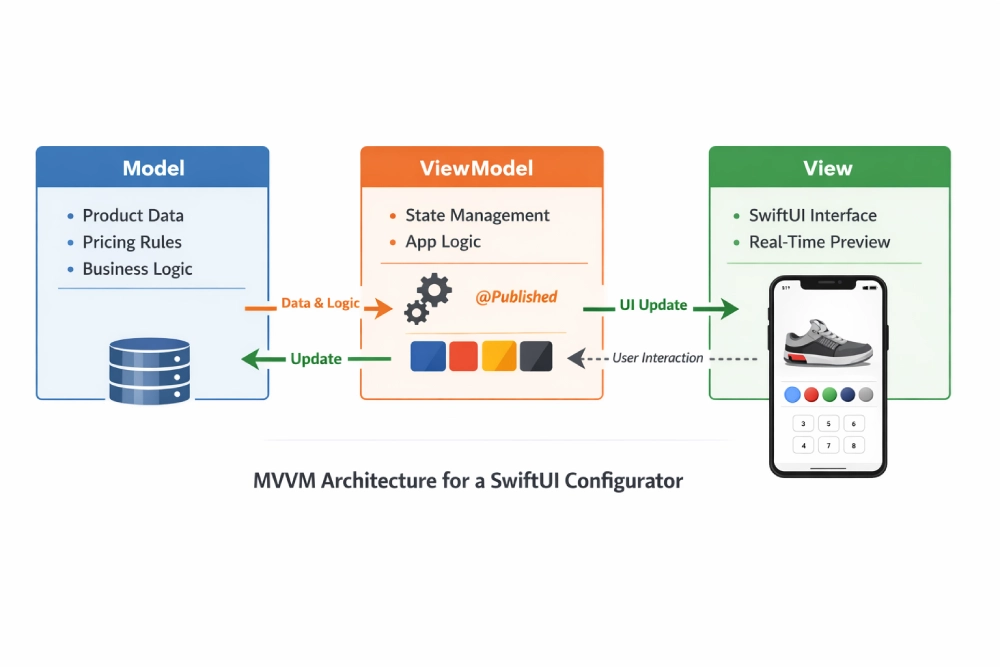
We implemented the Model-View-ViewModel (MVVM) pattern, which is the natural fit for SwiftUI’s reactive data flow.
How MVVM Works in This Context
- The Model holds product data, configuration rules, pricing logic, and API responses.
- The View is built entirely in SwiftUI. It observes the ViewModel and re-renders when data changes.
- The ViewModel manages business logic, user selections, validation, and state. It publishes changes the View automatically picks up.
This separation keeps business logic testable and the UI layer clean. It also makes it straightforward to swap out data sources or add new product lines without rewriting the interface.
A key advantage of this approach is how naturally it supports creating custom views in SwiftUI. Every product option, color swatch, material card, or feature toggle is a self-contained SwiftUI view with its own state binding. Compose them together and you get a complex configurator screen built from simple, independently tested building blocks.
Example: ViewModel for Product Selection
class ProductViewModel: ObservableObject {

@Published var selectedOption: String = "Default"

@Published var products: [Product] = []

func updateSelection(_ option: String) {

selectedOption = option

}

}
Binding the ViewModel to the View
struct ProductView: View {
@StateObject var viewModel = ProductViewModel()
var body: some View {
VStack {
Text("Selected: \(viewModel.selectedOption)")
Button("Change Option") {
viewModel.updateSelection("New Option")
}
}
}
}
When the user taps the button, the ViewModel updates the published property and SwiftUI re-renders the text instantly. No delegation, no notification center, no manual refresh. This is the core mechanism powering the entire configurator.
Technical Challenges We Solved During Development
No real project is without friction. Here are the challenges we encountered and how we addressed them.
Managing Complex Configuration Rules
Products with dozens of interdependent options create combinatorial complexity. Selecting one material might disable certain colors or change the price of another feature. We centralized all configuration rules in the ViewModel layer, where validation logic runs before any state update reaches the view.
Performance with Large Product Catalogs
Rendering hundreds of product cards simultaneously kills scroll performance. We implemented lazy loading with LazyVStack and LazyHGrid, which only renders views that are currently visible on screen.
Keeping the UI Responsive During Network Calls
API calls for pricing or availability should never block the interface. We used Swift’s structured concurrency with Task groups to fetch data in the background, showing lightweight loading indicators until results arrive.
Handling Offline Scenarios
Users do not always have reliable connectivity. We cached the most recent product configuration locally so users could continue customizing even when offline, syncing changes when the connection returned.
These are the kinds of engineering problems that require experienced architects, not just coders. Our software development teams work through these decisions during discovery, before writing production code.

Industry Use Cases for Real-Time Product Configurators
Product configurators are not limited to one vertical. Here is where they deliver the most value.
Manufacturing and Industrial Equipment
Manufacturers with complex product lines use configurators to let buyers spec out machinery, components, or assemblies. This reduces errors in the quoting process and shortens sales cycles. The manufacturing segment alone accounts for 34 to 38% of global product configurator software revenue, according to Verified Market Research.
E-Commerce and Direct-to-Consumer
Brands selling customizable products like furniture, apparel, or electronics see measurable lifts in conversion when users can visualize their selections in real time. Interactive configurators can increase conversion rates by up to 25% and reduce product returns by approximately 30%.
Automotive
Vehicle configurators are some of the most advanced examples in this category. Buyers select trims, colors, packages, and accessories, with the total price updating dynamically. SwiftUI’s animation capabilities make these transitions smooth and premium-feeling on mobile.
Healthcare and Medical Devices
Configuring medical devices or lab equipment involves regulatory constraints and complex option dependencies. A well-built configurator enforces these rules automatically, reducing errors and compliance risk. Our team builds with HIPAA guidelines in mind for healthcare-adjacent projects.
Construction and Modular Housing
Builders and architects use configurators to let clients spec out modular homes, prefabricated components, and finishes. Real-time visualization helps clients make confident decisions faster.
Business Results: What the Configurator Delivered
The configurator we built for our manufacturing and e-commerce client produced measurable outcomes.
- Faster product customization with zero manual intervention required.
- Improved user engagement on mobile, with session duration increasing significantly.
- Higher conversion rates as users completed configurations and moved to checkout.
- Reduced support dependency for configuration-related questions.
- Scalable foundation the client has since extended with new product lines.
The client streamlined operations while offering a modern digital experience to their US customer base. That is the real measure of success: not just shipping an app, but shipping a business outcome.
How State Management Powers Real-Time Product Configuration in SwiftUI
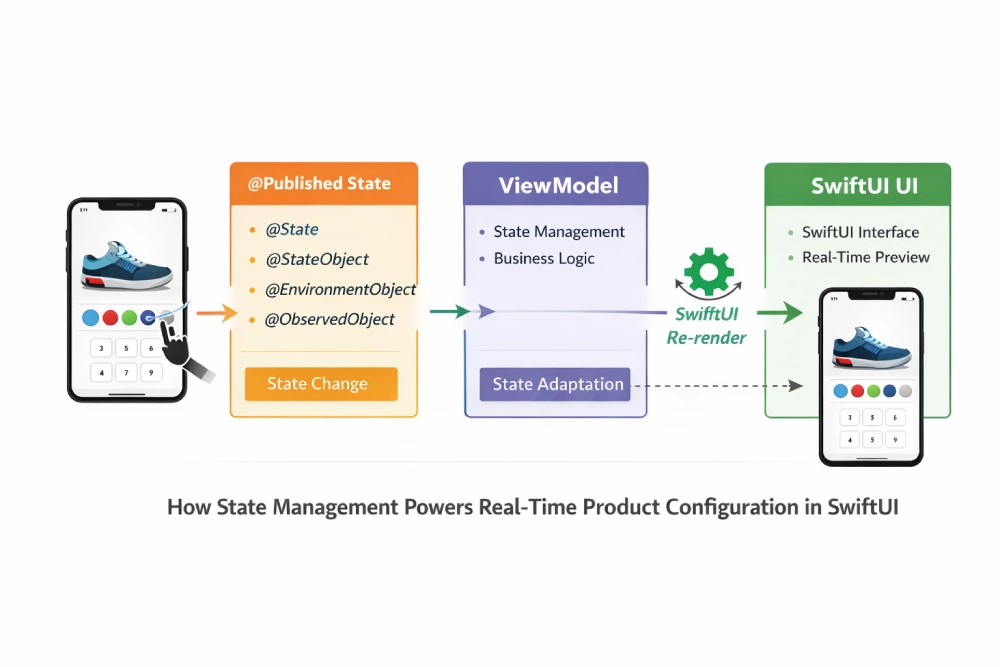
State management is the backbone of any real-time configurator. Without a well-designed state layer, changes feel sluggish, data falls out of sync, and the user experience breaks down. SwiftUI offers a tiered state management system that maps naturally to configurator requirements.
Understanding SwiftUI’s State Hierarchy
@State is for simple, view-local data. Think of it as a toggle for whether a dropdown is expanded or a color picker is visible. It lives and dies with the view that owns it.
@StateObject is for ViewModel instances that should persist across view re-renders. This is where your ProductViewModel lives. It initializes once and survives SwiftUI’s view diffing process.
@Published properties inside your ViewModel are the reactive triggers. When a user selects a new material, the @Published property changes, and every view observing that ViewModel updates automatically.
@EnvironmentObject lets you share a ViewModel across an entire view hierarchy without passing it through every constructor. For a configurator with nested screens, product options, pricing panels, and review steps, this is essential.
Practical Example: Multi-Step Configuration State
Imagine a furniture configurator where the user selects a frame, then a fabric, then a finish. Each step depends on the previous one, because not every fabric is available for every frame. The ViewModel holds the entire configuration state and exposes computed properties for which options are valid at each step.
When the user picks a new frame, the ViewModel recalculates available fabrics, updates the price, and publishes all changes. SwiftUI handles the rest. The fabric picker refreshes, invalid options disappear, and the price label updates. All in a single render cycle.
Performance Optimization Strategies for SwiftUI Configurators
Real-time performance is not automatic. Even with SwiftUI’s efficient diffing engine, a poorly optimized configurator will stutter and drain battery. Here are the strategies we applied.
Lazy Loading for Large Product Catalogs
If your client has 500 product variants, you cannot render them all at once. LazyVStack and LazyHGrid defer view creation until the item scrolls into the viewport. This keeps memory usage flat regardless of catalog size.
Adaptive Layouts with GeometryReader
When building for multiple Apple device sizes, knowing how to get the size of the screen in SwiftUI is important for responsive configurator layouts. GeometryReader gives you the exact dimensions of the parent container at runtime, letting you size product preview areas, option grids, and price panels proportionally across iPhone, iPad, and Mac without hardcoding breakpoints.
For a configurator displayed on both an iPhone SE and a 12.9-inch iPad Pro, adaptive sizing using GeometryReader keeps the experience intentional on every device rather than just stretched.
Equatable Conformance for Custom Views
SwiftUI’s diffing engine compares views to decide what needs re-rendering. By conforming your custom views to Equatable, you give SwiftUI a fast comparison path. Views that have not changed skip re-rendering entirely.
Image Caching and Async Loading
Product images are the heaviest assets in any configurator. We used AsyncImage with a custom caching layer to avoid redundant network requests. Previously loaded images render from memory instantly, even as the user scrolls back through options they already viewed.
Debouncing Rapid User Input
When a user rapidly taps through color options, you do not want to trigger a backend pricing API call on every single tap. We debounced state changes that require network calls, batching rapid selections into a single API request after a brief pause in user activity.
These optimizations compound. The difference between a configurator that feels premium and one that feels sluggish often comes down to a handful of performance decisions made early in the project.
Security and Data Handling in Product Configurator Apps
Product configurators often handle sensitive business data: proprietary pricing models, dealer-specific discounts, inventory levels, and customer preferences. Security cannot be an afterthought.
We implemented certificate pinning to prevent man-in-the-middle attacks on API calls. All product and pricing data transmitted between the app and backend is encrypted in transit using TLS 1.3.
Locally cached configuration data is stored in encrypted containers using Apple’s Keychain Services and Data Protection APIs. If the device is lost or compromised, cached product data is not accessible without authentication.
For enterprise deployments, we also integrated with existing identity providers using OAuth 2.0 and PKCE. Dealers and sales teams authenticate through their company’s single sign-on before accessing dealer-specific pricing or restricted product lines.
Apple’s privacy-first approach aligns well with these requirements. iOS enforces sandboxing, restricts background data access, and provides built-in biometric authentication through Face ID and Touch ID. Building on this foundation means your configurator inherits strong security defaults.
Security architecture is one of the areas where working with an experienced iOS app development team makes the biggest difference. Getting it right from the start avoids costly retrofits later.
SwiftUI vs. Cross-Platform Frameworks for Product Configurators
Should you use SwiftUI, Flutter, or React Native for a product configurator? The answer depends on your audience and performance requirements.
SwiftUI delivers the best performance on Apple devices. Its integration with Core Animation, Metal, and Apple’s rendering pipeline means smoother transitions, lower memory usage, and faster load times than any cross-platform alternative can match.
For businesses whose primary audience uses iPhones and iPads, which remains the dominant mobile platform in the US premium market, SwiftUI is the right call. If you need Android coverage too, a separate native build or a shared logic layer with platform-specific UI is usually more reliable than a single cross-platform codebase.
Developer Tech News reported that for new projects starting in 2025, SwiftUI combined with SwiftData is considered the most future-proof stack in Apple’s ecosystem. Apple is clearly investing in SwiftUI as its long-term UI framework, with new APIs and features shipping exclusively for it each year.
It is also worth addressing the SwiftUI vs Storyboard question directly. Storyboard served iOS development well for years, but it has real limitations for complex, data-driven interfaces. Layout constraints become brittle, collaboration on large teams creates XML merge conflicts, and runtime behavior is disconnected from the code. SwiftUI removes all of that. Layouts are written in Swift, previewed live, and driven entirely by state. For a configurator where the UI must respond to dozens of dynamic conditions, SwiftUI is not just easier to write; it is easier to maintain when requirements change.
Why Partner with Us for Your SwiftUI Product Configurator?
There is no shortage of development shops willing to build you a configurator app. The difference is not who says yes. It is who delivers a product that actually converts.
We are a senior-only iOS development team. Every engineer, architect, and PM on your project has shipped production-grade Apple products. We do not put junior developers on complex state management problems. That commitment to seniority is why our client outcomes consistently outperform initial expectations.
“Bitcot delivers quality products, timely communication, and most importantly hits committed timelines. I was so impressed with Bitcot’s speed and standards that I’ve asked them to begin a second project.”
– Joe Roberts, Founder, Poured
Architecture-First, Not Code-First
Most vendors start coding too soon. We run a structured discovery process that maps your product catalog, configuration logic, API dependencies, and data model before writing a single line of production code. That investment upfront eliminates the expensive surprises that derail most app projects at the 80% mark.
SwiftUI Expertise That Goes Beyond Tutorials
We have built iOS applications using SwiftUI for clients in manufacturing, healthcare, e-commerce, and enterprise SaaS. We understand the performance limits of @Published at scale, how to architect EnvironmentObject for nested configurator flows, and when to reach for Combine versus async/await for data pipelines.
Long-Term Partnership, Not One-and-Done
Your product catalog will grow. Your configuration rules will evolve. Your user base will scale. We build with that future in mind from day one. Clients who work with us do not come back to fix what we shipped. They come back to extend it. That is the model we have built, and it is why our partnerships span years, not sprints.
US-Based Leadership, Offshore Economics
Our leadership and communication operate to US standards. Project managers are accessible during your business hours. Architecture decisions come back to you in plain language, not buried in Jira tickets. You get the accountability of an onshore partner with the delivery efficiency of a world-class engineering team.
If you are a CTO, founder, or product leader evaluating iOS development partners, see how we work and what our clients say about the experience.
How to Start Building a Product Configurator for Your Business
If you are considering a product configurator for your mobile app, here is what the planning process looks like.
- Define your product catalog and configuration rules – Map out which options depend on each other and how pricing works.
- Choose your platform – If your audience is primarily on iOS, SwiftUI with MVVM is the proven path. When building a SwiftUI app for the latest iOS version, you gain access to the newest APIs, improved SwiftData integration, and performance improvements Apple ships exclusively to its current SDK.
- Invest in discovery before development – Validate the architecture, API design, and data model before writing production code.
- Build modular components – Design each configuration option as a reusable component that can be tested independently.
- Plan for scale – Your product catalog will grow. Build the system to handle it from day one.
We run a structured digital strategy and discovery process that covers all of these steps before a single line of production code is written. That is how we avoid the expensive surprises that derail most app projects.

Key Insights for CTOs and Founders Evaluating SwiftUI Configurators
After building and shipping real-time configurator applications across multiple industries, here are the patterns that consistently separate successful projects from costly rebuilds.
- Architecture decisions made in week one determine your cost in year two. Teams that skip discovery and jump to code almost always return to re-architect state management at scale. Front-load the thinking.
- SwiftUI adoption is accelerating, not slowing. With 70% of new iOS apps in 2025 using SwiftUI, hiring, documentation, and ecosystem support have never been stronger. Choosing UIKit for a new configurator today is choosing a narrowing talent pool.
- Real-time does not mean complex to maintain. When MVVM is implemented correctly, adding a new product option or pricing rule is a ViewModel change, not a UI rewrite. Modularity is the multiplier.
- Performance is a business metric, not just a technical one. A one-second delay in configurator response directly correlates to drop-off. Lazy loading, debouncing, and image caching are not optional polish. They are conversion levers.
- Security cannot be retrofitted. Certificate pinning, encrypted local storage, and OAuth 2.0 are fastest and cheapest when designed into the architecture upfront. Adding them post-launch typically costs 2 to 3x more in development and QA time.
- The team behind the build matters as much as the stack. SwiftUI is the right framework. An experienced team that has shipped production iOS configurators is what turns the right framework into a product that converts.
Conclusion
By now, you have seen exactly what a well-built SwiftUI configurator delivers. Real-time updates. Zero lag. A mobile experience that feels premium long before your customer ever reaches checkout.
That kind of outcome is never an accident. It comes from the right architecture, a state layer engineered to scale, and performance decisions locked in well before the first line of production code is written.
The businesses pulling ahead in the product configurator space understand this. They are not just investing in better design. They are investing in engineering teams who understand both the product and the platform at a deep level.
That is the work we do every day. We have built these systems for manufacturing, e-commerce, healthcare, fintech, and industrial clients across the US. We know what breaks at scale, and we know how to build past it from day one.
So if your current configurator is quietly costing you conversions, or you’re planning one from scratch and want the architecture right the first time, the next step is simple.
Based in San Diego, California, Bitcot provides iOS Mobile App Development services, helping businesses across the US design, architect, and deliver high-performance iOS applications using SwiftUI and modern development practices.
If you’re planning a configurator build, let’s architect it right from day one, and we’ll map out the right approach together.
Frequently Asked Questions (FAQs)
What is a product configurator app?
A product configurator app is a mobile or web application that lets users customize a product by selecting options like color, material, size, and features, with the preview and pricing updating in real time. It is widely used across manufacturing, e-commerce, automotive, furniture, and healthcare.
The real-time feedback is what separates a modern configurator from a static order form. Users make a selection, and the interface responds instantly.
For businesses, this translates to higher conversion rates, fewer order errors, and reduced dependency on sales support teams.
How much does it cost to build a product configurator app?
Costs vary based on scope. A focused configurator for a single product line on iOS typically ranges from $40,000 to $80,000. Enterprise-grade configurators with multiple product families, 3D visualization, and complex backend integrations can exceed $150,000.
The largest cost drivers are catalog size, configuration rule complexity, backend integrations, and whether offline support is required. Discovery adds two to four weeks upfront but almost always reduces total project cost by catching architecture decisions before they become expensive rework.
The most accurate way to scope cost is a structured discovery engagement. That is how we start every client project in the US.
How long does it take to build a product configurator iOS app?
Timeline depends on complexity. A basic configurator with a small product catalog can be built in 8 to 12 weeks. More complex projects with advanced visualization, backend integrations, and extensive product rules typically take 16 to 24 weeks. Discovery and architecture planning add another 2 to 4 weeks upfront.
Timeline is almost always driven by the number of configuration rules and API dependencies, not the UI itself. Teams that skip discovery to save time usually finish weeks or months late because architecture issues surface mid-build.
We front-load the planning to keep the build phase predictable.
Is SwiftUI better than React Native for iOS configurators?
For iOS-focused applications, SwiftUI delivers better rendering speed, smoother animations, and improved memory efficiency compared to React Native. It also offers direct access to Apple frameworks and APIs without relying on a bridge layer. For configurators that require frequent state updates and seamless transitions, this performance difference is noticeable to users.
React Native can be a practical option if you need a shared codebase across iOS and Android and are willing to accept some performance limitations. However, for high-end product experiences where iPhone and iPad users are the priority, SwiftUI stands out as the better choice.
Our senior Swift app developers rely on SwiftUI to build fast, scalable, and premium user experiences.
How do I scale a SwiftUI configurator to thousands of SKUs without performance issues?
Scaling comes down to three decisions made early: lazy rendering for large catalogs, caching strategy for product images and pricing data, and how your state layer handles configuration rules at scale. Get these right upfront and your configurator performs the same at 10,000 SKUs as it does at 100.
Get them wrong and you will hit a wall somewhere between 500 and 2,000 products. We have seen this pattern repeatedly with clients who inherited a configurator from another vendor.
Scaling is an architecture problem, not a feature problem. We solve it in the first week of discovery.
Why should I choose your team for SwiftUI development?
We are a senior-only iOS development team with production experience across manufacturing, e-commerce, healthcare, and enterprise iOS applications built in SwiftUI. We run architecture-first discovery before writing code, communicate to US business standards, and build systems designed to scale with your product catalog.
Every engineer on your project has shipped real production iOS work. No junior developers on complex state management problems, no offshore staffing model, no hand-offs mid-project.
See our work and reach out when you are ready to move forward.