Key Takeaways
- One React Native and Expo codebase delivers all seven patient portal features across Android, iOS, and Web with no separate builds and no duplicate maintenance cycles.
- PoC-first development validates biometrics, offline sync, and real-time chat before the main investment is committed, turning months of architecture risk into weeks of answered questions.
- Biometric auth, offline-first sync, and HIPAA-aligned secure messaging are the foundation, not optional upgrades added after the product ships.
- Modular Redux architecture and Expo Router mean new features ship without touching existing code.
Here’s something most healthcare organizations know but rarely say: patients don’t leave their portal because they prefer calling. They leave because it keeps failing them on their phones. So they call your front desk. Twenty minutes gone. And they’ll call every time from now on.
This isn’t a design problem. We’ve seen it across health systems throughout the United States: portals built for desktop, stretched to fit mobile, and failing on both. Adapting a desktop product for mobile isn’t the same as building for mobile. The gap is structural, not cosmetic.
According to McKinsey & Company, telehealth utilization stabilized at 38 times higher than pre-2020 levels (McKinsey & Company, 2021). American patients now expect mobile-first healthcare access. The organizations solving this now compound the advantage. The ones that wait fall behind.
That’s why we built this. A patient portal mobile application that works natively on Android, iOS, and Web from one codebase, with biometric login, real-time messaging, offline access, and compliant document handling built in from day one. We validated it as a PoC first. This is the full story of how we built it.

Why Most Patient Portal Apps Fail Your Patients Before They Even Log In
That failed lab result scenario is not an edge case. It is the default experience on most patient portals today. Understanding these failure patterns explains every feature decision we made in this PoC.
1. Desktop-First Design Shipped to a Mobile-First World
Most patient portals were designed for wide desktop screens and adapted to mobile as an afterthought. The result is slow load times, tiny tap targets, and session timeouts that kick patients out before they find what they came for.
Patients do not try it twice. They call the clinic, leave a frustrated voicemail, and your staff spends 20 minutes answering a question the portal should have handled in 30 seconds.
2. A Messaging System That Works Like a Slow Email Inbox
Standard portal messaging operates like an asynchronous email thread. Patients submit a question and wait 48 to 72 hours for a response. For anything time-sensitive, that wait is unacceptable and entirely unnecessary.
Secure real-time in-app chat closes that gap entirely. Faster consultations, fewer unnecessary in-person visits, and a communication channel patients will return to.
3. Zero Offline Resilience
Hospital basements, rural clinics, emergency waiting rooms. These are the moments when a patient most needs their portal, and also when connectivity is least reliable.
A blank screen in those moments does not just frustrate the patient. It permanently reduces their trust in the app as a reliable healthcare tool.
4. No In-App Document Handling
Sharing a prescription photo, uploading a lab result, or sending an insurance card should take seconds inside the portal. Without in-app media handling, patients switch to email or fax, fragment the care workflow, and rarely return to the session they were in.
“The problem is not that patients reject digital health tools. The problem is that the tools they are given do not meet basic mobile standards.”
What We Set Out to Prove: The 4 Core Assumptions Behind This PoC
Before writing a line of code, we defined four specific assumptions the PoC needed to validate. These shaped every architecture decision that followed.
- A single React Native and Expo codebase can deliver a consistent, native-quality experience on Android, iOS, and Web without platform-specific rewrites.
- Biometric authentication via Expo Local Authentication integrates cleanly without requiring custom native modules.
- Secure real-time one-to-one messaging can be embedded inside the portal without a separate communication application.
- Offline-first design with NetInfo and Redux Persist provides meaningful read-only access and reliable automatic sync when connectivity is restored.
Each of these assumptions, if wrong, has real consequences in a production healthcare environment. The PoC existed to answer them before those consequences became expensive.
The 7 Core Features That Define Effective Patient Portal Mobile Application Development
With the assumptions defined, we built a functional patient portal mobile application using React Native and Expo SDK 54, running on Android, iOS, and Web from a single codebase. This is a working application, not a wireframe. Every feature operates end-to-end.
Here is what the application delivers:
- Authentication and Security: secure login with username and password, optional biometric authentication, and persistent session handling
- Notifications System: push notifications for chat and an in-app notifications center
- Location Services: real-time display of the user’s current location
- Media and File Handling: camera capture, document upload, file selection from device storage, and in-app media preview
- Offline Support: network availability detection, limited read-only access in offline mode, queued request sync, and network status indicators
- In-App Chat and Messaging: secure real-time one-to-one messaging with text, image, and document support, chat history, push notifications, and availability status
- Health Information Screen: structured medical condition selection before initiating a doctor consultation
Now that we understand what breaks existing portals, here is what each of these features actually looks like in a build designed to fix those problems.
Feature 1: Biometric Authentication and Secure Session Management
A portal secured only by a password creates two problems at the same time: friction that discourages use, and protection that does not match the sensitivity of the health data being accessed.
Biometric authentication, including fingerprint and face recognition, solves both at once. Patients log in faster. The session is protected by a stronger access layer. Secure local storage and automatic session timeout keep the session safe even when the device is unlocked.
Business outcome: Lower login friction. Stronger session security. A portal patients open without hesitation, every time.
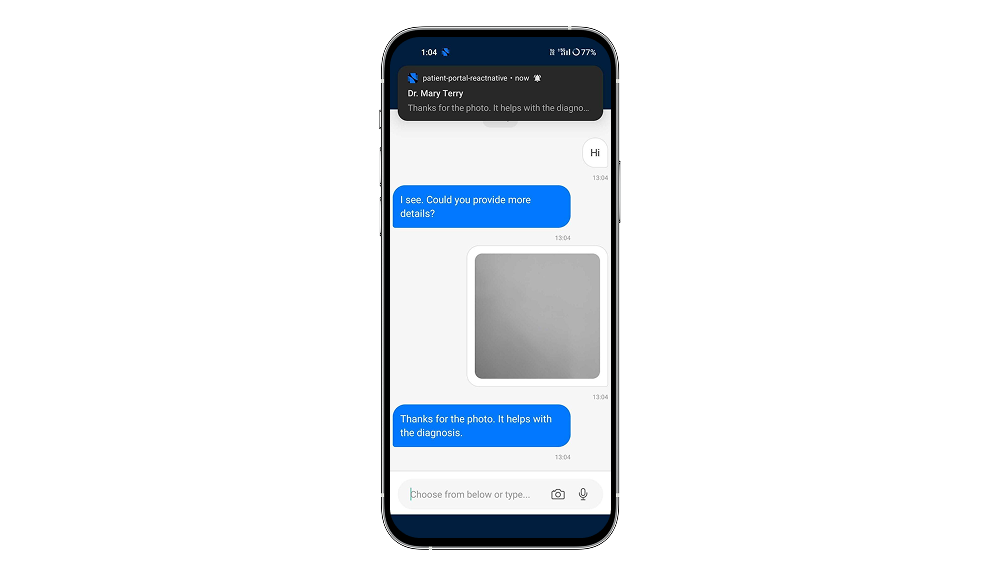
Feature 2: Push Notifications and In-App Notification Center
A patient who receives a timely push notification about a care team message responds faster than one who has to remember to log in and check. That response speed directly affects care quality, appointment adherence, and portal engagement over time.
The in-app notification center catches everything the push system might miss: messages received while the app is already open, event-based alerts, and health reminders that do not trigger a push.
Business outcome: Higher patient response rates. A more reliable, connected patient-provider communication loop.
Feature 3: Real-Time Location Services
Location context opens the door to features that change the care experience: geo-verified check-in, routing to the nearest urgent care facility, and location-aware appointment reminders that account for travel time.
Building location architecture into the PoC means these capabilities can be added during the production build without re-architecting the app. The foundation is already there.
Business outcome: Location-aware care features become a configuration step, not a rebuild.
Feature 4: In-App Media and Document Handling
Camera capture. Document upload. File selection from device storage. In-app media preview. These four capabilities transform the patient portal from a read-only records viewer into a functioning healthcare document hub.
Every time a patient stays inside the app to share a document instead of switching to email or fax, you reduce friction, accelerate clinical decisions, and reinforce the portal as the right place for all patient-provider communication.
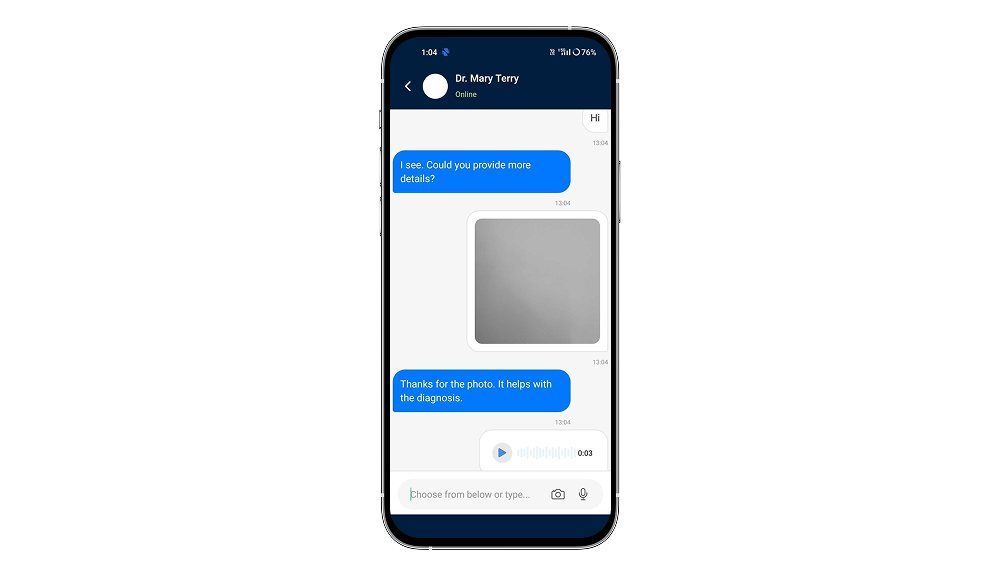
Business outcome: Fewer disconnected workflows. Faster clinical decisions. A portal that earns repeat use.
Feature 5: Offline Support with Automatic Sync
Offline support is a trust signal. When a patient opens their portal in a hospital basement and sees their records instead of an error screen, they file the app under reliable. That kind of trust is hard to build and harder to replace.
Our offline layer serves cached records when there is no connection, queues any write actions, and syncs everything automatically when connectivity returns. No data is lost. No action has to be repeated.
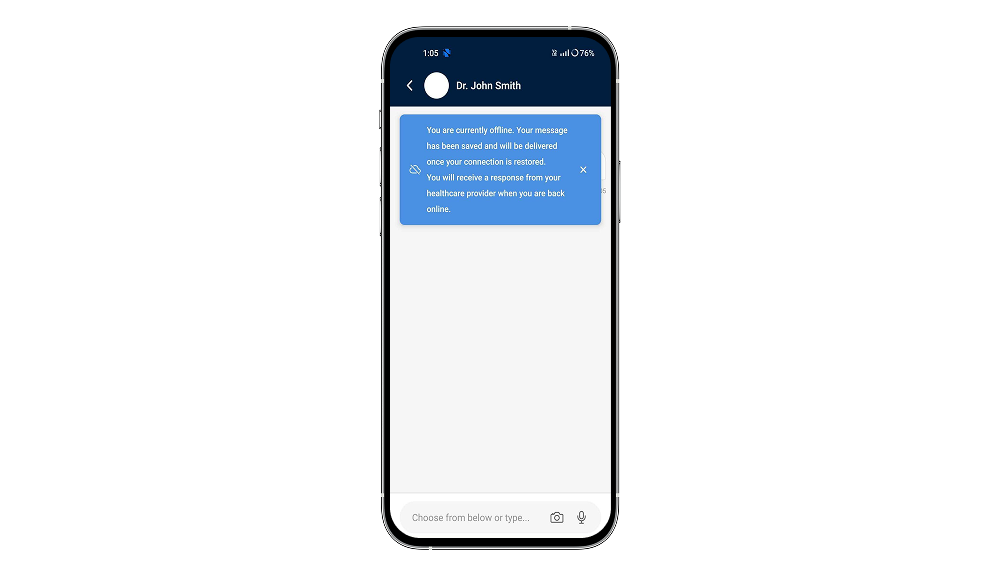
Business outcome: Patient trust across every connectivity environment. Queued actions execute automatically on reconnection with no manual intervention required.
Feature 6: Secure Real-Time In-App Chat and Messaging
Secure messaging is the single highest-impact feature a patient portal mobile app can offer after basic access. Real-time one-to-one chat with document sharing replaces multi-day response windows with conversations that move at the speed of care.
The full feature set includes text, image, and document support, chat history with cloud backup and local caching, push notifications for new messages, availability status, and moderation and audit logs for compliance. The feature adheres strictly to HIPAA regulations from the client layer through the messaging infrastructure.
Business outcome: Faster consultations. Fewer unnecessary in-person visits. A communication channel that reduces administrative load.
Feature 7: Structured Health Information Intake Screen
An unstructured consultation request wastes physician time and delays care. A structured intake screen where patients select their medical condition or health concern before initiating a conversation ensures the right context reaches the right care provider from the start.
Consultation setup is faster. Care team time is used more efficiently. And the patient feels like the system understands what they came for.
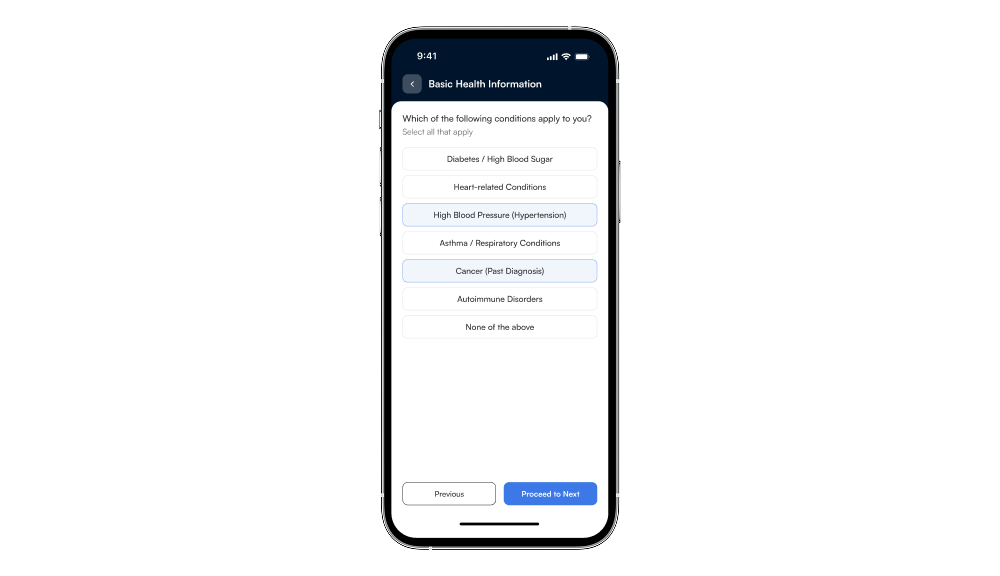
Business outcome: Shorter consultation setup time. Better patient-to-care-pathway matching.
The Technology Stack Behind Our Patient Portal Mobile Application Development
Knowing what to build is one part of the problem. Knowing which tools to build it with is the other. Every technology choice in this patient portal mobile application development project was deliberate. Here is the full stack and the reasoning behind each decision.
| Category | Technologies | Why We Chose It |
| Frontend | React Native, React, Expo SDK, Expo Router | Cross-platform development with a managed pipeline, high performance, and scalable routing |
| Languages | TypeScript, JavaScript ES6+ | Type safety and modern async patterns for a reliable healthcare application |
| State Management | Redux Toolkit, React Redux, Redux Persist | Structured, testable state with offline support and fast app restoration |
| Navigation | React Navigation, Bottom Tabs, Expo Router | Familiar, scalable navigation with protected routes |
| UI & Experience | React Native Components, Vector Icons, Safe Area Context, Reanimated, Gesture Handler | Consistent UI, smooth animations, and responsive layouts across devices |
| Device APIs | Expo APIs (Auth, Notifications, Media, Location, Browser, Haptics), Async Storage, NetInfo, Geolocation | Full access to device capabilities including biometrics, offline mode, and real-time updates |
| Dev Tools | TypeScript + ESLint, Babel Module Resolver, Yarn, NPM, Metro Bundler, Android Studio | Code quality, efficient builds, and streamlined development workflow |
This stack was selected for a clean, direct path from PoC to production. The same architecture that validates the concept scales into a compliant, enterprise-grade health information management platform without a rebuild.

The Architecture That Lets Patient Portal Software Scale Without Breaking
Choosing the right tools is just the start. How you structure the codebase determines whether the product can grow with your organization or requires a costly rewrite every time something changes. Here is how we built for durability.
Component-Based UI Composition
Every UI element is a standalone, reusable component organized under the src/components folder. Screen-level views live in src/screens and compose from these components. Custom logic is extracted into src/hooks to keep components clean and testable. Helper utilities sit in src/utilities, shared across the full app.
Any feature can be updated or extended without touching unrelated parts of the codebase. For a healthcare app evolving alongside regulatory requirements and new care workflows, that isolation is not optional.
Centralized Redux State Architecture
The Redux store is divided into domain slices with full middleware integration:
- Authentication State
- User Profile State
- App Settings
- Notification State
- Appointment State
The data flow is unidirectional and predictable. UI components dispatch actions to the Redux store. Redux Toolkit handles business logic and async operations. State updates propagate back to UI components. Redux Persist writes selected slices to Async Storage automatically.
Every state change is traceable. Every bug is reproducible. Every feature can be tested in isolation.
File-Based Routing with Expo Router
Navigation is driven by the file system. Each screen is a file. Each route is a folder under the app directory. Protected routes for authenticated users are enforced at the router level, not scattered across individual components where they are easy to miss in a code review.
Tab-based navigation provides the primary structure. Stack-based transitions handle screen-to-screen navigation. Every route is centrally defined and auditable.
Modular Folder Structure
The project structure separates concerns cleanly across dedicated directories:
- app/ and src/app/: Expo Router pages and application routes
- src/screens/: screen-level components
- src/components/: reusable UI components
- src/hooks/: custom React hooks
- src/utilities/: helper functions and API configuration
- src/redux/: Redux store, slices, and middleware
- src/assets/: images, fonts, and icons
- android/ and scripts/: native configs and utility scripts
“The architecture is designed to absorb change without breaking. New features add new slices, new screens, and new components without requiring structural rewrites elsewhere in the codebase.”
The 4 Technical Challenges That Shape Every Healthcare Mobile App Build
Good architecture decisions look straightforward on paper. In practice, healthcare mobile app development surfaces problems that generic mobile development does not prepare you for. Here are the four hardest ones we hit in this build, with the specific decision that resolved each one, and the trade-off we accepted.
1. Consistent Behavior Across Android, iOS, and Web
Why it is hard: Each platform has different rendering engines, permission models, font rendering, gesture behavior, and keyboard interaction. A component that looks correct on iOS can break on Android or render incorrectly on the Web.
How we solved it: Expo’s managed API layer abstracts the majority of platform differences. All screens use flexbox layouts with explicit safe area insets. Every screen was validated on all three platforms before the next feature began.
Trade-off: A small number of interactions required platform-specific conditional logic. These were isolated in utility functions rather than embedded in components, keeping the component layer clean across all three targets.
2. Biometric Authentication Across Every Device Type
Why it is hard: Biometric authentication behaves differently across manufacturers, Android versions, and iOS versions. Some devices have fingerprint sensors, some have face unlock, some have both, and some have neither. An auth flow that does not account for every state fails unpredictably.
How we solved it: Expo Local Authentication detects available biometric options at runtime and presents only what the device supports. When no biometric is available, the app falls back to password cleanly, with no dead end for the patient.
Trade-off: Advanced biometric configurations for specific compliance standards may require custom native modules in production. The PoC establishes the architecture that would support that extension.
3. Offline Sync Without Creating Data Conflicts
Why it is hard: Queuing write actions offline and executing them on reconnection creates potential data conflicts if server state has changed while the device was disconnected. In a healthcare context, a stale update can affect patient care.
How we solved it: Read-only access is served from the Redux Persist local cache when offline. Write operations queue in a pending actions store and execute with automatic retry on reconnection. Critical data changes require server confirmation before local commit.
Trade-off: Critical data changes require server confirmation before local commit. That adds a small delay after reconnection. In a healthcare context, accuracy matters more than speed for critical data.
Why it is hard: Secure real-time messaging requires low-latency delivery, efficient rendering of long conversation histories, and smooth keyboard animation, each with different performance characteristics on Android, iOS, and Web.
How we solved it: Chat list rendering uses virtualization for long histories without frame drops. Keyboard behavior uses Reanimated for smooth animation. Message delivery updates local state immediately while the network request resolves in the background.
Trade-off: The production messaging backend, whether a WebSocket server or a managed service like Firebase or Supabase, is a separate concern from the client-side architecture established in this PoC.
How We Built It: The 4-Phase Development Timeline
The build was organized into four phases. Each phase had a clear exit criterion before the next began. Nothing was built on top of an unstable layer.
Phase 1: Foundation and Architecture
Expo project initialized with TypeScript. Redux store structured with domain slices and Redux Persist configured. Expo Router file structure established with protected route logic in place. Biometric authentication integrated via Expo Local Authentication and validated across device types. Nothing moved to Phase 2 until this layer was stable on all three platforms.
Phase 2: Core Feature Build
Authentication screens, push notification integration via Expo Notifications, and the in-app notifications center implemented. Location services enabled via Expo Location. Media and file handling built end-to-end using Expo Image Picker and Document Picker with in-app preview.
Phase 3: Communication and Offline
Secure real-time in-app chat implemented with text, image, and document support. Chat history with local caching and push notification routing configured. Health information intake screen added. Offline detection via NetInfo, read-only cache mode, and request queue logic implemented.
Phase 4: Cross-Platform Validation and Polish
All screens tested on Android emulator, iOS simulator, and Web browser. Performance profiling and render optimization completed. Safe area handling validated across device form factors. Edge cases in offline sync, biometric fallback, and chat behavior confirmed.
“Phased delivery with exit criteria prevented the common failure mode of discovering cross-platform rendering issues only after all features are complete. Each phase delivered tested, working functionality before the next phase started.”
Validation Results: What the PoC Confirmed
The PoC validated all four core assumptions. Here is what the results confirmed across technical performance, UX behavior, and business interpretation.
Technical Validation
- Single codebase runs correctly on Android, iOS, and Web with consistent UI and feature behavior across all three platforms.
- Expo Local Authentication handles biometric auth reliably across tested device types with clean fallback to password when biometrics are unavailable.
- Redux architecture handles the full seven-feature load without state inconsistency or performance degradation.
- Offline mode serves cached records correctly via Redux Persist and NetInfo. Queued actions execute successfully on reconnection in tested scenarios.
- Real-time chat renders message history efficiently. Input interaction is smooth on Android and iOS using Reanimated.
UX Validation
- Biometric login is faster and better received than password-only flows.
- In-app notifications center provides clear visibility of all recent events.
- Document upload and preview work end-to-end without requiring the user to leave the app.
- Offline mode is transparent: users see a clear status indicator and experience no unexpected errors.
- Health information intake screen is intuitive and reduces unstructured consultation starts.
“The PoC confirms that a single React Native and Expo codebase can deliver all seven patient-facing features across Android, iOS, and Web simultaneously. The architecture is clean, the performance is solid, and the path from PoC to production is well-defined.”
Why We Started With a PoC Before Writing a Single Line of Production Code
Knowing you want React Native and Expo is not the same as knowing the architecture will hold under seven concurrent features, real device types, and low-connectivity environments. That is exactly what the PoC was built to prove.
Healthcare apps carry more risk than most software categories. They handle sensitive patient data, serve users in stressful moments, and have to perform reliably across a wide range of devices and connectivity conditions. Committing to a full production build before validating the architecture is an expensive bet on assumptions.
The PoC answered the questions that determine whether the production build succeeds:
- Does the cross-platform approach deliver consistent quality on Android, iOS, and Web?
- Does Expo Local Authentication handle biometric fallback correctly across device types?
- Does offline mode with Redux Persist sync correctly on reconnection?
- Can real-time secure messaging be embedded without degrading overall app performance?
- Does the Redux architecture hold under the full seven-feature load?
Each of those questions, if answered wrong in a full build, costs weeks of rework and months of schedule delay. In a PoC, they cost days. The PoC does not delay the main build. It makes the main build faster by removing uncertainty before the first sprint begins.
“A healthcare PoC is not a stakeholder demo. It is a technical risk reduction tool that makes the production roadmap trustworthy.”
Cross-Platform vs. Native: The Decision That Shapes Your Patient Portal App Development Approach
Once you have seen what the build required, the cross-platform versus native question answers itself. But it is worth laying out the trade-offs clearly, because this decision shapes every sprint, every release, and every maintenance cycle that follows.
Native apps for iOS and Android give you the best platform-specific performance. But they also mean two separate codebases, two development teams, two QA cycles, and two maintenance queues for every feature you ship, now and in every future sprint.
React Native with Expo changes that equation. One codebase. Native rendering on iOS and Android. Web support included. A single engineering team. According to a 2023 Accelerance report, companies using cross-platform development frameworks reduced mobile development costs by an average of 30% compared to maintaining separate native builds (Accelerance, 2023).
For health systems across America evaluating patient portal modernization, that difference in development overhead often determines whether a project launches this year or waits another planning cycle.
The patient demand is clear. According to Pew Research Center, about 91% of U.S. adults own a smartphone, reflecting near-universal mobile adoption. Your patients are already mobile. The question is whether your portal meets them there.
- Traditional native: Three separate codebases, teams, and update cycles. Platform bugs fixed in parallel. Security patches deployed separately per platform.
- React Native and Expo: One codebase, one team, all three platforms simultaneously. Security updates and feature releases deploy everywhere in a single cycle.
- Time to validate: Native requires months of full build before architecture is tested. React Native with a PoC-first approach validates everything in weeks.
- Maintenance over time: Native accumulates three separate bug backlogs. Cross-platform consolidates them into one queue with fixes that apply universally.
Our mobile app development practice has applied this architecture across healthcare, fintech, and enterprise digital products. The cross-platform model scales into compliant, production-grade systems across every industry.
Business Impact: What a Well-Built Patient Portal Actually Delivers
For healthcare executives and product leaders across the United States, a well-built patient portal translates directly into operational outcomes. Here is what each layer of this build delivers at the business level.
Secure, Trusted Access
Biometric authentication with secure local storage and session timeout gives patients confidence that their health data is protected. Trust is the prerequisite for digital health adoption. Without it, even the most feature-rich portal fails to retain users.
Real-Time Patient-Provider Communication
Secure in-app chat between patients and doctors reduces unnecessary in-person visits, accelerates consultation response times, and improves continuity of care. The care team stays informed. The patient stays engaged.
Reduced Communication Friction
In-app document upload means prescriptions, lab reports, and insurance documents reach the care team directly through the portal, eliminating reliance on fax, email, or separate file-sharing apps. Every document stays in one place.
Resilient Access in Any Connectivity Environment
Offline support with read-only cache and automatic sync ensures the portal remains useful regardless of network conditions, building the patient habit of using the app as their primary healthcare touchpoint.
Structured Patient Intake
The health information screen reduces unstructured consultation requests, helping care teams receive better-prepared patient inquiries and allocate their time more efficiently. Better intake means better care.
Single Codebase Economics
One React Native codebase serving Android, iOS, and Web reduces development overhead, maintenance cycles, and release complexity compared to three native builds. The same engineering team maintains the same codebase across every platform.
“A patient portal built to these standards is not a cost center. It is an infrastructure investment that reduces friction across the entire patient-provider communication workflow.”
Why Mobile-First Patient Portals Matter More Than Ever
Healthcare is the industry most in need of better mobile products and historically most resistant to building them well.
The barriers are real: regulatory complexity, legacy system integration, risk-averse procurement, and a history of expensive failed implementations. But patient demand for mobile-first healthcare access is real too, and it is growing faster than most organizations are moving to meet it.
This patient portal mobile application represents a specific, working answer to a specific question: what does a patient portal look like when it is built to mobile-first standards from day one? The answer: faster, more useful, more trusted, and more used.
The broader signal for any team building patient-facing digital products: React Native with Expo is mature enough for healthcare. Full device API coverage, offline resilience, biometric security, and real-time communication are all achievable in a single PoC sprint from one shared codebase.
“The organizations that build mobile-first patient experiences now will have a compounding advantage over those that wait. Patient expectations are rising. The window to lead rather than catch up is open, but it is not permanent.”
From Patient Portal Mobile App Development to Production: The Full Roadmap
The PoC proves the concept. Production turns it into a compliant, scalable product that real patients depend on. Here is what that transition looks like.
Backend and API Integration
The PoC uses local state and mock data. Production requires structured API endpoints for healthcare records, appointment data, and user profile management, configured in src/utilities.
The real-time messaging feature needs a WebSocket backend or a managed service like Firebase or Supabase, integrated with your existing EHR or EMR system for full data continuity.
Development commands: npx expo start. Production: npx expo prebuild, then npx expo run:android and npx expo run:ios, or was built for the full managed pipeline.
Security Hardening for HIPAA-Aligned Production
Every security consideration from the PoC becomes a hard production requirement:
- Biometric authentication as the primary access control layer
- Secure local storage with data encryption for all persisted patient data
- HTTPS for all API communication with certificate pinning
- Granular permission management for location, camera, notifications, and storage
- Session timeout handling with automatic re-authentication
- End-to-end encryption for the in-app secure messaging system
- Audit logs and moderation support for compliance documentation
The entire build adheres strictly to HIPAA regulations from mobile client architecture through backend infrastructure and post-launch operations.
Testing Strategy for Healthcare Mobile Applications
- Jest: unit tests across Redux slices and utility functions
- React Native Testing Library: component-level integration tests
- End-to-end tests: login, secure messaging, document upload, and offline sync critical flows
Build and Deployment via Expo Application Services
Production builds use Expo Application Services for managed build pipelines, OTA update delivery, and app store submission for iOS and Android.
How This Patient Portal Scales from PoC to Production
The modular architecture scales through lazy loading, code splitting, and centralized state management. New feature domains add new Redux slices and new screens without touching anything else in the codebase.
“Production is a different discipline from a PoC: reliability over speed, compliance over convenience, and observability over assumption. The PoC architecture was designed with that transition in mind.”
Why Healthcare Organizations Choose Bitcot for Patient Portal Mobile Application Development
Here is the honest reality of building a healthcare mobile application. The technology is the documented part. React Native, Expo, Redux Toolkit, TypeScript, these tools are well understood and widely available.
What is harder to source is a team that knows which architecture decisions matter specifically in a healthcare context. Which security layer belongs in the mobile client. How to sequence the build so the foundation holds under real clinical use, at scale, under compliance pressure.
We built this PoC with healthcare’s operational realities as hard constraints from day one, not compliance checkboxes added at the end.
- Biometric authentication is baseline, not a premium feature.
- Offline support is a patient trust requirement, not a nice-to-have.
- Secure real-time messaging determines whether patients open the digital patient engagement platform more than once.
- Every architecture decision was tested against one question: does this hold up in a production healthcare environment, at scale, under compliance requirements, with real patients depending on it?

We work with healthcare organizations across the United States, from early-stage digital health startups to established health systems modernizing legacy portals. In every engagement, the approach is the same: discovery before code, architecture before features, and a production roadmap that is trustworthy before the first sprint begins.
See how we have built for healthcare clients across America. Read our case studies.
Final Thoughts
Building a secure, cross-platform patient portal mobile application is no small feat, but as our PoC demonstrates, it is absolutely possible when you combine the right technology, architecture, and a patient-first design philosophy.
From biometric authentication to real-time secure messaging and offline-first sync, this PoC showcases how modern cross-platform mobile development can bridge the gap between what patients actually need and what most healthcare portals currently deliver, making life measurably easier for both patients navigating their care and the clinical teams serving them.
The application leverages the cross-platform rendering of React Native, the managed device API layer of Expo, and the structured state management of Redux Toolkit to build a portal that is intuitive for patients and maintainable for the engineers responsible for keeping it secure and compliant over time.
The clear separation of concerns, where Redux handles global state and offline persistence, Expo Router enforces protected navigation at the routing level, and React Native components deliver platform-consistent rendering, creates a robust and auditable foundation. This allows for straightforward future extensibility, such as adding AI-powered symptom triage, telemedicine features, or remote patient monitoring workflows, without rebuilding from scratch.
At the end of the day, it is all about giving your patients a healthcare experience that meets them where they actually are: on their phones, in low-connectivity environments, in moments of real medical need. Tools like these do not just improve operational efficiency. They build the kind of patient trust that determines whether people stay engaged with their care between visits or disappear until the next appointment.
If your healthcare organization is looking to turn complex compliance requirements and patient engagement goals into a seamless, scalable mobile experience, Bitcot can help. Our healthcare mobile application development service are tailored to build high-performance, HIPAA-aligned patient portals that meet your specific clinical workflows, whether it is a legacy portal modernization, a new cross-platform build, or a validated PoC before committing to a full production timeline.
Let’s build the patient portal your patients deserve together.
Contact us today for a technical discovery session. We will walk through your specific portal requirements, EHR integration needs, and compliance constraints, and show you how our proven React Native architecture can be tailored to meet your health system’s unique goals.
Frequently Asked Questions (FAQs)
Why do patients stop using patient portals after their first visit?
Most patients who try a portal once and never return were not failed by the technology. They were failed by a product that made a simple task harder than just picking up the phone. A session timeout before a lab result loads. A form too wide for a phone screen. A message sent that never received a timely reply.
That first frustrating experience rarely gets a second chance. The patient calls next time. And the time after that. The portal becomes invisible. Building for mobile first, removing login friction, and giving patients real-time responses changes that pattern entirely.
What features does an effective patient portal mobile app actually need?
The features that matter are the ones that fix the specific reasons patients stop using portals. A fast biometric login that replaces a slow password. Push notifications that bring patients back without requiring them to remember to check. Real-time messaging that responds at a speed that feels useful.
In-app document handling for sharing prescriptions and lab results, offline access for low-connectivity environments, location services for proximity-aware care, and a structured intake screen before consultations each address a specific failure mode that existing portals have left unresolved.
Should we build a custom patient portal or use an off-the-shelf solution?
Off-the-shelf portals deliver a working product faster, but they trade control over the mobile experience, security architecture, and integration depth for convenience. They were designed for the average health system, not yours.
A custom build gives you ownership of the mobile UX, the compliance architecture, the EHR integration scope, and the product roadmap. For organizations with specific clinical workflows or patient populations that generic platforms do not serve well, custom development on a validated foundation is the right long-term decision.
Starting with a proof of concept validates the architecture before the full investment begins, reducing the risk that makes custom development feel like a larger commitment than it needs to be.
How long does patient portal mobile application development take from start to launch?
A proof of concept validating the architecture, biometric login, offline support, real-time messaging, and cross-platform delivery typically takes four to eight weeks.
A full production build covering EHR integration, security hardening, compliance documentation, and QA across Android, iOS, and Web typically runs four to nine months.
Integration complexity and compliance scope are the primary variables. We establish a realistic timeline before any development begins so expectations are clear from the first conversation.
Does a patient portal mobile app need to be HIPAA compliant?
Yes, for every US healthcare organization handling patient data. HIPAA applies to any application that stores, transmits, or displays Protected Health Information, which covers everything a patient portal does.
At the mobile layer, this means biometric access controls, encrypted local storage for cached records, HTTPS with certificate pinning, session timeout with automatic re-authentication, end-to-end encrypted messaging, and a complete audit trail of every data access event.
HIPAA compliance is an architecture decision made on day one. Every security layer in this build was designed with that principle as the starting point, not as a box checked before launch.
Can a patient portal mobile app integrate with our existing EHR or EMR system?
Yes. Production patient portal mobile applications connect to EHR and EMR systems through HL7 FHIR APIs, vendor-specific SDKs, or REST middleware layers, depending on which system your organization runs.
The integration covers healthcare records, appointment data, care team information, and user profile management. Patient portal activity syncs back into the clinical workflow, and clinical updates surface in the patient-facing app in both directions.
Integration scope and timeline depend on the EHR vendor, their API version, and the level of data access your workflows require. We assess your specific environment as part of the initial scoping process.
How do I select the right patient portal app development partner?
Four criteria matter most. Verified experience building patient-facing mobile apps in regulated healthcare settings, not just general mobile development. A clear HIPAA compliance approach at the mobile client layer, not vague references to security practices.
A development methodology that validates architecture through a proof of concept before committing the main investment. And demonstrated integration experience with the specific EHR or EMR system your organization uses.
The right partner answers the hardest questions before the main build begins. Discovery before code. Architecture validation before production investment. A roadmap that is trustworthy before the first sprint starts.
What is the best technology stack for patient portal mobile application development?
React Native with Expo has become a leading choice for patient portal mobile application development because it delivers native performance on Android, iOS, and Web from one codebase. One team maintains one product and ships updates to all three platforms in a single release cycle.
TypeScript provides the compile-time type safety that a healthcare data context requires. A centralized state management layer with local persistence enables the offline access patients in low-connectivity environments depend on.
Expo’s device API coverage handles biometric authentication, push notifications, location services, and media handling without custom native modules, giving the build a clean path from proof of concept to a compliant production launch.