Key Takeaways
- iOS custom keyboard development requires a two-target architecture; skip that and the product breaks before users even type a word.
- A SwiftUI custom keyboard can coexist with Apple’s native UIInputViewController model without sacrificing performance or platform safety.
- Predictive text iOS keyboard features update in real time with zero noticeable lag when built on a lightweight, reactive native state model.
- AI keyboard app development works best when the AI is scoped to clear, bounded actions. Open-ended generation inside a keyboard breaks trust fast.
- The cost to build a custom keyboard app drops significantly when the foundation is validated through a PoC before full-scale engineering begins.
Think about how many times a day your users tap that keyboard. Hundreds of times. Maybe thousands.
Every tap is a micro-moment of experience. And right now, that experience belongs to Apple or Google, not to you.
That is the quiet problem most product teams in the United States miss until a competitor solves it first.
We built CustomKeyboard to prove something specific: that iOS custom keyboard development can be done right, at production quality, with a SwiftUI-first architecture that actually scales.
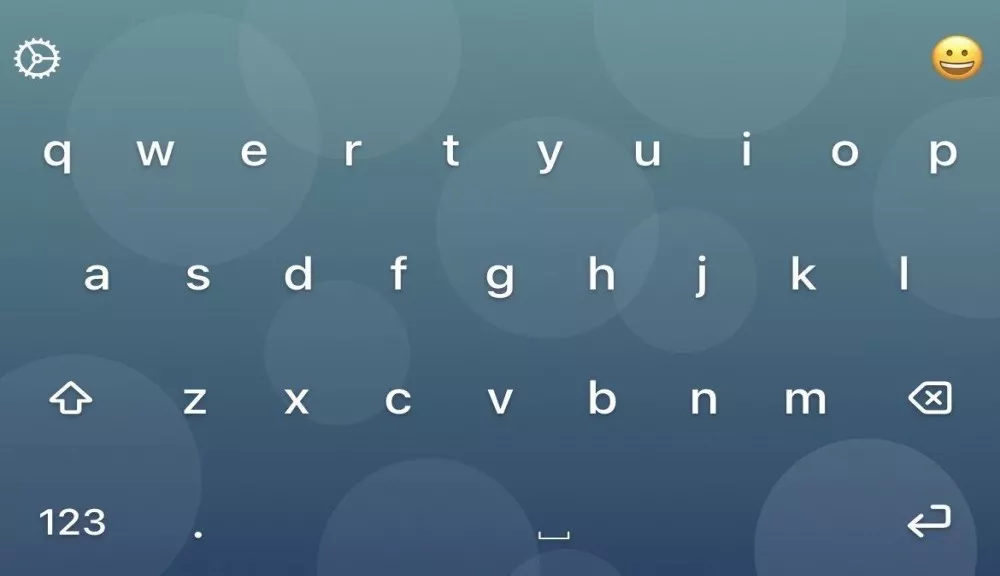
This is not a demo. It is a working proof of concept with multilingual support, six visual themes, 693+ emojis, predictive suggestions, and in-keyboard AI rewriting. Built with Swift, SwiftUI, and Apple-native frameworks, the way a production product should be.
According to Statista (2025), 94% of global internet users access chat and messaging apps every month, and messaging consistently ranks as the most common smartphone activity worldwide. That makes the keyboard one of the highest-frequency touchpoints in any mobile product.
And yet, most teams treat it like infrastructure rather than product. That is a missed opportunity at the most frequent point of user interaction.
So why does custom keyboard iOS Swift development fail so often in execution? Because the real challenges are hidden beneath the surface. Let’s walk through all of them, and more importantly, how we solved them.

Why Most “Custom Keyboard” Projects Collapse Before Launch
The idea sounds simple. Show keys, capture taps, insert text.
But that description hides three serious problems that we see surface in real projects.
Problem one is linguistic complexity: Supporting English alone is one challenge. Supporting Hindi, Chinese, and Japanese introduces different scripts, key densities, and user expectations. A multilingual keyboard is not just a UI problem. It is a system design problem.
Problem two is personalization performance: Themes, emoji navigation, and keyboard resizing create frequent UI state changes. In a keyboard extension, lag is instantly visible to users. There is no hiding it.
Problem three is architectural fragmentation: On iOS, a build iOS keyboard extension project lives across two targets: a container app for configuration and the keyboard extension for live typing. Without a clean state-sharing strategy, those two surfaces become incoherent fast.
Most teams underestimate these hidden costs. They build the visual shell first and discover the structural issues after launch. That is an expensive lesson.
What Are the Key Terms in iOS Keyboard Extension Development?
If you are new to iOS extension development, these definitions will make the rest of this post much easier to follow.
UIInputViewController is Apple’s base class for all custom keyboard extensions. Every custom iOS keyboard must be rooted here. It handles the extension lifecycle, text insertion, and system-level keyboard interactions. You can read the official specification in Apple’s developer documentation.
UITextDocumentProxy is the interface through which a keyboard extension reads and writes to the active text field in any host app. It is how predictive suggestions know what word you are currently typing.
Two-target architecture means a custom keyboard lives as two separate Xcode targets: a container app (where users configure settings) and the keyboard extension itself (where live typing happens). These two targets must share state cleanly.
App Group / UserDefaults (shared) is the persistence mechanism that allows the container app and the keyboard extension to communicate preferences, themes, language choices, and height settings across the target boundary.
GroqCloud is a cloud inference platform that serves large language models via an API compatible with OpenAI’s Chat Completions format. In this PoC, it powers the in-keyboard AI rewrite features using the Llama 3.3 70B model.
The Right Way to Think About iOS Keyboard Extension Architecture
The foundational decision is this: build a custom keyboard as a platform, not as a feature.
That means choosing Apple-native frameworks over cross-platform shortcuts, aligning with the extension lifecycle Apple expects, and designing the system to grow without structural rework.
In our iOS keyboard extension PoC, that philosophy shaped three early decisions.
First, the UI is built primarily with SwiftUI for composability and state-driven rendering. Second, the extension is grounded in UIInputViewController, which is Apple’s standard iOS keyboard extension model. Third, state is shared between the container app and the keyboard extension through a persistence strategy that keeps the two surfaces coherent in real time.
The result is not just a keyboard that works today. It is a keyboard architecture designed for iteration and scaling.
What We Actually Built: Every Feature, Every Trade-Off
We did not build a mockup. We built a working two-target iOS application with real product depth. Here is exactly what it includes and why each decision matters.
Multi-Language Support: English, Hindi, Chinese, and Japanese
The multilingual keyboard iOS problem forces your architecture to become modular early. You cannot bolt on new languages to a static layout system without constant rework.
We structured the keyboard as a scalable UI system that treats each language as a configuration, not a rewrite. English (QWERTY), Hindi (Devanagari), Chinese Simplified, and Japanese Hiragana all work within the same interaction model.
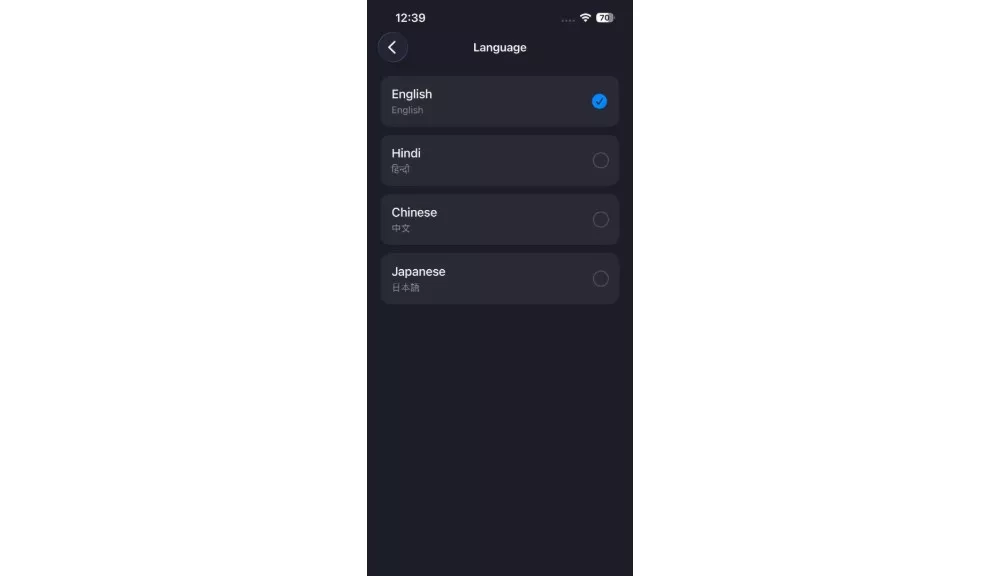
The trade-off is upfront layout modelling work. The payoff is a system that can accept new languages without touching the core architecture.
Six Visual Themes with Persistent Preferences
Users interact with a keyboard hundreds of times a day. Personalization at that frequency is not cosmetic. It affects how owned and familiar the product feels.
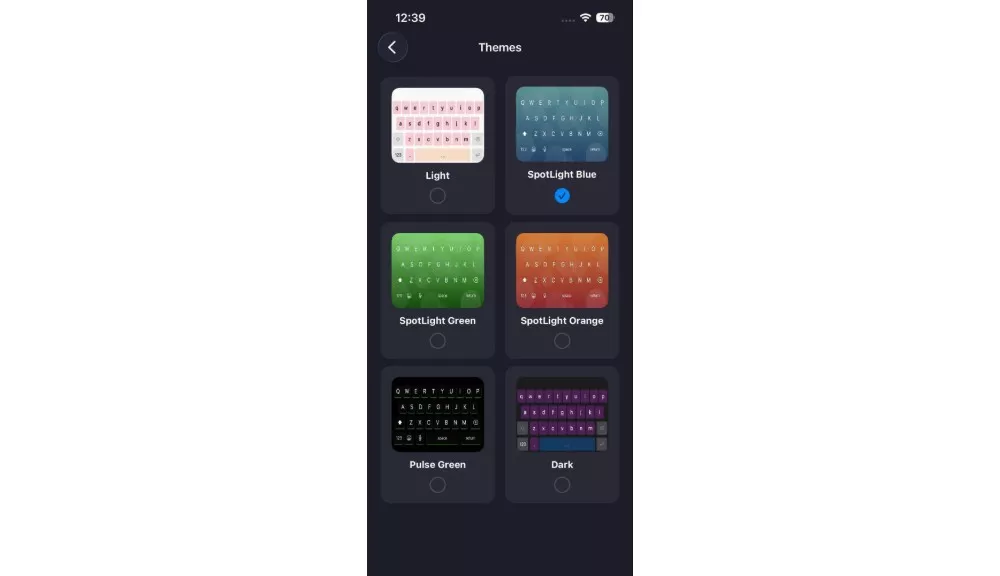
Our SwiftUI custom keyboard supports six themes: Light, Dark, SpotLight Blue, SpotLight Green, SpotLight Orange, and Pulse Green. Selections persist through UserDefaults and sync cleanly across the container app and extension.
Theme switching feels instantaneous because we kept the state model lightweight and reactive. No third-party theming engine. No performance overhead.
693+ Emojis Across 9 Categories
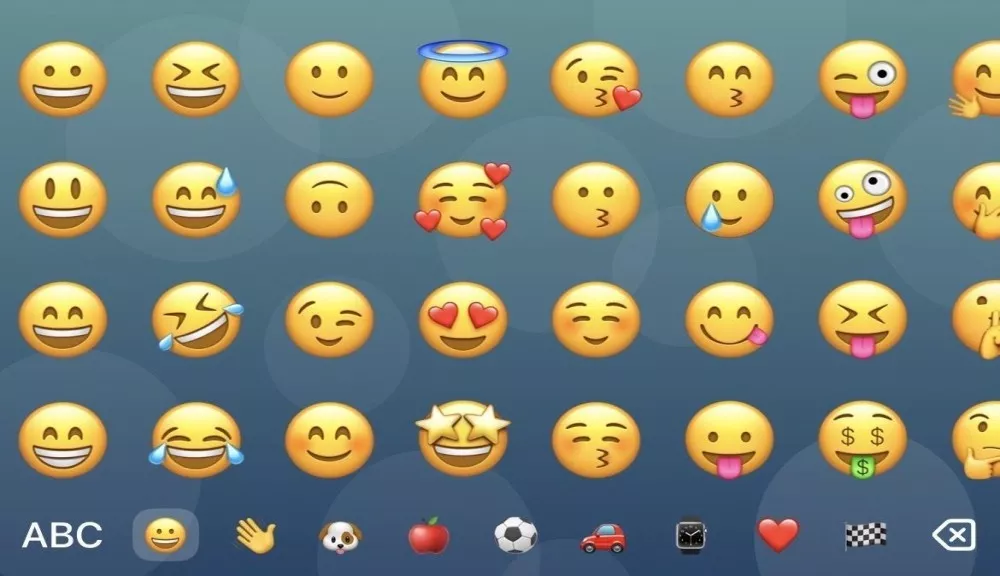
Emojis are a core communication behavior, not an optional extra. A keyboard that makes users switch to a separate input method for emoji is already losing engagement.
Our emoji mode includes quick navigation shortcuts, category browsing, and a clear return path to ABC typing. Users stay inside one coherent experience from start to finish.
Resizable Keyboard Height (0.7x to 1.6x)
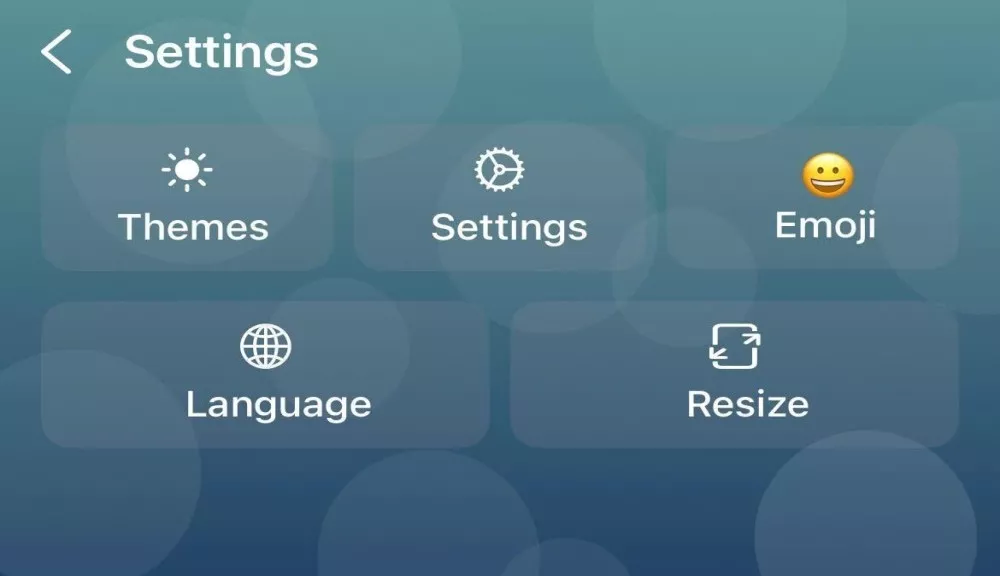
Accessibility and comfort are not afterthoughts. Different users, different hands, different preferences.
Drag-to-resize lets users set their preferred keyboard height anywhere from 0.7x to 1.6x the default, with that preference persisted across sessions. This is the kind of detail that separates a tool people use happily from a tool people tolerate.
Long-Press Symbols, Caps Lock, and Continuous Delete
These small interaction details define whether a keyboard feels production-ready or still in beta.
Long-press symbol popups for ( . , ? $ ), double-tap shift for caps lock, and long-press backspace for continuous rapid deletion. Each one is a small thing. Together, they make the keyboard feel mature.
Real-Time Predictive Suggestions (Top-3)
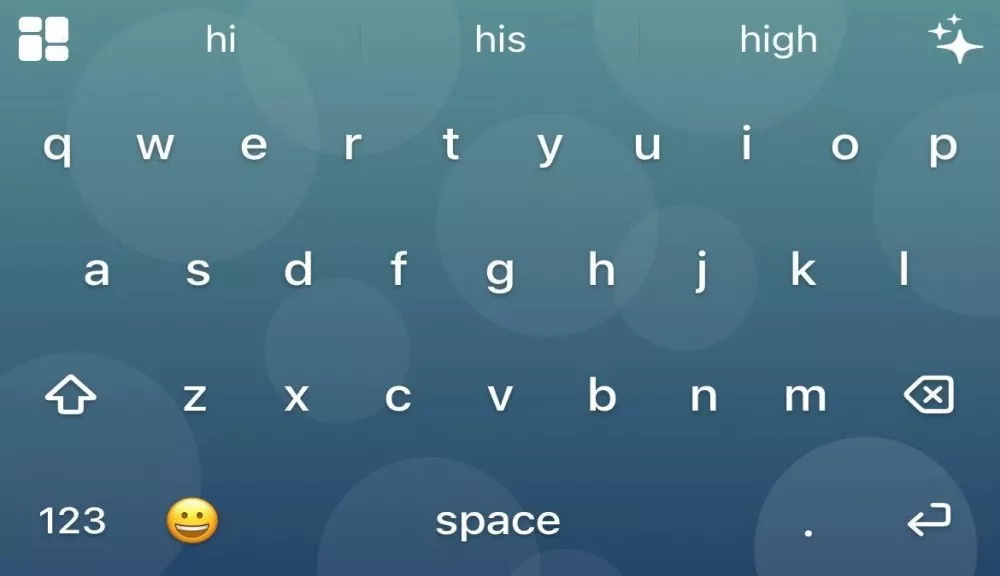
The predictive text iOS keyboard feature is pinned above the key rows and updates on every keystroke. One tap inserts the prediction. Zero configuration required from the user.
Predictive assistance is the highest-leverage improvement you can make in a typing product because it reduces effort on every single interaction, not occasionally. A large-scale study of 37,370 participants published by Aalto University and the University of Cambridge (Palin et al., ACM CHI 2019) found that average mobile typing speed is around 36.2 WPM compared to approximately 52 WPM on a physical keyboard, a gap that intelligent prediction directly closes.
The suggestion layer uses UITextDocumentProxy to infer the current word fragment and generate live candidates. It works cleanly because it stays inside the Apple-native model rather than trying to circumvent it.
In-Keyboard AI Writing Assistance: Polish, Formalize & Elaborate Actions
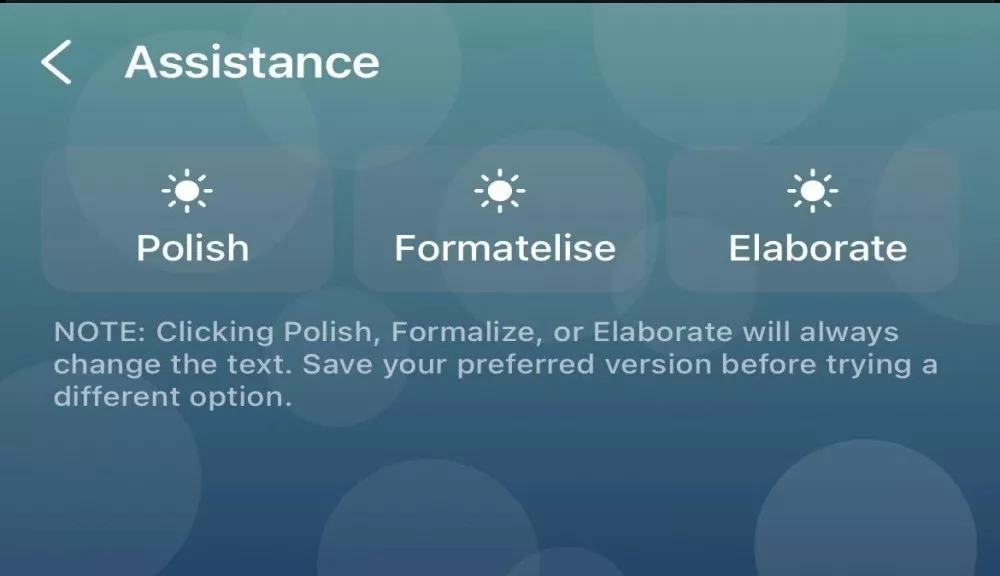
This is where the AI keyboard app development story gets interesting.
We integrated GroqCloud’s Llama 3.3 70B model to power three focused rewrite actions inside the keyboard itself. Polish refines tone. Formatelise improves structure. Elaborate expands the content.
The insight here matters. AI becomes genuinely useful when it is embedded in the workflow rather than requiring users to leave their writing context. Forcing someone to copy text, switch to an AI app, rewrite, then paste back is friction that most users never bother with.
Bounded AI actions build trust. Users know exactly what Polish does before they tap it. That clarity is what drives adoption.
Important note: Each AI action will always modify your text. Save your preferred version before trying a different option.
Custom Keyboard vs Default iOS Keyboard: What Actually Changes
Not sure whether a custom keyboard is worth the investment for your product? Here is a direct comparison of what changes when you build your own.
| Capability | Default iOS Keyboard | Custom iOS Keyboard |
| Brand control | None | Full, including themes and layout |
| Language support | System-level, limited | Custom scripts and layouts per product |
| Predictive suggestions | Generic, Apple-controlled | Domain-specific, product-tuned |
| AI writing assistance | None natively | In-keyboard rewrite actions possible |
| Emoji experience | Standard iOS | Custom categories, branded sets |
| Keyboard height | Fixed | User-adjustable with persistence |
| Analytics and behavior data | Not accessible | Fully instrumentable |
| White-label potential | Not applicable | Yes, across multiple product lines |
| Settings integration | iOS Settings app | Your own container app |
The default keyboard is a general-purpose tool. A custom keyboard is a product-specific communication layer. For apps where users type frequently, that distinction has measurable impact on engagement and retention.
What Is the Best Tech Stack for Building an iOS Custom Keyboard? (Swift, SwiftUI & GroqCloud)
Every technology decision in this project was intentional. Here is the reasoning behind each one.
SwiftUI handles all keyboard layouts, overlays, and the settings screen. It gives us layout composability, state-driven rendering, and reusable interaction components. For a keyboard with multiple layouts and themes, maintainability matters enormously. See Apple’s SwiftUI documentation for the framework’s full capability set.
UIKit via UIInputViewController is the extension integration layer. iOS keyboard extensions are fundamentally built around Apple’s extension architecture. Staying aligned with that model prevents lifecycle bugs and keeps the implementation production-safe. Abstracting it away creates subtle problems that compound over time.
Combine powers reactive state management. ObservableObject and @Published properties keep language changes, theme updates, and suggestion refreshes feeling instant without manual state wiring.
Foundation (UserDefaults + NotificationCenter) provides the persistence and utility layer. In a two-target architecture, this is what keeps the container app and keyboard extension synchronized. Settings made in the container app must propagate to the extension immediately. This handles that cleanly.
GroqCloud (llama-3.3-70b-versatile) delivers fast, high-quality rewrite actions via an OpenAI-compatible Chat Completions API. Fast response times matter especially inside a keyboard, where users feel every second of latency.
How the System Actually Works: Architecture and State Flow
At the system level, CustomKeyboard separates responsibilities cleanly across two product surfaces.
The container app handles everything configuration-related: language selection, theme browsing, privacy, about, and keyboard settings. This is where users shape their experience before they type.
The keyboard extension handles the live typing experience inside any host app. It reflects the preferences set in the container app in real time.
State sharing is not just an architectural preference here. It is a functional requirement. If a user sets their theme to Dark in the container app and then opens a messaging thread, they should not see the default Light theme. That kind of disconnect destroys trust.
The predictive suggestion layer reads the current word fragment through UITextDocumentProxy and surfaces three candidates above the key rows. The AI assistance layer sits alongside typing as an explicit transformation tool. Neither layer interrupts the core typing experience. Both add value without requiring users to change how they work.
Together, these layers show how a keyboard can function as both an input mechanism and an intelligence surface. That is not a metaphor. That is a product architecture decision.
The Four Hardest Technical Challenges (and How We Solved Them)
Supporting Multiple Scripts Without Structural Fragility
Different languages do not share a layout model. Scripts vary in row count, character density, and user expectations.
We solved this by structuring the keyboard as a scalable UI system from day one rather than building static layouts per language. Each language is a configuration layer on top of a shared interaction model. New languages require new key sets and layout logic, but they do not require core architecture changes.
Keeping Personalization Instant in an Extension Environment
Themes, emoji navigation, and resizing all create frequent state changes. In a keyboard extension, performance constraints are tighter than in a standard app. Lag is immediately visible.
We used a lightweight native stack with reactive state management. No unnecessary framework overhead. ObservableObject handles state changes at the speed the interaction model requires.
Managing the Two-Target Extension Boundary
The iOS keyboard extension model is constrained by design. It must work across app boundaries while respecting Apple’s extension patterns.
We kept the extension rooted in UIInputViewController and designed the entire state-sharing model around that reality. Aligning with Apple’s model rather than abstracting it away keeps the implementation lifecycle-safe and future-compatible.
Integrating AI Without Disrupting the Typing Experience
AI features can easily feel bolted on, disruptive, or unreliable inside a keyboard.
We limited the AI integration to three clearly scoped rewrite actions with predictable outputs. Users know what Polish does before they tap it. That clarity converts hesitation into adoption. Bounded AI creates trust. Open-ended AI in a constrained UI creates frustration.
One honest trade-off worth naming: AI rewrite actions require a network call to GroqCloud. In offline environments or on slow connections, this latency is noticeable. For a production deployment, a fallback state or offline-capable local model should be planned as part of the AI layer roadmap.
What Does a Custom iOS Keyboard PoC Validate Before Full Development?
A proof of concept is the right approach for enterprise mobile keyboard solutions because custom keyboards sit at the intersection of UX sensitivity, platform constraints, and architecture risk.
Technical validation: SwiftUI-first keyboard UI coexists effectively with UIInputViewController without compromising platform alignment. Meaningful personalization and productivity features do not require a heavy non-native stack. In-keyboard AI assistance is viable when scoped to focused rewrite actions.
UX validation: Predictive suggestions update on each keystroke with no noticeable lag. Theme switching and height resizing feel instantaneous. Multi-language layouts work cohesively without breaking core interaction patterns.
Business validation: A keyboard becomes a differentiated product asset when it combines usability, architecture discipline, and focused intelligence. This PoC proved all three are achievable together.
According to AppsFlyer’s mobile engagement research, 90% of users who engage with an app at least once a week tend to become long-term users. For products where users type daily, the keyboard is precisely the surface that makes or breaks that weekly habit, and mobile-first teams that invest here build a compounding retention advantage over those that leave the experience generic.
From PoC to Production: What Changes When You Scale
Moving this solution from PoC to production involves hardening across several layers. Here is the realistic roadmap.
Operational reliability means expanding test coverage across languages, layouts, edge cases, and host app environments. Extension behavior varies across different iOS versions and host apps in ways that require deliberate testing.
Data and intelligence maturity means improving predictive models, refining candidate generation, and deciding whether remote or local suggestion strategies best fit the target product context.
Product scaling means adding more languages, stronger accessibility support, analytics instrumentation, and more sophisticated user preference controls. The architecture we built supports all of this without structural rework.
AI layer production planning means accounting for user trust, performance expectations, network constraints, and the permissions model required for extended functionality.
A good PoC should not just prove something can work. It should clarify exactly what needs to change when the product scales. This one does both.
Why This Is the Direction Mobile Product Interaction Is Heading
The future of mobile productivity will not be defined only by standalone apps.
It will be shaped by embedded intelligence in the micro-surfaces users touch all day: keyboards, editors, message composers, and contextual assistants. Across America, product teams are starting to recognize this. The teams that move first on high-frequency surfaces like the keyboard gain a meaningful head start.
According to data.ai’s State of Mobile 2024 report, mobile users globally averaged 5 hours per day on their devices in 2023, a 6% year-over-year increase, with social and entertainment apps accounting for 3 trillion hours of that total. Every hour of that represents keyboard interactions.
Custom iPhone keyboard app development, done right, turns a passive input tool into a personalized, multilingual, AI-assisted productivity layer. For businesses operating in communication-heavy workflows, that compounds fast. Every saved tap, every improved sentence, every session of frictionless typing adds up across thousands of users.
This is not a UI experiment. It is a signal of where interaction design is heading.
Why Platform-First Architecture Wins in iOS Keyboard App Development
What made this PoC successful was not the feature list. It was the discipline to build it right from the start.
We approached this project with a platform-design mindset rather than a feature-delivery mindset. That meant thinking about architecture before aesthetics, persistence before personalization, and system cohesion before individual feature polish.
The two-target architecture, Apple-native stack, and modular UI system are not accidents. They are deliberate decisions that make the product easier to extend, maintain, and scale. And the AI integration was scoped carefully so that it adds measurable user value without compromising trust or usability.
That combination of technical depth, strategic framing, and product discipline is what separates a PoC that teaches from one that just demonstrates.
If you are evaluating white-label keyboard app development or building an AI writing assistant app development solution into your product, this is the approach that reduces long-term risk while maximizing the product value you can deliver at launch.

Ready to Build Your Custom iOS Keyboard? Bitcot Can Help
If your product lives on mobile and your users type inside it, the keyboard is your highest-frequency interaction surface. Leaving it generic is a choice. Building it right is a competitive advantage.
That is exactly where Bitcot can help.
Bitcot is an iOS app development company specializing in custom iOS keyboard development, mobile extensions, and AI-powered app experiences built for real-world production. Our platform-design approach puts architecture discovery first, validates scope early, and ensures every solution is engineered for scalability, performance, and long-term product growth.
Bitcot can help you validate your keyboard idea through a focused PoC, design the two-target architecture from the ground up, integrate AI assistance the right way, and define a clear production roadmap before you commit larger resources.
We do not hand you a prototype and disappear. We work alongside your team from architecture through post-launch as a long-term partner focused on delivering real product outcomes.
Ready to turn your keyboard into a true competitive advantage?
At Bitcot, we specialize in building high-performance iOS solutions that combine scalable architecture, seamless user experience, and intelligent features like AI-powered writing assistance. Our structured, architecture-first approach helps you move faster while reducing risk and avoiding costly rework.
Let’s build a smarter, more powerful typing experience for your users. Schedule a free discovery call with Bitcot.
Frequently Asked Questions (FAQs)
What is iOS custom keyboard development and how does it work?
iOS custom keyboard development is the process of building a third-party keyboard extension that replaces or supplements the default system keyboard inside any iOS app. It operates as a two-target project: a container app handles user configuration, and the keyboard extension handles live typing. The extension is registered through iOS Settings and runs inside host apps using UIInputViewController as the integration layer Apple requires. Done right, it gives your product full control over the typing experience, including layout, language, theme, and intelligence features.
How do I build an iOS keyboard extension using Swift and SwiftUI?
To build iOS keyboard extension functionality, create a new Keyboard Extension target in Xcode alongside your container app and root it in UIInputViewController. From there, use SwiftUI to build the key rows, suggestion bar, caps lock logic, long-press interactions, and emoji mode. Share state between the container app and extension using a shared App Group with UserDefaults. For a full production implementation, plan the multilingual layout system and persistence model from the start. Apple’s Creating a Custom Keyboard guide is the authoritative starting point for the extension setup.
Can I add AI writing assistance inside a custom iPhone keyboard app?
Yes, and it works well when the AI scope is tightly defined. In-keyboard AI rewrite actions using models like Llama 3.3 70B via GroqCloud deliver fast, high-quality results for bounded tasks like tone refinement, structure improvement, and content expansion. The key design rule is this: users must know what an AI action does before they trigger it. Open-ended AI generation inside a keyboard extension creates unpredictable latency and erodes trust. Focused AI writing assistant app development with clear, named actions outperforms open prompts in keyboard environments every time.
What is the cost to build a custom keyboard app for iOS?
The cost to build a custom keyboard app varies based on scope, language support, AI integration, and personalization depth. A production-ready keyboard with multilingual support, themes, predictive suggestions, and AI assistance is a meaningful engineering investment. Starting with a focused PoC, typically 4-8 weeks depending on feature scope, is the most cost-effective path because it validates architecture, UX, and AI viability before a full-scale build. This surfaces the trade-offs and blockers when changes are still cheap rather than expensive. Reach out to our mobile development team for a scoped estimate specific to your product.
How does predictive text work in a custom iOS keyboard?
Predictive text iOS keyboard features work through UITextDocumentProxy, which gives the keyboard extension read access to the text context surrounding the cursor in any active text field. The keyboard reads the current word fragment and generates top-N suggestions displayed above the key rows. Tapping a suggestion inserts the word and advances the cursor. For real-time responsiveness, the suggestion model must update on every keystroke using a reactive state architecture. More advanced implementations layer in domain-specific language models or personalized frequency models that improve with usage.
What are enterprise mobile keyboard solutions and who needs them?
Enterprise mobile keyboard solutions are production-grade custom keyboards built for internal tools or customer-facing business apps. They include communication platforms, field service tools, healthcare documentation systems, legal drafting tools, and multilingual enterprise products. Instead of a generic keyboard, enterprise teams deploy a domain-specific input layer with role-aware suggestions, compliance-conscious data handling, branded theming, and integration with internal systems. If your users type inside a business app frequently, a custom keyboard is a direct, measurable investment in their productivity.
What is white-label keyboard app development?
White-label keyboard app development means building a fully functional custom keyboard once and deploying it under multiple brand identities without rebuilding the core system each time. A well-architected white-label keyboard includes configurable themes, pluggable language packs, swappable AI models, and a brandable settings and onboarding layer. It is the right model for iOS app development companies and platform providers serving communication tools, creator platforms, or multilingual productivity apps where multiple clients need the same underlying capability with different product identities. The modular two-target architecture described in this post is specifically designed to support this deployment model.