Key Takeaways
- How Bitcot’s San Diego engineering team built a secure, role-based enterprise employee portal using React Native and Supabase, eliminating scheduling fragmentation, automating HR workflows, and delivering production-grade security for hospital and enterprise workforces across California and the US.
- Your workforce management system is failing in ways your dashboard isn’t showing you.
- Schedules stored in spreadsheets go stale the moment they’re saved. Shift changes communicated over email get missed. Leave approvals stall in inboxes. Task assignments vanish in group chats. And in high-stakes environments like hospitals, manufacturing facilities, and large corporate campuses, that fragmentation isn’t just an inconvenience; it’s an operational liability.
- This is the problem Bitcot’s engineering team set out to solve. We built a Proof of Concept (POC) enterprise employee portal, a mobile-first workforce management platform built with React Native and powered by Supabase, designed to unify scheduling, task management, and HR workflows into a single, secure system. Not a UI prototype. An architecture that could actually hold up at enterprise scale.
The Real Cost of Fragmented Workforce Management
Most enterprise leaders understand that fragmentation is inefficient. Fewer understand exactly how much it costs or where the losses actually appear.
In a hospital with 500 staff members, a missed shift update that reaches one nurse 20 minutes late doesn’t just create confusion. It can delay patient care, trigger overtime costs, and create documentation gaps that introduce compliance exposure. Multiply that across departments, locations, and shift cycles, and the operational risk compounds fast.
The typical setup in most large organizations looks like this:
- Static scheduling: Spreadsheets and whiteboards that are outdated the moment they’re printed
- Siloed communication: Shift changes announced over email, text, or phone with no confirmation trail
- Manual approvals: Leave requests and task assignments that stall in email queues for days
- Weak access control: Systems where employees can see data they have no business accessing
This isn’t a tool’s problem. Organizations already have tools they have too many tools, and none of them connect. The solution isn’t another app. It’s a unified system with the right architecture underneath it.
Why Most Employee Apps Fail on Security
The majority of enterprise mobile apps, including many purpose-built for workforce management, treat security as a frontend concern. They hide sensitive UI elements. They restrict navigation based on the user’s role. They call it “access control.”
It isn’t.
If the enforcement lives in the client, a motivated attacker can bypass it in minutes. The sensitive data is still reachable. The admin operations are still available. The illusion of security is worse than no security at all, because it creates false confidence while leaving the exposure intact.
Our architecture treats security as a backend guarantee, not a UI convention. That distinction drove every technical decision in this POC.

Key Features of the Enterprise Employee Portal POC
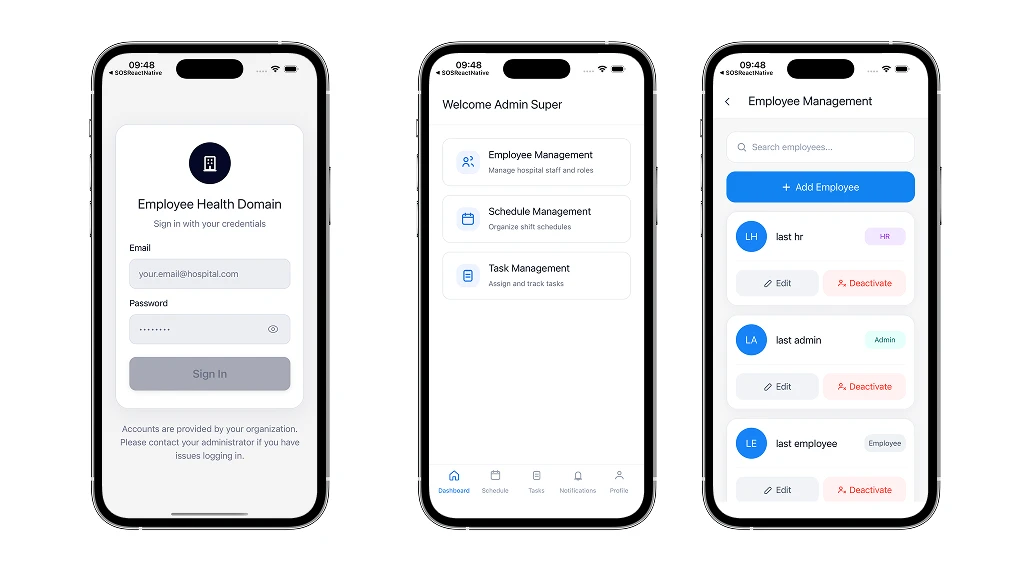
1. Role-Based Access Control (RBAC) Enforced at the Data Layer
The portal supports multiple distinct roles: Administrator, HR Manager, Doctor, Nurse, and Staff each with precisely scoped permissions. But unlike most implementations, this isn’t just routing logic in the app.
Permissions are enforced through Row-Level Security (RLS) at the PostgreSQL database layer. Every query is validated against the authenticated user’s role before any data is returned. Even if someone intercepts a client-side request or reverse-engineers the app, the backend rejects any operation the user’s role doesn’t authorize.
The result: a workforce management system where “role-based access” is a technical guarantee, not a UX convention.
2. Real-Time Scheduling System
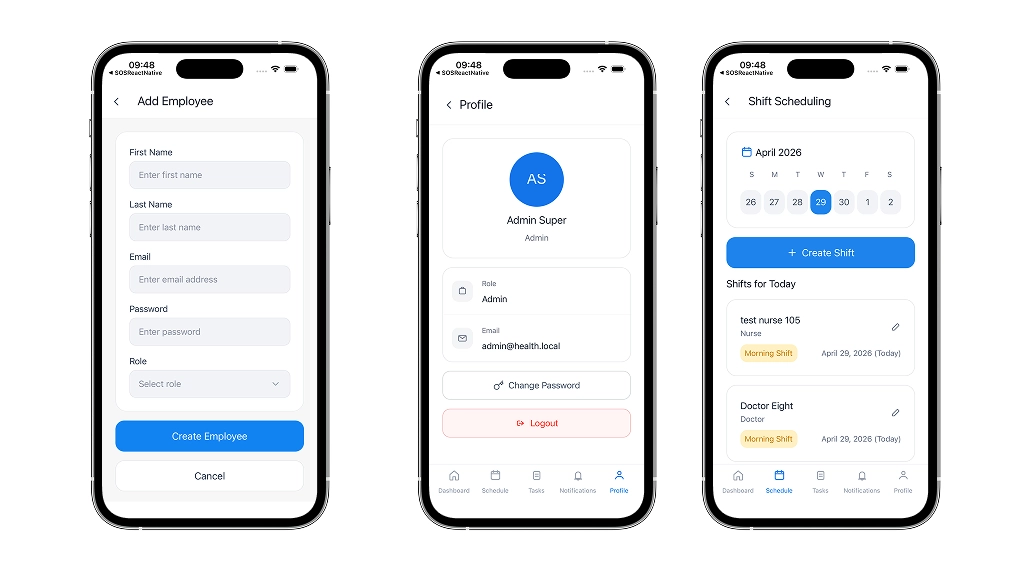
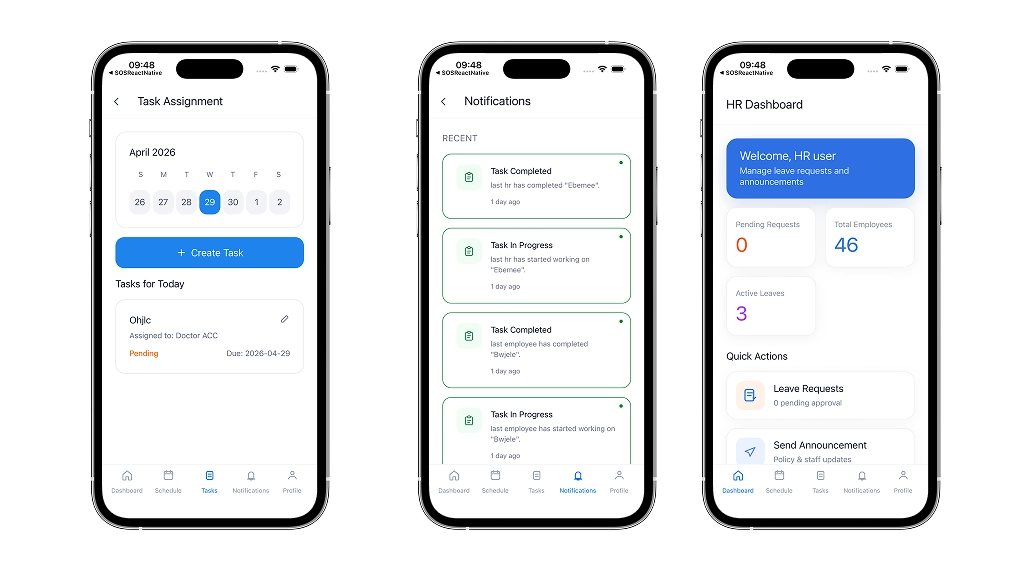
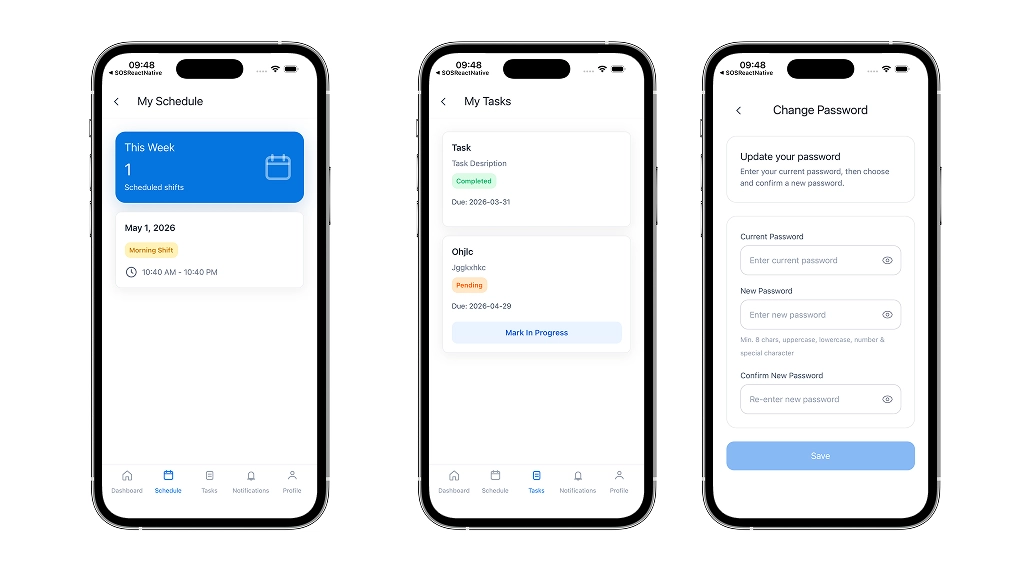
Administrators can create, modify, and publish shift schedules from a single interface. Changes propagate immediately to every affected employee’s device, no manual notification needed, no lag between the update and the awareness of it.
Employees see their current duty roster in real time. There is no ambiguity about when their shift starts, what tasks are assigned to them, or who they’re replacing. The system eliminates the coordination overhead that consumes hours of management time each week in most large organizations.
3. Integrated Task Management and HR Workflows
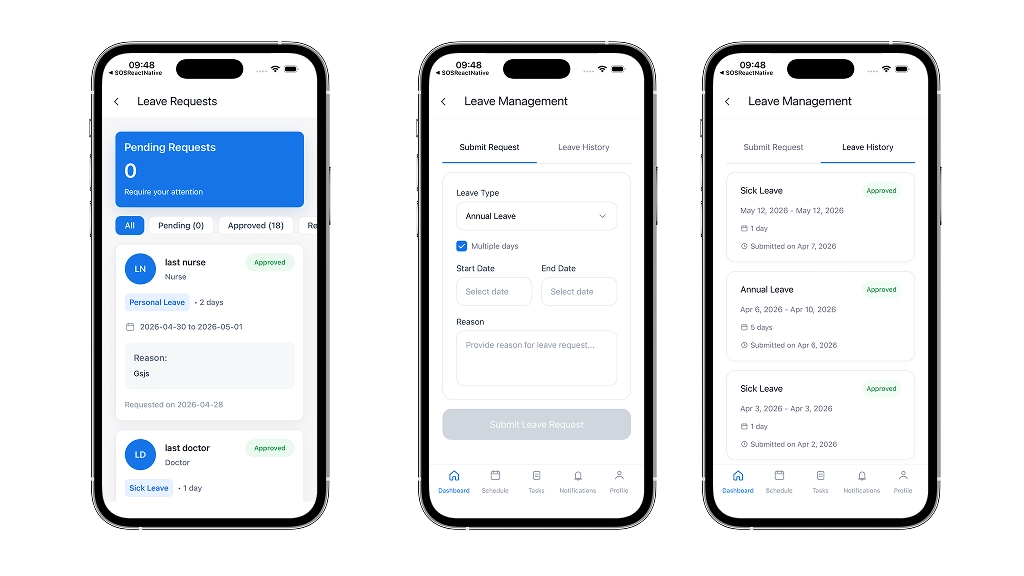
Tasks are assigned, tracked, and updated entirely within the app. Leave requests follow a structured, visible approval pipeline employees can see exactly where their request stands, and managers receive instant notifications when action is needed.
The “where is this request stuck?” question, one of the most common sources of friction in enterprise HR, disappears entirely when the workflow is transparent and centralized.
4. Push Notification System
The portal uses a dual-layer notification architecture: Expo Notifications for in-app alerts combined with Firebase Cloud Messaging (FCM) for native device push notifications. Shift changes, task assignments, leave approvals, and announcements reach employees instantly, whether the app is open or not.
5. Secure Onboarding with Temporary Password Workflow
When a new employee account is created, the system triggers an automated welcome email via SendGrid with temporary login credentials. On first login, the app detects the password-change state and forces a redirect to a secure password setup screen. No access to the dashboard is granted until the account is fully secured. This closed loop prevents the most common onboarding security gap: accounts that exist but haven’t been properly activated.
The Roadmap to GenAI Success for SMEs: From Strategy to ROI
The Tech Stack: Performance Meets Scalability
Every technology in this stack was selected against two criteria: response performance and data security. Here is what we chose and why each element earned its place.
- Frontend: React Native (v0.81.5) & Expo (v54) TypeScript-driven cross-platform development delivering a native experience on both iOS and Android from a single codebase. Critical for organizations where staff use diverse mobile devices across departments.
- Backend: Supabase Edge Functions Server-side TypeScript logic handles all privileged operations. Creating employee accounts, updating leave status, and sending emails are none of these actions are executable from the client. The secret keys never leave the server.
- Database: PostgreSQL with Row-Level Security. Relational tables manage the complex relationships between users, roles, schedules, and tasks. RLS policies enforce data isolation between departments at the database layer.
- Authentication: Supabase Auth Managed authentication with JWT tokens validated on every sensitive request, eliminating the risk of privilege escalation through token manipulation.
- Notifications: Expo Notifications + FCM A dual-layer delivery system ensuring both in-app alerts and native push notifications reach staff reliably, even when the app is running in the background.
Security Philosophy: Assume the Client Is Compromised
This is where most enterprise mobile POCs fall apart. The convenient assumption is that the app can be trusted to ensure that the user interacting with it is who they say they are, using the app as intended.
We built this system with the opposite assumption: the client is hostile until the server proves otherwise.
That produced four non-negotiable security decisions:
- Row-Level Security at the database layer, data access is controlled by policy, not by query logic
- Edge Functions for all privileged operations, admin actions like creating users or changing roles, never touch the client
- Token and role validation on every sensitive request authentication isn’t assumed to persist; it’s verified
- No direct admin access from the mobile client, the attack surface is minimized by design
The practical result: even a fully reverse-engineered version of this app cannot escalate privileges. The backend simply won’t allow it.
Architecture Highlights: The Container-View Pattern
The project follows a modular Container-View architecture. Containers own the application logic, state management, API calls, data validation, and error handling. Views own the presentation layer UI rendering, animations, and user interaction.
This separation matters for maintainability at scale. When scheduling data needs to be fetched from a different endpoint, only the Service and Container layers change. The UI is untouched. When a new role needs to be added, say, a “Pharmacist” role in a hospital, the Tab Resolver logic handles it with a configuration change, not a code rewrite.
The architecture was designed to support a seamless expansion from a 50-person clinic to a 5,000-person hospital network without a fundamental rebuild.
Engineering Challenges and How We Solved Them
Challenge: Secure New Employee Password Setup
The problem: New employees receive temporary credentials via email. The system needs to prevent any authenticated access until they’ve set a permanent, secure password — without creating friction for returning users.
The solution: On every login, the app checks a password_change_required flag in the user’s Supabase profile. If the flag is true, the app routes the user to a forced password change screen before any other navigation is permitted. The flag is cleared server-side only after the Edge Function confirms the password has been successfully updated. No client-side bypass is possible.
Challenge: Maintaining Session Persistence Across Busy Shifts
The problem: In hospital environments, staff cannot afford to be repeatedly logged out during active shifts. But persistent sessions create a security risk if devices are left unattended.
The solution: We used AsyncStorage for session persistence with Supabase’s built-in token refresh cycle. Sessions remain active for the duration of a shift without requiring re-authentication, while token expiration is handled automatically in the background. If a device goes idle beyond the defined threshold, the session is safely terminated.
Challenge: Real-Time Synchronization Without Polling
The problem: Schedule changes need to reach every affected device immediately — not after a scheduled API poll that could lag by minutes.
The solution: Supabase Realtime subscriptions push database changes directly to connected clients. When an admin updates a shift, every employee subscribed to that schedule receives the update within seconds, without the mobile app needing to request it.
Measured Results: What the POC Delivered
The POC demonstrated measurable impact across every dimension that matters for enterprise adoption decisions.
- Administrative efficiency: Scheduling overhead was reduced significantly through real-time propagation and in-app confirmation, eliminating the back-and-forth of manual shift communication.
- Employee experience: Staff reported higher clarity around their schedules and leave statuses, with zero ambiguity about upcoming responsibilities.
- Security posture: Role-based logic and RLS enforcement prevented any unauthorized access to administrative data across all test scenarios.
- API performance: Routing privileged operations through Edge Functions reduced the mobile app’s bundle size and improved API response times compared to direct database access patterns.
- Scalability validation: The architecture demonstrated clean horizontal scaling potential the same system that manages a 50-person team is structurally identical to one that would manage 5,000.
The Roadmap: From POC to Production
A validated POC changes the nature of the production investment decision. The architectural risks have been proven out. The business logic has been tested. What remains is a defined engineering exercise, not a second round of discovery.
The recommended production roadmap for this system includes:
- Single Sign-On (SSO) integration: Connecting to existing Active Directory, Okta, or Azure AD infrastructure so staff authenticate with credentials they already have
- Offline-first data sync: Enabling nurses, doctors, and field staff to view schedules and complete tasks in network dead zones common in hospital basements, manufacturing floors, and remote facilities
- Advanced analytics dashboard: An executive-facing view of workforce productivity, leave trends, task completion rates, and scheduling efficiency across departments
- Biometric authentication: Fingerprint and Face ID login for faster, more secure device access in environments where speed matters
- Compliance module: Automated documentation for HIPAA, labor law, and shift compliance reporting is critical for healthcare organizations operating in California and across the US
How Bitcot Helps Enterprise Teams in San Diego and Across the US
Bitcot is a San Diego-based software development company specializing in enterprise mobile applications, AI-powered systems, and secure backend architecture. Our team has designed and built production-grade mobile platforms for healthcare organizations, manufacturing companies, and corporate enterprises across California and the broader US market.
When it comes to a system like this, an enterprise employee portal, what we bring to the engagement is specific:
- Architecture-first discovery, we define the security model and data access boundaries before a single line of code is written
- Security-by-design engineering RLS, Edge Functions, and server-side validation aren’t added after the build; they’re the foundation of it
- React Native expertise, cross-platform delivery for iOS and Android from a single codebase, built by engineers who work in React Native daily
- Supabase specialization authentication, real-time subscriptions, Edge Functions, and PostgreSQL RLS used as intended at enterprise scale
- Senior-only execution, every engineer, designer, and PM on your project is senior level; no junior handoffs on production-track work
- Long-term partnership post-launch support, observability tooling, and ongoing iteration as your workforce management needs evolve
If your organization is dealing with scheduling fragmentation, compliance gaps, or the operational risk that comes from disconnected workforce tools, we can show you exactly what a unified, secure system looks like for your environment before you commit to a full build.
Frequently Asked Questions (FAQs)
Why use Supabase Edge Functions instead of direct database calls from the mobile app?
Security. Edge Functions execute server-side TypeScript in a secure environment that never exposes secret keys to the mobile client. Privileged operations creating employee accounts, updating role assignments, triggering email workflows require access credentials that must never exist on a device. Edge Functions enforce that boundary by design. Even if a mobile app is fully decompiled, there are no secrets to extract.
How does the push notification system work across iOS and Android?
The portal uses a dual-layer architecture. Expo Notifications handles the device interaction layer registering tokens, managing permissions, and displaying alerts within the app. Firebase Cloud Messaging (FCM) provides the delivery backbone for native push notifications when the app is running in the background or closed. This combination ensures reliable delivery across both platforms without requiring separate notification implementations for iOS and Android.
Can new roles be added without rebuilding the application?
Yes. The portal uses a “Tab Resolver” pattern where roles map to navigation configurations stored as data, not hardcoded in the UI. Adding a new role for example, a “Pharmacist” or “Field Technician” role requires defining the role’s permissions in the backend and updating the resolver configuration. The application navigation updates automatically. No UI rebuild or redeployment is needed.
How are welcome emails sent to new employees?
The create-employee Edge Function integrates with SendGrid. When a new employee profile is created, the function automatically triggers a transactional email containing the employee’s temporary login credentials and onboarding instructions. The email is sent server-side, so no email API keys are exposed in the mobile application. The employee uses those credentials on first login, at which point the forced password change workflow activates.
Is this system available for both iOS and Android?
Yes. React Native with Expo delivers a true native experience on both iOS and Android from a single shared codebase. This is critical for enterprise environments where staff use diverse device types. There is no feature disparity between the iOS and Android versions both platforms receive the same functionality, the same performance, and the same security architecture.
How does the system handle hospital environments with poor connectivity?
The current POC uses AsyncStorage to persist session data and recent schedule information locally, reducing the impact of brief connectivity interruptions. Full offline-first capability allowing staff to view schedules and complete tasks with no network connection is scoped for the production roadmap. This feature uses a local-first data sync model where changes made offline are queued and synchronized when connectivity is restored.
What compliance standards does this architecture support?
The architecture is built with healthcare and enterprise compliance requirements in mind. Row-Level Security enforces data isolation between departments, ensuring staff only access data their role permits. Edge Functions keep privileged operations off the client entirely. For California-based healthcare organizations, the system’s data isolation model supports HIPAA technical safeguard requirements. The production roadmap includes a dedicated compliance module for automated HIPAA, California labor law, and shift regulation reporting.
What does it cost to build a system like this, and how long does it take?
A focused POC of this scope covering authentication, RBAC, scheduling, task management, and HR workflows typically requires four to six weeks. Transitioning from a validated POC to a production-hardened enterprise deployment with SSO integration, offline sync, analytics, and compliance modules typically adds eight to twelve weeks depending on the organization’s existing infrastructure. Starting with a POC validates the architecture and business fit before the full production investment is committed.