Apple’s first foldable shipped on October 23. Our client’s app was live on the App Store the following week. The hard parts were not the foldable APIs. They were the eight years of layout decisions sitting underneath them.
The call came in on September 10, the morning after Apple introduced the iPhone Duo. Our client runs a patient facing healthcare app that we have maintained for years. The question was short: is our app going to look broken on this thing?
The honest answer was yes, at first. Not broken in the crash sense. Broken in the worse sense, where a $1,999 device with the largest display Apple has ever shipped on an iPhone opens up and your app sits there at the size it was in 2019, ignoring half the screen.
We shipped the upgraded build before the end of October. This post is the full set of notes from that work: what broke, which APIs actually mattered, what we deliberately chose not to build, and the testing matrix we now run on every iOS project. If you are a CTO or product lead deciding whether this is a sprint or a quarter, the answer is in here.
Day zero: three build targets, three completely different budgets
The first thing we did was not write code. It was establish which of three states the client actually wanted to be in, because the gap between them is the entire project estimate.
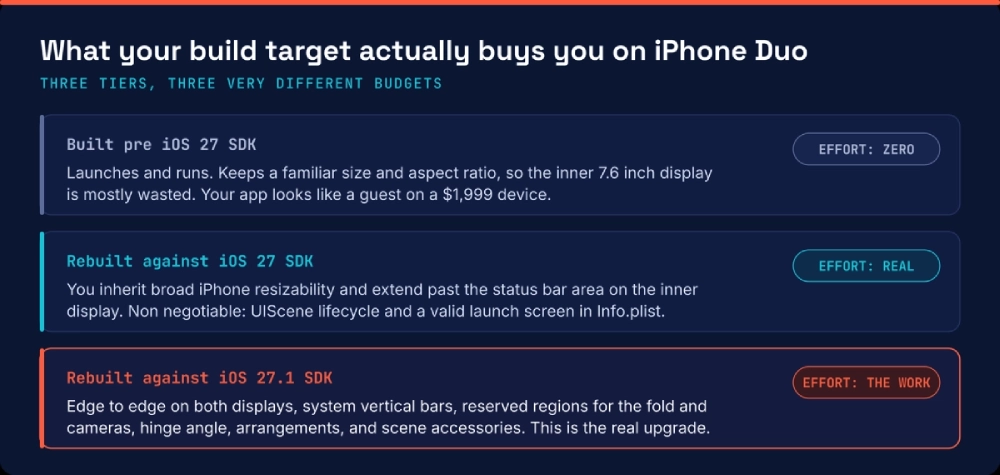
Three build targets, three very different budgets. The jump from tier two to tier three is where the foldable work actually lives.
Most teams discover tier two by accident. They rebuild against the new SDK for an unrelated reason, hit the resizability behavior, and spend a week firefighting layout they did not plan to touch. Decide deliberately instead.
We went to tier three. The app is the client’s primary patient touchpoint, their competitors ship slowly, and the resizability work was owed anyway.
The seven things that broke
The app refused to launch
This one took half a day, and it deserves to be first because it is the single highest severity trap in the whole migration. Our first rebuild against the new SDK produced a binary that did not launch. No crash log worth reading, no obvious cause.
Apps built with the latest SDK must use the scene-based lifecycle. Our app still had an AppDelegate doing window setup, the way thousands of apps written before 2019 still do. The old lifecycle is not deprecated in a gentle way anymore. It is a hard requirement. App Store Connect also now wants a valid launch screen configuration in Info.plist for apps built with the iOS 27 SDK.
If you do nothing else after reading this post, open your project and check whether you are on UIScene. That migration is the long pole, and it has nothing to do with foldables.
Face ID vanished
iPhone Duo does not have Face ID. It has Touch ID in the side button. Our app had eleven places that said “Face ID” in user facing copy, a Face ID glyph in the onboarding carousel, and one piece of logic that treated LABiometryType.faceID as the only acceptable biometric for a sensitive action.
In a regulated healthcare app, those eleven strings are not a find and replace. They are a copy deck that went through review, they appear in a published help center, and one of them is quoted in a security questionnaire the client sends to hospital procurement. Code was two hours. The rest of it was two days.
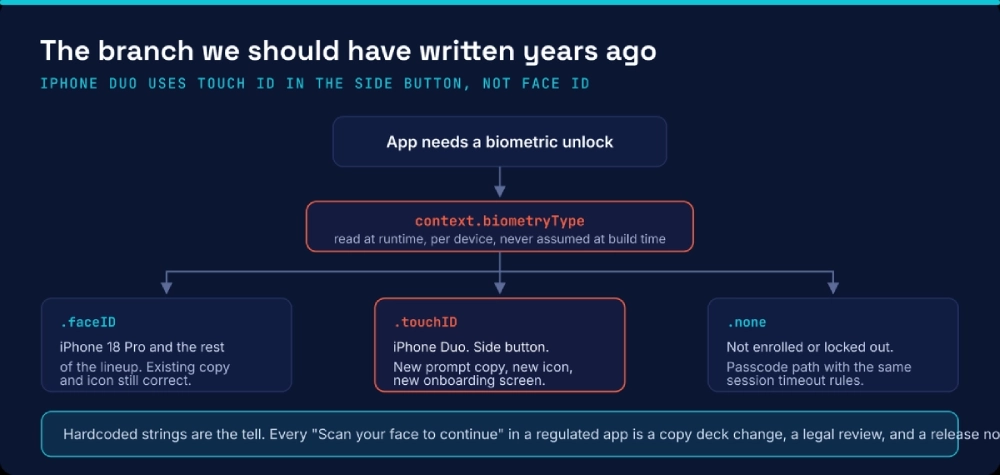
Biometry type is a runtime question. iPhone Duo answers it with Touch ID.
The lesson we took forward: never let a device capability name leak into product copy or control flow. Branch on the capability you read at runtime, and write the strings from the result.
Hardcoded frames, which is where the real money went
The foldable APIs were not expensive. Eight years of fixed numbers were. A partial list from the audit:
- A card component with a fixed
320point width, written when every iPhone was 375 points wide. - A chart view that calculated its own height from
UIScreen.main.bounds, a call that means something different when the window can resize under you. - A table header with a magic
-44offset to compensate for a navigation bar that no longer exists in that form. - Three screens that assumed portrait, hard enough that rotating them produced overlapping text rather than a different layout.
On the inner display there is simply a lot more room than those numbers ever anticipated, and the window can change size while the app is running. Every assumption that a screen has one size becomes a visible defect. This phase was five days and it is where almost every project of this type will spend its time.
The iPhone Duo did not create this debt. It published it.
Our custom modals landed on the crease
Apple handles this well if you let it. Sheets, popovers, context menus and alerts adapt to the different Duo configurations when you use the standard presentation APIs, and iOS 27.1 introduces reserved region APIs so layout can route around the fold and the cameras.
We had one component that bypassed all of it: a bespoke centered overlay built years ago for a confirmation flow, positioned by math. On the inner display, in book pose, it centered itself exactly on the fold. The primary action button sat on the crease.
We deleted the component and replaced it with a standard presentation. That is the general pattern for this whole migration. Most of the work is giving control back to the system, not taking more of it.
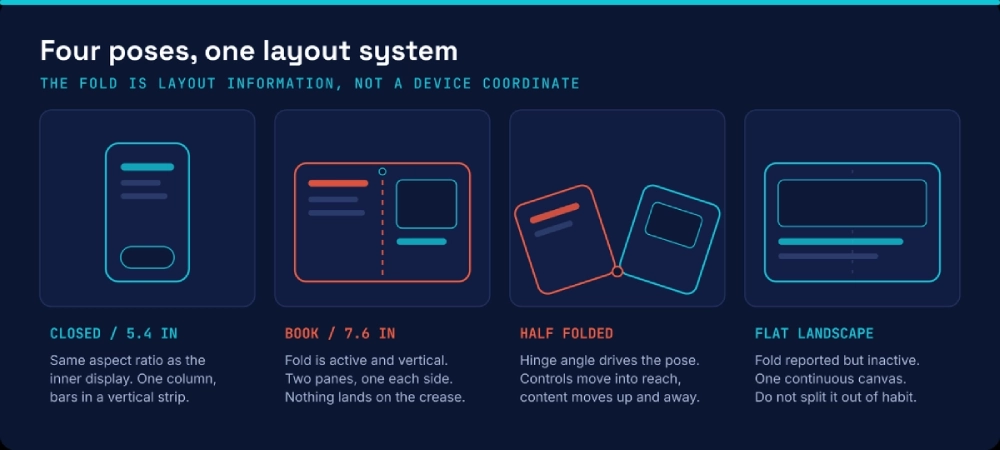
The four poses every screen has to survive. Test the transitions between them, not just the end states.
Our hand-rolled tab bar did not get the new treatment
Once you rebuild against the iOS 27.1 SDK, toolbars and tab bars move into a vertical strip at the side of the display, within easy reach, and controls nudge away from the fold when the device is partially folded. Content expands into multiple columns on the inner display.
That gift only applies to bars owned by system containers. Ours was a custom view that imitated a tab bar for brand reasons set in a design review in 2021. It stayed exactly where it was, horizontally pinned to the bottom of a 7.6-inch display, a long way from anyone’s thumb.
We moved to the system container and kept the branding through tint and iconography. The client’s design lead was skeptical for about a day and then saw it in the half-folded pose.
The camera flow needed its own plan
The foldable design unlocks camera behavior that no other iPhone has. The device can be half-folded and propped on a surface with the cameras facing out; there is an under-display camera on the inner screen, and apps can show content on both displays at once using scene accessories. Apple’s own example is a teleprompter on the outer display for the person being recorded.
Our app uses the camera for document capture, so insurance cards and wound photos. Two real problems surfaced. The capture session did not survive a pose change cleanly, and our capture overlay ignored the occlusion region around the inner camera, so the guidance frame sat partly underneath it.
We fixed the session handling, honored the reserved regions, and shipped a small win: in the propped pose, the preview goes on one half and the capture controls on the other, so a patient photographing a document no longer covers the preview with their own hand.
State fell out of the app mid-fold
Folding is a resize, and a resize is where sloppy state management shows itself. Our list and detail flow reset the scroll position when the device opened. A partially filled intake form lost two fields. A video explainer restarted.
None of these reproduce if you test only the end states. They reproduce while the hinge is moving. This is the reason the pose matrix at the end of this post exists.

What we deliberately did not build
The expensive version of this project is the one where someone decides the app needs an iPhone Duo mode. We said no three times.
- No hinge-driven interface flourishes. The hinge API reports the angle as the device opens and closes, and it is genuinely useful. We used it for exactly one thing: the propped camera pose. Everywhere else, responding to the angle would have been a demo, not a feature.
- No dedicated Duo screens. The most maintainable iOS 27 app contains surprisingly little code that explicitly knows about iPhone Duo. Every device-specific branch is a permanent tax on every future change.
- No scene accessories in version one. Showing content on both displays at once is a strong capability, and it is on our roadmap for the clinician-facing module. It was not worth delaying the release.
The sequence we would run again
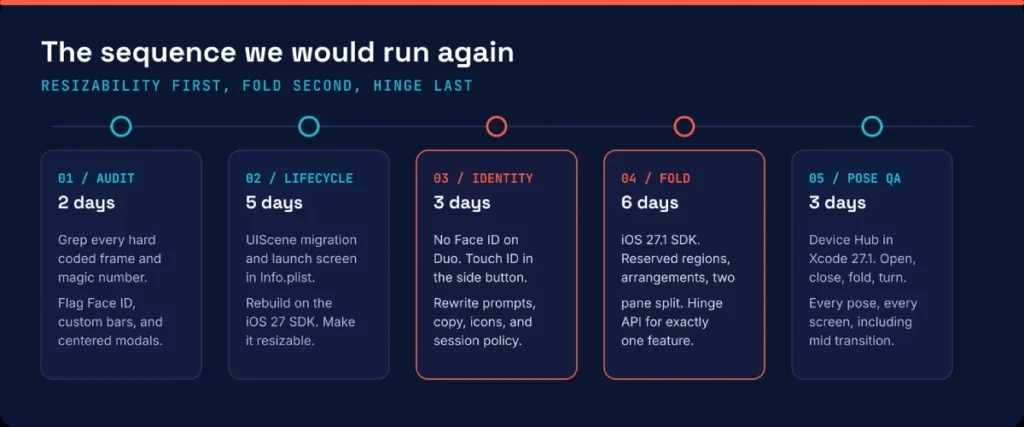
The 19-day sequence. Resizability first, fold second, hinge last.
Order matters more than duration. Teams that start with the fold-specific APIs end up rewriting that work once the resizability pass moves everything underneath it. Resizability first, fold second, hinge last.
The pose matrix we now run on every iOS build
Device Hub in Xcode 27.1 lets you open, close, fold, and rotate a simulated iPhone Duo. That turns pose coverage into something a QA lead can actually schedule. Here is the grid we gave the client’s QA team.
| Pose | What you are checking | Usual failure |
|---|---|---|
| Closed, outer display | Single column layout, bars in the vertical strip, reachability | Content designed for a wider canvas gets clipped |
| Open, book pose | Two-pane split, nothing on the crease, column behavior | Centered elements land on the fold |
| Half folded | Controls within reach, content lifted away from the hinge | Camera and media sessions drop |
| Flat landscape | Fold reported but inactive, one continuous canvas | App splits the layout out of habit |
| Flipped over | Content moves to the correct display | Rendering continues on the display nobody is looking at |
| Mid transition | Scroll position, form state, playback, in-flight network calls | State loss that end state testing never catches |
| Biometrics, three states | Enrolled, not enrolled, locked out | Dead ends in flows that assumed Face ID |
If you are on Flutter or React Native
Roughly half the mobile work we do at Bitcot is cross-platform, so this came up immediately on the next project. The short version: your app resizes correctly and reports the asymmetric safe area, so the layout half of this post applies to you with very little change. The native chrome does not come free. Framework-rendered toolbars do not automatically become the system vertical bars, and fold geometry, hinge angle, and reserved regions need a bridge to the iOS 27.1 APIs.
Budget the chrome and the fold geometry as separate line items. Treat anything claiming full fold support as needing verification against a shipping 27.1 SDK rather than against the Tech Talks, because several early plugins were written ahead of the beta.
What this is actually worth
I get asked whether a foldable that starts at $1,999 justifies an engineering sprint. Two arguments, and the second is the real one.
The visible argument is merchandising. Apple is actively promoting optimized apps and developers can submit iPhone Duo optimized builds now. Being early in a brand new category buys attention that is very hard to purchase later.
The argument I care about more is that almost none of this work was foldable work. Scene lifecycle, resizability, system containers, standard presentations, state restoration and runtime capability checks are all things a healthy iOS codebase should already have. The Duo just made the bill visible. Every one of those fixes also improves the app on iPad, in split view, on the next display size Apple ships, and on the foldables that competitors will keep shipping.
We did not pay for foldable support. We paid off eight years of layout debt and got foldable support as the receipt.

Ten things we would tell our past selves
- Check your
UIScenestatus before you estimate anything else. - Never put a device capability name into user-facing copy.
- Read biometry type at runtime, always, on every platform.
- Grep for fixed frames and
UIScreen.main.boundson day one. That list is your estimate. - Delete custom components that duplicate a system presentation. The system handles the fold; your component does not.
- Treat the fold as layout information, not a device coordinate.
- Adopt system containers to get the vertical bar behavior for free.
- Test transitions, not just end states.
- Use the hinge API sparingly and only where the physical pose changes the task.
- Ship the resizability pass even if you never ship a Duo build. It is the part that keeps paying.
Frequently asked question
Will my existing iOS app still work on the iPhone Duo?
An app built against a pre iOS 27 SDK launches and runs, but it keeps a familiar size and aspect ratio, so most of the 7.6 inch inner display goes unused. The case that catches teams out is an app rebuilt against the iOS 27 SDK without migrating to the UIScene lifecycle. That combination does not launch at all. If you are rebuilding for any reason, the scene migration is not optional.
What do I need to build for iPhone Duo?
Xcode 27.1 and the iOS 27.1 SDK. The iOS 27 SDK gives you broader iPhone resizability. The iOS 27.1 SDK is what unlocks full use of the display, system vertical bars, reserved regions for the fold and cameras, arrangement APIs, scene accessories and the hinge API. Device Hub in Xcode 27.1 lets you open, close, fold and rotate a simulated device.
How long does an iPhone Duo upgrade take?
For a mid sized production app already on SwiftUI or modern UIKit with system containers, plan two to four weeks of engineering plus QA. The variable is not the foldable APIs. It is how much hardcoded layout and how many custom bars the codebase accumulated. An app that was already adaptive for iPad takes days. An app full of fixed frames takes weeks.
Does the iPhone Duo have Face ID?
No. iPhone Duo uses Touch ID built into the side button, and it can also be unlocked with a paired Apple Watch. Any app that hardcodes Face ID copy, iconography or Face ID only logic needs a runtime branch on the biometry type. In regulated products this is a product and compliance change as much as a code change, because authentication copy usually lives in a reviewed content deck.
Do I need a separate iPhone Duo version of my app?
No, and building one is the most common expensive mistake. The healthiest codebase after the upgrade contains very little code that explicitly knows about iPhone Duo. Adopt system containers and standard presentation APIs, respond to size and arrangement rather than to a device name, and reserve fold specific code for the few features that genuinely react to the physical hinge.
What breaks most often on a foldable iPhone?
In our audit: hardcoded frames and magic numbers, centered custom modals that land on the fold, hand rolled tab and navigation bars that never pick up the system vertical bar treatment, view controllers that lose state across a fold transition, and camera sessions that do not survive a pose change.
What about Flutter and React Native apps on iPhone Duo?
Cross-platform apps resize correctly and report the asymmetric safe area, but framework rendered toolbars do not automatically become the system vertical bars, and fold geometry needs a plugin that bridges the iOS 27.1 reserved region and hinge APIs. The layout work transfers. The native chrome does not. Budget it separately.
Is it worth optimizing for iPhone Duo given the price of the device?
Unit volume is not the argument. Most of the work is resizability debt that also improves iPad, split view, and every future form factor, and early optimized apps get disproportionate visibility while the category is new.
What should I test before submitting an iPhone Duo build?
Run every primary screen through the full pose matrix: closed, book pose, half folded, flat landscape, flipped over, and the transitions between them. Then test with Touch ID enrolled, not enrolled, and locked out, and confirm sheets, alerts, and popovers never land on the crease.
Who can help upgrade an enterprise iOS app for iPhone Duo?
Bitcot is a San Diego based software development company that builds and modernizes iOS applications for healthcare, enterprise, and SaaS clients. We run a foldable readiness audit that returns a prioritized list of what breaks, what it costs, and what can ship first. Reach us at [email protected] or +1 858-683-3692.