- Rescued a year-stalled app in one 30-day sprint.
- Shipped iOS, Android, Web, and a marketing site together.
- Built a custom admin console for real-time engagement tracking.
- Integrated Stripe and native in-app purchases for monetization.
- Used React Native, Expo SDK 53, and Node.js throughout.
Introduction
Most wellness apps don’t fail because the idea is weak. They fail because the engineering behind them stalls, and the go-to-market clock keeps running anyway. That was the exact situation with Zestia, a personalized growth and wellness platform originally built under the codename “BYBS” by a previous development vendor.
The client had spent nearly a year waiting on a codebase riddled with critical bugs, no monetization layer, no web presence, and zero visibility into how users were actually behaving inside the product. Our team stepped in as the engineering partner tasked with reversing that stagnation. What follows is a first-hand account of how we audited the legacy code, rebuilt the commercial layer, and shipped a complete multi-platform ecosystem, mobile app, companion web app, marketing site, and admin dashboard, in a single 30-day window.
Why Was the Original Zestia App Stuck for a Year?
The app was stuck because it combined three compounding problems: an unstable codebase, no revenue mechanism, and no way to measure user behavior. Individually, any one of these is a manageable fix. Together, they had made the product effectively unpublishable.
The previous vendor left behind a mobile app framework, under the working name BYBS, that had accumulated a year of unresolved technical debt. According to Project Management Institute research on project failure patterns, unclear ownership handoffs and unresolved technical debt are among the most common reasons software projects stall past their original timeline. That pattern matched what we found: broken workflows, no structured onboarding, and no path to a live release.
There was also no monetization engine in place, no Stripe integration, and no native in-app purchase handling, which meant the client had no way to convert downloads into paying subscribers even if the app had shipped as-is. And because there was no admin infrastructure, the client had no visibility into who was using the app, how often, or where they were dropping off.
What Did the 30-Day Rescue Actually Involve?
The rescue involved four parallel workstreams: bug remediation across the existing mobile codebase, a new companion web application, a public marketing site, and a custom admin console, all engineered to ship together rather than in sequence.
We started by auditing the inherited BYBS codebase line by line, isolating the critical bugs that were blocking release. Rather than patching around the instability, we treated the audit as a checkpoint for architecture decisions that would carry the product forward, including a move to Expo SDK 53 and React Native 0.79.5 for the mobile core. This is the same audit-first approach our app development company team applies to any inherited codebase, regardless of the original framework.
In parallel, we built zestiaapp.com, the platform’s public marketing site, on Squarespace, using content the client had already prepared, so it was ready for launch-day traffic rather than being an afterthought. Squarespace let us move fast on the marketing layer without slowing down the engineering team, who stayed focused on the mobile app, Web App, and admin console. As a web development company, we also engineered a companion Web App using React and Node.js, giving users a way to continue their wellness courses from a browser instead of being locked into mobile only.
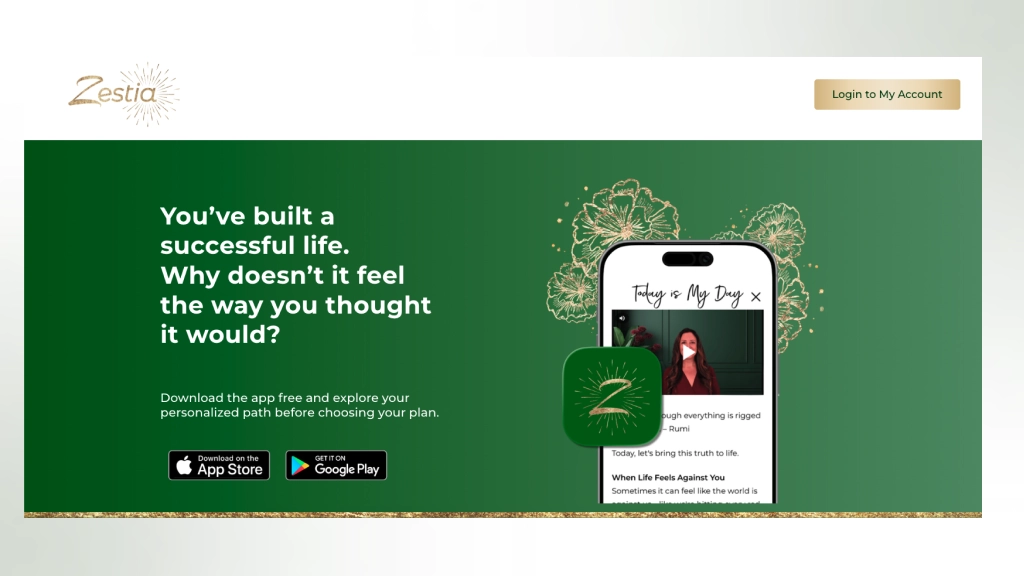
The rebuilt mobile home screen (left) tracks course progress, points, and streaks. The course library (right) organizes exercises into levels users unlock as they progress.
How Do You Add Monetization to a Mobile and Web App at the Same Time?
You add monetization to both surfaces at once by running a dual-channel payment architecture: a web-based processor for browser checkout and a native in-app purchase flow for mobile stores, both feeding the same subscription state.
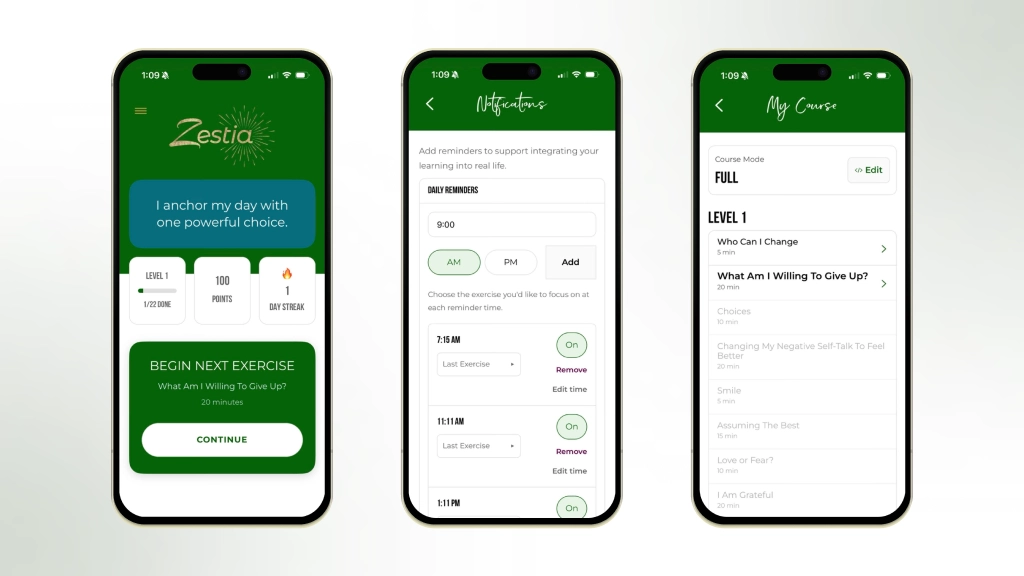
For Zestia, that meant integrating the Stripe API for the Web App and native In-App Purchases (IAP) for iOS and Android, so a user could subscribe from whichever surface they were already on without a broken or duplicated checkout experience. This was one of the pieces the client had been missing entirely; without it, the year-old codebase had no way to generate revenue regardless of how polished the front end looked.
According to Stripe’s own documentation on global payment infrastructure, reliable subscription billing depends on the underlying app correctly syncing entitlement state across every platform a user might pay from, which is exactly why the mobile IAP flow and the web Stripe flow had to be engineered to write to the same source of truth rather than as two separate systems.
What Belongs in an Admin Dashboard for a Wellness App?
An admin dashboard for a consumer wellness app needs three core views at minimum: an executive snapshot of business health, a user-level lookup tool, and engagement analytics tied to the app’s core habit-building mechanic.
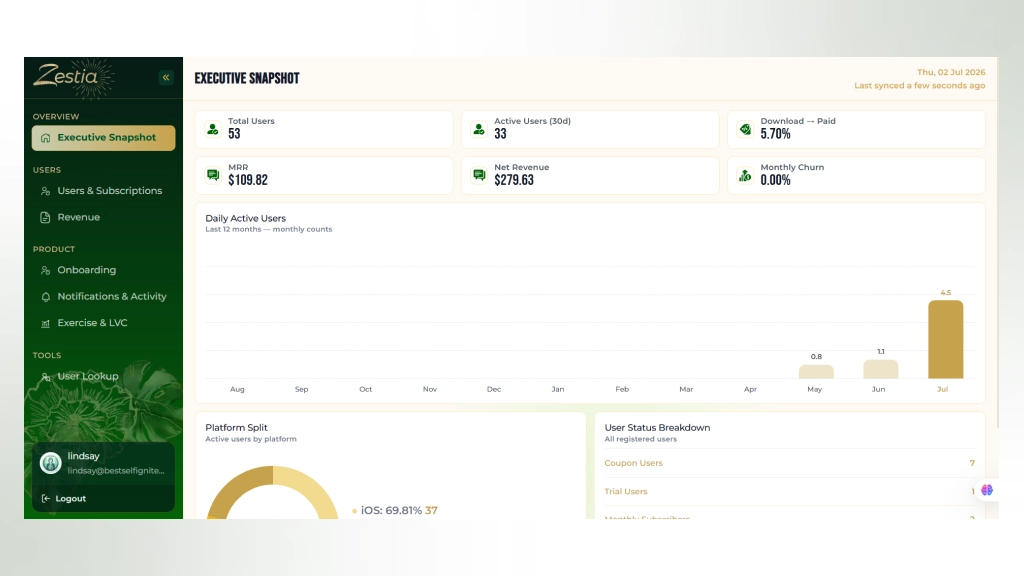
We built the Zestia Admin Console from scratch to give the client exactly that. The Executive Snapshot view surfaces total users, active users over a rolling 30 days, download-to-paid conversion rate, MRR, net revenue, and monthly churn on one screen, alongside a 12-month daily active user trend and a platform split between iOS, Android, and Web.
The Executive Snapshot view gives the client a single-screen read on revenue, churn, and platform distribution.
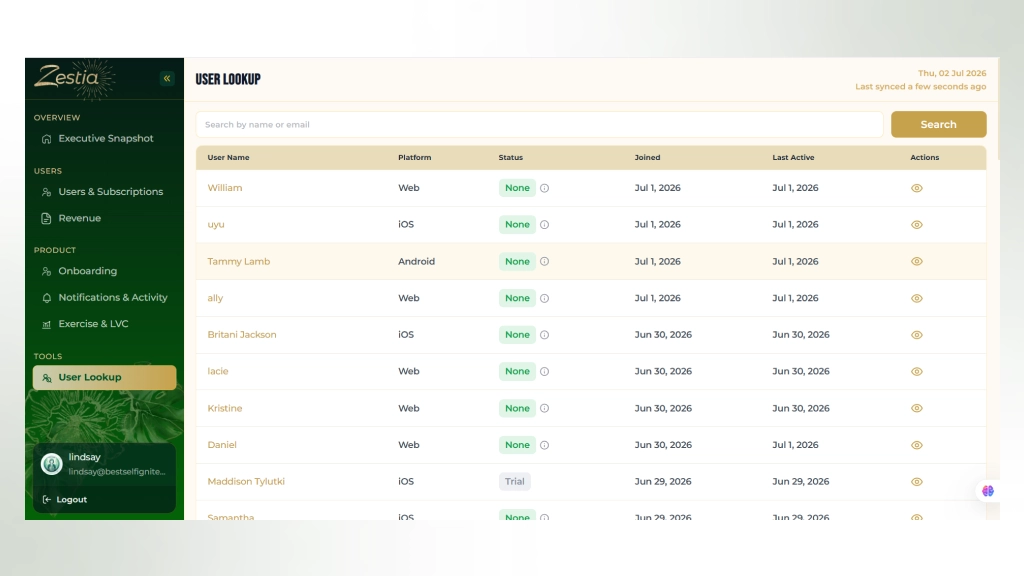
Beyond the top-level numbers, the console includes a User Lookup tool, so support and product teams can search any user by name or email and see their platform, subscription status, join date, and last active date without touching the database directly.
User Lookup gives the client’s team direct visibility into individual accounts across every platform.
Because Zestia’s core engagement loop is built around daily reminders and completed exercises, we also shipped a Notifications & Activity view that tracks notification volume sent over 30 days, how many were acted on, action rate broken down by the specific reminder copy used, and a distribution of how many active days each user logged in the last week.
The Notifications & Activity view shows exactly which reminder phrasing drives the most app opens, a direct signal for tuning the habit-building loop.
The console sits behind its own branded login, so access can be limited to the client’s internal team without exposing the data layer to the public-facing app or website.
For teams evaluating whether they need this level of internal tooling, our custom software development work follows the same pattern: start from the three or four decisions the client actually has to make weekly, then build the views that answer those decisions directly, rather than shipping a generic analytics wrapper.

How Does the Habit-Building Reminder System Work Inside the App?
The reminder system works by pairing a scheduled push notification with a specific exercise from the user’s course, so the notification itself is the entry point back into the habit rather than a generic “come back” nudge.
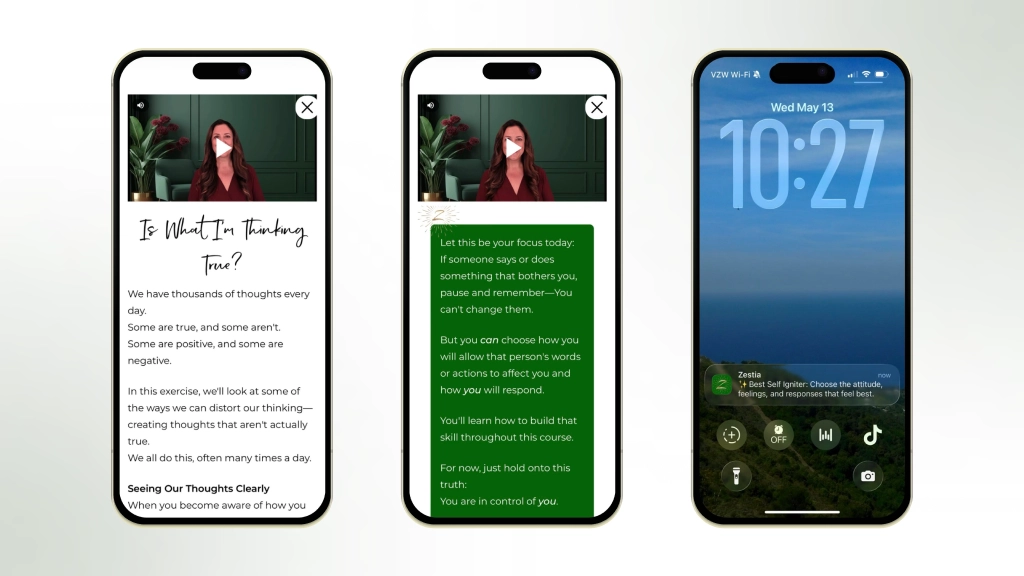
On the mobile side, users can set multiple daily reminder times, for example 7:15 AM and 11:11 AM, and attach a specific focus, such as their last completed exercise, to each one. When a reminder fires, it references the actual course content, like “Best Self Igniter: Choose the attitude, feelings, and responses that feel best,” rather than a blank prompt.
The course content itself follows a level-based structure, Level 1 exercises like “Who Can I Change,” “What Am I Willing To Give Up?,” and “Is What I’m Thinking True?”, each delivered through a short video paired with written reflection prompts.
We also built course reset and archiving controls, so a user can clean up completed material or restart a track from the beginning without losing their overall point and streak history, a detail that matters more than it sounds, since wellness apps live or die on whether returning users feel like the app remembers their progress accurately.
Rebuilding for Reliability, Not Just for a Deadline
The instinct on a rescue project is to patch just enough to hit the launch date. We deliberately avoided that. Every critical bug fix in the BYBS codebase was paired with a decision about whether the underlying pattern would hold up post-launch, not just whether it passed a manual test before demo day.
That’s why the mobile core was rebuilt on Expo SDK 53 with Expo Router for file-based navigation, React Native 0.79.5, React 19, and TypeScript with strict type checking, following an MVVM architecture. It’s a stricter foundation than the app needed to simply “work” for launch day, but it’s the foundation that lets the client’s team keep shipping features without reopening the technical debt we had just spent 30 days closing. The same discipline applies on the web side, where our full stack development team kept the Node.js backend and React front end on a shared data contract with the mobile app, so a change to a course or subscription never has to be made twice.
What We Notice Across Rescue Projects Like Zestia
Every stalled project we take over tells a version of the same story: a working idea, a reasonable original scope, and a codebase that grew technical debt faster than it grew features. What differs project to project is whether the client caught it in month three or month twelve.
Zestia caught it at month twelve, which is late enough that a straight patch job would not have held. Our team’s instinct on projects like this is to resist the urge to rebuild everything from zero, since a full rewrite trades one long delay for another. The faster path, and the one that got Zestia live in 30 days, is separating what’s structurally sound from what’s actually broken, then rebuilding only the second category with a foundation strict enough to survive the next year of feature requests, not just the next release.

Conclusion
Zestia’s relaunch is a reminder that a stalled app is rarely a product problem; it’s usually an execution problem wearing a product’s clothes. In one month, the same idea that had been stuck for a year shipped as a working iOS app, Android app, Web App, marketing site, and admin console, with real monetization and real visibility behind it.
If your team is sitting in a similar situation- a codebase inherited from a vendor that didn’t finish, a launch date that keeps slipping, or a product with no way to see how it’s actually performing- the fix is rarely a full rewrite. It’s usually a focused audit, a clear priority order, and an engineering team willing to move at the pace the business actually needs.
Frequently Asked Questions (FAQs)
What does it mean to "rescue" a stalled app project?
Rescuing a stalled app means taking over an existing, partially-built codebase, rather than starting from scratch, auditing it for critical bugs and architectural risk, and completing the missing pieces needed for a public launch. For Zestia, that meant inheriting a year-old mobile framework and completing it alongside a new web app, marketing site, and admin console.
Is it faster to rescue an existing codebase or rebuild an app from scratch?
Rescuing an existing codebase is usually faster when the core product concept is sound and the underlying framework is salvageable, since the UI, navigation, and content structure don’t need to be recreated. Zestia’s mobile shell was kept and stabilized, while the monetization, web, and admin layers were built new, a hybrid approach that shipped in 30 days instead of restarting the entire build.
How long does it realistically take to launch an app on iOS, Android, and Web together?
For an app with an existing but unstable codebase, a realistic timeline is four to eight weeks once critical bugs are scoped, depending on how much of the monetization and admin layer already exists. Zestia’s full relaunch, mobile, web, marketing site, and admin console together, was delivered in 30 days because the mobile core only needed stabilization rather than a rebuild.
What should an admin dashboard for a subscription app track at minimum?
At minimum, it should track active users, subscription conversion rate, monthly recurring revenue, and churn, plus a way to look up individual user status. Zestia’s admin console adds a third layer on top of that baseline: notification action rates by message type, since the app’s retention depends on daily reminder engagement specifically.
Do you need both Stripe and native in-app purchases, or is one enough?
You need both if your app is genuinely cross-platform with a web presence, because Apple and Google require native IAP for purchases made inside their apps, while Stripe (or a similar processor) is needed to handle web-based checkout. Zestia runs both in parallel so a user can subscribe from whichever surface, mobile app or Web App, they’re already using.