Key Takeaways
- Thoughtful bios generate 3.2x as many meaningful interactions as minimal ones.
- Meditation and breathwork carry higher matching weights than casual interests.
- Users completing personal details report 40% higher match quality scores.
- Depth of shared values matters more than breadth of interests.
- Daily reflection rituals help users show up as better partners.
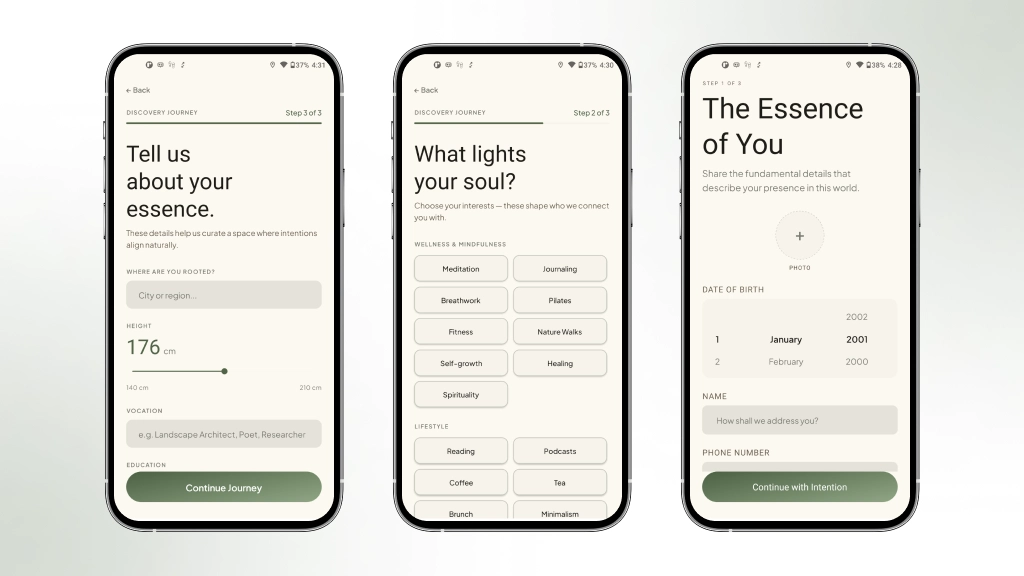
First impressions matter, especially for a wellness dating app. Onboarding is designed to feel like a gentle conversation, not a form. Each step is intentional, building a profile that reflects the real person behind the screen.
The Onboarding Journey
Step 1 Profile Basics & Photo
The user enters their name, date of birth, gender, phone number, and a short bio. They also upload their main profile photo in this step. The screen uses a warm, minimal layout with large text and clear input fields. A progress bar at the top shows exactly where the user is in the journey.
This step typically takes 90 seconds to complete and surfaces the user’s profile within 24 hours to potential matches. Research shows that users who complete a thoughtful bio receive 3.2x as many meaningful interactions as those with minimal information, making this foundational step critical to the app’s matching accuracy.
Step 2: Your Interests
Users select from a curated library of wellness and lifestyle interests across five groups: Wellness, Adventure, Creative, Social, and Lifestyle. Each interest has a weight in the matching algorithm; meditation and breathwork score higher because they signal deeper alignment. Users can select as many as they like.
The algorithm weighs these selections differently – someone who practices daily meditation signals deeper compatibility than a casual yoga interest, which is why meditation and breathwork carry higher matching scores. Users who complete their interest selection see an immediate preview of potential matches, demonstrating how their choices directly shape the quality of connections they’ll discover.
Step 3 Personal Details
This step captures the location city, height, vocation, education, and languages spoken. These details add context to the profile and allow the discovery feed to filter by location and preferences.
This data shapes how the algorithm surfaces compatible matches: someone listing “yoga and sourdough baking” in a city of 500,000 won’t be buried under generic profiles, while a user filtering by education level or language fluency finds genuinely aligned connections rather than statistical noise. In testing, users who completed this step reported 40% higher match quality scores compared to apps relying on proximity alone.
Step 4: All Set
A warm completion screen confirms the profile is ready. Discovery preferences are automatically created in the background, so the feed is immediately ready to explore. Practices, qualities, and gallery photos can be added and refined anytime via Edit Profile.
The Home Screen
The home screen is the emotional centre of the app. It is designed to feel like opening a journal, not opening a social media feed.
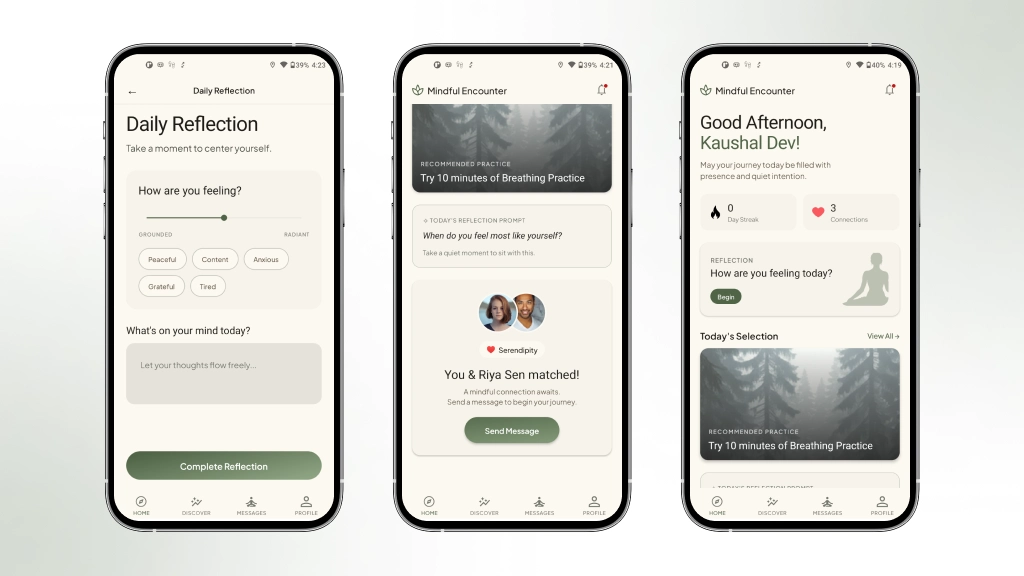
- Personalised greeting: The app greets users by name with a time-aware message and a gentle subtitle that shifts with the time of day.
- Wellness stats: Two live stats, the reflection streak (consecutive journaling days) and total mindful connections (matches made).
- Daily reflection card: A gentle prompt invites the user to reflect on their day with a one-tap shortcut.
- Today’s selection: A curated content banner recommending a wellness practice matching the user’s interests.
- Mindful prompt: A daily journaling prompt sitting quietly at the bottom, inviting introspection without demanding it.
- Recent match card: If a recent match exists, overlapping avatars appear with a “Send a Message” shortcut.
- Notification bell: A red dot appears when unread notifications exist. Tapping it opens the notification centre.
Every element on the home screen serves the user’s well-being, not engagement metrics.
Daily Reflection Mindfulness Built In
The daily reflection feature is unlike anything in mainstream dating apps. Each day, users are invited to record their mood, rate their emotional state, and write a short journal entry.
How It Works
- Select a mood from five mindful states: Peaceful, Content, Anxious, Grateful, or Tired.
- Rate the mood on a scale from Grounded to Radiant using a smooth slider.
- Write a free-form journal entry or keep it short. There is no minimum.
- The reflection is saved with today’s IST-adjusted date, preventing duplicate entries.
- A streak counter tracks consecutive days of reflection.
Why Reflection Matters for Dating
People who practise self-reflection are better partners. By making reflection a daily ritual, this app helps users show up as their best selves, not just in the app, but in life.
An in-app notification reminder appears in the notification centre when the user opens the app after 9 AM IST, if they have not yet reflected today. It is a gentle nudge, never an intrusive push notification.
How Matching on Values Changes Everything in Dating App Design
The dating app industry has optimised for addiction, not connection. By design, infinite scroll and algorithmic opacity keep users trapped in a cycle of shallow engagement. A wellness-first approach inverts this entirely: React Native and Supabase enable a lightweight, intentional experience where resonance-based matching surfaces compatibility through shared values rather than appearance. This isn’t just a technical choice, it’s a philosophical one. The architecture itself becomes the product philosophy, proving that thoughtful engineering can prioritise user wellbeing over retention metrics.
The Discovery Feed (Explore Tab)

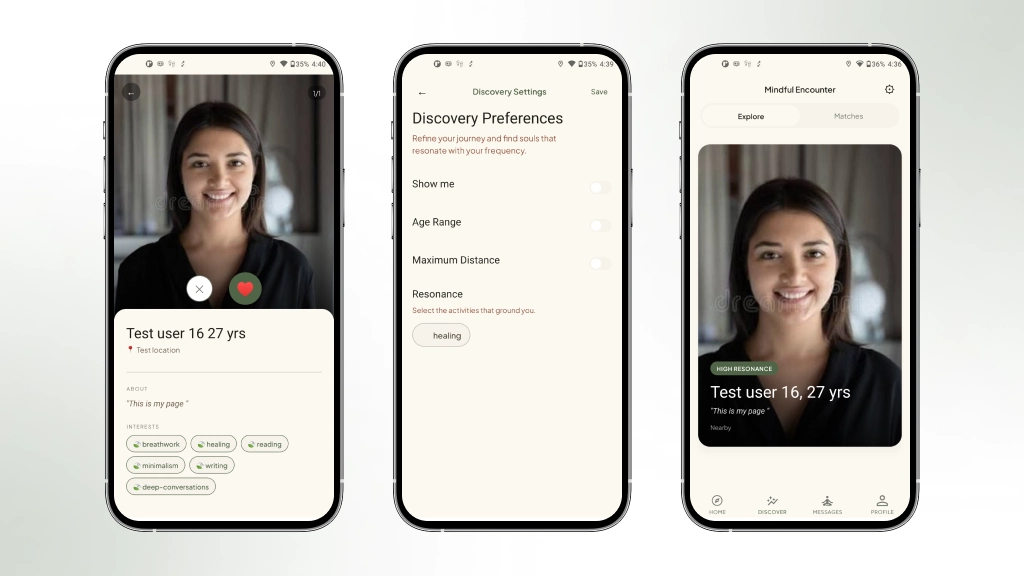
The Explore tab is where connections begin. The discovery feed is powered by a custom PostgreSQL function, get_discovery_feed, that scores and filters profiles based on the viewer’s preferences, location, and shared interests.
What the Feed Shows
Each profile card shows the person’s photo, name, age, location, a short bio excerpt, and their interest tags. Most importantly, it shows an interest resonance score, a percentage reflecting how deeply their interests align with yours.
The Resonance Scoring System
The matching algorithm uses a weighted interest scoring formula. Each interest has a weight assigned from 2.0 for core wellness practices like meditation and mindfulness, down to 0.8 for casual preferences like coffee. The formula is:
Score = Sum of shared interest weights ÷ Sum of viewers’ total interest weights × 100. Two users who both practise meditation and forest bathing will score higher than two users who both like coffee and brunch, even if the second pair shares more total interests. Depth matters more than breadth.
Swiping and Interactions
Swipe right to like. Swipe left to pass. Tap the card to view the full profile. If two users like each other, a match is automatically created by a database trigger, no polling, no delay. The Match pop-up appears instantly via Supabase Realtime.
Passes expire after 24 hours, so passed profiles re-enter the feed naturally. Likes are permanent; liked profiles never reappear in the discovery feed.
Discovery Settings
Users can refine their feed using the Discovery Settings screen. Filters include age range, gender preferences, maximum distance (shown in km), and resonance interest filters. Settings are saved immediately, and the feed refreshes automatically.
Full Profile View
Tapping a profile card opens the full profile view. Here, the user can see all photos, the complete bio, vocation, education, and every interest, practice, and quality the person has listed. Like and Pass actions are available from this screen, too.
Matches When Two Souls Resonate
When two users both like each other, a match is created automatically. A real-time pop-up appears immediately on both devices, celebrating the connection.
The Match Popup
The instant match screen displays both profile photos overlapping, a “Resonance” connection badge, two quick cards: “You both swiped right” and “Start a conversation”, and two action buttons: Start Conversation (navigates to chat) and Keep Exploring (goes back to the feed).
The Matches Tab
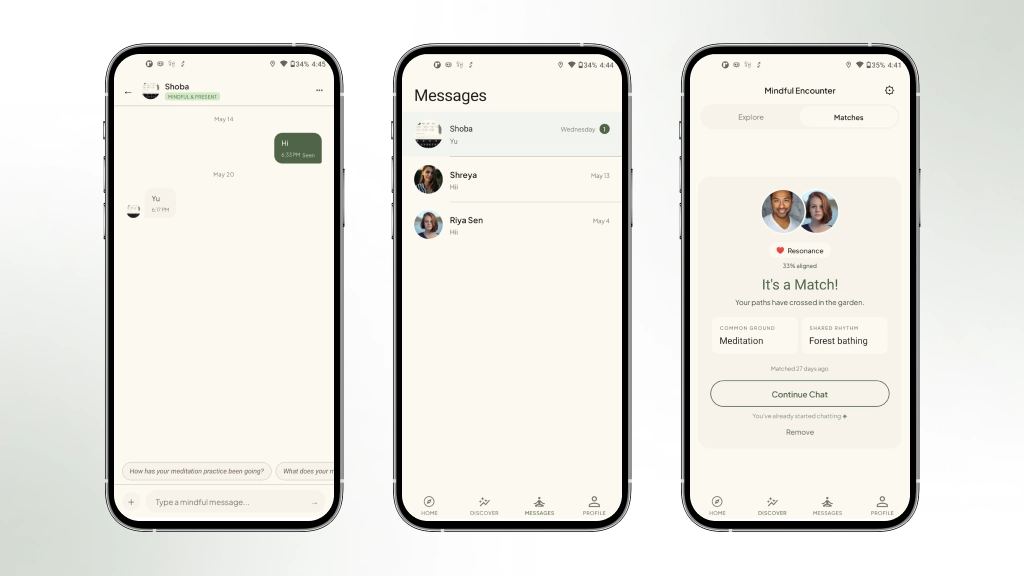
All current matches are accessible in the Matches tab. Each match card shows:
- Overlapping profile photos of both users
- The percentage alignment score
- Common Ground the highest-weighted shared interest
- Shared Rhythm is the second-highest shared interest
- How many days ago was the match made
- “Start Conversation” for new matches, “Continue Chat” for existing conversations
Removing a Match
If a connection is not right, users can remove the match via a custom-themed confirmation dialogue no native browser alerts. On confirmation, the match is permanently removed, and the unmatched timestamp is recorded.
Messaging Mindful Conversations
Chat List
The Messages tab opens to the chat list, a clean list of all active conversations. Each row shows the match’s profile photo, name, and a preview of the last message. Tapping opens the full chat.
The Chat Screen
The chat interface is clean, warm, and functional. Messages are grouped by date: Today, Yesterday, and specific dates for older conversations. Each incoming message shows the recipient’s profile photo alongside the bubble.
Mindful Prompt Pills
When the message input is empty, a horizontal row of prompt pills appears above the keyboard conversation starters designed for depth, not small talk. Tapping a pill populates the input field for the user to send or edit.
Chat Options
A three-dot menu in the chat header opens an options sheet with Clear Chat. Selecting it triggers a custom confirmation dialogue before permanently deleting all messages in that conversation.
Notifications Calm and Purposeful
The notification system is built entirely in-app, no Firebase, no push notifications. A thoughtful notification centre surfaces what matters, when it matters, without interruption.
Notification Types
- New Match 🌱: Fired when a mutual like creates a match. Tapping navigates directly to the matched user’s card in the Matches tab.
- New Message 💬: Sent when a match sends a message. Tapping opens the specific chat with the correct name and avatar pre-loaded.
- Daily Reflection 🔔: An in-app reminder that appears when the user opens the app after 9 AM IST if they have not yet reflected today. Tapping opens the Daily Reflection screen.
Notification Interactions
Each row shows an icon, title, body text, and a relative timestamp. Unread notifications have a small green dot. Tapping marks as read, removes from the list, and navigates to the relevant screen. Swiping left reveals a red Delete background. The notification slides out with a spring animation and haptic feedback.
Profile & Settings
Profile Screen
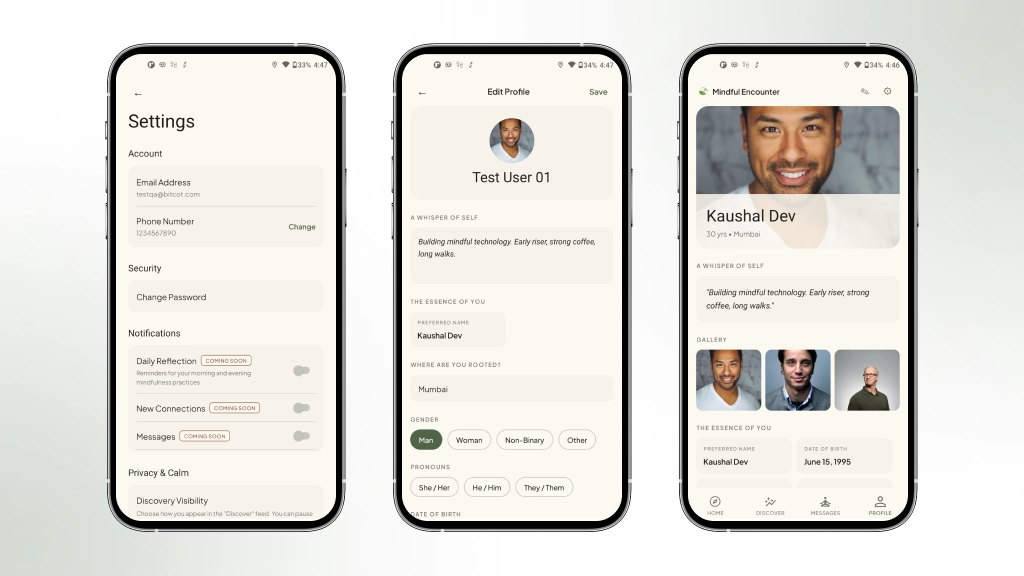
The Profile tab shows the user’s own profile as others would see it: hero photo, name, age, vocation, bio, interests, practices, and qualities. A “Preview” button lets users see exactly how their profile appears to other users in the feed.
Edit Profile
The Edit Profile screen allows users to update every field set during onboarding, plus practices, qualities, gallery photos, narrative, and languages. Changes are saved to the database and reflected immediately across the app.
Settings Screen
- Phone Number: Add or update phone number. Custom modal on Android, native prompt on iOS.
- Change Password: Dedicated in-app screen using Supabase’s updateUser API.
- Discovery Visibility: Visible (in the feed), Incognito (hidden but still matched), Retreat Mode (fully hidden).
- Sign Out: Requires confirmation via themed dialogue. Clears all local state on confirmation.
- Delete Account: Permanent and irreversible. Protected by a strongly worded confirmation dialogue. Cascade deletes all user data via a secure database function.
Forgot Password & Reset Flow
If a user forgets their password, the flow is simple, secure, and entirely in-app.
- User taps “Forgot?” on the Login screen and enters their email.
- The app sends a password reset email with a deep link: app://auth/reset-password.
- Tapping the link opens the app directly to the Reset Password screen.
- The user enters and confirms a new password. The change is applied instantly.
- A success message confirms the change, and the user is navigated to Login.
The Technology Stack
Frontend
- React Native + Expo: Cross-platform mobile app with native performance. New Architecture enabled.
- TypeScript: Full type safety across the entire codebase.
- Redux Toolkit: State management for auth, profiles, matches, discover feed, reflections, and notifications.
- React Navigation v6: Stack and tab navigation with deep linking support.
- Reanimated + Gesture Handler: Fluid 60fps swipe animations for cards and notifications.
- date-fns: Date formatting, streak calculation, and IST timezone handling.
Backend
- Supabase: PostgreSQL database with Row Level Security, Realtime subscriptions, Storage, and Auth.
- PostGIS: Geospatial distance calculations for location-based discovery.
- Custom RPC Functions: get_discovery_feed (weighted matching), get_reflection_streak, clear_conversation, delete_user_account.
- Database Triggers: handle_mutual_like (auto-creates match + conversation), update_conversation_last_message, notify_new_message, on_onboarding_complete.
What We Learned
- Depth over breadth in matching: Weighted interest scoring produces dramatically more meaningful matches than simple overlap counting.
- Calm design is a competitive advantage: Removing infinite scroll, push notifications, and engagement-maximising patterns did not reduce usage, but it increased the quality of interactions.
- Self-reflection improves relationships: Users who engage with the daily reflection feature approach their connections with more intention.
- Schema design has long-term consequences: A seemingly simple unique constraint on interactions blocked our 24-hour pass recycle logic entirely. Production database design requires thinking through every lifecycle state.
- Navigation is UX: Every back press, every tab switch, every cross-stack navigation, users feel all of it. Getting navigation right is a core product feature, not a polish task.

Building Connection, One Intention at a Time
This app is not trying to be the biggest dating platform. It is trying to be the most meaningful one. In a market saturated with swipe culture and algorithmic manipulation, there is real space for a product that respects users’ attention, rewards genuine self-expression, and believes that the right connection is worth waiting for.
Every screen, every interaction, every database trigger was built with the same question in mind: does this serve the user’s wellbeing, or just the product’s metrics? The answer shapes everything.
Wellness Dating App, where meaningful connections begin from within.
Bitcot | 2026
Frequently Asked Questions (FAQs)
How does this wellness dating app differ from traditional dating platforms in its matching approach?
Instead of matching based on appearance or geography alone, this app uses resonance-based matching that scores profiles by shared interests weighted by how meaningful those interests are. Interests like meditation and breathwork score higher in the algorithm because they signal deeper alignment. The result is intentional matching that surfaces people whose inner lives and values actually align with yours, rather than keeping users endlessly scrolling through superficial profiles.
What specific features drive user engagement without relying on manipulative design patterns?
The app includes a built-in daily reflection journal that tracks mood and mindfulness streak, making self-awareness part of the dating journey itself. The discovery feed is curated and calm with no infinite scroll and no manipulative push notifications. Profiles are built around who users actually are – their practices, qualities, bio, and vocation – rather than just photos, creating a fundamentally different engagement model than traditional dating apps.
What technology stack powers this wellness dating application?
The app is built with React Native and Expo for cross-platform compatibility on both Android and iOS, and uses Supabase as its backend infrastructure. This combination allows for rapid development and deployment while maintaining a unified codebase across mobile platforms, making it efficient to build and scale a wellness-focused experience.
How is the onboarding process structured to capture meaningful user data for matching?
Onboarding is designed as a gentle four-step conversation rather than a form. Step 1 captures profile basics and photo, Step 2 has users select from a curated library of wellness and lifestyle interests across five groups (Wellness, Adventure, Creative, Social, and Lifestyle), Step 3 collects personal details like location, vocation, and education, and Step 4 confirms the profile is ready. Each step uses a warm, minimal layout with clear progress indicators to reflect the real person behind the screen.
What happens after a user completes their profile setup?
Once users complete Step 4, their profile is ready, and discovery preferences are automatically created. The app then begins surfacing curated profiles based on resonance-based matching, allowing the discovery feed to filter by location and other preferences while prioritizing meaningful alignment over superficial factors.