- Glide app development enables non-profits to launch fully functional donation apps in days instead of the 3 to 6 months typical of traditional development.
- By combining Glide’s low-code platform with Google Sheets, organizations can manage donors, applicants, and campaigns without a dedicated IT team.
- Bitcot’s Proof of Concept (PoC) demonstrates that professional-grade donation apps are achievable at a fraction of standard development costs.
- Non-profits in California, San Diego, and across the US are increasingly turning to low-code platforms to stretch limited budgets while maximizing mission impact.
- A modern donation app needs more than a payment form: immersive storytelling, recurring giving tools, and AI-driven personalization are now baseline expectations.
In the world of non-profit technology, there is a persistent and costly gap between needing a custom application and being able to afford one. Traditional non-profit software development commonly starts at $50,000 or more, demands months of back-and-forth with development teams, and imposes technical requirements that quickly exhaust already limited organizational budgets. Every dollar spent on technology is a dollar not spent on the mission.
That is why Bitcot turned to Glide app development to build a Proof of Concept (PoC) for a non-profit donation app. Using Glide’s low-code platform alongside Google Sheets integration, our team delivered a fully functional, mobile-first donation application in days, not months. In this post, we pull back the curtain on how Glide works, what the PoC includes, and why this approach is transforming how mission-driven organizations access custom software technology.
What Is Glide App Development and Why Does It Matter for Non-Profits?
Glide app development is a low-code approach to building mobile and web applications without the complexity, cost, or long timelines of traditional software projects. Rather than writing thousands of lines of custom code, developers and even non-technical staff can use Glide’s visual interface to design screens, connect data sources, and deploy applications quickly.
At its core, Glide transforms data stored in familiar tools like Google Sheets into fully functional applications. Backend processes such as database connections, user authentication, real-time data sync, and responsive design are handled automatically by the platform. For non-profits specifically, this means professional-grade functionality without the overhead of enterprise-level budgets.
According to Forrester Research, low-code development platforms are projected to account for the majority of new application development activity within the next few years, driven largely by demand from resource-constrained organizations that cannot sustain traditional development pipelines.
Core Advantages of Low-Code Development
The value of the Glide app development centers on three key pillars:
- Rapid time-to-market: Deploy fully functional applications in days or weeks, compared to the 3 to 6 month timelines of conventional development.
- Dramatic cost reduction: Eliminate expensive development teams, hosting infrastructure, and ongoing maintenance contracts that often consume 60 to 80 percent of traditional app budgets.
- Democratized development: Enable non-technical staff or small teams to build, modify, and manage applications without relying on scarce technical expertise.
Why Glide Is Purpose-Built for Budget-Conscious Organizations
Non-profits face constant pressure to maximize program spending. Glide addresses that reality through several structural advantages:
- Zero infrastructure costs: Glide handles all hosting, scaling, and backend management, eliminating the server costs that traditionally run into thousands of dollars annually.
- Instant database connectivity: Direct integration with Google Sheets means organizations can leverage existing data without expensive database licensing or migration work.
- Multi-platform publishing: Deploy to web, iOS, and Android from a single build, removing the need to maintain separate native applications.
- Seamless third-party integration: Built-in connections to donation processors, email platforms, and analytics tools require simple configuration rather than custom API development.
Why Non-Profits Need Custom Donation Apps
With more than half of all non-profit website traffic now originating from mobile devices, according to data from Nonprofit Tech for Good, a dedicated donation app is no longer a luxury. Generic website donation forms create friction that drives donors away. A purpose-built app solves three specific problems that generic platforms cannot:
- Reduced donation friction: One-tap checkout flows prevent drop-off during long, complex web forms.
- Recurring revenue infrastructure: Apps make it far easier to convert one-time givers into monthly supporters through automated scheduling and donor portals.
- Instant communication: Push notifications allow non-profits to send real-time thank-you messages, campaign updates, and urgent appeals directly to engaged supporters.
Beyond fundraising mechanics, a custom app creates a centralized system to manage donor records, track contributions, share mission updates, and build lasting relationships. Unlike commercial donation platforms, where the user experience is dictated by the vendor, a custom application built through Glide app development puts control back in the hands of the organization.

Core Features of a Modern Non-Profit Donation App Built with Glide
In 2026, a high-performing donation app goes well beyond accepting payments. Organizations competing for donor attention must deliver experiences that mirror what supporters encounter in consumer technology. Here are the features that define a modern platform:
Frictionless One-Tap Giving
Modern donors expect a checkout experience as smooth as their favorite retail app. This means native integration with Apple Pay, Google Pay, and Venmo; the option to store payment tokens for returning donors; and guest checkout that does not require account creation before completing a gift.
Recurring Giving by Design
Predictable monthly revenue is the foundation of sustainable non-profit operations. Rather than hiding recurring giving as a checkbox, effective apps make it the default and primary option, with tiered giving levels, flexible donor portals for managing subscriptions, and automated retry logic for expired payment methods.
Immersive Impact Storytelling
Donors stay engaged when they can see where their money goes. Personalized impact timelines, short-form video updates from the field, and real-time transparency dashboards showing progress toward specific funding goals all drive retention far more effectively than static annual reports.
AI-Driven Personalization
Platforms are increasingly using behavioral data to suggest optimized donation amounts based on a donor’s history and local economic context, and to trigger personalized follow-up messages based on which campaigns a user browses.
Peer-to-Peer and Community Tools
Social philanthropy is accelerating. Apps that let donors create their own mini-fundraising campaigns for birthdays or challenges, share pre-formatted impact graphics on social media, and earn recognition through in-app badges consistently outperform those limited to direct-give experiences.
| Feature | Legacy Donation Apps | Modern Donation Apps |
| Payments | Credit card forms only | Multi-wallet support |
| Matching | Manual follow-up emails | In-flow employer auto-matching |
| Giving Type | One-time focused | Recurring-first architecture |
| Storytelling | Static PDF reports | Immersive video and live feeds |
| Intelligence | Fixed gift arrays | AI-optimized ask amounts |
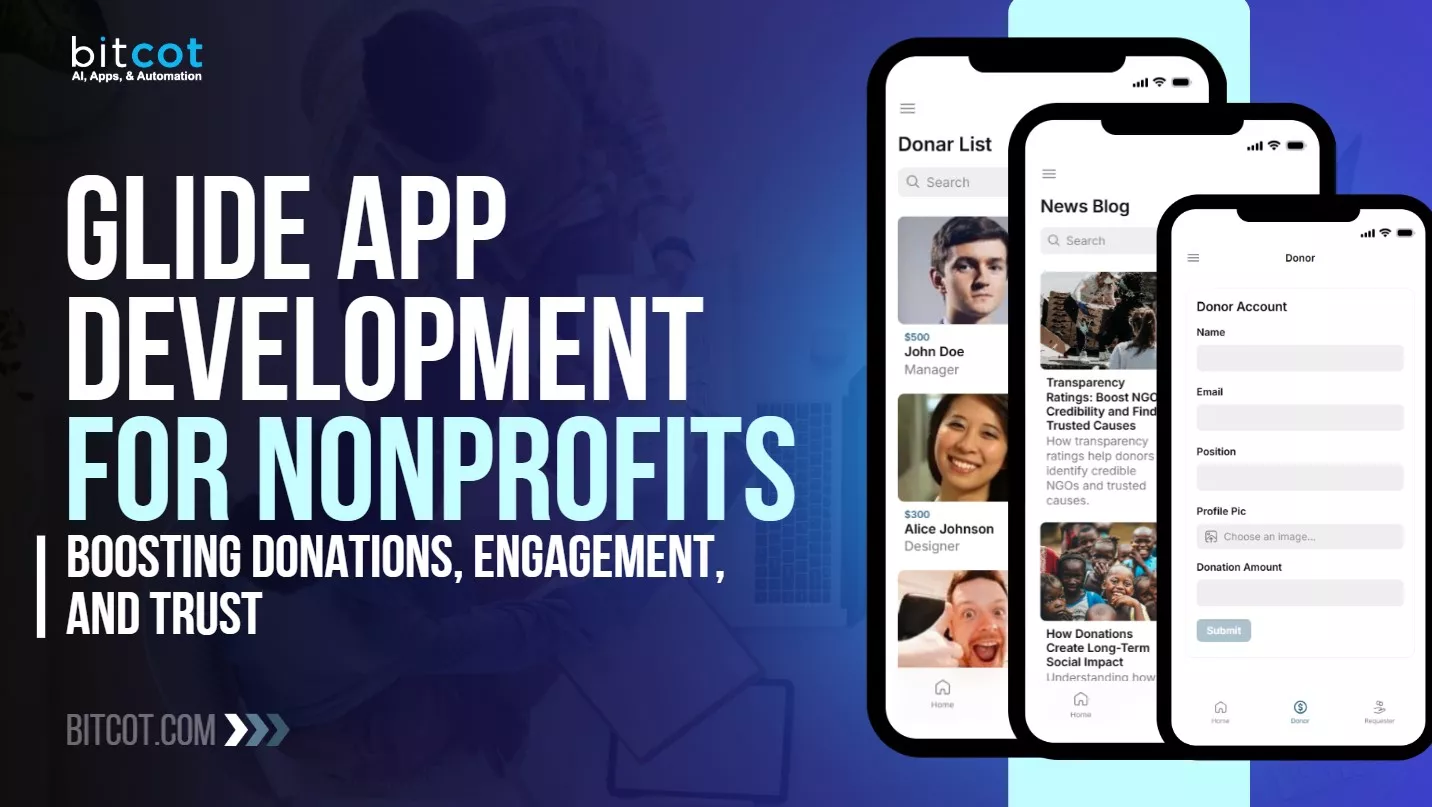
To demonstrate what is possible, Bitcot built a complete non-profit donation app Proof of Concept using a Glide frontend and a Google Sheets backend. The architecture eliminates the need for a dedicated IT department. Non-profit administrators manage the entire ecosystem, from donor records to incoming aid requests, through a familiar spreadsheet interface that syncs in real time with the mobile application.
Dual-Sided Registration
The app serves both donors and aid requesters through dedicated registration flows. Supporters create digital profiles with their name, professional position, profile image, and preferred donation amount. Requesters complete an intake form capturing full contact details and geographic data, ensuring every application is backed by verifiable information required for proper donation processing.
Transparent Tracking Ecosystem
Trust is the foundation of any non-profit relationship. The PoC addresses this directly through two transparent directories: a searchable Donor List that displays profiles, contribution amounts, and sortable top-contributor rankings; and an Applicant List that makes each community need visible, from college tuition assistance to emergency medical support. This direct visibility allows donors to see exactly where their generosity is needed.
To prevent donors from feeling overwhelmed by volume, the application uses a category-based filter system. Requests are organized into Education, Health, and Essential Needs, allowing supporters to browse only the causes that align with their priorities. A persistent side menu provides instant access to every section of the app, ensuring zero navigation friction.
High-Impact Content Delivery
Beyond transactions, the PoC integrates a Video Gallery for donation appeal clips and NGO success stories, along with a News Blog covering organizational updates, giving trends, and transparency reports. These content layers build long-term donor trust and keep the community engaged between campaigns.
How Each Screen Serves the Mission
Below is a detailed walkthrough of the app’s nine core screens and the specific goal each one fulfills.
1. Home Screen: The Mission Control Hub
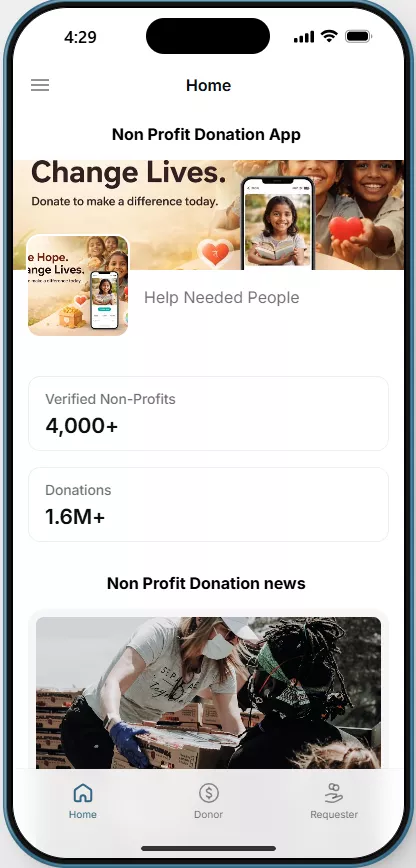
The Home Screen serves as the digital heart of the application, designed to inspire confidence through data and storytelling.
- Impact at a Glance: A prominent banner highlights the core mission: “Change Lives, Donate to Make a Difference Today.”
- Verified Transparency: Showcases a list of verified non-profits alongside live statistics, including total donations processed and quick stats for each organization.
- Real-Time Updates: Users can scroll through a curated news feed to stay informed about the latest activities and success stories within the community.
Goal: Serves as the hub, providing a quick overview of app stats and the latest updates on donation activities.
2. Donor Registration Screen: Personalizing Support
To foster a committed community of supporters, the app provides a streamlined onboarding process for those looking to give.
- Profile Creation: Donors can quickly set up a profile with their name, email, professional position, and upload a profile picture.
- Customized Giving: The interface allows donors to specify exact donation amounts, ensuring every gift is captured according to the user’s preference.
- Data Retention: Details are submitted and saved to streamline all future interactions and contributions.
Goal: Allows donors to register and offer their financial support to the causes they care about.
3. Requester Registration Screen: Streamlining Aid
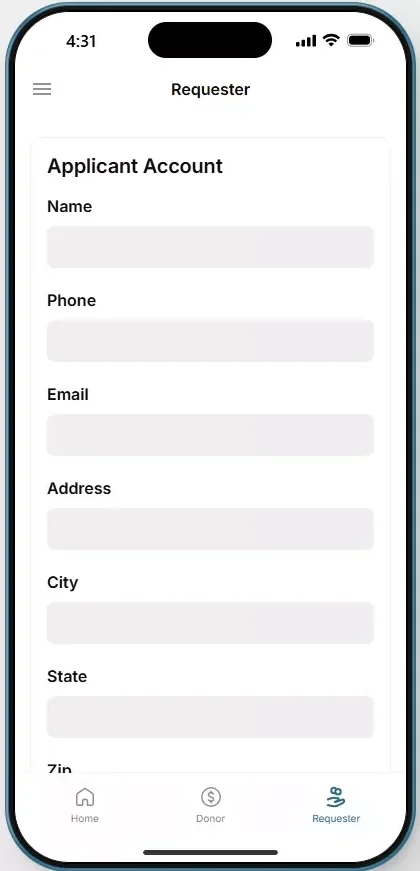
A non-profit app is only as strong as its ability to identify and verify needs. The PoC includes a robust intake system for those seeking assistance.
- Detailed Intake: Applicants fill in personal details, including name, phone number, email, address, and location details (City, State, Zip).
- Accurate Processing: This screen ensures that every request is logged with the necessary documentation required for donation processing.
Goal: Enables applicants to register for donations, ensuring that their requests are logged and managed by non-profits.
4. Donor List: Building Community Transparency
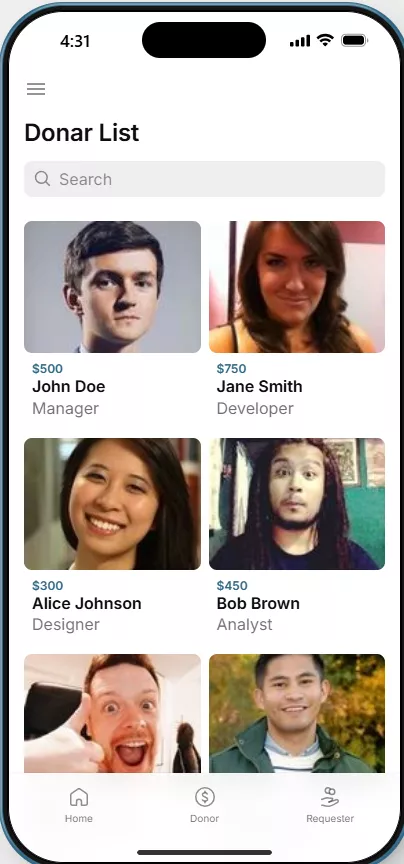
This section showcases the collective power of the community, giving visibility to those who make the mission possible.
- Donor Profiles: Displays a searchable list of supporters with their profile pictures, donation amounts, and positions.
- Top Contributors: Users can sort the list by donation amounts, making it easy to recognize and celebrate the community’s most generous supporters.
Goal: Showcases the community of supporters, promoting transparency and engagement.
5. Applicant List: Direct Connection to Needs
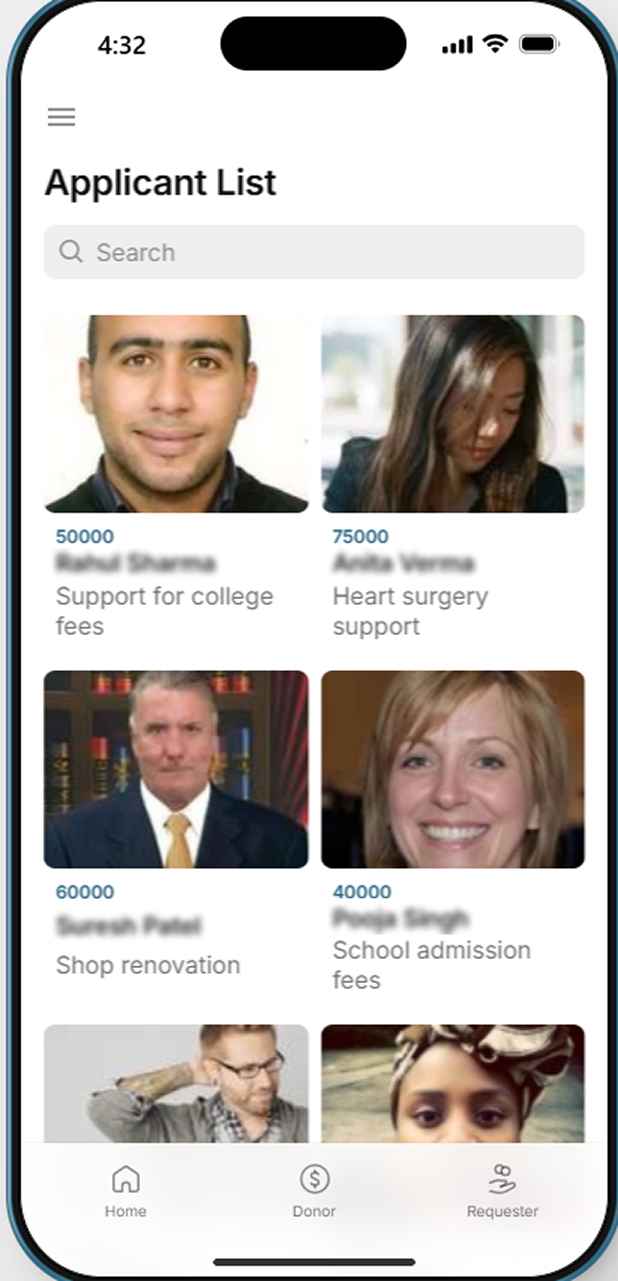
This screen acts as a transparent marketplace of needs, allowing donors to see exactly where their help is required.
- Requirement Specifics: Each applicant profile highlights their specific needs (college fees, surgery support, housing, etc.) and the donation amounts requested.
- Cause-Based Search: A search feature allows users to filter applicants based on the amount requested or the nature of the cause.
Goal: Enables users to view donation requests and decide which applicants to support.
6. Video Gallery: Immersive Impact Storytelling
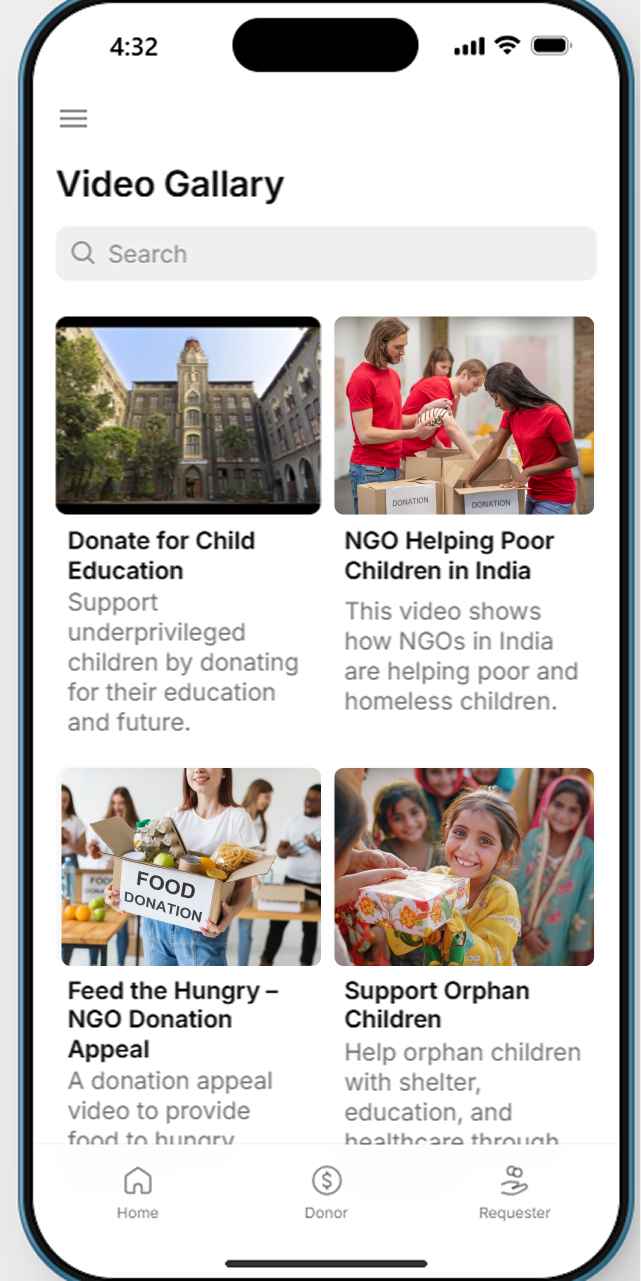
The Video Gallery moves beyond text, using visual content to educate users on the impact of their generosity.
- NGO Support Clips: Showcases videos related to donations and campaigns, highlighting how organizations are helping underprivileged individuals and communities.
- Campaign Focus: Includes a search feature to find specific donation appeals or campaign videos that resonate with the donor.
Goal: Engages users with visual content, educating them on the impact of donations and the causes they support.
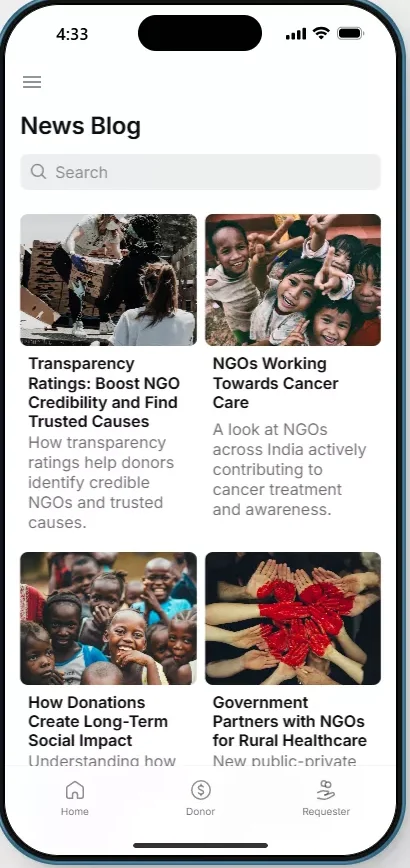
7. News Blog: Fostering Long-Term Trust
Information is a key driver of donor retention. The News Blog acts as an educational resource to keep the community engaged between campaigns.
- NGO Credibility: Articles cover transparency, the tangible impact of donations, and new charitable initiatives.
- Trend Awareness: Keeps users updated with the latest news and trends in the global non-profit world, helping donors understand how their contributions make a difference.
Goal: Provide educational content to foster trust and transparency between donors and non-profit organizations.
8. Donation Category: Targeted Philanthropy
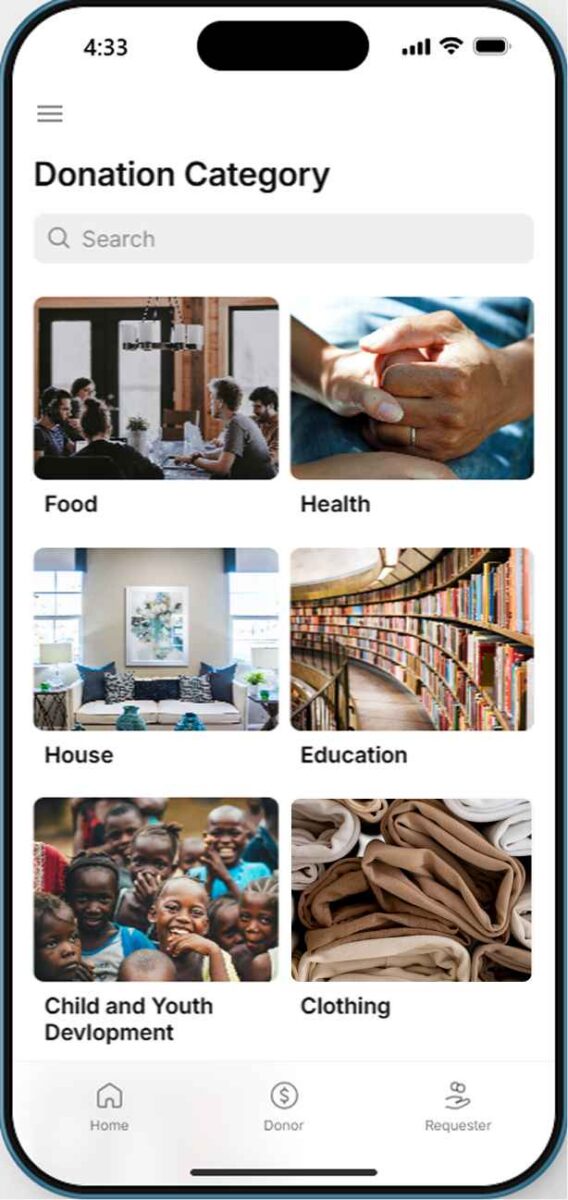
To improve navigation and personalization, the app categorizes requests into specialized areas of impact.
- Value Alignment: Users can explore donation requests by area of interest, such as Food, Health, Housing, or Education.
- Personalized Filtering: Each category displays specific causes, helping donors find initiatives that align with their values.
Goal: Gives users the ability to filter donation requests, making the donation process more personalized and relevant.
9. Side Menu: Universal Navigation
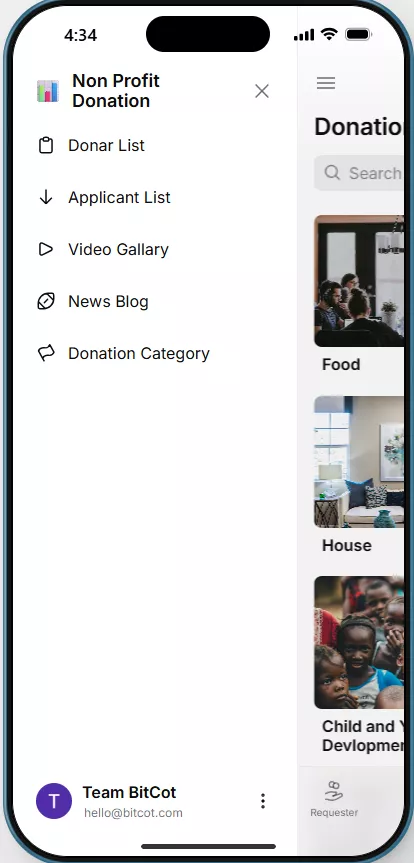
The Side Menu ensures that the user is never more than a tap away from any section of the application.
- Centralized Access: Provides instant navigation to the Donor List, Applicant List, Video Gallery, News Blog, and Donation Categories.
- Communication Link: Includes options to contact the app team directly, ensuring a smooth and supported user experience.
Goal: Ensures users can quickly navigate between all sections of the app, enhancing the overall experience.
The full PoC demonstrates that impactful technology does not need to be over-engineered. Syncing a polished mobile interface with the accessible environment of Google Sheets gives non-profit administrators a powerful, real-time management tool without any of the complexity of traditional enterprise software.
How Bitcot Delivers Glide App Development for Non-Profits
While Glide dramatically simplifies development, transforming organizational requirements into an optimized, scalable application still benefits from experienced technical guidance. Bitcot’s approach combines the platform’s native efficiency with strategic development expertise to deliver maximum value at non-profit budgets.
Pre-Engineered Framework
Core elements such as secure donation workflows, responsive layouts, and structured navigation are already built into Bitcot’s reusable Glide architecture. Rather than starting from scratch, organizations benefit from proven foundations that handle standard functionality from day one. Development effort concentrates on the custom features, integrations, and workflows that make each app unique.
Rapid Prototype-to-Production Path
Budget uncertainty often prevents organizations from committing to full development projects. Bitcot uses Glide’s rapid prototyping capabilities to create functional demonstrations quickly, allowing stakeholders to evaluate and refine concepts before full investment. Initial prototypes can be live in days, providing real interaction points for feedback and preventing costly misalignment between technical implementation and actual user needs.
Knowledge Transfer and Operational Independence
The goal is not ongoing dependency on external technical support. Bitcot’s process includes comprehensive training so organizational teams can manage content, administer users, and handle routine updates independently. Documentation covers common tasks and future modification scenarios, empowering organizations to own and evolve their applications over time.
Scalable Architecture for Growth
Starting with core features does not mean building in limitations. Bitcot designs Glide applications with growth potential, so additional capabilities such as recurring donations, event registrations, and volunteer coordination integrate smoothly without architectural rework as the organization’s needs evolve. Our non-profit software development services are structured to grow with each organization’s digital journey.
For a deeper look at how AI-powered capabilities can be layered onto low-code foundations, explore how teams are beginning to combine Glide’s rapid deployment model with intelligent personalization features. Research from Gartner consistently highlights low-code platforms as among the highest-value investments for organizations with limited IT staff, a finding particularly relevant for the non-profit sector.
Our Perspective
Having built software applications for non-profits, healthcare organizations, and fintech platforms across California and beyond, the challenge we encounter most consistently is not technical complexity; it is the assumption that custom software is out of reach. That assumption gets made early, usually when an organization receives its first traditional development quote, and it lingers long after better options become available.
What our Glide PoC demonstrates is that the calculation has genuinely shifted. When we built this donation app for the non-profit sector, the most significant realization was not how quickly it came together, but how much organizational value was unlocked immediately. The Google Sheets backend meant that a non-technical program manager in San Diego could update donor records, add applicant categories, and refresh content the same afternoon we deployed. That operational independence is worth more to most organizations than any single feature on the application itself.
Low-code is not a shortcut. It is a more honest allocation of where development effort actually belongs: on the workflows and experiences that are unique to each organization’s mission.

Conclusion
Budget constraints have kept custom technology out of reach for too many mission-driven organizations for too long. Glide app development changes that equation in a meaningful way, making it possible to build professional, mobile-first donation platforms at a fraction of what traditional development requires, and in a fraction of the time.
Bitcot’s Proof of Concept illustrates what becomes possible when a polished mobile experience connects to a familiar, real-time data layer. Donors get a seamless giving journey. Administrators get a management system they can operate independently. And the organization gets a scalable digital foundation that grows alongside its mission.
Whether you are exploring your first digital fundraising tool or looking to replace a legacy system that has outgrown your needs, the path forward does not require an enterprise budget. If you are ready to see what a purpose-built donation app could look like for your organization, our team is ready to help you get there.
Frequently Asked Questions
What is Glide app development and how does it work for non-profits?
Glide is a low-code platform that turns data stored in Google Sheets or Airtable into fully functional mobile and web applications. For non-profits, it eliminates the need for a dedicated development team by handling backend infrastructure, user authentication, and cross-platform deployment automatically. Organizations can build and manage custom donation apps through a visual interface without writing code.
How long does it take to build a non-profit donation app with Glide?
A functional Glide donation app can be deployed in as little as one to two weeks, compared to the three to six months typically required for traditional development. Using a pre-engineered framework, initial prototypes are often ready for stakeholder review within days, which allows organizations to refine the product before committing to full deployment.
Can non-technical staff manage a Glide app after it is built?
Yes. One of Glide’s core advantages is that the data layer is managed through Google Sheets, a tool most non-profit staff already know. Content updates, new donor records, campaign changes, and applicant additions can all be made directly in the spreadsheet and are reflected in the app in real time. No developer involvement is required for routine management tasks.
What features should a non-profit donation app include in 2026?
Modern donation apps should include one-tap giving with digital wallet support, recurring giving infrastructure, real-time transparency dashboards, campaign-specific video content, category-based browsing for donor-applicant matching, and push notification capabilities. Peer-to-peer fundraising tools and AI-driven personalized ask amounts are increasingly expected features for organizations looking to maximize donor engagement.
Is Glide app development suitable for large non-profits or only small organizations?
Glide works well across organizational sizes. Small non-profits benefit from its low cost and rapid deployment, while larger organizations can use Glide for specific programs or campaigns that would otherwise require lengthy procurement and development cycles. Bitcot designs Glide applications with scalable architecture, so the app can grow as user volume, feature requirements, and organizational complexity increase over time.