- Pick your first platform by revenue model, not audience size.
- iOS held 53.59% of US mobile share in September 2026.
- Google Play billing and fee rules changed across 2026 and 2027.
- San Diego health apps often launch iOS first for HealthKit depth.
- Android developer verification goes global in 2027; plan identity early.
The iOS vs Android app development question used to have a stock answer: build for iPhone if your buyers are affluent Americans, build for Android if you need global reach. That answer is out of date for anyone planning a 2027 launch. Between March and September 2026, Google rewrote its Play Store billing rules, Apple’s US link-out rules moved through federal court, and Android started requiring verified developer identity for app installs.
Our position, based on the healthcare and fintech apps our team builds out of San Diego: choose your first platform by where your revenue event and your sensitive data actually happen. A subscription telehealth app, a lending app that collects payments on the web, and a patient-monitoring tool tied to wearables each land on a different answer, even when they target the same users.
This guide walks through what changed, what it means for engineering and release planning, and a decision matrix you can use before you write the first line of code. If you are a founder or product lead weighing iPhone first, Android first, or both at once, this is the version of the comparison built for the next 18 months rather than the last five years.
What Changed for iOS vs Android App Development Between 2025 and 2027?
Three things changed: store payment rules opened up, Android distribution gained an identity layer, and both design systems were overhauled. Each one affects your engineering time more than any spec-sheet difference between iPhones and Pixels.
On payments, Google announced that developers in the US, UK, and European Economic Area can offer their own in-app billing next to Google Play Billing, or send users to a website to pay. According to the Android Developers Blog, those changes reached the US by June 30, 2026, with the rest of the world scheduled by September 30, 2027. On the Apple side, US apps can already point users to web checkout, while the commission Apple can charge on those linked purchases is still being argued in court as of October 2026.
On design, Apple introduced its Liquid Glass visual language with iOS 26 and Google rolled out Material 3 Expressive on Android. Neither change is cosmetic for a product team. Apps that hard-coded custom navigation bars and tab styles in 2023 now look dated on both platforms and need UI refactoring, while apps built on standard SwiftUI and Jetpack Compose components picked up most of the new look automatically.
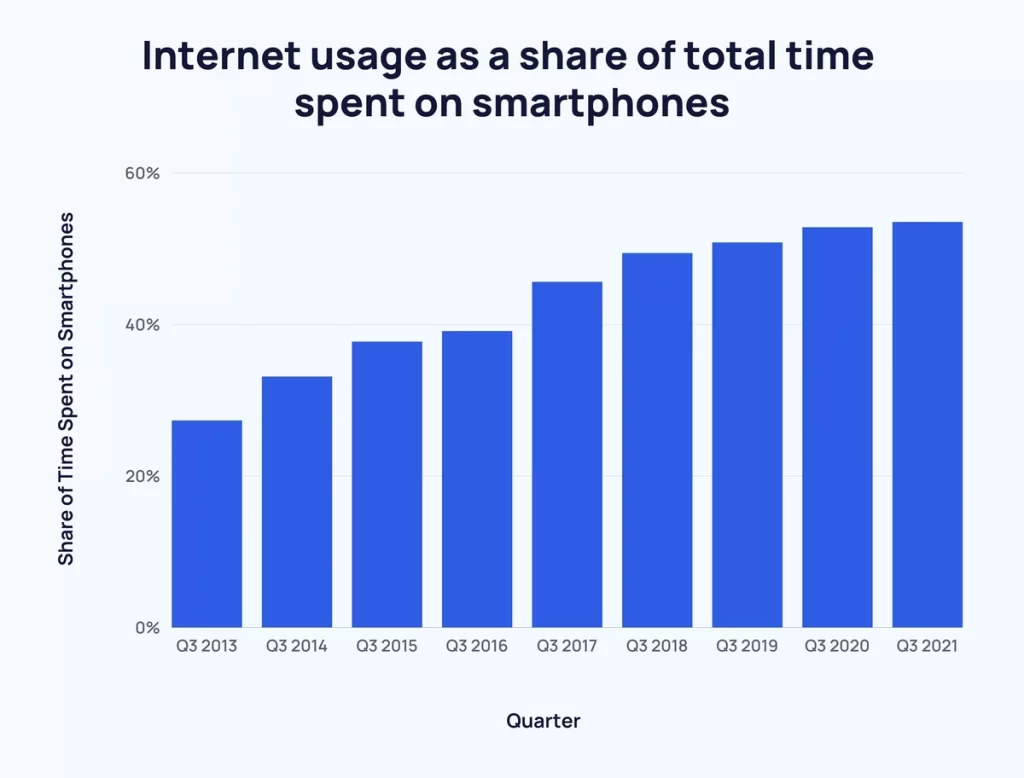
Image Source: explodingtopics.com
The takeaway: a 2027 platform decision is as much about store policy and component strategy as it is about which phone your customers carry.
iOS leads in the United States and Android leads almost everywhere else. That split has held for years, but the size of the US lead matters for how you sequence a launch.
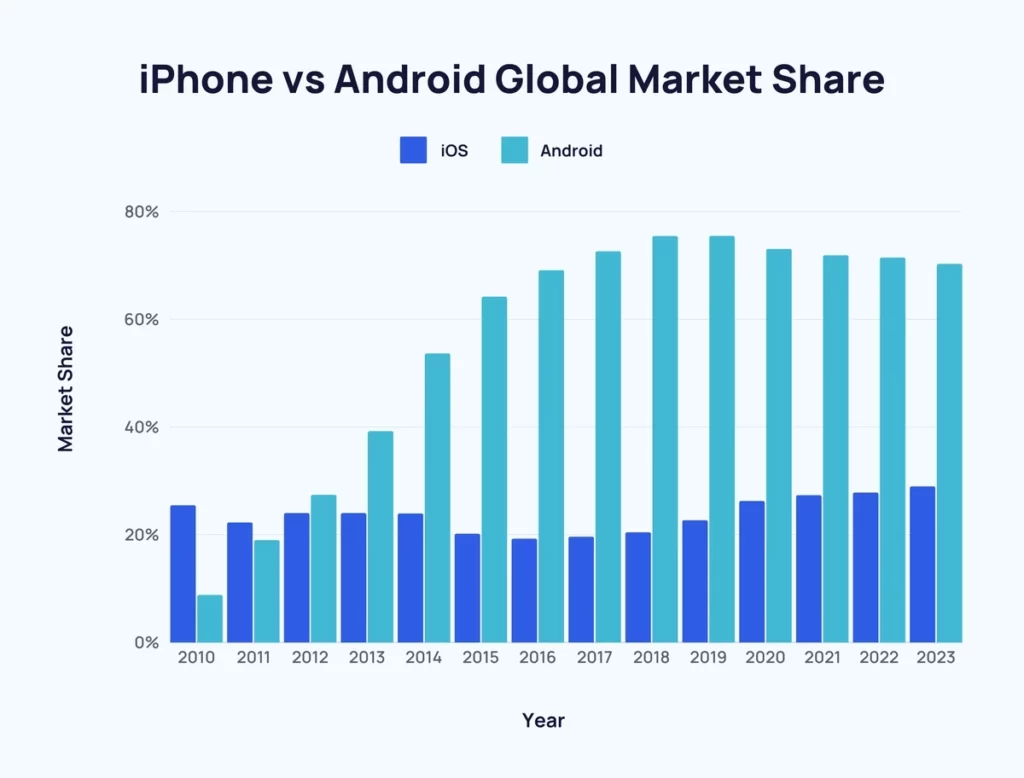
Image Source: explodingtopics.com
According to StatCounter, iOS accounted for 53.59% of US mobile operating system share in September 2026, with Android at 46.39%. Worldwide in the same month, StatCounter put Android at 69.17% and iOS at 30.81%. A US-only product therefore faces a near-even split, not the iPhone-dominated market many founders assume.
That near-even split changes the risk profile of launching on one platform. Skipping Android in the US means leaving close to half of your addressable phones unserved, which matters for products where the user does not choose the app, such as a patient portal a clinic hands to every patient or a benefits app an employer rolls out to all staff.
For consumer products that rely on voluntary downloads, a single-platform launch still works as a learning phase. For mandated-use products in healthcare and financial services, plan for both platforms from day one, even if one ships a few weeks behind the other.
Store Economics Now Follow Your Revenue Model
The platform that “makes more money” now depends on how your app collects money. Before 2026, both stores pushed nearly every digital purchase through their own billing, so the difference between iOS and Android came down to how much users spent. That is no longer the full picture.
According to Sensor Tower, consumers spent $167 billion on in-app purchases in 2025, and non-game apps out-earned games for the first time. That shift toward subscriptions and services is exactly the category where the new billing options apply most, because subscription apps can now steer renewals to a web account on both platforms in the US.
Here is how we map revenue models to platform impact when scoping a build:
- No in-app digital purchases (a lending app, an insurance claims app, a hospital scheduling app): store fees barely matter. Choose by audience and device features.
- Subscriptions (telehealth memberships, budgeting tools): both stores now allow some form of web purchase in the US. Build your account and entitlement system on your own backend so it works the same whichever way the user paid.
- One-time digital purchases (premium content, credits): store billing still gives the smoothest checkout. Expect iOS users to convert at higher rates, so iOS often goes first.
- Physical goods or real-world services (pharmacy delivery, in-person care): neither store takes a cut of these, so payment SDK quality, such as Apple Pay and Google Pay, is what to compare.
The engineering lesson: keep pricing, entitlements, and receipts in a backend you control. Teams that wired entitlements directly to a single store’s receipts in 2023 now face rework to take advantage of the new rules.
Is It Easier to Build for iOS or Android in 2027?
iOS is still easier to test, while Android is easier to start on, and shared-code frameworks have narrowed the gap between them. The difference now sits in device coverage and release logistics rather than in the languages themselves.
Native Stacks on Each Platform
Native iOS app development uses Swift and SwiftUI inside Xcode, which runs only on macOS. Swift 6 added stricter concurrency checking, a compiler feature that catches data races (two parts of the code changing the same value at once) before the app ships. That check pays off in apps that sync health or transaction data in the background.
Native Android development uses Kotlin and Jetpack Compose inside Android Studio, which runs on Windows, macOS, and Linux. The harder part is device coverage: an Android build has to behave on budget phones with small memory, foldables, and tablets from many manufacturers, so test plans need a device matrix instead of a handful of iPhone models.
Three cross-platform approaches are production-ready for 2027 builds:
- Flutter: one Dart codebase that draws its own interface on both platforms. Our Flutter app development projects use it most for form-heavy business apps where pixel-identical screens across platforms are a feature, not a flaw.
- React Native: JavaScript or TypeScript with native UI components. Its new architecture is now the default, which removed most of the old performance complaints about the bridge between JavaScript and native code.
- Kotlin Multiplatform: shares business logic (networking, validation, data models) while keeping fully native screens. It suits teams that want SwiftUI on iPhone and Compose on Android without writing the rules twice.
Our rule of thumb: shared code is the right call when the app’s core value lives in its backend and workflows. Go native when the core value depends on deep hardware access, such as Bluetooth medical devices, camera-based scanning, or on-device AI models.

Distribution and Review Rules That Shape Your Release Plan
Apple reviews every build before release, and Google now verifies who is behind every app. Both rules affect your launch calendar, so they belong in the project plan, not the week before go-live.
Apple’s Review Gate
Every iOS submission goes through App Review against Apple’s App Review Guidelines, and apps must declare data collection through privacy nutrition labels and privacy manifests for third-party SDKs. Health and finance apps draw closer scrutiny, so we plan extra review cycles for first submissions and for any release that adds a new permission or payment flow.
Apple also requires new submissions to be built with a recent Xcode and SDK on a yearly cadence. A team that skips a year of maintenance can find itself unable to ship an urgent bug fix until the toolchain is upgraded.
Android’s New Identity Layer
Android is no longer the “publish anything, anywhere” platform. According to Android Developers, installs on certified devices in Brazil, Indonesia, Singapore, and Thailand started requiring verified developers on September 30, 2026, and verification expands globally in 2027. This applies even to apps distributed outside Google Play.
For enterprise and healthcare clients who distribute internal apps directly to staff devices, that is a real change. The organization that owns the app needs a verified developer identity before rollout, and the signing keys must sit with the client, not with an individual contractor’s personal account.
Google Play also enforces a yearly target API level requirement, which forces apps to adopt current Android behavior around permissions and background work. Treat both platforms’ annual updates as fixed calendar items in your maintenance plan.
Healthcare and Fintech: Where Platform APIs Decide the Roadmap
In regulated industries, the platform’s built-in health and payment frameworks often decide the first platform more than market share does. These frameworks determine how much you build yourself and how much the operating system handles for you.
Health Data: HealthKit and Health Connect
Apple HealthKit has a long head start, with Apple Watch feeding heart rate, ECG, sleep, and activity data into a single permissioned store. Android’s Health Connect now plays the same role across Samsung, Google, and other wearables, but data quality and available metrics vary by device brand.
For telemedicine software development, this often leads to an iOS-first launch when remote monitoring is central, followed by Android once the data model is proven. HIPAA requires covered entities to protect patient health information wherever it travels, so the sync layer between these frameworks and your servers deserves the most engineering attention.
Clinics that hand an app to every patient face the opposite pressure. A patient portal software development project cannot ignore Android users, so a shared-code build that ships both platforms together is usually the better fit.
Payments, Identity, and Tap Features
Fintech apps lean on biometric login (Face ID, fingerprint), secure hardware storage for keys, and contactless features such as Tap to Pay on iPhone and NFC on Android. Android has historically given developers more open NFC access, while Apple has gradually opened its NFC and secure element APIs in selected regions.
In fintech software development, we see a clear pattern: consumer wallets and investing apps start on iOS for its higher spend per user, while lending, remittance, and gig-worker payout apps start on Android because their users skew toward Android in the US and abroad.

iOS vs Android App Development: A 2027 Decision Matrix
The fastest way to decide is to score your product against the factors below. If most of your answers fall in one column, launch there first; if they split, a shared-code build that ships both is usually the safer bet.
| Factor | Points to iOS first | Points to Android first |
|---|---|---|
| Primary market | US, Canada, UK, Japan, Australia | Latin America, India, Southeast Asia, Africa |
| Revenue model | Premium subscriptions, one-time digital purchases | Ad-supported, high-volume free usage, transaction fees |
| Usage type | Voluntary consumer downloads | Workforce, field staff, kiosk, and rugged devices |
| Hardware dependency | Apple Watch, HealthKit, Tap to Pay on iPhone | Custom hardware, open NFC, Bluetooth peripherals from many vendors |
| Distribution | Public App Store release | Managed device fleets, direct installs (with verified identity) |
| Testing load | Small device set, faster QA cycles | Wider device matrix, more QA time |
When the matrix splits evenly, look at the decision from a build vs buy software angle as well. Some features, such as video visits or card issuing, are better bought as SDKs that already support both platforms, which reduces the engineering effort of covering iOS and Android at once.

Why Our San Diego Engineers Ask About the Payment Flow Before the Phone
Across recent mobile builds for healthcare and fintech clients, the most expensive rework we have seen did not come from picking the “wrong” platform. It came from coupling business logic to one platform’s billing, login, or health data framework, then discovering the second platform needed a different flow.
One recurring case: a subscription wellness app launched on iPhone with entitlements tied directly to App Store receipts. When the client added Android and web sign-ups, every pricing change had to be rebuilt in three places. Moving entitlements to a central backend fixed it, but that work belonged in the first sprint, not the third release.
So the first workshop question our team asks clients from San Diego to Irvine is not “iPhone or Android?” It is “where does money change hands, and where does sensitive data leave the device?” Answer those two, and the platform order usually becomes obvious.
What to Expect From Both Platforms Through 2027
Both platforms are moving toward on-device AI, more open payments, and tighter developer accountability. Plan your architecture so these shifts become upgrades rather than rewrites.
- On-device AI: Apple’s Foundation Models framework and Google’s Gemini Nano let apps run summarization and classification locally, which keeps sensitive text on the phone. This matters for AI-native app development in health and finance, where sending raw data to a cloud model creates extra privacy exposure.
- Payment choice spreading globally: Google’s alternative billing timeline runs through September 2027, and Apple’s US link-out terms are still being settled. Keep payment logic modular so you can switch providers by market.
- Developer identity everywhere: Android verification goes global in 2027, joining Apple’s long-standing developer account checks. Keep signing keys and store accounts in the client’s name.
- Web as a third front end: with purchases able to move to the web, many teams pair their mobile apps with a web account area. Our engineers plan these to build scalable web applications that share the same APIs as the mobile apps.
Teams in Los Angeles and San Francisco that we speak with are already treating iOS, Android, and web as three clients of one backend. That structure is the most reliable way to absorb platform policy changes without a rebuild.

Conclusion
The iOS vs Android decision for 2027 is no longer a contest of market share charts. The US market is split nearly evenly, store payment rules now favor teams that own their billing and entitlements, and Android is adding identity checks that change how internal apps reach devices.
The practical takeaway: decide where your revenue event and sensitive data flows live, then pick the platform that serves those best for version one. Build the backend so the second platform, and the web, plug in without rework.
If you are mapping out a mobile launch for a healthcare or fintech product, start with those two questions. The platform answer tends to follow, and our team in software development in San Diego is glad to pressure-test your plan whenever you are ready.
Frequently Asked Questions
What is iOS vs Android app development?
iOS vs Android app development is the choice between building for Apple’s iPhone platform with Swift and Xcode or for Google’s Android platform with Kotlin and Android Studio. Each platform has its own app store, review rules, payment options, and device frameworks. Many teams now use Flutter, React Native, or Kotlin Multiplatform to cover both from shared code.
What is the difference between building for iOS first and Android first?
Building iOS first targets a smaller, faster-to-test device set and users who spend more on in-app purchases, while building Android first targets a larger global audience and more varied hardware. In the US the two platforms are close to an even split, so the choice depends more on your revenue model and hardware needs than on audience size.
How do I decide which platform to launch on first?
Decide by identifying where your app collects money and where sensitive data leaves the device, then pick the platform whose frameworks serve those flows best. Score your product on market, revenue model, usage type, hardware dependency, distribution, and testing load. If the results split, a shared-code build that ships both platforms is usually the safer option.
Which platform do healthcare and fintech apps in San Diego usually launch on?
Healthcare apps built around remote monitoring often launch on iOS first because HealthKit and Apple Watch offer mature health data, while patient portals launch on both platforms together. In fintech, consumer wallets and investing apps lean iOS first, and lending, remittance, and payout apps lean Android first because of who uses them.
Is building for both iOS and Android worth it for a first release?
Building for both is worth it when users do not choose the app themselves, such as patient portals, employee apps, or benefits tools, because skipping one platform leaves nearly half of US users out. For voluntary consumer apps, a single-platform launch is a reasonable learning phase, provided the backend is designed so the second platform plugs in without rework.