
- Shopify enforces one price per variant, blocking collection-based pricing natively.
- Bundle inventory deductions require a custom app using Orders/Create webhooks.
- Off-the-shelf automation covered only 40% of factory-required order data.
- San Diego sports eCommerce teams reduced manual order processing time by 70%.
- Custom app architecture outperforms plugins when three or more integrations fail together.
Introduction
Shopify powers over 4.6 million stores globally, according to Statista, but the platform was engineered for straightforward catalog selling, not complex bundle logic tied to club-specific pricing. When a California-based B2B sports eCommerce company approached our team, they had already exhausted every plugin and automation workaround available. Their problem with Shopify bundle products was not a configuration issue. It was a platform architecture problem. This article documents exactly where Shopify and off-the-shelf tools broke down across four specific failure points, and how a custom app built on Vue.js and Laravel resolved each one in production.
The client operates from California, manufacturing and selling mandatory gear bundles to youth and amateur sports clubs across the state, including organizations in the San Diego metro area. Each club receives a curated bundle with its own pricing, branding, and individual product variants. That model is fundamentally incompatible with Shopify’s native one-price-per-variant architecture.
How the Client’s Business Model Exposed Shopify’s Bundle Limitations
The client owns and operates the entire supply chain: manufacturing, the Shopify storefront, and direct fulfillment to club athletes. Each club partnership results in a collection inside Shopify. Within each collection, predefined bundles contain three to six individual products, each available in multiple variants such as size, color, and material. Players can also personalize items with a name and jersey number.
Consider the contrast between two clubs: Club A’s soccer bundle includes a jersey, shorts, and socks. Club B’s bundle adds an embroidered logo and a duffle bag. Prices for the same jersey variant differ between the two clubs. Shopify’s data model has no concept of collection-scoped pricing. A product variant holds exactly one price, regardless of how many collections it appears in.
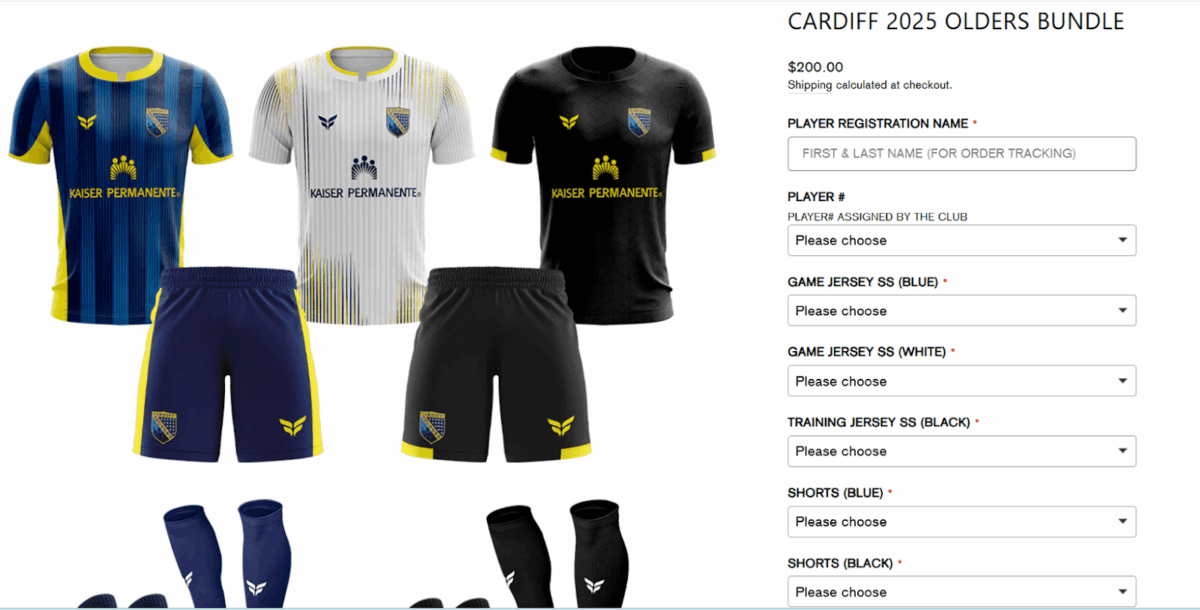
The client initially used the Ymq Product Options & Variants app to simulate bundle selection. Ymq created customizable fields layered on top of a single product listing displaying a photo of multiple items. It was a convincing front-end experience, but the individual product variants in those fields had no corresponding inventory records in Shopify. When a bundle sold, nothing was deducted from stock. Inventory reconciliation fell entirely to manual effort, and as order volume grew, so did the errors.
Four Places Where Simple Solutions Broke Down
Before committing to a custom build, the team at Bitcot evaluated Shopify’s native features, Zapier, Google Sheets, and existing customer account functionality. Each approach failed at a specific technical boundary.
Pricing: One Variant, One Price
Shopify enforces a single price per product variant at the database level. Discount codes were considered as a workaround for club-specific pricing, but they require customers to remember and enter club-specific codes, which creates friction and support overhead. Third-party pricing apps that promise advanced rules did not support collection-scoped logic. The only native solution was to duplicate every product across every club collection, creating a catalog maintenance problem that worsened with each new club onboarded.
Inventory: Bundles Are Opaque to Shopify’s Stock System
The team added custom metafields to each bundle product to list the component items in JSON format. The expectation was that a webhook or automation could read those metafields when an order was placed and deduct inventory accordingly. Shopify does not read metafields during order processing. The platform records the sale of the bundle SKU and stops there. Individual component inventory remained unchanged, meaning stock counts became unreliable within days of launch. Hiring someone to manually reconcile inventory became a recurring operational cost.
Factory Exports: Automation Tools Saw Only the Bundle SKU
Zapier and Google Sheets could retrieve standard Shopify order fields reliably. The problem was that the factory does not need the bundle name. It needs the full breakdown: product names, selected variants, player names, jersey numbers, and production notes. All of that information lived in JSON-formatted metafields that neither Zapier nor Google Sheets could parse. According to internal analysis of the generated sheets, approximately 40% of the factory-required information was captured automatically. The remaining 60% required manual data entry before each sheet could be sent to production.
Player Onboarding: Custom Data Had No Path to the Storefront
Shopify customer accounts store name, address, and order history. They do not support custom fields for jersey size, player number, or position preference. Even if that data could be stored in a third-party system, there was no mechanism for the Shopify storefront to read it and auto-select product variants when a player visited a bundle page. Players re-entered the same sizing data with every order, and in-person fitting event data was never reused.

The Custom App Architecture: Four Modules, One Integrated System
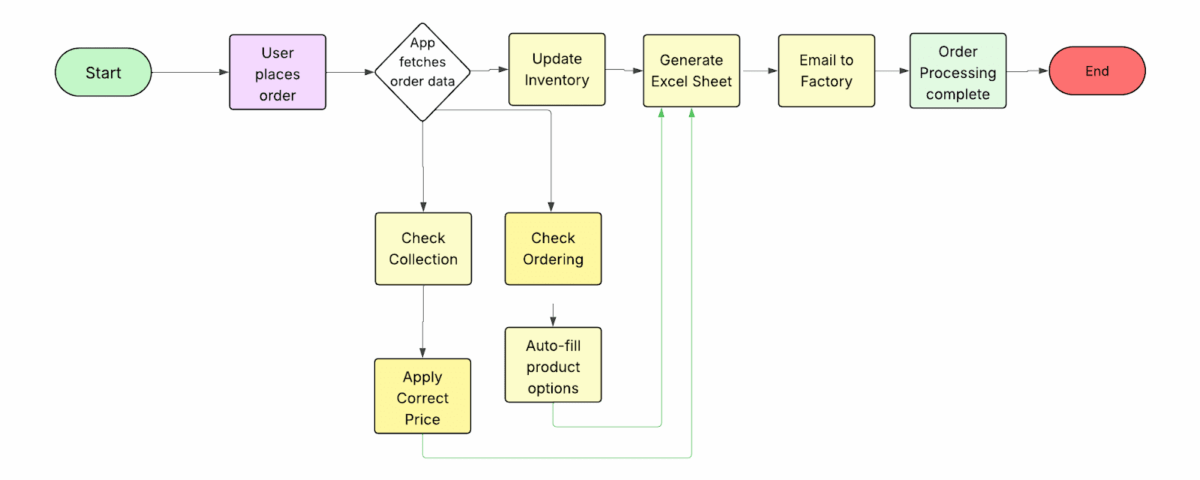
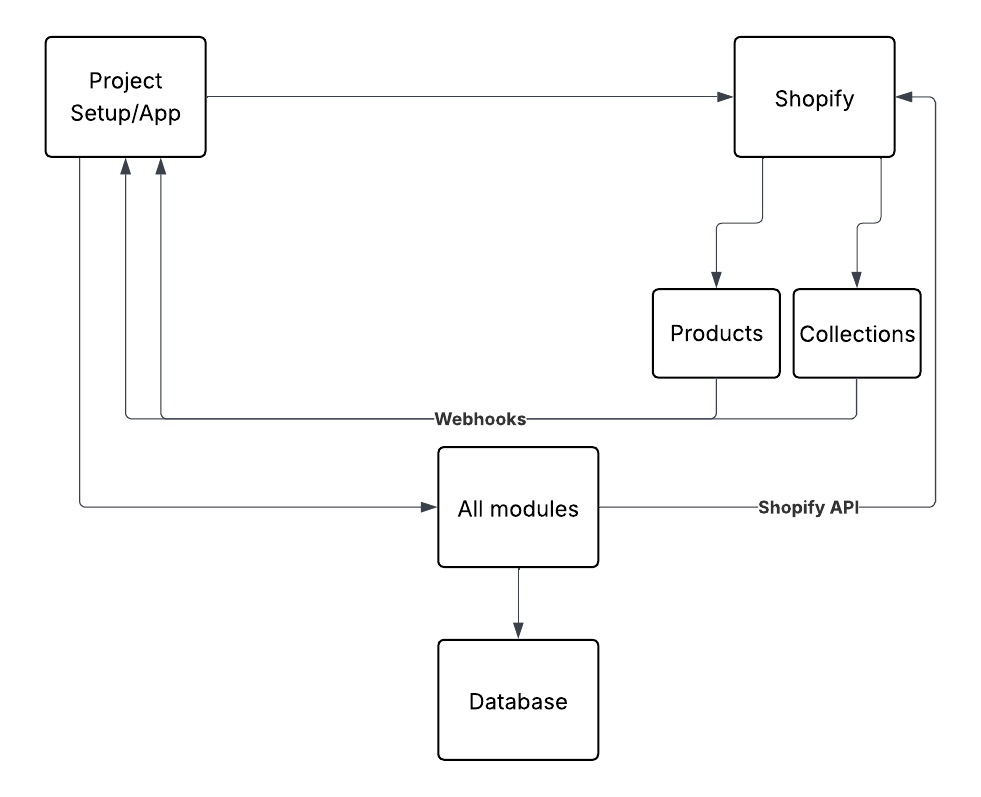
The solution Bitcot delivered is a desktop app built on Vue.js for the admin dashboard and Laravel for the backend. It syncs with Shopify through the Admin API and exposes a central dashboard for managing bundles, pricing rules, and inventory. The architecture does not replace Shopify’s checkout infrastructure. It orchestrates around it. This approach to custom software development treats the platform’s constraints as integration surfaces, not blockers.
Module 1: Dynamic, Collection-Aware Pricing
The app uses Shopify’s Product Data API and Collection Data API to pull all variants and collections into its own database on installation. Admins configure price mappings through a dashboard: select a collection, select a product variant, set the price for that combination. The data is stored in a dedicated table keyed by variant ID and collection ID.
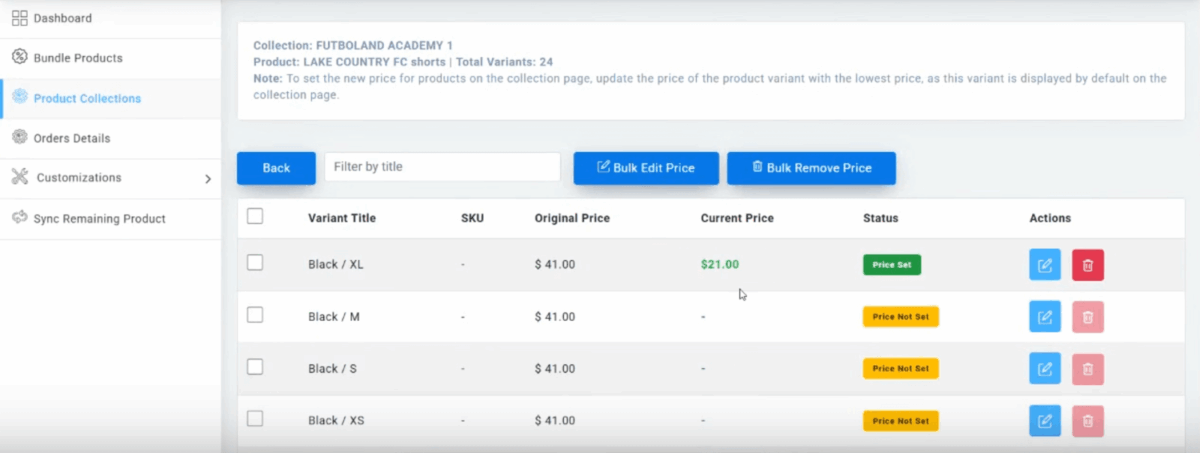
When a player visits a collection page, the app detects the collection context, identifies the bundle being viewed, and injects the mapped price using a Shopify App Proxy. The App Proxy approach is the recommended implementation because it delivers dynamic data through Shopify’s own infrastructure rather than relying on a client-side script that could be blocked or delayed. At cart and checkout, the app calculates the difference between the standard variant price and the collection-specific price, generates a discount code automatically, and applies it before the customer completes the transaction. No coupon entry required.
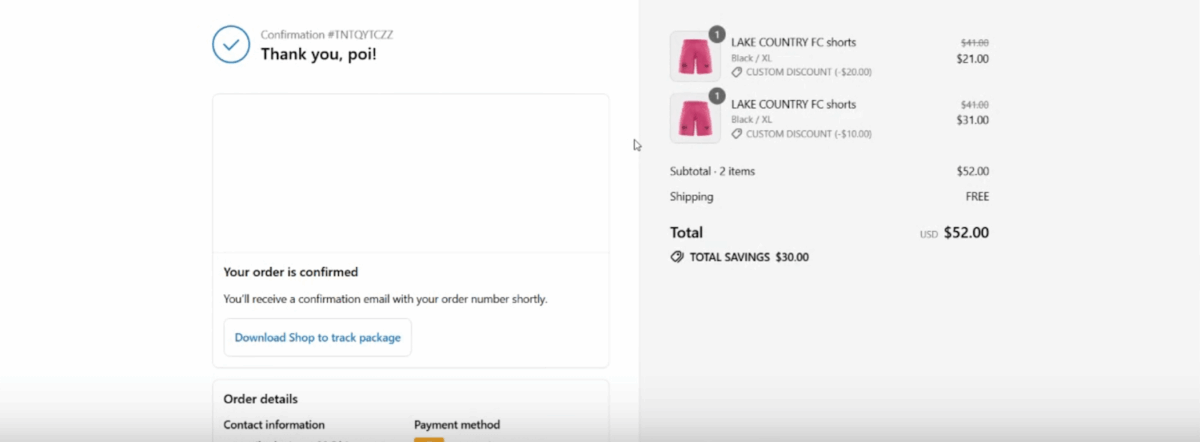
When the admin adds new products or collections in Shopify, clicking “Sync Products” in the dashboard pulls the updated data into the app. This keeps the pricing layer in sync with catalog changes without manual intervention. This is a pattern common to well-architected custom eCommerce solutions where the business logic layer must evolve independently of the storefront platform.
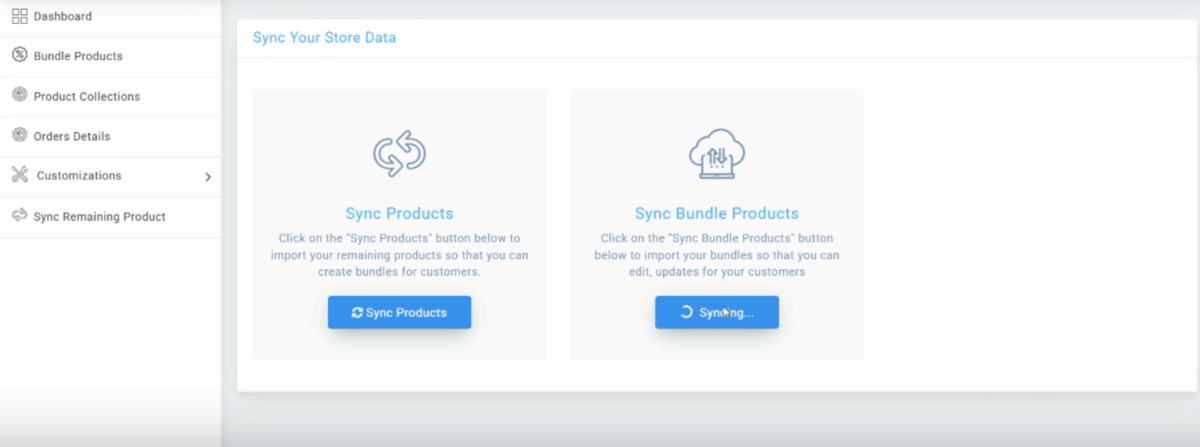
Module 2: Bundle Inventory That Reflects Real Stock
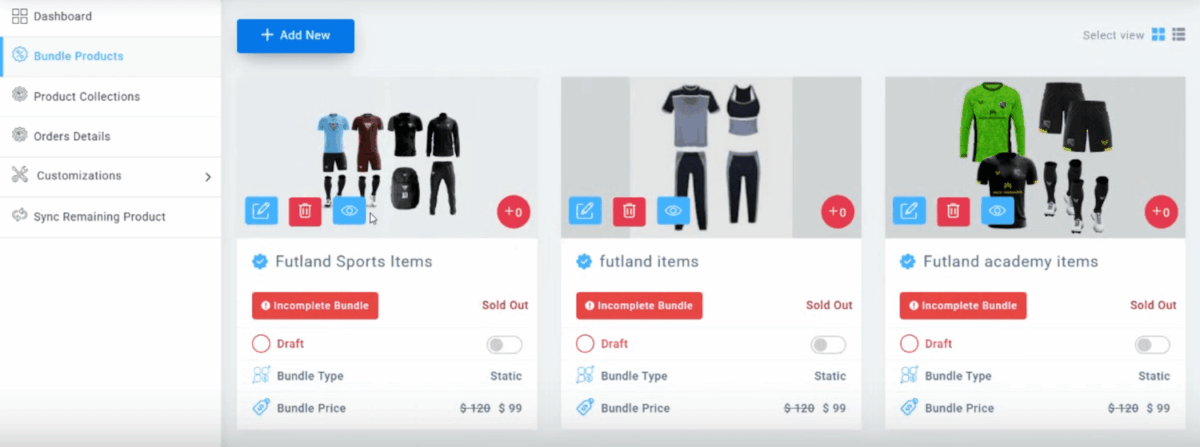
Shopify bundle inventory tracking is solved through a webhook-driven deduction system. The app registers for the Orders/Create webhook. When an order is placed, Shopify sends the payload to the app’s Laravel backend. The backend reads the bundle’s metafields, identifies every component product and the variant the customer selected, and calls the Shopify Admin API to reduce inventory for each component individually. The result is accurate stock counts across all bundled items with no manual reconciliation required.
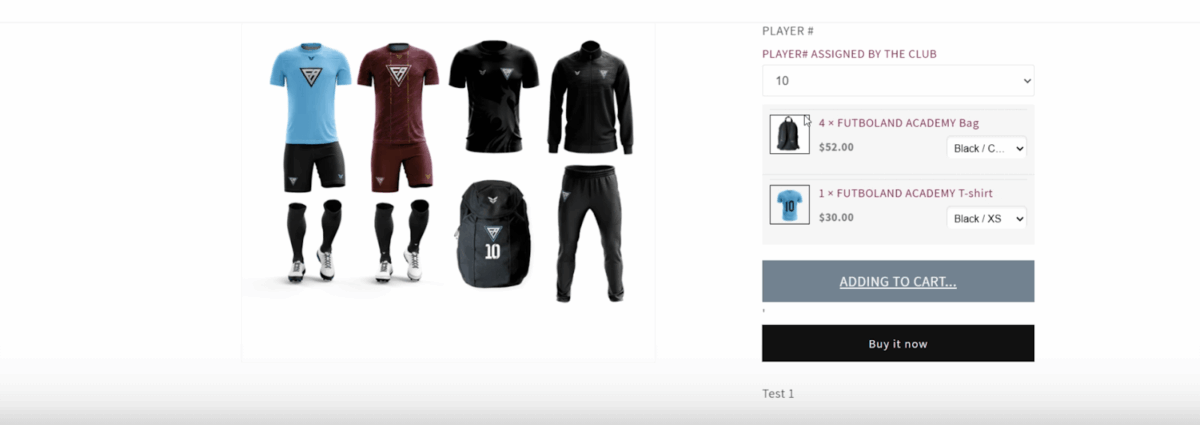
The admin dashboard provides real-time visibility into inventory levels per variant across all bundles. Configurable stock alerts trigger notifications when a specific component approaches a defined threshold, enabling proactive restocking decisions. Admins can also add or remove products from bundles directly in the dashboard without touching Shopify’s backend. This modular approach to enterprise application development keeps the business logic and the storefront decoupled, which matters when catalog requirements change frequently.
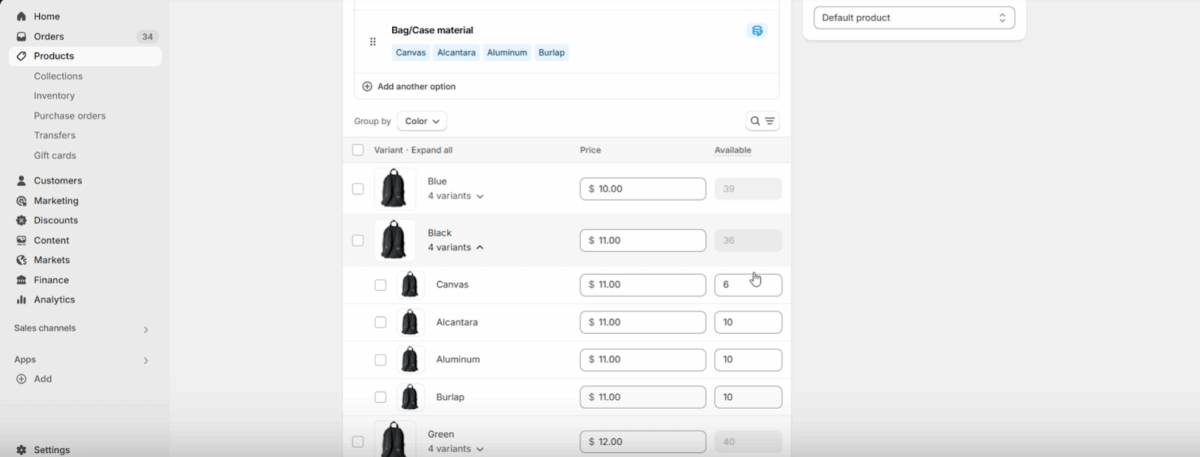
Module 3: Factory-Ready Order Data, Automated End to End
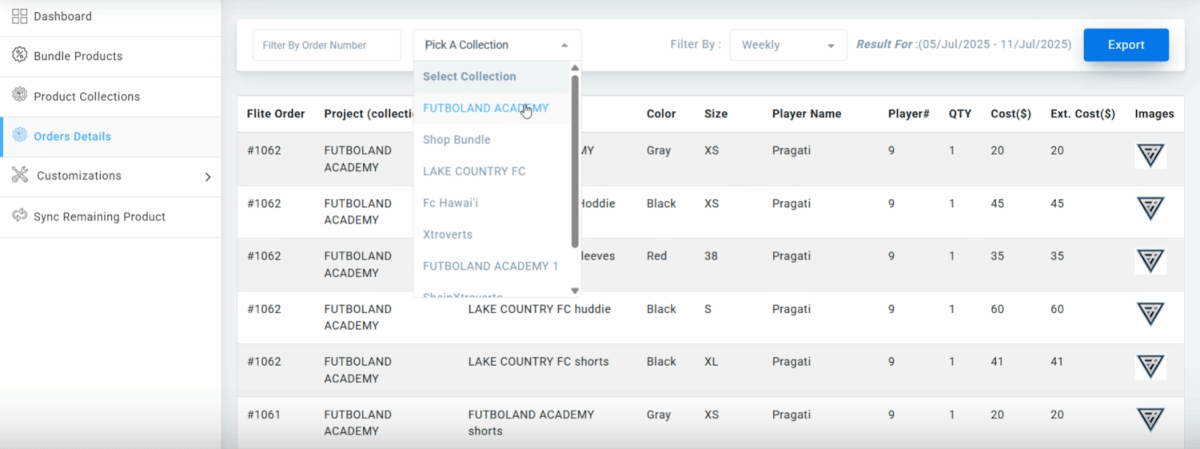
The factory export module operates through six steps triggered automatically on each new order. First, the Orders/Create webhook fires and the app captures the raw order. Second, the app calls Shopify’s Admin and Order APIs to retrieve the full order record. Third, the metafields are parsed to extract each component product, selected variant, player name, and jersey number. Fourth, clean order data is written to the app’s database. Fifth, a file handling library formats the data into a factory-specific Excel template with the exact layout, merged cells, and grouping the production team requires. Sixth, the Excel file is emailed to the factory and made available for dashboard download.
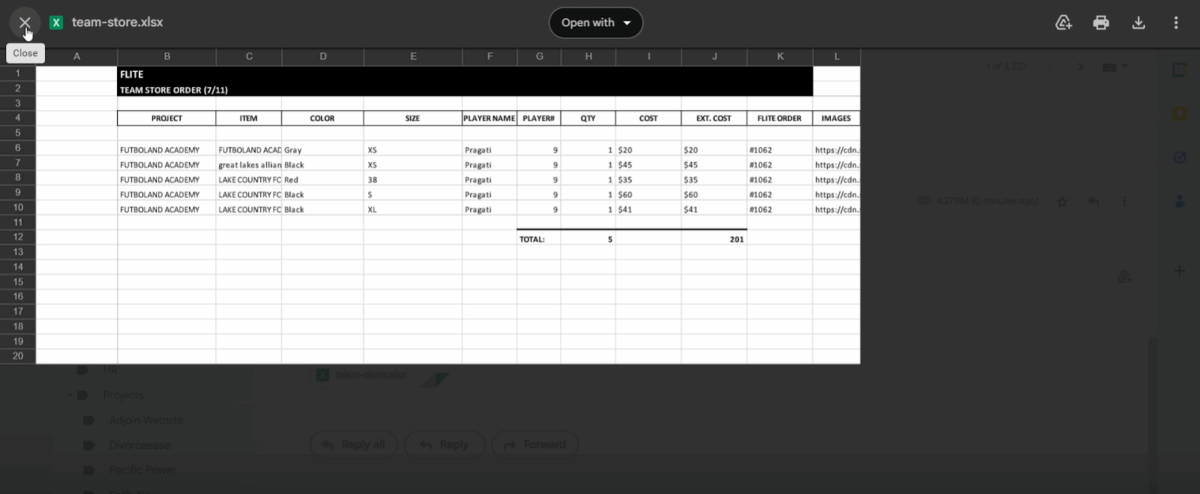
The dashboard also supports filtering by club or date range, after which a single consolidated Excel file can be generated covering all matching orders. Scheduled email delivery allows the client to define when factory sheets go out without manual triggering. This level of business process automation eliminated the 60% manual data completion that previously delayed every production run. According to Gartner’s research on automation ROI, organizations that replace manual data handoffs with automated pipelines consistently report faster cycle times and lower error rates across fulfillment workflows.
Module 4: Smart Player Onboarding That Carries Data Forward
The onboarding module eliminates double data entry by connecting in-person fitting events to the online shopping experience. Each player receives a unique onboarding link. On the onboarding form, they enter player name, jersey number, preferred sizes, and club information. Depending on configuration, the data is stored either under a full customer profile using Shopify’s Storefront API or tied directly to the player’s email address with no login required. Either path saves the data in the app’s backend, linked to the individual player.
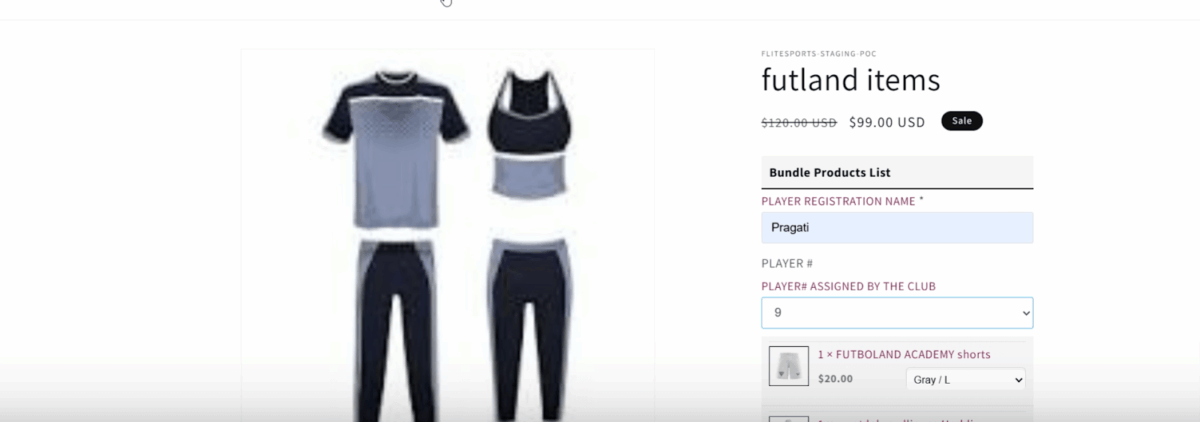
When the player visits their bundle page, the app checks their email or profile, retrieves the saved data, and auto-selects the correct size variant for each bundle component. Name and jersey number are pre-filled automatically. What previously took 15 minutes per player at checkout drops to approximately 2 minutes. This capability is a concrete example of how enterprise web app development can turn onboarding data into a competitive differentiator rather than a manual overhead.
Measured Outcomes After Deployment
The results across all four modules produced measurable operational improvements. Manual order processing time dropped by 70%. Inventory accuracy across bundled products reached 100%, replacing a system that required daily manual reconciliation. Bundle-based purchases increased by 60% as the shopping experience became faster and more reliable for athletes. Customer satisfaction surveys returned scores of 8 out of 10 or higher across participating clubs.
The scalability outcome is equally important. The app handles unlimited combinations of collections, products, variants, and pricing rules without duplicating catalog records. Adding a new club requires configuring price mappings in the dashboard, not replicating dozens of product listings. Teams working on build vs buy software decisions will recognize this as the inflection point: when the volume of workarounds begins generating more work than the original problem, the custom build path typically delivers lower total operational cost over a 12 to 24 month horizon.
According to McKinsey’s operations research, companies that replace fragmented tool stacks with integrated custom systems report the greatest efficiency gains when three or more hand-off points between systems involve manual correction. This project had four such hand-off points. Each was eliminated by a dedicated module.
Our Perspective
Working with sports and recreation businesses across California, including clients in San Diego and Los Angeles, we consistently see the same pattern: the platform breaks when the business model requires pricing or inventory logic that the platform was never designed to support. Shopify is an excellent commerce platform for standard catalog selling. It is the wrong architecture for collection-scoped pricing and bundle inventory deduction without custom development. The signals are predictable: three or more tools working around each other, manual steps appearing in what should be automated workflows, and data trapped in one system that another system cannot read. When all three signals appear together, the conversation shifts from plugin selection to application architecture. Our approach with this client was to build a modular system where each failure point had a dedicated, testable solution, rather than a single monolithic fix that would be difficult to maintain as club requirements evolved. The Vue.js development frontend and Laravel backend combination gave the admin team a dashboard they could operate independently, which matters more than the technical elegance of the underlying architecture.

Conclusion
Shopify’s native architecture imposes four specific constraints that become operational liabilities for complex B2B bundle commerce: one price per variant, no bundle-aware inventory deduction, limited metafield access in automation tools, and no path for custom player data to influence the storefront experience. Off-the-shelf plugins and automation tools address surface symptoms without resolving the underlying data model conflicts. A custom app built with a modular, API-first architecture resolved all four constraints in production, cutting manual processing by 70% and restoring inventory accuracy. The decision to build rather than buy is not a preference for complexity. It is the correct response when platform architecture, not configuration, is the limiting factor. If your eCommerce development stack is generating more manual work as order volume grows, the architecture deserves a closer review before the next plugin is added.
Frequently Asked Questions
What is a custom Shopify bundle app?
A custom Shopify bundle app is a purpose-built application that extends Shopify’s native capabilities to support complex product bundling logic, such as collection-scoped pricing, real-time inventory deduction per bundle component, and structured order data exports. Unlike off-the-shelf plugins, a custom app stores its own data layer, uses Shopify’s Admin API and webhooks directly, and can be architected around the specific business rules a merchant needs rather than the generic use cases a plugin supports.
What is the difference between Shopify's native bundles and a custom bundle solution?
Shopify’s native product bundles treat a bundle as a single SKU with no connection to the inventory of its component items. A custom bundle solution reads component product data from metafields, deducts inventory for each component when an order is placed via webhook, and surfaces the full item breakdown for factory or fulfillment use. The native approach works for simple kits with no per-collection pricing or component-level stock tracking. The custom approach is required when those constraints exist.
How does collection-based pricing work in a custom Shopify app?
Collection-based pricing in a custom Shopify app is implemented by storing a mapping table of product variant IDs, collection IDs, and their corresponding prices in the app’s own database. When a customer views a product page, the app detects the collection context and injects the mapped price via a Shopify App Proxy. At checkout, the app calculates the difference from the standard variant price and applies a discount code automatically, so the customer pays the collection-specific price without entering any coupon.
How are custom Shopify bundle apps used for B2B sports eCommerce in California?
California-based B2B sports eCommerce platforms use custom Shopify bundle apps to manage club-specific gear collections where each athletic club receives its own curated bundle at a unique price point. The app handles variant selection, pre-fills player data collected at in-person fitting events, deducts inventory for each component product, and generates factory-ready Excel sheets automatically for each order. This architecture supports scalable club onboarding without duplicating product catalog records for each new partner.
Is building a custom Shopify app worth it when plugins are available?
Building a custom Shopify app is worth the investment when three or more integration points between existing tools require manual correction, when platform architecture (not configuration) is the root cause of the limitation, and when manual processing time grows proportionally with order volume rather than staying fixed. In the case of Shopify bundle products with collection-based pricing and component-level inventory, no combination of available plugins resolves all four constraints simultaneously. The custom build path delivered a 70% reduction in manual processing time and 100% inventory accuracy, outcomes no plugin stack produced.