- The real gap is everything after the WordPress form Submit.
- Power Automate turns form emails into structured data, no form changes.
- AI-assisted extraction reads messy emails and inconsistent property addresses.
- Validation sends incomplete requests to exceptions, not the queue.
- A database queue gives every department one Open-to-Closed view.
A customer fills out a form on your WordPress website, clicks Submit, and sees a friendly thank-you message. On their side, the job is done. On your side, the work has only just started, and it usually starts in a shared mailbox that nobody fully owns.
This is the story of how a lending team learned to automate WordPress form submissions with Power Automate and turned that inbox into an automated request queue. We connected their WordPress form to Microsoft Power Automate, used AI-assisted extraction to read each submission, validated the data, and stored every request as a trackable record in their client database, from Open to Closed.
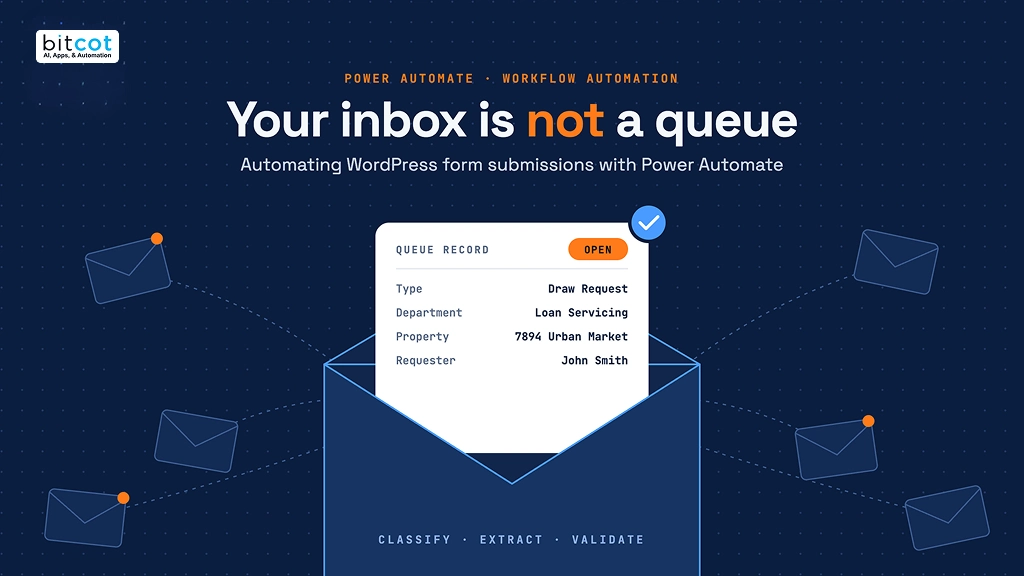
The idea in one picture: a web form submission arrives as an email, Power Automate classifies it, extracts the key fields, validates them, and creates a queue record the right department can act on. No copy-paste, no lost emails, no guessing what is still open.
At Bitcot, our San Diego team builds workflow automation and Microsoft Power Platform solutions for teams that have outgrown manual processes. The request we hear most often sounds simple: “Our forms work fine, but we are drowning in the emails they create.” Here is the problem we found, the architecture we built to solve it, and how the same pattern applies to almost any business that receives requests through web forms and email.
The original process looked simple on paper: User → WordPress form → submission email → shared mailbox. It worked well when a handful of requests arrived each week. As volume grew, the cracks showed up in three predictable ways.
Every submission is an email someone has to decode
A borrower submits a Draw Request. A broker submits a New Loan Request. Someone else sends a general loan question. All of them land in the same inbox as plain email.
Before any real work can begin, a person has to open each message and answer the same questions every time:
- What type of request is this?
- Which department should process it?
- Who submitted it, and how do we reach them?
- Which property is it about?
- Is all the required information there?
- Has this request already been handled?
None of those questions is hard. Answering them hundreds of times, by hand, is where the hours go.
The data is readable by people, not by systems
Email is great for communication and terrible as structured data. The requester’s name, email, property address, and request details are all in the message, but they are buried in free text. Staff end up copying fields from the email into a tracking system one at a time, which is slow and invites typos.
Property addresses were the worst offenders. Some arrived neatly labeled. Others were split across several lines, mixed in with other details, or sent without any “Property Address” label at all.
Nobody can answer “what is still open?”
An email has no built-in status. It can be read, flagged, or moved to a folder, but none of those reliably means “in progress” or “done.” Managers could not see all open requests in one place, measure turnaround time, or report on workload by department. Requests could quietly slip through the cracks.
| Challenge | What it costs the business |
|---|---|
| Unstructured information | Email is readable by people but not ready for downstream processing |
| Variable request types | Different requests need different departments and processing rules |
| Inconsistent addresses | Property addresses are labeled differently or split across lines |
| Manual data entry | Staff retype information from emails into a tracking system |
| Limited visibility | There is no single view of all open requests |
| Status ambiguity | An email has no reliable Open or Closed lifecycle |
The trap: Because the web form already works, teams assume the fix is a better form or a new plugin. The real gap sits after the Submit button: turning an unstructured email into a structured, trackable business request. Automating the email notification alone just moves the mess faster.

The solution: a six-layer request queue to automate WordPress form submissions with Power Automate
The fix was not a smarter form or another inbox rule. We placed Power Automate between the shared mailbox and the client database, and split the work into six layers. Each layer has exactly one job, which keeps the solution easy to maintain and extend.
WordPress to Power Automate request queue architecture · 6 layers, 1 validation gate. Only form submissions enter the flow, only validated requests reach the database, and incomplete ones go to exception handling instead of the queue.
How each layer works when you automate WordPress form submissions with Power Automate
Layer 1: WordPress captures the request
The journey starts on the WordPress website. A user completes a web form for a Draw Request, a New Loan Request, or another loan-related request. The website’s only job is to capture the request and submit it. The processing architecture behind it stays invisible to the user, so the existing WordPress form does not need to change.
Each submission generates an email delivered to a shared mailbox. The mailbox becomes the clean boundary between the website and the automation. The team keeps its familiar email-based intake, and the process is not tied to any one person’s inbox.
Layer 3: Power Automate orchestrates the workflow
A Power Automate flow monitors the shared mailbox. Its first decision is simple: is this email a relevant form submission? If not, the email stays in the mailbox untouched.
If yes, processing continues. This filter keeps newsletters, replies, and unrelated messages out of the request queue.
Layer 4: AI classifies the request and extracts the details
Next, the flow works out what the request is. Classification tags it as a Draw Request, New Loan Request, or Other Loan-Related Request, then maps it to the responsible department: Loan Origination, Underwriting, Loan Servicing, or Investor Relations.
Then comes information extraction. The email is written for humans, but the database needs fields: requester, email, request type, property address, request details, and received date. For variable email content, AI-assisted extraction identifies those fields without hard-coding every possible layout. The instruction looks like this:
Extract:
- Request Type
- Requester
- Email
- Property Address
- Request Details

For Property Address, identify address-like information even when
there is no explicit "Property Address" label. Consider street
number, street name, city, state, ZIP/postal code, and country.

Return the result in structured JSON.
The result is clean, structured JSON:
{
  "requestType": "Draw Request",
  "requester": "John Smith",
  "email": "[email protected]",
  "propertyAddress": "7894 Urban Market, San Diego, CA 11111-1111, US",
  "requestDetails": "Property draw request"
}
Solving the property address problem. Instead of hunting for an exact “Property Address” label, the extraction looks for the characteristics of an address: street number, street name, city, state, ZIP or postal code, and country. That makes it resilient when addresses are split across lines or embedded in other text.
The key design rule: AI handles classification and extraction only. Power Automate stays responsible for validation, routing, and business processing.
The control point: validate before anything reaches the database
An extracted value is not automatically a valid business value. Before anything is written to the database, the flow checks required fields and business rules. If the request type is present but the property address is missing, the request goes to exception handling instead of creating an incomplete queue record. Validation is the control point that keeps bad data out.
Layers 5 and 6: Database stores the request, the queue manages it
Validated data is sent to the database, where the unstructured email becomes a structured request record. The flow creates a queue record and sets its initial status to Open:
| Field | Value |
|---|---|
| Request Type | Draw Request |
| Department | Loan Servicing |
| Property | 7894 Urban Market |
| Requester | John Smith |
| Status | Open |
From here, the team works the request. If it is still in progress, it stays Open. Once processing is confirmed complete, the status changes to Closed. The question shifts from “which emails still need attention?” to “which requests are open right now?”
The value is not an automation that reads email. It is an automation that turns every email into a business record your team can track, filter, and report on.
Why the database, not the inbox, should be the request queue
It is tempting to treat the shared mailbox as the queue, because that is where requests arrive. But email and queue management do different jobs. This architecture does not replace the mailbox. It gives the mailbox a reliable downstream workflow.
| Email / shared mailbox is good at | Database / request queue is good at |
|---|---|
| Receiving submissions | Structured records |
| Communication | Status management |
| Notifications | Filtering and searching |
| Keeping the original submission | Reporting and department views |
| Historical tracking |
With requests living in the database, the whole team shares one view of open work:
| Request type | Department | Property | Status |
|---|---|---|---|
| Draw Request | Loan Servicing | 7894 Urban Market | Open |
| New Loan Request | Loan Origination | 123 Main Street | Open |
| Loan Request | Underwriting | 456 Oak Avenue | Open |
Where this works: industries and use cases
This solution was built for loan requests, but the pattern is not tied to lending. Any organization that receives structured or semi-structured requests through web forms and email can use the same architecture. The common pattern: capture the request once, structure the information automatically, and manage it through a centralized lifecycle.
- Lending and financial services. Draw requests, new loan applications, payoff requests, and investor inquiries are classified and routed to origination, underwriting, servicing, or investor relations automatically.
- Real estate and property management. Maintenance requests, lease inquiries, and tenant applications are tied to the right property address and tracked until they are resolved.
- Healthcare. Referral and appointment request forms become queue records care coordinators can work, much like our healthcare referral management automation with Power Automate.
- Professional services and agencies. Quote requests, onboarding forms, and support tickets from the website are routed to the right team without anyone triaging an inbox.
- HR and operations. Internal request forms for equipment, access, or approvals get a real status instead of living in someone’s email folder.
The traditional path is Web Form → Email → Manual Processing → Business System. The automated path is Web Form → Email → Automation → Classification → Extraction → Validation → Business System → Centralized Queue.
The results: what changed for the team
The biggest shift was not eliminating the need to read email. It was changing the role of email from a manual work queue into an automated intake channel.
- Less manual processing. Staff no longer create a queue record by hand for every submission.
- Faster request identification. Request type and responsible department are identified automatically.
- Structured data. Email content becomes database fields that other systems and reports can use.
- Centralized visibility. Every open request is visible from one place, filtered by department.
- Consistent status tracking. Every request follows the same lifecycle, from Open to Closed.
- Fewer missed requests. Submissions enter the workflow automatically instead of waiting for someone to notice them.
- Better reporting. Structured request data supports operational reporting and analytics.
What a production-ready Power Automate request workflow looks like
A proof of concept can focus on the happy path. A production solution has to define what happens when information is missing, formats change, or downstream systems fail. These five practices made the difference.
- Validate before creating records. Never create a queue record just because an email arrived. Check required fields first.
- Handle missing information. Route incomplete requests through an exception process rather than creating a half-filled record.
- Account for email variations. Email templates change. Extraction logic should not depend on one exact text layout.
- Watch for duplicate requests. If the same submission can arrive twice, check for duplicates before creating a new record.
- Log processing failures. When the automation fails, the team should see which message was processed, which stage failed, whether extraction and database insertion succeeded, and what to do next.
| Layer | Responsibility |
|---|---|
| Intake | WordPress and the shared mailbox capture and receive the request |
| Intelligence | Classification and information extraction work out what the request means |
| Validation | Required-field checks and business rules decide whether the request is ready |
| Data | The database stores the structured request |
| Operations | The centralized queue manages processing and status |
What comes next
Once the core pipeline is stable, the same foundation supports more:
- Automated team notifications when a new request enters the queue
- SLA monitoring for requests that stay open too long
- Priority assignment based on request type or business rules
- Human-in-the-loop review for low-confidence extractions
- Operational dashboards for request volume, workload, status, and processing time
- Automated requester updates when a request’s status changes
None of this needs exotic technology. It needs the discipline to separate intake, intelligence, validation, and storage, so each layer does one job well.
The side spreadsheet is the real requirement
The pattern we see most often is not a broken form; it is a team that has quietly turned a shared mailbox into its system of record. On projects tied to our software development in San Diego and with teams in Los Angeles, the first sign is the same: someone keeps a side spreadsheet just to know what is still open.
That spreadsheet tells us what the queue needs. When we scope business process automation, we start by mapping the columns people already track by hand, because those columns become the fields on the queue record.
The second lesson is restraint. AI workflow automation earns trust when AI reads the email and Power Automate decides what happens next, so every record in the queue traces back to a rule the team understands.

Conclusion: from inbox-driven to a measurable business workflow
The team in this story did not need a new website or a new form. They needed what happens after Submit to be automatic, structured, and visible. WordPress handles submission, the shared mailbox handles intake, Power Automate handles orchestration, AI-assisted extraction handles messy content, and the database holds the structured request data.
Together they follow one clear lifecycle: Capture → Classify → Extract → Validate → Store → Queue → Process → Close. If your team is still reading, retyping, and chasing form submissions in a shared inbox, this is the pattern that gets you out. Explore our AI agent development and Power Platform consulting services, or talk to our team about your workflow.
Frequently Asked Questions
What role does the database play?
If your WordPress form already sends a notification email, point it at a shared mailbox and build a Power Automate flow that monitors that mailbox. The flow filters relevant submissions, extracts the fields you need, validates them, and writes a record to your database or request queue.
Why not just use Power Automate string functions to extract data?
String functions work well when every email follows the same format. When submissions vary, especially for fields like property addresses, AI-assisted extraction is more flexible and far less brittle.
How do I automate WordPress form submissions with Power Automate?
Point your WordPress form’s notification email at a shared mailbox and build a Power Automate flow that monitors that mailbox. The flow filters relevant submissions, extracts the fields you need, validates them, and writes a record to your database or request queue.
Can this architecture support other request types, departments, and industries?
Yes. Classification and routing rules can be extended to cover new request types, new departments, and entirely different business processes, from lending and real estate to healthcare, professional services, and HR.
Do we need to change our existing WordPress form?
No. As long as the form generates an email with the required submission information, Power Automate can use that email as the automation entry point.