Key Takeaways
- Fragmented audit data and manual change checks slow compliance teams down.
- Power Automate, Dataverse and Power Apps form one integrated audit workflow.
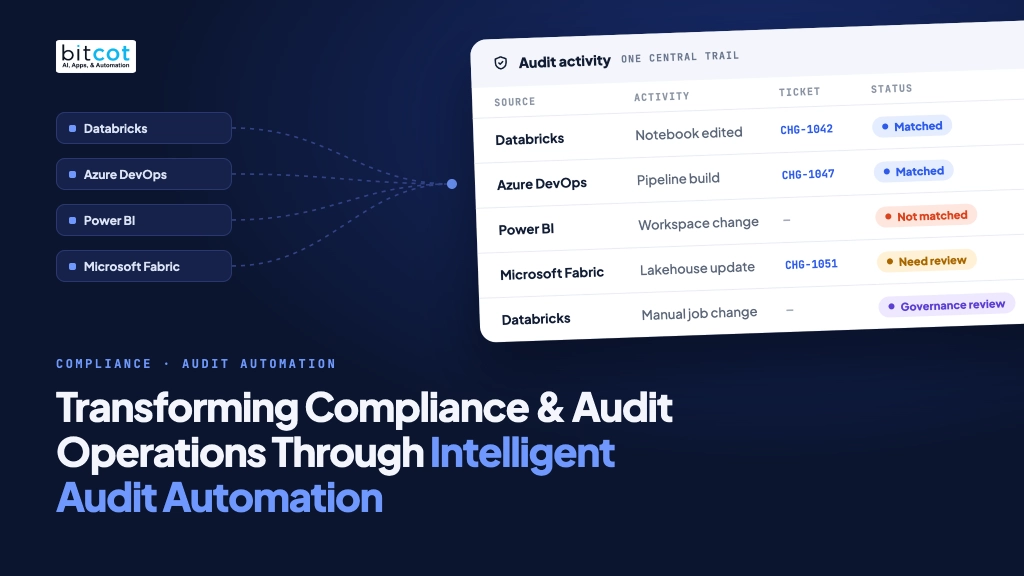
- Activities from Databricks, Azure DevOps, Power BI and Fabric match JIRA tickets.
- Unmatched activities go to structured human review with role-based access.
- Dashboards, notifications and execution history improve traceability and audit readiness.
How an integrated audit automation solution helps enterprises streamline audit data collection, improve traceability, and strengthen compliance oversight.
Introduction
In today’s increasingly complex digital landscape, organizations rely on multiple platforms to manage their data, applications, infrastructure, and business operations. While these technologies improve efficiency and scalability, they also introduce challenges for compliance and audit teams responsible for monitoring system activities, validating changes, maintaining records, and ensuring that appropriate controls are followed.
Traditional audit processes often depend on manual data collection, spreadsheet-based tracking, disconnected systems, and time-consuming reviews. As the number of platforms and system activities grows, these methods can make it difficult to maintain consistent oversight, identify changes that require attention, and establish a clear audit trail.
To address these challenges, organizations are increasingly adopting automated, centralized audit management solutions that bring together activity data from multiple enterprise platforms, correlate activities with approved change requests, and provide a structured process for reviewing exceptions.
An integrated Audit Automation solution built using Microsoft Power Platform demonstrates how organizations can modernize compliance and audit operations by automating data collection, change validation, audit tracking, reporting, and notifications across multiple technology environments.
The Challenges of Traditional Audit Management
Enterprise audit teams need to establish visibility into system activities and verify whether changes are properly authorized, documented, and reviewed. When this process is performed manually across multiple platforms, several operational challenges can arise.
Fragmented audit data across platforms
Organizations commonly use different platforms for data engineering, application development, reporting, and cloud-based operations. Each platform maintains its own activity logs, audit records, and change information.
When audit data is distributed across systems such as Databricks, Azure DevOps, Power BI, and Microsoft Fabric, teams may need to access multiple interfaces and retrieve information separately. This fragmentation makes it difficult to obtain a consolidated view of activities and their associated change records.
Manual change validation
One of the key responsibilities of an audit team is to determine whether a system activity is associated with an approved change request.
In a manual process, reviewers may need to compare activity logs against change tickets in a separate project management system, such as JIRA. This can involve searching for ticket references, validating change details, and updating audit records manually.
As activity volumes increase, this approach can consume significant time and make the review process more difficult to manage consistently.
Limited visibility into unmatched activities
Not every system activity can be automatically associated with an approved change request. Some activities may have no corresponding ticket, while others may require additional investigation before a decision can be made.
Without a centralized review mechanism, unmatched activities can be difficult to track, assign, prioritize, and resolve. This can also make it challenging for audit teams to identify records that are still awaiting review.
Inconsistent audit tracking and documentation
When different teams maintain audit records in separate spreadsheets, systems, or reporting tools, the information may not follow a consistent structure.
Review status, ticket references, reviewer updates, and historical execution details may be stored in different places. This can make it harder to trace how an activity was collected, evaluated, and resolved.
Delayed reporting and operational insights
Audit reporting often requires teams to consolidate data from different platforms, validate records, and prepare summaries for stakeholders.
Manual reporting can delay access to meaningful insights, including the number of activities reviewed, matched or unmatched records, outstanding exceptions, and trends across systems.
These challenges highlight the need for a centralized and automated approach that reduces repetitive work while maintaining visibility, accountability, and human oversight.
Introducing an Integrated Audit Automation Solution
An Audit Automation solution can help address these challenges by bringing together activity data from multiple enterprise platforms, applying configurable matching logic, and providing a centralized interface for audit review and reporting.
Built using Microsoft Power Platform, the solution combines Power Automate, Microsoft Dataverse, and Power Apps to create an integrated workflow for audit data collection, processing, review, and monitoring.
The solution connects with source platforms through their available APIs, retrieves relevant activity records, stores the information in a centralized data repository, and applies automated logic to associate activities with corresponding change tickets.
Where an activity cannot be matched confidently, it can be routed for manual review. Audit users can then inspect the record, update relevant ticket information, and manage its review status according to their access permissions.
This approach helps reduce repetitive administrative effort while retaining the involvement of authorized reviewers in decisions that require human judgment.
How the Audit Automation Workflow Works
The solution follows a structured workflow to collect, process, validate, and review audit activities.
Step 1: Automated data collection
The solution integrates with enterprise platforms to retrieve activity records through their respective APIs.
Supported integrations include:
- Databricks: Captures relevant manual changes and notebook-related activities.
- Azure DevOps: Retrieves pipeline and build-related activity information.
- Power BI: Collects relevant administrative and activity records.
- Microsoft Fabric: Retrieves relevant platform activity information.
Automated workflows retrieve data according to configured schedules and source-specific requirements. Where supported, workflows can also be triggered for manual or historical execution.
This reduces the need for audit teams to repeatedly access each source platform and collect records individually.
Step 2: Centralized audit data storage
Retrieved activities are processed and stored in Microsoft Dataverse, providing a centralized location for audit records and related information.
The centralized repository can hold details such as:
- Source platform and activity type
- Activity description and relevant identifiers
- Execution or activity timestamps
- Associated user or system information, where available from the source
- Change ticket references
- Matching and review statuses
- Reviewer updates
- Workflow execution history
The exact information available depends on the data exposed by each source platform and the integration configuration.
Centralized storage helps maintain a consistent structure for audit records and supports downstream review, reporting, and tracking.
Step 3: Automated change ticket matching
A key capability of the solution is its ability to correlate collected activities with change requests maintained in JIRA.
The matching workflow evaluates available activity details against ticket information using configured matching criteria. When a corresponding ticket is identified, the activity can be marked as matched and linked to the relevant change record.
This reduces the need for reviewers to search for ticket references manually across large volumes of activity records.
Automated matching is intended to support the review process, not replace the need for validation where the available information is incomplete or ambiguous.
Step 4: Exception identification and manual review
Activities that cannot be matched, or that require further assessment, are made available for review through the centralized application.
Reviewers can inspect the activity details, assess the available evidence, and update permitted fields such as the JIRA Ticket ID or Ticket URL.
Records can be managed using defined review statuses, including:
- Matched: A corresponding change ticket has been identified.
- Not Matched: No corresponding ticket has been identified and the record requires attention.
- Need Review: Further assessment is required.
- Data Governance Review: Additional governance assessment is required.
These statuses help teams distinguish records that have been matched from those that need additional investigation or governance review.
The review process keeps human judgment within the workflow, allowing authorized users to resolve exceptions rather than relying entirely on automated decisions.
Step 5: Audit history and execution monitoring
The solution maintains execution history to support monitoring of the automated data collection processes.
Authorized users can review API execution details, monitor workflow activity, and investigate execution issues. This provides operational visibility into when data retrieval processes ran and helps teams identify workflows that may need attention.
Maintaining execution history alongside audit records supports traceability across the collection and review lifecycle.
Step 6: Dashboards, reporting, and notifications
Collected and processed data is made available through centralized dashboards and reporting interfaces.
Dashboards provide visibility into platform-specific activities, matching outcomes, and review requirements. Configured notifications help inform relevant stakeholders about workflow events and records that require attention.
Together, these capabilities help audit teams monitor activity and review progress without relying exclusively on manually prepared reports or repeated system checks.

A Unified View Across Enterprise Platforms
A major advantage of an integrated audit approach is the ability to bring relevant activity information from different enterprise systems into a common review experience.
The solution includes platform-specific modules and dashboards designed around the types of activities being monitored.
Databricks audit monitoring
Databricks audit workflows focus on relevant manual changes and notebook-related activities.
The solution retrieves available activity information through platform APIs, stores the records centrally, and supports association with change tickets.
This provides a structured way to review activities occurring within the data engineering environment and identify records that require further validation.
Azure DevOps pipeline auditing
Azure DevOps workflows capture relevant pipeline and build-related activity data.
By retrieving information through APIs and correlating it with change ticket details, the solution helps audit teams review pipeline activity and assess whether the associated changes have been documented.
Build-related filters and configured retrieval criteria can help align data collection with operational requirements.
Power BI activity auditing
Power BI audit workflows retrieve relevant administrative and activity information through available APIs.
Centralizing these records helps teams review activities associated with the reporting environment, correlate them with change requests, and monitor records that require additional assessment.
Microsoft Fabric activity auditing
Microsoft Fabric integration extends the audit workflow into the analytics and data platform environment.
Relevant activity data is collected through available platform interfaces and processed through the same centralized workflow approach. This allows audit teams to review Fabric-related activities alongside other supported platforms.
Although each integration has its own data structure and retrieval requirements, a common review experience helps maintain consistency across the overall audit process.
Solution Architecture: Built on Microsoft Power Platform
The Audit Automation solution uses Microsoft Power Platform components to connect source systems, orchestrate workflows, centralize audit data, and deliver an accessible application interface.
Power Automate: Workflow orchestration
Power Automate acts as the workflow engine for the solution.
It is responsible for activities such as:
- Executing scheduled data collection workflows
- Connecting with source platforms through APIs
- Processing and transforming retrieved activity records
- Applying configured matching logic
- Storing and updating records in Dataverse
- Triggering notifications
- Recording workflow execution details
Automated workflows reduce repetitive manual operations and provide a consistent process for handling audit activities.
Microsoft Dataverse: Centralized data repository
Microsoft Dataverse provides the centralized data layer for the solution.
It stores audit activity records, matching information, configuration data, review statuses, and execution history.
Using a common data repository allows the application, automated workflows, and dashboards to work with consistent information while supporting structured access and management.
Power Apps: Centralized audit application
Power Apps provides the user-facing interface for audit users, reviewers, and administrators.
The application brings together audit dashboards, activity records, review workflows, and administrative functions in one place.
Users can navigate to relevant platform-specific modules, inspect activity details, update permitted fields, and monitor the status of records according to their assigned access.
API integrations: Connecting enterprise platforms
The solution uses APIs to retrieve activity information from connected systems.
API-based integrations allow the workflows to collect relevant information without requiring audit teams to manually export records from each platform.
The available data, retrieval frequency, and filtering capabilities depend on the APIs, permissions, and configuration of each source platform.
JIRA: Change request correlation
JIRA serves as the change management reference for matching audit activities with corresponding tickets.
The matching workflow uses available activity and ticket information to establish relationships between system activities and documented changes, helping reviewers validate records through a structured process.
Dashboards and Audit Insights
A centralized audit application becomes more useful when it provides clear visibility into both operational activity and review progress.
The solution includes dashboards designed to provide platform-specific insights, including:
- DBA Insights: Visibility into relevant Databricks activities.
- DOP Insights: Visibility into relevant DevOps pipeline and build activities.
- Power BI Insights: Visibility into relevant Power BI activity records.
- Fabric Insights: Visibility into relevant Microsoft Fabric activities.
These dashboards help users access relevant activity information and review outcomes in a consolidated interface.
Depending on the configured reporting requirements, audit teams can use dashboard information to examine matching outcomes, identify records that need attention, and monitor review progress across connected platforms.
This reduces reliance on manually consolidating information from multiple sources and helps stakeholders work from a more consistent view of audit activity.
Role-Based Access Control and Secure Administration
Audit information may include operationally sensitive details. It is therefore important that users can access and modify records according to their responsibilities.
The solution incorporates role-based access control (RBAC) to help manage application permissions.
Access can be structured around user and administrator responsibilities, including:
- Audit users and reviewers: Access relevant audit records and update permitted information, such as their own ticket references, according to assigned permissions.
- Administrators: Manage broader application functions, including configuration, access roles, operational settings, record review, and supported exports.
Application access can be controlled through an authorized security group, while application-level roles determine which functions a user can perform after access is granted.
Administrative capabilities include credential and configuration management, operations list management, RBAC, audit history, notification settings, record review, and match status management.
Credentials and service identities are configured according to the organization’s environment and security requirements. Appropriate permissions and access controls are essential to ensuring that integrations operate within their approved scope.
Notifications and Proactive Review
Audit teams need timely visibility into activities and records that require attention.
The solution supports configured notifications to inform relevant stakeholders about selected workflow events, including matching-related updates and records requiring review.
Notification workflows can include appropriate recipients and configured email handling, helping ensure that relevant updates reach the intended users.
By connecting notifications with the centralized review process, the solution can reduce the need for users to continuously monitor dashboards or manually check individual records for changes.
Notification content, recipients, and triggering conditions can be configured to align with operational needs.
Supporting Traceability and Audit Readiness
Traceability is an important aspect of effective audit management. Teams need to understand where an activity originated, how it was processed, whether it was associated with a change request, and what review actions were taken.
The Audit Automation solution supports traceability by bringing together:
- Activity records retrieved from connected platforms
- Associated change ticket references
- Matching and review statuses
- Permitted reviewer updates
- Workflow execution history
- Centralized dashboards and reporting
This structured information can help teams investigate individual records, understand outstanding review requirements, and prepare supporting information for internal audit activities.
The solution supports audit operations and documentation; it does not independently certify regulatory compliance or replace an organization’s formal control framework, audit judgment, or governance responsibilities.
Business Benefits of Audit Automation
Implementing an integrated audit automation workflow can support several operational improvements.
Reduced manual effort
Automating repetitive data retrieval, record processing, and change ticket matching can reduce the time audit teams spend on routine administrative tasks.
This allows reviewers to focus more of their effort on exceptions, investigation, and activities that require human assessment.
Centralized visibility
Bringing relevant activities from multiple platforms into a common repository and application helps reduce fragmentation.
Audit teams can access records, review statuses, and execution information from a centralized interface rather than relying entirely on separate systems and manual consolidation.
Consistent review processes
Standardized workflows and defined review statuses provide a consistent approach to handling matched, unmatched, and other records requiring further assessment.
This helps establish a common process across different platforms and teams.
Improved traceability
Centralized audit records, ticket references, reviewer updates, and execution history help teams follow the lifecycle of an activity.
This supports investigation, operational monitoring, and preparation of audit evidence, subject to the completeness of the underlying source data and configured retention policies.
Faster identification of exceptions
Automated matching and exception identification can help surface activities that do not have an identified corresponding change ticket.
This enables reviewers to focus on records that need further attention instead of manually checking every activity in the same way.
Better operational oversight
Dashboards, execution history, and notifications provide visibility into activity collection and review workflows.
This can help administrators and audit stakeholders monitor processing, identify issues, and follow up on outstanding records.
Scalable integration approach
A modular, API-based architecture allows integrations to be organized around individual source platforms.
Additional integrations may be considered as organizational requirements evolve, subject to API availability, permissions, security reviews, and implementation effort.
The Importance of Human Oversight
Automation can significantly improve the efficiency of audit operations, but not every activity can be evaluated accurately through predefined rules alone.
An activity may lack sufficient context, contain incomplete metadata, or require an interpretation that depends on business processes and governance policies.
For this reason, an effective audit automation approach should combine automated processing with structured human review.
The solution automates repeatable steps such as data collection, matching, status assignment, and notification, while allowing authorized reviewers to assess exceptions, validate ticket references, and manage records requiring additional scrutiny.
This balance helps organizations improve operational efficiency without removing accountability from the people responsible for audit and compliance decisions.
Implementation Approach
Introducing an audit automation solution requires more than developing workflows. It involves understanding source systems, establishing secure connectivity, defining matching criteria, configuring review processes, and validating the solution in the target environment.
A structured implementation approach may include the following stages:
Discovery and requirements analysis
Identify the systems to be monitored, the activity types to be collected, the audit requirements, the matching criteria, and the responsibilities of users and administrators.
Integration and configuration
Establish the required API connections, service identities, permissions, and environment-specific configurations for each source platform.
Workflow development
Develop data collection, processing, matching, exception handling, execution logging, and notification workflows.
Application and reporting development
Configure the centralized application, platform-specific modules, dashboards, administrative functions, and role-based access.
Testing and validation
Validate data retrieval, record processing, matching outcomes, exception handling, permissions, notifications, and execution history in a controlled environment.
User acceptance and audit review
Allow relevant business stakeholders and audit teams to review the solution, validate that workflows meet their requirements, and provide feedback before production deployment.
Production deployment and monitoring
Deploy the approved solution, configure production-specific settings, validate integrations, enable scheduled workflows, and monitor initial executions.
This approach helps align technical implementation with operational requirements and provides opportunities to validate the solution before it is used in production.
Looking Ahead: Building a More Connected Audit Ecosystem
As enterprise environments continue to evolve, audit requirements are also likely to expand across new platforms, services, and types of activity.
An integrated architecture provides a foundation for extending audit coverage as new requirements emerge. Additional source integrations, expanded review workflows, enhanced reporting, and new methods of surfacing relevant information can be evaluated over time.
Potential future enhancements may include broader activity coverage, additional automation around exception handling, richer trend analysis, and new user interaction channels, subject to business priorities, security requirements, and technical feasibility.
The goal is to evolve audit operations from disconnected, largely manual activities into a more connected, transparent, and manageable process.

Conclusion
As organizations adopt more enterprise platforms and cloud-based technologies, maintaining visibility into system activities and their associated changes becomes increasingly important.
An integrated Audit Automation solution built using Microsoft Power Platform can help organizations address the operational challenges of fragmented audit data, manual change validation, inconsistent tracking, and delayed reporting.
By combining API-based data collection, centralized storage, automated JIRA matching, structured exception review, role-based access, dashboards, notifications, and execution history, the solution supports a more consistent and traceable audit workflow across multiple enterprise platforms.
Automation does not replace the judgment of audit professionals. Instead, it helps reduce repetitive work, improve visibility, and provide a structured foundation for reviewers to focus on activities that require investigation and decision-making.
For organizations seeking to modernize their compliance and audit operations, integrated audit automation offers a practical approach to improving efficiency, strengthening operational oversight, and supporting audit readiness as technology environments grow in complexity.
Modernize audit operations with connected data, structured workflows, and meaningful human oversight.
Frequently Asked Questions
What is an audit automation solution?
An audit automation solution brings activity data from multiple enterprise platforms into one place, matches activities to approved change tickets, and routes exceptions for human review. The Power Platform version combines Power Automate, Microsoft Dataverse and Power Apps. Together they handle data collection, processing, review and monitoring.
What is the difference between the Matched, Not Matched and Need Review statuses?
Matched means a corresponding change ticket has been identified, while Not Matched means no ticket has been identified and the record requires attention. Need Review means further assessment is required. A fourth status, Data Governance Review, marks records that need additional governance assessment.
How does automated change ticket matching work?
The matching workflow evaluates available activity details against JIRA ticket information using configured matching criteria. When a corresponding ticket is identified, the activity is marked as matched and linked to the relevant change record. Activities that cannot be matched confidently are routed to reviewers instead.
Which enterprise platforms can the solution monitor?
The solution retrieves activity records through APIs from Databricks, Azure DevOps, Power BI and Microsoft Fabric. Each platform has its own module and dashboard, such as DBA Insights for Databricks and Fabric Insights for Microsoft Fabric. All of them feed the same centralized review process.
Does audit automation replace auditors or certify compliance?
No, the solution supports audit operations and documentation, but it does not independently certify regulatory compliance. It also does not replace an organization’s formal control framework, audit judgment or governance responsibilities. Automation handles repeatable steps, while authorized reviewers resolve exceptions that need human judgment.