- Supplier price sheet processing dropped from two days to under an hour.
- Independent sellers drive over 60% of sales in Amazon’s store.
- Normalize UPCs and flag multi-ASIN matches before automating anything.
- Our San Diego team built the flow in Power Automate desktop.
- RPA is the fast first build; APIs are the durable next step.
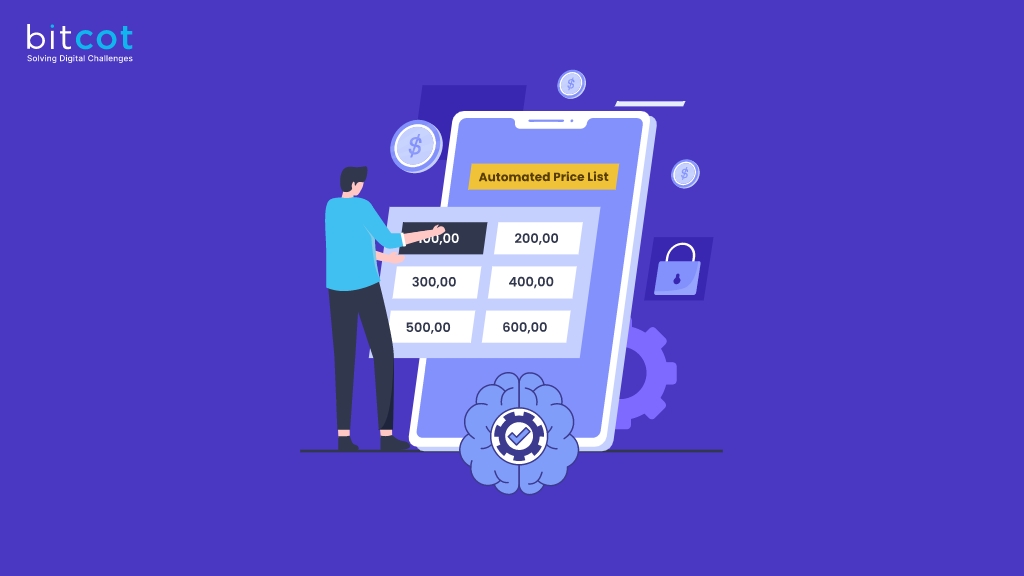
For one Amazon wholesale seller, every new supplier price sheet meant one to two days of searching, filtering, copying, and pasting before a single buying decision could be made. By the time the sheet was finished, the sales ranks it was based on had already moved. Price sheet automation for Amazon sellers solves exactly that lag, and this case study shows how our San Diego engineering team cut the job to about an hour with Power Automate RPA.
The problem is common because the seller base is large. According to Amazon’s 2025 Small Business Empowerment Report, independent sellers account for more than 60% of sales in Amazon’s store, and most of them are small and medium-sized businesses without in-house data engineering teams.
The speed came from the bot, but the accuracy came from somewhere less obvious. Supplier sheets carried broken product identifiers, and one barcode could point to several Amazon listings. This article covers the workflow we automated, the data problems that nearly undermined it, and when a seller should move from UI automation to official APIs.
What Is Price Sheet Automation for Amazon Sellers?
Price sheet automation for Amazon sellers is software that reads a supplier’s product and cost list, matches each item to its Amazon listing, pulls current market data such as sales rank and Buy Box price, and returns a ranked sheet showing which products are worth buying. It replaces the manual research that sits between receiving a supplier file and placing a purchase order.
A supplier price sheet usually lists brand, product name, ASIN, UPC, unit cost, and minimum advertised price. Sellers use it to make three decisions: which products to buy, what to sell them for, and whether the margin justifies the inventory risk. Each of those decisions depends on market data that changes daily, which is why speed matters as much as accuracy.
The Client and the Manual Workflow It Replaced
The client is a U.S. eCommerce wholesaler that sources products from multiple suppliers and sells them through its Amazon store. As the supplier list grew, the time spent evaluating each new price sheet grew with it, and pricing decisions started to lag behind the market.
The Six-Step Manual Process
Before automation, a team member worked through every supplier file by hand, switching between the spreadsheet, SmartScout, and Amazon for each product. Every step depended on one person’s attention. The process looked like this:
- Receive the price sheet. Suppliers sent PDF or Excel files with brand names, ASINs, UPCs, unit prices, and minimum sale prices.
- Search the brand in SmartScout. The team opened the Brands section, found the supplier’s brand, and applied filters such as sales rank under 250,000 and an Amazon in-stock rate of 30% or lower.
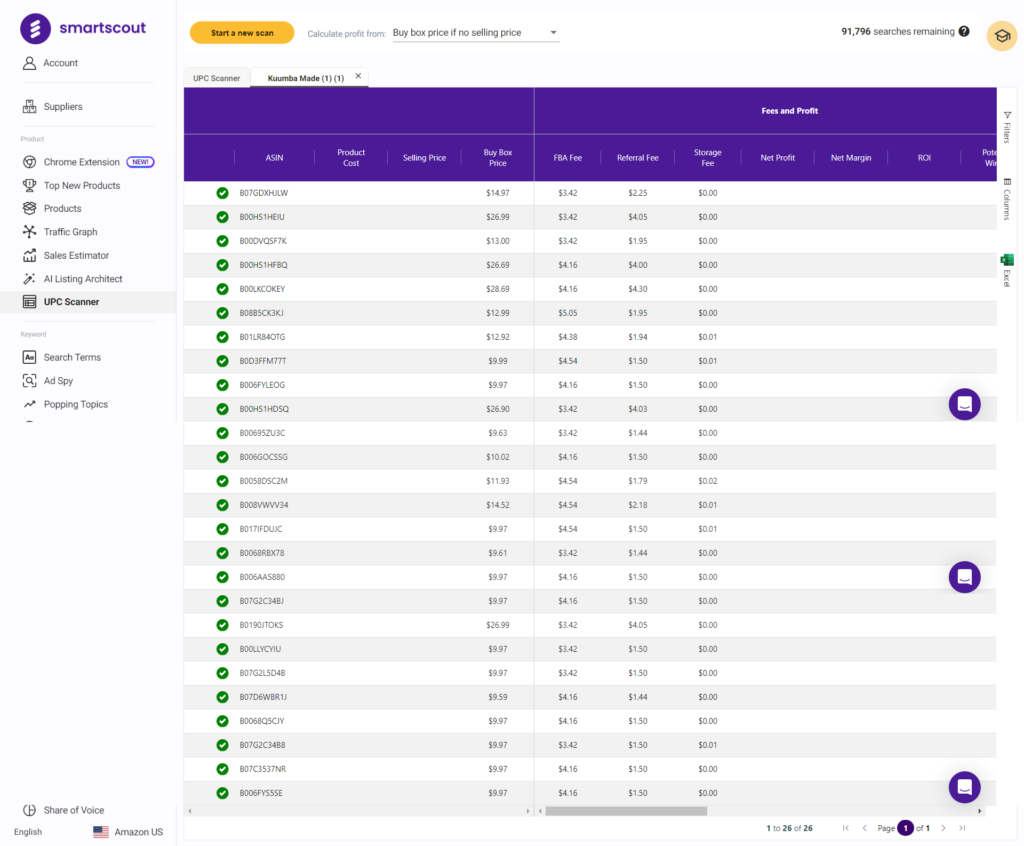
- Export and upload. Products that passed the filters were exported and uploaded into SmartScout’s UPC scanner.
- Pull product details. The scanner returned detailed records for each matched ASIN.
- Check each listing. The team opened every Amazon product page and read values from browser extensions such as AZInsight and Keepa.
- Build the output sheet. All findings were typed into a final spreadsheet used for purchasing and listing decisions.
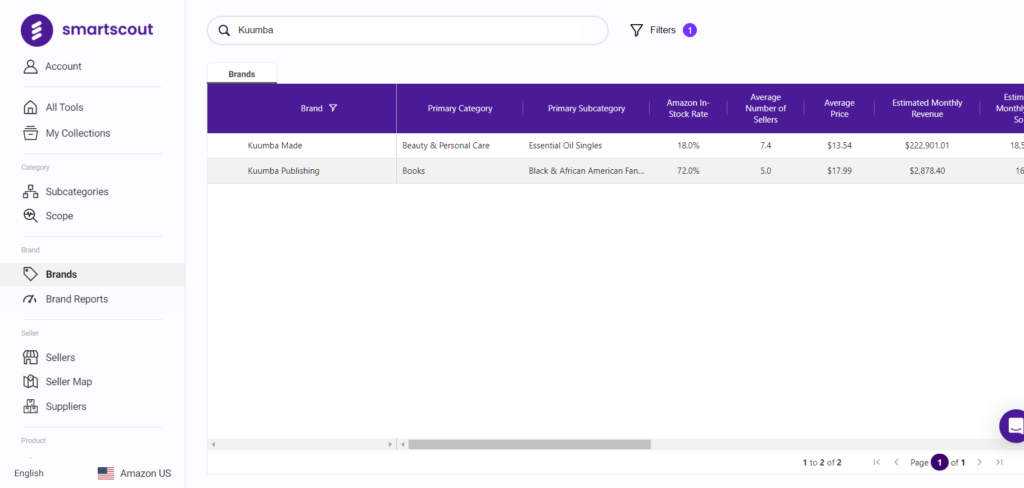
Each sheet took one to two days, and the delay itself was the costliest part. Amazon sales ranks shift constantly, so a sheet finished on day two described a market that no longer existed on day one.
How We Built the Price Sheet Automation in Power Automate
We built the workflow as a desktop flow in Microsoft Power Automate, because every tool the client relied on was browser-based and the fastest reliable path was to automate the screens the team already used. The flow starts when a user selects a supplier file and presses run, and it ends with a finished output sheet in the user’s inbox.
That choice matches how Microsoft positions the technology. According to Microsoft Learn, robotic process automation is needed for applications that lack a prebuilt connector and an API for a custom one, and it works by teaching Power Automate for desktop to mimic a user’s mouse movements and keystrokes.
This is the same pattern our robotic process automation work follows in other industries: automate the human path first, then measure where it breaks. The flow runs in five stages.
Stage 1: File Intake and Standardization
The flow reads the supplier file and converts it into one standard layout defined by the client, regardless of how the supplier formatted it. A new working spreadsheet is created for each run so the original file is never modified.
Stage 2: Brand Search and Filtering in SmartScout
The bot opens SmartScout, searches each brand, and applies the client’s predefined filters: sales rank under 250,000 and an Amazon in-stock rate of 30% or lower. It then runs the UPC scanner with the seller name and sorts the results by rank from low to high, exactly as a team member would.
Stage 3: Listing Enrichment With AZInsight and Keepa
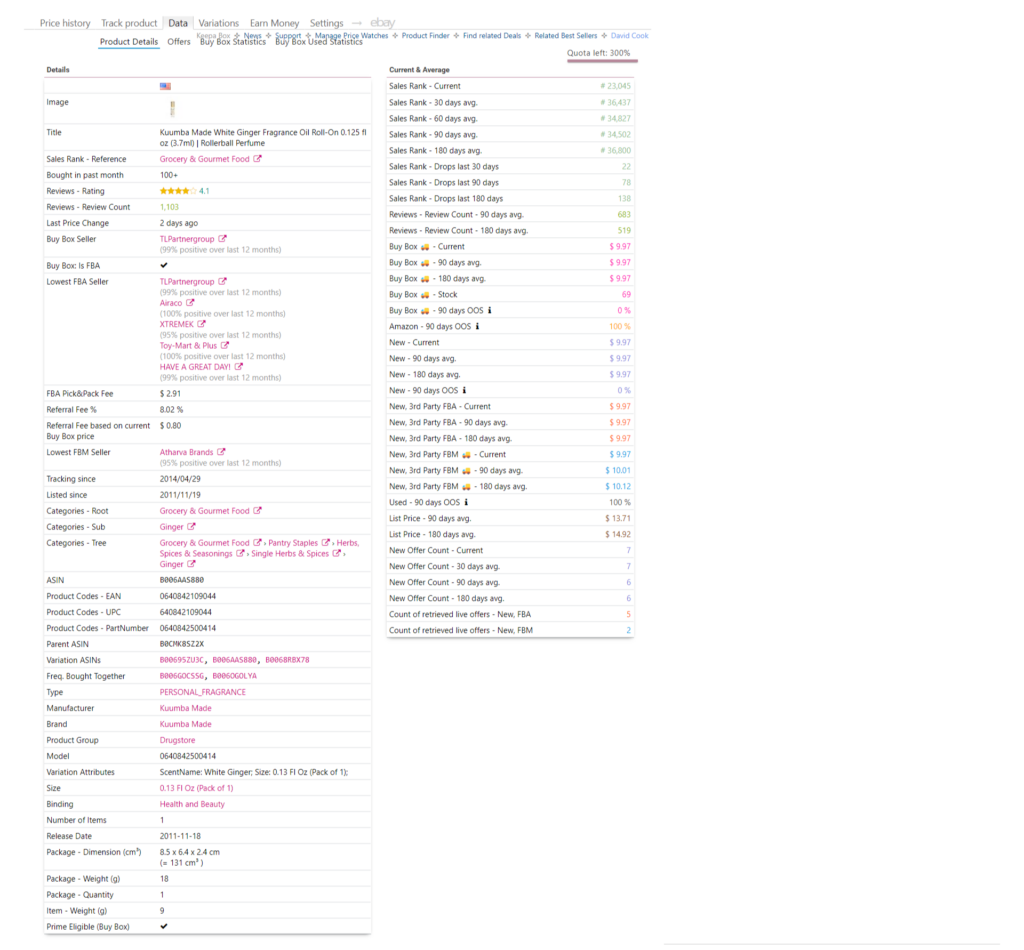
For each shortlisted product, the flow opens the Amazon detail page and reads values from the AZInsight and Keepa extensions, plus estimated monthly sales from RevSeller. AZInsight supplies profit and ROI calculations based on supplier cost and Buy Box price, while also handling parent and child ASINs for products sold in multiple sizes or colors.
Keepa contributes the historical view: current and past sales rank, average prices over 30, 90, and 180 days, Buy Box holder and stock levels, and the lowest merchant-fulfilled offer. Together, the two tools turn a single product page into a snapshot of demand, competition, and margin.
Stage 4: Loop and Consolidate
After each product, the flow checks whether more rows remain and continues until the sheet is exhausted. It then consolidates every value into one output sheet with the fields shown below.
| Output field | Source | Decision it supports |
|---|---|---|
| ASIN and product mapping | Price sheet and SmartScout | Confirms the right listing was evaluated |
| Current and 30/90/180-day rank | Keepa | Demand and demand stability |
| Supplier cost and Buy Box price | Price sheet and Keepa | Room for a competitive price |
| ROI and profit margin | AZInsight | Whether the product is worth buying |
| Estimated monthly sales | RevSeller | How many units to order |
| Who sells it (Amazon, brand, or third party) | Keepa | How hard the Buy Box will be to win |
Stage 5: Review and Handoff
The finished output sheet is emailed to the client for review. The buying team makes the final purchase and listing decisions, so the automation speeds up research without taking judgment out of the process.
Because the flow runs inside the client’s existing Microsoft environment, it also fits their wider tooling. Teams that want to extend it with approvals, SharePoint storage, or Teams alerts can do so with Microsoft Power Automate cloud flows without rebuilding the desktop automation.

Why Supplier Data Broke Before the Bot Did

The biggest accuracy risk in Amazon price sheet automation is not the bot; it is the product identifiers in the supplier file. A bot copies whatever it is given at machine speed, so a broken UPC produces a confident wrong answer faster than a person ever could.
UPCs have a strict format. According to GS1, the standards body that issues them, a UPC is a GTIN-12: a 12-digit number used mostly in North America, while EAN codes used elsewhere run to 13 digits.
Supplier sheets routinely break that format. In sample price sheets from this project, we found UPCs stored as numbers so their leading zero had disappeared, leaving 11 digits; the same UPC listed against two different ASINs; and manufacturer part numbers typed into the UPC column.
The duplicate matches are not a supplier mistake alone. Amazon’s Selling Partner API documentation states that the catalog makes no guarantee of a one-to-one mapping between UPCs and ASINs, and that one external identifier can map to multiple ASINs, so each match has to be checked against brand, title, and product type.
| Data problem | How it shows up | Standardization rule |
|---|---|---|
| Leading zero dropped | 11-digit UPCs that match nothing | Store UPCs as text and pad to 12 digits |
| One UPC, several ASINs | Wrong listing evaluated, wrong margin reported | Flag multi-ASIN matches for human review |
| Part number in the UPC column | Scanner returns no result or a random product | Reject values that are not 12 or 13 digits |
| Supplier-specific layouts | Columns shift between files | Map every supplier file to one standard template |
Handling these rules at intake is what made the output trustworthy. The same principle drives any well-designed AI-powered data pipelines project: validate and normalize at the entry point, so every downstream step works from clean data.
What Changed for the Client After Price Sheet Automation

The clearest result was time: a price sheet that took one to two days of manual work now completes in about an hour or less, depending on how many products it contains. Because the research finishes the same day the sheet arrives, the rank and price data behind each decision is current when the buying team uses it.
| Area | Before automation | After automation |
|---|---|---|
| Time per price sheet | One to two days | About an hour or less |
| Data freshness | Ranks outdated by completion | Ranks captured the same day |
| Throughput | One sheet at a time | Multiple sheets processed in parallel |
| Consistency | Filters applied by hand, varied by person | Same filters and rules on every run |
| Team focus | Copying data between tools | Reviewing results and negotiating with suppliers |
Scalability followed from the same change. Adding a new supplier now means mapping one more file layout rather than adding more manual hours, so the client can evaluate more suppliers without growing the research team.

When Is RPA the Right Choice, and When Should You Move to APIs?
RPA is the right choice when the tools involved offer no practical integration and the business needs results in weeks; APIs are the better choice once the workflow is proven and will run at high volume for years. Screen-based bots break when a website changes its layout, while APIs change on published schedules.
| Factor | UI-based RPA | API integration |
|---|---|---|
| Time to first result | Fast, reuses existing tools | Slower, requires developer setup and access approval |
| Resilience to change | Breaks when screens change | Stable within documented versions |
| Volume | Limited by browser speed | Built for batch requests |
| Best stage | Proving the workflow | Running the proven workflow at scale |
For most sellers, the sensible sequence is to automate the manual path first, measure which steps fail most often, then replace those steps with official integrations. That phased approach is the practical answer to the build vs buy software question for automation, because each stage earns the investment in the next.
When the workflow outgrows desktop automation, custom software development can move identifier matching and enrichment into a scheduled service that calls Amazon’s Catalog Items API directly. That service becomes the single place where supplier costs and Amazon data meet.
Sellers who also run their own storefront can connect the same service to their WooCommerce development stack, so supplier cost changes flow into pricing on every channel. Amazon and the storefront then work from the same numbers.
The next layer is intelligence rather than speed. AI workflow automation can classify supplier files with unfamiliar layouts, extract data from scanned PDFs, and suggest which flagged ASIN matches are most likely correct, leaving people to confirm rather than research.
The price sheet flow is also rarely the only manual process in an Amazon business. Purchase orders, supplier onboarding, and reorder alerts follow the same pattern, which is why sellers often treat this project as the first step in wider business process automation.
What Amazon Price Sheet Projects Teach Us About Automation Debt
The lesson we took from this project is that fast automation creates debt unless someone owns the data rules. Across Amazon seller work in Southern California, from San Diego to Los Angeles, the bots rarely fail first; supplier files with shifting layouts and broken identifiers do.
At Bitcot, our engineers now start every price sheet project by reviewing a handful of real supplier files before building anything, cataloging each identifier problem and agreeing on a rule for it. That review shapes both the first RPA build and the later move to APIs. For sellers looking for software development in San Diego on this kind of work, the practical takeaway is simple: fix the data contract first, and the automation becomes easy to maintain.

Conclusion
Price sheet automation turned a one-to-two-day manual task into a same-day, roughly one-hour process for this Amazon wholesaler, and it made purchasing decisions rest on current data rather than stale ranks. Power Automate desktop was the right tool for the first build because it automated the exact screens the team already trusted.
The durable gains, though, came from the data rules around the bot: normalized UPCs, flagged multi-ASIN matches, and one standard layout for every supplier. If your team is still researching supplier sheets by hand, start by reviewing a few real files for identifier problems; that single step shows how much of the workflow is ready to automate.
Frequently Asked Questions
What is price sheet automation for Amazon sellers?
Price sheet automation for Amazon sellers is software that reads a supplier’s product and cost list, matches each item to its Amazon listing, and pulls current rank, price, and margin data into one ranked output sheet. It replaces the manual research between receiving a supplier file and deciding what to buy.
What is the difference between RPA and API integration for Amazon data?
RPA automates the screens a person already uses, while API integration exchanges data directly with Amazon’s systems through documented endpoints. RPA is faster to launch and works with browser-based tools, but it breaks when layouts change; APIs take longer to set up and are more stable at high volume.
How do you automate supplier price sheet processing with Power Automate?
You build a Power Automate Desktop flow that standardizes the supplier file, searches each brand in your research tool with fixed filters, reads listing data from Amazon product pages, and writes the results into one output sheet. Clean the UPCs and flag products that match more than one ASIN before the flow runs, so the output stays accurate.
How are Amazon sellers in San Diego and Los Angeles using automation?
Amazon sellers in San Diego and Los Angeles use automation to process supplier price sheets, enrich product research with rank and Buy Box data, and keep pricing current across channels. The most successful projects start by cleaning supplier identifier data, because broken UPCs cause more errors than the automation tools themselves.
Is price sheet automation worth it for a small Amazon seller?
Yes, if the seller regularly evaluates supplier price sheets, because each manual sheet can take one to two days, while the underlying rank data keeps changing. A small seller can start with a single desktop flow built around existing tools and move to API integrations only once the workflow is proven.