- Basic custom CRMs cost $10,000 to $50,000 over 2 to 4 months.
- Version one scope drives cost more than the tech stack.
- HBR research links 55% of CRM projects to lost customers.
- San Diego teams often integrate first, then build only the gaps.
- Launch with one workflow, then expand from real usage data.
Custom CRM software development is the process of designing and building a customer relationship management system around one company’s own sales, service, and operations workflows. The question most teams ask first is “what will it cost,” and the honest answer is that the price is mostly set before anyone writes code: by how much you ask version one to do.
We see this pattern constantly with San Diego businesses. A marine services company we worked with was losing 1 in 3 leads before it moved off a generic CRM that did not fit how it handled inquiries. The fix was not a giant platform. It was a focused first release built around its lead workflow, followed by everything else.
This guide covers what a custom CRM is, when building beats buying, realistic cost ranges and timelines, the five-step development process, and the mistakes that sink CRM projects. Use it to scope your project and set a budget before you talk to any development team.
What Is Custom CRM Software Development?

Custom CRM software development means building a CRM whose data model, screens, and automations match how your company actually sells and serves customers. A packaged CRM gives you its own idea of a “deal” or a “contact,” and your team adapts to it. A custom CRM starts from your process and models it directly.
The difference shows up in the data model. A vehicle wrap printer needs jobs tied to vehicle dimensions, proof approvals, and installer schedules. A political fundraiser needs donors, contribution limits, and event attendance. Neither fits cleanly into a generic “lead, opportunity, account” structure without heavy workarounds.
Modern custom CRMs also carry intelligence that generic tools struggle to tailor. Through generative AI integration, a CRM can summarize call notes, score leads using your own closed-deal history, and draft follow-ups in your team’s voice. The value comes from training those features on your data rather than a vendor’s averages.
Build, Buy, or Integrate: Which CRM Path Fits Your Business?
Build a custom CRM when your core workflow is your competitive advantage and no packaged tool models it without constant workarounds. Buy an off-the-shelf CRM when your sales process is standard and speed matters more than fit. Integrate when your CRM is fine but disconnected from the tools around it.
That third option is often missed. If your team likes its current CRM but loses time switching to phone, SMS, or billing tools, CRM integration services connect those systems without a rebuild.
Teams on Salesforce follow the same logic: a targeted Salesforce integration often removes the pain that prompted a “let’s build our own” conversation.
Custom CRM vs. Off-the-Shelf CRM at a Glance
| Factor | Custom CRM | Off-the-Shelf CRM |
|---|---|---|
| Upfront cost | Higher, paid as a project | Lower, paid as a per-user subscription |
| Workflow fit | Modeled on your exact process | Your process adapts to the tool |
| Time to launch | Months | Days to weeks |
| Scaling cost | Grows with infrastructure, not seats | Grows with every user added |
| Maintenance | Your team or a development partner | Handled by the vendor |
| AI features | Trained on your own data and rules | Generic features, limited tuning |
| Data ownership | Full control of storage and access | Governed by vendor terms |
For a deeper framework that applies beyond CRMs, our guide on build vs buy software walks through the scoring questions we use with clients. The short version: if per-seat fees are climbing and your team keeps a spreadsheet beside the CRM, building deserves a serious look.
How Much Does Custom CRM Software Development Cost?

Custom CRM development typically costs $10,000 to $50,000 for a basic system, $50,000 to $150,000 for a mid-level CRM, and $150,000 or more for an enterprise build. The range is wide because the cost follows scope: the number of workflows, user roles, and integrations you need on launch day.
| Type of CRM | Cost Range | Typical Features | Development Time |
|---|---|---|---|
| Basic CRM | $10,000 to $50,000 | Contact management, lead tracking, task management | 2 to 4 months |
| Mid-level CRM | $50,000 to $150,000 | Custom workflows, integrations, reporting dashboards | 4 to 6 months |
| Enterprise CRM | $150,000 to $500,000+ | Advanced automation, role-based security, full system integrations | 6 to 12+ months |
What Drives the Price Up or Down
- Workflow count at launch: Each workflow adds screens, rules, and test cases. Cutting version one from six workflows to two often halves the first invoice.
- Integrations: Every external system (phone, email, billing, ERP) needs mapping, error handling, and monitoring.
- Data migration: Years of messy contact records take real effort to clean, deduplicate, and import.
- Team rates and location: Engineering labor is the largest line item in any CRM budget.
Labor cost explains most of the spread. According to the U.S. Bureau of Labor Statistics, the median annual wage for software developers was $135,980 in May 2025. A CRM that needs three engineers for six months carries a very different price than one that needs two engineers for ten weeks.
The build price is only part of the picture. Hosting, security updates, and new features continue after launch, which is why we recommend modeling the total cost of ownership for digital products over three to five years. Compare that figure against your current per-seat subscription costs, not against zero.
When the scope is right, the return is measurable. Across the CRM builds our team has delivered, clients have seen an average 45% return on investment, driven mainly by recovered leads and fewer manual handoffs.

How Do You Build a Custom CRM? The 5-Step Process
Building a custom CRM follows five steps: map the workflows, choose the architecture, design for daily users, build in small releases, and launch in phases. Each step below includes the decision that most affects cost and adoption.
Step 1: Map the Workflows Worth Automating
Start by watching how your team works today, not by listing features. Shadow a sales rep and a support agent for a day and record every tool switch, copy-paste, and spreadsheet lookup. Those friction points become your version one requirements.
Then rank them by revenue impact. A long wish list almost always hides one or two workflows that account for most of the lost deals or wasted hours.
Step 2: Choose an Architecture That Fits Your Scale
Pick a stack your future team can maintain. A common, well-supported setup pairs React for the interface, Node.js or Python (Django) for the backend, and PostgreSQL for relational customer data. MongoDB suits CRMs with highly variable record structures.
Plan the AI layer here, too. Deciding early where call transcripts, email history, and deal outcomes are stored makes lead scoring and automated summaries far easier to add later.
Step 3: Design Screens Around Daily Tasks
Adoption depends on how fast a rep can log a call or update a deal. Design the three or four screens people use every hour first: the pipeline view, the contact record, and the activity log. Test clickable wireframes with real users before development begins.
Make mobile a first-class view for field teams. Technicians and outside sales reps update records between appointments, not at a desk.
Step 4: Build in Small, Testable Releases
Ship a minimum viable product (MVP), meaning the smallest version that solves the top-ranked problem, then add features in two-week sprints. Each release gets automated tests plus a short session with real users.
Automation belongs here as well. Rules that assign leads, trigger follow-ups, or update deal stages are where business process automation pays off inside a CRM, so build them against real data, not assumptions.
Step 5: Launch in Phases and Measure Adoption
Roll out to a small group of power users first, fix what they find, then expand team by team. Host on a major cloud provider (AWS, Azure, or Google Cloud) with automated backups and encrypted connections from day one.
Track adoption, not just uptime. Daily active users, records updated per rep, and time-to-first-response tell you whether the CRM is actually replacing the old spreadsheets.
What Benefits Does a Custom CRM Deliver in Practice?
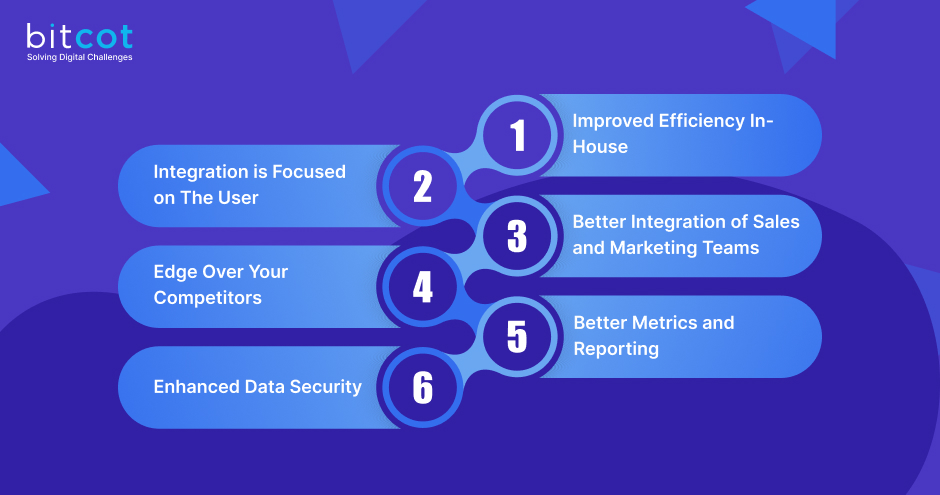
A custom CRM delivers four practical benefits: fewer manual steps, reports built on your own KPIs, lower costs as headcount grows, and full control over customer data. CRM is also too central to cut corners on. According to Gartner, CRM became the largest and fastest-growing enterprise application software category, accounting for almost a quarter of that market.
Fewer Manual Steps
When the CRM models your real process, reps stop re-entering data across tools. Pricing rules, approval steps, and follow-up reminders live inside the system instead of in side spreadsheets and sticky notes.
Reports Built on Your KPIs
Packaged dashboards show what the vendor thinks matters. A custom CRM reports on your own metrics, such as revenue per technician, repeat-job rate, or donor retention by event.
Costs That Do Not Scale With Seats
Subscription CRMs charge for every new user. A custom system’s running cost grows with infrastructure, which usually rises far more slowly than headcount.
Control Over Customer Data
You decide where records live, who can see them, and how long they are kept. The Federal Trade Commission advises businesses to keep only the personal information they need and to dispose of the rest properly. A custom CRM lets you build those retention rules directly into the software.
Why Do Custom CRM Projects Fail?
Custom CRM projects fail most often because companies treat the CRM as a technology purchase instead of a change in how teams work with customers. In a widely cited Harvard Business Review article, Bain researchers asked why 55% of CRM projects drive customers away and dilute earnings; the summary is available from Bain & Company.
In our own project reviews, three causes repeat:
- Copying every legacy workflow into version one. Teams rebuild ten years of exceptions instead of fixing the process first.
- No owner on the business side. Without a sales or operations lead making decisions, requirements drift every sprint.
- Dirty data migrated as-is. Duplicate and outdated contacts erode trust in the new system within weeks.
These patterns are not unique to CRMs. Our breakdown of why software projects fail covers the broader warning signs worth checking before kickoff.
Questions to Ask Before You Hire a CRM Development Team
The right CRM development partner can explain your version one scope back to you in plain language before quoting a price. Use these questions in every evaluation call:
- Which workflows would you leave out of version one, and why? A strong team pushes back on scope.
- How will you migrate and clean our existing data? Ask for a specific plan, not a promise.
- Which systems will you integrate first? Phone, email, and billing are the usual priorities.
- Cloud or on-premise hosting? Cloud lowers hardware costs; on-premise gives tighter physical control.
- Who owns the source code? You should, with full repository access from the first sprint.
- What does support look like after launch? Clarify response times and how new features are priced.
Also decide early whether you want an outside team, an internal one, or a mix. Our comparison of outsourcing vs in-house development lays out the tradeoffs for long-lived systems like a CRM.
What Version One Taught Us Across California CRM Builds
The most reliable predictor of a successful CRM build we have seen is a short version one. Clients in Irvine, Los Angeles, and San Diego who launched with one or two workflows were using the system daily within weeks, while those who insisted on full feature parity with their old tool often waited months for anything usable.
Specialty businesses show this most clearly. A vehicle wrap printer, for example, juggles job specs, proof approvals, installer schedules, and invoicing, and every one of those feels urgent on day one. Starting with the step where jobs stall, then adding modules based on real usage data, keeps both budget and adoption on track. Teams looking for software development in San Diego often expect a big launch; the smaller one is usually what gets adopted.

Conclusion
Custom CRM software development is worth it when your workflow is the thing that makes you different and packaged tools keep forcing workarounds. The budget, timeline, and adoption all trace back to one decision: how much version one has to do.
Start by mapping the two workflows that cost you the most revenue today. Price a build around those, compare it with your current subscription and integration options, and expand only once your team is using the system every day. If you want a second opinion on that scope, a short conversation is a good place to start.
Frequently Asked Questions
What is custom CRM software development?
Custom CRM software development is building a customer relationship management system around a company’s own sales, service, and operations workflows. Instead of adapting to a vendor’s data model, the CRM models your actual records, rules, and reports.
What is the difference between a custom CRM and an off-the-shelf CRM?
A custom CRM is built to match your process, while an off-the-shelf CRM asks your process to match the tool. Custom systems cost more upfront and take months to launch, but they avoid per-seat fees and fit specialized workflows. Off-the-shelf tools launch in days and suit standard sales processes.
How long does it take to build a custom CRM?
A basic custom CRM takes 2 to 4 months, a mid-level CRM takes 4 to 6 months, and an enterprise CRM takes 6 to 12 months or more. Timelines shrink when version one is limited to one or two high-impact workflows and the rest ship in later releases.
Do San Diego businesses build custom CRMs or integrate existing ones?
Many San Diego businesses integrate first and build only where integration cannot close the gap. A team happy with its CRM but slowed by disconnected phone or SMS tools usually needs integration, while a team whose core workflow does not fit any packaged CRM is a candidate for a custom build.
Is a custom CRM worth the investment for a small business?
A custom CRM is worth it for a small business when its workflow is specialized and subscription workarounds are costing leads or staff hours. Basic builds start around $10,000 to $50,000, so compare that against several years of per-seat fees and the revenue lost to missed follow-ups before deciding.