Key Takeaways
- Mining work orders break at handoffs between systems and shifts.
- Validate requests first, distribute jobs second, sync systems third.
- Rule-based job distribution replaces phone calls for technician assignment.
- Western US mines, from Boron, California, need shift-aware approval routing.
- The same event-driven flow tracks concentrate shipments between CRM and SAP.
Introduction
A haul truck operator finds a hydraulic leak during the pre-shift inspection. The defect goes on a paper card, then into an email, then into the ERP, then into the maintenance schedule, typed by three different people. By the time a technician arrives, the truck has missed half a shift and nobody is sure which record is current.
That is the real cost of manual work orders in mining and natural resources. The systems are rarely the problem; the handoffs between them are. Whether the site is a borate operation near Boron, California or a copper mine in Arizona, the delays come from re-entry, phone-based scheduling, and status checks at shift change.
This guide shows how to automate work order processing with Microsoft Power Automate. It covers a seven-step workflow, how automated job order distribution works, how to connect SAP and a CRM for real-time shipment tracking, and what our engineers in San Diego have learned about sequencing these flows.
How Do You Automate Work Orders?
You automate work orders by capturing every request into one structured record, validating it, distributing the job by rules, syncing the ERP and asset systems, and tracking execution until close. Power Automate connects each step, so no one re-types data or phones around to assign work.
The short version of the process:
- Capture requests from apps, portals, email, and ERP triggers into one table.
- Validate mandatory fields and check people, equipment, and parts availability.
- Distribute the job automatically using skill, location, shift, and workload rules.
- Sync the ERP and asset management system in parallel.
- Notify the technician and supervisor at the moment of assignment.
- Monitor progress and escalate overdue jobs automatically.
- Report on completed work to plan the next cycle.
The sections below explain each step with the specific Power Automate actions and expressions behind it.
Where Traditional Work Order Processing Breaks Down
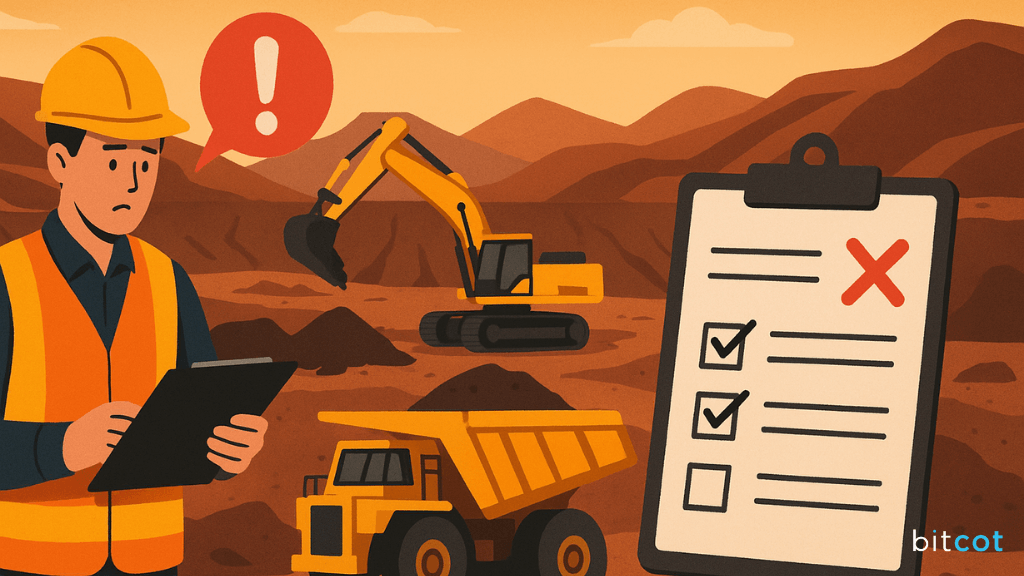
Manual work order processes in mining share four structural failure points:
- Repeated data entry. The same asset ID, job type, requester, and location are typed into the ERP, the asset management system, and the scheduling tool, and each re-entry invites a transposed equipment number.
- Slow availability checks. Confirming that a qualified technician, the right equipment, and spare parts are free usually means a round of radio calls and emails, and one stalled check delays every job behind it.
- Errors with physical consequences. An incomplete record can send a crew out without the right tools, miss a maintenance window, or skip a required safety step.
- No shared view of status. Managers cannot tell whether a job is in progress or waiting on a part, so problems surface at shift change instead of when they start.
Each step in the workflow below removes one or more of these failure points.
How to Automate Work Order Processing With Power Automate: 7 Steps
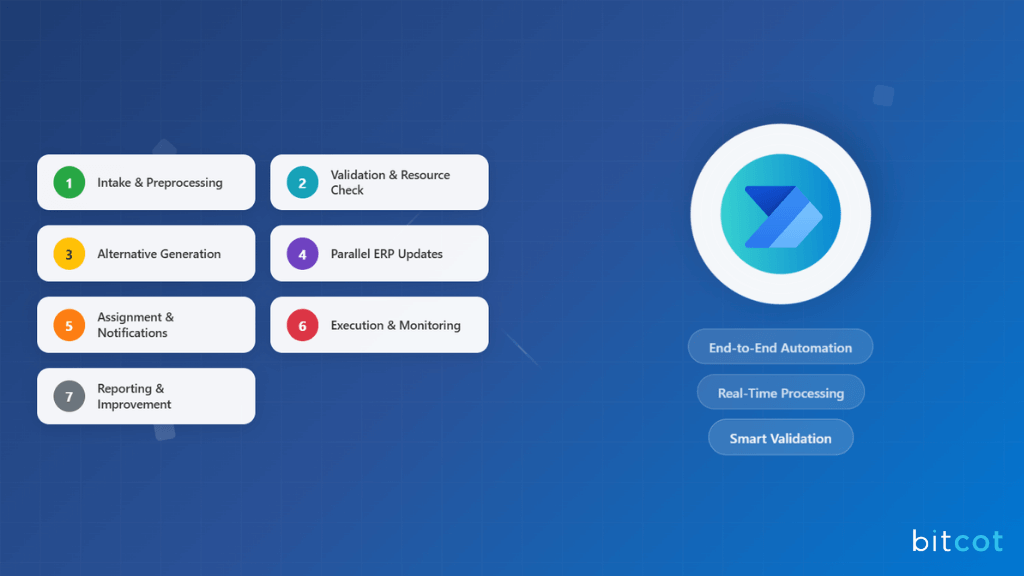
The seven steps run in a fixed order. Validation comes before distribution, and system updates happen only after a work order is confirmed. Changing that order is the most common reason automated workflows still produce conflicts and mismatched records.
Step 1: Capture and Normalize Every Request
Work orders arrive from field mobile apps, maintenance portals, a shared mailbox, and ERP-generated triggers. This step converts every request, whatever its source, into one consistent record before a person touches it.
Power Automate actions:
- When an item is created (SharePoint) or When a row is added (Dataverse) picks up portal and app submissions.
- When a new email arrives (V3) captures emailed requests from the maintenance mailbox.
- Get attachments and Get file content pull PDFs or spreadsheets attached to a request.
- AI Builder document processing extracts asset ID, job type, location, and requester from forms and scanned cards.
A request portal built with Microsoft Power Pages gives contractors and field crews one structured form instead of free-text emails.
Every source then writes to the same work order table, which is the foundation of sound business process automation.
Step 2: Validate the Request and Check Resource Availability
Before any assignment, the request must pass two checks: are the mandatory fields complete, and are the required people, equipment, and parts actually available?
Power Automate actions:
- Condition confirms required fields are present and returns incomplete requests to the requester with a specific message.
- SQL Server: Get rows (V2) or Dataverse: List rows reads technician schedules, equipment status, and parts inventory.
- Filter array keeps only resources that match the job’s skill and availability requirements.
- Compose builds a short summary of matching resources for the supervisor.
Here is the validation and filtering logic in practice. The field names are illustrative; use the column names from your own tables.
// Condition (advanced mode): all mandatory fields are present
@and(
  not(empty(triggerBody()?['AssetID'])),
  not(empty(triggerBody()?['JobType'])),
  not(empty(triggerBody()?['Requester']))
)

// Filter array: technicians with the required skill who are available
@and(
  equals(item()?['SkillCode'], triggerBody()?['RequiredSkill']),
  equals(item()?['Status'], 'Available')
)
Automated validation is usually where cycle time first improves in a measurable way, which makes it a practical starting point for wider digital transformation in operations.
Step 3: Propose Alternatives When Resources Conflict
In high-utilization environments, the first-choice technician or machine is often busy. Instead of stalling, the workflow proposes alternatives and sends them to the person who can approve one.
Power Automate actions:
- Switch branches on the availability result: available, partially available, or unavailable.
- Select builds a list of alternative technicians, time slots, or backup equipment.
- Post adaptive card and wait for a response (Microsoft Teams) sends the options to the supervisor, who approves one without leaving Teams.
The work order moves forward the moment the supervisor responds, rather than waiting in a queue while a coordinator searches by hand.

Step 4: Update SAP and Asset Systems in Parallel
Once a work order is confirmed, the ERP and the asset management system both need the same information. Updating them one after another by hand is where inconsistencies creep in.
Power Automate actions:
- Parallel branches run the ERP and asset updates at the same time.
- SAP ERP connector (or HTTP for a REST-based ERP) creates or updates the maintenance order.
- HTTP or a custom connector updates asset platforms such as IBM Maximo through their REST APIs; Dataverse: Update a row handles Dataverse-based systems.
- Scope with Configure run after catches a failure in either branch and alerts an administrator.
Most mine SAP systems run on-premises, so plan the connection early. According to Microsoft’s SAP ERP connector guide, the setup requires an on-premises data gateway on a Windows VM with the SAP Connector for Microsoft .NET installed, which usually needs your SAP Basis team involved.
The error-handling scope matters as much as the connector. Without it, one failed API call leaves the ERP and asset system disagreeing, which is the exact problem the automation was meant to remove.
Step 5: Assign the Work and Notify Everyone at Once
Assignment and notification belong in the same step. If technicians learn about a job later, the time saved on scheduling is lost.
Power Automate actions:
- Update a row (Dataverse) or Update item (SharePoint) assigns the work order to the selected technician.
- Send me a mobile notification or a Teams activity alert notifies the technician immediately.
- Post message in a chat or channel (Teams) updates the operations channel.
- Send an email (V2) delivers full work order details to managers.
This follows a core principle of AI workflow automation: deliver the right information to the right person as part of the action itself, not as a follow-up.
Step 6: Monitor Execution and Escalate Automatically
Many implementations automate intake and assignment, then leave execution to manual check-ins. That brings the visibility problem straight back, so this step keeps watching the job until it closes.
Power Automate actions:
- Update a row records status changes (in progress, delayed, completed) as technicians report from the field.
- Append to string variable keeps a running progress log for audit and reporting.
- A scheduled flow (Recurrence trigger) checks open work orders and escalates any that exceed their expected duration.
The escalation check compares elapsed time with the job’s expected duration. Power Automate measures time in ticks, and one hour equals 36,000,000,000 ticks:
// Condition: work order has run longer than its expected hours
@greater(
  div(sub(ticks(utcNow()), ticks(item()?['StartedOn'])), 36000000000),
  item()?['ExpectedHours']
)
That progress log also supports safety recordkeeping. For US surface mines, MSHA’s rule at 30 CFR 56.14100 requires safety defects on mobile equipment that are not fixed immediately to be reported, recorded, and kept on file until corrected, which a timestamped work order history makes easy to show an inspector.
Step 7: Report and Improve
The last step turns completed work orders into data for the next planning cycle.
Power Automate actions:
- Add a new row (Dataverse) or Add a row into a table (Excel) stores completed work orders for trend analysis.
- Refresh a dataset (Power BI) keeps dashboards current.
- Create HTML table builds weekly summaries for leadership emails.
Over time, this history shows recurring failures, overloaded crews, and assets that need a replacement plan.
How Does Automated Job Order Distribution Work?
Automated job order distribution assigns each validated work order to a technician or crew by applying fixed rules for skill, location, shift, priority, and current workload. The system makes the routine assignment instantly and sends only the exceptions to a supervisor.
These are the rules most mining operations start with:
| Rule | What it checks | Why it matters on site |
|---|---|---|
| Skill match | Certifications such as hydraulics, electrical, or welding | Prevents sending an unqualified technician to a critical asset |
| Location or zone | Pit, plant, or crusher area of the asset | Cuts travel time across large sites |
| Shift | Who is on the current or next shift | Avoids assigning work to crews who are off rotation |
| Priority | Safety defect, breakdown, or planned maintenance | Puts safety and production-critical jobs first |
| Workload | Open jobs already assigned to each technician | Balances work instead of overloading the fastest person |
In Power Automate, these rules live in a Dataverse table that supervisors can edit, not in hard-coded flow logic. When a rule changes, such as a new crane certification requirement, operations updates a row instead of asking a developer to rebuild the flow.
High-volume, repetitive back-office steps that sit next to distribution, such as copying data from legacy desktop screens, are a better fit for robotic process automation. Power Automate Desktop handles those screens, while cloud flows handle the rules and approvals.
Can a CRM Integrate With SAP for Real-Time Concentrate Shipment Tracking?
Yes. A CRM such as Dynamics 365 or Salesforce can integrate with SAP for near real-time concentrate shipment tracking by subscribing to shipment events, such as loadout weights, assay results, and vessel or rail departures, and writing them to the customer record. Most mines do not need a mining-specific CRM; they need a reliable integration layer between the CRM and SAP.
The same event-driven pattern used for work orders applies here. When a delivery document, weighbridge ticket, or assay result is posted in SAP, a flow reads it and updates the shipment record in the CRM, so sales and customer teams see status without logging into SAP. Microsoft notes that its SAP OData connector works with ECC, S/4HANA, and other OData APIs on SAP systems, with a gateway required only when SAP sits behind the company firewall.
For Salesforce-based commercial teams, a Salesforce integration follows the same design: SAP stays the system of record for weights, assays, and invoicing, and the CRM shows the customer-facing status. Keep the direction of each field clear, because two systems writing the same value is how shipment records drift apart.
What Changes After Automation
| Area | Before | After |
|---|---|---|
| Intake | Requests re-typed from email, portals, and apps | Captured once, in one format (Step 1) |
| Scheduling | Radio calls and emails to confirm availability | Checked and distributed by rules; conflicts resolved in Teams (Steps 2 and 3) |
| Data accuracy | Same data entered into several systems | SAP and asset systems updated together (Step 4) |
| Technician time | Chasing assignments and missing details | Notified with full details at assignment (Step 5) |
| Visibility | Status calls; problems found at shift change | Live status, automatic escalation, and an audit trail (Steps 6 and 7) |
What Comes Next: IoT, AI, and Automated Invoicing

Once the seven-step workflow is stable, it becomes a platform for further automation:
- Sensor-triggered work orders. Equipment sensors create a work order when vibration, temperature, or pressure readings move out of range, shifting maintenance from reactive to predictive.
- AI-ranked assignments. A model trained on past work orders ranks the best-fit technician instead of listing every available one in Step 3.
- Chat-based approvals. A Teams assistant summarizes conflicts and lets supervisors approve or reassign in conversation.
- Automated cost allocation. Completed work orders trigger labor, equipment, and material allocation to the right project in the ERP.
Each enhancement reuses the same work order table and event triggers, which is why getting Steps 1 to 4 right comes first.
Why Shift Patterns, Not Connectors, Decide Mining Workflow Design
When our team builds Power Automate workflows for operations-heavy clients, the connectors are rarely the hard part. SAP, SharePoint, Dataverse, and Teams are well documented, and most asset platforms expose REST APIs. The hard part is matching the flow to the order in which decisions actually happen on site.
A mine running three rotating shifts with supervisors in the field needs different approval routing than an operation with a central planning office. We have seen projects cut cycle time sharply when approvals followed the shift roster, and seen others simply move the bottleneck when approvals all routed to one planner who worked days.
That is why our first workshop maps where a delay in validation cascades into distribution and system updates. Teams planning broader enterprise application development around Microsoft 365 get the most from this mapping.
Our Microsoft Power Automate engineers use it to design the flow before writing a single expression.
Conclusion
Automating work orders in mining and natural resources is less about adding technology and more about fixing coordination. Each of the seven steps removes a specific failure point: scattered intake, slow availability checks, resource conflicts, out-of-sync systems, late notifications, invisible execution, and missing reporting.
Start with intake and validation, prove the improvement, then add rule-based distribution, parallel SAP updates, and monitoring. Keep the order intact and build error handling into every integration.
When that foundation is stable, the same pattern extends naturally to shipment tracking, invoicing, and sensor-driven maintenance. A good next step is to list every place your team re-types a work order today; that list is your automation roadmap.

Frequently Asked Questions
What is work order automation?
Work order automation is the use of software workflows to capture, validate, assign, track, and close maintenance requests without manual re-entry or phone-based scheduling. In mining, it connects field apps, ERP systems like SAP, and asset platforms so every system holds the same work order data.
What is the difference between automated job order distribution and manual dispatching?
Automated job order distribution assigns work instantly using rules for skill, location, shift, priority, and workload, while manual dispatching relies on a coordinator making calls. Automation handles the routine assignments and sends only conflicts to a supervisor for approval.
How do I automate work orders with Power Automate?
You automate work orders with Power Automate by building one intake table, adding validation conditions, applying distribution rules, updating SAP and asset systems in parallel branches, and running a scheduled flow that escalates overdue jobs. Start with intake and validation, then add the remaining steps once those are stable.
How can mining companies integrate a CRM with SAP to track concentrate shipments?
Mining companies integrate a CRM with SAP by using event-driven flows that read shipment events, such as loadout weights, assays, and departures, from SAP and update the CRM shipment record. SAP remains the system of record, and the CRM gives sales and customer teams near real-time status without SAP access.
Is Power Automate enough for a mine that already runs SAP?
Power Automate is enough for most work order and approval workflows around SAP, because it connects through the SAP ERP and SAP OData connectors without changing SAP itself. Very high-volume integrations or complex master data processes can need a dedicated integration platform alongside it.