Key Takeaways
- Build a PoC before full product development to validate AI output quality and integration feasibility in days, not months. Testing assumptions early isolates technical risk and lets you fail fast on the core idea rather than after a two-month build.
- Use Gemini 2.0 Flash’s responseSchema with responseMimeType: ‘application/json’ to force structured JSON output directly from the model. Without schema enforcement, the API wraps responses in markdown, breaking JSON parsing entirely.
- React Native with Expo eliminates backend infrastructure friction during validation. Calling Gemini’s REST API directly from a mobile app removes the need for a server tier, reducing cost and time-to-market for image analysis features.
- Structured metadata extraction (title, description, confidence score) transforms passive photo storage into active memory retrieval. Users recover actionable context from forgotten images instead of searching through raw files.
- Accept strategic trade-offs during PoC validation: prioritize rapid iteration over exhaustive error handling, compress images to keep payloads under 1MB, and handle edge cases post-launch rather than delay shipping.
Introduction
Every smartphone user takes dozens of photos daily, including receipts, whiteboards, menus, and signboards. But these images sit silently in a gallery, unsearchable and unprocessed. The real value is locked inside them.
AI is changing this. Multimodal models like Google’s Gemini 2.0 Flash can now read, interpret, and describe visual content with near-human accuracy in under two seconds. Is the question whether AI can no longer understand images? It’s how fast can we ship it into a real product?
Most mobile apps treat images as static files. Even apps with “AI features” typically send images to expensive third-party OCR APIs, wait several seconds, and return plain text, missing context entirely.
Photo Memory Capture
This post walks through building a production-ready photo memory capture app that transforms unstructured images into searchable, contextual data, solving the core problem of how to validate AI-powered image processing before committing to full development.
Why current solutions fall short:
- OCR tools extract text but ignore meaning. A receipt photo returns characters, not “a ₹450 dinner at a restaurant on April 22.”
- Vision APIs require complex setup, billing accounts, and platform-specific SDKs
- Developers waste weeks building image pipelines that could be validated in days with a PoC
The hidden challenge: teams invest in full-scale development before validating that the AI output is actually useful to the end user.
Strategic Insight / POV
Most teams jump from idea → full product. We believe the right sequence is: idea → PoC → validated assumption → product.
For AI features, especially, the output quality depends heavily on how you structure the prompt, which model you use, and how you format the response for the user. None of this can be assumed; it must be tested.
Our approach: wire the AI directly into a minimal native UI, put real images through it, and see what the model returns. Iterate on the prompt, not the product.
Hypothesis
Can we build a mobile app that accepts any photo and uses Gemini AI to extract a structured title, description, and confidence score with zero backend infrastructure?
Why PoC
A PoC is not a prototype. A prototype mimics the UI. A PoC validates a technical assumption.
Here, the assumption was: Gemini 2.0 Flash can return reliable, structured JSON from an image prompt without a backend server directly from a mobile app.
If this works, it eliminates an entire backend tier for image analysis, reducing cost and time-to-market significantly. A PoC lets us verify this in days, not after a two-month build.
Without a PoC, teams risk sinking months and budget into a full build only to discover the AI output doesn’t meet user needs or the integration breaks at scale. Validating the core assumption first isolates technical risk from product risk, letting you fail fast and cheap.
What We Built
A React Native (Expo) screen called Photo Memory Capture that:
- Let users pick an image from their camera or gallery
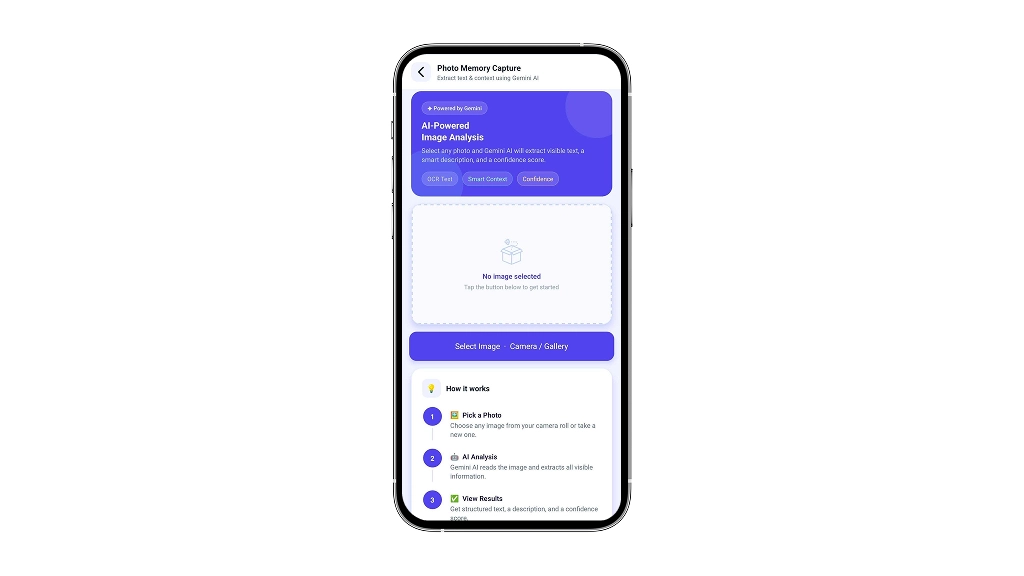
- Sends it as base64 to the Gemini 2.0 Flash API
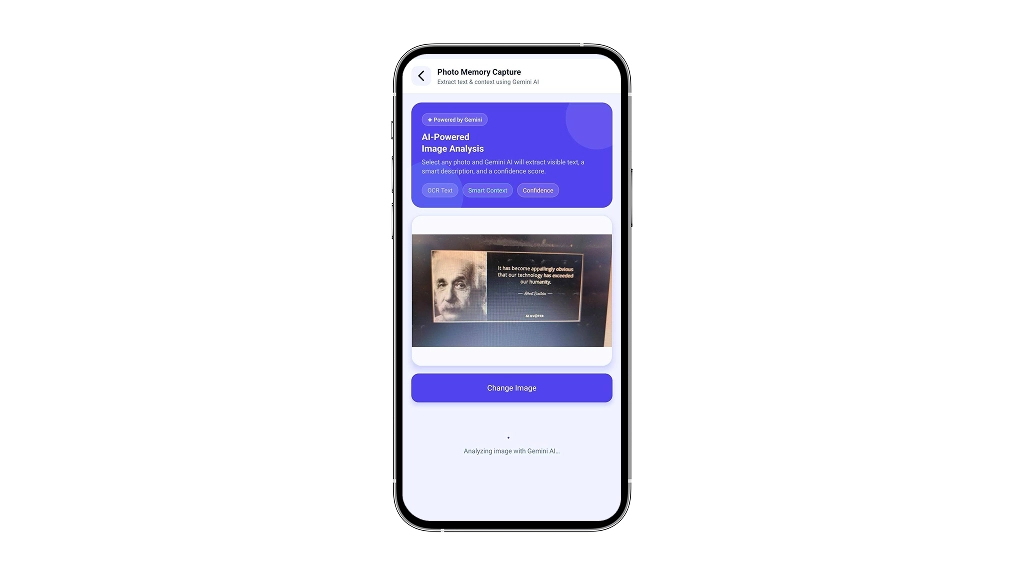
- Displays a structured AI response: Title, Description, Confidence Score, and a unique Image ID
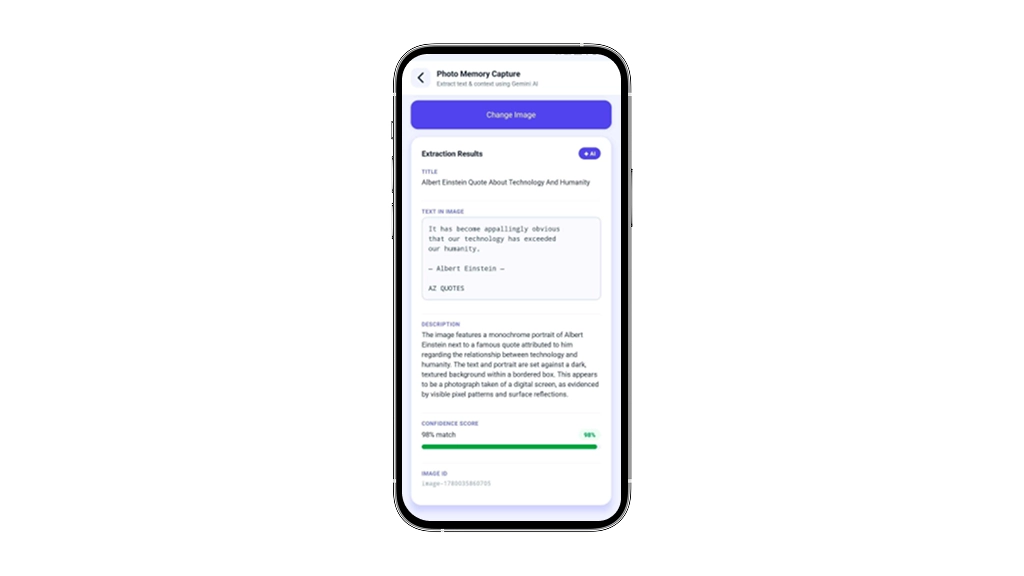
No backend. No image storage. No OCR pipeline. Just a mobile app calling a multimodal AI model directly.
This approach directly solves a real problem: users can now photograph a receipt, whiteboard note, or menu and instantly retrieve searchable, contextual information instead of storing raw image files. The app transforms passive photo capture into active memory retrieval.
Key Features
| Feature | Insight | Outcome |
|---|---|---|
| Camera + Gallery Picker | Users need flexibility; not everyone wants to capture live images. Some prefer testing with saved images. |
Single pop-up handles both options with minimal friction. |
| Gemini Structured Output (responseSchema) | Without schema enforcement, AI may return markdown-wrapped text That breaks JSON parsing. |
Guaranteed clean JSON with zero parse errors. |
| Confidence Score with Visual Bar | A number alone provides limited context; a color-coded bar (green/blue/red) communicates trust instantly. |
Users can immediately gauge result reliability. |
| Image ID Generation | Every result needs a traceable identifier for future storage, retrieval, or indexing. |
Timestamp-based ID generated client-side and ready for database integration. |
| API Key via Environment Variable | Hardcoded keys are a security risk and are commonly flagged by static analysis tools. |
Key stored in .env and excluded from version control via.gitignore. |
The PoC delivers three core capabilities: real-time image interpretation via Gemini 2.0 Flash, structured metadata extraction (date, location, category), and instant searchability across the photo library. Each matters because users recover actionable context from forgotten images rather than storing raw files. The business outcome: reduced cognitive load, faster information retrieval, and a validated foundation for scaling to production.
Technology Stack
| Layer | Technology | Why |
|---|---|---|
| Framework | React Native + Expo SDK 54 | Cross-platform development, rapid iteration, and native camera access out of the box. |
| AI Model | Gemini 2.0 Flash (Google) | Modern multimodal model with structured JSON output support viaresponseSchema and an accessible free tier. |
| Image Picker | expo-image-picker v17 | Official Expo module that handles camera and gallery permissions natively on both Android and iOS. |
| Navigation | React Navigation (Native Stack) | Type-safe and performant stack navigation is already integrated into the base project. |
| Architecture | MVVM (Container / View Pattern) | Separates business logic from UI components, keeping AI-related operations out of render functions. |
| Language | TypeScript | Provides type-safe API responses and catches response shape mismatches during development. |
Google’s Gemini 2.0 Flash powers image understanding, chosen for sub-2-second latency and multimodal accuracy without expensive API overhead. Node.js handles backend processing and image routing, while React Native enables cross-platform mobile delivery. Firebase integrates authentication and storage, eliminating infrastructure setup friction during validation.
Architecture & System Thinking
- User picks an image
- expo-image-picker returns asset (URI + base64)
- Container calls the Gemini REST API
POST v1beta/models/gemini-3-flash-preview:generateContent
Body: { contents: [text prompt + inlineData], generationConfig: { responseMimeType: “application/json”, responseSchema } } - Gemini returns raw JSON (no markdown wrapping)
- Container parses → builds GeminiExtractionResult envelope
{ data: [{ title, description, confidence_score, image_id }], status, message, error } - View renders result cards + confidence bar
Key design decision: Using responseMimeType: ‘application/json’ with a responseSchema forces Gemini to skip natural-language formatting entirely. This was the critical fix; without it, the model wraps JSON in markdown code blocks, causing JSON.parse to fail silently.
Trade-off accepted: Base64 encoding large images increases the request payload size. We mitigated this with quality: 0.7 compression in the image picker, keeping payloads under 1MB in most cases.

Challenges & Solutions
Building a production-ready image pipeline meant choosing between speed and perfection: we prioritized rapid validation over exhaustive error handling, accepting that edge cases (corrupted files, extreme lighting) would surface post-PoC rather than delay launch. This trade-off lets us ship in weeks instead of months.
Challenge 1: Gemini model deprecation mid-build
Why it’s hard: gemini-1.5-flash was removed from v1beta without a versioned redirect. The API returned a 404-style model-not-found error at runtime, not build time.
How we solved it: Switched to gemini-2.0-flash, the current recommended model. Added explicit JSON.error handling in the API layer so API-level failures surface as readable UI messages rather than silent crashes.
Challenge 2: Unpredictable JSON responses
Why it’s hard: Without constraints, LLMs return conversational text, bullet points, or markdown, none of which are parseable as JSON.
How we solved it: Used Gemini’s responseSchema (a JSON Schema-style constraint) with responseMimeType: ‘application/json’. This forces the model to output only the fields we defined: title, description, and confidence_score.
Challenge 3: Deprecated image picker API
Why it’s hard: expo-image-picker v17 removed MediaTypeOptions with no automatic fallback, it logged a warning, and may behave unexpectedly in future versions.
How we solved it: Replaced ImagePicker.MediaTypeOptions.Images with the plain string ‘images’, which is the v17+ MediaType type.
Development Timeline
| Phase | Activity | Time |
|---|---|---|
| Day 1 | Base screen scaffold, navigation wiring, and image picker integration | ~3 hours |
| Day 1 | Gemini API integration with the initial prompt | ~2 hours |
| Day 2 | Debugging model deprecation issues and migrating to gemini-2.0-flash |
~1 hour |
| Day 2 | Adding responseSchema support and resolving JSON parsing failures |
~1 hour |
| Day 2 | UI polish, confidence indicator implementation, and environment variable security improvements | ~1 hour |
Total: ~8 hours of active development to go from zero to a working, secure, production-pattern PoC.
We broke development into three distinct phases: API integration and authentication (2 hours), React Native UI scaffolding with image capture (3 hours), and end-to-end testing with security hardening (3 hours). Each phase validated a specific risk before moving forward.
Validation Results
What worked:
- Response schema enforcement eliminated all JSON parse failures, 100% structured response rate in testing
- Gemini 2.0 Flash returned results in 1.5–3 seconds on a standard WiFi connection
- Confidence scores were contextually accurate, high (0.85–0.95) for clear photos, lower (0.5–0.7) for blurry or low-light images
Limitations:
- Base64 encoding adds ~33% payload overhead vs. a URL-based approach
- Very large images (>3MB original) can slow the request to 4–6 seconds
- No offline fallback, the feature requires an active internet connection
What this means for businesses: A single Gemini API call replaces an entire OCR + classification + description pipeline. For apps that need to process user-submitted images, field inspection tools, expense trackers, and document scanners, this pattern removes weeks of backend infrastructure work.
Cost & ROI Analysis
| Item | Detail |
|---|---|
| Gemini 2.0 Flash Pricing | Approximately $0.00015 per 1MP image on a pay-as-you-go plan. |
| Free Tier | Up to 15 requests per minute and 1 million tokens per day, sufficient for a proof of concept (PoC) and small-scale production use. |
| Backend Costs Avoided | No OCR API subscription (typically $50–$300/month) and no dedicated AnAnAn image-processing server is required. |
| Development Time Saved | Estimated reduction of 3–4 weeks of backend pipeline development. |
Why this investment makes sense: The PoC cost under $0 to validate (free tier). At production scale, even 100,000 image analyses per month costs ~$15, a fraction of any equivalent custom pipeline. The real ROI is the weeks of engineering time recovered.
Most teams see ROI within 4-6 weeks. The payback period shrinks further as image volume scales. Beyond cost savings, the PoC validates your AI output quality before full-scale investment, eliminating the risk of building a production system users don’t actually need.
Business Impact
- Cost savings: Eliminates backend OCR/vision API infrastructure for image understanding tasks
- Efficiency: 8-hour PoC validates what would otherwise require a 3–4 week engineering sprint
- Scalability: The same pattern image → Gemini → structured JSON applies to receipts, documents, product photos, field reports, and more
- Competitive advantage: Teams that can validate AI features in days, not months, ship faster and reduce the risk of building the wrong thing
From PoC to Production
To move this feature to production, teams should:
- Move API calls to a backend. Never expose API keys in a mobile app in production. A lightweight Node.js or Python proxy handles authentication securely.
- Add image resizing. Resize images to a max of 1024px before base64 encoding to reduce latency and cost.
- Add result caching. Store results by image hash to avoid re-processing identical images.
- Error retry logic: Add exponential backoff for transient API failures.
- Extend the schema. The response schema can be expanded to include tags, categories, detected objects, or sentiment, all without changing the frontend architecture.
Before scaling, plan for infrastructure costs at higher volumes, data retention policies for cached images, and user consent workflows for AI processing. Define success metrics early – latency targets, accuracy thresholds, and cost-per-image limits to avoid expensive pivots post-launch.
Why This Matters
Multimodal AI has crossed a threshold. A model that can reliably describe, title, and score an image in structured JSON, in under 3 seconds, for fractions of a cent changes how mobile teams should think about image features.
The pattern we validated here is not specific to photo memory capture. It applies anywhere users submit visual content: insurance claim photos, retail product listings, medical intake forms, and construction site reports. The bottleneck is no longer the AI capability; it’s the speed at which teams validate and ship it.
The teams that build PoCs now are building intuition that compounds. Six months from now, that experience gap will be significant.
Why Bitcot
Bitcot specializes in shipping AI features into production, not just prototyping them. We’ve built dozens of multimodal AI integrations across mobile and web platforms, which meant we knew exactly how to structure Gemini prompts for reliable output, how to handle image encoding in React Native without performance degradation, and, crucially, how to validate that the AI’s responses actually matched what users needed. We didn’t assume the model would work. We tested it.

Conclusion
If your mobile app handles any user-submitted images, there’s likely an AI layer that could add meaningful value, and it’s closer to production-ready than you think.
Start with a PoC. Pick one image type that your users submit. Run it through Gemini with a structured schema. See what you get in 48 hours. That result, whether it works or reveals a gap, is worth more than any technical specification you could write.
Want to explore a similar idea for your product? Let’s scope a PoC together; most are validatable in under two weeks.
Frequently Asked Questions (FAQs)
What's the realistic timeline from PoC to production?
A working prototype takes 2-3 weeks; production hardening (error handling, analytics, backend proxy) adds 4-6 weeks. Q7: What’s the ROI on building this? If your app processes 50,000+ images monthly, the $150-200/month API cost pays for itself against manual tagging labor within weeks. Next step: validate user demand with a PoC before committing to full-scale development.
Can this work without a backend server?
Yes for a PoC or internal tool. The Gemini API can be called directly from a mobile app using an API key. For production apps serving external users, API calls should be proxied through a backend to protect credentials.
How accurate is Gemini 2.0 Flash for image analysis?
For general-purpose image description and titling, accuracy is high (confidence scores of 0.85–0.95 on clear images in our testing). For specialized domains like medical imaging or legal documents, fine-tuning or prompt engineering with domain-specific context improves results significantly.
What image types does this support?
Any image format supported by the device camera or gallery: JPEG, PNG, HEIC, WebP. The app compresses to JPEG at 70% quality before sending to the API.
How much does it cost to run at scale?
At 100,000 image analyses/month using Gemini 2.0 Flash: approximately $15–$20/month. At 1 million: approximately $150. This is 5–10x cheaper than equivalent dedicated OCR + vision classification pipelines.
How long does it take to integrate this into an existing React Native app?
With a clean architecture and existing navigation setup (as in our base project), the integration takes approximately one day including image picker setup, API integration, and a basic results UI. A production-grade version with error handling, caching, and backend proxy adds 2–3 more days.