Running workloads on AWS does not make you secure. It gives you the tools to become secure, and that is a different thing entirely.
According to the IBM Cost of a Data Breach Report, the average US breach now costs $10.22 million, a 9% jump from the prior year and an all-time high. That number keeps rising, not because AWS is getting weaker, but because the environments built on top of it often are.
Gartner predicted that 99% of cloud security failures through 2025 would be the customer’s fault, and the data confirmed it. The pattern has not changed.
Misconfigurations, over-permissioned roles, and neglected credentials continue to be the primary breach vectors for organizations across the United States.
AWS calls this the shared responsibility model. They handle the physical infrastructure, managed hardware, and core service security. You own everything you deploy, every permission you grant, and every configuration you ship. That handoff is where most teams are exposed.
This guide is not a setup walkthrough. It [email protected] written for CTOs, engineering leads, and founders who need to know whether what they have already built is defensible, and what to do if it is not.
We have structured the sections the way a senior cloud architect actually approaches an engagement: identity first, then data, then network, then the detection and governance layers that hold it all together. Ten domains. One coherent architecture.

Why IAM Misconfigurations Create the Biggest Risk in AWS Cloud Security
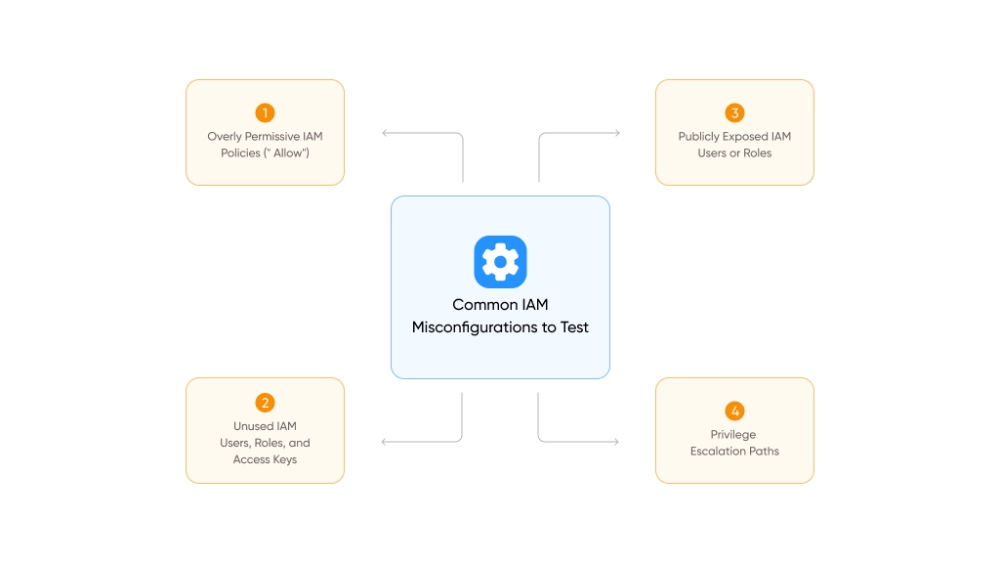
Start a conversation with any AWS security engineer about what causes production breaches, and IAM comes up within the first thirty seconds.
Every API call, resource access request, and automated deployment in AWS passes through Identity and Access Management. Get it wrong once and the downstream consequences touch everything.
That is why 83% of cloud breaches carry an access-related component, per Security Boulevard’s 2025 research.
The root causes are almost always the same: roles with too much access, credentials that never got rotated, and service accounts that outlived the projects they were created for.
The Core IAM Rules Every Team Must Follow
- Enforce least privilege from day one. Start at zero permissions and grant only what is explicitly required. A developer reading from one S3 bucket does not need s3:*.
- Eliminate long-lived credentials wherever possible. EC2 instances, Lambda functions, and ECS tasks should assume IAM roles, not rely on hard-coded access keys. Keys embedded in code get exposed in Git repositories, CI/CD logs, and third-party integrations.
- Use IAM Identity Center (formerly AWS SSO) for all human console access. It centralizes authentication, simplifies offboarding, and eliminates the sprawl of individually managed IAM users.
- Implement permission boundaries. These are policy-level ceilings that cap what any role can do, regardless of what individual policies grant. They are especially critical in multi-team environments where IAM administration is delegated.
- Adopt Attribute-Based Access Control (ABAC) using resource tags. Engineers manage only the resources tagged with their team or environment. This scales far better than maintaining dozens of custom policies as your organization grows.
If CI/CD pipelines require credentials, scope them tightly and enforce rotation on a defined schedule. Credentials that are never reviewed are credentials waiting to be exploited.
How to Lock Down the AWS Root Account Before Anything Else Gets Built
Here is something worth letting sink in: the AWS root account bypasses every security control you put in place. IAM policies, SCPs, permission boundaries – none of them apply to root. Whoever holds those credentials holds the entire account.
That level of access demands a matching level of caution.
Root Account Hardening Checklist
- Enable hardware MFA immediately. A YubiKey is the right choice here, not a virtual authenticator app sitting on someone’s personal phone. Hardware keys resist phishing attacks and stay with the organization when a team member moves on.
- Delete root access keys if they exist. No legitimate automation workflow needs root-level programmatic access. If keys are present, they are a liability.
- Store the root password in a secure vault. HashiCorp Vault, AWS Secrets Manager, or a hardware-backed password manager with access restricted to a very small group, not a shared notes document.
- Use an organization-owned email address. Something like [email protected] means no single person’s departure locks you out of your own account.
- Keep root out of daily operations entirely. The handful of tasks that genuinely require root access, like changing your AWS support plan or closing an account, come up rarely. For everything else, a well-configured IAM role is the right tool.
For organizations managing multiple accounts through AWS Organizations, enforce MFA at the organizational level using a Service Control Policy. This ensures no IAM user can perform sensitive operations without an active MFA session, regardless of whether the individual account admin configured it.
For programmatic access, require MFA-authenticated sessions via sts:GetSessionToken before allowing sensitive operations. This prevents scripts and pipelines running under long-lived credentials from bypassing MFA requirements silently.
How S3 Misconfigurations Become the Most Expensive Mistakes in AWS
Of all the AWS services that get organizations into trouble, S3 shows up most consistently. Not because it is difficult to secure, but because configurations drift over time, and it only takes one public bucket to make headlines.
Healthcare systems, financial institutions, and government agencies across America have all learned this the hard way.
In late 2025, a security researcher exposed critical vulnerabilities in a major automotive firm’s AWS environment, including hard-coded credentials and misconfigured S3 buckets.
The exposed data spanned roughly 70 terabytes, including fleet telemetry, invoices, and database backups stretching back decades. A few basic settings would have prevented it.
So what does proper S3 security actually look like?
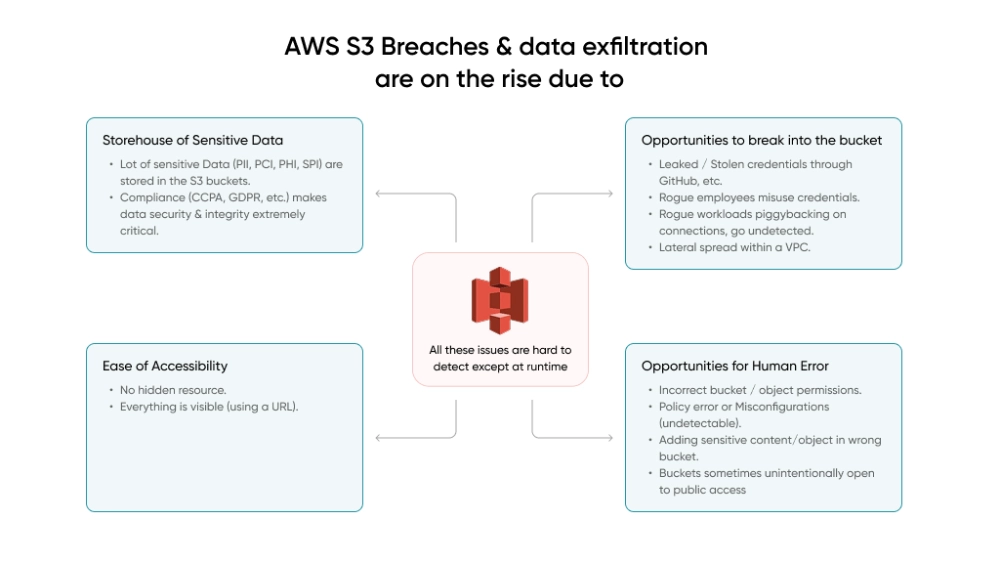
S3 Security Settings to Enable on Every AWS Account
- S3 Block Public Access at the account level. This single toggle prevents any bucket from being made public, deliberately or by accident. It overrides bucket-level settings, which means even a misconfigured deployment script cannot expose data publicly.
- Default encryption on every bucket. SSE-KMS with customer-managed keys is the right baseline for sensitive workloads. Customer-managed keys give full control over key policies, automatic rotation, and CloudTrail logging of every key access.
- Versioning and MFA Delete on critical buckets. Versioning protects against accidental overwrites. MFA Delete requires a second authentication factor before any object can be permanently removed, even by a user with admin credentials.
- Bucket policies enforcing HTTPS. Deny any request not using TLS in transit. No exceptions.
- VPC endpoints for S3 access. Route S3 traffic off the public internet entirely when possible.
S3 Encryption Strategy: At Rest and In Transit
| Layer | Recommended Approach | Use Case |
| At rest (standard) | SSE-S3 (AES-256) | General workloads |
| At rest (sensitive) | SSE-KMS with customer-managed keys | Regulated data, compliance requirements |
| In transit | TLS 1.2+ enforced via bucket policy | All S3 traffic |
| Highly sensitive | Client-side encryption before upload | Healthcare, financial, PII |
For the most sensitive workloads, encrypt client-side before data ever reaches AWS. This ensures that even a misconfiguration at the storage layer cannot expose readable data.
VPC Architecture That Limits Blast Radius When Something Goes Wrong
Good network architecture will not stop every attack. What it does is change the math for anyone who gets in. A well-segmented VPC turns a single compromised workload into a contained incident. A flat network turns it into a full account takeover.
The principle that drives everything here is blast radius reduction. And for engineering leaders across the US evaluating their cloud posture, this is often the area with the most room for improvement.
Multi-Tier VPC Design Principles for AWS Security
The core principle is strict tier separation:
- Public subnets contain only load balancers and NAT gateways
- Private subnets contain application servers and business logic
- Isolated subnets contain databases and data stores, with no direct internet path, ever
Security Groups are your primary firewall at the instance level. They are stateful, operate per-instance, and are highly configurable. Rules to enforce across every Security Group:
- Default deny all inbound traffic
- Allow only specific ports from specific sources
- Reference Security Groups for internal communication instead of IP ranges
- Never open 0.0.0.0/0 on port 22 (SSH) or port 3389 (RDP)
Use AWS Systems Manager Session Manager for all instance access. It eliminates open SSH ports entirely and provides a full audit trail of every session.
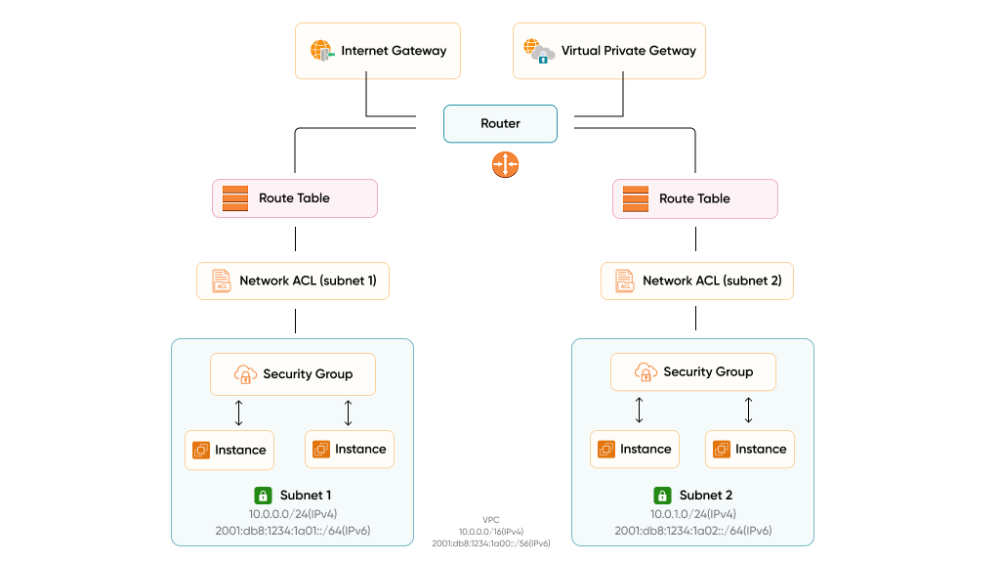
Additional Network Controls Worth Implementing
- Network ACLs (NACLs): A stateless second layer at the subnet level. Use them for broad deny rules against known malicious IP ranges, as a complement to Security Groups, not a replacement.
- VPC Flow Logs: Enable across all VPCs and send to CloudWatch or a dedicated S3 bucket. Flow Logs capture metadata on every network connection. Without them, incident response is forensics in the dark.
- VPC Endpoints: Route AWS service traffic (S3, DynamoDB, and others) internally without traversing the public internet. This reduces exposure surface and can meaningfully reduce NAT Gateway costs at scale.
- AWS PrivateLink: For exposing services across VPCs or to third parties without full VPC peering.
CloudTrail: The Audit Record Your AWS Incident Response Depends On
Without CloudTrail, you are doing security blind. An incident happens, someone asks what changed and when, and you have no authoritative record to work from.
Every console click, CLI command, SDK call, and automated pipeline action lands in CloudTrail, and that log is the difference between an incident you can investigate and one you can only guess about. This is not optional monitoring. It is the audit trail that makes every other security service in this list meaningful.
CloudTrail Configuration Requirements
- Enable in all regions, not just the ones you are currently using. Attackers routinely spin up resources in unused regions specifically because teams are not watching them.
- Centralize logs in a dedicated security account. Use CloudTrail Lake for queryable log storage, or send logs to a centralized S3 bucket isolated from workload accounts. Apply strict bucket policies to prevent tampering.
- Enable log file integrity validation. If trail files are modified after the fact, you need to know.
- Enable CloudTrail Insights. Automated detection of unusual API patterns, like a spike in RunInstances calls that signals compromised credentials being used for crypto mining, surfaces here before your next billing cycle.
CloudWatch Alarms to Set Up Immediately
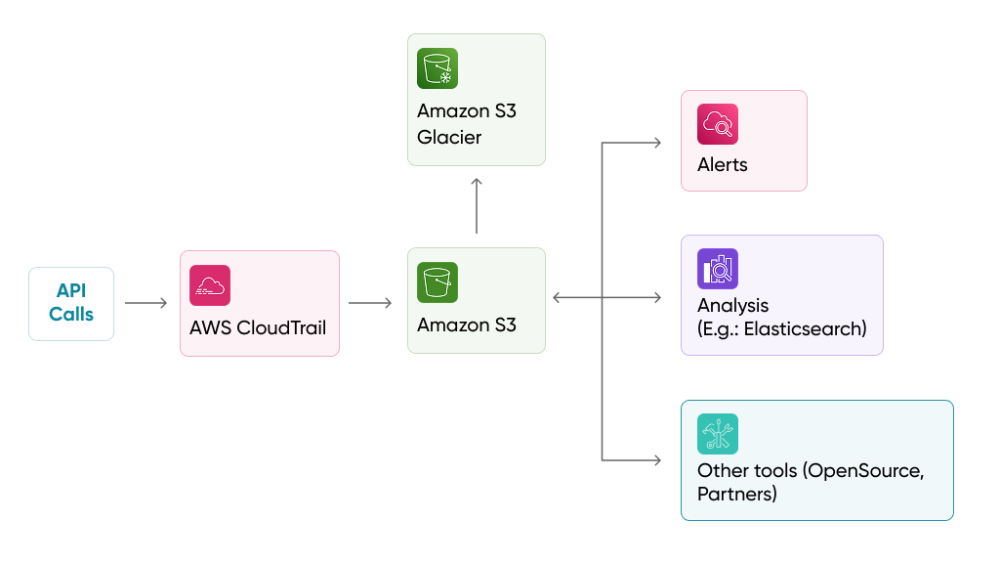
Pair CloudTrail with CloudWatch Metric Filters and Alarms to get real-time alerts on these high-priority events:
| Event | Why It Matters |
| Root account usage | Should never happen in normal operations |
| IAM policy changes | Could signal privilege escalation |
| Console sign-in failures | Potential credential stuffing or brute force |
| Security Group modifications | Network exposure changes |
| S3 bucket policy changes | Data exposure risk |
| Unauthorized API calls | Active compromise indicator |
| CloudTrail configuration changes | Attacker covering their tracks |
Amazon GuardDuty: Intelligent AWS Threat Detection With Zero Infrastructure Overhead
GuardDuty is the closest thing AWS has to a security service that runs itself. Unlike most detection tooling that requires you to deploy agents, wire up log forwarders, or maintain dedicated infrastructure, GuardDuty needs none of that. You enable it and it starts working.
It pulls from CloudTrail logs, VPC Flow Logs, and DNS query data, running continuous analysis against AWS threat intelligence and machine learning models. For most engineering teams, the operational overhead is close to zero. The value, however, is significant.
What GuardDuty Detects
- Compromised EC2 instances communicating with known command-and-control servers, running cryptocurrency miners, or exhibiting unusual traffic patterns
- Compromised credentials – API calls from unusual locations, impossible travel scenarios, calls from known malicious IP addresses
- S3 bucket threats – unusual data access patterns, access from Tor exit nodes, disabled logging on sensitive buckets
- Malware – GuardDuty Malware Protection scans EBS volumes attached to EC2 instances when suspicious behavior is detected
- Container threats – suspicious activity in EKS clusters, including potentially compromised pods
Automated Remediation with GuardDuty and EventBridge
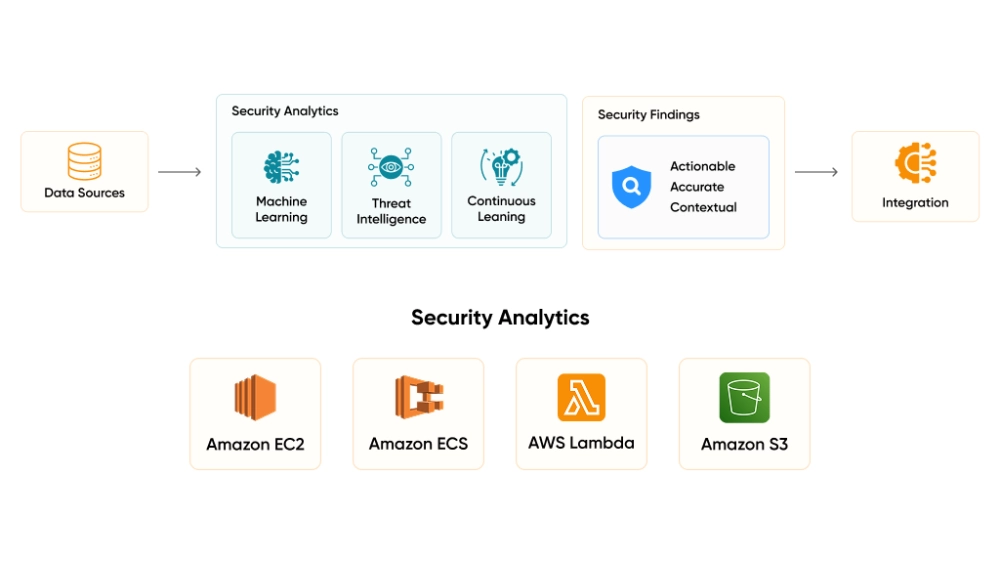
The operational power of GuardDuty comes from pairing it with automated response workflows:
- GuardDuty generates a high-severity finding
- EventBridge catches the finding and triggers a Lambda function
- Lambda isolates the compromised resource (for example, by replacing its Security Group with one that has zero inbound/outbound rules)
- The on-call engineer is paged with full context
Response time measured in seconds, not the minutes it takes someone to read a Slack notification and act.
GuardDuty Deployment Best Practices
- Enable across all regions and all accounts in your organization
- Use a delegated administrator account for centralized management, not the management account
- Enable S3 Protection, EKS Protection, and Malware Protection for comprehensive coverage
- Integrate findings with Security Hub for a unified view
- Configure suppression rules to reduce noise from known-safe behavior like internal vulnerability scanners
AWS Security Hub: One Dashboard Across Every Account Your Organization Runs
Security Hub solves a problem that grows directly with the size of your AWS footprint: too many security tools, each generating findings in different formats, across different accounts, with no single place to look at all of it together.
It pulls findings from GuardDuty, Amazon Inspector, Macie, IAM Access Analyzer, and Firewall Manager into one interface. On top of that, it runs its own automated compliance checks against recognized industry frameworks, not just flagging problems, but telling you what resource failed, how severe it is, and how to fix it.
Supported Compliance Frameworks
| Framework | What It Covers |
| AWS Foundational Security Best Practices (FSBP) | AWS-specific security controls baseline |
| CIS AWS Foundations Benchmark | Industry-standard AWS hardening guidance |
| PCI DSS | Payment card data security requirements |
| NIST 800-53 | US federal government security standard |
Each check produces a finding with a severity score, the specific affected resource, and actionable remediation guidance.
Security Hub Best Practices for Multi-Account AWS Environments
- Enable auto-enable for new accounts. When a new account is created in your AWS Organizations setup, it inherits your monitoring configuration automatically, no manual step that gets skipped during a busy sprint.
- Use cross-account aggregation. Designate a central security account and pull findings from every account in your organization into one place.
- Export to your SIEM. Integrate Security Hub with Splunk, Datadog, or equivalent for broader correlation across your environment.
- Set up custom actions via EventBridge to automate remediation workflows directly from Security Hub findings.
- Disable irrelevant controls to reduce noise. Not every control applies to every environment, and noise degrades response quality.

AWS Config: Continuous Compliance Monitoring for Infrastructure That Never Stops Changing
Where CloudTrail tells you what actions were taken, Config tells you what changed. Every resource in your environment, from Security Groups to IAM policies to S3 buckets, has a configuration state that Config tracks over time.
When something goes wrong, Config is how you answer the question that always comes next: what did this look like before someone touched it, and when exactly did it change? That kind of historical record is what turns a two-week investigation into a two-hour one.
Essential AWS Config Rules to Enable on Day One
AWS provides over 300 managed Config rules. These are the ones every team should activate immediately:
| Config Rule | What It Checks |
| root-account-mfa-enabled | Root account has MFA active |
| iam-password-policy | Password policy meets minimum requirements |
| encrypted-volumes | All EBS volumes are encrypted |
| s3-bucket-public-read-prohibited | No public-read S3 buckets exist |
| s3-bucket-ssl-requests-only | S3 buckets enforce HTTPS |
| restricted-ssh | No Security Group opens port 22 to 0.0.0.0/0 |
| cloudtrail-enabled | CloudTrail is active in the account |
| rds-instance-public-access-check | No RDS instances are publicly accessible |
| vpc-flow-logs-enabled | VPC Flow Logs are active |
| guardduty-enabled-centralized | GuardDuty is enabled and centralized |
Automated Remediation and Config Best Practices
Pair Config Rules with automated SSM remediation documents. When a non-compliant resource is detected, like an unencrypted EBS volume from a developer who missed a step, remediation triggers automatically. The engineer is notified. The gap is closed without a manual review queue.
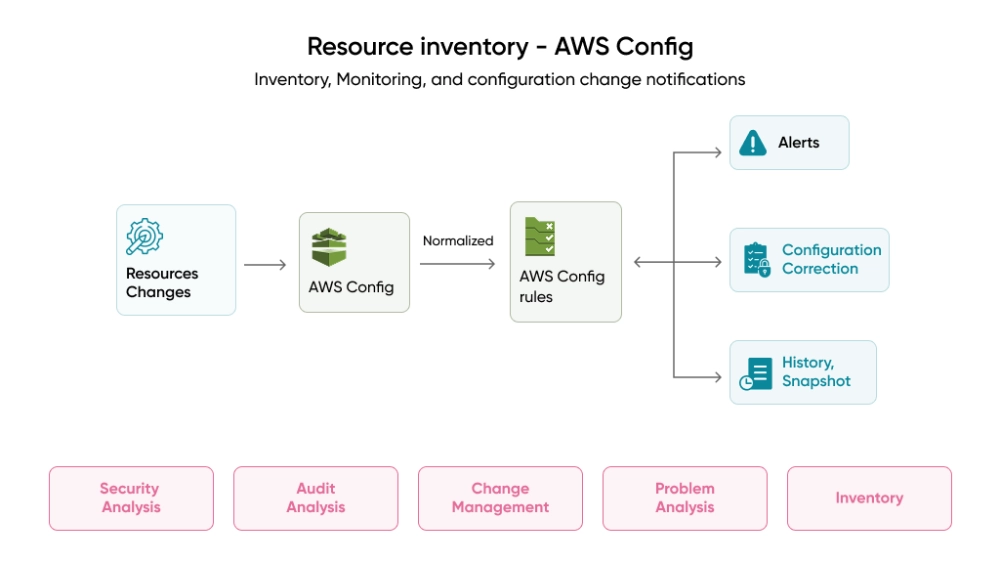
Additional best practices:
- Enable Config recording for all resource types in all regions
- Use a centralized aggregator in AWS Organizations for a multi-account view
- Deploy conformance packs to map groups of rules to compliance frameworks (HIPAA, PCI, SOC 2) in one coordinated deployment
- Use advanced queries to run SQL-like queries against your current configuration state, for example, finding all unencrypted EBS volumes across production accounts
IAM Access Analyzer: Finding the External Access Gaps You Did Not Know Existed
Most security scanners work by matching what they see against a list of known bad patterns. IAM Access Analyzer takes a different approach. It uses formal mathematical reasoning to evaluate your actual policies and determine whether external access to a resource is provably possible, not just suspicious-looking, but mathematically confirmed.
That distinction matters. Pattern-matching misses novel configurations. Formal reasoning does not. If you are wondering how to audit AWS permissions at scale, this is the service built for exactly that question.
What Access Analyzer Finds
- S3 buckets accessible from outside your account or organization
- IAM roles that external principals can assume
- KMS keys shared with external accounts
- Lambda functions with cross-account invocation policies
- SQS queues and SNS topics with external access
- Secrets Manager secrets reachable from outside your organization
Types of Analyzers to Enable
| Analyzer Type | What It Does | When to Use |
| External Access Analyzer | Identifies resources shared outside your account or org | Always – enable in every account |
| Unused Access Analyzer | Identifies IAM users and roles with permissions they have not used | Quarterly hygiene reviews and ongoing monitoring |
The Unused Access Analyzer is equally important. A service account from a project that ended six months ago, still active and still broadly permissioned, is exactly the attack surface that gets overlooked until it is exploited.
Access Analyzer Best Practices
- Enable both external and unused access analyzers in every account
- Integrate findings with Security Hub for centralized visibility
- Use policy validation in CI/CD pipelines – fail deployments that introduce overly permissive policies
- Run unused access analysis quarterly and revoke permissions that have not been used in 90 or more days
- Archive findings you have reviewed and accepted, for example, intentional cross-account sharing. This keeps your active findings list focused on real issues
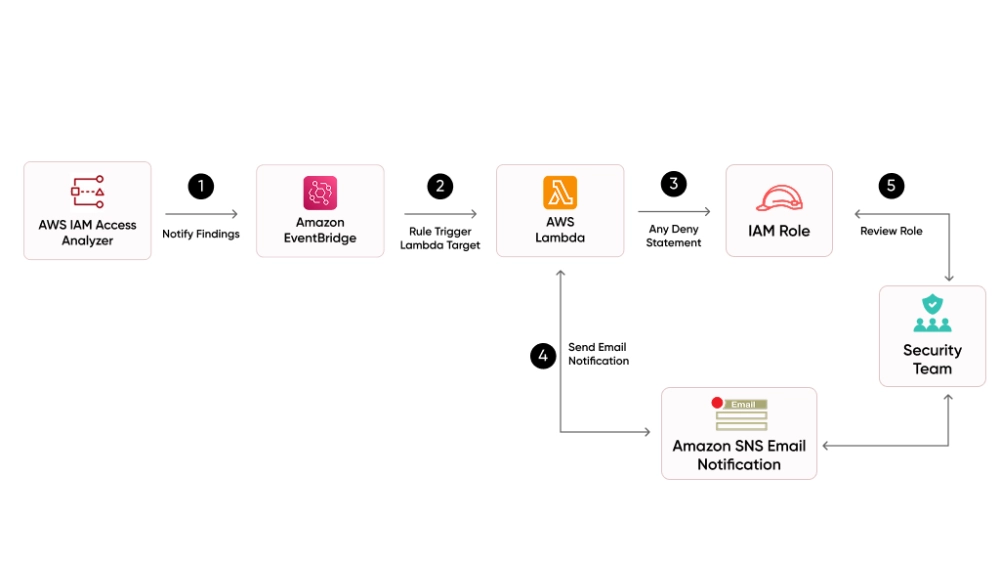
Policy Validation and Generation
Access Analyzer validates IAM policies before deployment, checking for security warnings (overly permissive actions), errors (invalid syntax or resource references), and suggestions (best practice improvements).
Policy generation is equally powerful. Access Analyzer analyzes your CloudTrail logs and generates a least-privilege policy based on what a role or user actually does. Instead of guessing what permissions a service account needs, you let usage history define the policy, then tighten from there.
Integrate policy validation into your CI/CD pipeline. Deployments that introduce overly permissive IAM policies should fail automatically before reaching production, not be caught in a quarterly access review.
AWS Organizations and SCPs: Governance Architecture for Multi-Account Cloud Security
Running every workload inside a single AWS account is one of the more common architectural decisions that looks fine until something goes wrong.
One compromised service, one over-permissioned developer credential, one misconfigured role, and an attacker has lateral access to everything in that account. There is no wall between your dev database and your production secrets.
Account separation is not an advanced practice reserved for enterprises. It is a baseline isolation strategy that any team running serious workloads should implement.
Recommended Multi-Account AWS Structure
| Account Type | Purpose | What Lives Here |
| Management account | Billing and org administration only | No workloads |
| Security account | Centralized security tooling | GuardDuty, Security Hub, Config aggregation |
| Log archive account | Immutable audit storage | CloudTrail, Config logs, Flow Logs (read-only) |
| Shared services account | Internal shared infrastructure | CI/CD pipelines, DNS, shared networking |
| Workload accounts | Actual products and environments | Dev, staging, production (separate per team or environment) |
Use AWS Control Tower to automate this setup with guardrails baked in from day one.
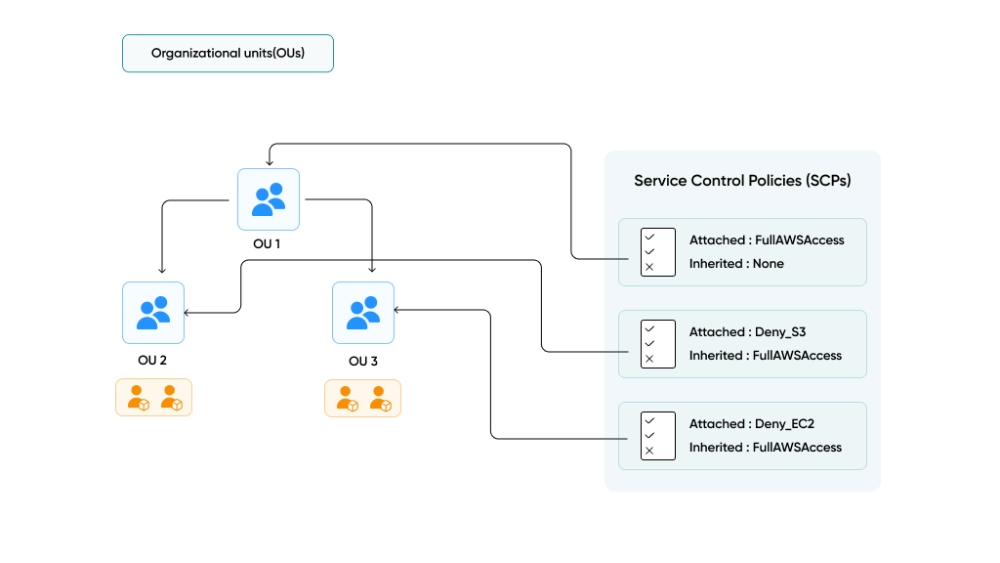
Service Control Policies: The Maximum Permissions Guardrail
SCPs define the ceiling of what any IAM user, role, or root user in a member account can do, regardless of what that account’s IAM policies grant. If an SCP does not allow an action, no IAM policy can grant it.
SCPs to implement across your organization:
- Deny access to unused regions – prevents attackers from spinning up shadow infrastructure in regions you are not watching
- Prevent disabling security services – blocks anyone from turning off GuardDuty, CloudTrail, or Security Hub, even account admins
- Deny root account usage in member accounts – the root user in member accounts should never be used
- Enforce encryption at resource creation – ensure EBS volumes and RDS instances are always created encrypted
- Restrict IAM user creation – force all identity management through IAM Identity Center
Additional Organization Policy Types
Beyond SCPs, AWS Organizations supports:
- Tag Policies – enforce consistent tagging (Environment, CostCenter, Owner) across all accounts. Non-compliant resources get flagged and you can block creation of resources that do not meet tagging requirements.
- Backup Policies – centrally manage AWS Backup plans, frequency, retention, cross-region copy rules, and vault lock settings. Member accounts inherit these automatically.
- AI Services Opt-Out Policies – control whether AWS AI services like Rekognition, Textract, and Comprehend can store and use your content for service improvement. For regulated industries, this is often a compliance requirement.
- Resource Control Policies (RCPs) – restrict what external principals can do with your resources, even if a resource policy allows it. While SCPs restrict what your principals can do, RCPs restrict what anyone, including external accounts, can do with your resources.
SCP Deployment Best Practices
- Apply SCPs at the OU level, not individual accounts. Organize accounts into Organizational Units (Security, Sandbox, Production, SDLC) and apply SCPs to the OU. This scales better and avoids policy drift across accounts.
- Start with a deny-list strategy. Allow everything by default, then explicitly deny dangerous actions. This is easier to manage than an allow-list, which can break services unexpectedly.
- Test SCPs in a sandbox OU first. A misconfigured SCP can lock out an entire account including its administrators. Always validate before promoting to production.
- Use Control Tower guardrails alongside custom SCPs. Control Tower provides a curated set of preventive and detective guardrails. Layer your custom SCPs on top for organization-specific requirements.
- Maintain a break-glass mechanism. Always exclude a dedicated emergency admin role from your most restrictive SCPs. If something goes wrong, you need a way to regain access.
AWS Security Priority Order: What to Do on Day 1, Week 1, and Month 1
Security debt compounds. Starting in the right order makes the difference between a defensible posture and a patched-together one.
Day 1 – Non-Negotiable Actions
These take under two hours combined and close the most commonly exploited gaps:
- Enable hardware MFA on the root account
- Delete root access keys
- Enable CloudTrail in all regions
- Enable GuardDuty in all regions
- Enable S3 Block Public Access at the account level
Week 1 – Build Your Core AWS Security Posture
- Set up IAM Identity Center for all human access
- Enable Security Hub with the FSBP standard
- Enable AWS Config with essential rules
- Enable IAM Access Analyzer (external and unused)
- Review and tighten all Security Groups
- Set up AWS Organizations OU structure
- Apply SCP to deny unused regions
- Apply SCP to prevent disabling security services
Month 1 – Mature and Automate Cloud Security Operations
- Implement automated remediation via EventBridge and Lambda
- Deploy VPC Flow Logs across all VPCs
- Integrate Security Hub with your SIEM
- Implement permission boundaries for delegated admin
- Run unused access analysis and revoke stale permissions
- Set up cross-account and cross-region aggregation
- Deploy Tag Policies and Backup Policies across the org
- Apply SCPs for encryption enforcement and IAM user restriction
- Test all SCPs in a sandbox OU before promoting to production
Why Architecture-First AWS Security Reduces Long-Term Risk and Cost
The services in this guide do not work independently. They form a stack, each layer reinforcing the ones around it.
| Layer | Service | What It Protects Against |
| Identity | IAM, Identity Center, Access Analyzer | Over-permissioned access, credential abuse |
| Data | S3 encryption, KMS, bucket policies | Data exposure, unauthorized access |
| Network | VPC, Security Groups, NACLs, Flow Logs | Lateral movement, unauthorized connections |
| Audit | CloudTrail, CloudWatch | Undetected API abuse, configuration changes |
| Detection | GuardDuty | Active threats, compromised resources |
| Compliance | Config, Security Hub | Configuration drift, framework violations |
| Governance | Organizations, SCPs | Policy enforcement across all accounts |
The teams that get this right are not necessarily more technical than those that struggle. The difference is usually timing. They built security into the architecture early, when the cost was low. The teams that retrofitted it later paid far more, in engineering time, in remediation cost, and sometimes in breach costs.
According to the IBM Cost of a Data Breach Report 2025, the average breach lifecycle has dropped to 241 days, down from 258 days in 2024. That is a nine-year low, continuing a downward trend from the 287-day peak in 2021.
That window does not shrink on its own. It shrinks when detection is automated, visibility is centralized, and the architecture was designed with an attacker’s perspective in mind from the start.
Four Principles That Drive Every Decision
Least Privilege Everywhere. Over-permissioned access is the most quietly accumulated problem in AWS. Permissions granted during a sprint, policies copied from an older project, roles that never got tightened after a proof-of-concept became production.
Apply minimum access to every IAM policy, every Security Group rule, every bucket policy, for human users, service roles, CI/CD pipelines, and cross-account integrations alike.
Automate Detection and Response. Manual security reviews cannot keep pace with the rate at which infrastructure changes. A team reviewing configurations once a week cannot catch a misconfiguration that appears on Monday and gets exploited by Wednesday.
GuardDuty, Config, Security Hub, and Access Analyzer run continuously. Pair them with EventBridge and Lambda and you shift from reactive to proactive.
Centralize Visibility. Scattered findings across twelve accounts and four regions are nearly as bad as no findings at all. When something goes wrong, your team needs one place to look, not a tab for each account. Aggregate everything into Security Hub. Feed that into your SIEM.
Layer Your Defenses. No single control catches everything. IAM can be bypassed by a misconfigured resource policy. Encryption protects stored data but does not stop unauthorized API calls. Network controls limit movement but do not prevent credential theft. Each layer catches what the adjacent layers miss.

How We Help Build Secure AWS Architectures
Across America, the organizations scaling on AWS that we talk to regularly are hitting the same realization: security cannot live on the backlog indefinitely. The regulatory environment, the cost of incidents, and the expectations of enterprise buyers have all raised the floor.
We partner with CTOs, engineering leads, and founders who are building or scaling products on AWS and need a team that treats security as an architectural requirement from day one, not a layer added after the fact.
Our cloud solutions practice is made up of senior engineers with direct experience implementing these patterns across healthcare, fintech, SaaS, and enterprise environments.
We have seen what breaks in production, and we build to avoid it.
If you want a second set of eyes on your current AWS setup, or you are building something new and want to get the architecture right from the start, let’s talk. We will tell you where the gaps are and what closing them looks like for your specific team and product.
Our case studies show how we have helped teams build secure, scalable cloud infrastructure that holds up in production.
Frequently Asked Questions (FAQs)
What are the best practices to secure an AWS account?
Securing an AWS account starts with enabling MFA on the root account, enforcing least privilege IAM policies, disabling unused credentials, enabling CloudTrail logging, and turning on services like GuardDuty and Security Hub for continuous monitoring.
How do I protect my AWS root account from unauthorized access?
You should enable hardware MFA, remove root access keys, store credentials securely, and avoid using the root account for daily operations. The root account should only be used for rare administrative tasks.
Why is IAM considered the biggest security risk in AWS?
IAM controls access to all AWS resources. Misconfigured roles, excessive permissions, and unused credentials can allow attackers to gain full control over systems, making IAM the most common cause of cloud breaches.
What is the AWS shared responsibility model in security?
AWS secures the cloud infrastructure, while customers are responsible for securing their data, configurations, applications, and access controls within the cloud environment.
How does AWS Organizations improve cloud security?
AWS Organizations helps enforce security at scale by managing multiple accounts with centralized policies. Using Service Control Policies (SCPs), teams can restrict risky actions, enforce compliance, and ensure consistent security configurations across all accounts.