Key Takeaways
- Building an Emergency Notification & Safety App for Android & iOS starts with a unified session system for SOS, location, and media.
- A well-built safety app goes beyond panic buttons, using a single session to manage alerts, tracking, and response.
- React Native enables cross-platform SOS apps for Android and iOS from one codebase with near-native performance.
- Session-based architecture links location, media, and alerts into one incident record for real-time response clarity.
- Privacy is enforced at session level, activating camera, mic, and GPS only during an SOS event and stopping after.
- Production apps require device testing, security hardening, compliance checks, and strong error handling across all layers.
Imagine calling for help and nothing happens. The signal drops, the alert never arrives, and no one knows where you are. A reliable emergency safety app solves this, and its absence costs lives.
A safety and emergency app is a mobile tool that triggers SOS alerts, shares live GPS location, captures audio and video evidence, and instantly notifies trusted contacts when danger strikes.
According to CTIA, Americans place over 240 million 911 calls every year. Yet most people have no reliable backup when connectivity fails, panic sets in, or they are simply unable to speak.
The best emergency response apps for personal safety fix this by building a coordinated system that keeps working under real-world pressure, not just in ideal conditions with full connectivity.
Whether you are a product team, a campus safety officer, or a founder in America with a real problem to solve, this guide walks you through exactly how to build an app that works when it must.

What Is an Emergency Safety App and Why Does It Matter Right Now?
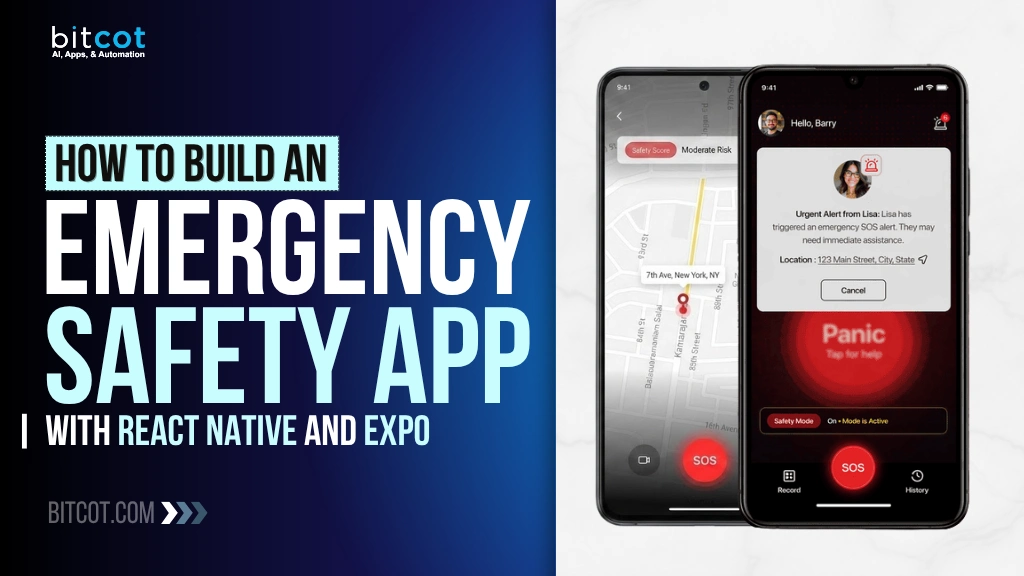
Most people think of safety apps as simple alert buttons. They are not. A modern emergency safety app is a coordinated response system running on a session lifecycle.
When a user triggers an SOS, the app does not just send a text. It opens a live incident session that manages location tracking, media capture, contact alerts, and structured data storage all at once.
That distinction matters because emergencies are chaotic. The person in danger cannot manage six different notifications or remember to hit multiple buttons. The app has to do the coordination for them.
According to MarketsandMarkets, the global emergency notification systems market is projected to reach $6.5 billion by 2028, driven by rising smartphone adoption and enterprise safety compliance demands.
Across the United States, safety software is no longer seen as a feature add-on. It is an operational expectation for schools, campuses, enterprises, and solo users alike.
The product gap is clear: there is a massive difference between an app that sends an alert and one that creates a documented, real-time emergency record. That gap is where serious product teams compete.
What the SOS Alert Emergency & Safety App Actually Does
Our solution is built around a single core idea: one action sets everything in motion. The moment a user triggers SOS, the system automatically takes over from there.
Here is what that single trigger sets in motion:
- Location tracking activates immediately, sharing the user’s GPS coordinates with trusted contacts in real time.
- Background audio and video recording begins, creating media evidence tied to the active incident session.
- Push notifications go out to pre-configured trusted contacts, telling them an emergency is active and showing the live map.
- Live streaming starts when connectivity allows, and falls back to local recording when it does not.
- An incident session record is built, capturing the route history, media files, timestamps, and alert delivery log.
Everything stays connected to one session ID. That design choice is what makes the product coherent under stress, because there is no fragmentation between the alert, the location, and the evidence.
That is exactly what separates a real safety product from a single-feature app, and it is what we focused on when building this.
Core Features of the Best Emergency Response Apps for Personal Safety
Good features mean nothing without a good structure holding them together. Here is what we built into the app, and why each piece matters.
One-Touch SOS Trigger for Instant Emergency Activation
Emergency UX breaks when users have to make decisions. The trigger compresses the entire incident start into a single action, no login, no menu navigation, no confirmation screens in the critical moment.
Real-Time Location Sharing
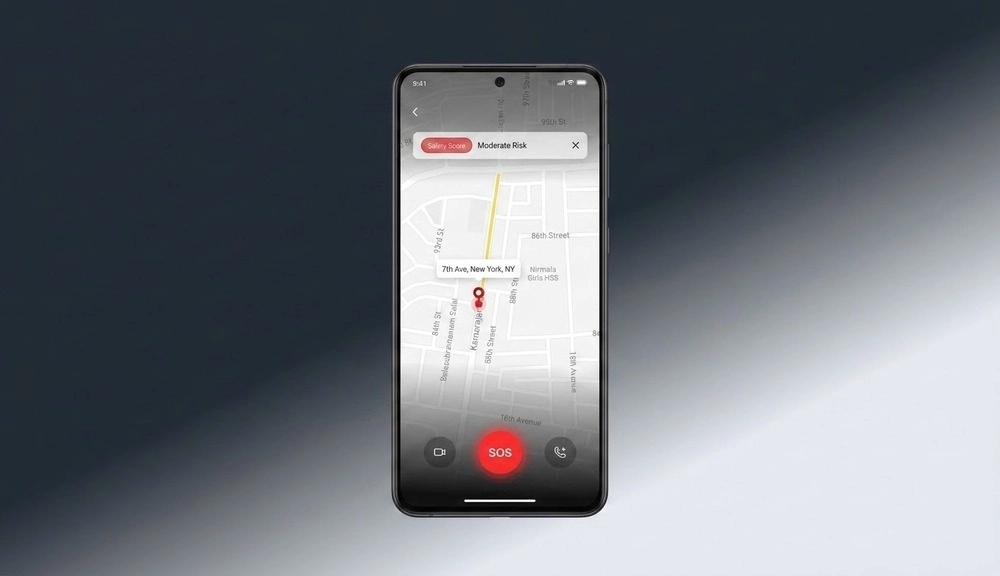
Live GPS tracking streams the user’s position to trusted contacts the moment the SOS session opens. Route history is preserved so responders can see where the person has been, not just where they are now.
Background Audio & Video Capture During SOS Sessions
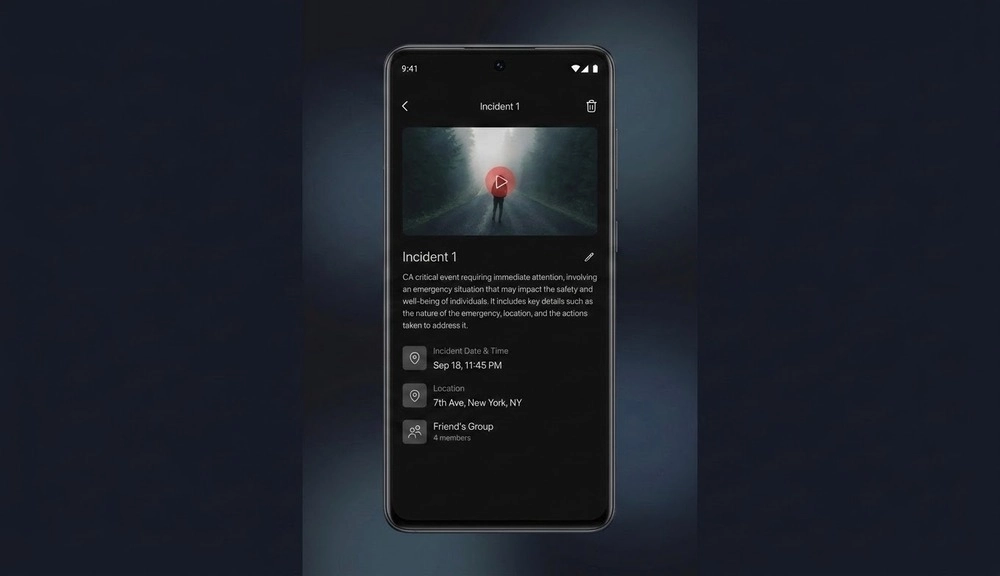
Audio and video recording runs throughout the active session. This creates an evidence trail without requiring the user to hold the phone up or interact with the app during the emergency.
Trusted Contact Notification System
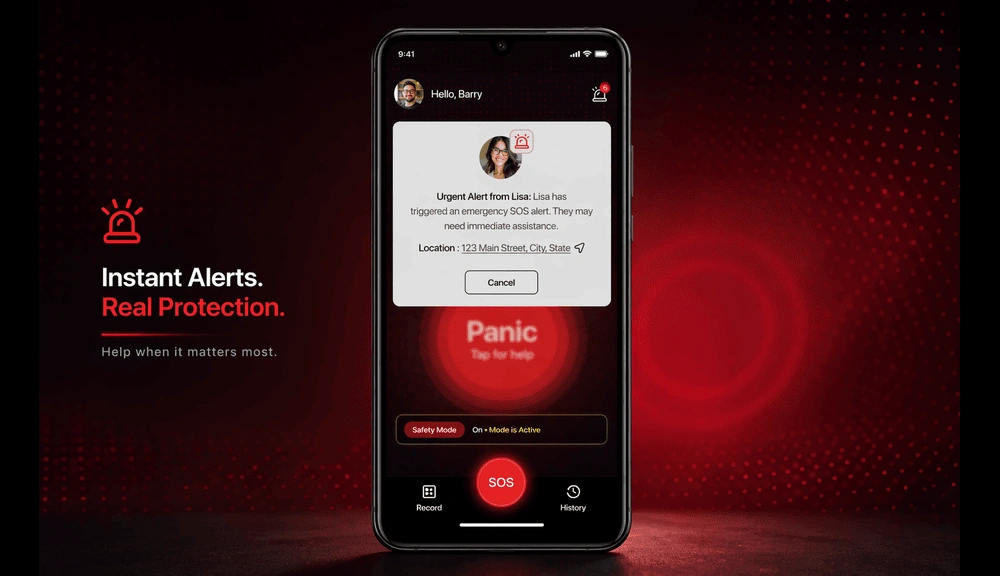
Pre-configured contacts receive push alerts with a direct link to the live session map. Here, the app must be installed to receive notifications; without the app, users will not receive alerts. That said, they do not need the app installed to view the location via the shared link. This reduces friction for real-world adoption while ensuring reliable alert delivery.
Session-Based Incident Records
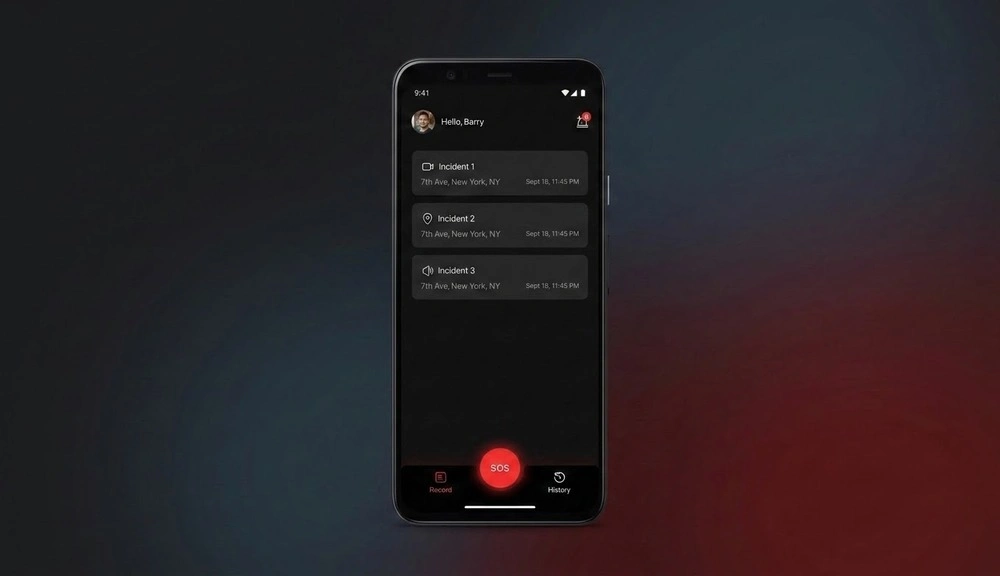
Every alert, location point, media file, and timestamp is stored as a single structured incident record. This makes the data reviewable and useful after the fact, for personal safety, legal purposes, or product analytics.
Cross-Platform Support for Android & iOS
The app runs on both emergency alert apps for Android and iOS platforms from a shared codebase, so no user is left out based on device choice.
How Are Safety Apps Helping Colleges Respond Quickly in Emergencies?
This is one of the most searched questions in the safety app space, and the answer is more concrete than most people expect.
When looking at how safety apps are helping colleges respond quickly in emergencies, the pattern is consistent: speed comes from pre-configured coordination, not manual escalation.
A 2023 report from Rave Mobile Safety found that campuses using dedicated emergency notification platforms reduced average incident response acknowledgment time by up to 40% compared to those relying on email and manual phone trees.
A well-built campus safety app replaces the phone-tree model with an automated session that notifies relevant contacts instantly, shares location without requiring the student to stay on a call, and creates a record that campus security can review and act on.
The key feature for campus environments is the trusted contact hierarchy. A student’s emergency escalates first to a peer contact, then to a resident advisor, then to campus security, all within seconds, all without the student managing the chain.
That kind of layered escalation logic is not hard to build once the session architecture is in place. It is one of the natural extensions from a solid prototype toward a full production product.
What’s the Right Way to Use Emergency SOS & Safety Apps?
Most people download a safety app once and never configure it properly. That is the fastest way to make sure it fails when they actually need it.
What’s the Right Way to Use Emergency SOS & Safety Apps? Here is the practical answer.
Before an emergency:
- Set up trusted contacts and make sure they know they are on the list.
- Test the SOS trigger at least once in a safe environment so muscle memory kicks in under stress.
- Confirm that location permissions are set to “Always Allow,” not just “While Using.”
- Check notification settings so trusted contacts will actually receive the alert even if their phone is on silent.
During an emergency:
- Trigger SOS once. Let the app manage the rest. Do not try to call and use the app simultaneously.
- Keep the phone in your hand or pocket. Background recording works without holding the camera up.
- Trust the session. Everything is being captured and logged, even if you cannot see it happening.
After an emergency:
- Review the incident record. It contains your route, media files, and the full alert delivery log.
- Share the record with authorities or support contacts if needed. The structured format makes it easy to hand over.
This is also a product design lesson: the best trusted apps improving safety and coordination during emergencies are designed around human behavior under stress, not around what is easiest to build.
Emergency Alert App for Android vs iOS: What Builders Need to Know
Building a cross-platform safety app sounds simple until you hit the platform-specific constraints. Android and iOS do not treat background services the same way, and that difference has direct consequences for an emergency app. The solution is not to build two separate apps. The right approach is platform-aware session handling inside a shared codebase, using React Native to abstract the shared logic while allowing platform-specific modules where behavior diverges.
| Feature Area | Emergency Alert App for Android | Emergency Alert App for iOS |
| Background Location | Foreground services required; more permissive overall | Strict background limits; needs explicit “Always” permission |
| Background Audio | Supported with platform channels and equivalent APIs | Requires AVAudioSession category set for background recording |
| Push Notifications | FCM; reliable background delivery | APNs; subject to Focus Mode and system throttling |
| Session Persistence | More tolerant of long-running background tasks | May require silent pushes to maintain active session context |
| Camera Access | Available in background with service declaration | Generally restricted; workarounds required for background use |
That is the approach we took, and it is why the mobile app development architecture decisions come before any screen design decisions when building this kind of product.
How to Build an Emergency Safety App: Step-by-Step
If you are asking how to build an Emergency Safety App, start with the architecture, not the screens. The session lifecycle is the spine of the entire product.
Step 1: Define the Session Lifecycle First
Every feature in the app ties back to the SOS session state: opened, active, paused, or closed. Defining this lifecycle upfront prevents fragmentation between location, media, alerts, and records later on.
Step 2: Choose Your Stack
We used React Native with Expo for cross-platform mobile delivery. For the backend, Node.js with Express handles API logic, PostgreSQL manages structured session records, and Firebase handles real-time location sync and push delivery.
This stack lets a team move from prototype to testable product fast while still handling real mobile constraints around background processing, connectivity, and device-level permissions.
Step 3: Build the SOS Trigger First
The trigger is the most critical UX decision in the product. It must be reachable in one action from any screen, must not require confirmation in the moment of activation, and must immediately start the full session lifecycle without waiting for a server response.
Step 4: Implement Location Before Notifications
Live location is the most valuable piece of information for any trusted contact. Get that working reliably on both platforms, with background persistence confirmed, before building the notification layer on top of it.
Step 5: Handle Media as a Session Component
Do not treat audio and video recording as standalone features. Tie them to the active session ID from the start. This keeps media files associated with the right incident record and makes post-session review clean and usable.
Step 6: Design Privacy Into the Session, Not as an Afterthought
Sensor access for camera, microphone, and GPS must activate when the session opens and stop when it closes. This is not just a compliance concern. It is a trust signal that users and regulators both expect from a safety and emergency alert app.
Step 7: Think About Production Before You Finish the Prototype
A working prototype validates the product model. Production requires device-level testing across dozens of handsets, security hardening, observability, error handling, compliance review, and a support workflow. Plan for this before you celebrate the demo.
If your team needs help navigating from concept to a validated, production-ready build, explore our startup software development services or custom software development approach to understand how we structure these engagements.

Trusted Apps Improving Safety and Coordination During Emergencies
Trust is not a feature. It is an outcome. And trusted apps improving safety and coordination during emergencies earn that trust through product decisions made long before the first user ever opens the app.
Here is what actually builds trust in a safety app:
- Transparency about sensor access: Users must see exactly what the app is accessing and when. This means clear permission requests tied to the session, not broad background access requests at install time.
- Reliability under poor conditions: A safety app that fails when signal is weak has a trust problem by design. Offline persistence, retry logic, and graceful degradation are non-negotiable requirements.
- Evidence integrity: The incident record must be complete, structured, and tamper-evident. If a user needs to share that record with law enforcement or a support organization, it has to hold up under review.
- No surprise data practices: The app should collect only what the active session requires. Storing location data or media outside the session scope, without explicit user consent, will destroy product trust faster than any bug.
Pew Research reports that over 85% of American adults own a smartphone, yet a significant portion cite privacy concerns as a barrier to adopting health and safety apps. Transparency in data handling is directly tied to download and retention rates.
Safety software is judged in moments where failure carries real consequences. Getting the trust architecture right is as important as getting the technical architecture right, sometimes more so.
Key Challenges in Building an Emergency Safety App (And How to Solve Them)
Keeping Activation Simple Enough to Use Under Stress
Emergency UX fails when users face decisions in a crisis. We compressed the entire incident start into one clear action that triggers the full session lifecycle. No menus, no confirmations, no steps.
Managing Live Media When the Network Is Unstable
Live streaming is useful, but mobile connectivity is not always reliable. We built the solution to stream when possible, record locally when not, and reconcile both into the same session record once connectivity returns.
iOS and Android Background Behavior
The two platforms handle background tasks differently enough that a single behavior model fails on one of them. We used platform-aware session handling that respects each OS’s constraints rather than forcing a one-size-fits-all approach.
Making Privacy Explicit Without Making the App Annoying
Permissions for location, microphone, and camera are sensitive. We tied every sensor request directly to the session lifecycle with clear in-app context, so users always understand why access is needed and when it stops.
Keeping the Incident Record Complete and Coherent
Alerts, route history, and media become fragmented when they are not tied to one data model. We stored every emergency event as a structured session record from day one, so the full incident flow stays complete and reviewable.
From Prototype to a Production-Ready Safety App
A working prototype proves the product model works. It does not prove the product is ready for real emergencies. That gap is where most teams underestimate the work.
Production readiness means thorough testing across a wide range of Android and iOS devices, stronger authentication and access controls, robust observability and performance monitoring, and production-grade error handling, and a real support workflow for users who have just experienced a genuine emergency.
It also means decisions about how the product evolves. Escalation logic, responder acknowledgments, administrative dashboards, analytics, and compliance certifications are all realistic next phases once the core session flow is validated and stable.
The prototype creates the foundation. Production creates the operational system. They are not the same project, and treating them as identical is one of the most expensive mistakes a product team can make.
Emergency Notification App for Business: Why Safety Software Matters Now
For founders, CTOs, and product leaders in America, the value of a well-designed emergency notification app for business is not just feature coverage. It is operational clarity and long-term defensibility.
A structured emergency workflow improves response speed, gives trusted contacts better visibility, preserves incident evidence more reliably, and reduces product risk by building privacy into the interaction model from the start.
That matters because an emergency notification app for business is judged differently from productivity or entertainment apps. Users forgive a slow loading screen. They do not forgive a failed alert. The bar for reliability, trust, and ethical data handling is higher here than in almost any other product category.
The companies that get this right build a product moat that is genuinely hard to replicate quickly. The coordination logic, trust architecture, and session design behind a production-grade emergency notification app for business are not things a competitor can copy in a sprint.
Want to see how we have approached similar high-stakes products for clients? Browse our case studies or read what clients say on our testimonials page.
Why Choose Bitcot to Build Your Emergency Safety App
This build works because we approached it as both a product problem and a system design problem. The focus was never on adding features for the sake of feature count. It was on validating the core workflow, reducing technical risk early, and making smart architectural choices before scaling.
Our senior-only engineering teams bring architecture-first thinking to every engagement. No code is written before the session model, the permission design, and the platform constraints are fully understood. That discipline is what separates a prototype that demos well from a product that holds up in real emergencies.
We work with startups validating their first concept and enterprises building safety infrastructure at scale. From early product discovery through to production and beyond, we stay accountable to the outcomes, not just the delivery.
If you are exploring the safety app space and want a partner who has already worked through the hard architectural decisions, we would like to talk.

Final Thoughts
An emergency safety app should do more than send an alert. It needs to operate as a dependable response system that works under real-world pressure, not just in ideal conditions.
The difference comes down to how the product is designed from the start. When the session workflow is structured correctly, users can trigger help instantly, trusted contacts receive real-time context, and every interaction is captured in a complete, usable incident record. At the same time, access to sensitive data like location, camera, and microphone remains controlled and transparent.
Most safety apps fall short not because they lack features, but because the underlying system is not designed for reliability. These gaps often surface after launch, when fixing them becomes slower, more expensive, and harder to recover from.
The smarter approach is to validate the core system early, account for platform constraints upfront, and move toward production with a clear, tested foundation.
At Bitcot, our mobile app development services are built around that principle. We help product teams move from concept to production with a strong architectural foundation, so what you launch performs consistently when it matters most.
We specialize in building custom mobile solutions that turn complex ideas into scalable, real-world products. By validating the core workflow early, we help you reduce risk, avoid costly rework, and move forward with confidence.
If you are exploring how to build an emergency safety app or evaluating your next step, start with clarity. Know what to build, how to structure it, and what it will take to make it work in real-world conditions.
Get clarity on your safety app architecture with Bitcot and move forward with a clear, production-ready plan. Connect with our team today.
Frequently Asked Questions (FAQs)
What is an emergency safety app and how does it work?
An emergency safety app is a mobile application that lets users trigger an SOS alert with a single action. When activated, it shares the user’s real-time GPS location, notifies pre-configured trusted contacts, starts background media recording, and builds a structured incident record. Everything is managed within one session lifecycle, so nothing falls through the cracks during a genuine emergency.
What is the best emergency response app for personal safety?
Effective solutions in this space are built around how people actually behave under stress, rather than long lists of features. Focus on options that offer a one-touch SOS trigger, live GPS sharing, pre-configured trusted contacts, background media capture, and a structured incident record. Avoid those that require multiple steps to activate an alert or depend entirely on phone connectivity to send notifications.
How are safety apps helping colleges respond quickly in emergencies?
Campus safety apps replace slow manual phone trees with an automated notification system tied to a live location session. When a student triggers SOS, the app instantly alerts a pre-set hierarchy of contacts, from a peer contact to campus security, with the student’s exact location and a running media record. This removes the delay caused by manual escalation and gives responders actionable information the moment an incident starts.
What is the difference between an emergency alert app for Android and iOS?
The core functionality is the same, but the platform behavior differs significantly. An emergency alert app for Android has more permissive background processing rules, making it easier to maintain long-running sessions. An emergency alert app for iOS operates under stricter background limits, requiring explicit location permission settings and careful handling of background audio and notification delivery. Well-built cross-platform apps handle both with platform-specific session management inside a shared codebase.
How do I build a safety and emergency alert app from scratch?
Start with the session architecture, not the UI. Define the SOS session lifecycle, choose a cross-platform stack like React Native, implement location tracking and push notifications before building any media features, tie all data to the session model from day one, and design privacy controls as part of the session flow rather than as an afterthought. The session structure determines whether the product holds together under real emergency conditions.
What makes a safety app trusted during real emergencies?
Trust during real emergencies comes from transparency, reliability, and strong privacy practices. The system should clearly explain which sensors it uses and under what conditions. It needs to function even with weak or unstable networks, using features like offline recording and automatic retries.
Data collection should be limited strictly to what’s needed for the active session, and all sensor access must stop once the session ends. When people feel confident using it in normal situations, they’re far more likely to rely on it effectively in a crisis.
What's the right way to use emergency SOS & safety apps before an emergency happens?
The most important step is configuration, not download. Set up trusted contacts and notify them they are on your list. Test the SOS trigger once in a safe environment. Set location permissions to “Always Allow” rather than “While Using.” Verify that notification delivery works even when your contacts’ phones are on silent. A safety app that has been properly configured and tested once will perform far better under real emergency conditions than one that was never opened after installation.