Key Takeaways
- The live application is the first source of truth, the code is the second, and memory is a distant third.
- A strictly read-only AI exploration records every page, tab, control and embedded system before any test is written.
- A structured specification links every control to a requirement, and every requirement to a test case.
- An independent capture that never sees the test cases checks coverage without bias.
Missed coverage rarely comes from careless testers. It comes from the gap between what a team thinks the product does and what it actually does today. This is the five-step workflow we use to close that gap.
Where escaped defects really come from
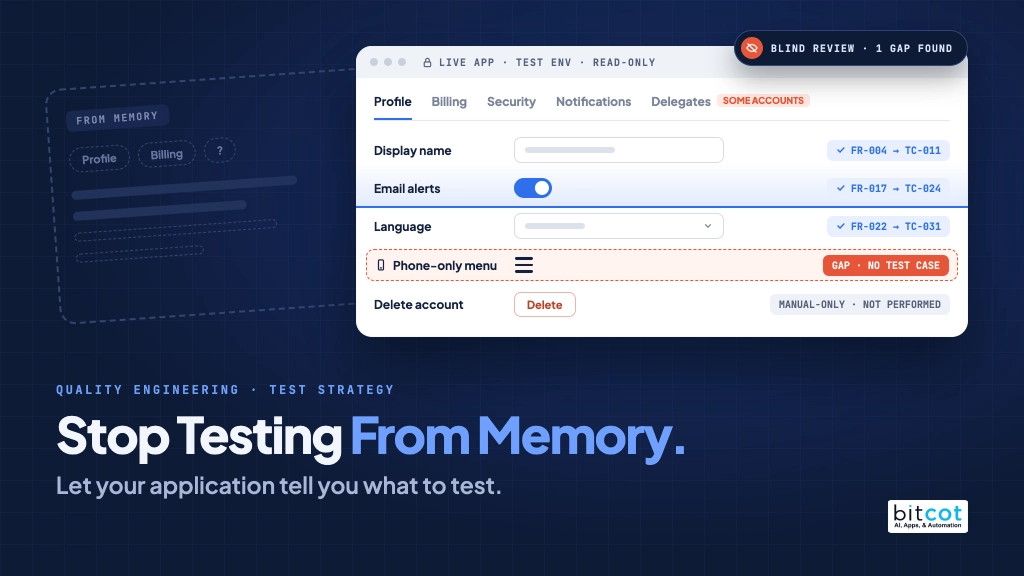
Ask an experienced tester to list everything a settings page can do and you will get a thoughtful answer. Ask again three releases later and you will get a different thoughtful answer. Neither will perfectly match what the page renders right now, for every kind of user, on every screen size.
In our experience, the scenarios that escape to production are rarely difficult to test. They are easy to forget:
- A tab that appears only for certain account types.
- A menu that exists only at phone width.
- A screen embedded from a third-party system that changed in its own release cycle.
- An error state that only appears when data is missing.
- A control that was added in a sprint nobody wrote a requirement for.
For an enterprise client in a regulated industry, Bitcot built an AI-assisted workflow that grounds every test case in the live application rather than in anyone’s memory of it.
The five-step workflow at a glance
From live application to trusted coverage
Each step produces evidence the next step builds on. Nothing is written from memory.
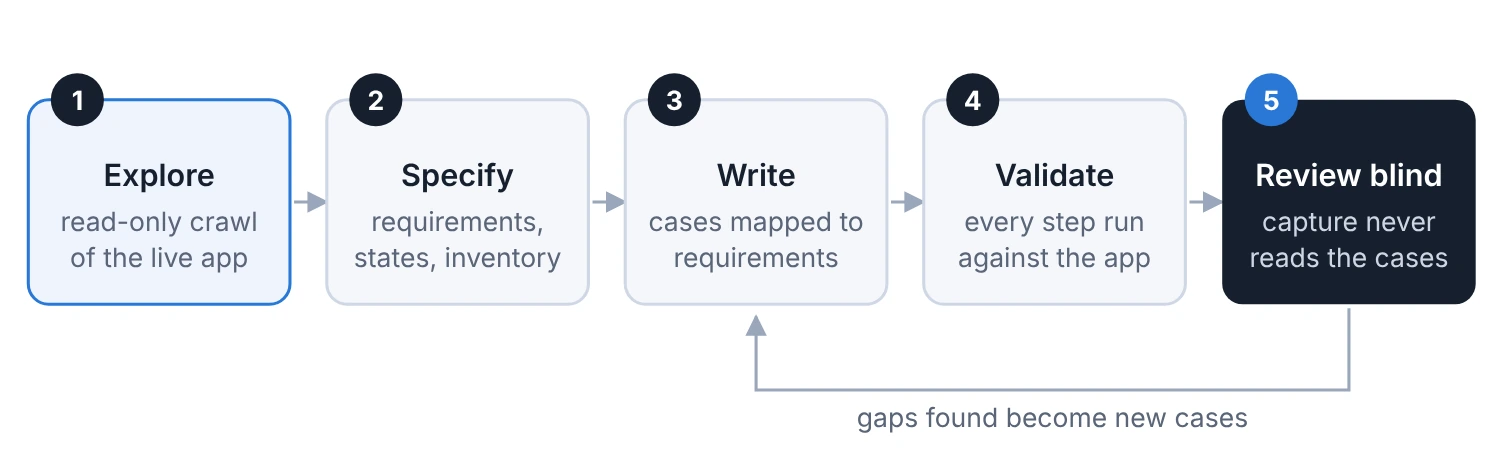
Gaps found in step 5 become new cases in step 3.
Figure 1. The workflow is a loop. Anything the blind review finds on screen but in no test case goes back to step 3.
- Explore: read-only crawl of the live app.
- Specify: requirements, states, inventory.
- Write: cases mapped to requirements.
- Validate: every step run against the app.
- Review blind: capture never reads the cases.
Step 1: Explore the live application, safely
An AI agent signs in to the test environment as a realistic test user and walks the area being tested. It opens every page, every tab and every menu, first at desktop width and then again at phone width, where navigation often collapses into a single menu button.
For every page it records:
- The page title and its heading structure.
- Every tab, and what each tab’s panel contains.
- Counts and names of links, buttons and form fields.
- Every embedded screen from another system, and what that embedded screen shows.
- Expandable sections, opened one at a time and closed again.
Read-only, enforced
The exploration never submits a form, saves a setting, sends a message, schedules an appointment or makes a payment. This is not left to the agent’s judgment. The tooling only allows changes against a short list of test environments that a person has confirmed, and anything else is blocked and reported by name.
The agent is not allowed to edit that list. If a click unexpectedly navigates instead of expanding, the explorer treats it as a link, steps back and stops toggling on that page.
Exploration also finds pages that links do not
Following links finds most of an application, but not all of it. Where the source code is available, we cross-check the explorer’s page list against the application’s own route list. Pages that exist in code but are linked from nowhere are reported separately, because an unlinked page is either dead code or a missing link, and both deserve a decision.
Step 2: Turn evidence into a specification
The evidence becomes a structured specification for the feature, written in plain language that product owners, developers and testers can all read. Each specification is a small set of documents:
| Document | What it holds |
|---|---|
| Product requirements | The problem, the users, goals, scope, user journeys and open questions for a person to decide. |
| Functional requirements | Numbered, testable statements of what the feature must do. |
| Non-functional requirements | Accessibility, performance, security and resilience expectations. |
| States | Every state the feature can be in: empty, loading, error, partial data and different account types. |
| Control inventory | Every control the exploration saw, what it does, where it leads and which requirement covers it. |
| Side effects | What a test would change if it acted, and what was deliberately not performed. |
Every requirement carries an honest status
The life of a requirement
Requirements are never simply “true”. Each one says how much it can be trusted.
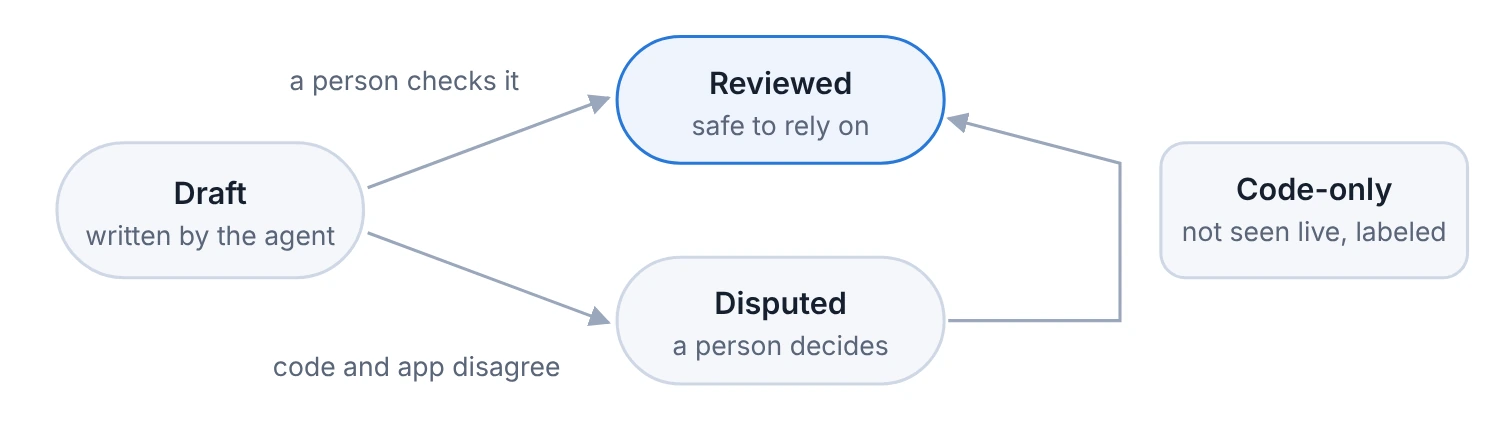
Figure 2. Anything the exploration could not observe directly is labeled as coming from the code alone, so nobody mistakes it for confirmed behavior.
- Draft: written by the agent. A person checks it and it becomes Reviewed, or the code and the app disagree and it becomes Disputed.
- Reviewed: safe to rely on.
- Disputed: a person decides.
- Code-only: not seen live, labeled.
The inventory is the honesty check. If a control is on the page and no requirement covers it, the specification says so in a row of its own.
Step 3: Write test cases from the specification
With a specification in place, writing test cases becomes a mapping exercise rather than an act of recall. Each case:
- Points to the requirement identifiers it covers, so coverage is traceable in both directions.
- Follows the team’s shared authoring standard, with consistent tags for platform, suite and area.
- Is marked manual-only, with a reason, when it cannot be run safely by a machine, such as completing a real password change.
The “not performed” list from the specification feeds directly into the manual-only cases. Nothing that was deliberately left untouched during exploration is silently forgotten.
Step 4: Validate every step live
Before any case is accepted, an AI agent runs its steps one by one against the live test environment and judges each one against what the page actually shows. The outcomes are deliberately distinct:
| Outcome | Meaning | What happens next |
|---|---|---|
| Pass | The step ran and the page matched the expected result. | The case is ready for review. |
| Fail | The step ran and the case itself is wrong. | The case is corrected. |
| Blocked | The step could not run, for example because test data is missing. | Test data is fixed; the case is not blamed. |
| Application defect | The page broke a rule the case states. | The defect is logged and the case is kept as written. |
Step 5: Review coverage blind
This is the step clients find most valuable. After the cases are written, a separate capture records what the application displays, using accessibility snapshots of every page and every expandable section, at desktop and phone width. That capture never reads the test cases.
A comparison tool then lists every heading, control and state that appears on screen but in no case. Because the capture runs separately for each type of user, in its own browser session, several user types can be captured side by side, revealing coverage gaps that only one kind of account would expose.
When the capture cannot reach a state on its own, such as a dialog behind an ordinary button, an explorer agent writes a small, focused probe that reaches it under the same read-only rules and saves a snapshot of every state it finds.
What one engagement looked like in numbers
The figures below come from real work on the client’s test environment, with all identifying details removed.
Pages explored by application area
One read-only exploration of a large customer-facing web application, signed in as a single test user. 62 pages in total.
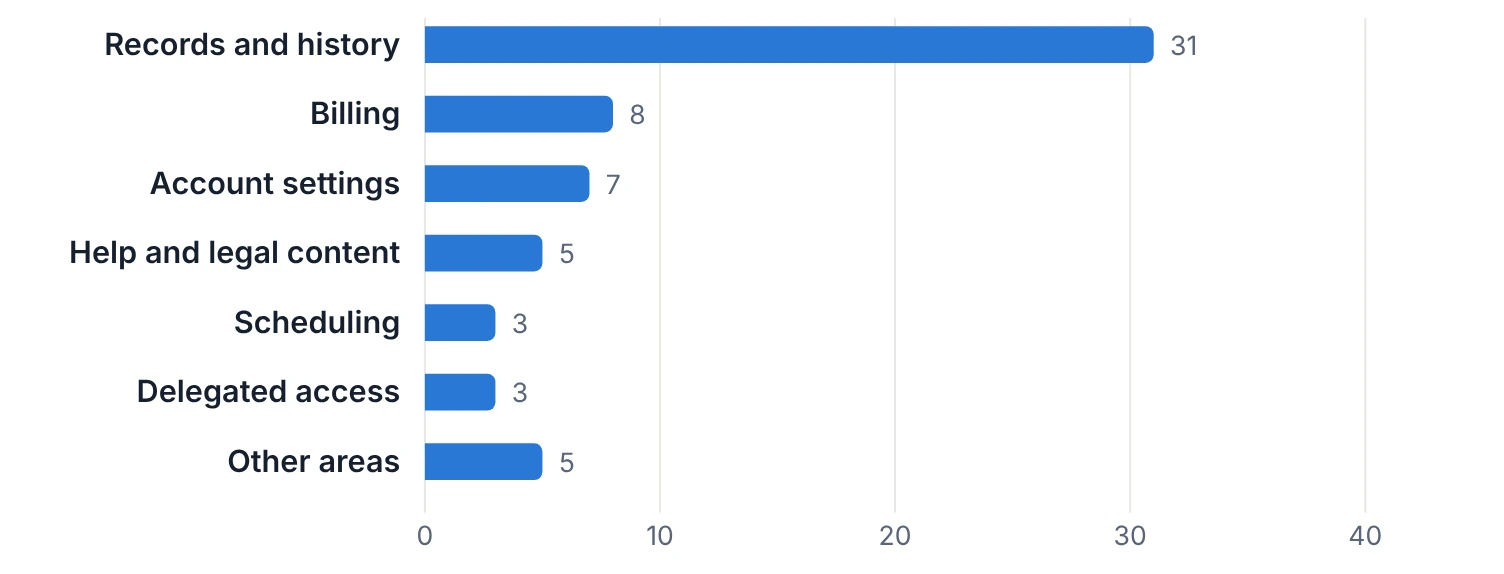
Figure 3. One area held half of all pages, most of them tabs inside a single section. An area-by-area view like this is how teams decide where specification work pays off first.
62 pages
explored read-only in one session, with every tab opened.
46 of 62
pages embedded a screen from another system, each recorded separately.
0 changes
made to the application during exploration.
That second figure matters. Three quarters of the pages showed content from an embedded third-party system with its own release cycle. A test plan written from memory of the host application alone would have missed most of what users actually interact with.
What one module specification contained
The finished specification for a single account-settings module with seven tabs.
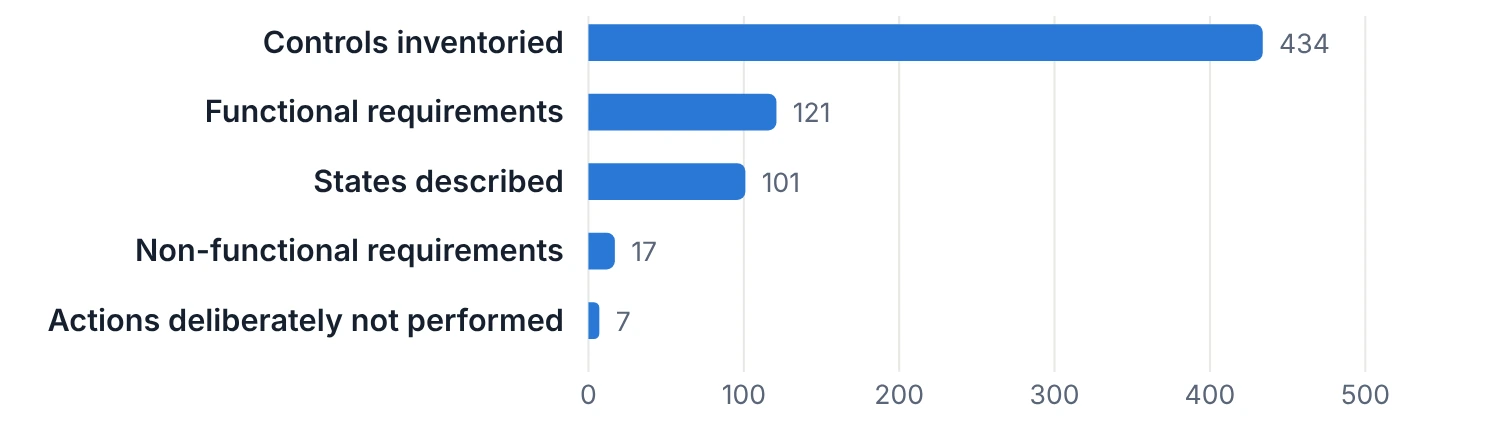
Figure 4. Of 121 functional requirements, 116 were drafts awaiting review and 5 were flagged as disputed for a person to decide. 270 inventoried controls were recorded on the way in and marked as belonging to other modules, so they were neither lost nor double counted.

Lessons learned
- Exploration finds what people forget. The first specification surfaced settings that appear only for certain account types and a phone-only selector with no desktop equivalent.
- Honest statuses beat confident guesses. Labeling a requirement as draft or disputed is far more useful than writing it confidently and being wrong.
- Embedded systems need first-class attention. When most pages host another system’s screen, that screen needs its own specification and its own tests.
- “Not performed” is a deliverable. A clear list of what was intentionally left untouched gives reviewers a precise map of the remaining manual work.
- Blind review keeps writers honest. It is easy to grade your own work generously. A capture that has never seen the cases has no such bias.
What your team gains
- Fewer escaped defects caused by forgotten scenarios.
- Specifications that stay aligned with the product instead of drifting from it.
- Test cases that trace to requirements, which simplifies audits and compliance reviews.
- Clear visibility into exactly what is covered, what is not, and why.
Frequently Asked Questions
What is AI-assisted test design?
AI-assisted test design is a workflow where an AI agent explores the live application read-only, and what it finds becomes the specification and test cases. Nothing is written from memory. Every requirement and test case traces back to something observed on screen.
What is the difference between validating test cases live and a blind coverage review?
Live validation checks that each test case runs correctly against the application, while a blind review checks that the cases cover everything the application shows. Validation ends in one of four outcomes: pass, fail, blocked, or application defect. The blind capture never reads the test cases, so its comparison is bias-free.
How does the five-step workflow work?
The workflow runs in five steps: explore the live app, write the specification, write test cases, validate every step live, and review coverage blind. Each step produces evidence that the next step builds on. Any gap the blind review finds goes back to step 3 as a new test case.
Can this workflow be used in regulated industries?
Yes, we built the workflow for an enterprise client in a regulated industry. Exploration is strictly read-only, and the tooling allows changes only in a short list of confirmed test environments. Test cases that trace to requirements also simplify audits and compliance reviews.
Is it worth writing a specification before test cases?
Yes, because a specification turns test writing into a mapping exercise instead of an act of recall, and recall is where forgotten scenarios come from. In one engagement, 46 of 62 pages embedded a screen from another system, which a plan written from memory would have largely missed. The specification also shows exactly what is covered, what is not, and why.