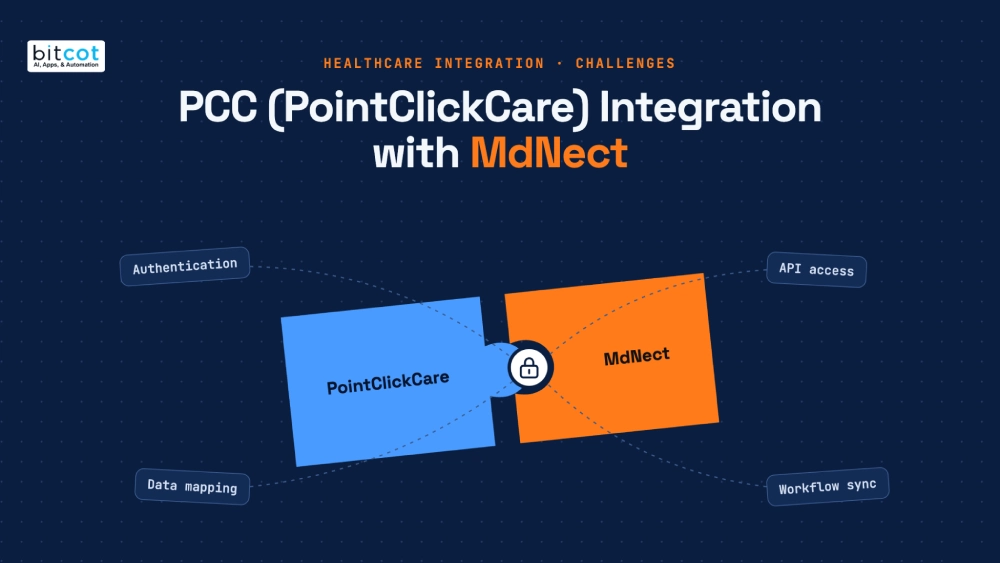
- PCC integration needs coordination with the PointClickCare team at every stage.
- Namecheap SSL was supported initially; PCC later recommended switching to DigiCert.
- A PCC policy change forced migration from 2-legged to 3-legged OAuth.
- Facility mapping links each MdNect facility to the correct PCC facility.
- Facility activation after Marketplace install takes about 5 to 10 business days.
A PointClickCare integration is much more than connecting a few APIs and moving data between two systems. It means working through PCC’s authentication framework, API requirements, facility and organization structure, security requirements, data synchronization, webhooks, technical validation, and production deployment.
While building the MdNect healthcare platform, our team worked through every one of these stages. We started in PCC’s sandbox with 2-legged authentication, and then PCC updated its policies and required a move to 3-legged OAuth. Along the way, we also faced challenges with SSL certificates, production environments, facility activation, technical validation, and Marketplace deployment.
This article walks through that journey, the challenges we encountered, how we addressed them, and the lessons we learned while integrating PointClickCare with MdNect.
Getting Started: PCC Account Setup and the First SSL Challenge
The first step was setting up the PointClickCare account and getting access to the PCC development environment. Unlike platforms where developers can create an account and start using APIs right away, this setup required coordination with the PointClickCare team. The owner of the MdNect platform worked with PCC to establish the required account and access.
Our first technical challenge was the SSL certificate required to connect to PCC APIs. We reviewed PCC’s documented certificate requirements and selected a certificate from Namecheap based on the listed options. Getting the certificate and sandbox connectivity working took multiple interactions with PCC support.
The lesson came early: healthcare integrations often have infrastructure and security requirements that must be validated with the API provider, not only on the application side.
Building the Sandbox Integration
Once sandbox connectivity was in place, we started building the integration to connect MdNect with PCC and synchronize key healthcare data. Working in the sandbox let us develop and test without touching production healthcare data.
The initial scope covered:
- Organization information
- Facility information
- Patient information and patient synchronization
- Data storage within MdNect
- API communication with PCC
The goal was to make synchronization as automated as possible, so information available in PCC would be reflected inside MdNect.
Why Sandbox Success Did Not Mean Production Readiness
When we began preparing for production, the SSL certificate that had worked during development was not supported for the production integration. We contacted PCC support again, and the PCC team advised us to use a certificate from DigiCert. We purchased the DigiCert certificate, then configured and tested the integration again.
Sandbox success does not guarantee production readiness. Infrastructure, certificates, security requirements, permissions, and API environments can all differ between development and production.
The First Version: 2-Legged Authentication and Data Flow
With the infrastructure requirements addressed, we created a development application in PointClickCare and built the first version using 2-legged authentication. This version handled organization, facility, and patient synchronization, stored PCC data in the MdNect database, and made that data available to MdNect workflows.
The basic data flow was:
PointClickCare → PCC APIs → MdNect Integration Layer → MdNect Database → MdNect Application
For example, patient information retrieved from PCC could be used by MdNect when creating patient visit notes and running other application-specific operations.
How Did We Keep MdNect Synchronized with PCC?
We kept MdNect current by building synchronization mechanisms that used PCC APIs and webhooks, so changes in PCC were reflected in MdNect without unnecessary manual work. The flow looked like this:
PCC Data Change → PCC Notification/API → MdNect Integration → MdNect Database Update
This gave MdNect up-to-date information for its workflows. While this work was progressing well, PCC introduced a major change to its authentication requirements.
Migrating from 2-Legged to 3-Legged OAuth
PointClickCare updated its authentication policy, and the 2-legged approach was no longer supported for our integration requirements. PCC introduced a 3-legged OAuth process, where the facility user takes part in the authorization step instead of the application authenticating on its own.
We redesigned the integration so a facility user could start the PCC connection from MdNect:
- Log in to MdNect as a facility and open Facility Settings.
- Click “Connect PCC” and get redirected to the PCC authorization page.
- Enter PCC credentials and authorize the connection.
- MdNect receives an authorization code and exchanges it for access and refresh tokens.
- MdNect stores the PCC connection details and shows “PCC Connected Successfully.”
- Data synchronization begins.
This was not just an endpoint change. It required updates to authentication, callback handling, token management, connection storage, and synchronization logic, and it changed how the application maintained the relationship between MdNect facilities and PCC facilities.
Facility and Organization Mapping
A PCC organization can have multiple facilities, so we could not assume one PCC organization equals one MdNect facility. We designed a clear mapping: MdNect Facility ↔ PCC Organization ↔ PCC Facility.
The database stores the PCC organization and facility identifiers and links them to the correct MdNect facility. Incorrect mapping could sync data to the wrong facility, so this was treated as a core part of the design.

Workflow Review and the Production Application
After implementing the new authentication flow, we prepared a complete integration workflow and submitted it to PointClickCare for review. PCC needed to understand not only individual API calls but how they fit into the overall application.
The workflow explained user authentication, facility connection, PCC authorization, token generation, API communication, patient synchronization, webhook processing, data storage, and application workflows.
We then created the production application in PCC, moved MdNect from sandbox to production APIs, and validated the configuration. Production added new considerations around authentication, security, facility access, and real PCC accounts, so the application had to be ready to support real facilities.

What Happens During PCC Technical Validation?
During PCC technical validation, PointClickCare representatives meet with the development team multiple times to review the full workflow and see the APIs and webhooks working in a running environment. We demonstrated the authentication flow, facility and patient APIs, data synchronization, webhook functionality, and other APIs in the integration.
PCC wanted to know why each API was used and how it fit into MdNect, not just whether it returned a successful response. Our team explained how facilities connect, how authorization and tokens work, how patient data syncs, how PCC identifiers are stored, how webhooks are processed, how synced data is used, and how errors are handled.
Before each session, we made sure the APIs were available, test data was ready, authentication and webhooks were working, and the workflow could be demonstrated live. The APIs and webhooks we demonstrated were approved by PCC as part of the validation process.
Marketplace Approval, Facility Installation, and Activation
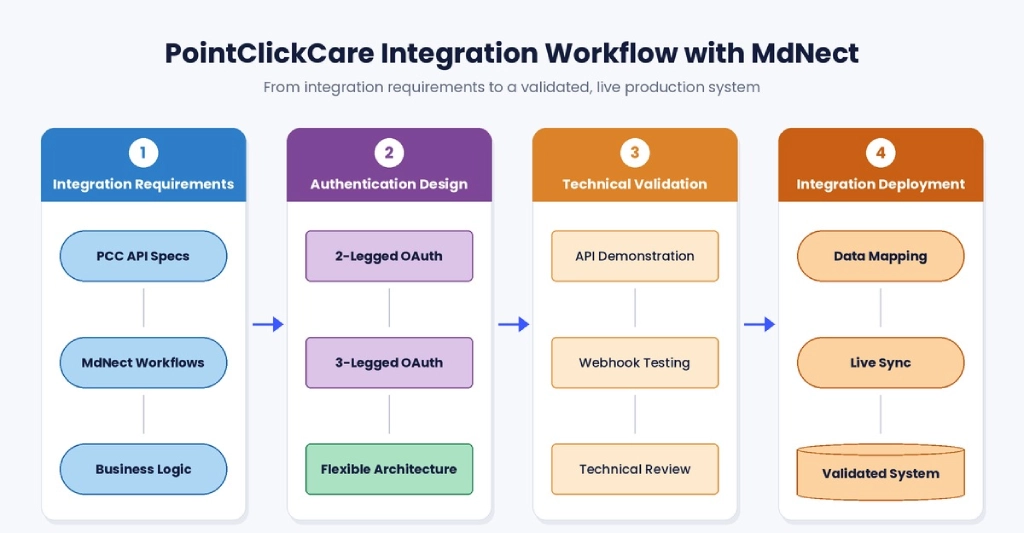
After technical validation, PCC gave us access to its Marketplace environment, where we created the MdNect application. Once the Marketplace requirements were completed, PointClickCare approved MdNect for publication.
Publication does not mean a facility can start syncing right away. A facility installs MdNect from the Marketplace, MdNect receives the installation notification, and PCC completes an activation step that can take about 5 to 10 business days.
The production flow looks like this:
Facility Installs MdNect → PCC Processes Installation → MdNect Receives Notification → PCC Activates the Application → Authorized Token Becomes Available → MdNect Connects to PCC → Facility Data Sync Begins → Patient Data Available in MdNect
Key Challenges at a Glance
| Challenge | What It Involved |
|---|---|
| Account and environment setup | Required coordination with the PointClickCare team |
| SSL certificate compatibility | Sandbox certificate not supported in production; switched to DigiCert |
| Authentication policy change | Migration from 2-legged to 3-legged OAuth |
| Facility mapping | Mapping PCC organizations with multiple facilities to MdNect facilities |
| Real-time synchronization | Reliable API and webhook-based sync |
| Production transition | Extra configuration and testing for production APIs |
| Technical validation | Live API and webhook demos plus technical discussions |
| Marketplace deployment | Marketplace setup, approval, and facility installation |
| Facility activation timeline | PCC activation required before production sync |
What the MdNect Build Taught Us About PCC Integrations
- Start with current requirements: Healthcare platforms can update authentication, security, and integration rules, so verify them before finalizing the architecture.
- Design for change: Our move from 2-legged to 3-legged OAuth showed why integration architecture needs flexibility.
- Treat facility mapping as core: When an organization has multiple facilities, mapping is an architectural requirement, not an afterthought.
- Separate sandbox and production: Certificates, credentials, permissions, endpoints, and activation can all differ.
- Prepare for vendor validation: Have documentation, workflows, test scenarios, and API demos ready.
- Build reliable sync: Handle failures, duplicate events, token expiration, and API errors.
- Understand the business workflow: Know why each API is used and how its data serves the application.
How We Can Help With PointClickCare Integration
PCC integrations can involve many technical and operational challenges, especially when connecting PCC with a custom healthcare platform. Bitcot supports organizations and healthcare technology companies with:
- PointClickCare API integration
- OAuth and 3-legged authentication implementation
- Healthcare and patient data synchronization
- Facility and organization mapping
- Webhook implementation and API development
- Custom healthcare application development
- Database and data-mapping architecture
- Integration testing and third-party API troubleshooting
- Production deployment and integration support
Conclusion
The MdNect PointClickCare integration moved from account setup and SSL configuration through sandbox development, the OAuth migration, facility mapping, production deployment, technical validation, Marketplace approval, and facility activation. Every stage brought its own challenges.
The biggest lesson was adaptability. Requirements change, authentication models evolve, production adds new rules, and vendor validation raises new questions. By handling each challenge systematically and working closely with the PointClickCare team, we established a production-ready integration. Teams that understand these stages before they start can avoid unexpected delays and build a more reliable integration strategy.
Frequently Asked Questions
What is a PointClickCare integration?
A PointClickCare integration connects a healthcare platform with PCC so data like organization, facility, and patient information can sync between them. It covers authentication, APIs, webhooks, facility mapping, technical validation, and production deployment.
What is the difference between 2-legged and 3-legged OAuth in a PCC integration?
In 2-legged authentication, the application authenticates with PCC on its own, while 3-legged OAuth requires the facility user to take part in authorization. With 3-legged OAuth, the user signs in on the PCC authorization page and the application exchanges the authorization code for access and refresh tokens.
How does a facility connect MdNect through the PCC Marketplace?
A facility installs MdNect from the PCC Marketplace, and PCC then completes an activation step before data sync begins. MdNect receives the installation notification, the authorized token becomes available after activation, and facility data synchronization starts.
How is PointClickCare data used inside a healthcare platform like MdNect?
MdNect stores synchronized PCC data in its own database and uses it in its workflows. For example, patient information from PCC is used when creating patient visit notes and other application-specific operations.
Does Marketplace approval mean a facility can sync data immediately?
No, Marketplace approval does not mean a facility can start syncing right away. Facility-level installation and PCC activation are still required, and activation can take about 5 to 10 business days.